


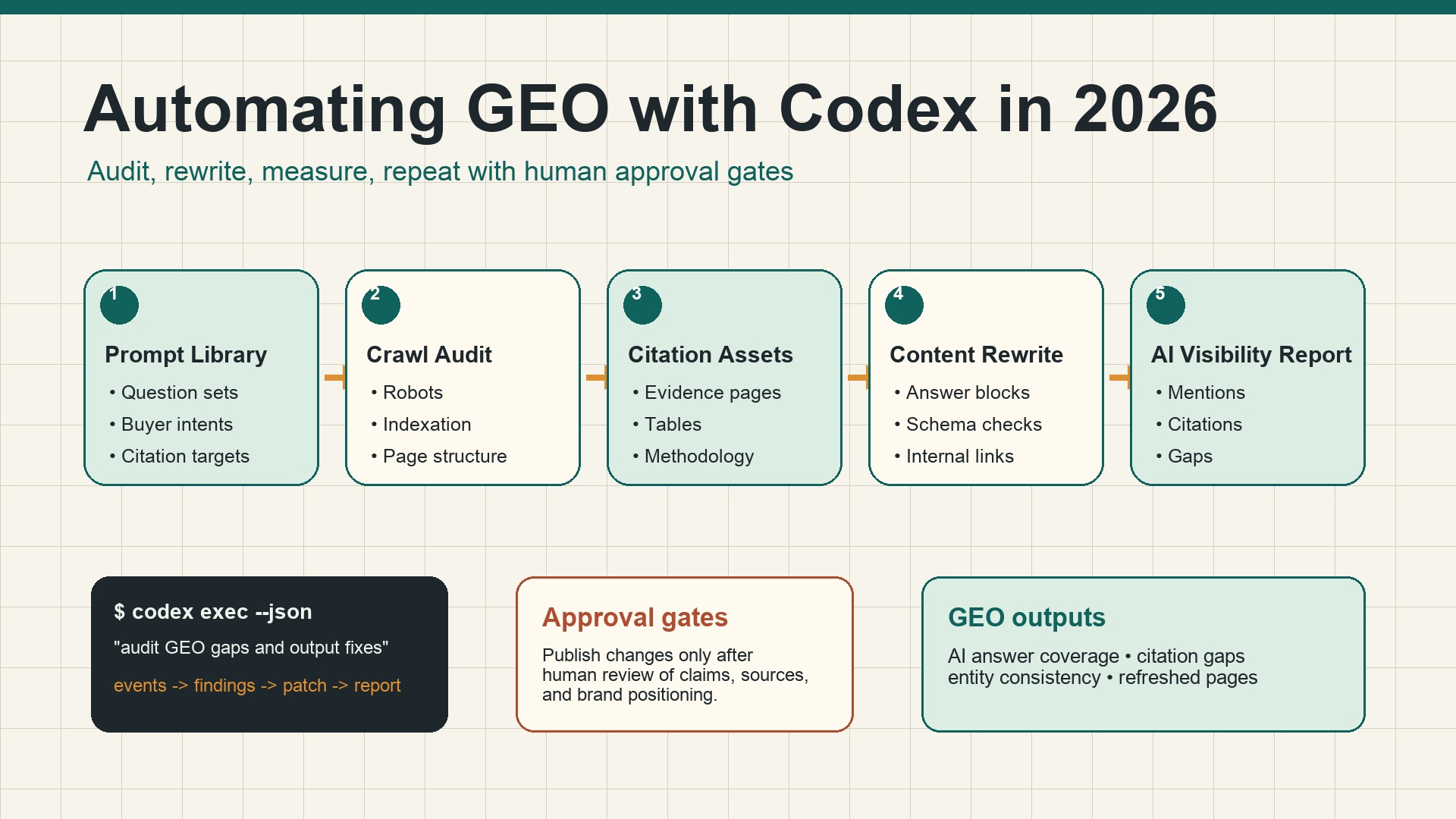
What you will build in this tutorial
This is not a concept article. By the end, you will have a working Codex GEO operating folder inside your website repo:
seo-geo/
  brand-facts.md
  prompt-library/core-prompts.md
  exports/
  snapshots/
  reports/
  qa/
AGENTS.md
You will use Codex to do five practical jobs:
- create a GEO rule file so Codex does not invent claims;
- build a prompt library for AI search visibility checks;
- audit one real page for GEO extractability;
- prepare a safe page diff with answer blocks, evidence slots, and internal links;
- generate a weekly GEO report from snapshots and exports.
The workflow is intentionally beginner-safe. Codex can inspect files, run commands, draft patches, and summarize evidence, but you approve every content change before publishing.
Before you start: what you need
You do not need a mature SEO team. You need a website repository and a few source files.
Requirement | Beginner version | Better version |
|---|---|---|
Website repo | Any Next.js, Astro, Vite, WordPress theme, docs, or static site repo | Repo with build/lint commands documented |
Codex | CLI, IDE, app, or cloud thread | Project with |
Search data | Manual notes or CSV exports | GSC, Bing Webmaster, GA4, SERP/API snapshots |
AI answer checks | Manually paste answers into markdown | Felo Search, Perplexity, Gemini, or other API snapshots |
Approval process | You review the diff | PR review, checks, and scheduled monitoring |
Open a clean branch before you let Codex edit anything:
git checkout -b geo-codex-setup
mkdir -p seo-geo/{exports,snapshots,reports,qa,prompt-library}
touch seo-geo/brand-facts.md seo-geo/prompt-library/core-prompts.md
If you do not use Git, create a copy of the website folder first. Do not run automated GEO edits directly on your only production copy.
Step 1: write the brand facts file
Codex cannot do reliable GEO work if it has to guess what your company does. Start with seo-geo/brand-facts.md.
Copy this template:
# Brand facts for GEO work

## Entity
- Brand name:
- Website:
- Product/category:
- Primary audience:
- Main use cases:
- Countries/languages served:

## What we can safely claim
- Claim 1:
- Claim 2:
- Claim 3:

## Proof we actually have
- Public customer quote:
- Case study URL:
- Product screenshot:
- Integration page:
- Pricing page:
- Docs/help page:

## Claims Codex must not invent
- Customer logos
- Revenue numbers
- Awards
- Reviews or ratings
- Legal/medical/financial claims
- Competitor comparisons without evidence

## Preferred conversion path
- Primary CTA:
- Secondary CTA:
- Pages that should receive internal links:
Fill it with boring facts. GEO work gets worse when the agent writes impressive but unsupported claims. If a proof point is missing, write TODO, not a fake substitute.
Step 2: create AGENTS.md so Codex follows your GEO rules
OpenAI's Codex docs describe AGENTS.md as persistent project guidance that Codex reads before doing work. Use it to make your GEO rules durable.
Create or update AGENTS.md at the repo root:
# AGENTS.md

## GEO working rules

Before editing content for GEO, read:
- `seo-geo/brand-facts.md`
- `seo-geo/prompt-library/core-prompts.md`

## Approval boundaries
Ask before changing:
- pricing, legal claims, customer proof, testimonials, competitor claims;
- robots.txt, noindex, canonicals, redirects, sitemap generation;
- analytics scripts, tracking pixels, CMS publishing settings;
- shared components that affect many pages.

Never invent:
- customers, logos, awards, revenue numbers, reviews, rankings, integrations, or case-study results.
Mark missing proof as TODO.

## GEO page standard
Important pages should include:
- one direct answer near the top;
- clear entity/category/audience language;
- comparison or decision table where useful;
- evidence or proof section;
- relevant internal links;
- FAQ only when questions are real;
- title, meta description, canonical, and schema review.

## Validation
After edits, summarize changed files and run the build/lint/typecheck command if available.
If validation cannot run, explain why.
Now ask Codex to verify it loaded the rule:
Read the project instructions and summarize the GEO rules you will follow. Do not edit files.
If Codex does not mention brand-facts.md, approval boundaries, or “do not invent proof,” fix AGENTS.md before moving on.
Step 3: build your GEO prompt library
A GEO prompt library is the set of questions you want AI search systems to answer with your brand, category, or content included.
Open seo-geo/prompt-library/core-prompts.md and add prompts in groups:
# Core GEO prompt library

## Category discovery
- What are the best tools for [category]?
- How do I solve [problem] for [audience]?
- What is the difference between [category A] and [category B]?

## Brand evaluation
- What does [brand] do?
- Who is [brand] best for?
- Is [brand] good for [use case]?
- What are alternatives to [brand]?

## Buying and comparison
- Best [category] software for [audience]
- [brand] vs [competitor]
- How much does [category] software cost?

## Implementation questions
- How do I set up [workflow]?
- What data do I need for [workflow]?
- How do I measure [outcome]?
Do not start with 500 prompts. Start with 20-40. You need a prompt set that a human can review.
Ask Codex to clean it:
Read `seo-geo/prompt-library/core-prompts.md` and `seo-geo/brand-facts.md`.
Group the prompts into category discovery, brand evaluation, comparison, and implementation.
Remove duplicates.
Add 10 missing prompts that a buyer would realistically ask.
Do not add prompts unrelated to our actual product or audience.
Step 4: collect AI answer snapshots
You need observations before you ask Codex to rewrite pages. There are two ways to start.
Option A: manual snapshot for beginners
Create:
seo-geo/snapshots/2026-07-06-manual-ai-answers.md
Use this table:
# Manual AI answer snapshot - 2026-07-06

| Prompt | Surface | Brand mentioned? | Cited URL | Competitors mentioned | Notes |
|---|---|---:|---|---|---|
| What are the best tools for [category]? | ChatGPT | No | - | A, B, C | Our comparison page is missing |
| What does [brand] do? | Perplexity | Yes | /about | A, B | Summary misses main use case |
Paste short summaries only. Do not paste long copyrighted answers into your repo.
Option B: API snapshot for teams
If you have an approved API such as Felo Search, Perplexity, a SERP API, or an internal search snapshot tool, store output as JSON:
seo-geo/snapshots/2026-07-06-ai-answers.json
Use a simple shape:
[
  {
    "date": "2026-07-06",
    "surface": "example-search-api",
    "prompt": "best tools for AI search visibility",
    "answer_summary": "Competitors A and B were mentioned; our brand was not mentioned.",
    "brand_mentioned": false,
    "citation_urls": [],
    "competitors": ["A", "B"],
    "notes": "Need comparison page and third-party proof."
  }
]
Ask Codex to analyze the snapshot:
Read the latest file in `seo-geo/snapshots/` and the prompt library.
Create `seo-geo/reports/YYYY-MM-DD-geo-visibility.md`.

For each prompt, report:
- whether our brand is mentioned;
- whether our site is cited;
- which competitors appear;
- what page or proof asset is missing;
- the recommended next action;
- priority: P0, P1, P2, or watchlist.

Do not edit website pages yet.
Step 5: pick one page to improve
Do not ask Codex to optimize your whole site. Pick one page connected to one prompt gap.
Good first targets:
Prompt gap | Page to improve |
|---|---|
“What does [brand] do?” is wrong | Homepage or About page |
Brand missing from category prompts | Category landing page |
Competitors cited but you are not | Comparison or alternatives page |
AI answers miss product use cases | Use-case page |
AI answers cite old content | Content refresh page |
Ask Codex to choose one target from the report:
Read the latest GEO visibility report.
Choose one page we should improve first.
Return:
1. target URL/file;
2. prompt gap it addresses;
3. expected page changes;
4. proof needed;
5. files likely involved;
6. risk level;
7. validation command.

Do not edit yet.
Step 6: audit the target page before editing
Use this exact prompt:
Audit the target page for GEO readiness.

Inputs:
- `seo-geo/brand-facts.md`
- `seo-geo/prompt-library/core-prompts.md`
- latest `seo-geo/reports/*geo-visibility.md`
- target page file: [path]

Return a table with:
- issue;
- current page evidence;
- why it hurts GEO;
- proposed fix;
- whether proof is needed;
- whether human approval is needed.

Do not edit files yet.
A useful audit should mention concrete page sections. If Codex says only “add authoritative content,” ask it to be specific.
Step 7: make a safe GEO page patch
After you approve the audit, ask for a small patch:
Apply only the approved GEO fixes to [target file].

Allowed changes:
- add a concise direct answer block near the top;
- clarify brand/category/audience/use case language;
- add one comparison table if useful;
- add an evidence section with TODO markers for missing proof;
- improve FAQ only if questions match the prompt library;
- add 1-3 relevant internal links;
- update title/meta description if the file controls them.

Not allowed without asking:
- pricing claims;
- testimonials or customer logos;
- legal or compliance claims;
- robots, canonicals, redirects, sitemap, analytics;
- shared template changes.

After editing, run validation and summarize changed files.
Here is what a practical GEO answer block looks like:
## Short answer

[Brand] is a [category] for [audience] who need to [job-to-be-done]. It helps teams [workflow] by combining [capability 1], [capability 2], and [capability 3]. The best use cases are [use case A], [use case B], and [use case C]. If you are comparing options, start with [proof point or TODO evidence] and review [internal link].
This is not magic text. It simply gives AI answer systems and human readers a clear, supported summary.
Step 8: run validation and review the diff
Codex works better when it can verify. OpenAI's Codex prompting guidance recommends giving validation steps such as linting, build, or checks. For a GEO content patch, ask for both technical and editorial validation:
Review your diff before I publish.

Return:
1. changed files;
2. exact GEO issue each change addresses;
3. unsupported claims removed or marked TODO;
4. metadata/schema/internal link changes;
5. validation command and result;
6. remaining risks;
7. what to measure after publishing.
Run your own check too:
git diff
npm run build
# or pnpm build / yarn build / your site command
If the page is markdown-only and no build is available, at least review the diff, links, headings, and factual claims manually.
Step 9: publish only after a human approval gate
Do not let the first Codex GEO workflow publish automatically. Use this approval checklist:
Check | Pass condition |
|---|---|
Claims | No fake numbers, customers, logos, or awards |
Entity clarity | Brand, category, audience, and use case are clear |
Prompt fit | Page addresses one or more prompt-library questions |
Evidence | Proof exists or is marked TODO |
Technical | Build/lint/checks pass or skipped reason is documented |
Links | Internal links are relevant and not stuffed |
Indexing | No robots/canonical/noindex changes unless approved |
After publishing, store the URL and date in the report:
## Published changes
- URL:
- Date:
- Prompt gap addressed:
- Files changed:
- Follow-up date:
Step 10: measure the same prompts again
Wait long enough for search and AI systems to refresh. For fast manual checks, you can retest weekly. For search data, use GSC/Bing after the data updates.
Create a follow-up snapshot:
seo-geo/snapshots/2026-07-13-ai-answers.md
Ask Codex:
Compare the latest AI answer snapshot with the previous snapshot.
Focus only on prompts related to the page we changed.

Return:
- brand mention changed? yes/no;
- citations changed? yes/no;
- competitor set changed? yes/no;
- answer accuracy changed? better/worse/same;
- next action;
- whether the result is too noisy to judge.
Do not claim “GEO success” from one prompt on one day. Look for repeated improvement across prompts, surfaces, and weeks.
Step 11: turn the process into a recurring Codex automation
Once the manual workflow works, you can ask Codex to create a recurring check. Codex automations can run recurring tasks and report findings; use them carefully because unattended automation carries risk.
Use a read-only automation first:
Create a weekly read-only GEO monitoring automation for this project.

Schedule: every Monday morning.
Scope:
- read `seo-geo/prompt-library/core-prompts.md`;
- read the latest snapshots and exports;
- create a weekly report under `seo-geo/reports/`;
- identify prompt gaps, missing citations, competitor mentions, and page opportunities;
- do not edit website files;
- do not publish;
- do not change robots, canonicals, redirects, sitemap, analytics, pricing, or claims.

Report only findings and recommended next actions.
If you use worktrees, tell Codex to run automation work in a separate worktree so it does not touch unfinished local changes.
A full beginner prompt you can paste into Codex
Use this after the folders and brand-facts.md exist:
I want you to help me run a beginner-safe automated GEO workflow for this website.

Follow this process exactly:

Phase 1: Setup check
- Read `AGENTS.md`, `seo-geo/brand-facts.md`, and `seo-geo/prompt-library/core-prompts.md`.
- Inspect the repository structure.
- Tell me where pages, metadata, schema, sitemap, robots, and content files live.
- Do not edit files.

Phase 2: Visibility report
- Read the latest files in `seo-geo/snapshots/` and `seo-geo/exports/`.
- Create a GEO visibility report with prompt gaps, citation gaps, competitor mentions, and recommended page actions.
- Do not edit files.

Phase 3: One-page plan
- Pick one target page and explain why it is the best first GEO fix.
- Return an audit table and wait for approval.

Phase 4: Approved patch only
- Apply only approved changes to the target page.
- Do not invent proof.
- Mark missing evidence as TODO.
- Do not change pricing, legal claims, robots, canonicals, redirects, sitemap, analytics, or shared templates without asking.
- Run validation.

Phase 5: Report
- Summarize changed files, validation results, remaining risks, and follow-up prompts to retest.
Common beginner mistakes
- Starting with “optimize my site for GEO.” Too broad. Start with one prompt gap and one page.
- Letting Codex invent evidence. Missing proof should become TODO, not fake authority.
- Skipping snapshots. Without before/after snapshots, you cannot know whether anything changed.
- Editing too many files. One page, one diff, one report is the right first workflow.
- Confusing mention tracking with business results. GEO visibility is useful, but you still need traffic, leads, and conversion checks.
- Automating too early. Make the manual workflow work before scheduling it.
Codex SEO/GEO learning path
This article is part of the Codex SEO/GEO operator series. If you are building the workflow from scratch, follow the sequence:
- How to Use Codex for Automated GEO in 2026
- How to Use Codex for Automated SEO
- How to Set Up a Codex SEO Workspace with AGENTS.md
- How to Connect Codex to SEO Data with MCP
- The Best Codex GEO Skill in 2026
- How to Build a Codex Skill for Keyword Clustering
- How to Use Codex Subagents for SERP, Content, and Technical SEO
- How to Use Codex for Technical SEO Fixes Without Breaking Production
- How to Run Daily SEO/GEO Monitoring with Codex Automations
- Codex SEO/GEO Quality Gates: Diff, Evidence, Tests, and Human Approval
- How to Use Codex to Build and Deploy an SEO/GEO-Ready Website
Where to go next
Next: How to Use Codex for Automated SEO
Sources and notes
- OpenAI Codex docs: Prompting, AGENTS.md guidance, Model Context Protocol, and Automations.
Author: Martin Hayes, GEO Playbook Builder for 200+ Execution Checklists at Auspia. Martin writes step-by-step workflows, tactical guides, and operating checklists for GEO teams.


