


Short answer
DeepSeek Harness (dsh) is an open-source agent runtime released by DeepSeek AI on August 13, 2026 under the MIT license. It's the "harness" half of the company's own formula, Model + Harness = Agent: the software layer that connects a language model to your files, terminal, browser, and other tools, and lets the model work through them. It's currently in developer preview. It already sits at roughly 93,000 GitHub stars. And it's positioned as an open-source alternative to tools like Claude Code and OpenAI's Codex.
For SEO and GEO teams, the short version is this: a free, locally installed agent platform that reads your files, searches the web, runs multi-step workflows, and logs everything it does. That combination makes it a serious workhorse for keyword research, content briefs, citation-gap audits, and automated monitoring — once you know a few prompts. This guide covers what the project actually is, what its architecture means in practice, and what it can't do yet.
What "everything is a plugin" means
The project's tagline is "Everything is a Plugin," and it's not marketing. There is no privileged core inside DeepSeek Harness: the model adapters, file tools, shell access, web search, session management, approval policies, and even the agent loop itself are all plugins mounted into a shared runtime. The default installation ships with 159 toggleable plugins — you can see and switch each one in Settings → Plugins.
Why does this matter to you? Because it explains two things you'll notice immediately:
- The tool is modular. If a workflow needs web search, you use the web-search plugin. If you don't want the agent touching your shell, you disable it. You're not stuck with a fixed product.
- The ecosystem is the product. DeepSeek built the harness on Cordis, a microkernel ecosystem that has powered the Koishi chatbot community for years. The
dsh-pluginGitHub topic already collects community plugins, and DeepSeek says hundreds were built during internal testing.
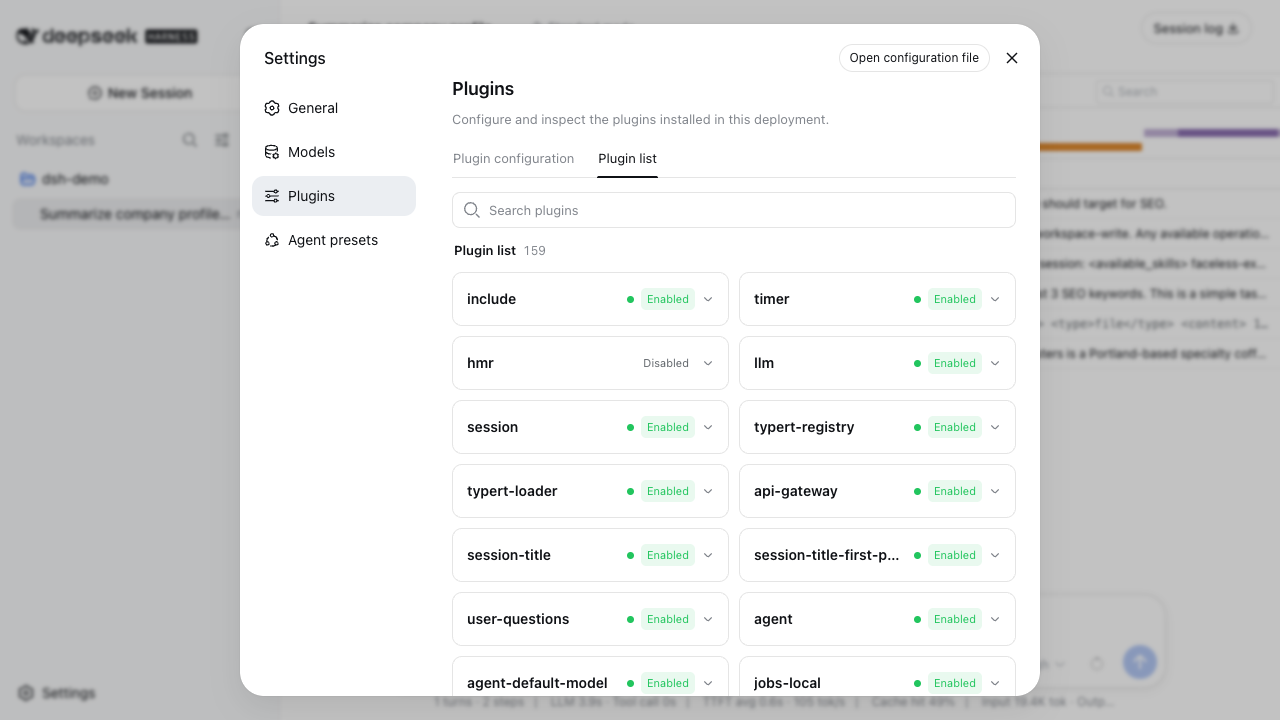
The plugin list inside the DeepSeek Harness web UI — 159 plugins, each individually toggleable.
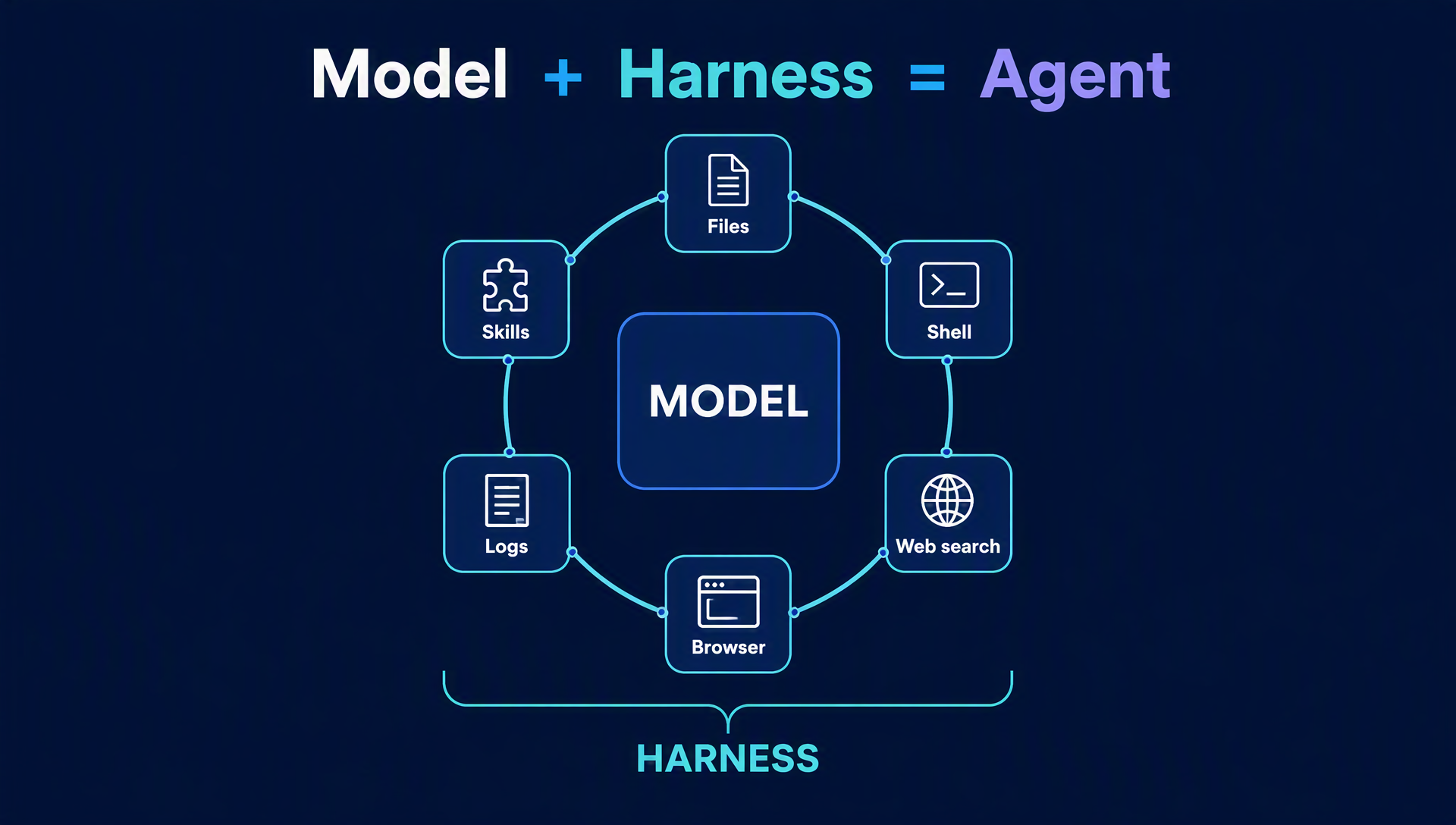
The mental model: a model at the core, plugins around it, everything held together by the harness.
The four agent presets
When you open a new session, you pick a preset. These are the four that ship with the tool (names straight from the UI):
Preset | What it does | Who should use it |
|---|---|---|
Standard mode | Full coding agent: file editing, shell, web search, skills, planning, goals, subagents, workflows | Most people, most of the time |
Code mode | Same capabilities, but tools are exposed through a Code Mode SDK so the model writes one TypeScript program combining multi-step operations | Token-conscious users — coverage reports it cuts token use by batching tool calls into programmatic steps |
Minimal mode | Two-tool agent: persistent bash + strreplaceeditor only | Benchmarking, testing, constrained tasks |
Creator mode | Standard capabilities plus runtime inspection and preset authoring — the agent can help you build new presets | Power users building their own modes |
For SEO work, Standard mode covers everything in this series. Code mode is worth trying when you start running batch jobs (like weekly monitoring), because it writes one program instead of many back-and-forth tool calls.
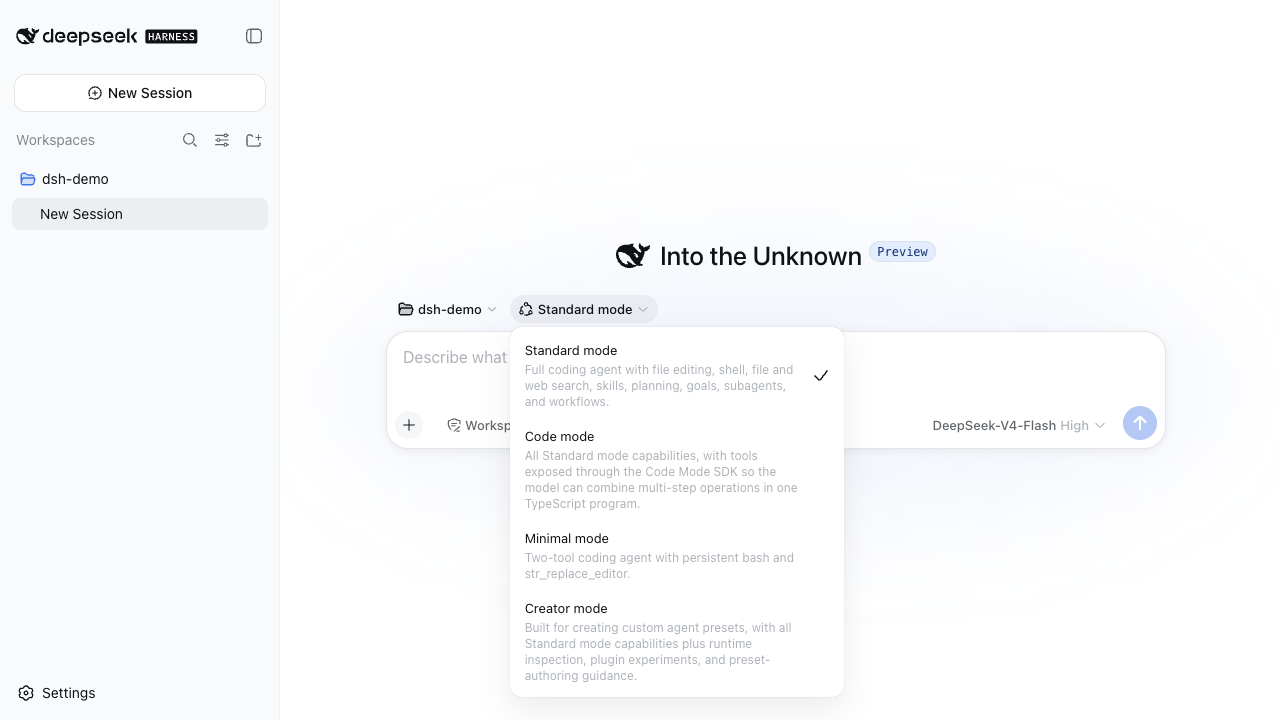
Choosing a preset. Standard mode is the default and covers the SEO/GEO workflows in this series.
Why SEO and GEO teams should care
You don't need to be a developer to get value from this tool. Here's what makes it interesting for search work specifically:
- It runs locally and free. MIT-licensed, installed on your machine. You only pay for model API tokens when you run tasks.
- It can read your actual files. Content drafts, sitemaps, CSVs of URLs — the agent works in your project folder, not in a vacuum.
- It has real tools, not just chat. Web search, file editing, shell. A GEO citation-gap audit (see the next article in this series) needs exactly this combination: read content, query an AI answer, compare, rewrite.
- Everything is logged. The session log and Trajectory view record what the model saw and did — system prompts, tool calls, context. For teams that need to audit how content was generated, that transparency is rare in AI tools.
- It's scriptable. The headless mode runs a one-shot task and exits:
dsh --profile headless "task", which is how you build scheduled SEO/GEO monitoring without touching a GUI. - It's brand new, and early movers win. Right now there are almost no SEO tutorials for this tool. The people who learn the workflows first get the unfair advantage.
What it costs
The software is free (MIT license). You pay only for what the model itself consumes:
- No per-seat license, no subscription, no usage fee from DeepSeek Harness.
- Model tokens: you add a DeepSeek API key (or another provider) in Settings → Models and pay per token at the provider's normal rate. A typical single-question session costs fractions of a cent.
- Your machine: it's a local Node.js app. No cloud account needed to run it.
One honest caveat: the harness doesn't ship its own free model quota. If you just want to test the UI without a key, you can — but running actual tasks needs an API key from DeepSeek or another provider.
How it compares to Claude Code, OpenClaw, and n8n
DeepSeek Harness | Claude Code / Codex | OpenClaw | n8n | |
|---|---|---|---|---|
Open source | Yes (MIT) | No | Yes | Yes (fair-code) |
Local install | Yes | Yes (CLI) | Yes | Self-hostable |
Model choice | Any provider (DeepSeek by default) | Claude / OpenAI models | Multiple | Multiple |
Visual UI | Yes (web UI at | Terminal-only | Terminal | Node-based canvas |
Focus | General agent platform ("everything is a plugin") | Coding agent | Personal agent automation | Workflow automation |
Built for SEO/GEO work | No dedicated features, but all the tools you need | No | No | Add-on nodes only |
The positioning, straight from DeepSeek: "Model + Harness = Agent." They're betting that the harness, not just the model, becomes the platform, the same way Android became the platform around the mobile OS. Launch coverage from TechNode and VentureBeat describes it as DeepSeek's open-source answer to Claude Code, released alongside the V4-Pro-0813 model update.
What it can't do yet (be honest about this)
DeepSeek Harness is a developer preview, and DeepSeek says so inside the app itself: the first-run dialog warns that "core plugins and foundational APIs will continue to evolve rapidly," and the README says compatibility-breaking changes are coming. Practically, that means:
- Expect rough edges. The preview is aimed at developers; the UI is usable but not polished-for-marketers yet.
- Things will change. A prompt or workflow that works today may need adjustments after updates. Pin the version you rely on for automations.
- No built-in SEO features. There are no keyword tools, rank trackers, or citation dashboards. What this series shows you is how to build those workflows from the tool's general capabilities.
None of that is a reason to wait — it's a reason to start now, while the knowledge gap is in your favor.
Beginner checklist
- [ ] You understand the model: DeepSeek Harness is the software layer around a model, not a model itself
- [ ] You know the four presets and which one you'll start with (Standard mode)
- [ ] You've seen Settings → Plugins and know every capability is a toggleable plugin
- [ ] You know the cost model: free tool, pay-per-token API key
- [ ] You know it's a developer preview with breaking changes ahead
- [ ] You're ready to install it — next article in this series walks through setup and your first task
FAQ
Is DeepSeek Harness free? Yes — MIT-licensed and free to install. You pay only for the model API tokens your sessions consume.
Do I need a DeepSeek API key? To run tasks, yes — any provider works, but DeepSeek's own API is the simplest starting point (it's also the model the tool is tested against).
Is DeepSeek Harness a model? No. It's the harness: the software that connects a model to tools, files, and workflows. DeepSeek's formula is "Model + Harness = Agent."
Do I need to be a developer to use it? The tool targets developers today, but the workflows in this series are written for marketers — install, paste a key, choose a workspace, and type a task.
Can it replace my SEO tool stack? Not as a plug-and-play replacement. Think of it as a flexible worker that can do parts of keyword research, content briefs, and GEO audits with the right prompts — covered in the next articles of this series.
Other articles in this series
- How to Install DeepSeek Harness and Run Your First Task (2026 Walkthrough)
- DeepSeek Harness for SEO: 7 Workflows with Copy-Paste Prompts
- DeepSeek Harness for GEO: How to Get Cited by ChatGPT, Perplexity & Google AI Overviews
- 35 Copy-Paste Prompts for SEO & GEO Work in DeepSeek Harness
- Build Your First Automation: Weekly GEO & SEO Monitoring with dsh Headless Mode
- DeepSeek Harness CLI Cheat Sheet + Troubleshooting for Beginners
Author: Alice Monroe, AI SEO Tools Analyst Covering 150+ Tools at Auspia. Alice writes about AI tooling, software workflows, and what new releases actually mean for search teams.


