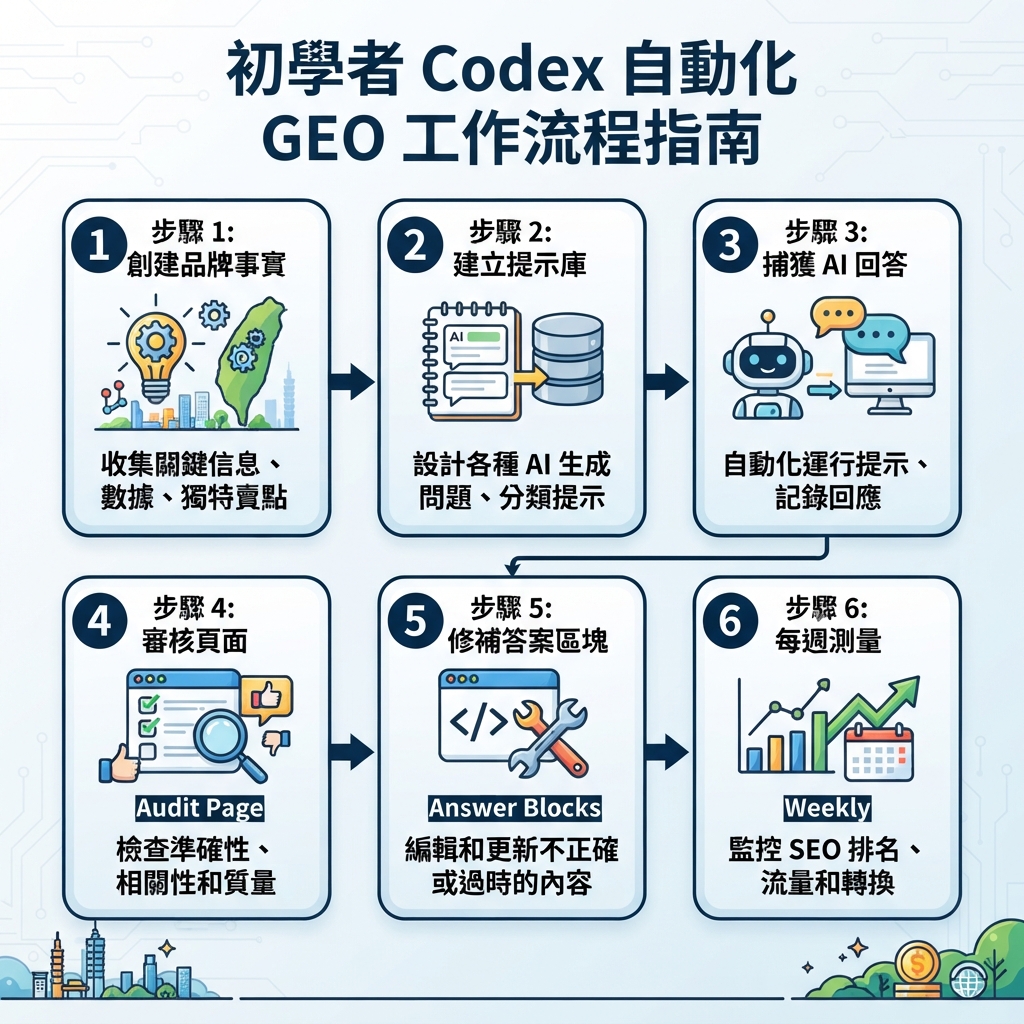
這篇教學會帶你建立什麼
這不是概念文章。照著做完後,你會在自己的 website repo 裡得到一個可運作的 Codex GEO operating folder:
seo-geo/
  brand-facts.md
  prompt-library/core-prompts.md
  exports/
  snapshots/
  reports/
  qa/
AGENTS.md
你會讓 Codex 做五件實務工作:
- 建立 GEO rule file,避免 Codex invent claims。
- 建立 AI search visibility checks 的 prompt library。
- Audit 一個真實 page 的 GEO extractability。
- 準備安全 page diff,包含 answer blocks、evidence slots 與 internal links。
- 從 snapshots 與 exports 產出 weekly GEO report。
這個 workflow 對 beginner 很安全。Codex 可以 inspect files、run commands、draft patches 與 summarize evidence,但每個 content change 都由你批准後才 publish。
Before you start:你需要什麼
你不需要成熟 SEO team。你需要一個 website repository 和幾個 source files。
Requirement | Beginner version | Better version |
|---|---|---|
Website repo | Next.js、Astro、Vite、WordPress theme、docs 或 static site repo | 有 build/lint commands documented 的 repo |
Codex | CLI、IDE、app 或 cloud thread | 已設定 AGENTS.md 與 MCP 的 project |
Search data | Manual notes 或 CSV exports | GSC、Bing Webmaster、GA4、SERP/API snapshots |
AI answer checks | 手動把 answers 貼進 markdown | Felo Search、Perplexity、Gemini 或其他 API snapshots |
Approval process | 你 review diff | PR review、checks 與 scheduled monitoring |
開始讓 Codex edit 之前,先開乾淨 branch:
git checkout -b geo-codex-setup
mkdir -p seo-geo/{exports,snapshots,reports,qa,prompt-library}
touch seo-geo/brand-facts.md seo-geo/prompt-library/core-prompts.md
如果你不用 Git,先複製一份網站 folder。不要直接在唯一 production copy 上跑 automated GEO edits。
Step 1:寫 brand facts file
如果 Codex 必須猜你的公司做什麼,它就無法做可靠 GEO。從 seo-geo/brand-facts.md 開始。
# Brand facts for GEO work

## Entity
- Brand name:
- Website:
- Product/category:
- Primary audience:
- Main use cases:
- Countries/languages served:

## What we can safely claim
- Claim 1:
- Claim 2:
- Claim 3:

## Proof we actually have
- Public customer quote:
- Case study URL:
- Product screenshot:
- Integration page:
- Pricing page:
- Docs/help page:

## Claims Codex must not invent
- Customer logos
- Revenue numbers
- Awards
- Reviews or ratings
- Legal/medical/financial claims
- Competitor comparisons without evidence

## Preferred conversion path
- Primary CTA:
- Secondary CTA:
- Pages that should receive internal links:
請填 boring facts。GEO 最怕漂亮但無法驗證的 claims。
Step 2:建立 AGENTS.md,讓 Codex 遵守 GEO rules
在 repo root 建立 AGENTS.md:
# AGENTS.md

## GEO working rules
- Use brand facts from seo-geo/brand-facts.md.
- Do not invent claims, sources, customers, metrics, or comparisons.
- Prefer clear answer blocks near the top of each page.
- Add evidence slots when proof is missing.
- Preserve existing URLs unless a redirect plan is approved.

## Approval boundaries
- Do not publish content automatically.
- Do not submit URLs to search engines.
- Do not edit robots.txt, sitemap, canonical logic, redirects, or schema templates without approval.

## GEO page standard
Every GEO-targeted page should include:
- short answer
- entity facts
- buyer questions
- evidence or TODO proof slots
- internal links to supporting pages
- FAQ only when useful

## Validation
Run available build, lint, link, and SEO checks before marking the task complete.
這會把 Codex 從「自由寫作者」變成有邊界的 repo-aware operator。
Step 3:建立 GEO prompt library
在 seo-geo/prompt-library/core-prompts.md 建立固定 prompts:
# Core GEO prompt library

## Category discovery
- What are the best tools for [category]?
- How do I solve [problem] with AI?

## Brand evaluation
- What is [brand]?
- Who is [brand] best for?
- Is [brand] good for [use case]?

## Buying and comparison
- [brand] vs [competitor]
- Best alternatives to [competitor]
- Which [category] tool should a small team choose?

## Implementation questions
- How do I set up [workflow]?
- How do I measure [outcome]?
不要每天改 prompt set。你需要 stable prompts,才能比較 visibility 是否真的變化。
Step 4:收集 AI answer snapshots
Option A:beginner manual snapshot
手動把 answers 貼進 markdown:
# Manual AI answer snapshot - 2026-07-06

Prompt:
Surface: ChatGPT / Perplexity / Gemini / Felo Search
Brand mentioned: yes/no
Brand cited: yes/no
Competitors mentioned:
Citation URLs:
Summary:
Concerns:
Option B:team API snapshot
如果 team 有 approved APIs,可以讓 Codex 寫 scripts,把 raw responses 存到 seo-geo/snapshots/YYYY-MM-DD/,再產出 normalized CSV。重要的是保留 raw response,不要只保留 summary。
Step 5:選一個 page 改善
不要一開始全站重寫。選一個 high-value page:
- 已有曝光,但 CTR 偏弱。
- AI 答案提到競品,卻沒提到你。
- 頁面能回答買家問題,但答案藏太深。
- 有證據,但沒有整理成可引用區塊。
Step 6:editing 前先 audit target page
給 Codex 這段 prompt:
Audit this page for GEO readiness before editing.
Use seo-geo/brand-facts.md and seo-geo/prompt-library/core-prompts.md.
Return:
- target buyer questions
- whether the page answers them in the first 150 words
- unclear entity facts
- unsupported claims
- missing evidence
- internal links to add
- technical risks
Do not edit files yet.
先 review audit。若 Codex 沒有 evidence,就不要批准 edit。
Step 7:做安全 GEO page patch
批准後,再讓 Codex 做 narrow patch:
Patch only the approved page.
Add:
- one short answer block near the top
- entity facts using brand-facts.md
- evidence TODO slots where proof is missing
- 2-3 relevant internal links
- FAQ only if it answers real buyer questions
Preserve slug and page intent.
Run checks and show the diff.
Example short answer:
## Short answer
[Brand] is a [category] for [audience] that helps teams [outcome]. It is best for [use cases]. Teams should use it when they need [decision criteria], and should compare it with alternatives when [constraint].
Step 8:run validation and review diff
要求 Codex run available commands:
pnpm lint
pnpm test
pnpm build
# or pnpm build / yarn build / your site command
然後要求 review memo:
## Published changes
Changed files:
Claims added:
Evidence used:
Checks run:
Remaining TODO proof:
Risk level:
Rollback plan:
Approval needed:
如果 memo 裡沒有 claims、evidence、checks 或 rollback plan,就不要 publish。
Step 9:只有通過 human approval gate 才 publish
Codex 可以 prepare content、diff 與 report,但 publishing 應該由人確認。尤其是涉及 pricing、legal、medical、financial、competitor comparisons 或 technical SEO files 的 changes。
Step 10:用同一組 prompts 再 measure
發布後等待 indexing,再用同一組 prompt library 測試:
- 品牌是否被提及?
- 品牌是否被引用?
- 競品是否仍被優先推薦?
- 答案是否準確描述 positioning?
- Citation URL 是否指向更新後的頁面?
把結果放進 seo-geo/reports/YYYY-MM-DD-geo-followup.md。GEO 的重點不是「改完就結束」,而是建立 measurement loop。
Step 11:把流程變成 recurring Codex automation
當 manual workflow 可用後,再建立 recurring task:
Every week, run the Codex GEO monitoring workflow.
Use approved read-only data only.
Compare prompt snapshots with the previous week.
Create a report with:
- brand mentions gained/lost
- citations gained/lost
- competitor changes
- pages that need refresh
- technical risks
- recommended next owner
Do not edit or publish without approval.
可直接貼進 Codex 的 full beginner prompt
I want to set up an automated GEO workflow with Codex for this website.
Work in phases. Do not skip ahead.

Phase 1: Setup
- Create seo-geo folders.
- Create brand-facts.md and prompt-library/core-prompts.md templates.
- Create or update AGENTS.md with GEO safety rules.

Phase 2: Audit only
- Pick one target page from my input.
- Audit it for answer extractability, entity clarity, evidence, internal links, and technical risk.
- Do not edit yet.

Phase 3: Patch after approval
- Add only approved answer blocks, evidence slots, internal links, and useful FAQ.
- Preserve slug and page intent.
- Run validation and show the diff.

Phase 4: Measurement
- Create a prompt snapshot template.
- Create a weekly report template.
- Do not publish or submit URLs automatically.
Common beginner mistakes
- 讓 Codex invent proof。
- 每天改 prompt set,導致無法比較。
- 一開始就 rewrite whole site。
- 把 AI answer snapshot 當成 stable ranking。
- 沒有保留 raw evidence。
- 沒有 human approval gate。
- 沒有 follow-up measurement。
Codex SEO/GEO learning path
這篇文章是 Codex SEO/GEO operator series 的一部分。如果你要從零建立 workflow,建議照這個順序讀:
- 如何在 2026 年用 Codex 做自動化 GEO
- 如何用 Codex 做自動化 SEO
- 如何用 AGENTS.md 建立 Codex SEO Workspace
- 如何用 MCP 把 Codex 接上 SEO Data
- 2026 年最佳 Codex GEO Skill
- 如何建立 Codex Keyword Clustering Skill
- 如何用 Codex Subagents 做 SERP、內容與技術 SEO
- 如何用 Codex 修 Technical SEO 且不破壞 Production
- 如何用 Codex Automations 跑每日 SEO/GEO Monitoring
- Codex SEO/GEO Quality Gates:Diff、Evidence、Tests 與 Human Approval
- 如何用 Codex 建立並部署 SEO/GEO-Ready Website
下一步
Sources and notes
請以 OpenAI 官方 Codex documentation 作為 current syntax 與 product behavior 的準確來源,包括 Codex CLI、AGENTS.md、Codex Skills、MCP、subagents 與 configuration reference。