このチュートリアルで作るもの
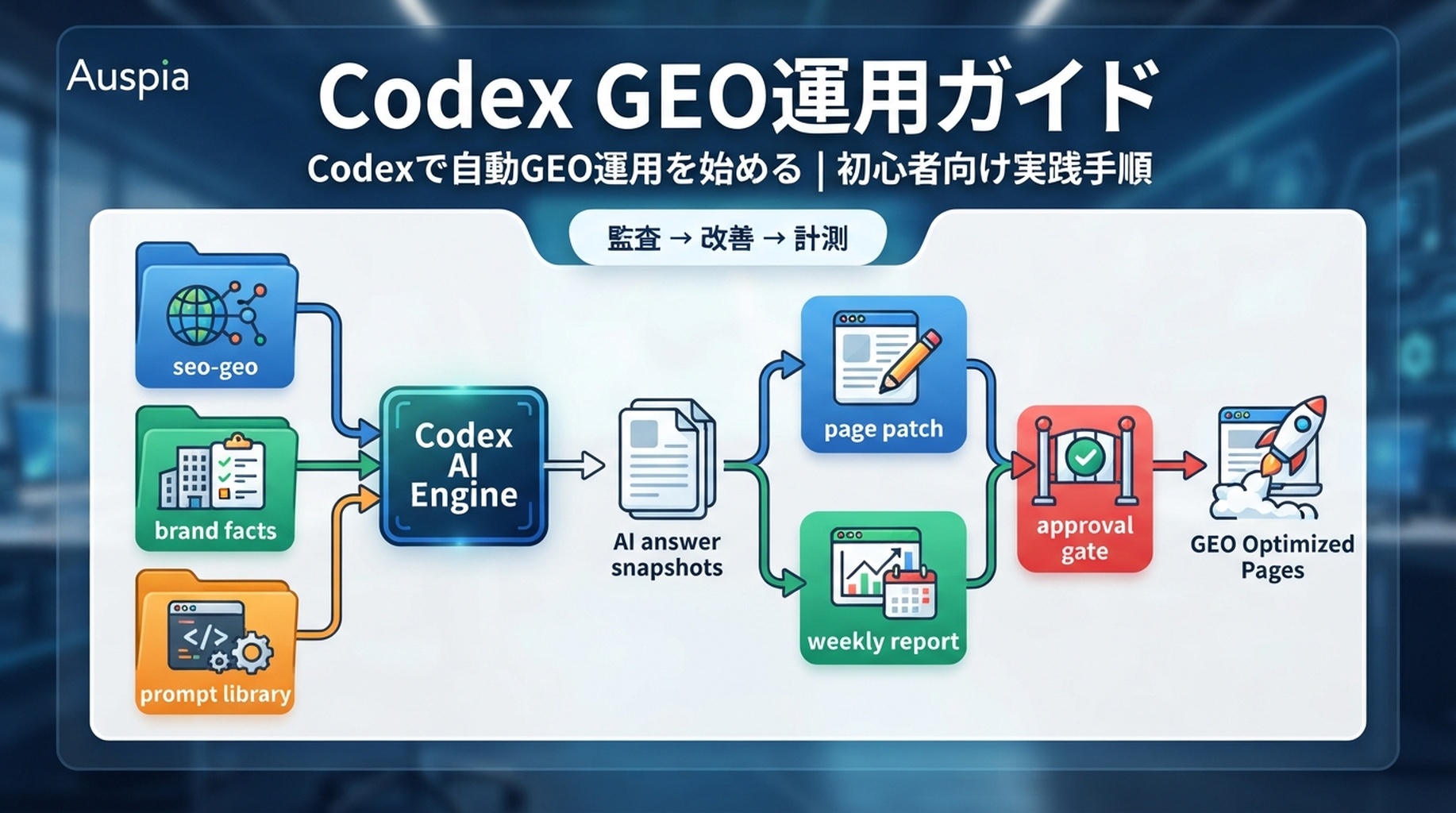
これは概念解説ではありません。最後まで進めると、あなたのWebサイトのリポジトリ内に、実際に使えるCodex向けのGEO運用フォルダができます。
seo-geo/
  brand-facts.md
  prompt-library/core-prompts.md
  exports/
  snapshots/
  reports/
  qa/
AGENTS.md
Codexには、次の5つの実務を担当させます。
- Codexが根拠のない主張を作らないように、GEOルールファイルを作る。
- AI検索での可視性を確認するためのプロンプトライブラリを作る。
- 実際の1ページを対象に、GEOで引用されやすい構造かを監査する。
- 回答ブロック、証拠の差し込み欄、内部リンクを含む安全なページ差分を作る。
- スナップショットとエクスポートデータから、週次GEOレポートを作る。
このワークフローは、初心者でも安全に始められるように設計しています。Codexはファイルを調べ、コマンドを実行し、パッチ案を作り、証拠を要約できます。ただし、公開前のコンテンツ変更は必ず人間が承認します。
始める前に必要なもの
成熟したSEOチームは必要ありません。必要なのは、Webサイトのリポジトリと、いくつかの情報源です。
必要なもの | 初心者向けの形 | より良い形 |
|---|---|---|
Webサイトのリポジトリ | Next.js、Astro、Vite、WordPressテーマ、ドキュメント、静的サイトなどのフォルダ | build / lint コマンドが整理されたリポジトリ |
Codex | CLI、IDE、アプリ、またはクラウドスレッド |
|
検索データ | 手動メモまたはCSVエクスポート | GSC、Bing Webmaster、GA4、SERP/APIスナップショット |
AI回答チェック | AI回答を手動でMarkdownに貼る | Felo Search、Perplexity、GeminiなどのAPIスナップショット |
承認プロセス | 自分でdiffを確認する | PRレビュー、チェック、定期モニタリング |
Codexに編集を任せる前に、クリーンなブランチを作ってください。
git checkout -b geo-codex-setup
mkdir -p seo-geo/{exports,snapshots,reports,qa,prompt-library}
touch seo-geo/brand-facts.md seo-geo/prompt-library/core-prompts.md
Gitを使っていない場合は、まずWebサイトフォルダのコピーを作ってください。本番で使っている唯一のフォルダに対して、自動GEO編集を直接走らせないでください。
Step 1: ブランド事実ファイルを書く
Codexは、ブランドについて推測しなければならない状態では、信頼できるGEO作業ができません。まず、Codexが参照してよい事実を1つのファイルにまとめます。
seo-geo/brand-facts.md に次を入れます。
# Brand facts

## Entity
Brand name: [your brand]
Website: https://example.com
Category: [your category]
Primary audience: [who buys or uses it]
Main use cases:
- [use case 1]
- [use case 2]
- [use case 3]

## What we can safely claim
- [claim with source]
- [claim with source]
- [claim with source]

## Proof we actually have
- product screenshots: [location]
- public docs: [location]
- case studies: [location]
- reviews or testimonials: [location]

## Claims Codex must not invent
- customer names
- revenue numbers
- rankings
- awards
- legal, medical, or financial claims
- competitor superiority claims without evidence

## Preferred conversion path
Primary CTA: [demo / signup / trial / contact]
Secondary CTA: [tool / guide / checklist]
ここで重要なのは、空欄を無理に埋めないことです。証拠がない場合は TODO と書きます。AI検索で引用されやすいページは、派手な表現よりも、確認できる事実を明確に示しています。
Step 2: AGENTS.md を作り、CodexにGEOルールを守らせる
次に、リポジトリのルートに AGENTS.md を作ります。Codexはこのファイルを、プロジェクトの永続的な作業ルールとして参照できます。
# AGENTS.md

## GEO working rules
- Read `seo-geo/brand-facts.md` before writing or editing public copy.
- Do not invent statistics, customers, awards, rankings, pricing, or legal claims.
- Mark missing proof as TODO instead of filling it with guesses.
- Prefer clear answer blocks, evidence sections, comparison tables, and useful internal links.

## Approval boundaries
Ask before changing:
- production content
- title/meta helpers
- schema helpers
- canonical tags
- redirects
- robots.txt
- sitemap generation
- analytics or tracking code

## GEO page standard
A page is GEO-ready only if it has:
- a concise answer near the top;
- clear entity, category, audience, and use case language;
- evidence or proof slots;
- relevant internal links;
- claims that match `seo-geo/brand-facts.md`;
- no unsupported superlatives.

## Validation
Before final response, summarize:
- files inspected;
- files changed;
- commands run;
- remaining risks;
- what human approval is still needed.
初心者がよく失敗するのは、Codexに「GEO向けに最適化して」とだけ頼むことです。代わりに、何をしてよくて、何をしてはいけないかを先に固定します。
Step 3: GEOプロンプトライブラリを作る
AI検索の可視性は、1つのキーワードだけでは判断できません。購入者がAIに聞きそうな質問を、プロンプトとして保存します。
seo-geo/prompt-library/core-prompts.md を作ります。
# Core GEO prompts

## Category discovery
- What are the best tools for [category]?
- What should I use to solve [problem]?
- Which platforms help [audience] with [use case]?

## Brand evaluation
- What does [brand] do?
- Is [brand] good for [audience]?
- What are the pros and cons of [brand]?

## Buying and comparison
- [brand] vs [competitor]
- Best [category] tools for [audience]
- Alternatives to [competitor]

## Implementation questions
- How do I use [brand/category] to solve [problem]?
- What is the workflow for [use case]?
- What should I check before choosing [category] software?
最初は10〜20個で十分です。多すぎるプロンプトより、毎週同じプロンプトを計測できることのほうが重要です。
Step 4: AI回答スナップショットを集める
最初は手動で構いません。ChatGPT、Perplexity、Gemini、Felo Searchなどでプロンプトを実行し、結果を保存します。
TODAY=$(date +%F)
mkdir -p seo-geo/snapshots/$TODAY
seo-geo/snapshots/YYYY-MM-DD/ai-answers.md を作ります。
# AI answer snapshots

Date: 2026-07-07
Brand: [brand]

## Prompt
What are the best tools for [category]?

## Surface
Perplexity / Gemini / ChatGPT / Felo Search

## Answer summary
[short summary]

## Brand mentioned?
No

## Cited URLs
- [URL]
- [URL]

## Competitors mentioned
- [competitor]
- [competitor]

## Notes
The answer mentions the category but does not mention our brand. It cites general list posts, not product pages.
APIを使える場合はJSONで保存しても構いません。ただし、キーをプロンプトに貼らないでください。APIキーは環境変数や安全なシークレット管理に置きます。
Step 5: 改善するページを1つ選ぶ
最初からサイト全体を直そうとしないでください。1ページだけ選びます。
良い候補は次のようなページです。
候補ページ | 選ぶ理由 |
|---|---|
主要な機能ページ | AI回答がブランドやカテゴリを説明するときに引用されやすい |
比較ページ | 購入検討プロンプトと相性が良い |
How-to記事 | 実装質問に答えやすい |
ツールページ | 具体的な問題解決とCTAがある |
既に表示回数がある記事 | GSCで需要が確認できている |
Codexに次のように依頼します。
Read `seo-geo/brand-facts.md`, `seo-geo/prompt-library/core-prompts.md`, and the latest files under `seo-geo/snapshots/`.

Recommend one page to improve for GEO first.
Do not edit files.
Return:
- target URL or local file;
- matching prompts;
- current weakness;
- evidence needed;
- risk level;
- why this page should be first.
Codexが10ページを一度に提案してきたら、最初の1ページに絞らせてください。GEO運用は、小さな修正と計測を積み重ねるほど安全です。
Step 6: 編集前に対象ページを監査する
ページを選んだら、すぐに書き換えさせず、まず監査だけを依頼します。
Audit the target page for GEO readiness. Do not edit yet.

Check:
1. Is there a concise answer near the top?
2. Does the page clearly state entity, category, audience, and use case?
3. Are claims supported by `seo-geo/brand-facts.md`?
4. Are there proof sections, screenshots, examples, or data?
5. Are internal links useful and relevant?
6. Does the page answer any prompts in `seo-geo/prompt-library/core-prompts.md`?
7. What should be changed, and what must not be changed?

Write the audit to `seo-geo/reports/target-page-geo-audit.md`.
良い監査は、具体的なファイル名、ページ上の弱い箇所、必要な証拠を示します。悪い監査は「もっと詳しく書きましょう」のような一般論だけで終わります。
Step 7: 安全なGEOページパッチを作る
監査を確認してから、限定的な変更だけを承認します。
Using `seo-geo/reports/target-page-geo-audit.md`, prepare a small GEO improvement patch.

Allowed:
- add a short answer block;
- clarify category, audience, and use case;
- add TODO proof slots where evidence is missing;
- improve relevant internal links;
- improve FAQ only if the page already supports the answer.

Not allowed:
- invent claims;
- change pricing;
- change legal claims;
- change schema helpers;
- change canonicals;
- change redirects;
- change robots or sitemap files;
- publish or deploy.

Show the plan first and wait for approval before editing.
承認後、Codexが作る差分は小さくあるべきです。たとえば、冒頭に次のような回答ブロックを入れます。
## Short answer

[Brand] helps [audience] solve [problem] by [specific workflow]. It is best for [use case], especially when teams need [evidence-backed differentiator]. If you are comparing tools, start by checking [criterion 1], [criterion 2], and [criterion 3].
証拠がない部分は空想で埋めず、次のようにします。
TODO: Add approved screenshot of the reporting workflow.
TODO: Add public customer quote after approval.
Step 8: 検証し、diffを確認する
編集後、必ず差分とコマンド結果を確認します。
git diff --stat
git diff
npm run build
プロジェクトに npm run build がない場合は、Codexに利用可能な検証コマンドを探させます。
Inspect package.json and project files. Identify the safest validation command for this repo. Do not invent commands.
Codexの最終報告には、次が必要です。
Changed files:
- [file]

What changed:
- added answer block
- clarified category and audience
- added evidence TODOs
- added two relevant internal links

Validation:
- npm run build: passed

Risks:
- proof screenshot still missing
- public customer quote not approved

Human approval needed before publish:
- yes
Step 9: 人間の承認ゲート後にだけ公開する
公開前に、次のチェックリストを使います。
チェック | 合格条件 |
|---|---|
事実 |
|
証拠 | ないものはTODO、あるものだけ公開 |
差分 | 承認されたファイルだけ変更 |
技術 | robots、canonical、redirect、sitemapを触っていない |
内部リンク | 読者にとって自然で関連性がある |
検証 | build / lint / previewなどが通っている |
公開したら、変更内容を記録します。
# Published changes

Date:
URL:
Prompts targeted:
Files changed:
Validation:
Expected measurement window: 14-28 days
Step 10: 同じプロンプトを再計測する
公開後、すぐに順位や引用が変わるとは限りません。まず同じプロンプトを再実行し、前回と比較できる形で保存します。
TODAY=$(date +%F)
mkdir -p seo-geo/snapshots/$TODAY
Codexに比較レポートを依頼します。
Compare the latest AI answer snapshots with the previous snapshot.

Report:
- prompts where our brand is now mentioned;
- prompts where citations changed;
- competitors that appear more often;
- pages that may need more evidence;
- whether the published page appears in citations;
- next recommended action.

Write the report to `seo-geo/reports/weekly-geo-visibility.md`.
重要なのは、1回のAI回答を「成果」と決めつけないことです。少なくとも数回のスナップショットを見て、傾向として判断します。
Step 11: Codexの定期運用にする
最初のページで流れが固まったら、週次の読み取り専用タスクにします。
Every week, run a read-only GEO visibility review.

Inputs:
- `seo-geo/brand-facts.md`
- `seo-geo/prompt-library/core-prompts.md`
- latest `seo-geo/snapshots/`
- latest GSC/Bing/GA4 exports if available

Output:
- `seo-geo/reports/YYYY-MM-DD-geo-report.md`

Rules:
- do not edit production pages;
- do not publish;
- do not submit URLs;
- do not invent data;
- recommend actions with evidence and confidence.
Codexの役割は、毎週同じ観点で観測し、優先順位を出すことです。公開判断は人間が行います。
Codexに貼り付けられる初心者向けプロンプト
最初から迷う場合は、これをそのまま貼ってください。
I want to set up a beginner-safe GEO workflow in this website repo.

Please do not edit production pages yet.

First:
1. Create or inspect `seo-geo/brand-facts.md`.
2. Create or inspect `seo-geo/prompt-library/core-prompts.md`.
3. Create or inspect `AGENTS.md`.
4. Recommend one page for the first GEO audit.
5. Write a diagnosis report only.

Rules:
- Do not invent claims, customers, statistics, awards, or rankings.
- Mark missing proof as TODO.
- Do not change robots, sitemap, canonicals, redirects, schema helpers, analytics, or pricing.
- Wait for approval before editing any public page.
- Return files inspected, risks, and the exact next step.
初心者がよくやる失敗
- ブランド事実ファイルを作らずに、Codexにページを書き換えさせる。
- AI回答を1回だけ見て、GEOの成果だと判断する。
- 証拠がない主張を、AIにそれらしく書かせる。
- 1回のタスクでページ、schema、redirect、analyticsを同時に触る。
- 公開後のプロンプト再計測を忘れる。
- 内部リンクをSEO目的だけで増やし、読者に役立たない導線にする。
Codex SEO/GEO 学習パス
このページは Codex SEO/GEO オペレーターシリーズの一部です。ゼロから組み立てる場合は、次の順番で進めてください。
- 2026年にCodexで自動GEOを実践する方法
- CodexでSEOを自動化する方法
- AGENTS.mdでCodex SEOワークスペースを作る方法
- MCPでCodexをSEOデータに接続する方法
- 2026年版:最も実用的なCodex GEO Skill
- キーワードクラスタリング用のCodex Skillを作る方法
- SERP、コンテンツ、テクニカルSEOでCodex Subagentsを使う方法
- 本番を壊さずにCodexでテクニカルSEOを修正する方法
- Codex Automationsで毎日のSEO/GEO監視を行う方法
- Codex SEO/GEO品質ゲート:Diff、証拠、テスト、人間の承認
- CodexでSEO/GEO対応のWebサイトを作成・デプロイする方法
次に読むべき記事
次はこちら:CodexでSEOを自動化する方法
参考情報
現在の構文や製品挙動については、OpenAIの公式Codexドキュメントを信頼できる情報源として確認してください。
- Codex CLI: https://developers.openai.com/codex/cli
- AGENTS.md: https://developers.openai.com/codex/guides/agents-md
- Codex Skills: https://developers.openai.com/codex/skills
- Codex MCP: https://developers.openai.com/codex/mcp
- Codex subagents: https://developers.openai.com/codex/subagents
- Codex configuration: https://developers.openai.com/codex/config-reference
Author: Martin Hayes, AuspiaのGEO実行チェックリスト担当エディター。Martinは、GEOチーム向けの実践手順、戦術ガイド、運用チェックリストを執筆しています。