The useful output is not a keyword list
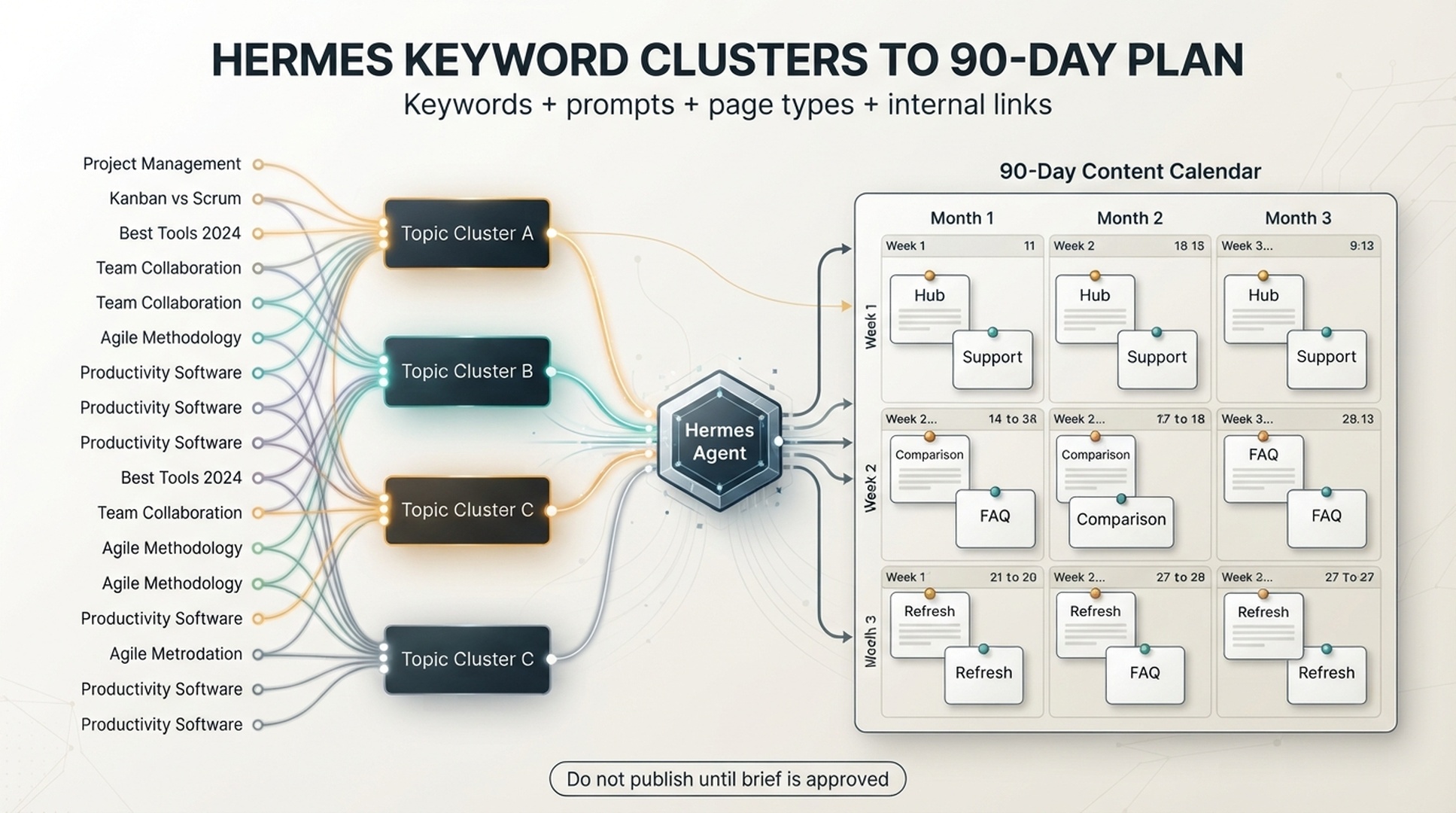
A keyword list is not a content strategy. It is raw material. The useful output is a plan that tells you which topics deserve pages, which pages should be updated first, which search intent each page serves, which GEO prompts the page should answer, and how those pages link to each other.
Hermes is useful here because keyword planning has many small decisions. It needs to clean duplicates, group similar queries, label intent, choose page types, avoid cannibalization, assign internal links, and turn everything into a calendar. A spreadsheet can store the plan, but Hermes can help you build it.
Hermes is an open-source AI agent framework from NousResearch, with documentation at https://hermes-agent.nousresearch.com/docs. If you have not set up a Hermes project yet, follow our walkthrough on setting up a Hermes SEO agent first.
For beginners, the safest workflow is this:
Raw keywords -> Clean list -> Topic clusters -> Intent labels -> Page types -> GEO prompts -> Internal links -> 90-day calendar -> Human approvalAsk Hermes to create a content operating plan that a human can review. Publishing pages straight from a keyword list stays outside the workflow.
Who this is for | Content marketers and SEO/GEO owners who have a Hermes project and a keyword list, and want a plan a human can review before anything gets written |
What you get | A cleaned keyword list, topic clusters with intent and page type labels, and a draft 90-day SEO/GEO content calendar with briefs for the first two weeks |
Prerequisites | A Hermes project with context files, plus a seed keyword list of 20-100 terms |
Time | About 1-2 days for one person, most of it spent on review |
Done when | The opportunity list passes the Step 9 approval checklist and the 90-day calendar is frozen |
What you need before clustering
You can start with a small dataset. Perfect keyword data is not a prerequisite.
Input | Beginner version | Better version later |
|---|---|---|
Seed keywords | 20-100 terms from your product, customers, and competitors | Export from SEO tools, GSC, paid search, sales calls, and site search |
Website context | Brand, product, audience, target market | Full ICP, positioning, funnel, competitor list, conversion goals |
Existing pages | A list of URLs or sitemap export | Content inventory with traffic, conversions, word count, and last updated date |
GEO prompts | 10-30 obvious AI search questions | Prompt library by buyer journey, problem, comparison, and recommendation intent |
Approval rules | Human review before publish | Owner, deadline, risk level, and CMS workflow for each page |
Put the files into your Hermes project:
/hermes-seo-agent
  /context
    brand.md
    website.md
    audience.md
  /data
    seed-keywords.csv
    existing-pages.csv
    gsc-performance-last-28-days.csv
  /reports
  /briefs
  /calendar
  /prompts
If you do not have SEO tool exports yet, create a simple seed-keywords.csv:
keyword,source,notes
seo dashboard,product,core product category
seo reporting template,sales call,customers ask for templates
google search console ga4,blog idea,common integration topic
ai search visibility checker,product,tool page topic
generative engine optimization,category,education topic
Step 1: clean the keyword list
Messy inputs create messy calendars. Start by asking Hermes to clean the list before clustering.
Create prompts/keyword-cleaning-prompt.md:
You are helping build an SEO/GEO content plan.

Read:
- /context/brand.md
- /context/website.md
- /data/seed-keywords.csv

Clean the keyword list.

Return:
1. Removed duplicates
2. Removed irrelevant keywords
3. Keywords that are too broad for this site
4. Keywords that may be high-risk or off-brand
5. Clean keyword list

For each removed keyword, explain why.
Do not create new article ideas yet.
A good cleaning output might say:
| Keyword | Decision | Reason |
|---|---|---|
| seo | Remove | Too broad for a beginner content plan. Use as category context only. |
| free analytics software | Keep with caution | Relevant, but may attract low-intent users. |
| enterprise data warehouse | Remove | Outside the product scope. |
This step prevents a common beginner problem: building content around every keyword that looks popular. If the cleaned list still contains duplicates or off-brand terms, rerun the prompt and add a constraint that names the specific problem you saw.
Step 2: create topic clusters
Now ask Hermes to group the cleaned list.
Cluster the cleaned keyword list into topic groups.

For each cluster, return:
1. Cluster name
2. Primary keyword
3. Supporting keywords
4. Search intent
5. Funnel stage
6. Existing page match, if any
7. New page needed: yes/no
8. Cannibalization risk
9. Business relevance score from 1-5

Do not recommend a new page if an existing page can be updated instead.
Use this cluster table:
| Cluster | Primary keyword | Supporting keywords | Intent | Funnel stage | Existing page | New page? | Cannibalization risk | Business relevance |
|---|---|---|---|---|---|---|---|---|
Intent labels should be simple:
Intent | What it means | Example |
|---|---|---|
Definition | User wants to understand a concept | what is GEO |
How-to | User wants steps | how to connect GSC to GA4 |
Template | User wants a reusable asset | SEO report template |
Comparison | User is choosing between options | GSC vs GA4 |
Problem | User has a symptom | impressions but no clicks |
Buyer | User is evaluating tools or vendors | best AI search visibility tools |
If Hermes creates 40 clusters from 80 keywords, it is over-segmenting. Ask it to merge clusters that serve the same reader and intent.
Step 3: map clusters to page types
A cluster does not always need a blog post. Some clusters need a tool page, glossary page, comparison page, template page, product page, or refresh of an existing page.
Use this prompt:
Map each keyword cluster to a page type.

Allowed page types:
- Hub guide
- Supporting article
- Tool page
- Template page
- Comparison page
- Use case page
- Glossary page
- FAQ section
- Existing page refresh
- Do not create page

For each choice, explain:
1. Why this page type fits the intent
2. Whether it should be new or refreshed
3. Which page it should link to
4. Which page should link back to it
5. What approval is needed
Here is the decision logic:
Search intent | Better page type | Why |
|---|---|---|
Broad category education | Hub guide | It can become the central topic page. |
Specific how-to | Supporting article | It solves a narrow task and links to the hub. |
Reusable asset | Template page | The reader wants something to copy or download. |
Tool evaluation | Tool or comparison page | The reader is closer to purchase. |
Basic definition | Glossary or FAQ section | It may not need a long standalone article. |
Existing topic with weak data | Refresh | Updating is safer than creating a duplicate. |
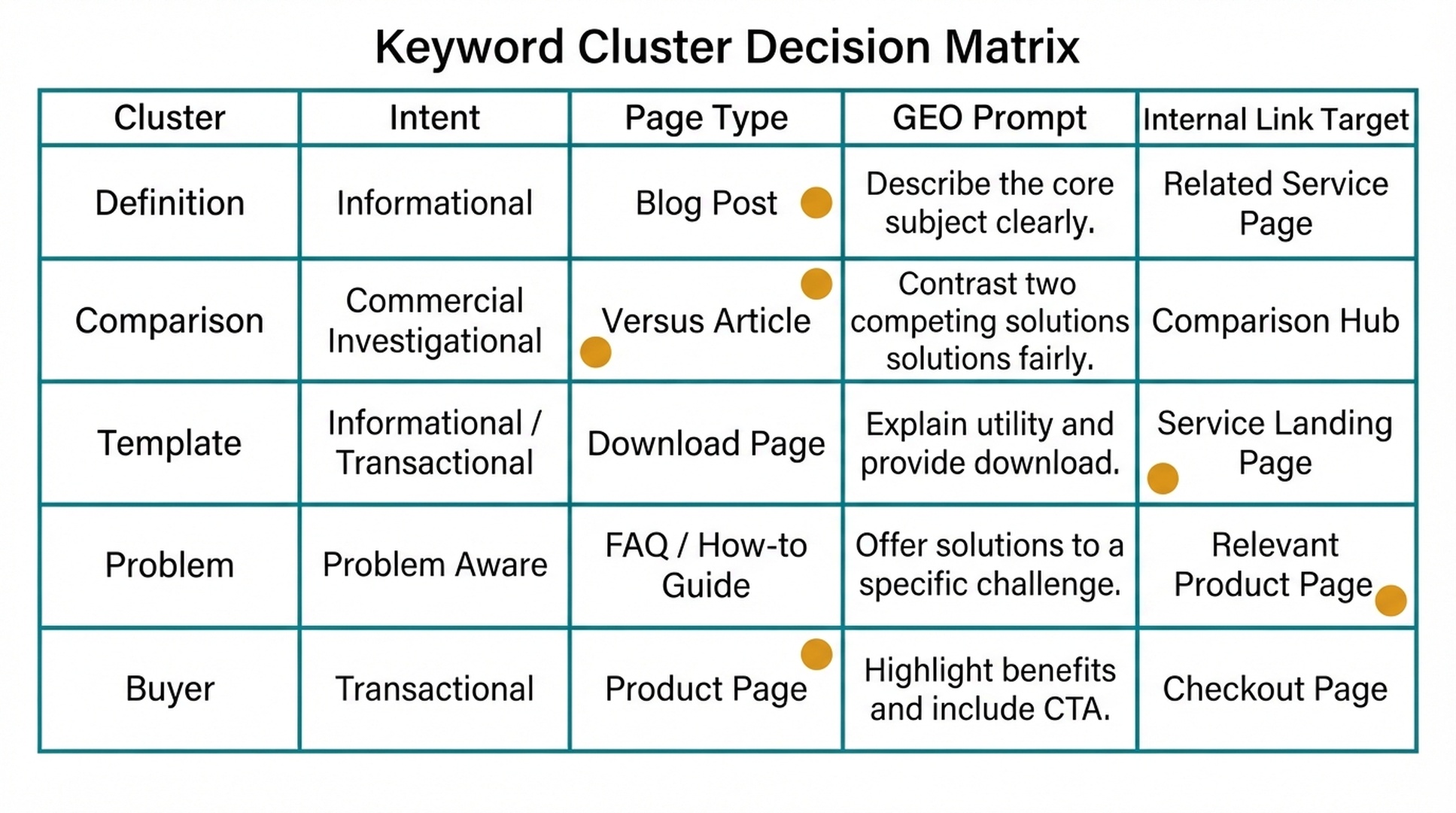
If a page type choice feels wrong, rerun the mapping prompt and add a constraint that states the rule you want enforced, for example that glossary pages stay separate from high-intent commercial clusters.
Step 4: add GEO prompt angles
Now add the GEO layer. A keyword says what someone types into search. A prompt says what someone may ask an AI assistant.
For each cluster, ask Hermes to create prompt angles:
For each keyword cluster, generate GEO prompt angles.

Create prompts in these categories:
1. Definition prompt
2. How-to prompt
3. Comparison prompt
4. Recommendation prompt
5. Problem-solving prompt
6. Buyer decision prompt, if relevant

For each prompt, map:
- Target page
- Missing evidence
- Entities to define
- Answer block needed
- Table or checklist needed
Example output:
| Cluster | GEO prompt | Target page | Missing evidence | Answer block needed |
|---|---|---|---|---|
| GSC + GA4 reporting | How do I connect Google Search Console data with GA4 landing page reports? | /blog/gsc-ga4-seo-reporting | Example workflow, field list | Step-by-step setup summary |
| AI search visibility | What tool can check whether my brand appears in AI search answers? | /tools/ai-search-visibility-checker | Product use case, prompt examples | Short tool explanation + use cases |
This matters for content structure. The article should not only target a keyword. It should answer the questions an AI system might summarize.
Step 5: check cannibalization before making the calendar
Schedule new pages only after Hermes checks for overlap.
Use this prompt:
Review the proposed clusters and page types for cannibalization risk.

Find:
1. Clusters that target the same intent.
2. Proposed pages that should be merged.
3. Existing pages that should be refreshed instead of replaced.
4. Keywords that should be secondary sections, not standalone pages.
5. Internal link relationships that clarify hierarchy.

Return a cannibalization risk table with recommended fixes.
Cannibalization table:
| Cluster A | Cluster B | Risk | Recommended fix | Final page decision |
|---|---|---|---|---|
Example:
Cluster A | Cluster B | Risk | Recommended fix | Final page decision |
|---|---|---|---|---|
GA4 SEO report | GSC GA4 dashboard | High | Merge into one guide with dashboard section | One how-to article |
GEO definition | Generative engine optimization | High | Use one glossary/hub page | One hub guide |
Low CTR pages | Improve CTR in GSC | Medium | Keep one diagnosis article, add examples | One supporting article |
This saves time. It is easier to merge ideas before anyone writes the pages.
Step 6: score each content opportunity
A 90-day calendar should not be sorted by search volume alone. Score by value and feasibility.
Use this scoring model:
Score factor | Range | What to ask |
|---|---|---|
Search demand | 1-5 | Is there evidence from keyword tools, GSC, or customer language? |
Business relevance | 1-5 | Does the topic connect to product, service, lead quality, or conversion? |
GEO potential | 1-5 | Could this page answer AI search prompts clearly? |
Existing authority | 1-5 | Does the site already have related pages or links? |
Effort | 1-5 | How hard is it to write, design, verify, or build? 5 means hard. |
Risk | 1-5 | Could it create compliance, brand, technical, or cannibalization risk? 5 means high risk. |
Priority formula:
Search demand + Business relevance + GEO potential + Existing authority - Effort - RiskPrompt:
Score each approved content opportunity.

Use these factors:
- Search demand: 1-5
- Business relevance: 1-5
- GEO potential: 1-5
- Existing authority: 1-5
- Effort: 1-5
- Risk: 1-5

Calculate priority score:
Search demand + Business relevance + GEO potential + Existing authority - Effort - Risk

Return a sorted table.
If data is missing, use "unknown" and explain the assumption.
Keep assumptions visible. If search volume is unknown, the score should say unknown, not pretend to be precise. If the scores look flat or tied everywhere, rerun the prompt and add a tie-break constraint, for example that business relevance outweighs raw demand.
Step 7: build the 90-day calendar
Now you can create the calendar. For most teams, 90 days should not mean 90 articles. It should mean a realistic mix of new pages, refreshes, templates, and technical improvements.
For a small team, start with 2-3 content actions per week:
Week | Content action | Page type | Goal |
|---|---|---|---|
Week 1 | Refresh an existing high-impression page | Refresh | Improve CTR and answer clarity |
Week 1 | Create one approved brief | Brief | Prepare next week's article |
Week 2 | Publish one supporting article | Supporting article | Cover a narrow how-to intent |
Week 2 | Add internal links from hub page | Internal link update | Strengthen topic cluster |
Hermes prompt:
Create a 90-day SEO/GEO content calendar from the scored opportunity list.

Rules:
- Do not schedule more than 3 content actions per week for a small team.
- Mix new pages, refreshes, briefs, internal links, and QA tasks.
- Put high-business-relevance topics earlier.
- Put refreshes before duplicate new pages.
- Include approval checkpoints.
- Include the target internal link for each page.
- Include the GEO prompt angle for each page.

Return a weekly calendar table.
This calendar is a draft. It only becomes the approved plan after it passes the human review gate in Step 9.
Calendar template:
| Week | Action | Cluster | Page type | Target URL | Primary keyword | GEO prompt angle | Internal link target | Owner | Approval gate |
|---|---|---|---|---|---|---|---|---|---|
Step 8: create briefs only for the first two weeks
Writing briefs for all 90 days at once wastes effort. Markets change. Search results change. Your team will learn from the first few pages.
Ask for briefs only for the first two weeks:
Create content briefs for the first two weeks of the draft 90-day calendar.

For each brief, include:
1. Working title
2. Target reader
3. Search intent
4. GEO prompt intent
5. Page type
6. Primary keyword
7. Supporting questions
8. Entities to explain
9. Required sources or evidence
10. Recommended structure
11. Internal links
12. CTA or conversion path
13. Quality gate
14. Approval needed

Do not write full drafts yet.
This keeps the system flexible. A 90-day calendar is a planning tool, not a publishing prison.
Step 9: add a human approval gate
Before anything becomes a draft, review the calendar.
Use this approval checklist:
# 90-day content calendar approval checklist

- [ ] Each page has a clear search intent.
- [ ] Each page has a GEO prompt angle.
- [ ] No two pages target the same intent.
- [ ] Existing pages are refreshed before duplicate pages are created.
- [ ] High-business-relevance topics appear early enough.
- [ ] Each new page has an internal link target.
- [ ] Each page has a realistic owner.
- [ ] No high-risk claims are scheduled without source requirements.
- [ ] Publishing pace is realistic for the team.
- [ ] The first two weeks have briefs, not only titles.
Prompt Hermes:
Review the 90-day calendar against the approval checklist.

Return:
1. Pass/fail for each item.
2. Pages that should be merged.
3. Pages that should be delayed.
4. Missing internal links.
5. Missing evidence.
6. A revised calendar if needed.
The calendar is approved only after the human reviewer agrees.
Beginner example: a small B2B SaaS calendar slice
Here is a small example for a SaaS analytics company:
Week | Action | Cluster | Page type | Primary keyword | GEO prompt angle | Internal link target | Approval |
|---|---|---|---|---|---|---|---|
1 | Refresh | SEO reporting dashboards | Existing page refresh | seo dashboard template | What should an SEO dashboard include? | /product | Editor |
1 | Brief | GSC + GA4 reporting | How-to article | google search console ga4 | How do I connect GSC data with GA4? | /blog/seo-dashboard-template | SEO lead |
2 | Draft | GSC + GA4 reporting | How-to article | google search console ga4 | How do I connect GSC data with GA4? | /product/integrations | Editor |
2 | Internal links | Analytics templates | Internal link update | seo report template | Which report template helps connect content to signups? | /blog/seo-dashboard-template | SEO lead |
3 | Brief | AI search visibility | Tool page support | ai search visibility checker | How can I check if my brand appears in AI answers? | /tools/ai-search-visibility-checker | Marketing lead |
6 | Refresh | SEO reporting dashboards | Existing page refresh | seo dashboard template | What should an SEO dashboard include? | /product | Editor |
9 | Publish | AI search visibility | Tool page support | ai search visibility checker | How can I check if my brand appears in AI answers? | /tools/ai-search-visibility-checker | Marketing lead |
Weeks 4-12 follow the same rhythm: one or two actions per week, mixing refreshes, drafts, briefs, and internal link updates. This slice stops at week 3 to show the pattern without repeating all twelve rows; the calendar template in Step 7 covers the full cycle.
Notice the mix. It is not just new articles. It includes refresh, brief, draft, and internal link work.
Measure at day 30, 60, and 90
A calendar is a hypothesis. Check it at day 30, day 60, and day 90, and adjust the next block of work with each check.
Day 30: indexation and first signals. Confirm that published or refreshed pages appear in Google Search, using a site: search or the URL inspection tool in Search Console. Then spot-check GEO visibility: ask an AI assistant the prompt questions from your calendar and see whether it references your brand. Put any page that does not show up on a fix list instead of scheduling more of the same.
Day 60: GSC before/after comparison. Compare Search Console performance for the pages you changed against the 28 days before the change. Look at impressions and average position for the target keywords, and check whether the new page structure answers the GEO prompt angles. A refreshed page with zero impressions for its target keyword is a signal to rewrite, not a reason to schedule another similar page.
Day 90: calendar revision. Re-score the remaining opportunities with the Step 6 scoring prompt and rebuild the calendar with the Step 7 prompt. A plan made on day 1 will be partly wrong by day 90; revising it is the point of measuring.
Update mechanism at each checkpoint: rerun the calendar prompt on the current scored list and add one constraint that encodes what you learned, for example to deprioritize a cluster that earned no impressions or to move a refresh earlier. Update the approval checklist with anything that failed, and freeze the next block of weeks only after the human reviewer agrees.
Common mistakes
Mistake | Why it hurts | Better approach |
|---|---|---|
Building one page per keyword | Creates duplicate intent and thin pages | Cluster by intent first |
Sorting only by volume | Ignores conversion and brand fit | Score by demand, relevance, GEO potential, effort, and risk |
Skipping existing pages | Creates cannibalization | Refresh or consolidate first |
No internal link plan | Pages launch as isolated assets | Assign hub and supporting links before drafting |
No GEO prompt angle | Content may rank but fail answer extraction | Add prompt questions, answer blocks, tables, and entities |
Writing 90 briefs at once | Wastes time when priorities change | Brief only the first two weeks |
Auspia take
Hermes works well for keyword clustering because the job is not one creative leap. It is a sequence of small decisions: clean, group, label, map, score, schedule, approve. That is exactly the kind of work an agent can help with if the rules are clear.
The real win is not a prettier spreadsheet. The real win is fewer random pages. Every planned page should have a reason to exist, a search intent, a GEO prompt angle, an internal link role, and a human approval gate.
If a keyword cannot pass those checks, it probably should not become a page yet.
FAQ
Can Hermes do keyword research by itself?
Hermes can organize, expand, and classify keywords, but it still needs data. Start with seed keywords from your product, customer questions, GSC, SEO tools, paid search, sales calls, or competitor research.
Should every keyword cluster become a new article?
No. Some clusters should become sections inside existing pages. Some should refresh old content. Some should become tool pages, templates, glossary entries, or comparison pages. Some should be rejected.
How many pages should a 90-day content calendar include?
For a small team, 8-20 meaningful content actions may be enough. A content action can be a new article, refresh, brief, internal link update, template, or QA task. Measure the plan by the mix of actions, not by article count alone.
How does this help GEO?
Each cluster gets mapped to AI search prompts, entities, answer blocks, tables, and evidence needs. That makes the resulting content easier for AI systems to understand and summarize.
How do I avoid keyword cannibalization?
Ask Hermes to compare clusters by search intent, existing page match, and target URL before scheduling. Merge clusters when they serve the same reader need.
Should Hermes write all drafts after building the calendar?
No. Ask for briefs first, then draft only the approved pages. This keeps the workflow controlled and prevents low-quality bulk publishing.
Author: David Sinclair, Topical Authority Strategist Across 500+ Topic Clusters at Auspia. David writes about topic clusters, authority building, coverage planning, and practical content systems for organic growth teams.