The short answer
A GEO prompt map is a working list of questions people may ask AI search systems, plus the pages, entities, facts, and evidence your site needs to answer those questions well. Hermes can help you build it from SEO keywords, customer questions, competitor pages, and your existing content inventory.
This is different from ordinary keyword research. A keyword is often short: "AI search visibility." A prompt is closer to how someone asks an assistant for help: "How do I know if my SaaS brand appears in ChatGPT or Perplexity answers?" That longer question changes the content you need. You may need a short answer block, a comparison table, a step-by-step workflow, a proof section, or a clearer product explanation.
The goal is not to trick AI systems. The goal is to make your useful pages easier to understand, summarize, and cite.
What you will get
- Who this is for: marketers and SEOs who have a keyword list and want their existing pages to answer AI search questions.
- Result: a trackable prompt map of 20-30 prompts, each carrying the seven fields in the next section, plus a monthly review habit.
- Prerequisites: a keyword cluster report (or the 5-row CSV in Step 1) and access to Hermes.
- Time: 2-4 hours for the first pass, then 1-2 hours per month for the review.
- Definition of done: at least 20 prompts in the map, each with a target page and a next action, and the top 25 prompts checked once by hand.
What a GEO prompt map contains
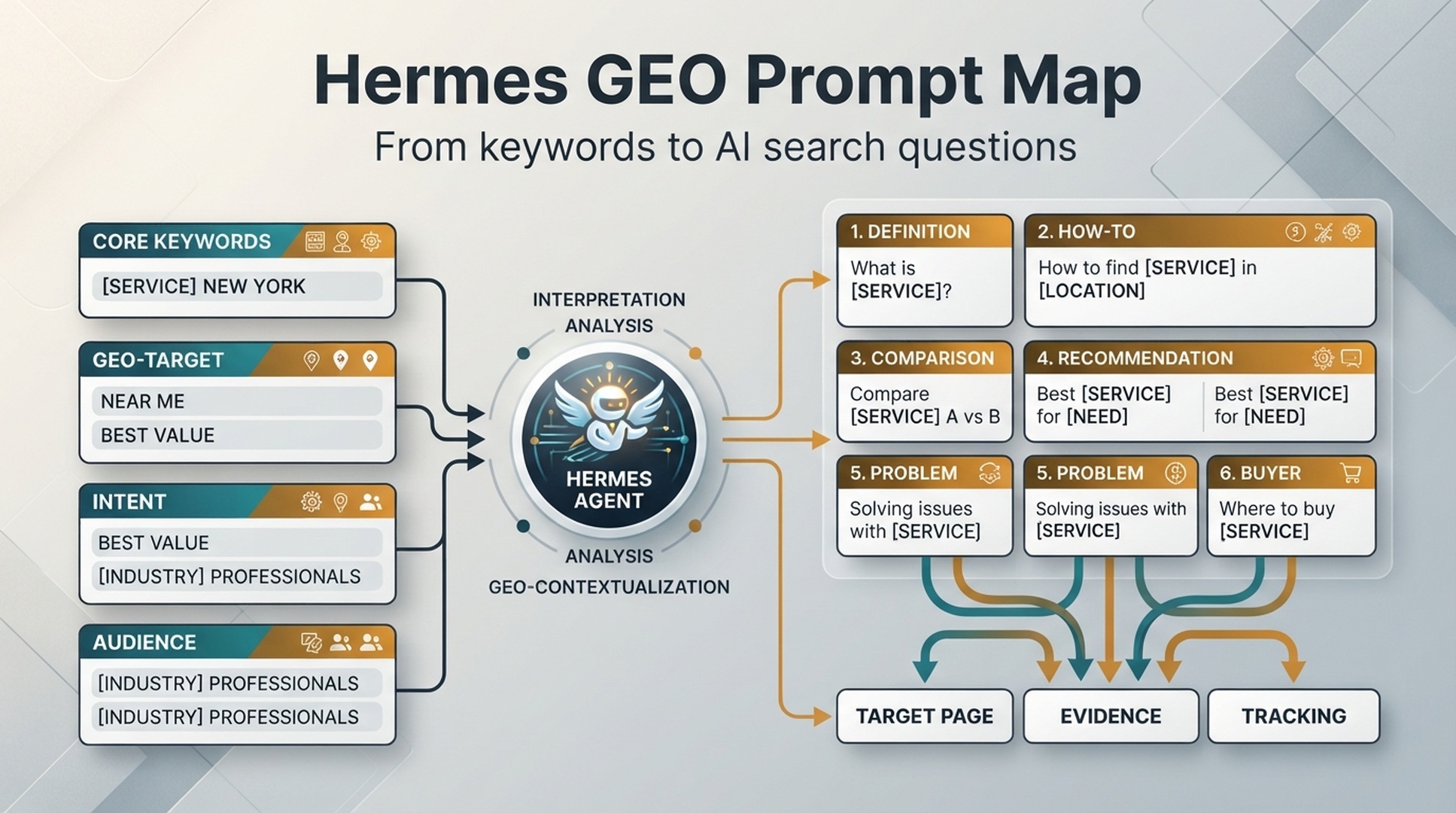
A beginner prompt map needs seven fields in this workflow:
Field | What it means |
|---|---|
Prompt | The natural-language AI search question. |
Prompt type | Definition, how-to, comparison, recommendation, problem, or buyer decision. |
Target page | The existing or planned page that should answer the prompt. |
Entity focus | The brand, product, category, feature, or concept that must be clear. |
Evidence needed | Facts, examples, screenshots, data, sources, or case material needed to support the answer. |
Visibility status | Whether the brand is mentioned, cited, absent, or misrepresented. |
Next action | Refresh a page, add answer block, create brief, improve evidence, or track again. |
A keyword list tells you what to rank for. A prompt map tells you what to be answer-ready for.
Hermes is the open-source AI agent framework from NousResearch. You run prompts from the CLI with hermes chat or on the Hermes platform, and the agent can use websearch and webextract tools, browser automation, skills, cronjob scheduled tasks, and persistent memory through MEMORY.md. Setup and reference: https://hermes-agent.nousresearch.com/docs.
Step 1: prepare your inputs
Start with the files from the earlier keyword clustering workflow, which groups your keywords into clusters and produces the report below. If you have not run that workflow, use the 5-row CSV at the end of this step instead.
/hermes-seo-agent
  /context
    brand.md
    website.md
    audience.md
  /data
    seed-keywords.csv
    existing-pages.csv
    gsc-performance-last-28-days.csv
  /reports
    keyword-clusters.md
  /geo
    prompt-map.csv
    prompt-checks.csv
  /prompts
    geo-prompt-map-prompt.md
If you do not have a keyword cluster report yet, create a small file manually:
cluster,primary_keyword,search_intent,target_page
AI search visibility,ai search visibility checker,buyer,/tools/ai-search-visibility-checker
GEO basics,what is GEO,definition,/blog/what-is-geo
GSC and GA4 reporting,google search console ga4,how-to,/blog/gsc-ga4-seo-reporting
Low CTR diagnosis,impressions but no clicks,problem,/blog/gsc-low-ctr-fixes
SEO vs GEO,seo vs geo,comparison,/blog/seo-vs-geo
This is enough to start. You can improve it later.
Step 2: teach Hermes the prompt types
Create prompts/geo-prompt-map-prompt.md:
You are building a GEO prompt map for this website.

Read:
- /context/brand.md
- /context/website.md
- /data/seed-keywords.csv
- /reports/keyword-clusters.md if available

For each keyword cluster, create AI search prompts in these types:
1. Definition
2. How-to
3. Comparison
4. Recommendation
5. Problem-solving
6. Buyer decision

Rules:
- Prompts must sound like real user questions.
- Do not create prompts that are irrelevant to the business.
- Do not create prompts only to stuff keywords.
- Map each prompt to an existing page or mark "missing page".
- Include evidence needed and next action.
Use simple definitions:
Prompt type | User behavior | Example |
|---|---|---|
Definition | Wants to understand a term | What is generative engine optimization? |
How-to | Wants steps | How do I track AI search visibility? |
Comparison | Chooses between concepts or tools | SEO vs GEO: what is the difference? |
Recommendation | Wants a shortlist or tool suggestion | What tools help check AI search visibility? |
Problem-solving | Has a symptom | Why does my page get impressions but no clicks? |
Buyer decision | Is evaluating a vendor or workflow | Which GEO tool should a B2B SaaS team use? |
These six categories keep the map useful, but only when the mix is real: if every prompt is a definition, the content plan will be too shallow to cover buyer and problem-solving intent. As a rule of thumb, keep at least one prompt outside the definition type in every cluster.
Step 3: generate prompts from keyword clusters
Run this prompt:
Create a GEO prompt map from the keyword clusters.

Return a table with these columns:
- Cluster
- SEO keyword
- Prompt
- Prompt type
- Target page
- Entity focus
- Evidence needed
- Current page gap
- Next action
- Priority: low, medium, high

Create 3-6 prompts per cluster.
Mark duplicate or weak prompts as "reject" instead of forcing them into the map.
Example output:
| Cluster | SEO keyword | Prompt | Type | Target page | Evidence needed | Gap | Next action | Priority |
|---|---|---|---|---|---|---|---|---|
| AI search visibility | ai search visibility checker | How do I check whether my brand appears in AI search answers? | How-to | /tools/ai-search-visibility-checker | Screenshots, workflow, prompt examples | Tool page needs clearer steps | Add 5-step workflow | High |
| SEO vs GEO | seo vs geo | Is GEO replacing SEO or adding a new visibility layer? | Comparison | /blog/seo-vs-geo | Clear comparison table, Google Search guidance | Needs stronger answer box | Refresh section | Medium |
The prompt should produce questions that sound like a person asking an AI assistant. If it returns keyword fragments like "GEO optimization guide best," ask it to rewrite them in natural language. Keep the accepted rows ready; in Step 6 they are written to geo/prompt-map.csv.
Step 4: map each prompt to a page
A prompt without a target page is just an idea. Map every prompt to one of four states:
Page state | Meaning | Action |
|---|---|---|
Existing page fits | A current page can answer the prompt | Refresh or add answer block |
Existing page partially fits | A current page is close but weak | Rewrite section, add evidence, improve structure |
Missing page | No page answers the prompt | Create a brief, not a full draft yet |
Reject | Prompt is irrelevant, too broad, or low value | Remove from the map |
Hermes prompt:
Review every prompt and assign a page state:
- Existing page fits
- Existing page partially fits
- Missing page
- Reject

For existing pages, recommend the exact section to improve.
For missing pages, recommend the page type.
For rejected prompts, explain why.
Assigning a page state to every prompt prevents a common habit: turning each prompt into a new article. Many prompts should be answered inside pages you already have, and the state column tells you which. Copy the final states into geo/prompt-map.csv when you set the sheet up in Step 6.
Step 5: define the evidence needed
AI search visibility is not only about saying the right words. Pages need support: facts, examples, tables, screenshots, definitions, product proof, external references, or original workflows.
Use an evidence table:
Evidence type | When to use it | Example |
|---|---|---|
Short definition | Definition prompts | A 2-3 sentence explanation near the top |
Step list | How-to prompts | 5 steps to export GSC and GA4 data |
Comparison table | Comparison prompts | SEO vs GEO vs AEO |
Criteria list | Recommendation prompts | What to check before choosing a tool |
Diagnostic table | Problem prompts | Symptom, likely cause, fix |
Product proof | Buyer prompts | Screenshot, workflow, use case, limitations |
Source references | Claims about platforms or policies | Link to official docs |
Prompt:
For each high-priority prompt, list the evidence needed to make the target page answer-ready.

Use these evidence types:
- Short definition
- Step list
- Comparison table
- Diagnostic table
- Screenshot
- Product proof
- Source reference
- FAQ answer
- Internal link

Return the minimum evidence needed. Do not add unnecessary assets.
Keep the word "minimum" in the prompt. Otherwise, an agent may recommend too many assets for every page. Write the chosen evidence types into the evidence_needed column of geo/prompt-map.csv once the sheet is ready in Step 6.
Step 6: create the tracking sheet
Create geo/prompt-map.csv or a spreadsheet with these columns:
prompt_id,cluster,prompt,prompt_type,target_page,page_state,entity_focus,evidence_needed,current_gap,next_action,priority,owner,status,last_checkedThen create geo/prompt-checks.csv:
date_checked,platform,prompt,brand_mentioned,cited_url,competitors_mentioned,answer_accuracy,gap,next_action,notesA simple tracking sheet is enough for the first month. You can later connect tools or automate checks.
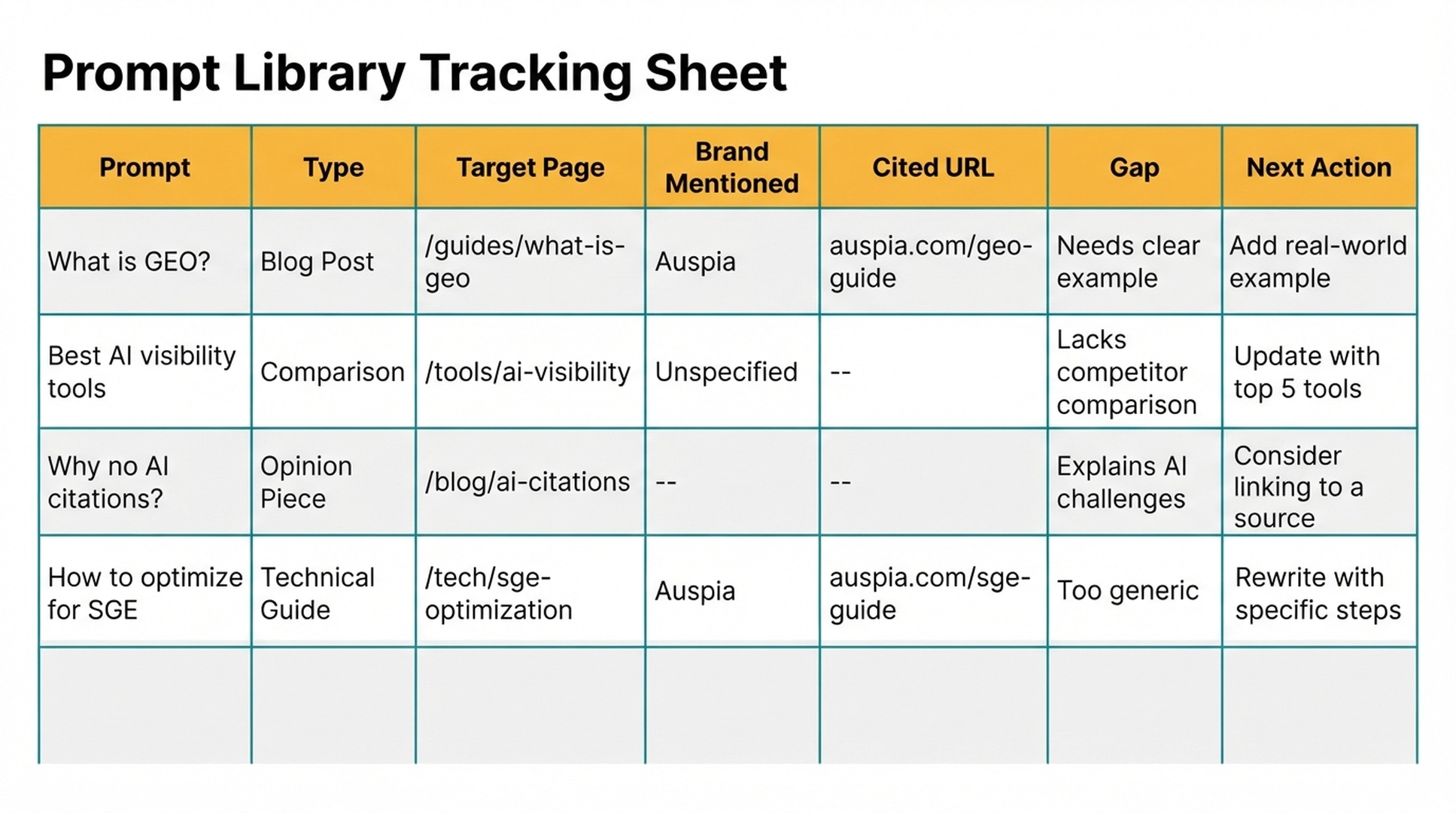
Step 7: run manual AI visibility checks
For beginner checks, manually test a small prompt set across the platforms you care about. Do not test 500 prompts on day one. Start with 20-30.
Suggested starter set:
Prompt group | Count |
|---|---|
Top product/category prompts | 5 |
Problem-solving prompts | 5 |
Comparison prompts | 5 |
Recommendation prompts | 5 |
Buyer decision prompts | 5 |
Track these fields:
Field | What to record |
|---|---|
Platform | ChatGPT, Perplexity, Gemini, Google AI Overviews, or another surface |
Brand mentioned | Yes, no, or partial |
Cited URL | The URL shown or cited, if any |
Competitors mentioned | Names of competitors in the answer |
Answer accuracy | Accurate, incomplete, wrong, or unclear |
Gap | Why the answer may be missing or weak |
Next action | Page update, evidence addition, entity cleanup, tracking only |
Prompt Hermes after you collect results:
Analyze /geo/prompt-checks.csv.

Find:
1. Prompts where our brand is absent but competitors appear.
2. Prompts where our brand appears but no URL is cited.
3. Prompts where the cited page is not the best page.
4. Prompts where the answer is inaccurate.
5. Prompts where our target page lacks evidence.

Return a GEO visibility gap report with priority, evidence, and recommended actions.
Treat results as directional, not absolute. AI answers can vary by time, account state, geography, and prompt wording.
Step 8: turn prompt gaps into page updates
Prompt gaps should become concrete page changes.
Prompt gap | Page update |
|---|---|
Brand absent from recommendation prompt | Add a clearer product use case, comparison criteria, and evidence section |
Brand mentioned but no URL cited | Strengthen the target page with clearer entity names, headings, and source-worthy sections |
Wrong page cited | Add internal links and clarify page purpose |
Answer inaccurate | Add a correction section, FAQ, or updated definition |
Competitor appears because they have better evidence | Add screenshots, data, examples, customer-safe proof, or source references |
Prompt has no target page | Create a brief, then approve before drafting |
Hermes prompt:
Convert the GEO visibility gaps into page update recommendations.

For each gap, include:
1. Prompt
2. Current answer issue
3. Target page
4. Exact section to update or create
5. Evidence to add
6. Suggested answer block
7. SEO impact
8. GEO impact
9. Risk level
10. Approval required

Do not recommend a new page if an existing page can be improved.
This is where the prompt map becomes useful. It stops being a tracking spreadsheet and becomes a content refresh queue.
Step 9: add answer blocks to target pages
A GEO-ready page should have a clear answer that an AI system can extract. That does not mean writing for bots. It means answering the reader directly.
Use this answer block pattern:
## Short answer

[Answer the prompt in 2-4 plain sentences. Name the entity, problem, and recommended next step. Do not use vague claims.]

| Situation | Recommended action | Why it matters |
|---|---|---|
| ... | ... | ... |
Example for a low CTR prompt:
## Short answer

If a page has high impressions but low clicks in Google Search Console, the page is visible but not earning enough attention. The likely causes are a weak title, mismatched search intent, unclear meta description, or a SERP feature that changes click behavior. Start by comparing the top queries, title tag, snippet, and page promise before rewriting the content.
Hermes prompt:
Create answer blocks for the top 10 high-priority prompts.

Rules:
- 2-4 sentences each
- Plain language
- No unsupported claims
- Include the main entity clearly
- Add a table only when it helps extraction
- Include source requirements when the answer depends on platform policy or data
A good answer block should sound like a helpful human wrote it. If it sounds like a glossary machine, revise it.
Step 10: review the map every month
A prompt map is not a one-time asset. Review it monthly.
Monthly review checklist:
# Monthly GEO prompt map review

- [ ] Remove prompts that no longer match the business.
- [ ] Merge duplicate prompts.
- [ ] Add prompts from new GSC queries.
- [ ] Add prompts from sales and support questions.
- [ ] Update target pages if page URLs changed.
- [ ] Recheck top 20 prompts across target AI surfaces.
- [ ] Mark pages that need refresh.
- [ ] Track whether brand mentions, citations, or answer accuracy changed.
Hermes prompt:
Review the GEO prompt map for this month.

Return:
1. Prompts to keep
2. Prompts to merge
3. Prompts to remove
4. New prompts to add from recent GSC queries and customer questions
5. Target pages that changed
6. Top 10 prompts to recheck this month
7. Recommended page updates
If the review takes longer than about 1-2 hours, trim the recheck list back to the top 20 prompts. A short monthly rhythm keeps the map close to how people actually ask questions; a skipped month means the gaps are already out of date.
Beginner example: one keyword becomes six prompts
Keyword: ai search visibility checker
Prompt type | Prompt | Target page | Evidence needed |
|---|---|---|---|
Definition | What is an AI search visibility checker? | Tool page or glossary section | Short definition, use cases |
How-to | How do I check if my brand appears in AI search answers? | Tool page | Step-by-step workflow, screenshots |
Comparison | AI search visibility checker vs rank tracker: what is different? | Comparison article | Criteria table |
Recommendation | What tools help B2B SaaS teams track AI search visibility? | Tool page or list article | Tool criteria, limitations |
Problem | Why does my brand rank in Google but not appear in AI answers? | Diagnostic guide | Symptom table, evidence checklist |
Buyer | Which AI visibility workflow should a small marketing team start with? | Use case page | 7-day starter plan |
One keyword can support a tool page, a diagnostic guide, a comparison section, and a starter workflow. In the map, each of the six rows carries its target page, evidence, and next action, so the decision about which asset to build first comes from the gaps, not from guesswork.
Common mistakes
Mistake | Why it hurts | Better approach |
|---|---|---|
Turning every prompt into a page | Creates thin and overlapping content | Map prompts to existing pages first |
Only creating definition prompts | Misses buyer and problem-solving intent | Use six prompt types |
Tracking too many prompts too early | Creates noise | Start with 20-30 prompts |
Treating AI answers as fixed rankings | Misreads volatile outputs | Track directional patterns over time |
Forgetting evidence | Pages may be clear but not convincing | Add examples, tables, screenshots, and sources |
No owner or next action | The map becomes a spreadsheet nobody uses | Add owner, priority, and status |
Troubleshooting
The map is missing output columns. Compare the returned table with the seven-field table in "What a GEO prompt map contains", add the missing column names to the Step 3 prompt, and re-run.
A target page does not match the prompt. Check whether the URL is in the keyword cluster report or the 5-row CSV from Step 1. If it is not, correct the mapping or mark the row "Missing page" instead of forcing a fit.
All prompts fall into one type. Add a constraint to the Step 2 prompt, for example one non-definition prompt per cluster or no more than half of all prompts as definitions, then regenerate.
Auspia take
A GEO prompt map is one of the simplest ways to make AI search work concrete. It takes an abstract goal, "show up in AI answers," and turns it into a list of questions, pages, gaps, and updates.
Hermes helps because the work is repetitive and structured. It can expand prompts, classify intent, map target pages, flag missing evidence, and turn visibility gaps into page updates. The human job still matters: approve the prompts, verify the evidence, and decide which pages deserve work first.
Start with 25 prompts. Track them for a month. You will learn more from that than from a 300-prompt spreadsheet nobody reviews.
FAQ
What is a GEO prompt map?
A GEO prompt map is a list of AI search questions connected to target pages, entities, evidence needs, visibility status, and next actions. It helps teams plan content for AI answer surfaces without guessing.
How is a prompt map different from keyword research?
Keyword research starts with search terms. A prompt map starts with full questions and tasks people may ask AI assistants. It captures definition, how-to, comparison, recommendation, problem-solving, and buyer decision intent.
How many prompts should beginners track?
Start with 20-30 prompts. That is enough to see patterns without creating a reporting burden. Expand only after the review workflow is stable.
Which AI platforms should I check?
Check the platforms your customers are likely to use. Common choices include ChatGPT, Perplexity, Gemini, and Google AI search features. Record the platform and date because answers can change.
Can Hermes check prompt visibility automatically?
Hermes can help structure and analyze the checks. Whether it can run them automatically depends on your tools, access, and policies. Beginners should start with manual checks and a CSV sheet.
What should I do when competitors appear but my brand does not?
Do not immediately write a new page. First check whether your existing target page has a clear answer, strong entity signals, useful evidence, and a reason to be cited. Refresh the existing page if it can serve the prompt.
Can a prompt map guarantee AI citations?
No. It can improve your readiness by clarifying pages, entities, answer blocks, and evidence. It cannot guarantee that an AI system will mention or cite your brand.
Author: Elena Shaw, Prompt Library Strategist, 3,000+ Buyer Prompts Mapped at Auspia. Elena writes about prompt sets, query maps, evaluation libraries, and AI search planning workflows.