The practical goal
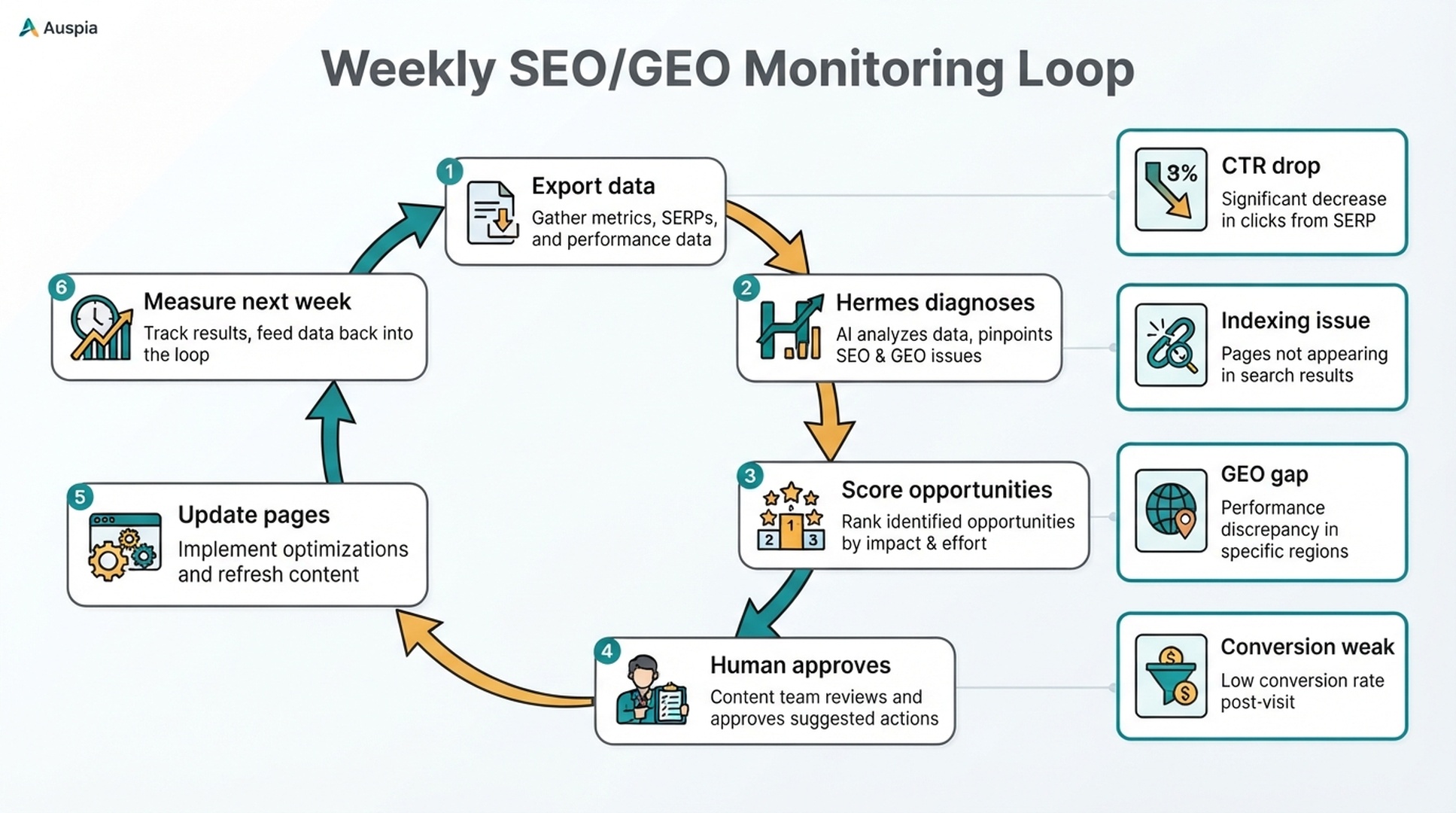
Hermes becomes much more useful when it reads real data. Without data, it can write decent checklists. With data, it can tell you which page lost clicks, which query has impressions but weak CTR, which landing page brings traffic but no conversions, which URL has a crawl issue, and which topic has SEO demand but no GEO visibility.
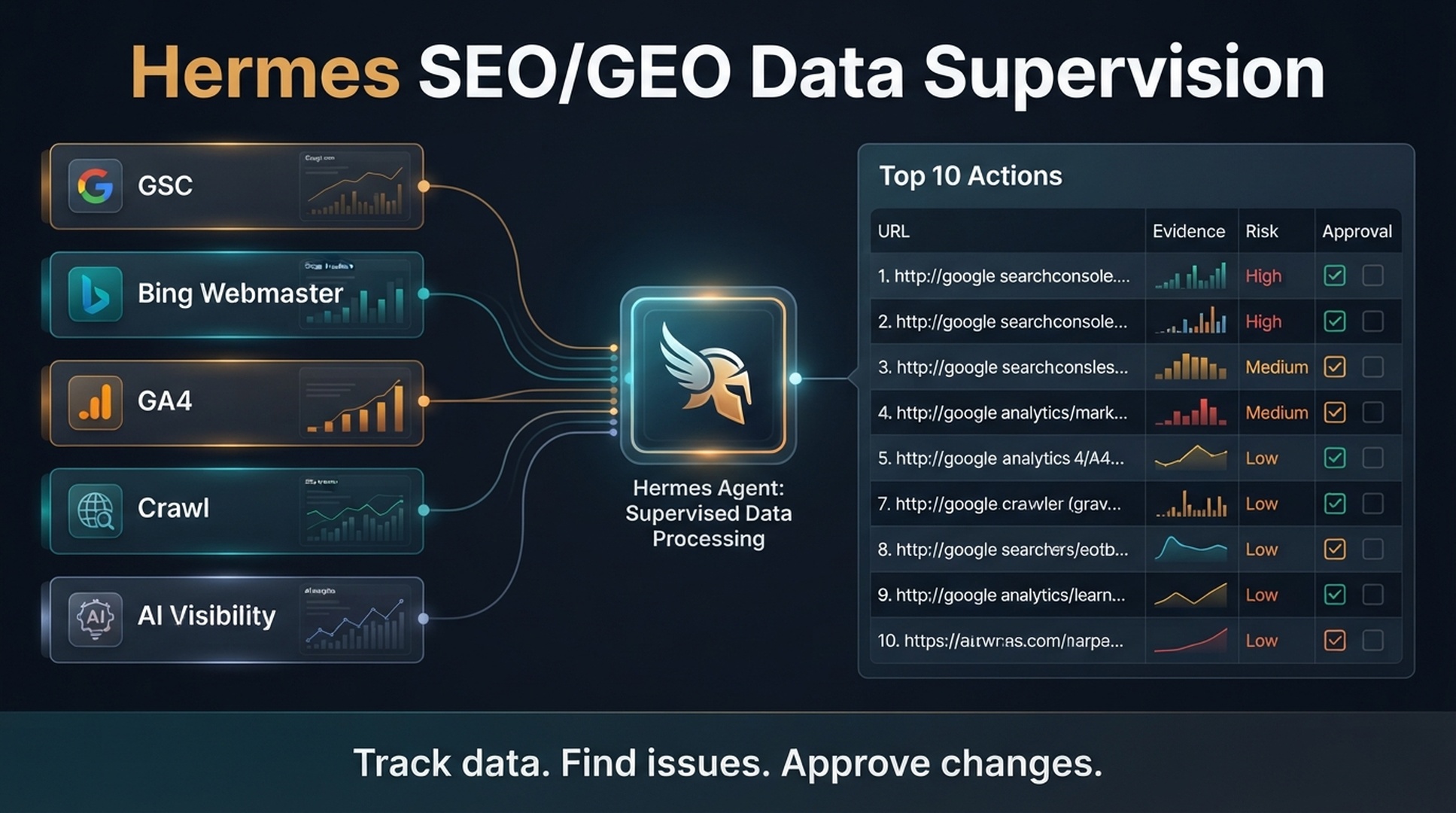
This tutorial shows a beginner-safe setup. You do not need live API integrations on day one. Start with exports from Google Search Console, Bing Webmaster Tools, GA4, a crawler, and a simple AI visibility sheet. Put those files into a Hermes project folder. Then ask Hermes to produce a weekly action queue with evidence, risk, and approval requirements.
The output is not "publish 20 pages." The output is: "Here are the 10 highest-priority SEO/GEO actions this week, and here is why each one matters."
Who this is for: solo growth teams and small sites, beginner-safe; no developer work or API integrations are needed on day one.
Before you start: Google Search Console property owner access, a verified site in Bing Webmaster Tools, GA4 view access, and an existing Hermes workspace.
Estimated time: about 1-2 hours the first time, then 30-60 minutes per weekly cycle.
Done when: the folder structure in Step 1 exists, the first weekly report passes the quality gate in Step 9, and a human has reviewed the top 10 action queue.
What Hermes should monitor
Think of Hermes as a data supervisor, not a dashboard replacement. Dashboards show numbers. A supervisor turns numbers into decisions.
Source | What it tells you | What Hermes should detect |
|---|---|---|
Google Search Console | Queries, pages, clicks, impressions, CTR, average position, indexing signals | Low CTR opportunities, content decay, query shifts, pages with demand |
Bing Webmaster Tools | Bing search performance, crawl issues, indexed URLs, inbound links, URL inspection signals | Bing-only opportunities, indexing gaps, crawl blockers, pages to submit or inspect |
GA4 | Organic sessions, engaged sessions, key events, landing page behavior | Pages with traffic but weak engagement or conversion |
Crawl export | Status codes, titles, meta descriptions, canonicals, indexability, internal links | Technical SEO issues, missing metadata, orphan risks, canonical conflicts |
AI visibility sheet | Prompts, brand mentions, cited URLs, competitor mentions, answer quality | GEO gaps, missing answer blocks, weak evidence, brand entity problems |
Keep the setup small and manual for now; automate only after you have run it a few times. The first version should answer five questions:
- Which pages are growing?
- Which pages are declining?
- Which queries have impressions but weak clicks?
- Which pages have SEO potential but weak GEO visibility?
- What are the top 10 actions that need human review this week?
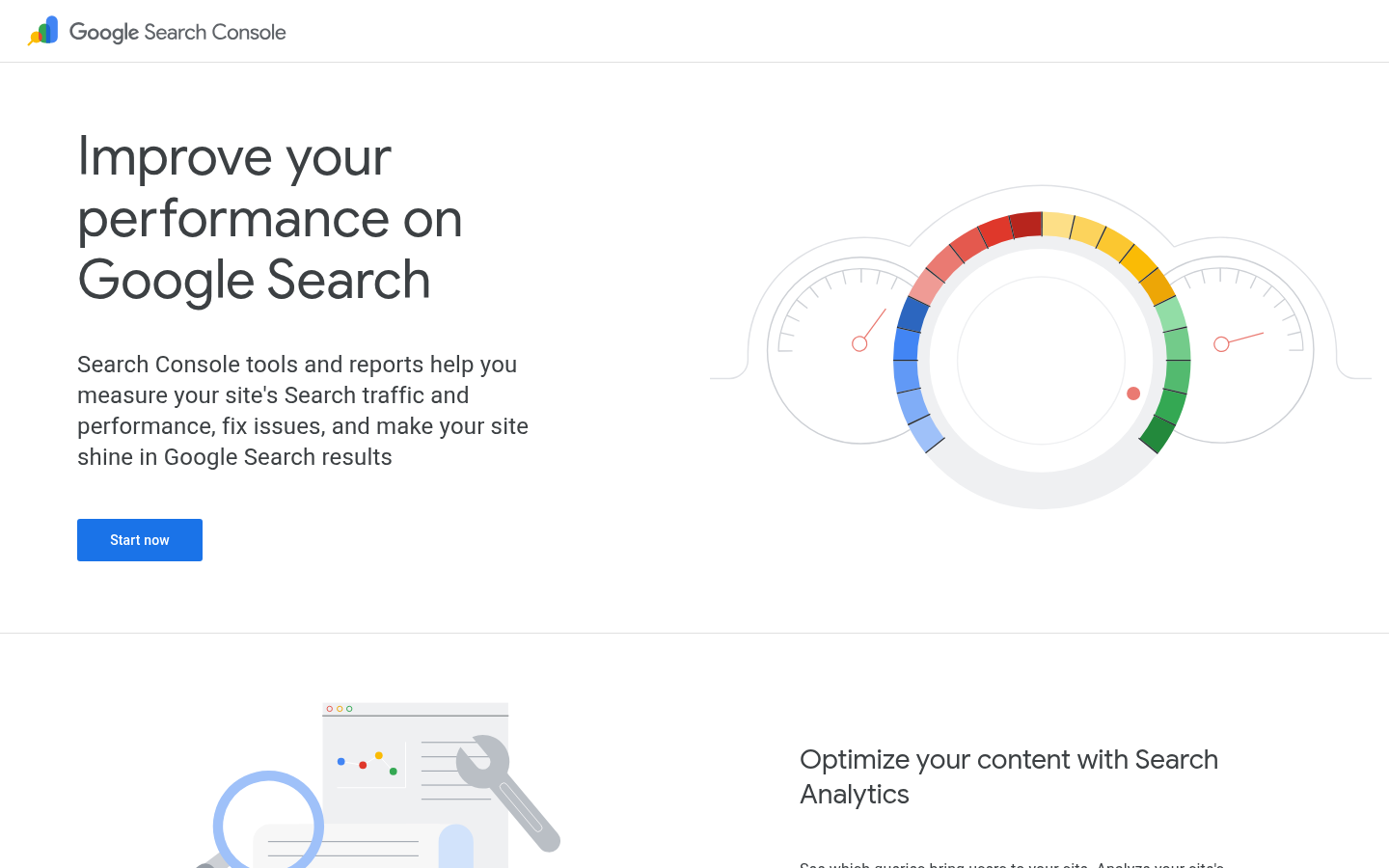
Caption: Google Search Console is usually the first data source to add because it connects queries, pages, clicks, impressions, CTR, and position.
Step 1: create the data folder
Use the same Hermes workspace from the setup article. Hermes is the open-source AI agent framework from NousResearch, documented at hermes-agent.nousresearch.com/docs. Add a clearer data structure:
/hermes-seo-agent
  /data
    /gsc
    /bing-webmaster
    /ga4
    /crawl
    /ai-visibility
  /reports
    /weekly
  /prompts
    data-supervisor-prompt.md
    weekly-report-prompt.md
  /qa
    data-quality-gate.md
Use date-stamped filenames:
/data/gsc/gsc-performance-2026-07-01.csv
/data/bing-webmaster/bing-keywords-2026-07-01.csv
/data/ga4/ga4-organic-landing-pages-2026-07-01.csv
/data/crawl/crawl-export-2026-07-01.csv
/data/ai-visibility/geo-prompts-2026-07-01.csv
Date stamps matter because Hermes needs to compare periods later. Avoid filenames like latest.csv unless you also keep an archive.
Step 2: export Google Search Console data
To start, export from the Performance report. You want query-level and page-level data.
Minimum GSC columns:
Query
Page
Clicks
Impressions
CTR
Average position
Date range
Country, if available
Device, if available
Create two exports if possible:
Export | Why it helps |
|---|---|
Queries by page, last 28 days | Finds pages with demand and low CTR. |
Queries by page, previous 28 days | Lets Hermes detect growth or decay. |
Save them as:
/data/gsc/gsc-performance-last-28-days.csv
/data/gsc/gsc-performance-previous-28-days.csv
Note on export size: the Performance report download caps at around 1,000 rows, and on larger sites query-level data can be silently truncated. If you are near that limit, export in segments (for example, one export per query pattern or page section) or use the Search Console API for the full dataset.
Then give Hermes this prompt:
Analyze the Google Search Console exports in /data/gsc.

Find:
1. Pages with high impressions and low CTR.
2. Queries where average position is 3-10 but CTR is weak.
3. Pages that lost clicks compared with the previous period.
4. Pages that gained impressions but not clicks.
5. Queries that suggest a new search intent.

For every finding, include:
- URL
- Query
- Evidence from the export
- Likely issue
- Suggested action
- SEO impact
- GEO impact
- Risk level
- Approval required

Do not invent missing metrics.
A useful output looks like this:
| URL | Query | Evidence | Likely issue | Suggested action | Risk |
|---|---|---|---|---|---|
| /blog/seo-dashboard-template | seo dashboard template | 8,400 impressions, 1.2% CTR, position 5.4 | Title may not match template intent | Test a clearer title and add a downloadable example section | Low |
If Hermes says "optimize the page" without a specific action, ask it to rewrite the report.
Step 3: export Bing Webmaster Tools data
Bing is easy to ignore, but it is useful for SEO/GEO monitoring. Some AI search experiences and web retrieval systems rely on broader web indexes and link signals. Even when Bing traffic is smaller than Google traffic, Bing data can reveal indexing gaps, crawl issues, and query demand you might miss.
Exports to collect:
Bing export | What Hermes should check |
|---|---|
Search keywords | Queries where Bing sees demand. |
Top pages | Pages receiving Bing impressions or clicks. |
Crawl issues | URLs Bing cannot crawl cleanly. |
Indexed pages or URL inspection results | Pages indexed in Google but not in Bing, or vice versa. |
Inbound links, if available | Pages with external evidence or authority signals. |
The Bing interface renames and reorganizes these reports over time, so look for the current crawl or indexing report rather than a fixed menu path.
Minimum columns:
Query
Page
Clicks
Impressions
Average position, if available
Crawl issue, if available
Indexed status, if available
Inbound links, if available
Save exports as:
/data/bing-webmaster/bing-keywords-2026-07-01.csv
/data/bing-webmaster/bing-pages-2026-07-01.csv
/data/bing-webmaster/bing-crawl-issues-2026-07-01.csv
Use this prompt:
Analyze the Bing Webmaster exports in /data/bing-webmaster.

Find:
1. Pages with Bing impressions but weak clicks.
2. Pages that appear in Google data but are missing from Bing data.
3. Crawl errors that may reduce Bing visibility.
4. Pages that may need URL inspection or resubmission.
5. Query opportunities that are not visible in the Google export.

Return a Bing SEO monitoring report with evidence, recommended action, risk, and approval required.
Do not submit URLs automatically.
Make the approval rule explicit: Hermes can recommend URL submission, but a human approves it. URL submission is low risk compared with noindex changes, but it is still a live webmaster action.
Step 4: export GA4 organic landing page data
GSC tells you how people reached your site from search. GA4 helps you see what happened after they arrived.
For SEO supervision, start with landing pages from organic search. In GA4, build the export from the landing page report or an exploration: add the Landing page dimension, filter Session default channel group to Organic, include the date range, and download the CSV.
Minimum GA4 columns:
Landing page
Session default channel group
Organic sessions
Engaged sessions
Engagement rate
Key events
Conversion rate or key event rate
Average engagement time, if useful
Date range
Save as:
/data/ga4/ga4-organic-landing-pages-last-28-days.csv
/data/ga4/ga4-organic-landing-pages-previous-28-days.csv
Prompt Hermes:
Analyze the GA4 organic landing page exports in /data/ga4.

Find:
1. Pages with organic sessions but weak engagement.
2. Pages with engagement but no key events.
3. Pages with conversions but low search visibility in GSC, if matching data exists.
4. Pages where search intent and on-page CTA may not match.
5. Pages that should get stronger internal links because they convert well.

For every finding, include:
- Landing page
- Evidence
- Likely issue
- Suggested SEO action
- Suggested conversion action
- Suggested GEO action
- Risk level
- Approval required
This is where the workflow becomes practical. A page with 20,000 impressions but no conversions may not deserve the same priority as a page with fewer impressions but strong demo requests.
Step 5: add a crawl export
Use Screaming Frog, Sitebulb, Ahrefs Site Audit, Semrush Site Audit, or another crawler. Hermes does not need the whole crawl at first. It needs enough fields to spot obvious technical blockers.
Minimum crawl columns:
URL
Status code
Indexability
Indexability status
Title
Title length
Meta description
Meta description length
Canonical URL
H1
Word count
Inlinks
Outlinks
Structured data types, if available
Save as:
/data/crawl/crawl-export-2026-07-01.csvPrompt:
Analyze /data/crawl/crawl-export-2026-07-01.csv.

Find:
1. Important pages that are non-indexable.
2. 404 or 5xx errors on SEO pages.
3. Redirect chains or redirecting internal links, if available.
4. Missing or duplicate titles.
5. Missing or weak meta descriptions.
6. Canonical conflicts.
7. Pages with few internal links.
8. Structured data gaps on pages where schema would be appropriate.

Classify each issue as low, medium, or high risk.
Do not recommend technical changes without human or developer approval.
Technical SEO actions should have a stricter gate than content actions. A bad title test is usually reversible. A wrong canonical can hide a page from search.
Step 6: add an AI visibility sheet
This is the GEO layer. You can start with a simple spreadsheet. No paid tool is required for the first version.
Create:
/data/ai-visibility/geo-prompts-2026-07-01.csvColumns:
Prompt
Prompt type
Target page
Brand mentioned? yes/no
Brand position or wording
Cited URL
Competitors mentioned
Answer accuracy
Missing evidence
Recommended action
Date checked
Platform
Prompt types:
Prompt type | Example |
|---|---|
Definition | What is SEO/GEO data monitoring? |
Comparison | GSC vs GA4 for SEO reporting |
Recommendation | Best tools for AI search visibility tracking |
Problem solving | Why is my site getting impressions but no clicks? |
Buying decision | Which SEO analytics tool should a SaaS startup use? |
Hermes prompt:
Analyze the AI visibility sheet in /data/ai-visibility.

Find:
1. Prompts where our brand is not mentioned but competitors are.
2. Prompts where our brand is mentioned but no URL is cited.
3. Prompts where the cited page is outdated or weak.
4. Prompts where the answer is inaccurate or incomplete.
5. Prompts that map to pages with strong GSC demand.

Return a GEO visibility gap report.
For each gap, recommend a content, evidence, entity, or technical action.
Treat AI visibility checks as directional evidence rather than exact ranking data. AI answers vary by platform, location, user context, and time.
Step 7: combine the files into one weekly action queue
Now give Hermes the full supervisor prompt.
Create prompts/data-supervisor-prompt.md:
You are the SEO/GEO data supervisor for this website.

Read these folders:
- /data/gsc
- /data/bing-webmaster
- /data/ga4
- /data/crawl
- /data/ai-visibility
- /context
- approval-rules.md

Your job is not to publish changes.
Your job is to turn data into a prioritized action queue.

For every recommendation, include:
1. URL or page name
2. Data source
3. Evidence
4. Likely cause
5. Recommended action
6. SEO impact
7. GEO impact
8. Conversion impact, if GA4 data exists
9. Implementation effort
10. Risk level
11. Approval required
12. Suggested owner

Scoring rules:
- Traffic opportunity: 1-5
- Conversion relevance: 1-5
- GEO visibility potential: 1-5
- Technical urgency: 1-5
- Implementation effort: 1-5, where 5 means hard
- Risk: 1-5, where 5 means high risk

Priority score formula:
Traffic opportunity + Conversion relevance + GEO visibility potential + Technical urgency - Implementation effort - Risk

Return the top 10 actions for this week.
Do not invent data.
If data is missing, write "missing".
The score does not need to be perfect. It needs to be consistent. Consistency lets you compare recommendations week by week.
Step 8: use a weekly report template
Create reports/weekly/weekly-seo-geo-report-template.md:
# Weekly SEO/GEO data supervision report

Date:
Website:
Data ranges reviewed:
Prepared by: Hermes Agent
Human reviewer:

## Executive summary
- Biggest growth opportunity:
- Biggest traffic risk:
- Biggest technical issue:
- Biggest GEO visibility gap:
- Recommended focus this week:

## Data sources reviewed
| Source | File | Date range | Status |
|---|---|---|---|
| GSC | | | |
| Bing Webmaster | | | |
| GA4 | | | |
| Crawl | | | |
| AI visibility | | | |

## Top 10 action queue
| Priority | URL | Evidence | Action | SEO impact | GEO impact | Risk | Approval |
|---|---|---|---|---|---|---|---|

## GSC findings
| URL | Query | Issue | Evidence | Action |
|---|---|---|---|---|

## Bing Webmaster findings
| URL | Issue | Evidence | Action |
|---|---|---|---|

## GA4 organic quality findings
| Landing page | Behavior issue | Evidence | Action |
|---|---|---|---|

## Crawl and technical findings
| URL | Technical issue | Risk | Approval needed |
|---|---|---|---|

## GEO visibility gaps
| Prompt | Gap | Target page | Action |
|---|---|---|---|

## Decisions needed from humans
| Decision | Owner | Deadline |
|---|---|---|

## Follow-up next week
| Previous action | Metric to check | Expected signal |
|---|---|---|
The top of this report should fit on one screen. Busy teams will not read a 40-page AI report every Monday. Put the action queue first, then the evidence.
Step 9: add a data quality gate
Create qa/data-quality-gate.md:
# Data quality gate

Hermes must check this before producing recommendations.

- [ ] Every data file has a date range.
- [ ] GSC data includes clicks, impressions, CTR, and position.
- [ ] GA4 data identifies organic traffic or landing pages clearly.
- [ ] Bing data separates crawl issues from performance metrics.
- [ ] Crawl export includes indexability and status codes.
- [ ] AI visibility checks include platform and date checked.
- [ ] Missing fields are marked as missing.
- [ ] No recommendation uses invented metrics.
- [ ] High-risk technical actions require human approval.
- [ ] Publishing actions require human approval.
Then run:
Before creating the weekly report, review all files against /qa/data-quality-gate.md.

If the gate fails, return:
1. Which files failed.
2. Which columns or date ranges are missing.
3. Which recommendations cannot be made safely.
4. What the human should export or fix.

Only create the weekly report after the data quality gate passes.
This step keeps the workflow honest. If the data is bad, Hermes should say so.
Step 10: decide which actions need approval
Use this approval table:
Action | Approval level |
|---|---|
Add a recommendation to a report | No approval needed |
Create a content brief | No approval needed |
Draft a page update in Markdown | Content approval needed before use |
Change title or meta description | Content or SEO approval needed |
Add internal links | SEO/editor approval needed |
Update public content | Content approval needed |
Submit URL in Bing Webmaster or GSC inspection tools | SEO approval needed |
Change robots.txt, noindex, canonical, redirects, sitemap, or schema | Technical approval needed |
Publish new page | Final human approval needed |
Save this table as approval-rules.md in the workspace root, next to the data, reports, prompts, and qa folders, so the supervisor prompt in Step 7 can read it. If you keep site-wide context files (goals, audience notes, brand terms), put them in a /context folder too; the prompt reads that folder as well. Update the file whenever the approval policy changes.
Keep approval decisions visible: put them in a column so the team can sort by risk.
Verify the outputs
Before you act on anything, check that the report is built on real data.
- Spot-check the top three recommendations against the raw CSVs. The query, page, clicks, impressions, and position in the report should match the source rows.
- If a metric looks invented or inconsistent with the file, ask Hermes to show the source row. If it cannot, re-export the file and rerun. Never forward a recommendation with unverifiable numbers.
- Check weekly date coverage: the date range in each file should cover the period Hermes was asked to review (for example, the last 28 days), and no file should be stale or empty.
- Run the quality gate from Step 9 as part of the check.
Beginner example: one action from each source
Here is what a useful weekly queue might look like:
Source | Finding | Recommended action | Approval |
|---|---|---|---|
GSC |
| Test a clearer title and add a template preview section | SEO/editor approval |
Bing Webmaster |
| Inspect URL and check server response | SEO/technical approval |
GA4 |
| Add a relevant CTA and internal link to demo page | Content approval |
Crawl |
| Add meta description and link from GA4 hub page | SEO/editor approval |
AI visibility | Prompt "best tools for AI search visibility" mentions competitors but not brand | Add comparison section and clearer product evidence | Content approval |
That is enough for a week. The biggest beginner mistake is turning every finding into a task. Hermes should prioritize, not overwhelm.
Screenshot plan for publishing
This article can use public documentation screenshots, but the best operational screenshots require your own account data. Publish only captures where private queries, revenue, leads, or customer details are redacted or blurred.
Recommended capture list before publishing:
Screenshot | State | Notes |
|---|---|---|
GSC Performance report | Logged-in, redacted site | Show clicks, impressions, CTR, position; blur queries if needed. |
Bing Webmaster Search Performance | Logged-in, redacted site | Show keywords/pages and date range; blur domain if needed. |
Bing crawl issues or URL inspection | Logged-in, redacted site | Show issue type only, not private account data. |
GA4 landing page report | Logged-in, redacted property | Show organic landing pages, engagement, key events; blur sensitive data. |
Crawl export table | Local or redacted | Show columns Hermes needs, not private URLs if needed. |
If logged-in captures are not approved, use the generated diagrams and public docs screenshot only.
Auspia take
Hermes data supervision is the bridge between "AI writes content" and "AI helps run organic growth." That bridge matters. A team that only generates drafts can create work that nobody asked for. A team that starts from data can decide which pages deserve attention, which fixes are risky, and which actions should wait.
The best setup to start with is still manual. Export files once a week. Let Hermes diagnose them. Review the top 10 action queue. Approve only the actions that have evidence. After four clean cycles, automate the exports or connect APIs.
Take the time to get this part right. The data layer becomes the memory of your SEO/GEO program.
FAQ
Does Hermes need direct API access to GSC, Bing Webmaster, and GA4?
No. Start with CSV exports and prove that Hermes can read files, identify issues, and produce a useful action queue without inventing data. Add API access later. See Steps 2-4.
Which data source should I connect first?
Start with Google Search Console because it shows queries, pages, clicks, impressions, CTR, and position, then add GA4 for engagement and conversions, then Bing Webmaster and crawl data. See Steps 2-5.
Why include Bing Webmaster if most traffic comes from Google?
Bing can reveal separate crawl and indexing issues and query opportunities that differ from Google. For GEO work, broad web visibility matters, so Bing data is worth monitoring even when the traffic share is smaller. See Step 3.
Can Hermes automatically submit URLs for indexing?
Keep this manual: Hermes can recommend URL inspection or submission, but a human should approve the action. See Steps 3 and 10.
How often should Hermes run the data supervision report?
Weekly is enough for most teams. Daily reports create noise unless you are running a large site, a migration, or a time-sensitive campaign.
What if the GSC and GA4 numbers do not match?
They often will not match exactly because they measure different things. GSC reports search performance before the click. GA4 reports on-site behavior after the visit. Hermes should compare patterns, not force the numbers to match.
Can this measure GEO performance accurately?
It can measure directional GEO signals such as prompt visibility, mentions, cited URLs, and answer quality. Treat those as monitoring signals, not exact rankings. See Step 6.
Author: Ethan Marlowe, GEO Measurement Lead Across 500+ Prompts at Auspia. Ethan writes about prompt tracking, citation reporting, visibility dashboards, and AI answer quality checks.