


The Short Answer
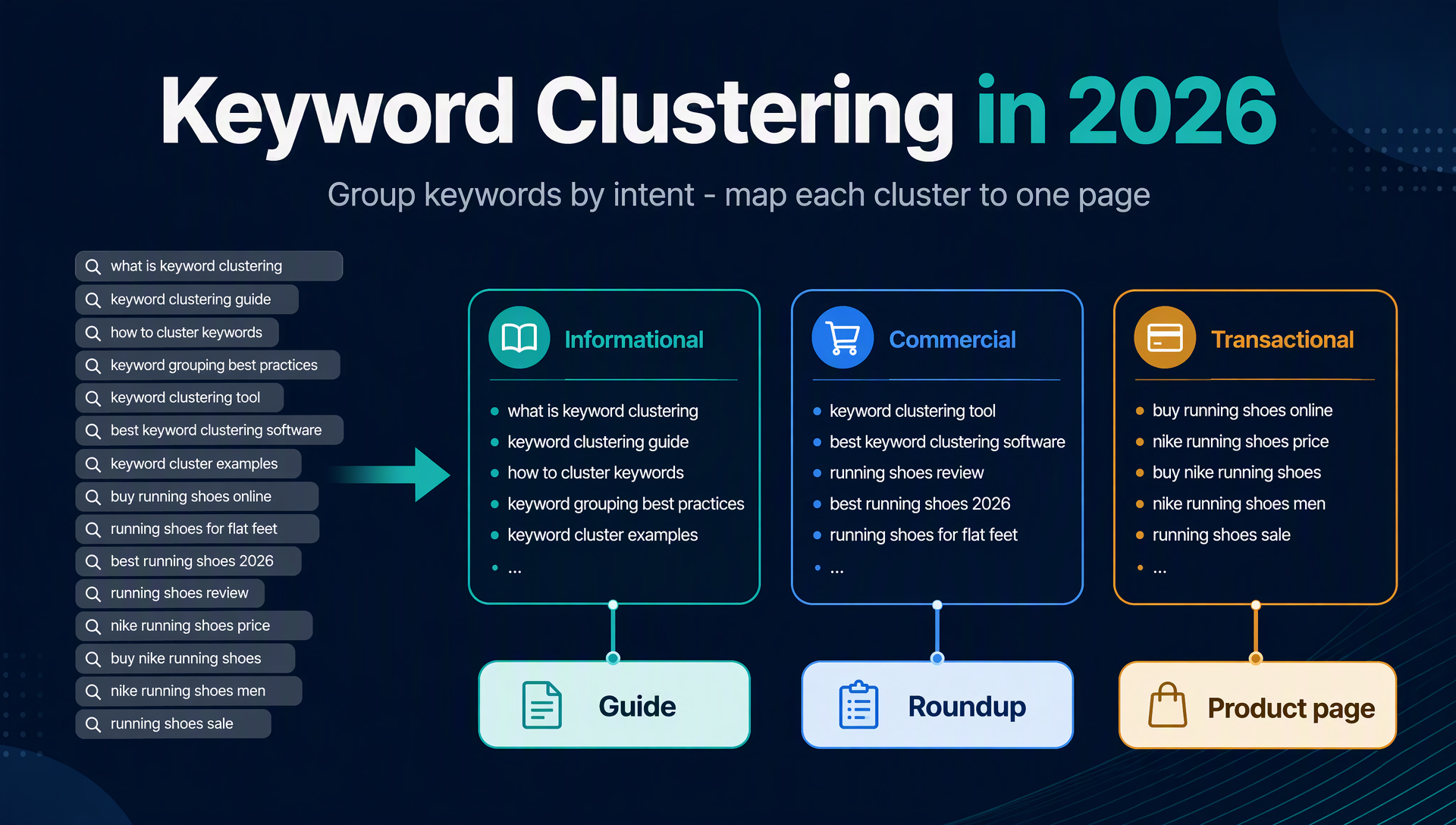
Keyword clustering is the practice of grouping keywords that share the same search intent, so that each group can be targeted by a single page.
A keyword list is not a content plan. When you research keywords, you usually end up with hundreds or thousands of rows: "best drip coffee maker," "best thermal carafe coffee maker," "best filter coffee maker," "how to brew coffee with a thermal carafe." Those rows are not separate articles — most of them can be answered by one well-built page. Clustering turns the raw list into a small number of topics, and each topic becomes one page. That is the entire job.
Two things changed by 2026 that make this article different from the older "cluster in seconds" tool posts:
- Clustering is no longer one vendor's feature. The methods are now well understood — SERP overlap, semantic (embedding) clustering, and LLM intent grouping — and some of the best implementations are free.
- An AI agent can run the whole workflow. Tools like OpenAI Codex can read your keyword file, clean it, group it, label each group's intent, and draft a page-by-page content plan — if you give it clear rules and an authorized data source.
This guide is written for complete beginners. You will leave with the three methods explained in plain language, a short list of free tools, a complete copy-paste SKILL.md that turns Codex into your clustering assistant, and a checklist to verify the clusters are actually any good.
Watch the full video explainer. This tutorial is also available as a narrated English video walkthrough (≈6 minutes): the three clustering methods, the free tools, and the Codex skill — shown end to end with on-screen captions.
Why Cluster Keywords in the First Place
If you are new to SEO, it is worth being concrete about what clustering buys you, because it shapes every decision below.
It turns keywords into writing tasks. Writers do not "rank for keywords"; they write pages. A cluster is a topic that one person can research, outline, and write. When the cluster is well formed, the brief practically writes itself: cover the cluster's core keyword, then answer the subtopics the rest of the cluster implies.
It prevents duplicate pages that compete with each other. Publishing "best nonstick pan" and "best nonstick skillet" as two separate articles means both pages fight over the same searchers. Search engines see two thin pages instead of one strong page. Clustered correctly, both keywords live on one page that can genuinely rank for the whole group.
It produces more complete pages. Keywords inside a good cluster are usually subtopics of the same question. The list "how to remove a stain," "how to remove red wine stain," "how to remove grease stain" tells you exactly which sections a single "how to remove stains" guide needs. Cluster first, and your outline is half-written for you.
It reveals niches you would otherwise miss. When you group a long list of keywords by the words they share — the "term clustering" approach — unexpected patterns appear. Thirty keywords built around "school template" or "gym bag" can be a sign of a viable topic area for a new site, even when no single keyword has impressive volume on its own.
The only real cost of clustering is the setup. That is why the rest of this guide is about making setup as small as possible.
The Three Ways Clustering Tools Actually Work in 2026
Every clustering tool you will meet in 2026 groups keywords by one of three mechanisms. Understanding which one a tool uses tells you what it is good at and where it will let you down.
1. SERP overlap: trust Google's own answer
Pull the top 10 search results for each keyword, then group keywords that return mostly the same pages. The idea is simple: if Google serves the same page for "best drip coffee maker" and "best thermal carafe coffee maker," Google believes both searchers want the same thing — so you should answer both on one page.
The common threshold is three to four shared URLs in the top 10. Above that, group them; below that, keep them separate. This method is the closest thing to an objective answer, because it uses Google's ranking as the evidence instead of your guess.
- Strengths: closest to how Google groups intents; reliable for commercial "best of" keywords.
- Weaknesses: requires live SERP data, which usually means a paid API or a tool that scrapes for you; slower on very large lists.
2. Semantic clustering: group by meaning, not by words
Convert every keyword into a mathematical vector that captures its meaning (an "embedding"), then group keywords whose vectors are close together. Synonyms and rephrased questions land in the same cluster even when they share no words — "ascendant calculator" and "how to calculate my ascendant" group together because their meanings match.
- Strengths: fast, free options exist, handles huge lists (thousands of keywords), understands synonyms well.
- Weaknesses: a page's topic is not always its intent. Two phrases can be about the same thing but for very different readers ("coffee beans" vs "buy coffee beans online" overlap semantically but differ in intent).
3. LLM intent grouping: ask a model to sort for you
Feed the keyword list to an LLM (ChatGPT, Claude, Codex) and ask it to group keywords by what a searcher wants — informational, commercial, transactional, navigational — then by topic. This is the easiest method to start with and the easiest to get wrong.
- Strengths: zero setup, understands synonyms and intent labels, good for small lists.
- Weaknesses: models group by meaning, not by which pages Google ranks for the query. In a 2025 third-party test by Keyword Insights, ChatGPT scored 47 out of 100 on clustering accuracy against SERP-based grouping. LLMs also lose context on very long lists and may confidently invent numbers. Treat LLM output as a draft, never as final.
How the methods compare
Method | What it groups by | Data needed | Speed | Cost to start |
|---|---|---|---|---|
SERP overlap | Shared top-10 ranking pages | Live SERP data (API or scraping tool) | Medium | Paid API or trial credits |
Semantic (embeddings) | Meaning similarity (vector distance) | Your keyword list only | Fast | Free options |
LLM intent grouping | Model's judgment of meaning + intent | Your keyword list only | Fast | Free tiers |
Term clustering | Shared words and phrases in the keyword text | Your keyword list only | Fast | Free |
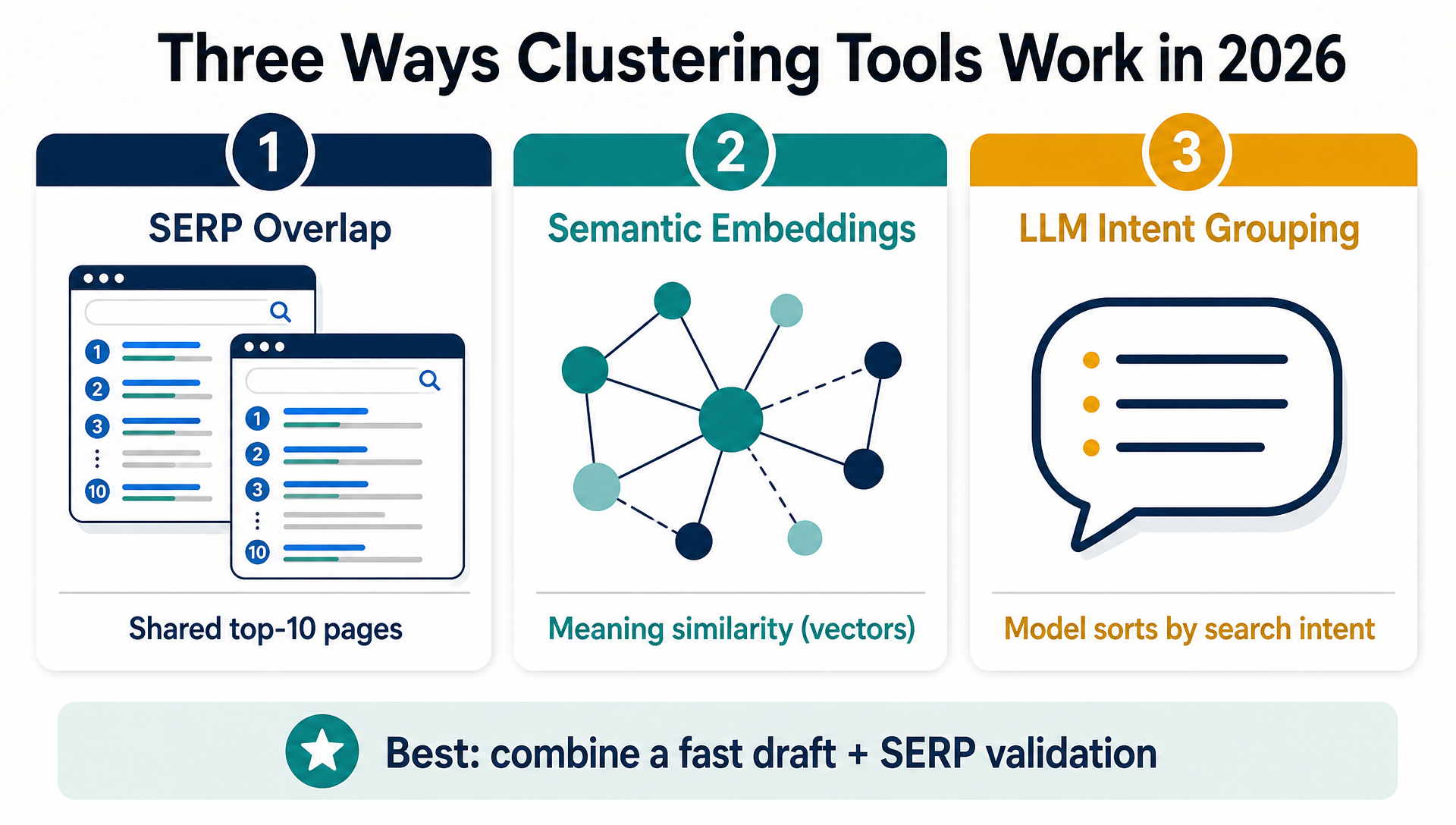
What most good 2026 workflows do is combine them: use semantic or LLM grouping to get a first draft, then validate the biggest clusters against real SERP overlap. Validation matters most for clusters you are about to invest a page in.
Free Tools to Cluster Keywords Today
You do not need a paid SEO suite to start. These tools are either free outright or offer a meaningful free tier. Limits change, so treat the numbers below as a starting point and check the tool before relying on it.
Tool | What it does | Free limit (as of mid-2026) | Groups by |
|---|---|---|---|
Google Search Console | Exports the queries people actually used to reach your site | Unlimited (your own data) | You decide |
PEMAVOR | Paste up to 10,000 keywords, drag the clustering-strength slider | Free, no sign-up | Semantic (TF-IDF) |
SEO.ai free topic cluster | Paste a seed keyword, get a color-coded cluster map | Free, no account | Topic clusters |
SEOquick | Word-composition clustering, synonym lists, import from several tools | Free | Lexical/term |
RyRob | Generate content clusters from a seed keyword | Free, no sign-up | AI topic clusters |
Cluster AI | SERP-based clustering | Free plan ≈ 200 keywords/month | SERP overlap |
Optiwing | Upload a CSV, group keywords sharing SERP URLs | Free credits ≈ 100 | SERP overlap |
The free path that works for almost every beginner:
- Export your queries from Google Search Console. Open Performance → add "Query" and "Page" dimensions → export. This is your first-party, free keyword list, and it reflects what your audience actually types.
- Paste that export into a free semantic tool (PEMAVOR is the most forgiving) to get an instant first draft of clusters.
- Use the Codex skill in the next section when the list grows beyond what a browser tool handles comfortably, or when you want a page-by-page content plan alongside the clusters.
If you outgrow the free tools, the paid options worth knowing are Keyword Insights and Keyword Cupid for SERP-based clustering, and Ahrefs' Keywords Explorer or Semrush for keyword research suites with built-in grouping. You do not need any of them on day one.
The 2026 Upgrade: Let Codex Cluster Keywords for You
Here is the part that was not possible in the old "paste into a tool" era. You can give an AI coding agent like OpenAI Codex a keyword file and explicit rules, and it will return a cluster CSV, intent labels, and a page-by-page content plan — using only the data you authorize.
Codex is a coding agent that runs in your terminal or VS Code and can read and write files, run scripts, and use its web search tool. You do not need to write any code yourself; you give it a skill file and plain-language instructions.
The complete SKILL.md (copy-paste)
Save the file below as ~/.codex/skills/keyword-cluster/SKILL.md (on macOS/Linux) or the equivalent skills folder in your Codex installation. Then tell Codex something like:
"Run the keyword-cluster skill on keywords.csv for the US market. Output the cluster CSV and a content plan."---
name: keyword-cluster
description: Group a keyword list into search-intent clusters, label each cluster, and map clusters to pages. Uses only authorized data sources (Google Search Console export, a pasted list, or a configured SERP API). Designed for SEO beginners.
---
# Keyword Cluster Skill
You are a keyword clustering assistant. Turn a raw keyword list into a small number of intent-based clusters and a page-by-page content plan, using only the data sources the user authorizes.
## Inputs To Ask For
Before starting, ask for (or read from the task):
1. **Keyword data source** — one of:
- a local CSV/Excel export (for example from Google Search Console or a free tool);
- a pasted list of keywords;
- a configured SERP API (DataForSEO or similar) that the user has already authorized in this environment.
2. **Target market and language** — for example `US / English`. Default to US English if not specified.
3. **Business context** — a one-line description of what the site sells or covers (used to name clusters well).
## Data Rules (Non-Negotiable)
- Only use keyword data the user provided or that comes from an authorized, configured provider. Never invent search volume, difficulty, CPC, ranking positions, or SERP contents.
- For every data point you report, record: provider, what was queried, the date you retrieved it, and the market/language.
- If volume or difficulty data is not available for a keyword, write `n/a` in the output. Do not estimate or fill in numbers.
- Never print, log, or save API keys, tokens, cookies, or credentials.
- Search-volume figures from any tool are estimates; label them as such.
## Workflow
### Step 1: Load and clean the list
1. Read the keyword file. Keep the original file untouched; never overwrite it.
2. Remove exact duplicates (case-insensitive).
3. Normalize: trim whitespace, collapse multiple spaces, drop empty rows.
4. Report how many unique keywords remain before clustering.
### Step 2: Choose a clustering method by data availability
1. If an authorized SERP API is configured: use **SERP overlap**. For each keyword, fetch the top 10 results (Google, market/language as specified). Group keywords that share 3 or more of the same top-10 URLs. Record `serp_overlap` as the method.
2. Otherwise, if the list has 2,000 keywords or fewer: use **LLM intent grouping** — group by meaning and search intent, then label each cluster.
3. Otherwise: use **term clustering** — group by shared words and phrases, then split any cluster larger than ~50 keywords into subtopics.
For every cluster produced by a non-SERP method, add a flag `verify_with_serp` for any cluster you would build a page around, and explain why in one sentence.
### Step 3: Label each cluster
For each cluster, output:
- `cluster_name` — a short, natural topic name a writer would recognize;
- `intent` — one of `informational`, `commercial`, `transactional`, `navigational`;
- `page_type` — the page that should own this cluster: `guide` / `roundup ("best X")` / `comparison ("X vs Y")` / `product or service page` / `landing page`;
- `core_keyword` — the keyword with the strongest evidence (highest reported volume if the source provides it, otherwise the most representative one);
- `keywords` — the full list of member keywords (for large clusters, show the first 20 and the total count);
- `data_gaps` — anything you could not confirm (for example no volume data).
Use this mapping as a default:
| Intent | Typical page type |
|---|---|
| Informational | Guide, how-to, glossary |
| Commercial "best of" | Roundup or listicle |
| Commercial "vs" | Comparison page |
| Transactional | Product, service, or category page |
| Navigational | Usually not worth a new page; note it |
### Step 4: Output the deliverables
1. **Cluster CSV** — write `clusters.csv` with one row per keyword: `keyword,cluster_name,intent,page_type,core_keyword,data_gaps,data_source,retrieved_date`.
2. **Content plan** — write `content-plan.md` with one H2 section per cluster: the cluster name, the core keyword, the intended page type, the member-keyword outline (top subtopics from the cluster), and the internal-links note.
3. **Summary table** — print a compact table of clusters with intent, page type, and keyword count.
### Step 5: Hand back for human review
End every run with a short review prompt, for example:
> "Here are the N clusters. The 3 clusters I would validate against live SERPs before writing are: [names]. Do you want me to split or merge any cluster? Recommended check: sample ~10% of keywords in the largest cluster to confirm the intent label."
## Boundaries
- You do not publish anything and you do not create content beyond the content-plan draft.
- You never promise rankings, traffic, or conversions.
- You stop and ask when the user wants data from a source that is not authorized or configured.
- If the user's file contains sensitive data (customer names, private metrics), you flag it and do not include it in outputs without permission.Step-by-step for complete beginners
If you have never used Codex, here is the whole loop:
Step 1 — Get your keyword file. Export queries from Google Search Console and save the file as keywords.csv in an empty folder.
Step 2 — Install Codex and save the skill. Open your terminal, install Codex (the official OpenAI CLI), create the skills folder if it does not exist, and save the SKILL.md from above into it.
Step 3 — Run the skill. In the same folder as your CSV, ask Codex:
"Use the keyword-cluster skill onkeywords.csv, target US / English, for a site that sells [your product]. Writeclusters.csvandcontent-plan.md."
Step 4 — Review the output. Open content-plan.md. Check that the cluster names read like real topics a human would search for, that the biggest cluster is not obviously two topics squashed together, and that no keyword appears in two clusters unless you intended it.
Step 5 — Validate the winners. Before writing a page for a cluster, check the top results for its core keyword once in a normal browser tab. If the top results are genuinely about the same topic, the cluster is good. If they diverge, split it.
What this costs you: $0 for the tools on the free tier (Codex CLI with your own API key, GSC, PEMAVOR). The only paid piece would be a SERP API if you want automatic validation at scale — optional at the start.
From Clusters to a Content Plan
Clusters only pay off when they become pages with a purpose. Here is the smallest useful downstream workflow.
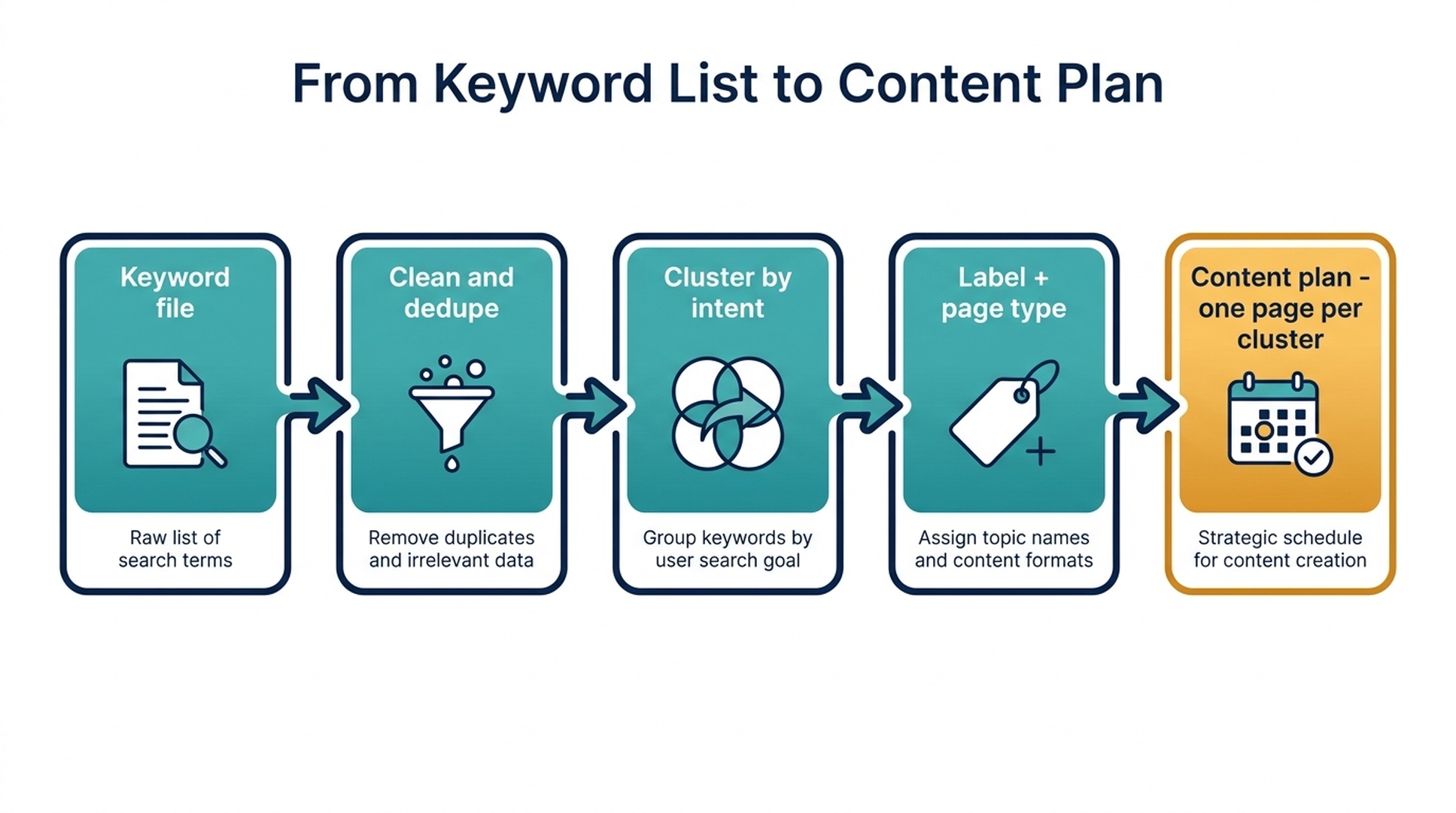
One page per cluster, one cluster per page. Every cluster in your output should correspond to exactly one planned page. If a cluster is so large it cannot be covered honestly by one page, it is two clusters — split it and re-check.
Use the cluster as the outline. The member keywords are your section ideas. For a "best nonstick pan" roundup, the cluster's long-tail members ("best nonstick pan for induction," "best nonstick pan set," "best nonstick pan with removable handle") tell you which specific comparisons the page needs.
Decide the page's role before writing. Roundups for "best X," comparisons for "X vs Y," guides for "how to." This is the page_type field in the skill output, and it decides the template and the internal links.
Link the support clusters to one pillar. When several small informational clusters belong to the same theme, treat the roundup or guide as the pillar and link each supporting page to it. You are building a topical cluster, which is stronger for SEO and easier for readers to navigate than a set of unlinked pages.
Mistakes Beginners Make (And How to Avoid Them)
Clustering by words instead of intent. Grouping "coffee beans" and "buy coffee beans" together because they share words is a classic error — the first is informational, the second is commercial. Ask "what would the searcher do next?" for every cluster before you trust it.
Making clusters too big or too small. Too coarse, and one page tries to answer two topics. Too fine, and you publish a dozen thin pages that all cannibalize each other. The target is: one cluster = one page = one honest topic. When in doubt, keep the cluster slightly smaller and write a second page later.
Publishing without checking the SERP. The most accurate clustering method in the world is still a prediction. Before you invest hours writing, glance at the top results for the cluster's core keyword. If the top results do not match your intended page type, your intent label is wrong.
Treating LLM output as final. An LLM groups by meaning; Google groups by which pages rank. Use the model for speed, use SERP data for confirmation, and use a human for the final call on any cluster you are about to write.
Assuming volume equals value. A cluster with no reported volume can still be the one your audience searches for daily; a high-volume cluster can be too competitive to crack with one page. Volume is a hint, not a verdict — and if your data source shows n/a, that is a gap to fill, not a number to invent.
How to Verify the Clusters Are Any Good
Before you build a content plan on top of your clusters, run these five checks:
- Sample check (the 10% rule). Open the largest cluster and spot-check roughly 10% of its keywords. Would a reader asking those questions be happy with the same page? If not, split.
- No cross-cluster duplicates. One keyword appearing in two clusters is a warning sign unless you meant it (for example a comparison page that legitimately spans two topics).
- Intent matches page type. Every commercial cluster should be mapped to a roundup or comparison page, not a thin guide.
- Core keyword is actually representative. The cluster's core keyword should be the one with the strongest evidence — not just the first row alphabetically.
- You could write the page from the cluster alone. If the cluster does not give you enough section ideas to write a useful page, it is too thin — go back to research.
Clusters are a starting point, not a finished strategy. The value is that they turn a spreadsheet into a decision: here are the topics, here is the page for each, here is what to write next. That decision is where the actual work of SEO content begins.
FAQ
Why should you cluster keywords? Clustering speeds up content production by turning keywords into topics a writer can start on immediately. It also prevents you from publishing two pages that compete for the same searchers, and it makes each page more complete because the cluster's keywords are usually the page's subtopics.
What is the best keyword clustering method? For accuracy, SERP overlap — grouping keywords that share the same top-10 results — because it uses Google's own judgment of intent. For speed and cost, semantic clustering and LLM grouping. The best practical workflow combines them: an LLM or embedding pass for the first draft, SERP validation for the clusters you will actually build pages around.
Are there free keyword clustering tools? Yes. Google Search Console exports your own queries for free, and tools like PEMAVOR, SEOquick, and RyRob cluster lists for free with no sign-up. SERP-based clustering usually requires a paid API or a limited free tier (for example Cluster AI or Optiwing).
Can ChatGPT or Codex cluster keywords? They can group keywords by meaning and intent, which is a fast first draft. But models score lower than SERP-based methods on clustering accuracy (in a 2025 third-party Keyword Insights test, ChatGPT scored 47 out of 100), and they cannot report real search volumes unless a data source provides them. Use an agent for the draft, verify with SERP data, and never let it invent metrics.
What is the difference between intent clustering and term clustering? Intent clustering groups keywords by what a searcher wants (informational, commercial, transactional), which maps directly to page types. Term clustering groups keywords by the words they share, which is great for spotting niches and trends but does not tell you the searcher's intent.
How many keywords should be in one cluster? As many as genuinely share one intent and can be answered by one page. There is no magic number; a "best X" roundup may honestly cover 200 variants, while a narrow how-to may only have 5. If a cluster cannot be covered honestly by one page, split it.
Author: Simon Vale, 11-Year Search Intent Researcher at Auspia. Simon writes about buyer queries, SERP patterns, intent mapping, and turning keyword research into content plans that actually get published.


