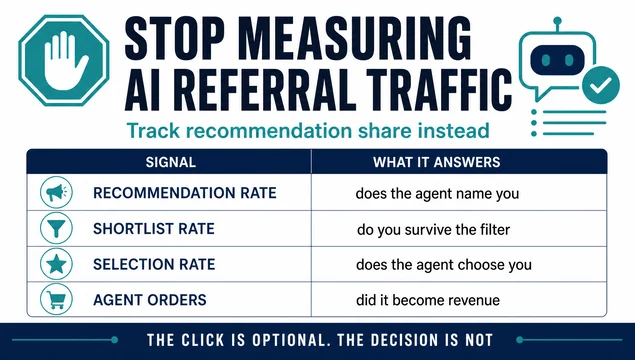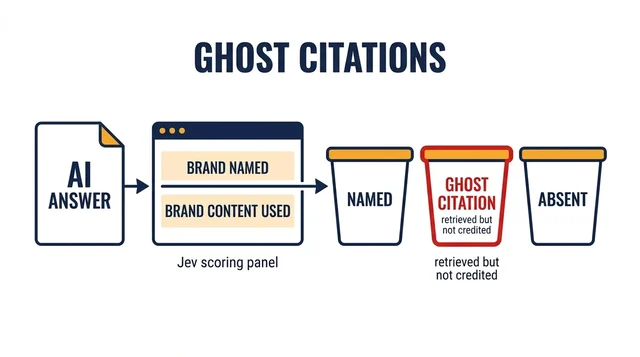
Most teams tracking AI visibility are still working from a screenshot. They ask ChatGPT a question, copy the citations, and paste them into a doc. That tells you what one model said on one afternoon. It does not tell you which sources the answer engine can actually reach, and it gives your agent nothing to query on its own.
The more useful version of this work is a source map plus a connection path. You decide which data sources matter for your category, then you wire the ones you can reach directly into the agent that runs your monitoring. What is left is a short list of sources you can only influence indirectly, and that list is usually smaller than people expect.
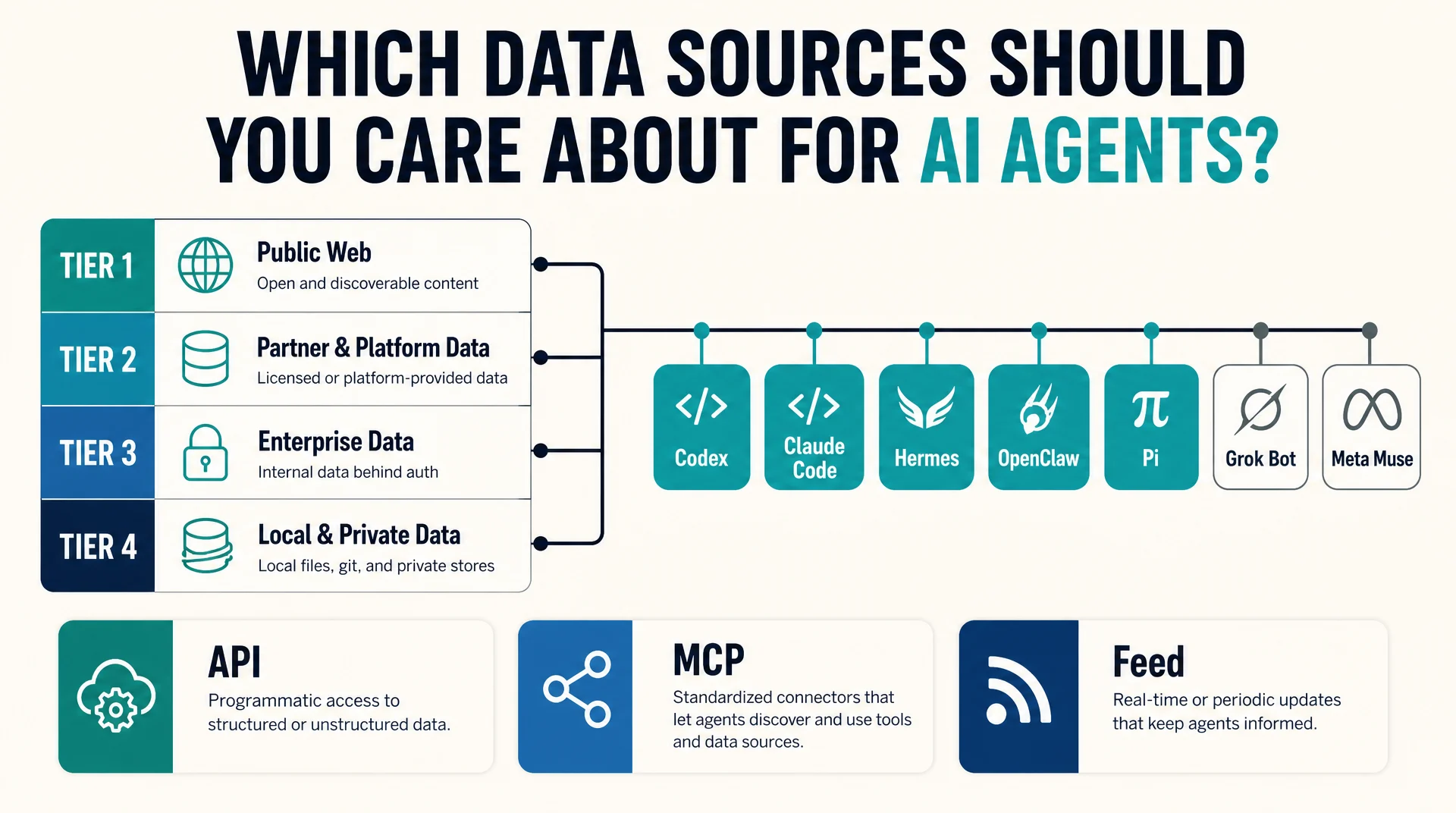
This article does three things. It sorts the data sources behind AI answers into tiers by how confirmed and how current the evidence is. It gives you the concrete API or MCP path for the ones that have one. And it walks through the connection method for Codex, Claude Code, Hermes Agent, OpenClaw, Pi Agent, Grok Bot, and Meta Muse, including the cases where no ready-made connector exists and you have to build the bridge yourself.
The short answer
Four categories of source feed AI answers, and they are not equally reachable.
Web and search discovery sources are reachable through grounding APIs and through your own crawlable pages. Structured commercial feeds are reachable through documented feed specs, but access is gated by approval. Knowledge and community corpora are partly reachable through licensed APIs and partly locked behind training-time ingestion you cannot influence. Agent action surfaces are reachable through protocol specs that are still settling.
For an agent-driven monitoring workflow, that translates into a practical rule. Connect what has a documented API or MCP server. Treat what has a feed spec as a data-quality project. Treat what has neither as a content and entity project rather than a data project.
How to read the tier table
The tiers below sort sources by how strong the evidence is that they currently feed AI answers, and by whether that connection is live or historical. This is the part most source lists get wrong. A source that shaped a model in 2022 and a source that a model queries today are different things, and conflating them produces bad strategy.
Tier | Meaning | What it means for your workflow |
|---|---|---|
1 | Confirmed and current | Live grounding, retrieval, or actions. Connect it, monitor it, optimize for it. |
2 | Confirmed and current | Training or licensing. You can influence it through content and partnerships, not through an API. |
3 | Confirmed historical | Pretraining only. No live lever. Do not build a monitoring workflow around it. |
4 | Strong evidence, not confirmed | Category inference. Worth watching, not worth budgeting against yet. |
One caveat before the table. This category changes monthly. Vendor docs, licensing deals, and feed specs all move. Treat the tier assignments as a starting point you re-check against the vendor's own documentation before you commit a team to a workflow.
Tier 1: live sources your agent can actually reach
These are the sources where a documented connection exists today. If your agent is going to pull AI-visibility data on its own, this is where it starts.
Web and search discovery
Google Search grounding. The Gemini API exposes a google_search tool that connects the model to real-time web content and returns citations to source URLs. This is documented, current, and the clearest example of live grounding in the market. It also means your crawlability and your page structure are the levers, not your feed.
Bing Search. Microsoft documents Bing results being used to enhance Copilot responses. The practical implication is the same as Google: if you want to appear, the page has to be reachable and extractable.
Live publisher pages. Reached at inference time through search grounding rather than pretraining. Retrieval selection and crawlability govern inclusion, which is why technical SEO work still shows up in AI visibility results.
Products and shopping
Google Merchant Center. Merchant feed data underpins Google's shopping surfaces. If you sell physical products and you are not in Merchant Center, you are absent from a surface that is actively being wired into AI answers.
OpenAI merchant and retail feeds. Merchants share a structured product feed, and the Agentic Commerce Protocol documentation describes the schema, the file-upload and API integration paths, and a refresh cadence that accepts updates throughout the day. Access is currently limited to approved partners, so this is a project with a lead time, not a switch you flip.
Local and places
Google Maps grounding. Documented as a tool alongside Search grounding, giving models geospatial context. This is why local businesses with accurate, complete profiles show up in AI answers about nearby options.
Google Business Profile. Business profile data feeds Google's local surfaces. For local businesses this is one of the highest-leverage, lowest-effort sources on the list.
Yelp. Yelp licenses reviews, photos, and business information for real-time local recommendations, and the relationship extends past grounding into actions. This is one of the few sources where a review platform is both a citation source and a transaction surface.
Knowledge and reference
Wikipedia and Wikimedia. Present in disclosed pretraining mixtures and widely used as a live reference corpus. Licensing is unusually clear, which makes it a legitimate target for entity work.
Community, Q&A, and social
Reddit. A live grounding source through a data-licensing arrangement, with the training side reported separately. Treat the renewal status as unstable and do not build a workflow that assumes permanent access.
Tier 2 and 3: sources you influence, not query
These matter, but not through an API you can call from an agent.
Licensed publisher content. Multiple explicit licensing partnerships exist across major publishers, with terms that differ per partner on training, grounding, and attribution. You cannot buy your way into this list as a small site, but you can be the kind of source that gets cited when the licensed corpus is thin on your topic.
Developer and technical sources. Public code repositories and technical documentation corpora are confirmed current sources. For developer-tool companies this is the highest-value tier on the list, and it is reachable through documentation quality rather than through a feed.
Historical web corpora. Cleaned derivatives of common crawl data and similar archives. Confirmed historical, no live lever. Useful context for understanding why a model has a prior, not useful for a monitoring workflow.
The connection layer: what each agent can reach
Here is where the article earns its keep. The table below maps each agent to the connection mechanism it actually supports, and the honest state of ready-made connectors for the sources above.
Agent | Connection mechanism | Ready-made source connectors | What you build |
|---|---|---|---|
Codex | MCP over stdio and streamable HTTP, configured in | Growing registry of community MCP servers | A thin MCP server for any source with an HTTP API |
Claude Code | MCP over HTTP, SSE, stdio, and WebSocket | Anthropic connector directory plus community servers | Same server, added with |
Hermes Agent | MCP with per-server tool filtering, plus native skills | Curated MCP catalog with one-click install | A skill that wraps the API when no MCP exists |
OpenClaw | MCP client and server, plus A2A JSON-RPC | OpenClaw MCP registry and saved server definitions | A saved MCP definition or an A2A bridge |
Pi Agent | TypeScript extensions and skills, no native MCP client | None by default | A small extension that calls the API as a tool |
Grok Bot | Remote MCP tools declared in the API request | Any remote MCP server you point it at | A remote MCP server, since Grok manages the connection |
Meta Muse | Connectors, no public MCP or API surface | Vendor-managed connectors only | Indirect work only: feeds, entity data, and crawlable pages |
The pattern worth noticing: five of the seven agents speak MCP, and the two that do not are at opposite ends of the spectrum. Pi Agent is deliberately minimal and expects you to write an extension. Meta Muse is a consumer product with no developer surface at all.
That means the efficient move is to build one MCP server for your highest-value source and reuse it across Codex, Claude Code, Hermes Agent, OpenClaw, and Grok Bot. You write it once.
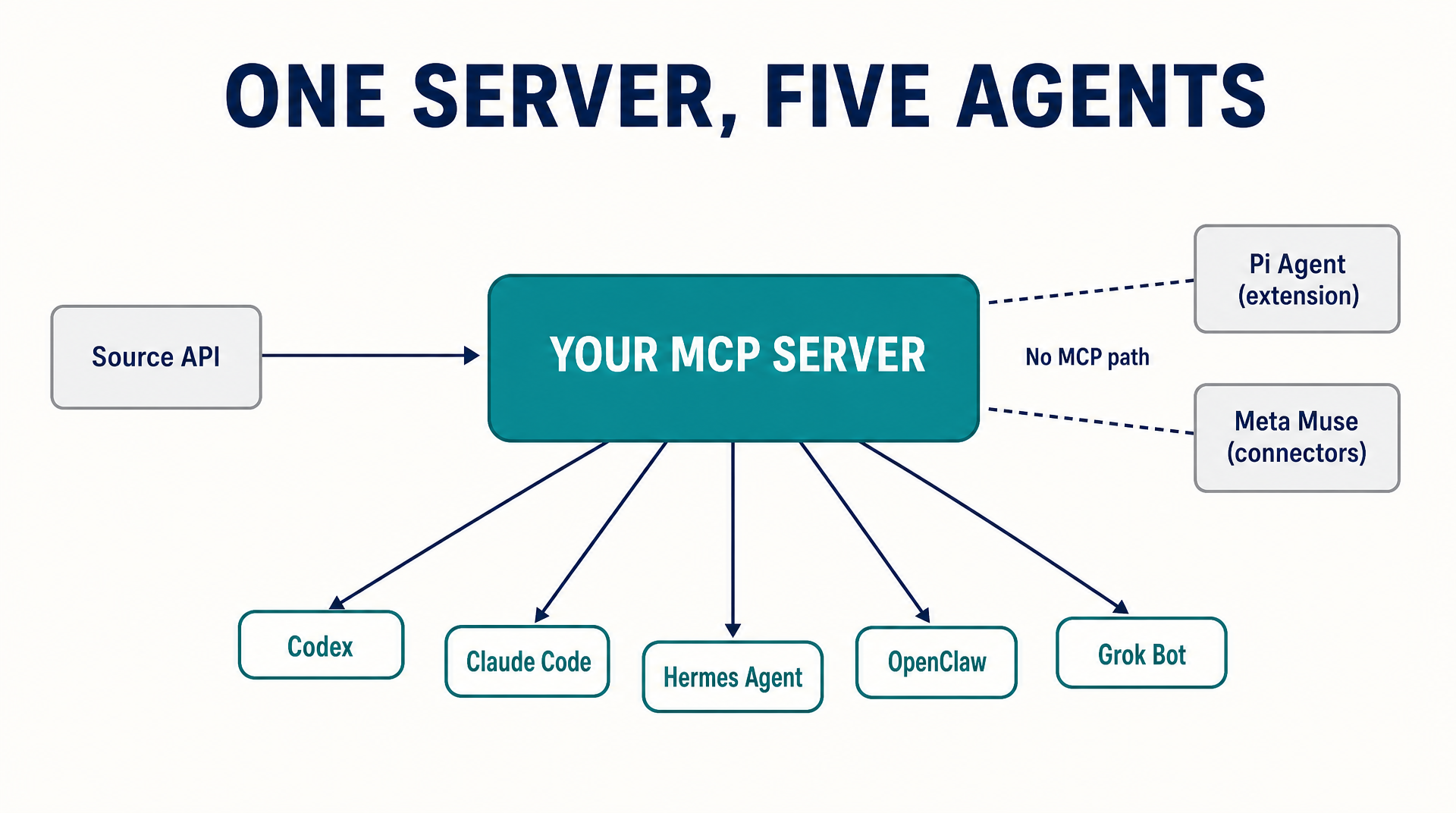
One server covers five of the seven agents. Pi Agent and Meta Muse need different paths.
How to connect each agent
The steps below assume you already have an API key or token for the source you are connecting. Never put credentials in a config file that gets committed.
Codex
Codex stores MCP configuration in config.toml, either at ~/.codex/config.toml or scoped to a project at .codex/config.toml. The ChatGPT desktop app, the Codex CLI, and the IDE extension share this configuration, so you configure it once.
For a stdio server:
codex mcp add my-source --env API_KEY=your-key -- npx -y @your-org/my-source-mcpFor a streamable HTTP server, add a table to config.toml:
[mcp_servers.my-source]
url = "https://mcp.example.com/mcp"
bearer_token_env_var = "MY_SOURCE_TOKEN"
Codex reads the MCP instructions field returned at initialization and uses it as server-wide guidance. If you are building the server, keep the first 512 characters self-contained so the most important constraints are available when the agent decides whether to call it.
Run codex mcp list to confirm the server registered, and /mcp inside the TUI to see active servers.
Claude Code
Claude Code supports remote HTTP, remote SSE, local stdio, and remote WebSocket transports. HTTP is the recommended option for remote servers.
claude mcp add --transport http my-source https://mcp.example.com/mcp \
  --header "Authorization: Bearer your-token"
For a local server:
claude mcp add my-source -- npx -y @your-org/my-source-mcpTwo details that trip people up. First, in a JSON config an entry with a url but no type is treated as a stdio server and silently skipped, so always set "type": "http" explicitly. Second, Claude Code sets CLAUDE_PROJECT_DIR in the spawned server's environment, so a local server can resolve project-relative paths without depending on the working directory.
Hermes Agent
Hermes Agent ships with MCP support in the standard install. Configuration lives in ~/.hermes/config.yaml:
mcp_servers:
  my-source:
    command: "npx"
    args: ["-y", "@your-org/my-source-mcp"]
Hermes also supports remote HTTP MCP servers in the same config, and it supports per-server filtering so you expose only the tools you actually want the agent to see. That filtering matters more here than on the other agents, because Hermes runs unattended on a schedule.
If you are migrating from Claude Code, hermes import-agent claude-code maps the mcpServers block from ~/.claude.json to mcp_servers in the Hermes config and brings across skills and instructions at the same time.
When no MCP server exists for a source, the skills system is the fallback. A skill is a directory with a SKILL.md that tells the agent when to use it and what to do. Wrap the API call in a bundled script and reference it from the skill, and the agent gets the capability without a protocol server.
OpenClaw
OpenClaw works as both an MCP client and an MCP server. As a client, you manage saved server definitions through the mcp registry subcommands, and you can edit and inspect servers from the browser Control UI settings page.
openclaw mcp registry add my-source --transport streamable-http --url https://mcp.example.com/mcp
openclaw mcp status
OpenClaw also exposes its own channel conversations over MCP, which is the reverse direction and useful if you want another agent to read what your OpenClaw instance has been doing. For external agents that are not MCP clients, OpenClaw speaks A2A over JSON-RPC.
The permission model is the reason to pick OpenClaw for this work. It has a per-chat tool policy and an explicit approval path for execution, which is what you want when an agent is reading a paid data source and you need to cap what it can spend.
Pi Agent
Pi Agent has no native MCP client, and that is a design choice rather than a gap. Its extension point is TypeScript modules that run inside the Pi process and register tools.
Create an extension at ~/.pi/agent/extensions/my-source.ts:
import type { ExtensionAPI } from "@earendil-works/pi-coding-agent";

export default function (pi: ExtensionAPI) {
  pi.registerTool({
    name: "my_source_lookup",
    description: "Look up a record in My Source by query.",
    parameters: { type: "object", properties: { query: { type: "string" } }, required: ["query"] },
    handler: async ({ query }) => {
      const res = await fetch(`https://api.example.com/search?q=${encodeURIComponent(query)}`, {
        headers: { Authorization: `Bearer ${process.env.MY_SOURCE_TOKEN}` },
      });
      return await res.json();
    },
  });
}
Load it directly during development with pi --extension ./my-source.ts, then move it into the extensions directory or package it with pi install when it is stable.
The tradeoff is real and worth stating plainly. An extension runs with the same operating-system permissions as the Pi process and can inspect prompts, tool calls, files, and credentials. Load extensions only from sources you trust, and read the source before you install it.
Grok Bot
Grok's API supports remote MCP tools, and xAI manages the server connection on your behalf. You declare the server in the tools array of the request:
from xai_sdk import Client
from xai_sdk.chat import user
from xai_sdk.tools import mcp

client = Client(api_key=os.getenv("XAI_API_KEY"))
chat = client.chat.create(
    model="grok-4.7",
    tools=[mcp(server_url="https://mcp.example.com/mcp", server_label="my-source")],
)
Only streaming HTTP and SSE transports are supported for remote MCP tools. You can restrict which tools are exposed with allowed_tools, and pass an authorization token that xAI sets in the Authorization header on requests to your server.
The advantage here is that you do not run or maintain a client-side connection. The disadvantage is that the MCP server has to be publicly reachable, so anything behind your VPN needs a different approach.
Meta Muse
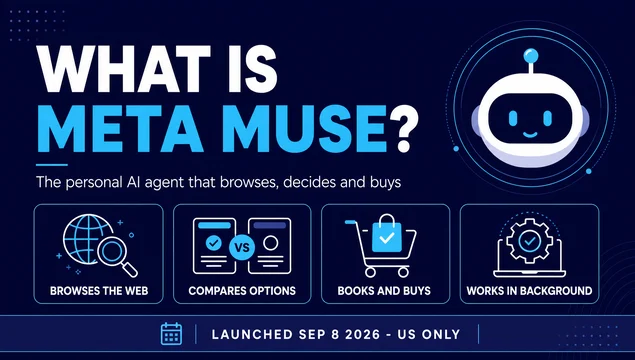
Muse connects to third-party apps and services through Connectors, and there is no public MCP or developer API surface for the agent itself. That is the honest answer, and it changes what you can do.
You cannot wire Muse into a monitoring workflow the way you can with the other six agents. What you can do is make the sources Muse reads better. That means accurate product and catalog data if you sell, complete and consistent business information if you are local, and crawlable pages with clear entity signals if you are a publisher. Muse is a target for readiness work, not a data source you query.
If Meta ships a developer surface for Muse, this section changes. Until then, treat it as an audience to prepare for rather than a system to integrate with.
Build one server, reuse it five times
If you are going to build anything, build the MCP server for your single highest-value source and reuse it. The five MCP-capable agents above all accept a streamable HTTP server, so one deployment covers all of them.
A minimum viable server needs four things: a tool that accepts a query and returns structured data, a bearer token check on the server side, a rate limit so a runaway agent cannot burn your API quota, and an instructions field that states the constraints in the first 512 characters.
Two rules that prevent most of the pain. Return structured data rather than prose, so the agent can reason over fields instead of re-parsing text. And make every tool read-only until you have watched the agent use it for a full cycle. A read-only server cannot corrupt anything, and you can widen it once you have seen the actual call patterns.
Verify the connection before you trust it
Do not assume a configured server is a working server. Run these four checks.
Check the server is registered. codex mcp list, claude mcp list, or openclaw mcp status should show it. A server that failed to parse is silently skipped on some clients.
Check the tool inventory. Ask the agent to list the tools the server exposes. If you expect six tools and see one, the server registered but the tools did not.
Check a real query. Ask for a specific record you can verify by hand. A generic "what data can you get" question proves nothing.
Check the failure path. Revoke the token and run the query again. You want a clear authentication error, not a silent empty result. An agent that treats a failed call as "no data" will report a clean result for a broken connection, and that is the most expensive failure mode in this whole workflow.
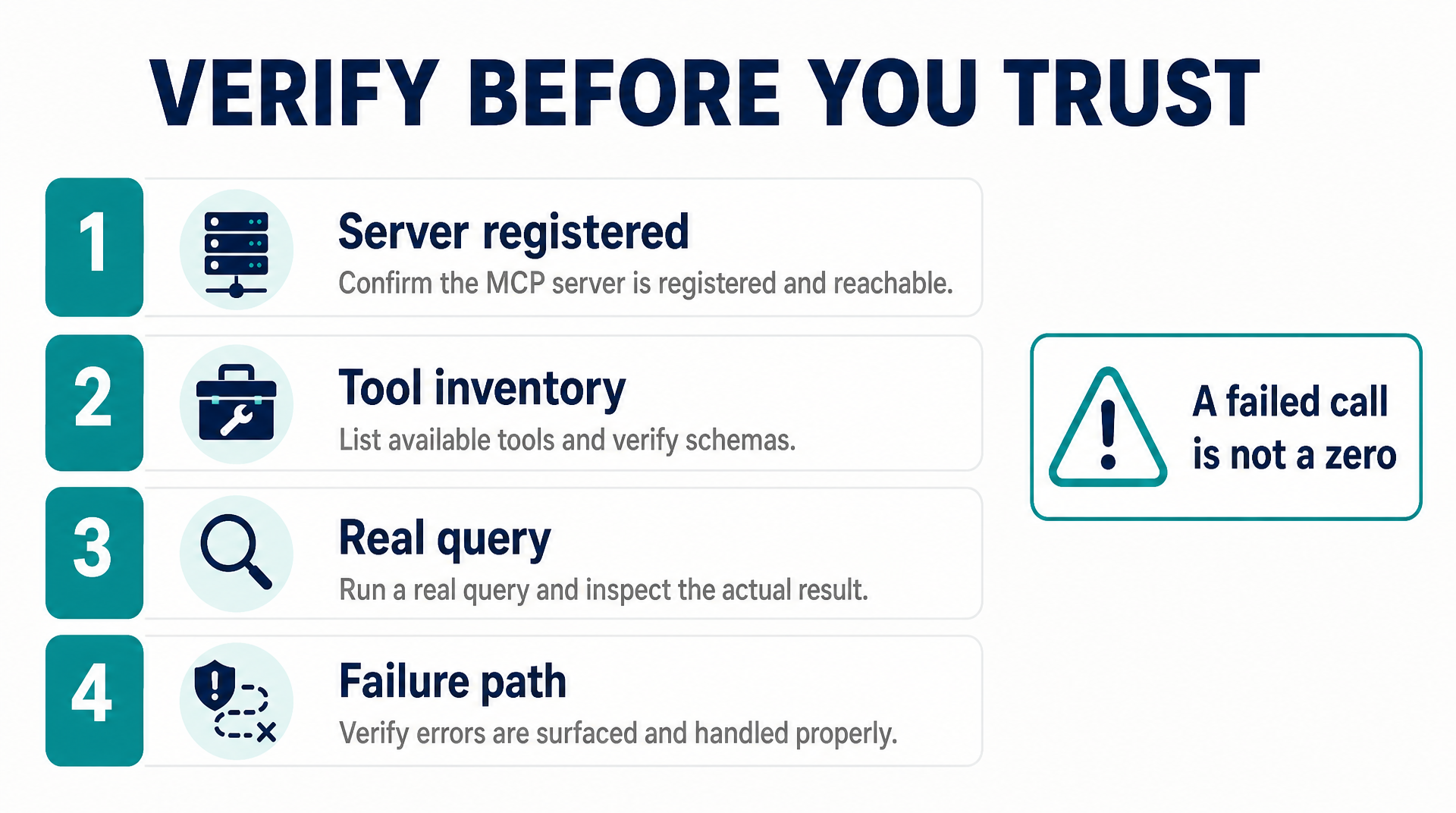
Four checks. The last one catches the failure that looks like a finding.
What this changes about your priorities
The tier table and the connection table point in the same direction. The sources you can wire into an agent are the sources you can measure, and the sources you can measure are the ones you can improve against a baseline.
That means the order of work is not the order most teams use. Start with the source that has both a documented connection and a real business impact for you. For a local business that is Google Business Profile and Maps grounding. For a product company it is Merchant Center or a product feed. For a developer-tool company it is documentation quality. For a publisher it is crawlability and extractability of live pages.
Then build the one MCP server that gets that source into your agent, and reuse it across the five agents that speak the protocol. Leave the sources with no connection path as content and entity work, and be honest that you cannot measure them the same way.
The teams that get ahead here are not the ones with the longest source list. They are the ones who connected the two or three sources that matter and built a monitoring loop around them.
FAQ
Do I need MCP to give an agent access to a data source? No. MCP is the standard that most agents now support, which makes it the most reusable option, but a skill with a bundled API script works just as well for a single agent. If you are connecting one source to one agent, a skill is less work. If you are connecting one source to five agents, MCP pays for itself immediately.
Which agent should I start with? Start with the one that matches where your work already lives. If your site is in a git repository, Codex or Claude Code. If you want scheduled runs with persistent memory, Hermes Agent. If you need a hard permission boundary on a paid data source, OpenClaw. If you want the smallest surface you can audit in one sitting, Pi Agent.
Can I connect a source that has no MCP server? Yes, in three ways. Write a thin MCP server if the source has an HTTP API and you want to reuse it across agents. Write a skill with a bundled script if you only need one agent. Or use an agent that supports remote MCP tools and point it at a server someone else hosts.
Why can't I connect Meta Muse? Meta has not published a developer API or MCP surface for Muse. Connectors are vendor-managed. Until that changes, Muse is a surface to prepare content and data for, not a system you can query.
Are the tier assignments permanent? No. This category moves monthly. Re-check the vendor documentation before you commit a team to a workflow, and treat any tier assignment older than a quarter as unverified.
What is the most common mistake in this work? Treating a failed API call as a real zero. If your agent reports that a brand has no AI visibility and the underlying cause is an expired token, you have a measurement failure disguised as a finding. Always test the failure path before you trust the success path.
Author: Julian Mercer, 14-Year Technical SEO Practitioner at Auspia. Julian writes about crawlability, schema, rendering, and the technical foundations that make content readable to both search engines and AI agents.