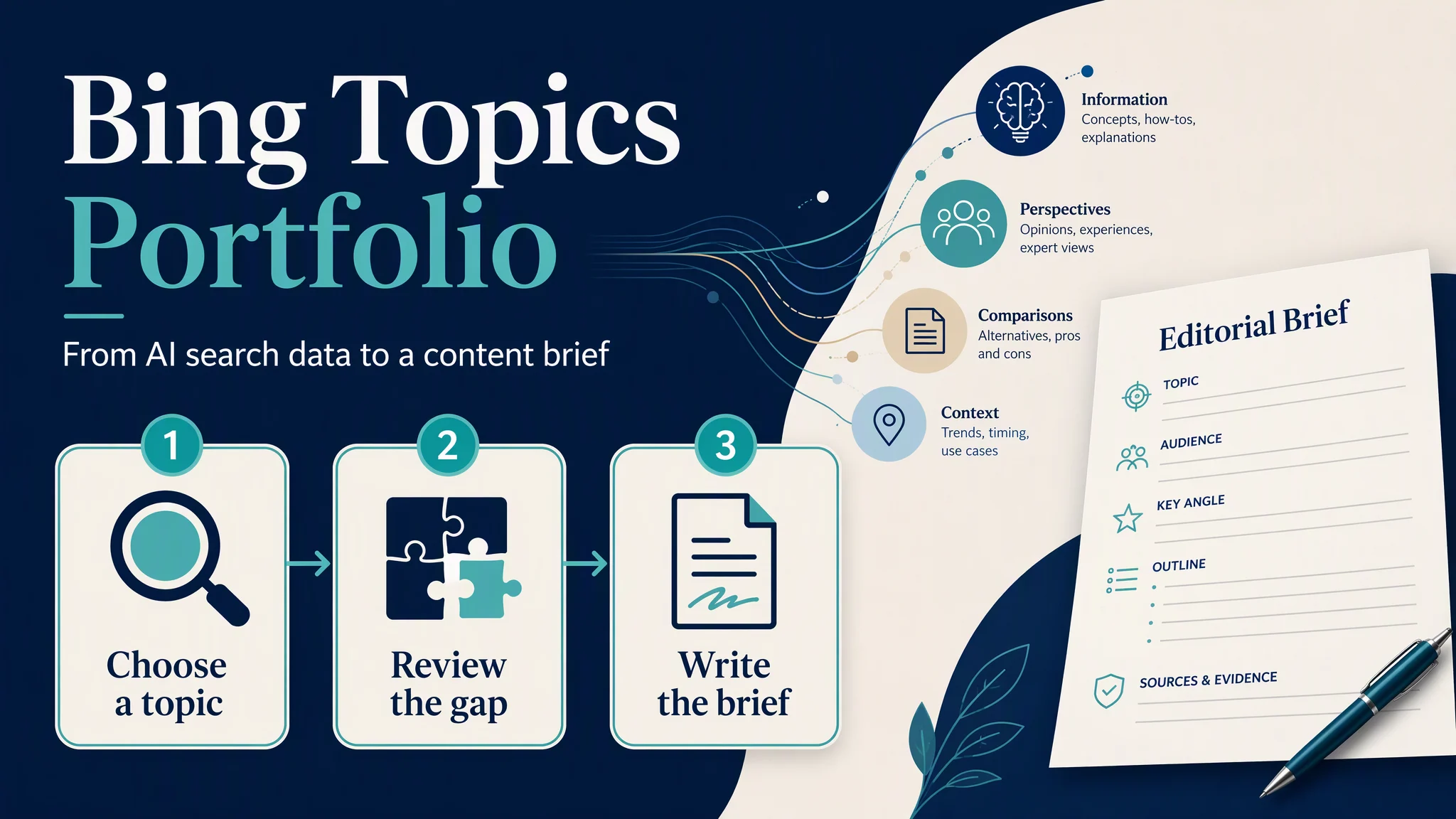
Use Bing Topics Portfolio to choose a topic you can credibly cover, identify a useful content gap, and turn it into one specific page update or article brief. Start with a subject close to your existing expertise. A large number in a dashboard is a reason to investigate, not a reason to publish.
This tutorial takes you from the report to a small, reviewable content plan. The editorial worksheet and prioritization method below are Auspia's suggested workflow; they are separate from Bing's product features.
What you will finish with
Before you begin | What you need |
|---|---|
Who this is for | Publishers, content marketers, and SEO teams planning AI search coverage |
Access | A site you can access in Bing Webmaster Tools, with the Topics Portfolio beta visible |
Inputs | Your current pages, business priorities, and somewhere to record observations |
Suggested time budget | 30–45 minutes for a first review; writing and publishing take additional time |
Definition of done | One chosen topic, a shortlist of relevant queries, and one content brief with an owner and review date |
Bing announced the beta on October 13, 2026. It groups grounding activity into themes and surfaces gaps related to your site's existing presence. Bing's announcement.
Keep the measurement scope clear. AI Performance covers Microsoft Copilot, Bing AI summaries, and selected partner integrations. Grounding queries summarize retrieval phrases, rather than reproducing a user's complete prompt. Citations record visible references; they do not count visits or conversions. Bing AI Performance documentation.
1. Open the report and record your baseline
Sign in to Bing Webmaster Tools, select your site, and open AI Performance → Topic Portfolio, beside Citations & Pages. Choose a one-, two-, or three-month window. Availability depends on sufficient data. Bing's setup instructions.
The supplied example shows 1M, 2M, and 3M buttons. Select 3M for a first pass, then record the site, date range, and date of review in your notes. This gives the rest of your decisions a common baseline.
Check the property before proceeding. A report for a different site or subdomain will produce an irrelevant content plan.
If the tab is missing, confirm that you are in the intended site's AI Performance report. Continue with the available query and page data, and leave the portfolio review pending. An absent tab gives you no basis for declaring that your site has zero AI visibility.
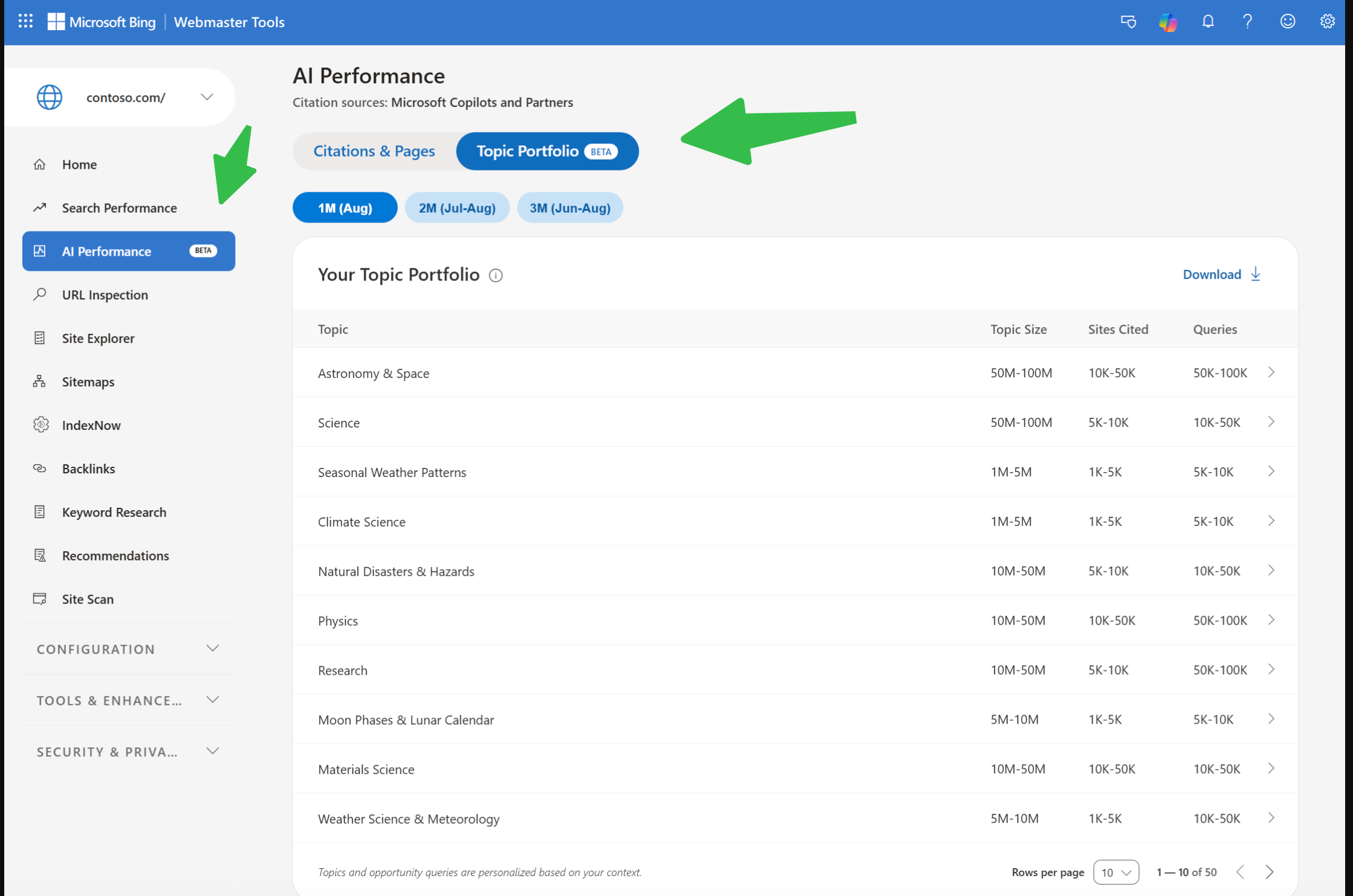
The supplied contoso.com example shows the entry point and topic table. Its dates and values illustrate the interface; they are not Auspia performance results.
2. Choose a topic you can actually serve
Read the table using these definitions:
Column | Meaning |
|---|---|
Topic | A thematic grouping |
Topic Size | Estimated citations across sites during the period |
Sites Cited | Estimated participating sites |
Queries | Estimated distinct grounding queries |
These measures provide context, not an exact forecast. Bing's column definitions.
Write down two or three topics that relate to your customers. Next to each, name an existing page or a subject expert who could support the work. Choose the topic with the clearest connection between reader need, business relevance, and evidence you can supply.
For example, a project-management software company might investigate a topic about team workflows before a much larger topic about sports. Even within team workflows, it should favor problems its product and documentation can explain well.
Before moving on, answer: If we earned visibility here, would it reach someone we can help?
If the answer is unclear, park the topic. Do not invent a difficulty score by dividing Topic Size by Sites Cited. That calculation would hide differences between queries and sources behind a misleadingly tidy number.
3. Inspect a topic before choosing an opportunity
Open the selected topic. Its detail view contains summary cards and two lists: Your Grounding Queries for current presence and Opportunity Queries for gaps. The portfolio also has Top Opportunity Queries across topics. Opportunity citation volumes appear as ranges. Bing's detail-view explanation.
Start with Your Grounding Queries. Copy a few phrases into your notes and describe the reader problem they suggest. Then inspect Opportunity Queries for related needs your content might address.
Keep your first shortlist small: five candidates are enough to make a useful decision. Copy each phrase exactly, including any brand name, and preserve the displayed volume range rather than replacing it with an invented midpoint.
A query is ready for further review when you can explain its likely reader need in plain language. If you cannot, mark it “intent unclear” and investigate before assigning a writer.
Check the cross-topic opportunity list afterward. It can suggest a second topic to examine, but a query should pass the same relevance check before joining your shortlist.
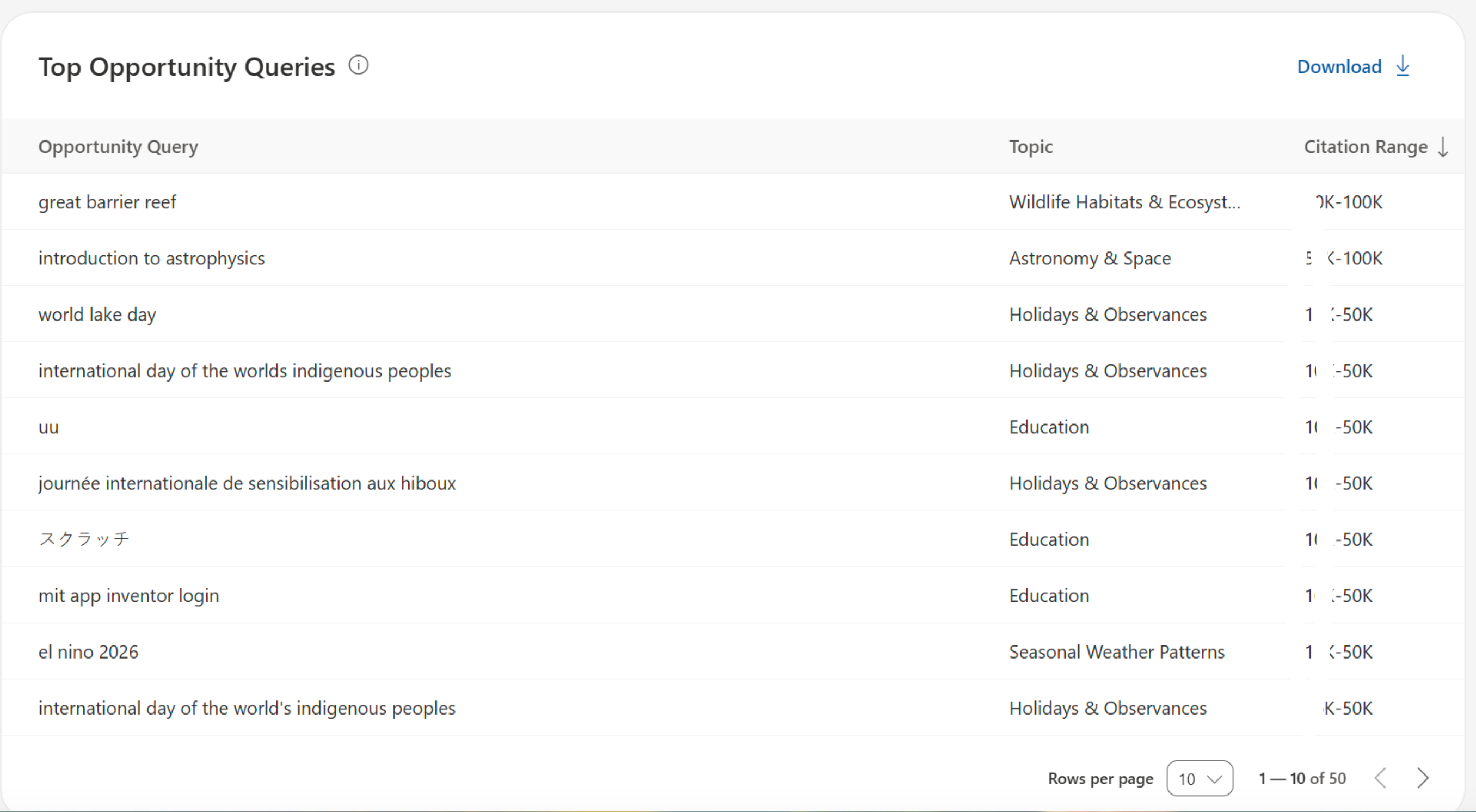
The cross-topic list connects query phrases with topics and citation ranges. Some values are obscured in this supplied screenshot; use the readable values in your own report.
4. Filter the shortlist with a simple worksheet
Create the following worksheet in your own document or spreadsheet. This is a planning template, not a Bing export format.
Topic | Query as shown | Volume range | Likely reader need | Existing page | Decision | Reason |
|---|---|---|---|---|---|---|
Copy from report | Copy verbatim | Copy verbatim | Describe in one sentence | URL or “none found” | Refresh / New / Investigate / Skip | Explain the choice |
For example, the supplied list includes “introduction to astrophysics” and “mit app inventor login.” A science publisher might investigate the first as an educational content need. The second appears to seek a specific service login, so it needs an intent check before becoming an article assignment. These are editorial interpretations of the visible phrases, not measured outcomes.
Give each candidate a decision:
- Refresh: an existing page already serves the need but lacks a useful explanation, example, or current evidence.
- New: the need belongs to your audience and deserves a page that your site does not yet have.
- Investigate: the phrase is ambiguous or you have not checked your existing coverage.
- Skip: the need falls outside your expertise or would add little value for your readers.
Be particularly careful with brand names. Ask whether the reader is looking for a competitor's official resource or making a comparison you can fairly answer. A competitor brand in the list is not enough to justify an alternatives page.
Apply a second check to every “New” decision: describe what your proposed page would contribute that is missing from your current coverage. “Mention the phrase more often” is not a content gap. A worked example, decision table, documented procedure, or supported comparison might be.
If you cannot identify a useful contribution, change the decision to Investigate or Skip.
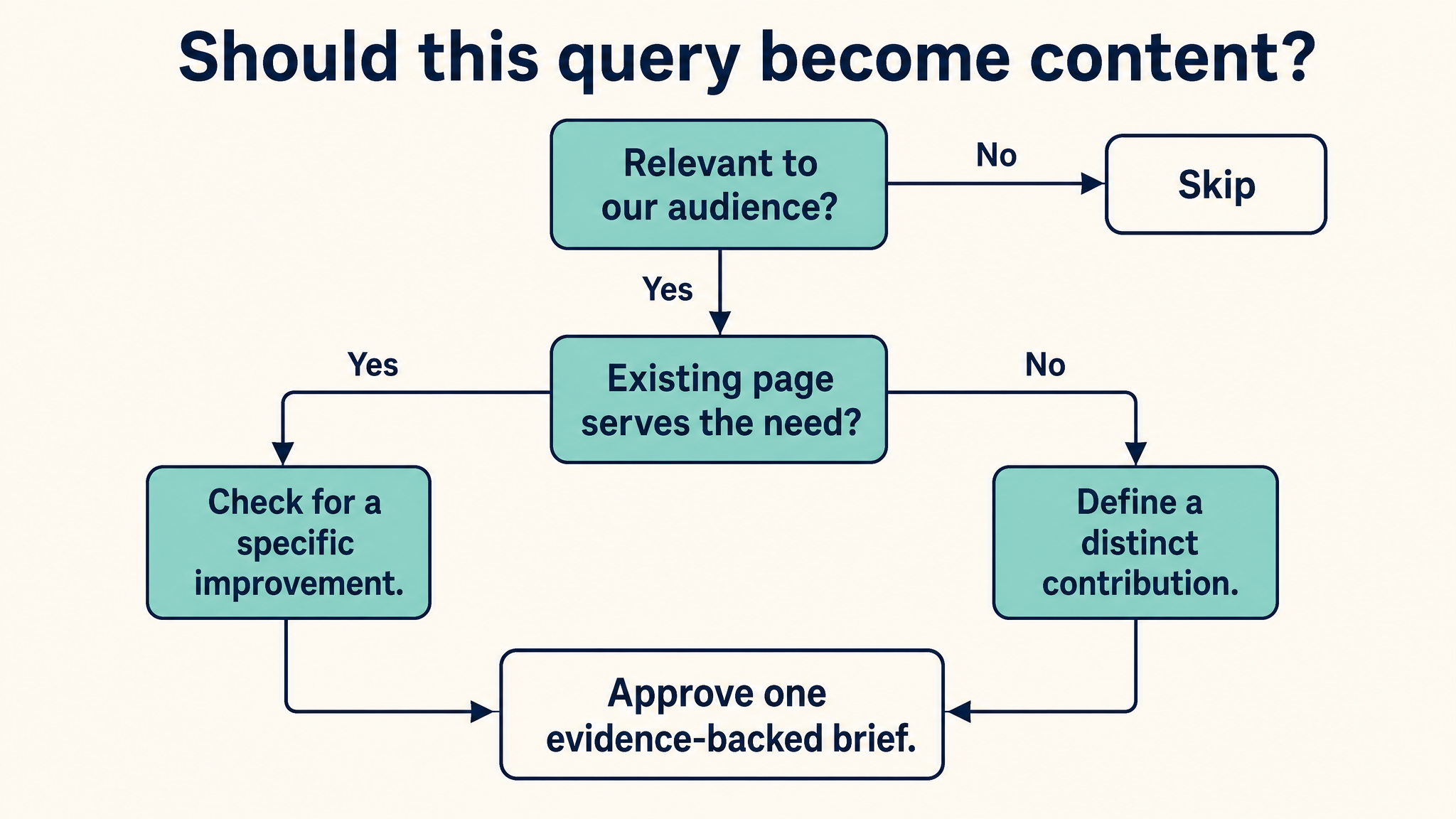
Check audience relevance and existing coverage before approving a content brief.
5. Check existing pages before commissioning new content
For shortlisted queries where your site already appears, use Citations & Pages to inspect query-to-page relationships. Bing supports viewing the cited pages associated with a grounding query, and the queries associated with a page. Query–page mapping documentation.
For an opportunity query, inspect your own content inventory and site search. Look for pages that answer the same need with different wording. Do not assume that a missing citation means a missing article.
Here is an illustrative editorial decision, not a result from a Bing account:
Finding on your site | Sensible next action |
|---|---|
A relevant guide exists, but explains the task vaguely | Add a concrete procedure and a worked example |
The answer exists in scattered help pages | Improve navigation or develop a coherent guide if the reader needs one |
A relevant page is no longer accurate | Correct it before expanding the coverage |
No page serves a distinct, relevant need | Draft a new page brief |
Read the candidate page as a customer would. Can the reader finish the task or make the decision without guessing?
If the page already does that well, leave the proposed edit unassigned until you have a stronger hypothesis. Rewriting a good page just because it is absent from an opportunity list is busywork.
6. Turn one gap into a brief a writer can use
Choose one approved candidate and complete this brief:
Brief field | What to record |
|---|---|
Reader and task | Who needs the answer and what they should finish with |
Evidence from the report | Topic, query phrase, date range, and displayed range |
Editorial hypothesis | Why the proposed page or update could serve the need better |
Target URL | Existing URL to update, or proposed URL for new content |
Main answer | A direct response the page must provide |
Supporting material | Required examples, sources, tables, and product details |
Distinct contribution | What this adds beyond your existing pages |
Owner and review | Responsible person, completion date, and follow-up date |
For a hypothetical “project handoff checklist” candidate, the brief might require a reusable checklist, a filled-in example, and guidance on who approves the handoff. The page should help someone perform the handoff, even if they never arrive through an AI answer.
Keep the hypothesis modest: “This update will explain the missing handoff procedure” is testable at editorial review. “This update will make Copilot cite us” promises a result you do not control.
Our recommendation at Auspia is to start with one strong refresh when a suitable page exists. It keeps the scope manageable and gives the team a clear change to document before commissioning a wider cluster.
7. Verify the plan, then schedule a follow-up
Your first review is complete when you can check every item below:
- The property and reporting window are recorded.
- The chosen topic serves a relevant audience.
- Each shortlisted query has a decision and a reason.
- Brand-specific or ambiguous queries have received manual review.
- Existing coverage has been checked.
- One brief names a target URL, an owner, and the evidence required.
- A follow-up date is on the calendar.
If any item is missing, return to that decision before assigning the work. The immediate output is a defensible content plan. Citation growth is a later observation.
After the page goes live, record the publication date and exact changes. Set an initial review about a month later as a working cadence, not a promise about how quickly Bing will reflect the update.
At that review, inspect the same topic and related query/page data using a comparable reporting window. Record whether the page appears, how the observed citation activity changed, and whether your own analytics show useful visits or conversions. Keep those observations separate.
If visibility rises, describe the change without claiming the edit caused it. Bing notes that citation trends can reflect multiple factors and do not establish the effect of an individual update. Bing's measurement caveats.
If the page remains absent, check its accuracy, accessibility, and usefulness before making another edit. A second revision should solve a specific problem you can point to.
When the beta gives you a poor suggestion
Misclassified or irrelevant entries can be rated with the thumbs controls. Small themes may be omitted, and competitor brands may appear as opportunities. Bing's beta limitations and feedback controls.
Keep a short note of the problem alongside your planning decision. For example: “Skip: query seeks a competing vendor's login page.” This prevents the same suggestion from becoming an assignment during the next review.
Use the dashboard to direct your attention, then let reader needs and evidence determine what gets published.
Author: Clara Bennett, 10-Year Content Strategy Practitioner at Auspia. Clara writes about editorial systems, topic maps, and repeatable SEO/GEO content workflows.