The short answer
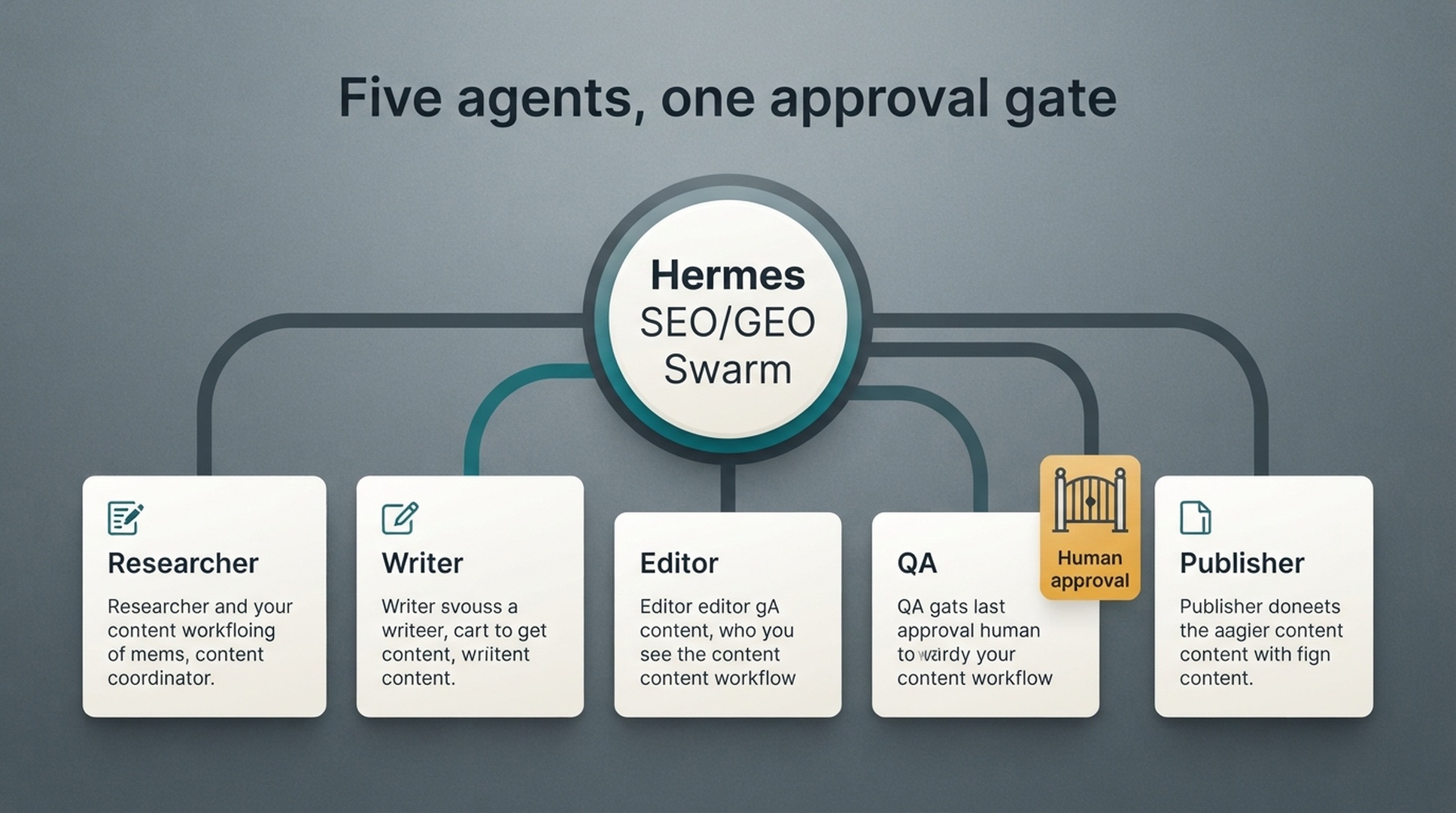
A Hermes SEO/GEO swarm is a supervised workflow where different agents handle different parts of organic growth work: research, brief, draft, edit, technical QA, and publishing preparation. The point is not to let five agents publish faster. The point is to stop one agent from doing every job badly.
Hermes is an open source AI agent framework from NousResearch, driven from the CLI with hermes chat. As of mid-2026 it provides websearch and webextract tools, browser automation, reusable skills, scheduled cronjob tasks, and MCP toolsets, and its documented delegation and parallel subagent support is what lets role agents run side by side; swarm is this article's name for the workflow design, not an official Hermes term. The official documentation is at https://hermes-agent.nousresearch.com/docs.
For beginners, use five roles:
- Researcher
- Writer
- Editor
- Technical QA
- Publisher
Keep one rule above all roles: no live page changes without human approval.
What you get
Item | Detail |
|---|---|
Audience | SEO, GEO, and content marketers who want structured agent workflows with clear human control points |
Result | A supervised five-role Hermes swarm (researcher, writer, editor, technical QA, publisher) with role prompts, file handoffs, a conflict log, and an approval record |
Prerequisites | Hermes installed and working, one project folder, basic Markdown editing, and a human reviewer for approvals |
Time | 45 to 60 minutes to set up folders and prompts, plus one supervised run to validate the flow |
Definition of done | The brief is approved before drafting, every role output exists as a file, the quality gate passes, and no live page changed without human approval |
Why a swarm helps
A single SEO agent tends to blur jobs together. It researches, writes, edits, checks links, invents a title, and declares the page ready. That is risky because the same agent that created the draft may miss its own weak assumptions.
A swarm adds separation:
Role | Main job | Output |
|---|---|---|
Researcher | Collect search, GEO, competitor, and source evidence | Research notes |
Writer | Turn approved brief into a draft | Draft Markdown |
Editor | Improve structure, clarity, voice, and usefulness | Edited draft |
Technical QA | Check links, schema needs, crawl risks, snippets, and indexability | QA report |
Publisher | Prepare CMS package after approval | Publish-ready Markdown and metadata |
This is still a human-led workflow. Hermes coordinates work, but people approve strategy, facts, technical changes, and publication.
Step 1: create the swarm folders
Use a file handoff system with a clear trail for every change an agent makes.
/hermes-seo-agent
  /swarm
    /researcher
    /writer
    /editor
    /technical-qa
    /publisher
  /briefs
  /drafts
  /qa
  /publish-ready
  /approvals
  /prompts
    researcher.md
    writer.md
    editor.md
    technical-qa.md
    publisher.md
    coordinator.md
Each role writes to its own folder first. The coordinator or human reviewer decides what moves forward.
Step 2: write the coordinator prompt
Create prompts/coordinator.md:
You are the Hermes SEO/GEO workflow coordinator.

Your job is to assign tasks to role agents and maintain safe handoffs.

Rules:
- Do not publish or edit live pages.
- Do not let the Writer start until the brief is approved.
- Do not let the Publisher prepare final CMS fields until Editor and Technical QA pass.
- Every role must write its output to the correct folder.
- Every role must list assumptions and missing data.
- Any technical change requires human approval.
- Any external claim requires source verification.

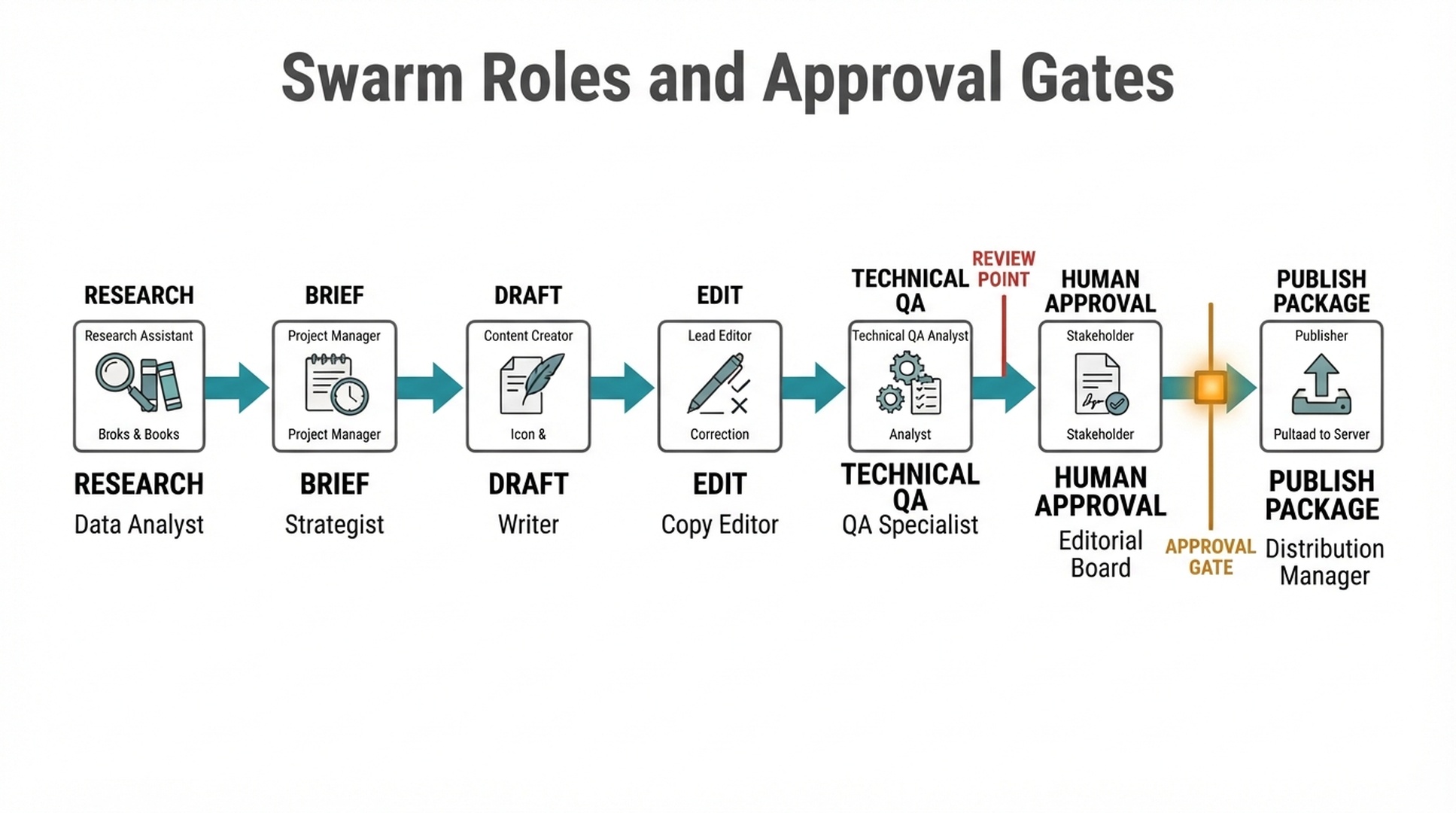
Workflow order:
1. Researcher creates research notes.
2. Human approves or revises research direction.
3. Coordinator writes the brief from approved research.
4. Writer creates draft from approved brief.
5. Editor revises draft.
6. Technical QA reviews draft and page risks.
7. Human approves final content.
8. Publisher prepares publish package.
The coordinator prevents parallel chaos. It is the traffic controller.
Step 3: define the Researcher role
Create prompts/researcher.md:
You are the SEO/GEO Researcher.

Inputs:
- Approved topic or page
- Website context
- Keyword cluster
- GEO prompt map
- GSC or Bing data, if available
- Competitor/source URLs, if provided

Your output goes to /swarm/researcher/[slug]-research.md.

Return:
1. Target reader
2. Search intent
3. GEO prompt intent
4. Primary and secondary keywords
5. Related questions
6. Entities to define
7. Source evidence needed
8. Competitor patterns to learn from
9. What not to copy
10. Recommended brief angle
11. Missing data

Rules:
- Do not write the article.
- Do not invent source claims.
- Do not use competitor wording.
- Mark uncertain claims for verification.
Researcher output should be notes, not prose. If the Researcher starts writing a finished article, stop it.
Step 4: define the Writer role
Create prompts/writer.md:
You are the SEO/GEO Writer.

Inputs:
- Approved brief
- Researcher notes
- Brand context
- Approval rules

Your output goes to /swarm/writer/[slug]-draft.md.

Write a beginner-friendly draft that includes:
1. Direct answer near the top
2. Clear section headings
3. Practical steps
4. Tables or checklists where useful
5. GEO answer blocks for approved prompts
6. Internal link placeholders
7. Source placeholders where claims need verification
8. FAQ based on real questions

Rules:
- Do not add unsupported claims.
- Do not publish.
- Do not change the brief without noting why.
- If evidence is missing, mark [SOURCE NEEDED].
The Writer should not decide whether the article is ready. It creates the first draft only.
Step 5: define the Editor role
Create prompts/editor.md:
You are the SEO/GEO Editor.

Inputs:
- Writer draft
- Approved brief
- Researcher notes
- Brand context

Your output goes to /swarm/editor/[slug]-edited.md.

Review and improve:
1. Opening clarity
2. Search intent match
3. Beginner usability
4. Section order
5. Examples
6. Tables and checklists
7. GEO answer extractability
8. Repetition and generic language
9. Unsupported claims
10. FAQ quality

Return:
- Edited draft
- Change summary
- Remaining risks
- Claims needing source verification

Rules:
- Do not invent facts.
- Do not remove useful specifics.
- Do not approve the draft for publication.
The Editor should make the draft clearer and more useful. It should not silently introduce new claims.
Step 6: define the Technical QA role
Create prompts/technical-qa.md:
You are the Technical SEO/GEO QA reviewer.

Inputs:
- Edited draft
- Target URL or planned URL
- Internal link plan
- Crawl data, if available
- Structured data notes, if available

Your output goes to /swarm/technical-qa/[slug]-qa.md.

Check:
1. Internal links
2. Anchor text accuracy
3. Image alt text
4. Table readability
5. Schema opportunities and risks
6. Snippet eligibility concerns
7. Canonical, indexability, or robots risks if updating an existing page
8. Broken or missing source links
9. Overpromising title/meta
10. Approval requirements

Rules:
- Do not change technical settings.
- Mark technical changes as requiring developer approval.
- Do not approve publishing if high-risk issues remain.
Technical QA is where many AI content workflows fail. A good article can still ship with bad links, bad schema assumptions, or risky title changes.
Step 7: define the Publisher role
Create prompts/publisher.md:
You are the Publisher preparation agent.

Inputs:
- Final human-approved draft
- Editor notes
- Technical QA pass report
- Metadata requirements
- Image assets

Your output goes to /swarm/publisher/[slug]-publish-package.md.

Prepare:
1. Title
2. Slug
3. Excerpt
4. SEO title
5. Meta description
6. Category
7. Tags
8. Featured image alt text
9. Inline image alt text
10. Final Markdown
11. Source list
12. Publishing checklist

Rules:
- Do not publish unless the human explicitly approves publishing.
- Do not change the approved article without listing the change.
- Do not remove source notes or QA warnings.
Publisher is a packaging role. It should not become a secret editor.
Step 8: use file handoffs
A beginner swarm should move work through files:
/swarm/researcher/topic-research.md
        ↓
/briefs/topic-brief.md
        ↓
/swarm/writer/topic-draft.md
        ↓
/swarm/editor/topic-edited.md
        ↓
/swarm/technical-qa/topic-qa.md
        ↓
/approvals/topic-approval.md
        ↓
/swarm/publisher/topic-publish-package.md
Approval file template:
# Human approval record

Topic:
Slug:
Reviewer:
Date:
Approved stage:

## Approved files
- Research:
- Brief:
- Draft:
- Editor version:
- QA report:

## Required changes before publish
-

## Final decision
- [ ] Approved for draft only
- [ ] Approved for CMS staging
- [ ] Approved for publishing
- [ ] Rejected
This is simple and useful. It gives the workflow memory.
Step 9: run one swarm task
Use a safe first task: create a refresh plan or content brief, and reach live publishing only after a supervised run passes.
Coordinator prompt:
Run a supervised SEO/GEO swarm task for this topic:
[TOPIC]

Goal:
Create an approved content brief, not a full article.

Use these roles only:
1. Researcher
2. Coordinator

Steps:
- Researcher creates research notes.
- Coordinator turns notes into a brief outline.
- Stop for human approval.

Do not draft the article yet.
After that works, run a full article workflow:
Run the full supervised SEO/GEO swarm workflow for the approved brief.

Use roles in order:
1. Writer
2. Editor
3. Technical QA
4. Publisher preparation

Stop after Publisher creates the publish package.
Do not publish until human approval is given.
This staged rollout prevents one bad prompt from becoming a live page.
Step 10: resolve conflicts between agents
Agents will disagree. That is useful if handled properly.
Conflict | Example | Resolution rule |
|---|---|---|
Researcher vs Writer | Writer adds a claim not in research | Mark source needed or remove claim |
Writer vs Editor | Editor removes a technical detail | Keep detail if it helps reader or source accuracy |
Editor vs Technical QA | Editor wants a bold title, QA says it overpromises | Choose accuracy over click appeal |
QA vs Publisher | Publisher wants to ship, QA has unresolved link issues | QA blocks publishing |
Researcher vs business owner | Research says topic is weak, owner wants it | Label as brand/strategic page, not SEO priority |
Create a conflict log:
# Swarm conflict log

| Issue | Roles involved | Decision | Reason | Owner |
|---|---|---|---|---|
Hermes prompt:
Review the role outputs and identify conflicts.

Return:
1. Conflicting recommendations
2. Evidence from each role
3. Risk of each option
4. Recommended decision
5. Human decision needed: yes/no
Surface disagreement early. It is often where quality improves.
Step 11: add a swarm QA gate
Create qa/swarm-quality-gate.md:
# Swarm quality gate

- [ ] Researcher output exists.
- [ ] Brief was approved before drafting.
- [ ] Writer did not add unsupported claims.
- [ ] Editor improved clarity without changing facts.
- [ ] Technical QA checked links, snippets, schema, image alt text, and title/meta risk.
- [ ] Publisher used the final approved draft.
- [ ] All source-needed notes are resolved or removed.
- [ ] Human approval file exists.
- [ ] No role published or changed live pages.
- [ ] Final package includes title, slug, excerpt, category, tags, images, alt text, and source list.
Run:
Review this project against qa/swarm-quality-gate.md.

Return pass/fail for each item.
Block publishing if any required file, source verification, or approval is missing.
Beginner example: one article workflow
Topic: How to use Hermes for technical SEO/GEO audits
Stage | Output |
|---|---|
Researcher | Notes on crawlability, indexability, snippets, canonicals, schema, Google guidance |
Brief | Approved structure and required sources |
Writer | First draft with steps and templates |
Editor | Clearer beginner language and less generic phrasing |
Technical QA | Checks robots/noindex/canonical warnings, link accuracy, snippet claims |
Human approval | Confirms source accuracy and technical risk language |
Publisher | Final Markdown, category, tags, image alt text, and publish checklist |
The value is not speed alone. The value is that each role catches a different kind of failure.
Common mistakes
Mistake | Why it hurts | Better approach |
|---|---|---|
Letting every agent edit the same file | Changes become hard to audit | Use role folders and handoffs |
Skipping human approval | Risky claims or technical changes go live | Require approval before publishing |
Starting with too many roles | Beginners cannot debug the process | Start with Researcher and Writer, then add roles |
Letting Publisher rewrite content | Final package drifts from approved draft | Publisher packages only |
No conflict log | Agent disagreements disappear | Record conflicts and decisions |
No QA gate | Weak links, claims, and metadata slip through | Block publishing until QA passes |
When the swarm fails: troubleshooting
Role outputs contradict each other
The Writer adds a claim the Researcher never sourced, or the Editor and Technical QA disagree on a title. Log the conflict with the roles involved, the evidence on each side, and a recommended decision, then let the human reviewer decide. The conflict resolution prompt in Step 10 handles this case.
One agent jumps ahead and publishes
A role agent decides the page is ready and changes a live page, metadata, or internal links. Revert the change, restrict the role to its own output folder, and add a line to its prompt stating that publishing requires a named human approval record. Check the approval file to see which gate was skipped.
The approver misses a gate
The human approves publishing while the QA report is missing or still lists unresolved issues. Make the approval record reference the QA report by file path, and let the Publisher start only when the report shows no high-risk items remain.
An agent overwrites another role's file
A role writes to the wrong folder and replaces an earlier output. Restore the file from the trail or version history, reconfirm the role's output path, and enforce the handoff flow from Step 8 as the only allowed file movement.
Auspia take
Hermes swarm workflows are useful when they add accountability. They are not useful when they create five agents that all produce more text.
The best beginner setup is conservative: one coordinator, five role prompts, file handoffs, a conflict log, and a human approval record. Once that works, the swarm can handle more volume without turning into a content factory.
If the workflow cannot explain who did what and who approved it, it is not ready for SEO/GEO production.
Run this swarm as a Hermes skill
Once the folder setup and role prompts work, package the whole flow as a reusable Hermes skill. A skill captures the five roles, the handoff rules, and the approval gates in one file, so a new topic starts the same supervised swarm without rebuilding prompts each time.
Save the file below as ~/.hermes/skills/seo/hermes-seo-geo-swarm/SKILL.md, run hermes skills list to confirm the skill loads, and then start hermes chat and say: "Use the hermes-seo-geo-swarm skill to run the swarm for this topic."
For the full folder walkthrough and role prompt details, see the series guide: Hermes SEO/GEO operator guide.
---
name: hermes-seo-geo-swarm
description: Run a supervised five-role SEO/GEO content swarm with research, writing, editing, technical QA, and publisher preparation, using file handoffs, a conflict log, and human approval gates before any publishing step. Use it to produce an approved content brief or a publish-ready article package for one topic at a time.
---

# Hermes SEO/GEO swarm skill

## Objective

Run a supervised SEO/GEO content workflow through five role agents. The human approves research direction, the final content, and every live change.

## Roles and handoffs

- Researcher: research notes to /swarm/researcher/[slug]-research.md
- Writer: draft to /swarm/writer/[slug]-draft.md
- Editor: edited draft to /swarm/editor/[slug]-edited.md
- Technical QA: QA report to /swarm/technical-qa/[slug]-qa.md
- Publisher: publish package to /swarm/publisher/[slug]-publish-package.md

## Approval gates

1. Human approves the research direction before drafting.
2. Human approves the final content before the Publisher starts.
3. No live page changes, metadata edits, internal link changes, or technical settings changes without a named human approval record.

## Workflow steps

1. Ask the user for the topic, target URL, keyword cluster, and GEO prompt map.
2. Run the Researcher. Collect search intent, keywords, related questions, entities, source evidence, and competitor patterns. Mark unverified claims with [SOURCE NEEDED].
3. Pause and ask the user to approve or revise the research direction.
4. Run the Writer from the approved direction. Produce a beginner-friendly draft with a direct answer near the top, clear headings, tables, GEO answer blocks, and internal link placeholders.
5. Run the Editor. Improve opening clarity, section order, examples, and GEO extractability. Return the edited draft, a change summary, and remaining risks.
6. Run Technical QA. Check internal links, anchor text, image alt text, schema risks, snippet claims, canonical and indexability risks, and title and meta overpromising.
7. Pause and ask the user to approve the content and any technical changes.
8. Run Publisher preparation. Package title, slug, excerpt, category, tags, image alt text, source list, and final Markdown into a publish-ready file.

## Conflict handling

When role outputs disagree, write the conflict to the conflict log with the roles involved, the evidence from each side, and a recommended decision. Ask the human to decide. Accuracy beats click appeal on titles and claims.

## Quality gate before approval

- [ ] Research notes exist and all claims carry a source or [SOURCE NEEDED]
- [ ] Research direction was approved before drafting
- [ ] Writer added no unsupported claims
- [ ] Editor changed no facts
- [ ] QA report covers links, schema, snippets, alt text, and title risk
- [ ] Publisher used only the approved draft
- [ ] No role changed live pages

## Rules

- Every role writes to its own folder; only the human moves work between stages.
- Every claim that is not in the research notes is flagged for verification.
- Stop at every approval gate and wait for an explicit human decision.
- The Publisher prepares a package and never publishes or rewrites the approved article.
- If any required file or approval is missing, block the next stage.

## Output

A publish-ready Markdown file with metadata (title, slug, excerpt, category, tags, image alt text) and an approval record listing every approved stage.
If installing a skill feels like too much setup, send this article (https://auspia.ai/blog/hermes-seo-swarm-workflow) or paste its full text into a Hermes session and say: "Follow this article and run the swarm workflow for this topic." The session can work through the steps without a saved skill file.
FAQ
What is a Hermes SEO/GEO swarm?
It is a multi-role workflow where different agents handle research, writing, editing, technical QA, and publishing preparation. The goal is better quality control, not automatic publishing.
Do beginners need five agents immediately?
No. Start with Researcher and Writer. Add Editor, Technical QA, and Publisher after the handoff workflow works.
Can the Publisher agent publish directly?
Not in a safe beginner setup. The Publisher should prepare the CMS package only after human approval.
How does a swarm improve GEO content?
The Researcher maps prompts and evidence, the Writer adds answer blocks, the Editor improves clarity, and Technical QA checks links, snippets, schema, and page risks. Each role improves a different part of GEO readiness.
What is the most important approval gate?
The gate before live changes. No role should publish, update live pages, change metadata, alter internal links, or touch technical settings without human approval.
How do I know if the swarm is working?
It is working when outputs are specific, files are traceable, conflicts are logged, QA catches real issues, and the human reviewer can approve or reject work without reconstructing the whole process.
Continue the Hermes SEO/GEO series
- Start here: Hermes SEO/GEO operator guide.
- Previous guide: How to use Hermes for a technical SEO/GEO audit.
- Next guide: How to use Hermes for weekly SEO/GEO monitoring.
- Closely related: How to set up your first Hermes SEO Agent, How to use Hermes for weekly SEO/GEO monitoring.
Sources used
- Hermes Agent documentation: https://hermes-agent.nousresearch.com/docs/
- Google guidance on creating helpful content: https://developers.google.com/search/docs/fundamentals/creating-helpful-content
- Google guidance on using generative AI content: https://developers.google.com/search/docs/fundamentals/using-gen-ai-content
Author: Camille Rhodes, Architect of 300+ AI Content Workflows at Auspia. Camille writes about AI-assisted content workflows, automation, publishing systems, and editorial quality control.