要点
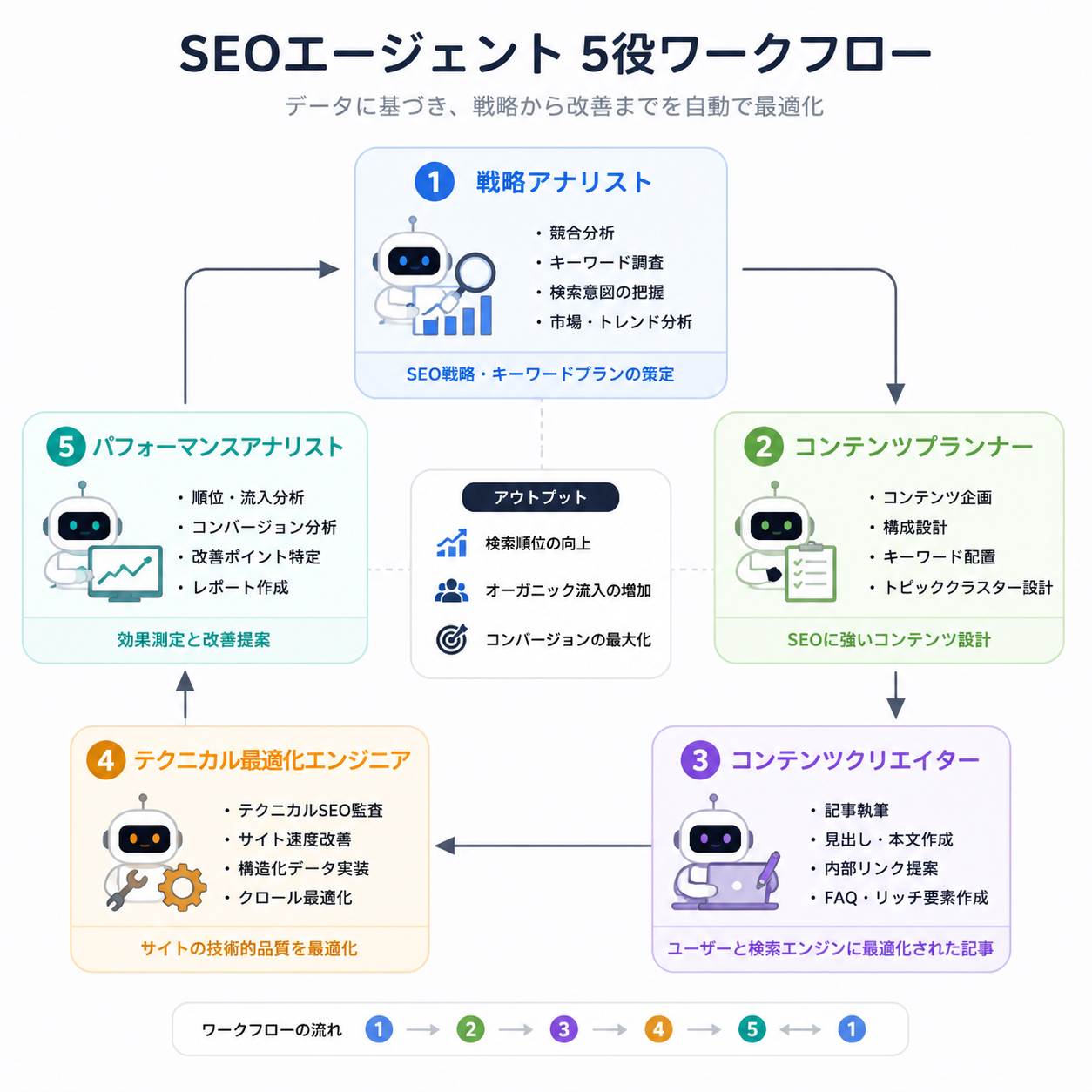
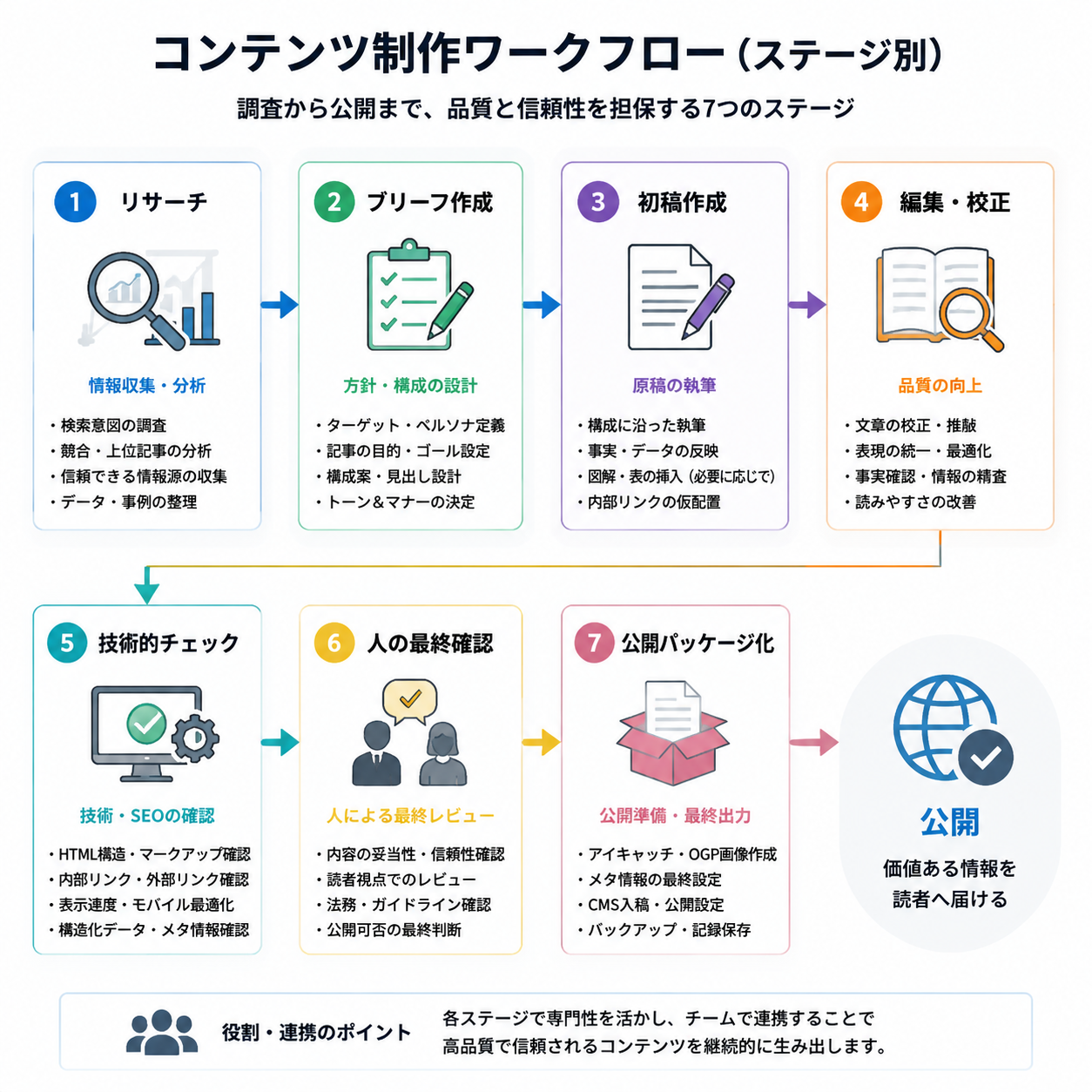
Hermes SEO/GEO swarm とは、オーガニック成長作業の各部分を別々の Agent が担当する、監督付きワークフローです。調査、ブリーフ、下書き、編集、技術 QA、公開準備を分けます。目的は、5 つの Agent に速く公開させることではありません。1 つの Agent がすべての仕事を雑に行うのを防ぐことです。
初心者は 5 つの役割から始めます。
- Researcher
- Writer
- Editor
- Technical QA
- Publisher
すべての役割の上に 1 つのルールを置きます。人間の承認なしに公開ページを変更しないことです。
swarm が役立つ理由
単一の SEO Agent は、仕事を混ぜがちです。調査し、書き、編集し、リンクを確認し、タイトルを考え、ページは準備完了だと宣言します。これは危険です。下書きを作った同じ Agent は、自分の弱い仮定を見落としやすいからです。
swarm は分離を追加します。
役割 | 主な仕事 | 出力 |
|---|---|---|
Researcher | 検索、GEO、競合、出典の根拠を集める | Research notes |
Writer | 承認済みブリーフを下書きにする | Draft Markdown |
Editor | 構造、明確さ、声、実用性を改善する | Edited draft |
Technical QA | リンク、schema の必要性、クロールリスク、スニペット、indexability を確認する | QA report |
Publisher | 承認後に CMS パッケージを準備する | Publish-ready Markdown and metadata |
それでもこれは人間主導のワークフローです。Hermes は作業を調整しますが、戦略、事実、技術変更、公開は人間が承認します。
Step 1:swarm フォルダを作る
ファイル受け渡しシステムを使います。Agent 同士が履歴なしに作業を上書きしないようにします。
/hermes-seo-agent
  /swarm
    /researcher
    /writer
    /editor
    /technical-qa
    /publisher
  /briefs
  /drafts
  /qa
  /publish-ready
  /approvals
  /prompts
    researcher.md
    writer.md
    editor.md
    technical-qa.md
    publisher.md
    coordinator.md
各役割は、まず自分のフォルダに出力します。coordinator または人間のレビュー担当が、次に進めるものを決めます。
Step 2:coordinator プロンプトを書く
prompts/coordinator.md を作成します。
You are the Hermes SEO/GEO workflow coordinator.

Your job is to assign tasks to role agents and maintain safe handoffs.

Rules:
- Do not publish or edit live pages.
- Do not let the Writer start until the brief is approved.
- Do not let the Publisher prepare final CMS fields until Editor and Technical QA pass.
- Every role must write its output to the correct folder.
- Every role must list assumptions and missing data.
- Any technical change requires human approval.
- Any external claim requires source verification.

Workflow order:
1. Researcher creates research notes.
2. Human approves or revises research direction.
3. Writer creates draft from approved brief.
4. Editor revises draft.
5. Technical QA reviews draft and page risks.
6. Human approves final content.
7. Publisher prepares publish package.
coordinator は並列作業の混乱を防ぎます。交通整理役です。
Step 3:Researcher の役割を定義する
prompts/researcher.md を作成します。
You are the SEO/GEO Researcher.

Inputs:
- Approved topic or page
- Website context
- Keyword cluster
- GEO prompt map
- GSC or Bing data, if available
- Competitor/source URLs, if provided

Your output goes to /swarm/researcher/[slug]-research.md.

Return:
1. Target reader
2. Search intent
3. GEO prompt intent
4. Primary and secondary keywords
5. Related questions
6. Entities to define
7. Source evidence needed
8. Competitor patterns to learn from
9. What not to copy
10. Recommended brief angle
11. Missing data

Rules:
- Do not write the article.
- Do not invent source claims.
- Do not use competitor wording.
- Mark uncertain claims for verification.
Researcher の出力はメモであり、完成した文章ではありません。Researcher が完成記事を書き始めたら止めてください。
Step 4:Writer の役割を定義する
prompts/writer.md を作成します。
You are the SEO/GEO Writer.

Inputs:
- Approved brief
- Researcher notes
- Brand context
- Approval rules

Your output goes to /swarm/writer/[slug]-draft.md.

Write a beginner-friendly draft that includes:
1. Direct answer near the top
2. Clear section headings
3. Practical steps
4. Tables or checklists where useful
5. GEO answer blocks for approved prompts
6. Internal link placeholders
7. Source placeholders where claims need verification
8. FAQ based on real questions

Rules:
- Do not add unsupported claims.
- Do not publish.
- Do not change the brief without noting why.
- If evidence is missing, mark [SOURCE NEEDED].
Writer は記事が公開可能かどうかを判断しません。最初の下書きを作るだけです。
Step 5:Editor の役割を定義する
prompts/editor.md を作成します。
You are the SEO/GEO Editor.

Inputs:
- Writer draft
- Approved brief
- Researcher notes
- Brand context

Your output goes to /swarm/editor/[slug]-edited.md.

Review and improve:
1. Opening clarity
2. Search intent match
3. Beginner usability
4. Section order
5. Examples
6. Tables and checklists
7. GEO answer extractability
8. Repetition and generic language
9. Unsupported claims
10. FAQ quality

Return:
- Edited draft
- Change summary
- Remaining risks
- Claims needing source verification

Rules:
- Do not invent facts.
- Do not remove useful specifics.
- Do not approve the draft for publication.
Editor は下書きをより明確で有用にします。新しい主張をこっそり追加してはいけません。
Step 6:Technical QA の役割を定義する
prompts/technical-qa.md を作成します。
You are the Technical SEO/GEO QA reviewer.

Inputs:
- Edited draft
- Target URL or planned URL
- Internal link plan
- Crawl data, if available
- Structured data notes, if available

Your output goes to /swarm/technical-qa/[slug]-qa.md.

Check:
1. Internal links
2. Anchor text accuracy
3. Image alt text
4. Table readability
5. Schema opportunities and risks
6. Snippet eligibility concerns
7. Canonical, indexability, or robots risks if updating an existing page
8. Broken or missing source links
9. Overpromising title/meta
10. Approval requirements

Rules:
- Do not change technical settings.
- Mark technical changes as requiring developer approval.
- Do not approve publishing if high-risk issues remain.
Technical QA は、多くの AI コンテンツワークフローが失敗する場所です。良い記事でも、悪いリンク、悪い schema 仮定、危険な title 変更を含んだまま公開されることがあります。
Step 7:Publisher の役割を定義する
prompts/publisher.md を作成します。
You are the Publisher preparation agent.

Inputs:
- Final human-approved draft
- Editor notes
- Technical QA pass report
- Metadata requirements
- Image assets

Your output goes to /swarm/publisher/[slug]-publish-package.md.

Prepare:
1. Title
2. Slug
3. Excerpt
4. SEO title
5. Meta description
6. Category
7. Tags
8. Featured image alt text
9. Inline image alt text
10. Final Markdown
11. Source list
12. Publishing checklist

Rules:
- Do not publish unless the human explicitly approves publishing.
- Do not change the approved article without listing the change.
- Do not remove source notes or QA warnings.
Publisher はパッケージング役です。秘密の編集者になってはいけません。
Step 8:ファイル受け渡しを使う
初心者向け swarm では、作業をファイルで移動させます。
/researcher/topic-research.md
        ↓
/briefs/topic-brief.md
        ↓
/writer/topic-draft.md
        ↓
/editor/topic-edited.md
        ↓
/technical-qa/topic-qa.md
        ↓
/approvals/topic-approval.md
        ↓
/publisher/topic-publish-package.md
承認ファイルテンプレート:
# Human approval record

Topic:
Slug:
Reviewer:
Date:
Approved stage:

## Approved files
- Research:
- Brief:
- Draft:
- Editor version:
- QA report:

## Required changes before publish
-

## Final decision
- [ ] Approved for draft only
- [ ] Approved for CMS staging
- [ ] Approved for publishing
- [ ] Rejected
これはシンプルで役に立ちます。ワークフローに記憶を持たせられます。
Step 9:swarm タスクを 1 つ実行する
安全な最初のタスクを使います。リフレッシュ計画またはコンテンツブリーフです。公開から始めないでください。
coordinator プロンプト:
Run a supervised SEO/GEO swarm task for this topic:
[TOPIC]

Goal:
Create an approved content brief, not a full article.

Use these roles only:
1. Researcher
2. Coordinator

Steps:
- Researcher creates research notes.
- Coordinator turns notes into a brief outline.
- Stop for human approval.

Do not draft the article yet.
それがうまく動いたら、記事全体のワークフローを実行します。
Run the full supervised SEO/GEO swarm workflow for the approved brief.

Use roles in order:
1. Writer
2. Editor
3. Technical QA
4. Publisher preparation

Stop after Publisher creates the publish package.
Do not publish until human approval is given.
この段階的な展開により、悪いプロンプト 1 つが公開ページになることを防げます。
Step 10:Agent 間の衝突を解決する
Agent 同士は意見が分かれます。適切に扱えば、それは有用です。
衝突 | 例 | 解決ルール |
|---|---|---|
Researcher vs Writer | Writer が調査にない主張を追加する | source needed としてマークするか、主張を削除する |
Writer vs Editor | Editor が技術的な詳細を削る | 読者理解や出典正確性に役立つなら詳細を残す |
Editor vs Technical QA | Editor は大胆なタイトルを望むが、QA は過剰約束だと言う | クリック訴求より正確性を優先する |
QA vs Publisher | Publisher は公開したいが、QA に未解決リンク問題がある | QA が公開をブロックする |
Researcher vs business owner | 調査では弱いトピックだが、事業責任者は欲しがる | SEO 優先ではなくブランド/戦略ページとしてラベル付けする |
conflict log を作ります。
# Swarm conflict log

| Issue | Roles involved | Decision | Reason | Owner |
|---|---|---|---|---|
Hermes へのプロンプト:
Review the role outputs and identify conflicts.

Return:
1. Conflicting recommendations
2. Evidence from each role
3. Risk of each option
4. Recommended decision
5. Human decision needed: yes/no
意見の違いを隠さないでください。品質が改善するのは、多くの場合その対立点です。
Step 11:swarm QA ゲートを追加する
qa/swarm-quality-gate.md を作成します。
# Swarm quality gate

- [ ] Researcher output exists.
- [ ] Brief was approved before drafting.
- [ ] Writer did not add unsupported claims.
- [ ] Editor improved clarity without changing facts.
- [ ] Technical QA checked links, snippets, schema, image alt text, and title/meta risk.
- [ ] Publisher used the final approved draft.
- [ ] All source-needed notes are resolved or removed.
- [ ] Human approval file exists.
- [ ] No role published or changed live pages.
- [ ] Final package includes title, slug, excerpt, category, tags, images, alt text, and source list.
実行します。
Review this project against qa/swarm-quality-gate.md.

Return pass/fail for each item.
Block publishing if any required file, source verification, or approval is missing.
初心者向け例:1 本の記事ワークフロー
トピック:Hermes を使ったテクニカル SEO/GEO 監査の方法
段階 | 出力 |
|---|---|
Researcher | crawlability、indexability、snippets、canonicals、schema、Google ガイダンスのメモ |
Brief | 承認済み構成と必要ソース |
Writer | 手順とテンプレートを含む初稿 |
Editor | より明確な初心者向け表現と、汎用的すぎる表現の削減 |
Technical QA | robots/noindex/canonical の警告、リンク正確性、snippet 主張を確認 |
Human approval | 出典正確性と技術リスク表現を確認 |
Publisher | 最終 Markdown、category、tags、画像 alt text、公開チェックリスト |
価値は速度だけではありません。各役割が異なる種類の失敗を見つけることに価値があります。
よくある失敗
失敗 | なぜ悪いか | より良い方法 |
|---|---|---|
すべての Agent に同じファイルを編集させる | 変更の監査が難しくなります | 役割フォルダと受け渡しを使う |
人間の承認を飛ばす | 危険な主張や技術変更が公開されます | 公開前に承認を必須にする |
役割を多くしすぎて始める | 初心者はプロセスをデバッグできません | Researcher と Writer から始め、後で追加する |
Publisher に本文を書き換えさせる | 最終パッケージが承認済み下書きからズレます | Publisher はパッケージングだけ行う |
conflict log がない | Agent の意見の違いが消えます | 衝突と決定を記録する |
QA ゲートがない | 弱いリンク、主張、メタデータが残ります | QA 通過まで公開をブロックする |
Auspia の見解
Hermes swarm ワークフローが有用なのは、説明責任を追加するときです。5 つの Agent がただ文章量を増やすだけなら、有用ではありません。
初心者に最適なセットアップは保守的です。1 つの coordinator、5 つの役割プロンプト、ファイル受け渡し、conflict log、人間の承認記録です。それが機能すれば、swarm はコンテンツ工場にならずに、より多くの作業量を扱えます。
誰が何を行い、誰が承認したかを説明できないワークフローは、SEO/GEO 制作に使う準備ができていません。
FAQ
Hermes SEO/GEO swarm とは何ですか?
調査、執筆、編集、技術 QA、公開準備を別々の Agent が担当するマルチロールワークフローです。目的は自動公開ではなく、品質管理を高めることです。
初心者はすぐに 5 つの Agent が必要ですか?
いいえ。Researcher と Writer から始めます。受け渡しワークフローが機能してから、Editor、Technical QA、Publisher を追加してください。
Publisher Agent は直接公開できますか?
安全な初心者セットアップではできません。Publisher は、人間の承認後に CMS パッケージを準備するだけにします。
swarm は GEO コンテンツをどう改善しますか?
Researcher がプロンプトと根拠をマッピングし、Writer が回答ブロックを追加し、Editor が明確さを改善し、Technical QA がリンク、スニペット、schema、ページリスクを確認します。各役割が GEO readiness の異なる部分を改善します。
最も重要な承認ゲートはどれですか?
ライブ変更前のゲートです。どの役割も、人間の承認なしに公開、公開ページ更新、メタデータ変更、内部リンク変更、技術設定変更を行うべきではありません。
swarm が機能しているかはどう判断しますか?
出力が具体的で、ファイルが追跡可能で、衝突が記録され、QA が実際の問題を見つけ、人間レビュー担当が全プロセスを再構築しなくても承認または却下できるなら、機能しています。
Hermes SEO/GEO シリーズを続けて読む
- 最初に読む:Hermes SEO/GEO オペレーターガイド
- 前のガイド:Hermes でテクニカル SEO/GEO 監査を行う方法
- 次のガイド:Hermes で週次 SEO/GEO モニタリングを行う方法
- 関連ガイド:初めての Hermes SEO Agent をセットアップする方法、Hermes で週次 SEO/GEO モニタリングを行う方法
使用したソース
- Hermes Agent ドキュメント: https://hermes-agent.nousresearch.com/docs/
- 有用なコンテンツ作成に関する Google ガイダンス: https://developers.google.com/search/docs/fundamentals/creating-helpful-content
- 生成 AI コンテンツ利用に関する Google ガイダンス: https://developers.google.com/search/docs/fundamentals/using-gen-ai-content
Author: Camille Rhodes, Auspia の 300 以上の AI コンテンツワークフローを設計したアーキテクト。Camille は AI 支援コンテンツワークフロー、自動化、公開システム、編集品質管理について執筆しています。