


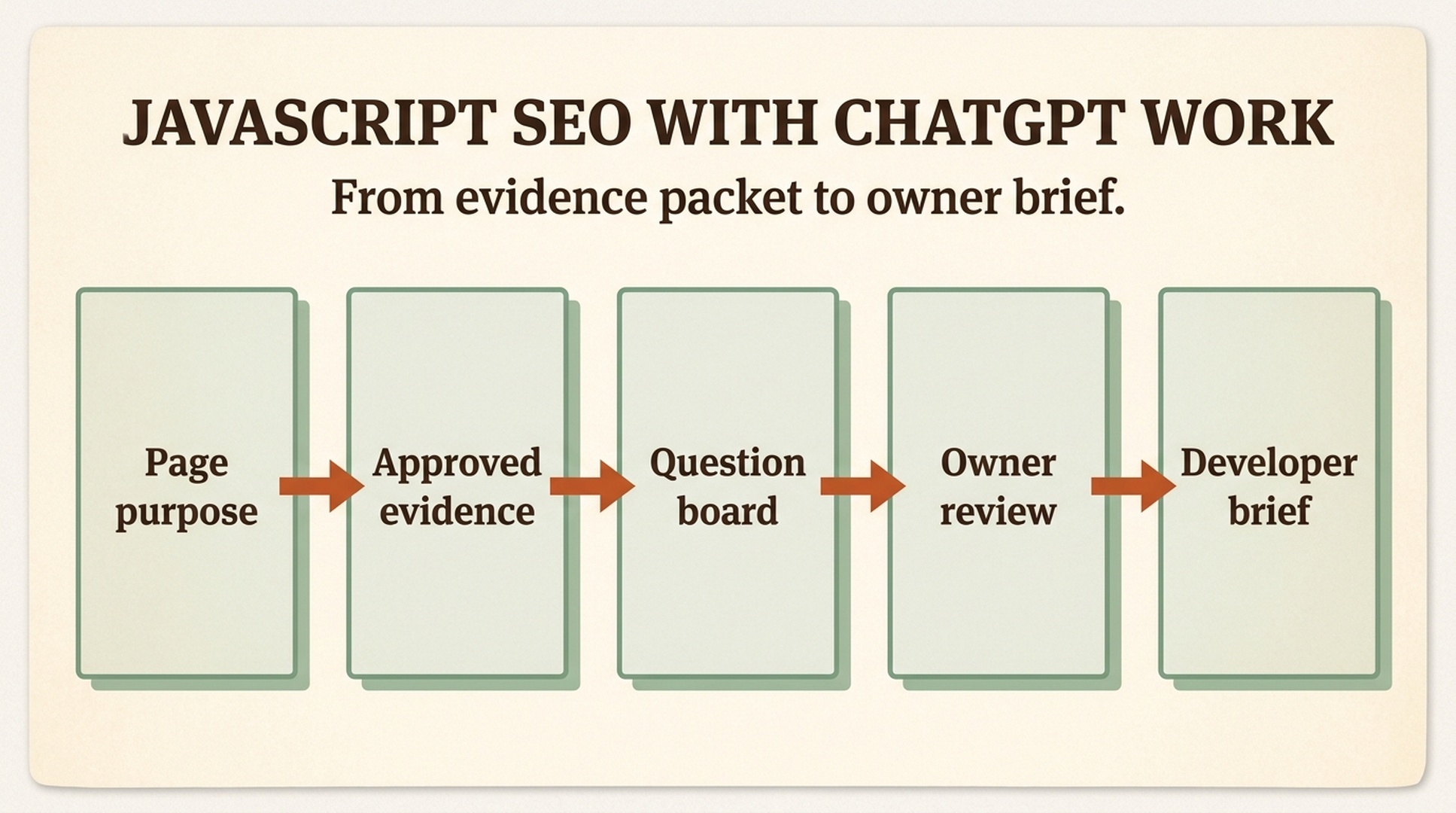
JavaScript SEO problems often arrive as workplace rumors. Someone posts a screenshot and says, "Google cannot see this page." Marketing sees falling clicks. A developer says the application loads correctly. A product owner remembers a recent release. Each person may be looking at a real clue, but the clues answer different questions.
ChatGPT Work is well suited to organizing that confusion. Its strongest role is not pretending to be a crawler or editing code it has never seen. It is creating a shared decision record from approved files, conversations, and connected sources that are actually available in the workspace.
What you will finish with: an evidence packet for one page question, a board that separates facts from risks and unknowns, an owner-reviewed decision, and a developer brief with acceptance checks. It is a collaboration workflow, not proof of indexation or an automatic website repair.
Part 1: A plain-English map of JavaScript SEO
What happens between a URL and the page you see
When you visit a URL, the server sends a response. On some pages, that response already contains most of the useful HTML. On a JavaScript application, the response may provide a shell, scripts, and references to data. The browser then runs the application and builds the page you see.
Search systems also discover URLs, request pages, process allowed resources, and interpret content and links. JavaScript is not disqualifying. The SEO risk appears when the page's important content or signals depend on a step that is unavailable, delayed, inconsistent, or hidden behind an interaction.
For a non-developer, it helps to separate the journey into four questions:
Question | What you are checking | Example evidence |
|---|---|---|
Did the URL respond correctly? | Status, redirect, final URL | Response capture or crawl |
What did the server send? | Initial content, links, title, canonical, robots | Source HTML |
What did the completed page contain? | Rendered content, link markup, loaded images and data | Rendered DOM or browser capture |
What did a search platform report? | Inspection, crawl, index, or performance data | Authorized export or tool result |
One source cannot answer every question. A screenshot cannot show an HTTP status. Source HTML cannot show everything inserted after rendering. A Search Console chart cannot identify the responsible component. Good JavaScript SEO work connects the sources without merging them into one claim.
The difference between crawling, rendering, indexing, and ranking
These terms are often used as if they mean the same thing.
- Crawling is fetching a URL and its accessible resources.
- Rendering is processing the page to obtain a completed state.
- Indexing is a search engine's decision to store and interpret a URL.
- Ranking is the page's position for a particular query and context.
A page can render in your browser and still have discovery or indexation questions. A URL can be indexed without ranking for the query a team cares about. A local rendering test can confirm a technical change, but it cannot prove that Google recrawled or selected the URL.
This is why the phrase "Google cannot see it" is usually a poor starting point. It compresses four different questions into one unsupported conclusion.
The seven beginner checks that catch many problems
Response status and redirects
A useful URL should return the intended response. A missing page should not return a successful empty shell. Redirects should end at the right destination. Client-side redirects may work for visitors but can be slower and harder to diagnose than an appropriate server response.
Main content
Identify what makes the page useful: the article body, product information, category items, event details, or location data. Check where and when that content appears. If it requires a click, scroll, failed request, or user-specific state, record the condition.
Stable links
Important destinations should generally be represented by standard links with resolvable URLs. Buttons and click handlers are not interchangeable with links. A visually clickable card may need an ordinary primary destination, but the implementation must preserve accessibility, analytics, and routing.
Canonical URL
The canonical tag indicates a preferred URL among similar versions. It is a hint, not a guarantee. It should be valid, relevant, and consistent with internal links, redirects, sitemaps, and the actual page.
Robots instructions
Robots directives control whether crawling or indexing is allowed in particular ways. Teams should distinguish robots.txt resource blocking from a page-level robots meta directive. Changing either can affect a large part of a site, so a beginner workflow should never alter them automatically.
Lazy loading and infinite scroll
Lazy loading is often sensible, but essential content should not require arbitrary interaction. Infinite-scroll interfaces should provide stable paths to later items when search discovery matters. A browser screenshot taken after scrolling may hide this dependency.
Metadata and structured data
Titles, descriptions, canonical tags, and structured data may be inserted or changed by JavaScript. They should remain accurate and match visible content. Structured data can improve understanding and eligibility, but it does not guarantee a rich result.
Define the page purpose before collecting evidence
Choose one URL and write one sentence about the visitor's job. For example:
A visitor should be able to compare shoes in this category and open a stable product page for each item.
Now list the content and destinations required to complete that job. This prevents a meeting from becoming a general discussion of rendering technology.
Use a starter card:
Field | Example |
|---|---|
Page question | Are product destinations available as standard links? |
Visitor job | Compare products and open product detail pages |
Required elements | Heading, product name, price, destination |
Known evidence | Redacted screenshot and rendered DOM excerpt |
Unknown evidence | Initial response, URL Inspection, logs |
Decision owner | Category-product owner and frontend owner |
Out of scope | Framework migration, production edit, ranking promise |
That is enough context to build a useful workplace investigation.
Part 2: Run JavaScript SEO as a ChatGPT Work decision room
ChatGPT Work may use workspace context, files, and authorized connections, depending on configuration. Treat reading, drafting, writing, sharing, scheduling, and executing as different risk levels. A conversation with attached files does not automatically grant repository, analytics, ticketing, or production access.
Create one evidence packet per page question
Do not upload every SEO export the company owns. A smaller packet is easier to review and less likely to include irrelevant or sensitive information.
Use this structure:
javascript-seo-case/
  01-page-purpose.md
  02-response-evidence.md
  03-rendered-evidence.md
  04-search-evidence.md
  05-engineering-context.md
  06-owner-decisions.md
Each file should identify its source, capture date, and limitations. Redact cookies, tokens, private user data, internal URLs, and unrelated customer information. If the workspace has a governed shared location, store the source files there and attach only what the conversation needs.
Packet item | Include | Do not claim |
|---|---|---|
Page purpose | Visitor task and required elements | That the page deserves a ranking |
Response evidence | Final URL, status, initial markup when supplied | That |
Rendered evidence | DOM excerpt, screenshot, loading condition | That one browser represents every renderer |
Search evidence | Authorized inspection, crawl, or export | Metrics that the source did not provide |
Engineering context | Framework, ticket, or release note supplied by owner | A guessed root cause |
Quality check: a teammate can trace every fact to a packet item. Recovery path: remove unsupported statements and mark the corresponding question unknown.
Ask for a question board, not an instant diagnosis
Use a prompt that rewards uncertainty:
Create a JavaScript SEO question board from the attached approved evidence packet.

Page purpose: [ONE SENTENCE]
Required content and destinations: [LIST]
Approved packet items: [LIST]

Classify every statement as:
- Confirmed
- Plausible risk
- Unknown
- Owner decision

Keep the evidence source and capture date beside each statement. Group open questions into:
1. URL and response signals,
2. source and rendered content,
3. crawlable links and progressive loading,
4. search-tool evidence,
5. implementation decisions.

Do not access unapproved sources, invent Search Console data, claim an index status,
prescribe a framework migration, or recommend a production change yet.
End with the three questions that would reduce the most uncertainty.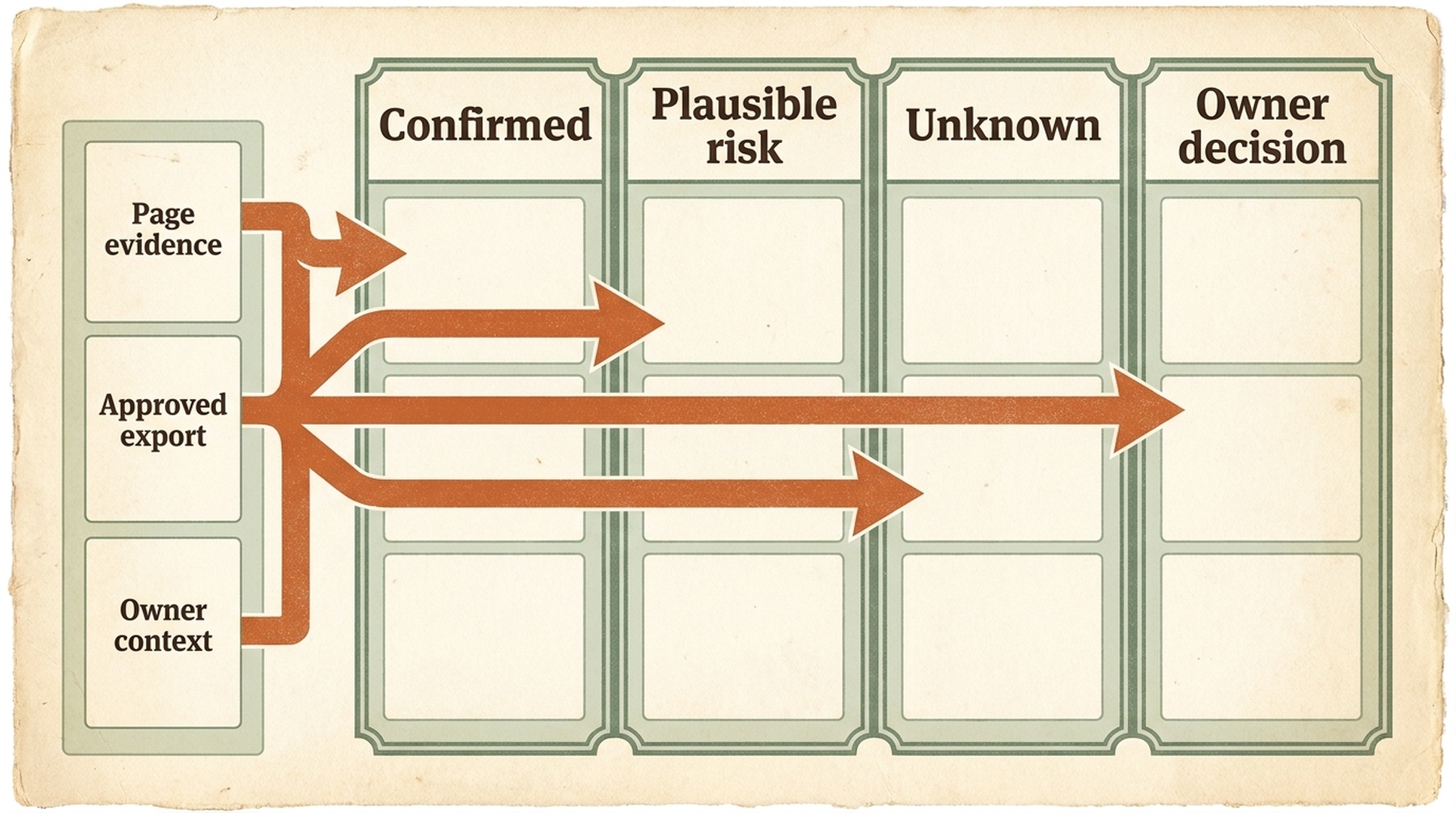
A question board helps a team separate evidence from assumptions before it asks engineering for a fix.
The output should resemble a meeting agenda, not an audit certificate. If the board says "Google did not render the links" when the packet contains only a screenshot, correct it to "standard links were not visible in the supplied rendered-DOM excerpt; Google rendering is unknown."
Prioritize the next question by uncertainty and impact
Not every unknown deserves another tool or meeting. Score open questions with two simple criteria:
Question | Visitor impact if true | Evidence gap | Next owner |
|---|---|---|---|
Are product destinations standard links? | High | Rendered markup incomplete | Frontend owner |
Did the initial response include products? | Medium | No response capture | Technical SEO owner |
Did Google select this canonical? | Medium | No URL Inspection | Search-platform owner |
Should the site migrate frameworks? | Unclear | No mechanism established | Defer |
Resolve the high-impact question with the smallest evidence request. Do not jump from a missing DOM excerpt to a broad architecture project.
Hold a 15-minute owner review
Invite the people who own the visitor goal and the relevant technical area. A large meeting is not required.
Use four decisions:
- Confirm or narrow the visitor impact. Does the observed condition actually interfere with the page's intended job?
- Approve the evidence set. Which files can be attached, which must be redacted, and which should remain in a governed system?
- Choose the next owner. Is another response capture needed, a code-path investigation, or authorized search evidence?
- Set the action boundary. Is this an investigation only, a draft brief, or a separately approved change later?
Record the decision in the packet. ChatGPT Work can format it, but a named owner should approve the substance.
Generate a developer brief without pretending to know the codebase
After owner review, ask ChatGPT Work to translate the approved question into a technical handoff:
Turn the approved JavaScript SEO question board and owner decisions into a developer brief.

Include:
- page purpose,
- confirmed evidence with source references,
- unknowns,
- visitor impact,
- the smallest codebase question to investigate,
- behavior that must be preserved,
- acceptance checks,
- rollback expectation,
- evidence not yet available and its owner type.

Use neutral language. Do not prescribe SSR, prerendering, a framework migration,
or a production edit unless the owner approved that exact option. Do not claim that
the brief itself will improve indexation or rankings.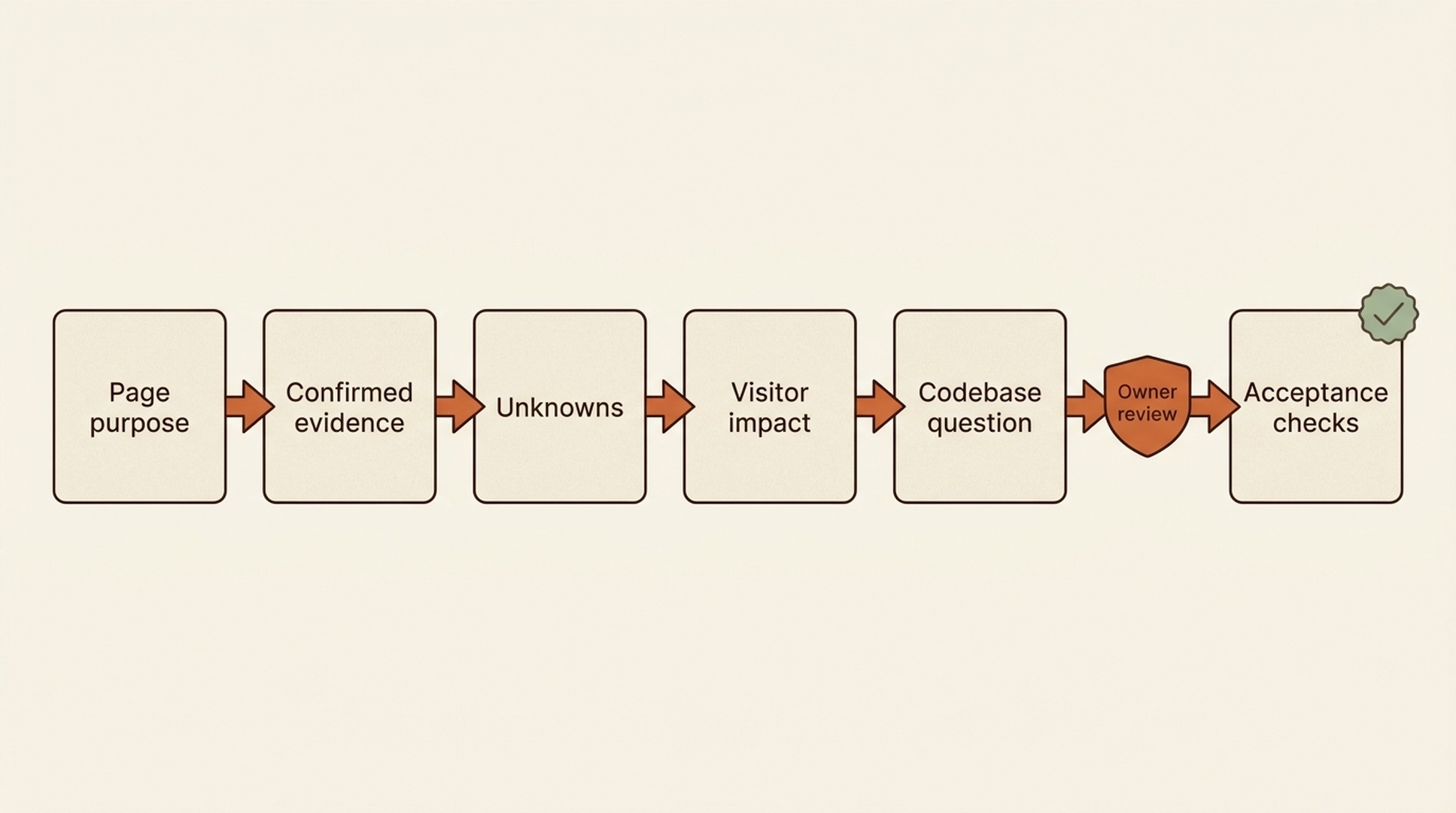
A developer-ready brief translates a reviewed SEO concern into a bounded technical question and acceptance checks.
A strong brief says:
Confirm whether category cards expose stable product destinations as standard links in the rendered page. Preserve keyboard navigation, analytics events, styling, and client routing. Provide the responsible component, a local test, and a preview capture.
A weak brief says:
Fix JavaScript so Google can index the site.
The first gives engineering a testable question. The second transfers anxiety and asks the developer to invent the scope.
Route the brief to the right implementation environment
ChatGPT Work may be the place where the team agrees on the problem, but implementation might belong in a repository workflow such as Claude Code, Codex, an internal ticket, or a developer's normal branch and review process.
The handoff should include only approved information. Do not paste private workspace conversations into a repository. Do not grant a code agent broad access merely because a brief exists. The receiving owner should restate the accepted scope and permissions.
Bring engineering evidence back into the decision room
When the developer responds, add the result to the same case:
- responsible code path;
- confirmed mechanism or rejected hypothesis;
- proposed or completed diff reference;
- local and preview test results;
- behavior preserved;
- rollback condition;
- new unknowns;
- owner decision.
Then update every question-board item to resolved, still unknown, or intentionally deferred. This closes the reasoning loop without rewriting history.
Verify the outcome without overclaiming
Verify the technical target
If the issue concerned links, inspect the relevant DOM and visitor flow. If it concerned status, inspect the response. If it concerned metadata, compare response and rendered values. Match the verification to the original symptom.
Verify preserved behavior
Check keyboard access, client navigation, analytics expectations, visual state, empty states, and error states. An SEO-oriented change can still be a product regression.
Keep search evidence separate and dated
Use authorized URL Inspection, crawl, log, or Search Console information when available. Record when the evidence was captured. A same-day technical fix does not guarantee a same-day recrawl, indexing change, traffic increase, or ranking movement.
Define done
The workplace case is complete when:
- the original observation is stated accurately;
- the relevant mechanism is confirmed or left explicitly unknown;
- the owner approved the action or decision;
- acceptance checks passed or failures were recorded;
- the developer brief and response are attached;
- no unapproved write, share, schedule, or execution occurred.
A repeatable monthly team routine
Use the workflow on a small number of important templates rather than creating a giant permanent audit conversation.
Stage | Owner | Output |
|---|---|---|
Intake | SEO or page owner | Page purpose and evidence packet |
Sorting | ChatGPT Work session | Question board |
Review | Page and technical owners | Decision record |
Investigation | Developer or repository workflow | Mechanism and test result |
Closure | SEO owner | Updated case and later measurement date |
Archive closed cases according to workspace policy. Reuse the packet template, not old conclusions.
Common mistakes
Uploading a large export with no page question
More context can create more noise. Start with one page purpose and only the rows or files needed for that question.
Treating workspace access as universal access
A shared workspace, file attachment, or connected source does not imply permission to browse the web, read the repository, send a ticket, or execute an action. Confirm each capability and risk level.
Asking for a solution before owners agree on the problem
Generate the question board first. A short review can eliminate a misleading screenshot or an incorrect business assumption before it reaches engineering.
Turning unknowns into polished prose
Clear writing can make speculation sound factual. Keep the status labels and source references in the final brief.
Judging the project only by rankings
Technical validation comes first. Later search performance also depends on relevance, competition, content, links, and other factors outside the JavaScript change.
Allowing a brief to become a hidden approval
A polished developer brief can look like a decision even when no owner signed off. Add an explicit approval line, owner role, and action boundary to the brief. If the team only approved investigation, the document must say so. That keeps a developer or a connected workspace action from interpreting a draft as permission to change production.
Losing the original source after a meeting
Meeting notes tend to flatten detail. Keep the original capture, export, or owner-provided context alongside the summary. When someone challenges a claim later, the team should be able to find the source and capture date rather than reconstructing the discussion from memory.
A practical first case, end to end
Consider a marketing manager who notices a category page losing clicks and shares a screenshot. The screenshot shows products, but says nothing about the response, link markup, or index state. The first ChatGPT Work task creates a packet and labels the screenshot as rendered visual evidence only. The question board then identifies two high-impact unknowns: whether the product cards expose standard links, and whether the initial response contains the category's main content.
At the 15-minute owner review, the product owner confirms that reaching product detail pages is the visitor job. The technical owner agrees to inspect the card component and provide a response capture. The action boundary remains investigation only. ChatGPT Work produces a brief that asks one question: "Confirm how category cards expose their primary product destination and whether the rendered output contains a stable link."
The developer returns a component path, a preview capture, and a small test result. The team adds those to the same packet, marks the link question resolved, leaves index status unknown, and schedules a later inspection check if the page warrants it. The page may or may not recover traffic. The team has nevertheless replaced a vague cross-functional dispute with a documented technical decision.
FAQ
Can ChatGPT Work inspect my production JavaScript application?
Only when the needed context and authorized tools are actually available. A screenshot, shared conversation, or text export is not repository or production access.
Is ChatGPT Work replacing a technical SEO crawler?
No. It can organize an approved crawl export and help the team reason about it, but it should not invent crawl data or imply that a conversation reproduced a search engine.
Who should approve a JavaScript SEO change?
The page or marketing owner should confirm the visitor goal and measurement plan. The owner of the affected code path should approve technical scope. One person may hold both roles in a small team, but the decisions remain distinct.
What if the packet contains no Search Console data?
Keep indexation and search-performance questions unknown. The team can still investigate response, rendered content, links, and code behavior.
Can the developer brief be reused in Claude Code or Codex?
Yes, as an approved input. The receiving environment must still establish its own permissions, repository rules, test commands, and implementation approval.
Author: Clara Bennett, 10-Year Content Strategy Practitioner at Auspia. Clara writes about editorial systems, repeatable content operations, and SEO/GEO production workflows.


