The weekly monitoring rule
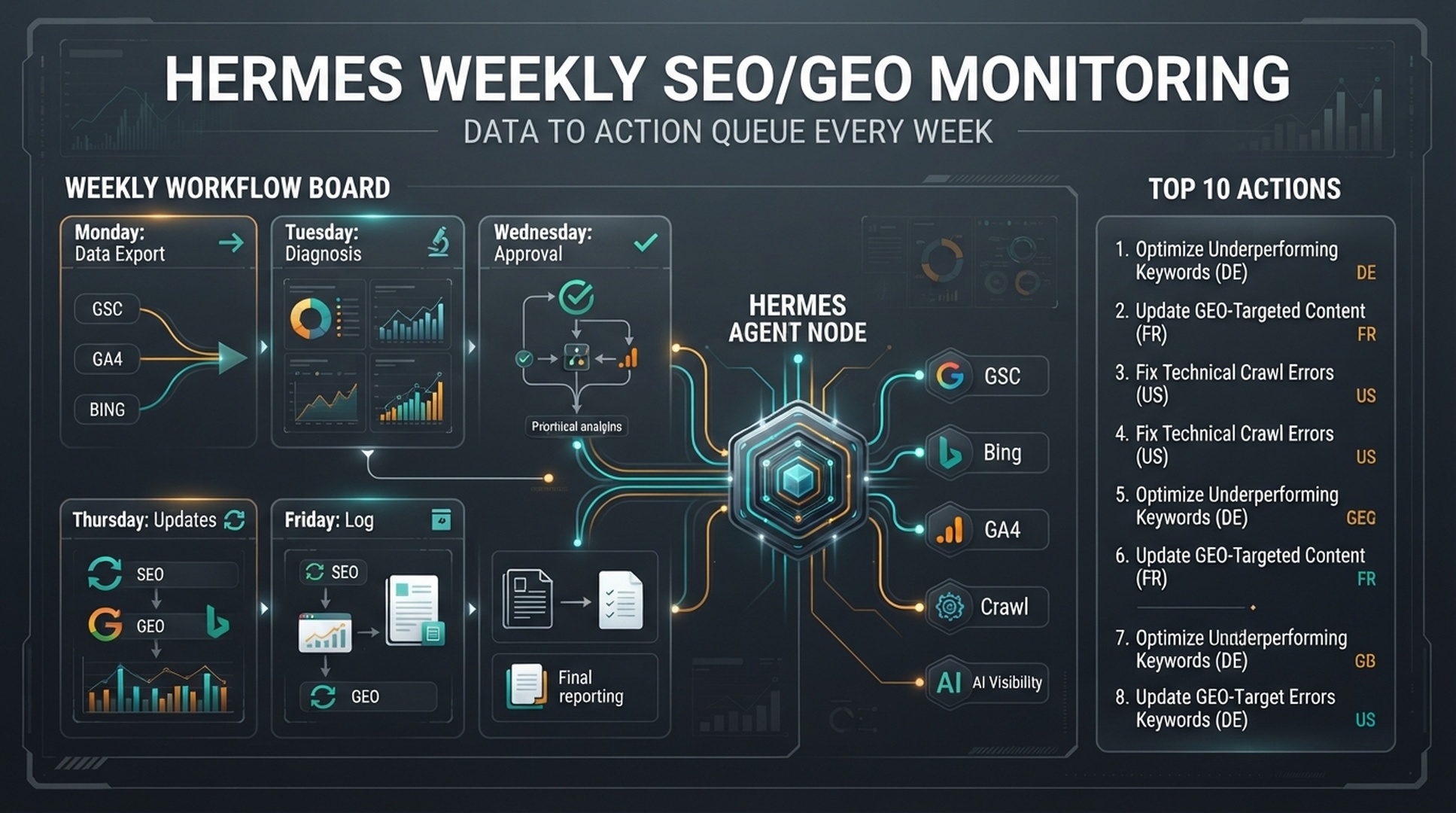
A weekly SEO/GEO monitoring workflow should answer one question: what should the team do next, based on evidence?
This is different from the data setup article. Data setup explains what to export from Google Search Console, Bing Webmaster Tools, GA4, crawl tools, and AI visibility checks. Weekly monitoring turns those exports into a habit: review, diagnose, score, approve, implement, and follow up.
The weekly output should be a short action queue with owners, risk levels, evidence, and approval gates, not a long report nobody reads.
Hermes is the open-source AI agent framework from NousResearch, driven from the CLI with hermes chat. As of mid-2026 it ships web_search and web_extract tools, browser automation, reusable skills, scheduled cronjob tasks, and MCP toolsets, documented at https://hermes-agent.nousresearch.com/docs and developed in the open at https://github.com/NousResearch/hermes-agent. Those capabilities map directly onto this workflow: Hermes reads the exports, checks live pages in a browser, and a cronjob can trigger the same loop every week.
Outcome at a glance
Field | Detail |
|---|---|
Audience | Marketers and SEO/GEO operators with GSC, Bing, GA4, crawl, and AI visibility exports |
Outcome | A repeatable weekly review that ends in a scored action queue with owners, approval gates, and follow-up checks |
Prerequisites | Hermes installed, this week's export files, and the folder structure in Step 1 |
Estimated time | 30 to 60 minutes for the first run, less once the folder and prompts are set up |
Definition of done | Weekly report with a top 10 action queue, human approval on every action, and an updated follow-up log |
What the weekly loop looks like
Use a five-day rhythm:
Day | Hermes job | Human job |
|---|---|---|
Monday | Read fresh exports and create report | Check whether data is complete |
Tuesday | Diagnose wins, risks, and top opportunities | Pick 1-3 actions |
Wednesday | Prepare briefs, refresh plans, or QA notes | Approve or reject actions |
Thursday | Support approved implementation | Make live changes manually |
Friday | Log what changed and set follow-up checks | Confirm next review date |
Beginners can run this manually. Once the workflow has been useful for a few weeks, a Hermes cronjob can trigger the same loop every week and send the notification automatically.
Step 1: create a weekly monitoring folder
/hermes-seo-agent
  /weekly-monitoring
    /2026-07-01
      gsc.csv
      bing.csv
      ga4.csv
      crawl.csv
      ai-visibility.csv
      weekly-report.md
      action-queue.md
      follow-up-log.md
  /prompts
    weekly-monitoring-prompt.md
  /qa
    weekly-monitoring-gate.md
Use one folder per week. This makes it easy to compare reports later.
Step 2: define the data freshness rule
A weekly report is only useful if Hermes knows the date ranges.
Create qa/weekly-monitoring-gate.md:
# Weekly monitoring data gate

- [ ] GSC export has a date range.
- [ ] Bing export has a date range or export date.
- [ ] GA4 export has a date range.
- [ ] Crawl export has a crawl date.
- [ ] AI visibility checks have platform and date checked.
- [ ] Missing files are marked missing.
- [ ] No metric is invented.
- [ ] The report separates evidence from interpretation.
Prompt:
Before creating the weekly report, review this week's folder against qa/weekly-monitoring-gate.md.

If the gate fails, return missing files, missing columns, and what the human should export.
Do not create recommendations from incomplete or unclear data unless the limitation is labeled.
This gate keeps the report from becoming confident nonsense.
Step 3: create the weekly monitoring prompt
Create prompts/weekly-monitoring-prompt.md:
You are the weekly SEO/GEO monitoring operator.

Read this week's folder:
weekly-monitoring/[date]

Read the website context and approval rules.

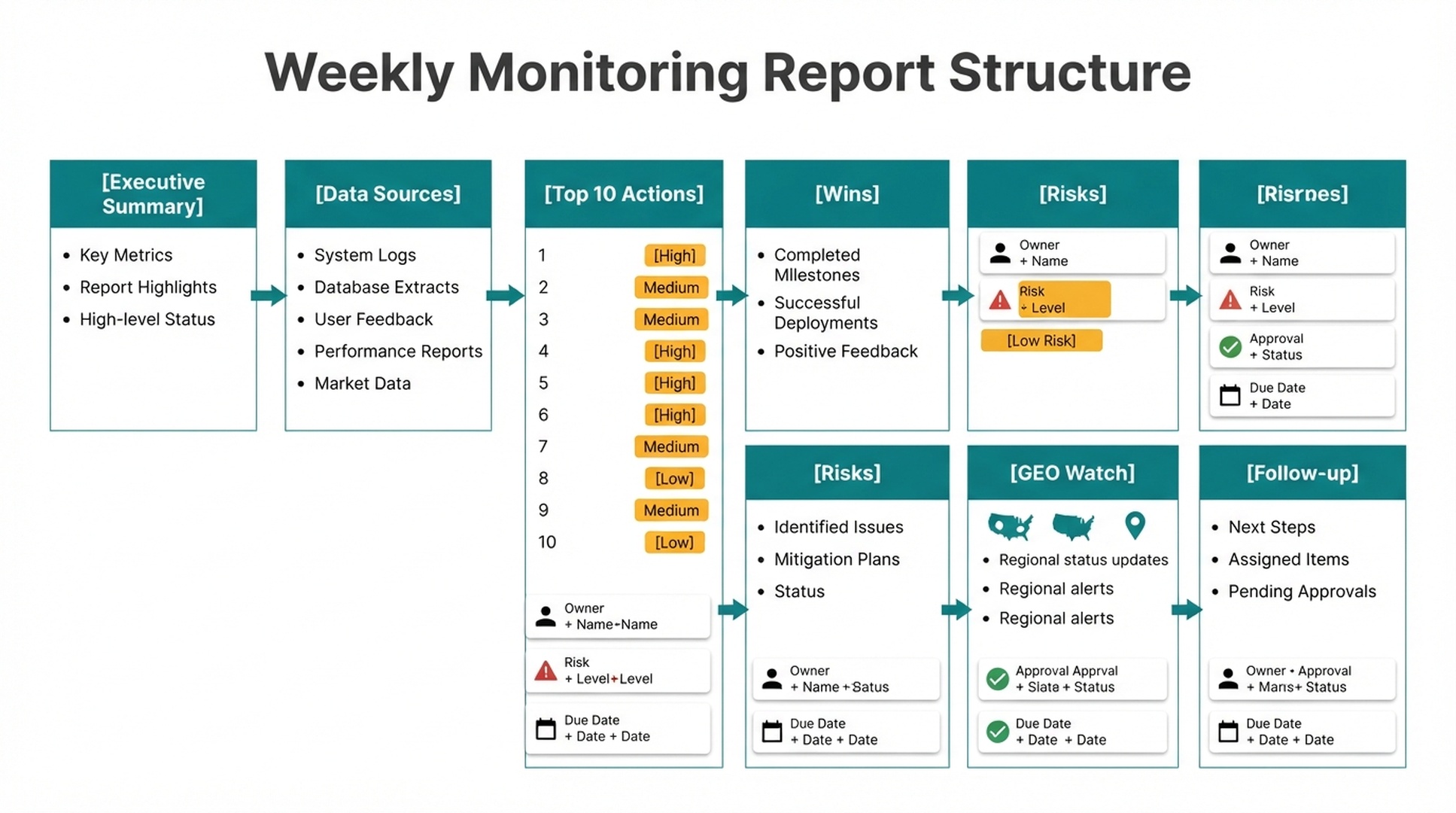
Create a weekly report that includes:
1. Executive summary
2. Data sources reviewed
3. Top 5 positive changes
4. Top 5 risks
5. Top 10 action queue
6. GSC low-CTR opportunities
7. Bing crawl or indexing issues
8. GA4 organic quality issues
9. Crawl and technical issues
10. GEO visibility gaps
11. Follow-up from last week
12. Human decisions needed

For every action, include:
- URL or page
- Evidence
- Recommended action
- SEO impact
- GEO impact
- Conversion impact if available
- Risk level
- Owner
- Approval required
- Due date suggestion

Do not publish or edit live pages.
Do not invent missing data.
The report should put decisions before details.
Step 4: score actions consistently
Use one scoring model every week:
Factor | Range | Meaning |
|---|---|---|
Traffic opportunity | 1-5 | Demand, impressions, ranking proximity, or query growth |
Conversion relevance | 1-5 | Connection to trial, demo, signup, lead, or sales intent |
GEO potential | 1-5 | Chance to answer important AI search prompts |
Technical urgency | 1-5 | Crawl, index, snippet, canonical, or error severity |
Effort | 1-5 | Work needed, where 5 means hard |
Risk | 1-5 | Chance of harming traffic, trust, compliance, or conversions |
Formula:
Priority score = Traffic + Conversion + GEO + Technical urgency - Effort - RiskPrompt:
Score each recommended action with the weekly scoring model.

Return a sorted top 10 list.
If a score is based on judgment instead of data, label it "judgment".
The score is not perfect. It makes tradeoffs visible.
Step 5: use a report template
# Weekly SEO/GEO monitoring report

Date:
Website:
Prepared by: Hermes
Human reviewer:
Data ranges:

## Executive summary
- Main win:
- Main risk:
- Main technical issue:
- Main GEO gap:
- Recommended focus this week:

## Data sources reviewed
| Source | File | Date range | Status |
|---|---|---|---|

## Top 10 action queue
| Priority | URL | Evidence | Action | Owner | Risk | Approval | Due |
|---|---|---|---|---|---|---|---|

## Wins
| URL | Metric improved | Likely reason | Follow-up |
|---|---|---|---|

## Risks
| URL | Metric declined | Likely cause | Action |
|---|---|---|---|

## GEO visibility watch
| Prompt | Brand status | Cited URL | Gap | Action |
|---|---|---|---|---|

## Follow-up from last week
| Previous action | Status | Result | Next step |
|---|---|---|---|

## Human decisions needed
| Decision | Owner | Deadline |
|---|---|---|
Keep the report short enough to review in 15 minutes.
Step 6: create the follow-up log
Most teams forget to check whether last week's actions worked. Add a follow-up log.
# Follow-up log

| Date | URL | Action taken | Baseline metric | Review date | Result | Next step |
|---|---|---|---|---|---|---|
Hermes prompt:
Compare this week's data with the follow-up log.

For each previous action, report:
1. Whether the action was implemented
2. Whether the expected metric moved
3. Whether more time is needed
4. Whether the action should be expanded, reverted, or left alone
This turns monitoring into a learning loop.
Step 7: send a short notification
If Hermes supports messaging in your setup, keep notifications short.
Notification template:
Weekly SEO/GEO report is ready.

Main win: [one sentence]
Main risk: [one sentence]
Top action: [one sentence]
Approval needed: [yes/no, owner]
Report: [file path or URL]
Send the decision summary and link to the file in chat, not the whole report.
Step 8: know what not to automate
Keep these steps manual in a beginner workflow:
Action | Why |
|---|---|
Publishing new pages | Needs editorial review |
Updating live content | May introduce factual or brand errors |
Changing title/meta at scale | Can hurt CTR or relevance |
Submitting many URLs | Can create noise and repeated submissions |
Changing robots/noindex/canonical | Technical risk is too high |
Adding internal links in bulk | Needs relevance review |
Hermes can recommend. Humans approve.
Beginner example: one weekly action queue
Priority | URL | Evidence | Action | Owner | Approval |
|---|---|---|---|---|---|
1 |
| 7,900 impressions, 1.3% CTR, position 6.1 | Refresh title and add template section | SEO editor | Yes |
2 |
| AI prompts mention competitors, brand absent | Add clearer use case and prompt examples | Product marketing | Yes |
3 |
| Clicks down 34% vs previous period | Create refresh plan | Content lead | Yes |
4 |
| New page, no internal links from hub yet | Add links from Hermes operator guide | SEO editor | Yes |
5 |
| Crawl export shows outdated schema warning | Technical QA review | Developer | Yes |
Five actions are enough. Weekly monitoring should reduce chaos, not create a new backlog nobody can finish.
Common mistakes
Mistake | Why it hurts | Better approach |
|---|---|---|
Reporting every metric | People stop reading | Lead with decisions |
No owner | Tasks stall | Assign owner and due date |
No approval column | Risk gets hidden | Add approval to every action |
No follow-up | Nobody learns what worked | Maintain a follow-up log |
Daily reports for small sites | Too much noise | Start weekly |
No data gate | Bad exports create bad advice | Check files before diagnosis |
Auspia take
Weekly monitoring is where Hermes becomes an operator instead of a writer. The workflow is simple: read data, diagnose changes, rank actions, ask for approval, log outcomes.
Judge the report by its decisions, not its length. A good weekly report may be short. If it gives the team three evidence-backed actions and prevents one risky change, it did its job.
Start manually. Automate only after the weekly report is useful for four weeks in a row.
Run this monitoring loop as a Hermes skill
Everything above can be packaged as a reusable Hermes skill. A skill bundles the data gate, the prompt, and the report template into one file, so a beginner can trigger the whole loop with one sentence instead of assembling files and prompts by hand.
---
name: hermes-weekly-seo-geo-monitoring
description: Run the weekly SEO/GEO monitoring loop for a website by checking data exports, scoring an action queue, and updating the follow-up log when asked to run this week's SEO/GEO monitoring.
---

# Hermes weekly SEO/GEO monitoring

You are the weekly SEO/GEO monitoring operator. Produce a short decision report, not a long essay.

## Inputs

- This week's folder: `weekly-monitoring/[date]` with `gsc.csv`, `bing.csv`, `ga4.csv`, `crawl.csv`, `ai-visibility.csv`
- Gate file: `qa/weekly-monitoring-gate.md`
- Follow-up log: `weekly-monitoring/[date]/follow-up-log.md`

## Steps

1. Check the data gate. Every export needs a date range, missing files are marked missing, and no metric is invented.
2. Read every file in this week's folder.
3. Diagnose wins, risks, and top opportunities.
4. Score each candidate action:
   Priority score = Traffic + Conversion + GEO + Technical urgency - Effort - Risk
   (each factor 1-5; label judgment-based scores "judgment")
5. Return a sorted top 10 action queue with URL, evidence, action, owner, risk level, approval, and due date.
6. Compare this week's data with the follow-up log and report what moved.
7. Write `weekly-report.md` and update `action-queue.md`.

## Report structure

1. Executive summary
2. Data sources reviewed
3. Top 5 positive changes
4. Top 5 risks
5. Top 10 action queue
6. GSC low-CTR opportunities
7. Bing crawl or indexing issues
8. GA4 organic quality issues
9. Crawl and technical issues
10. GEO visibility gaps
11. Follow-up from last week
12. Human decisions needed

## Rules

- Never invent data. If a file is missing, list it and say what the human should export.
- Separate evidence from interpretation.
- Do not publish or edit live pages. Humans approve every change.
- Keep the report short enough to review in 15 minutes.

## Quality gates

- [ ] Gate file passed, or failures listed with what to re-export
- [ ] Every action has URL, evidence, owner, risk, approval, and due date
- [ ] No metric is invented
- [ ] Follow-up log reviewed and updated

## Output

Write the report to `weekly-monitoring/[date]/weekly-report.md` and print a short notification:

Weekly SEO/GEO report is ready.
Main win: [one sentence]
Main risk: [one sentence]
Top action: [one sentence]
Approval needed: [yes/no, owner]
Report: [file path]

## Scheduling

For a hands-off cadence, add a weekly cronjob in Hermes that triggers this skill every Monday morning. See the Hermes docs at https://hermes-agent.nousresearch.com/docs for the cronjob syntax in your setup, and remove the job if the report stops being useful.
Install
Save the file as ~/.hermes/skills/geo/hermes-weekly-seo-geo-monitoring/SKILL.md, then confirm Hermes sees it with hermes skills list. In hermes chat, one sentence is enough: "Use the hermes-weekly-seo-geo-monitoring skill to run this week's monitoring."
No skill setup needed
If you do not want to create a skill yet, send Hermes this article's URL (or paste the text) and say "Follow this article and run the monitoring workflow." Hermes reads the steps with web_extract, checks live pages with browser automation, and runs the export review from the terminal, so the same loop works without any local configuration.
Troubleshooting
The gate fails on a missing date range. A GSC export filtered without explicit dates has no date range. Re-export from Search Console with a start and end date, drop the file into this week's folder, and run the gate again.
The report mixes two weeks of data. If an old export stays in the folder, the report compares different periods. Keep one folder per week, move stale files out, and let the gate flag anything without a clear date.
Scores contain guesses that look like facts. The scoring model needs judgment calls. Ask Hermes to label judgment-based scores "judgment" as in Step 4, so the approval decision stays honest.
The follow-up log never shows results. If the review date is not updated when an action is logged, the next week cannot check it. Set the review date when the action is approved, then confirm it each Friday.
FAQ
How often should Hermes run SEO/GEO monitoring?
Weekly is enough for most teams. Daily monitoring creates noise unless you are managing a large site, migration, outage, or campaign.
What should be in the weekly report?
Include an executive summary, data sources, top 10 actions, wins, risks, GEO visibility watch, follow-up from last week, and human decisions needed.
Can Hermes run this with CSV exports?
Yes. CSV exports are the best beginner setup. Connect APIs later after the report format and approval workflow are stable.
Should Hermes automatically update pages from the report?
No. Hermes should prepare recommendations, briefs, refresh plans, or QA notes. Humans should approve live changes.
What is the difference between data supervision and weekly monitoring?
Data supervision is the system for collecting and interpreting GSC, Bing, GA4, crawl, and GEO data. Weekly monitoring is the operating cadence that turns that system into recurring decisions.
How do I know the weekly workflow is working?
It is working when the team can review the report quickly, pick a few actions, implement them safely, and check the result the next week.
Sources used
- Hermes Agent documentation: https://hermes-agent.nousresearch.com/docs/
- Google Search Console Performance report documentation: https://support.google.com/webmasters/answer/7576553
- Bing Webmaster Tools help: https://www.bing.com/webmasters/help/
- GA4 engagement metrics documentation: https://support.google.com/analytics/answer/12195621
Author: Leo Harrington, SEO Analytics Translator for 500+ Executive Reports at Auspia. Leo writes about reporting, dashboards, and metrics that help teams make organic growth decisions.