The practical point
Technical GEO is mostly technical SEO with stricter clarity. If a page cannot be crawled, indexed, rendered, or shown with a useful snippet, it is a weak candidate for search visibility and AI answer visibility.
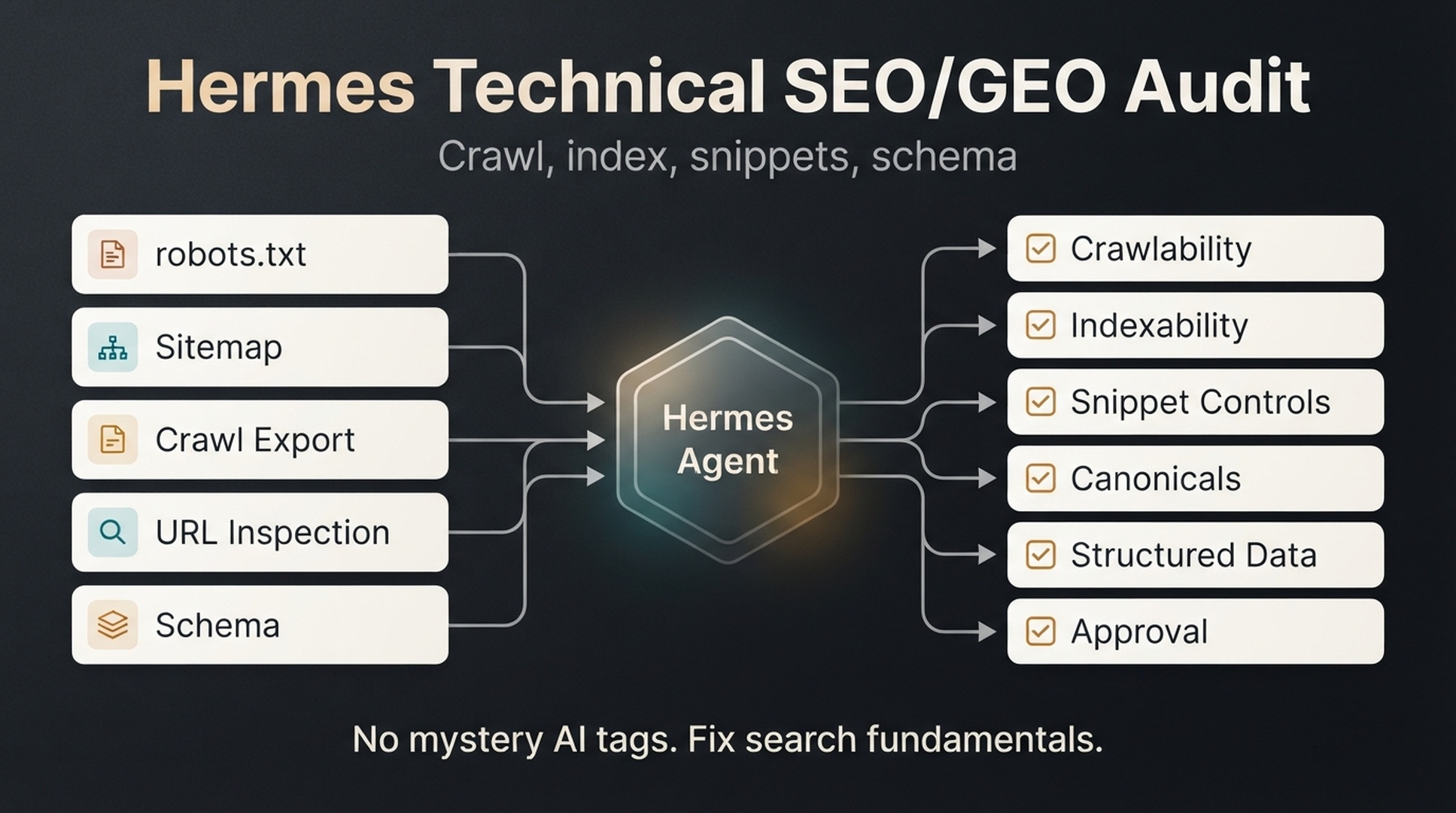
As of mid-2026, Google's guidance for AI features is clear on one important point: there are no special technical requirements for appearing in AI Overviews or AI Mode beyond being indexed and eligible to appear with a snippet. That means the beginner technical workflow can skip mystery AI tags. Start with crawlability, indexability, snippet controls, canonicals, sitemap health, internal links, and structured data that matches visible content.
Hermes can help by reading exports and turning them into a prioritized audit. Hermes is an open-source AI agent framework from Nous Research. Its CLI entry point is hermes chat, and it ships with web search and page extraction (web_search, web_extract), browser automation, reusable skills, scheduled cronjob tasks, and MCP toolsets. The official documentation is at https://hermes-agent.nousresearch.com/docs. Keep it in the auditor role: it reads and recommends, while a human approves every technical change.
Who this is for: SEOs, content editors, and site owners who want a first technical SEO/GEO audit without hiring a specialist. What you get: An evidence-backed technical issue queue for your site, grouped by priority with owners and approval levels, plus a fix approval gate and a post-fix validation plan. Prerequisites: Hermes installed and working (hermes chat responds), a crawl export of your site (Screaming Frog or any crawler), and at least one important URL to audit. No technical SEO background needed. Time: About 1 to 2 hours for the first run, most of it spent preparing the input files. Definition of done: Every audit area has a finding with evidence or is marked missing; the fix queue assigns owners and approval levels; approved fixes have a validation plan with a review date.What this audit checks
Use this beginner checklist:
Area | Question Hermes should answer | Why it matters |
|---|---|---|
Crawlability | Can search crawlers access the URL? | Blocked pages cannot reliably enter the search index. |
Indexability | Is the page allowed to be indexed? | A noindex page should not be expected to rank or appear in AI search features. |
Snippet eligibility | Is the page restricted by nosnippet or max-snippet? | Google AI features require eligibility to appear with a snippet. |
Canonical | Does the page point to the correct canonical URL? | Wrong canonicals can consolidate signals to the wrong page. |
Sitemap | Is the important URL included and clean? | Sitemaps help discovery and auditing. |
Structured data | Does schema match visible page content? | Structured data can clarify entities and page purpose. |
Internal links | Can important pages be discovered internally? | Orphan pages are harder to find and understand. |
Rendering | Does critical content load in crawlable HTML or render reliably? | Hidden or delayed content may weaken retrieval. |
The output should be a technical issue queue with evidence, impact, owner, and approval level.
Step 1: collect technical inputs
Create this folder:
/hermes-seo-agent
  /technical-audit
    crawl-export.csv
    robots.txt
    sitemap-urls.csv
    url-inspection-export.csv
    structured-data-export.csv
    server-log-sample.csv
    technical-audit-report.md
    technical-fix-queue.md
  /qa
    technical-seo-geo-gate.md
  /prompts
    technical-audit-prompt.md
Minimum files:
File | Beginner source |
|---|---|
| Screaming Frog, Sitebulb, Ahrefs, Semrush, or another crawler |
| Download from |
| Export sitemap URLs or crawl the XML sitemap |
| Manual GSC URL Inspection notes or API export if available |
| Rich Results Test notes, Schema validator output, or crawler schema export |
| Optional for beginners |
If you only have a crawl export, start there. Hermes should mark missing files as missing.
Step 2: ask Hermes to classify technical risk
Create prompts/technical-audit-prompt.md:
You are a technical SEO/GEO auditor.

Read the files in /technical-audit.
Do not make live changes.
Do not invent missing data.
If a file is missing, write "missing".

Audit these areas:
1. Crawlability
2. Indexability
3. Snippet controls
4. Canonicals
5. Sitemap inclusion
6. Structured data
7. Internal discoverability
8. Rendering or content visibility issues, if data exists

For every issue, return:
- URL
- Issue type
- Evidence
- SEO impact
- GEO impact
- Risk level: low, medium, high
- Recommended fix
- Approval owner
- Whether a developer is required
The output table:
| URL | Issue type | Evidence | SEO impact | GEO impact | Fix | Risk | Owner |
|---|---|---|---|---|---|---|---|
A useful technical audit should name the exact setting, not just say "fix crawlability."
Step 3: check robots.txt and crawl blocks
Robots.txt controls crawling, not indexing by itself. A blocked URL can still appear in search in limited cases if Google discovers it elsewhere, but blocking important pages is still a major audit item.
Prompt:
Review robots.txt and the crawl export.

Find:
1. Important directories blocked by robots.txt.
2. Important pages blocked from crawling.
3. CSS or JavaScript files blocked that may affect rendering.
4. AI or search crawler rules that may affect discovery.
5. Disallow rules that need human review.

Return only evidence-backed findings.
Do not recommend changing robots.txt without technical approval.
Robots findings table:
Finding | Why it matters | Approval |
|---|---|---|
| Important informational pages may not be crawlable | Technical approval required |
| Usually normal, but check if critical assets are blocked | Developer review |
AI crawler rules changed recently | May affect some AI retrieval systems | SEO and legal/policy review |
Keep robots advice conservative. Robots rules may exist for good reasons, so have Hermes flag rules for human review instead of opening everything.
Step 4: check indexability and noindex
Indexability checks should look for:
noindex- X-Robots-Tag headers
- canonical conflicts
- blocked pages that should be crawled
- pages returning non-200 status codes
- pages excluded in URL inspection data
Prompt:
Review indexability using crawl-export.csv and url-inspection-export.csv if available.

Find:
1. Important pages marked noindex.
2. Important pages with X-Robots-Tag noindex.
3. Pages returning 3xx, 4xx, or 5xx where 200 is expected.
4. Pages Google reports as not indexed, if URL inspection data exists.
5. Pages blocked by robots but expected to rank.

Classify every finding as expected or unexpected.
Expected noindex pages may include internal search results, filtered pages, staging URLs, thank-you pages, or duplicate utility pages. Unexpected noindex pages need review.
Step 5: check snippet controls
Snippet controls matter for GEO: as of mid-2026, Google says pages must be eligible to appear with a snippet for AI Overviews and AI Mode.
Check:
nosnippetmax-snippet:0- very restrictive
max-snippet data-nosnippetused on important content- pages with meta descriptions that do not match the article
Prompt:
Review snippet eligibility.

Find pages with:
1. nosnippet
2. max-snippet:0
3. very restrictive max-snippet values
4. data-nosnippet around important answer content
5. missing or misleading meta descriptions

For each page, explain whether the restriction is expected or risky for SEO/GEO visibility.
Do not recommend removing snippet controls without approval.
Use this decision table:
Setting | Usually safe when | Risky when |
|---|---|---|
| Page should not show text snippets | Page is meant to earn search or AI visibility |
| Legal or compliance reason exists | It hides useful answer content |
| Specific private or legal text should be excluded | It wraps the main answer or product details |
Step 6: check canonicals
Canonical tags tell search engines which URL should be treated as the preferred version. They are powerful and easy to get wrong.
Prompt:
Review canonical signals from the crawl export.

Find:
1. Important pages canonicalizing to another URL.
2. Canonical loops or chains.
3. Canonicals pointing to non-200 URLs.
4. Duplicate pages with inconsistent canonicals.
5. Pages where canonical choice conflicts with internal links or sitemap URLs.

Return recommended fixes only with evidence.
Mark all canonical changes as technical approval required.
Canonical issue table:
| URL | Current canonical | Expected canonical | Evidence | Risk | Approval |
|---|---|---|---|---|---|
Keep canonical changes in human hands. A wrong canonical can remove the wrong page from search consideration.
Step 7: check sitemap health
A sitemap should help discovery and auditing, not collect broken, redirected, duplicate, or non-indexable URLs.
Prompt:
Compare sitemap-urls.csv with crawl-export.csv.

Find sitemap URLs that are:
1. Non-200
2. Redirected
3. Noindex
4. Canonicalized to another URL
5. Blocked by robots.txt
6. Missing from internal links
7. Important pages missing from the sitemap

Return sitemap cleanup recommendations with risk level and approval owner.
Sitemap cleanup usually needs SEO approval and sometimes developer support, depending on the CMS.
Step 8: check structured data
Structured data should describe visible page content. It is not a magic GEO switch, but it can help clarify entities, page type, breadcrumbs, products, FAQs, articles, and organization details when used correctly.
Prompt:
Review structured-data-export.csv and the crawl export.

Find:
1. Pages with structured data errors.
2. Pages with schema that does not match visible content.
3. Important page types missing useful schema.
4. Duplicate or conflicting schema types.
5. Breadcrumb or organization schema inconsistencies.

For every recommendation, include the visible content that supports the schema.
Do not recommend schema that is not supported by visible page content.
Beginner schema checklist:
Page type | Schema to consider |
|---|---|
Blog article | Article, BreadcrumbList |
FAQ section | FAQPage only when FAQs are visible and eligible under current guidelines |
Product/tool page | SoftwareApplication, Product, Organization, BreadcrumbList where appropriate |
Local/service page | LocalBusiness or Service only when accurate |
Documentation page | TechArticle or HowTo when the page genuinely fits |
Schema should be accurate before it is ambitious.
Step 9: create a fix queue
Now ask Hermes to save the full findings as technical-audit-report.md in the audit folder, then turn them into a queue.
Create technical-fix-queue.md from the audit findings.

Group fixes by:
1. Critical blockers
2. Indexability risks
3. Snippet eligibility risks
4. Canonical and duplicate issues
5. Sitemap cleanup
6. Structured data improvements
7. Internal discoverability issues

For every fix, include:
- URL
- Evidence
- Recommended fix
- Expected SEO impact
- Expected GEO impact
- Implementation owner
- Approval required
- Rollback plan needed: yes/no
Fix queue template:
# Technical SEO/GEO fix queue

## Critical blockers
| Priority | URL | Issue | Evidence | Fix | Owner | Approval |
|---|---|---|---|---|---|---|

## Medium-priority fixes
| Priority | URL | Issue | Evidence | Fix | Owner | Approval |
|---|---|---|---|---|---|---|

## Low-risk improvements
| Priority | URL | Issue | Evidence | Fix | Owner | Approval |
|---|---|---|---|---|---|---|
Start with the few fixes that block important pages and leave the long tail for later sprints.
Step 10: run the technical approval gate
Create qa/technical-seo-geo-gate.md:
# Technical SEO/GEO approval gate

- [ ] Every issue has evidence.
- [ ] Missing data is marked as missing.
- [ ] Critical pages are separated from low-value pages.
- [ ] Robots.txt changes have technical approval.
- [ ] Noindex changes have SEO and technical approval.
- [ ] Canonical changes have technical approval.
- [ ] Sitemap changes have SEO or developer approval.
- [ ] Structured data matches visible content.
- [ ] Snippet control changes have SEO and policy approval if needed.
- [ ] Rollback plan exists for high-risk changes.
- [ ] Post-fix validation date is scheduled.
Prompt:
Review technical-fix-queue.md against qa/technical-seo-geo-gate.md.

Return:
1. Fixes approved for implementation
2. Fixes needing more evidence
3. Fixes needing developer approval
4. Fixes that should be rejected
5. Post-fix validation steps
If a fix changes indexation, crawling, canonicalization, redirects, or schema, treat it as a real technical change and give it its own technical ticket.
Step 11: validate after fixes
Technical work is not done when the ticket closes. Validate.
Post-fix checklist:
# Post-fix validation

- [ ] Re-crawl affected URLs.
- [ ] Confirm status code.
- [ ] Confirm robots access.
- [ ] Confirm indexability.
- [ ] Confirm canonical.
- [ ] Confirm snippet controls.
- [ ] Validate structured data.
- [ ] Check sitemap if changed.
- [ ] Use URL Inspection where appropriate.
- [ ] Record baseline and next review date.
Hermes prompt:
Create a post-fix validation plan for the approved technical fixes.

For each fix, include:
- URL
- What changed
- How to validate
- Tool to use
- Expected result
- What to do if validation fails
- Review date
Validation is where many beginner audits fail. The report looked good, but nobody checked whether the fix worked.
Beginner example: a technical GEO audit finding
Scenario: A guide is meant to appear for AI search visibility prompts, but it has weak search performance.
Data | Finding |
|---|---|
Crawl export | Page is indexable, status 200 |
Snippet check |
|
GSC | Page has impressions but low clicks |
GEO prompt check | AI answer does not cite the page |
Hermes recommendation:
Issue: Snippet restriction may limit search snippet and AI feature eligibility.
Evidence: Header contains max-snippet:0.
SEO impact: Search result snippet may be restricted.
GEO impact: Page may be ineligible or weak for AI feature summaries that require snippet eligibility.
Recommended fix: Review why max-snippet:0 exists. If no legal or product reason exists, remove or loosen it.
Risk: Medium.
Approval: SEO owner and policy/legal reviewer if restriction was intentional.
That is the right level of caution. Hermes should recommend "remove max-snippet" only alongside evidence and an approval note.
Common mistakes
Mistake | Why it hurts | Better approach |
|---|---|---|
Treating GEO as a special tag problem | Wastes time on unsupported hacks | Fix crawl, index, snippet, canonical, schema, and content clarity |
Changing robots.txt too quickly | Can block important pages | Review every rule with a technical owner |
Removing noindex without context | May index low-value or private pages | Classify expected vs unexpected noindex |
Ignoring snippet controls | Can weaken eligibility for search features | Audit nosnippet and max-snippet settings |
Adding schema that is not visible | Can violate structured data quality expectations | Match schema to visible content |
No validation after fixes | Issues may persist unnoticed | Re-crawl and inspect affected URLs |
When the audit stalls
Real failures this audit can hit, and how to recover:
- Hermes cannot find the audit files. The prompts reference
/technical-auditrelative to your project. If you launchhermes chatfrom the wrong directory, use an absolute path in the prompt (for example/hermes-seo-agent/technical-audit). - The crawl export reads as empty. Crawler exports with merged cells or blank first rows can break CSV parsing. Re-export with a plain header row, or ask Hermes to echo the header row it sees before it starts analyzing.
- The export is too large to work with. A 50,000-URL export burns tokens on pages you do not care about. Trim to the sections that matter (money pages, top content, newly launched templates) and re-export.
- Hermes reports no issues at all. Silence usually means missing data was treated as clean, not that the site is perfect. Verify by running the audit against one page you know is noindexed or blocked, and confirm the output flags it before trusting an all-clear.
If the output looks plausible but you still doubt it, spot check three findings against the source data yourself. Evidence you can reproduce is the whole point of this audit.
Auspia take
Technical SEO/GEO audits should be boring in the best way. They should find real blockers, show evidence, assign owners, and prevent risky changes from going live without approval.
Hermes is useful here because it can sort large exports and produce a readable fix queue. Leave the role of changing robots.txt at midnight to humans. Keep the agent in the auditor role until a technical owner approves the fix.
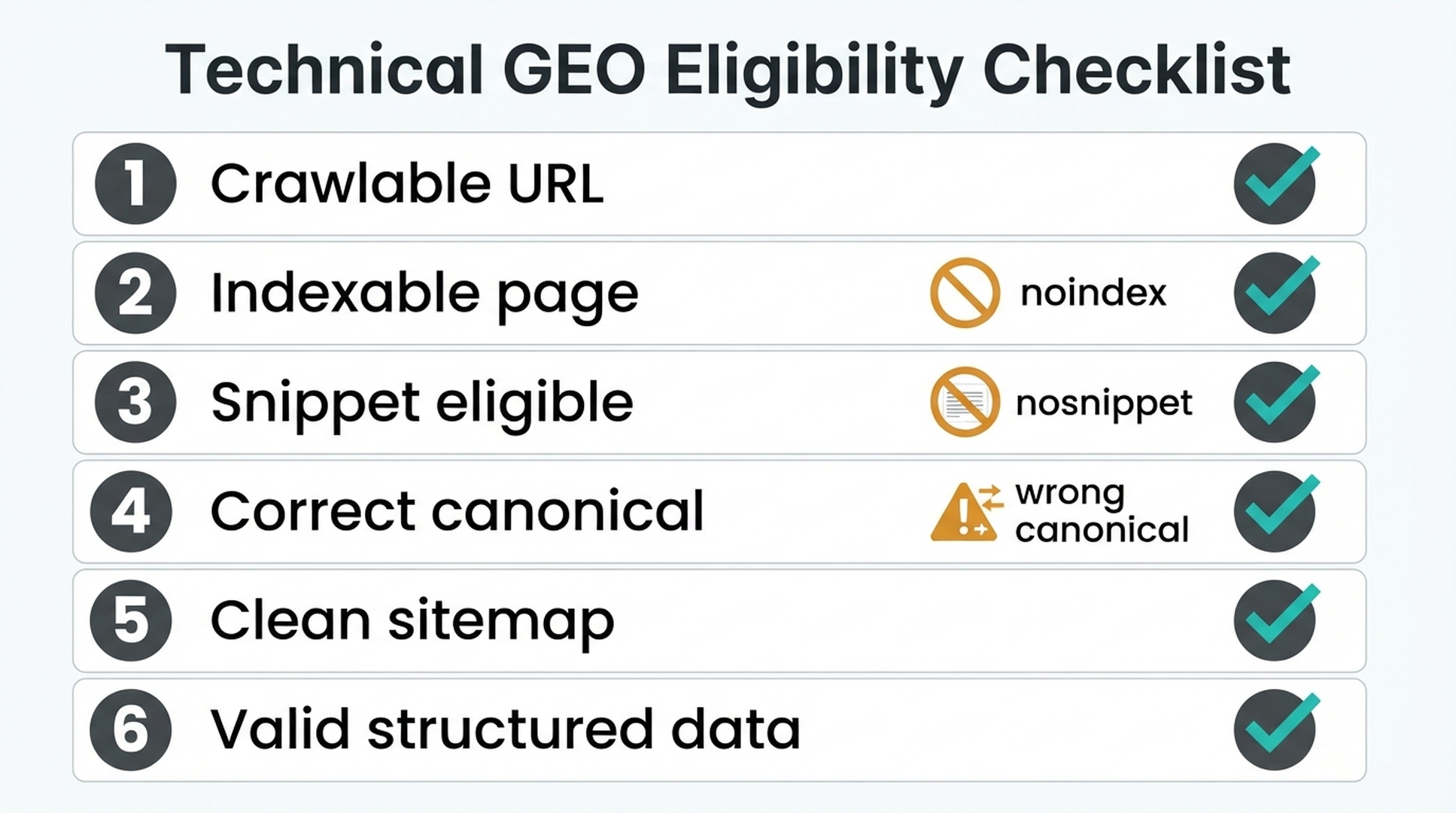
If you want one starter audit, check six things first: crawlable, indexable, snippet eligible, correct canonical, clean sitemap, and valid structured data.
Run this audit as a Hermes skill
If you plan to run this audit more than once, package it as a Hermes skill. A skill is a SKILL.md file that bundles the steps, prompts, and quality gates below, so a teammate with no SEO background can trigger a full audit with one sentence. The skill is a condensed version of the workflow in this article.
---
name: hermes-technical-seo-geo-audit
description: Run a beginner technical SEO/GEO audit with Hermes: classify crawl, index, snippet, canonical, sitemap, schema, and internal-link findings into a prioritized fix queue with owners and approval gates.
---

# Hermes technical SEO/GEO audit

Run a beginner technical SEO/GEO audit from a crawl export and other site inputs. Return a prioritized fix queue with evidence, owners, approval levels, and a post-fix validation plan.

## Inputs

Use a project folder such as /hermes-seo-agent with:

- /technical-audit/crawl-export.csv (required): URL, status code, indexability, canonical, title, meta description, H1, inlinks, and structured data fields when available
- /technical-audit/robots.txt
- /technical-audit/sitemap-urls.csv
- /technical-audit/url-inspection-export.csv (optional)
- /technical-audit/structured-data-export.csv (optional)
- /technical-audit/server-log-sample.csv (optional)

If an input file is missing, mark it as missing and continue. Never invent data.

## Steps

1. Read crawl-export.csv, robots.txt, sitemap-urls.csv, and any other exports present.
2. Crawlability: list blocked important pages, blocked CSS/JS that affects rendering, and AI crawler rules. Flag robots.txt changes for technical approval.
3. Indexability: find noindex pages, X-Robots-Tag noindex, non-200 statuses where 200 is expected, canonical conflicts, and blocked pages expected to rank. Classify each as expected or unexpected.
4. Snippet controls: find nosnippet, max-snippet:0, restrictive max-snippet, data-nosnippet around answer content, and misleading meta descriptions. Note whether each restriction is expected or risky.
5. Canonicals: find loops, chains, canonicals to non-200 URLs, inconsistent duplicates, and conflicts with internal links or sitemap URLs. Mark every canonical change as technical approval required.
6. Sitemap health: find non-200, redirected, noindexed, canonicalized, or robots-blocked sitemap URLs, plus important pages missing from the sitemap.
7. Structured data: find schema errors, schema that does not match visible content, missing useful schema, and duplicate or conflicting types. Support every recommendation with visible content.
8. Internal discoverability: find important pages missing from internal links.
9. Save the full findings as technical-audit-report.md, then create technical-fix-queue.md.
10. Create qa/technical-seo-geo-gate.md and run the approval gate.
11. Create a post-fix validation plan for every approved fix.

## Output format

For every issue return: URL, issue type, evidence, SEO impact, GEO impact, risk level (low/medium/high), recommended fix that names the exact setting, approval owner, and whether a developer is required.

Group the fix queue by:

1. Critical blockers
2. Indexability risks
3. Snippet eligibility risks
4. Canonical and duplicate issues
5. Sitemap cleanup
6. Structured data improvements
7. Internal discoverability issues

For every fix include: URL, evidence, recommended fix, expected SEO impact, expected GEO impact, implementation owner, approval required, and rollback plan needed yes/no.

## Quality gates

- Every issue has evidence from the input files.
- Missing data is marked as missing, never treated as clean.
- Expected noindex pages (internal search, filters, staging, thank-you pages) are not listed as unexpected issues.
- robots.txt, noindex, canonical, redirect, and sitemap changes carry explicit human approval requirements.
- Structured data recommendations match visible page content.
- High-risk changes include a rollback plan.
- Every approved fix has a validation step and a review date.

## Rules

- Act as an auditor only. Read and analyze, do not modify live files or settings.
- Recommend changing robots.txt, noindex, canonicals, redirects, sitemaps, or snippet controls only with human approval.
- Make no promises that any fix guarantees rankings or AI citations.
- Return evidence-backed findings only.
Install it
- Create the folder:
mkdir -p ~/.hermes/skills/seo/hermes-technical-seo-geo-audit - Save the block above as
~/.hermes/skills/seo/hermes-technical-seo-geo-audit/SKILL.md(create the folder and paste the file manually if you prefer). - Run
hermes skills listand confirmhermes-technical-seo-geo-auditappears. - In
hermes chat, say: "Use the hermes-technical-seo-geo-audit skill to audit my site."
Hermes then asks for the audit folder or crawl export location and runs the workflow. If Hermes is not installed yet, follow our setup guide first: https://auspia.ai/blog/set-up-hermes-seo-agent.
No install path
You do not need to install anything for a one-off audit. Send Hermes this article by URL (https://auspia.ai/blog/hermes-technical-seo-geo-audit) or paste the text, then say: "Follow this article step by step and run the audit." Hermes reads the article with its web_extract tool when you give it the URL, checks pages with its browser tools, and runs commands through the terminal, so it can execute the same workflow without a skill.
FAQ
Is technical GEO different from technical SEO?
Mostly, it is technical SEO applied to AI search readiness. GEO still depends on crawlable, indexable, understandable pages. The added focus is snippet eligibility, entity clarity, answer extractability, and evidence quality.
Do I need special schema for AI Overviews?
As of mid-2026, no special schema guarantees AI Overview inclusion. Use structured data when it accurately describes visible page content and fits the page type.
What is snippet eligibility?
Snippet eligibility means the page is allowed to show text snippets in search results. Restrictions such as nosnippet or very restrictive max-snippet settings can affect how content appears in search features.
Should Hermes change robots.txt or canonicals automatically?
No. Hermes can identify issues and recommend fixes, but robots.txt, noindex, canonical, redirect, sitemap, and structured data changes need human technical approval.
What crawl data should beginners export?
Start with URL, status code, indexability, title, meta description, canonical, H1, word count, inlinks, outlinks, and structured data fields if available.
How often should a technical SEO/GEO audit run?
Run a lightweight crawl monthly for active sites. Run a deeper audit after migrations, CMS changes, template changes, traffic drops, or major content launches.
Can technical fixes guarantee AI citations?
No. Technical fixes make pages eligible and easier to understand. They do not guarantee rankings, AI citations, or AI Overview inclusion.
Sources used
- Google AI features and your website: https://developers.google.com/search/docs/appearance/ai-features
- Google robots.txt introduction: https://developers.google.com/search/docs/crawling-indexing/robots/intro
- Google robots meta tag and X-Robots-Tag: https://developers.google.com/search/docs/crawling-indexing/robots-meta-tag
- Google canonical documentation: https://developers.google.com/search/docs/crawling-indexing/consolidate-duplicate-urls
- Google structured data intro: https://developers.google.com/search/docs/appearance/structured-data/intro-structured-data
- Hermes Agent documentation: https://hermes-agent.nousresearch.com/docs/
Author: Julian Mercer, Technical SEO Practitioner at Auspia. Julian writes about crawlability, schema, rendering, site architecture, and technical foundations for AI-readable content.