


How to Build a Scheduled PageSpeed SEO Audit Skill With Hermes Agent
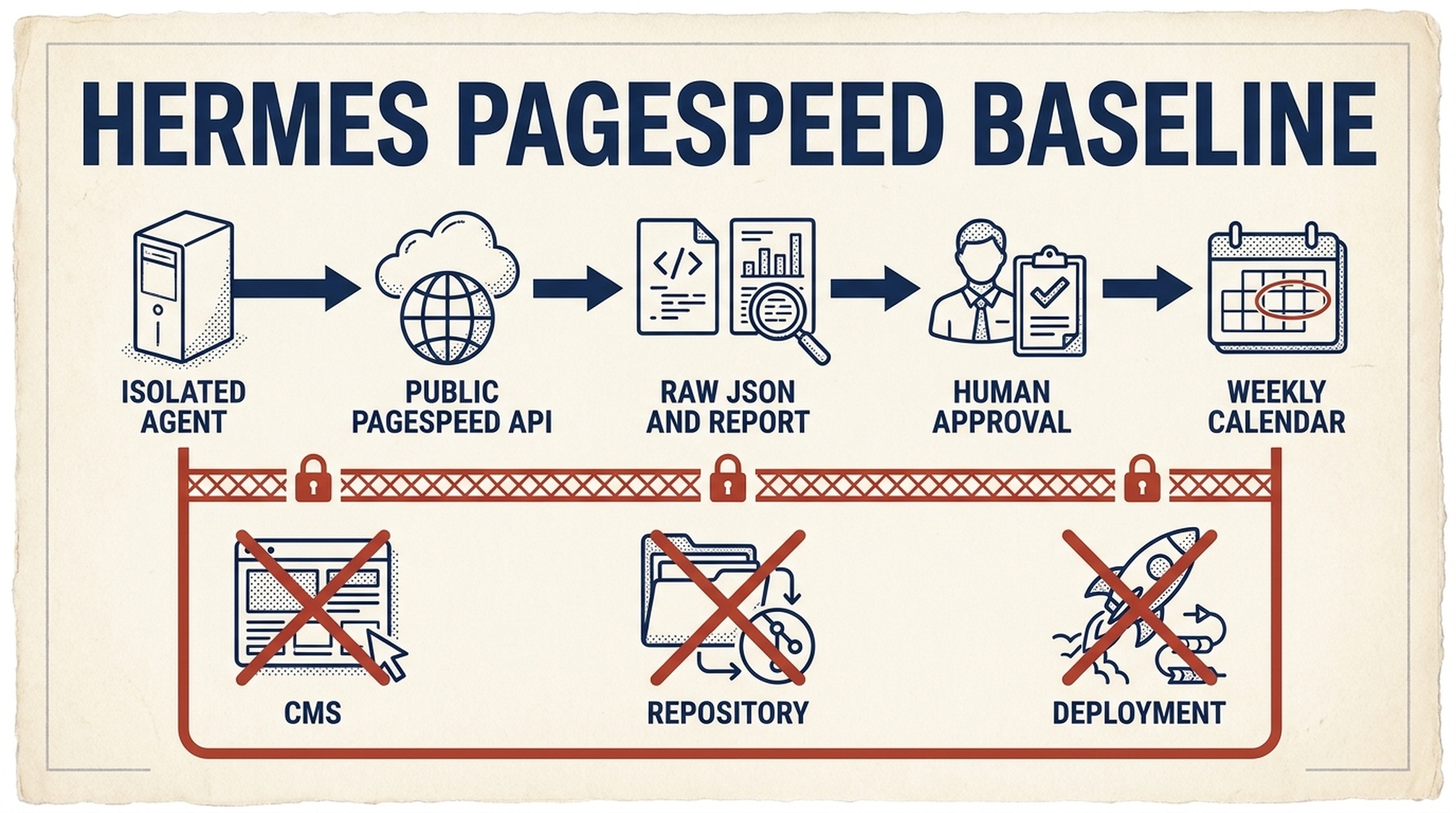
Hermes is useful for performance monitoring when it is allowed to repeat a narrow measurement, not when it is allowed to improvise its way into a production website. This tutorial creates a skill that audits public pages with Google's PageSpeed Insights API, saves the original responses, and prepares a dated report. You verify one manual run first. Only then do you schedule it.
The boundary matters. A PageSpeed score is a laboratory result for one URL at one moment. Chrome UX Report (CrUX) data is real-user field data only when Google returns it. Neither is permission for an autonomous agent to alter a CMS, a repository, or a deployment.
Hermes is the open-source AI agent framework from NousResearch, driven from the command line with hermes chat. It can search the web with its web_search and web_extract tools, automate a browser, run installable skills, schedule recurring tasks with cronjob, and use MCP toolsets, with documentation at https://hermes-agent.nousresearch.com/docs and source at https://github.com/NousResearch/hermes-agent. As of mid-2026, skills and cronjob tasks behave as described in this article, and this tutorial is a direct application of those two capabilities: build a bounded skill, then run it on a schedule only after a human reviews the first report.
The outcome: a baseline first, a schedule second
Item | This workflow provides |
|---|---|
Audience | SEO operators, developers, or technical marketers running Hermes locally or in an isolated environment |
Finished result | A |
Inputs | One public URL, a hand-picked URL list, or a sitemap with a maximum sample |
Prerequisites | Hermes Agent, Python 3.9+, a Google Cloud PageSpeed Insights API key, and a writable report directory |
Time | 25 minutes for the manual baseline; 10 minutes to add a schedule after review |
Done means | The report names every tested URL and strategy, keeps raw results, labels field-data scope, and has no website changes |
Use a curated URL list for a release check. Use a sitemap sample to look for patterns across templates, not to claim that every URL has been tested. The script samples one URL from each first path segment, then fills remaining slots in sitemap order. It does not crawl orphan pages, validate canonical tags, or prove indexability.
Ask Hermes to install the skill from this article
When this article is live, send its URL to Hermes with the prompt below. It tells Hermes to create the skill, verify its syntax, and stop before it touches a website.
Read [THIS ARTICLE URL] and install the Hermes skill described there.

First inspect my local Hermes configuration and any project guidance. Tell me
the destination you will use. Create only:
~/.hermes/skills/pagespeed-seo-baseline/SKILL.md
~/.hermes/skills/pagespeed-seo-baseline/scripts/pagespeed_baseline.py

Copy the complete code blocks from the article. Do not invent a different
workflow. Verify the Python file with a syntax check and report the two paths.
Tell me how to configure PAGESPEED_API_KEY locally, but never ask me to paste
the value into this chat and never display it.

Do not run PageSpeed, schedule a task, write to my site repository, use CMS or
hosting credentials, edit a skill other than this one, or change a live site.
Stop after installation and verification.
If Hermes cannot read the published page, paste the SKILL.md and Python blocks into the same conversation. On a local Hermes installation, as of mid-2026, skills live in ~/.hermes/skills/ and are invoked as slash commands. The skill directory is intentionally outside the website project: this is a monitoring tool, not an application feature.
Set the key where Hermes can request it safely
In Google Cloud Console, enable the PageSpeed Insights API for a project and create a restricted key. Keep the value in a local secret mechanism or the environment that starts Hermes, and keep it out of skills, reports, message channels, and Git.
Hermes skills support declared required environment variables. That lets the local Hermes runtime request a missing value securely; on a messaging surface, Hermes should tell the operator to configure it locally rather than soliciting a secret in a chat. Add the declaration to the skill, then configure the key in the environment used by Hermes:
export PAGESPEED_API_KEY="replace-with-your-key"If Hermes runs inside Docker, a remote terminal, or another sandbox, decide deliberately whether that environment should receive the key. Passing a secret into a container means code running there can read it. For a first audit, the lowest-risk choice is a local run with a dedicated, restricted API key. Confirm current API quotas in Google Cloud and build the schedule around the confirmed limit.
Install the Hermes skill
Create this exact directory structure:
~/.hermes/skills/pagespeed-seo-baseline/
  SKILL.md
  scripts/
    pagespeed_baseline.py
Save the following as SKILL.md. The required_environment_variables field is the Hermes-specific difference that keeps secret collection out of agent conversations. The rest of the instructions make the task bounded even if Hermes has access to browser, shell, or scheduling tools.
---
name: pagespeed-seo-baseline
description: Create a read-only PageSpeed Insights baseline for one public URL, a supplied URL list, or a controlled XML sitemap sample. Save raw JSON and a dated report that distinguishes Lighthouse lab data from CrUX field data. Use for website speed, Core Web Vitals, Lighthouse, and recurring performance-baseline requests. Never edit a site, repository, CMS, hosting configuration, or deployment.
required_environment_variables:
  - PAGESPEED_API_KEY
---

# PageSpeed SEO Baseline

This is an evidence-collection skill. It may call the public PageSpeed Insights API and public sitemap URLs, then write only inside the report directory chosen by the operator.

## Boundaries

- Read `PAGESPEED_API_KEY` from the runtime environment only. Never print, message, save, or commit it.
- Do not use browser logins, SSH, CMS, hosting, Git write, deployment, or website-editing tools. A performance report is not approval to repair a site.
- Run both `mobile` and `desktop`. Preserve each successful response under `raw/` before summarizing it.
- Describe Lighthouse as a point-in-time lab measurement. Treat `loadingExperience` as page-level CrUX only when returned, and `originLoadingExperience` as origin-level CrUX only when returned. Do not substitute one for the other.
- For `--sitemap`, say how URLs were sampled and how many were excluded. For important templates, prefer `--urls-file`.
- Never create or change a schedule until a human has reviewed one successful manual report and named the recurring scope, cadence, report path, and delivery destination.

## Commands

Run from this skill directory. The output path must be outside a repository unless the operator explicitly chooses an ignored evidence directory.

    python3 scripts/pagespeed_baseline.py \
      --url "https://www.example.com/pricing/" \
      --out "$HOME/hermes-pagespeed-reports/pricing-baseline"

    python3 scripts/pagespeed_baseline.py \
      --sitemap "https://www.example.com/sitemap.xml" \
      --max-urls 12 \
      --out "$HOME/hermes-pagespeed-reports/site-sample"

## Required report handoff

Return the report path and a compact table: requested URL, final URL, device strategy, performance score, LCP, INP, CLS, TBT, and field-data scope. Name failed requests and skipped URLs. Group repeated opportunities by likely mechanism, but label every repair as a hypothesis until a developer verifies it.

When the operator asks for a schedule, show the proposed command, cadence, report retention rule, and delivery target. Wait for explicit confirmation before creating it. If running on a messaging surface, send the report path or attachment; never send the API key or raw command environment.
The runner below uses Python's standard library. It accepts a URL, a text file with one URL per line, or an XML sitemap/sitemap index. It requests performance, accessibility, best-practices, and SEO categories for mobile and desktop. A short retry covers transient 429 and 5xx responses; completed results remain available when one request fails.
#!/usr/bin/env python3
"""Collect bounded PageSpeed Insights evidence without third-party packages."""
from __future__ import annotations

import argparse
import json
import os
import sys
import time
import urllib.error
import urllib.parse
import urllib.request
import xml.etree.ElementTree as ET
from collections import OrderedDict
from datetime import datetime, timezone
from pathlib import Path

API = "https://www.googleapis.com/pagespeedonline/v5/runPagespeed"
CATEGORIES = ("performance", "accessibility", "best-practices", "seo")
STRATEGIES = ("mobile", "desktop")
AUDITS = ("largest-contentful-paint", "interaction-to-next-paint", "cumulative-layout-shift", "total-blocking-time")


def get_bytes(url: str) -> bytes:
    request = urllib.request.Request(url, headers={"User-Agent": "Hermes-PageSpeed-Baseline/1.0"})
    with urllib.request.urlopen(request, timeout=45) as response:
        return response.read()


def sitemap_urls(url: str) -> list[str]:
    try:
        root = ET.fromstring(get_bytes(url))
    except (urllib.error.URLError, ET.ParseError) as error:
        raise RuntimeError(f"Could not read sitemap {url}: {error}") from error
    locs = [n.text.strip() for n in root.findall(".//{*}loc") if n.text and n.text.strip()]
    if root.tag.lower().endswith("sitemapindex"):
        locs = [item for child in locs for item in sitemap_urls(child)]
    return list(OrderedDict((u, None) for u in locs if urllib.parse.urlparse(u).scheme in {"http", "https"}))


def select_urls(urls: list[str], maximum: int) -> list[str]:
    groups: OrderedDict[str, list[str]] = OrderedDict()
    for url in urls:
        parts = [part for part in urllib.parse.urlparse(url).path.split("/") if part]
        groups.setdefault(parts[0] if parts else "root", []).append(url)
    chosen = [values[0] for values in groups.values()]
    chosen.extend(url for url in urls if url not in chosen)
    return chosen[:maximum]


def run_api(url: str, strategy: str, key: str) -> dict:
    params = [("url", url), ("strategy", strategy), ("key", key)]
    params.extend(("category", category) for category in CATEGORIES)
    endpoint = API + "?" + urllib.parse.urlencode(params)
    last_error = "unknown error"
    for attempt in range(3):
        try:
            request = urllib.request.Request(endpoint, headers={"User-Agent": "Hermes-PageSpeed-Baseline/1.0"})
            with urllib.request.urlopen(request, timeout=150) as response:
                return json.load(response)
        except urllib.error.HTTPError as error:
            last_error = f"HTTP {error.code}: {error.read().decode('utf-8', 'replace')[:240]}"
            if error.code not in {429, 500, 502, 503, 504}:
                break
        except (urllib.error.URLError, TimeoutError, json.JSONDecodeError) as error:
            last_error = str(error)
        time.sleep(2 ** attempt)
    raise RuntimeError(last_error)


def value(result: dict, audit_id: str) -> str:
    return result.get("lighthouseResult", {}).get("audits", {}).get(audit_id, {}).get("displayValue", "n/a")


def score(result: dict) -> str:
    raw = result.get("lighthouseResult", {}).get("categories", {}).get("performance", {}).get("score")
    return "n/a" if raw is None else str(round(raw * 100))


def field(result: dict, scope: str) -> str:
    metrics = result.get(scope, {}).get("metrics", {})
    names = ("LARGEST_CONTENTFUL_PAINT_MS", "INTERACTION_TO_NEXT_PAINT", "CUMULATIVE_LAYOUT_SHIFT_SCORE")
    return " / ".join(str(metrics.get(name, {}).get("percentile", "n/a")) for name in names) if metrics else "not returned"


def report(records: list[dict], scope: str, selected: int, total: int) -> str:
    lines = ["# Hermes PageSpeed baseline", "", f"- Generated (UTC): {datetime.now(timezone.utc).isoformat(timespec='seconds')}", f"- Scope: {scope}", f"- URLs selected: {selected} of {total}", "- Lighthouse is lab data. CrUX appears only when Google returned it.", "", "| URL | Final URL | Device | Perf | LCP | INP | CLS | TBT | Page CrUX (LCP / INP / CLS) | Origin CrUX (LCP / INP / CLS) | Status |", "| --- | --- | --- | ---: | --- | --- | --- | --- | --- | --- | --- |"]
    for item in records:
        if item["error"]:
            row = [item["url"], "n/a", item["strategy"], "n/a", "n/a", "n/a", "n/a", "n/a", "n/a", "n/a", item["error"]]
        else:
            data = item["result"]
            final_url = data.get("lighthouseResult", {}).get("finalUrl", item["url"])
            row = [item["url"], final_url, item["strategy"], score(data), *(value(data, name) for name in AUDITS), field(data, "loadingExperience"), field(data, "originLoadingExperience"), "ok"]
        lines.append("| " + " | ".join(str(cell).replace("|", "/") for cell in row) + " |")
    return "
".join(lines) + "
"


def main() -> int:
    parser = argparse.ArgumentParser()
    scope = parser.add_mutually_exclusive_group(required=True)
    scope.add_argument("--url")
    scope.add_argument("--urls-file")
    scope.add_argument("--sitemap")
    parser.add_argument("--max-urls", type=int, default=10)
    parser.add_argument("--out", required=True)
    args = parser.parse_args()
    key = os.environ.get("PAGESPEED_API_KEY")
    if not key:
        parser.error("PAGESPEED_API_KEY is not set in the environment")
    if args.url:
        urls, label = [args.url], "single URL"
        total = len(urls)
    elif args.urls_file:
        urls = [line.strip() for line in Path(args.urls_file).read_text(encoding="utf-8").splitlines() if line.strip() and not line.startswith("#")]
        label = "supplied URL list"
        total = len(urls)
    else:
        all_urls = sitemap_urls(args.sitemap)
        urls, label = select_urls(all_urls, args.max_urls), f"sitemap sample from {args.sitemap}"
        total = len(all_urls)
    out = Path(args.out)
    raw = out / "raw"
    raw.mkdir(parents=True, exist_ok=True)
    records = []
    for number, url in enumerate(urls, start=1):
        for strategy in STRATEGIES:
            try:
                result = run_api(url, strategy, key)
                (raw / f"{number:03d}-{strategy}.json").write_text(json.dumps(result, indent=2), encoding="utf-8")
                records.append({"url": url, "strategy": strategy, "result": result, "error": ""})
            except RuntimeError as error:
                records.append({"url": url, "strategy": strategy, "result": {}, "error": str(error)})
    (out / "report.md").write_text(report(records, label, len(urls), total), encoding="utf-8")
    (out / "summary.json").write_text(json.dumps({"scope": label, "urls": urls, "records": [{k: v for k, v in item.items() if k != "result"} for item in records]}, indent=2), encoding="utf-8")
    print(out / "report.md")
    return 0


if __name__ == "__main__":
    raise SystemExit(main())
Run one manual baseline in an intentionally boring place
Start with one canonical URL and a new report directory. A manual run checks that the skill can see its declared variable, reach the public API, and write only where intended.
mkdir -p "$HOME/hermes-pagespeed-reports"
cd ~/.hermes/skills/pagespeed-seo-baseline
python3 scripts/pagespeed_baseline.py \
  --url "https://www.example.com/" \
  --out "$HOME/hermes-pagespeed-reports/homepage-2026-07-24"
Expected output: the command prints report.md; the directory also contains summary.json and raw/001-mobile.json plus raw/001-desktop.json.
Quality check: open report.md and make sure the requested URL, final URL, strategies, and timestamp are present. Check that raw files are non-empty JSON. A final URL different from the requested URL can be a normal redirect, but it must be visible in the report.
Recovery: if the script says the key is missing, configure PAGESPEED_API_KEY in the local Hermes runtime rather than pasting it into a message. If an API request returns 403, check that the PageSpeed Insights API is enabled and the key restriction permits it. If a sitemap fails, switch to a small --urls-file while you fix the sitemap, and disclose the substitution in the report.
Read what PageSpeed actually measured
Begin with mobile, then compare desktop. Performance is a composite Lighthouse score, not a diagnosis. LCP, INP, CLS, and TBT give different clues, and a poor lab measurement does not prove that visitors have the same experience. For a quick cross-check of one URL, run it in the PageSpeed Insights web tool (https://pagespeed.web.dev) and compare its lab numbers with the matching report row.
Data in the report | What it means | Avoid saying |
|---|---|---|
Lighthouse score, LCP, INP, CLS, TBT | A controlled lab run for this requested page and strategy | "All users see this" |
| CrUX data returned for the page or Google-defined URL pattern | "This is origin-wide" |
| CrUX data returned for the origin | "Every template has this result" |
Missing CrUX | Google did not return eligible field data in this response | "The page has no real users" |
The audit is an evidence packet. Repeated large-image opportunities across product pages can justify investigating the image pipeline. It cannot, by itself, tell Hermes to convert assets, defer a script, or change cache headers.
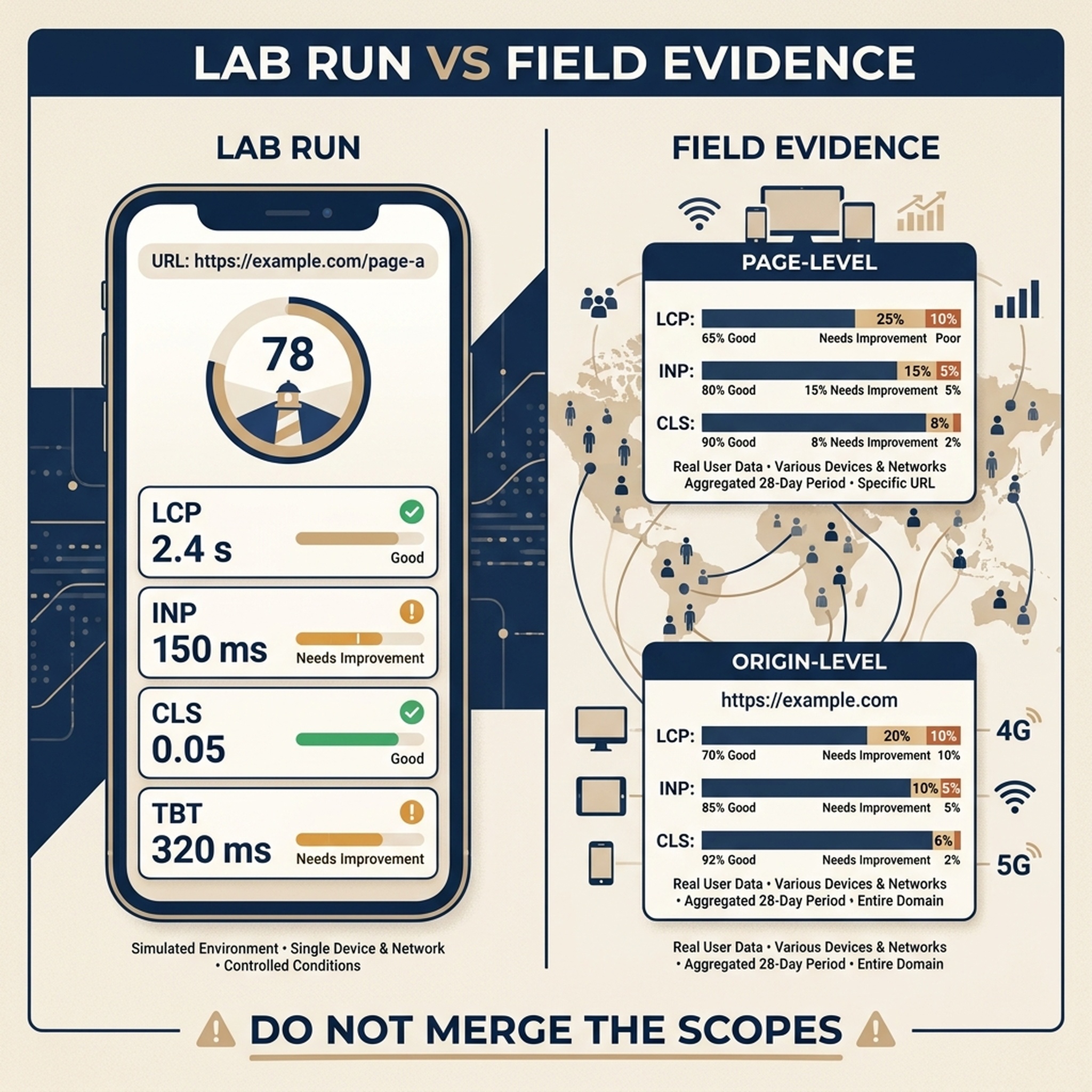
Lighthouse and CrUX answer different questions; label their scope before deciding what to fix.
Add a schedule only after the report is credible
As of mid-2026, Hermes can schedule recurring work with cronjob tasks, but scheduling an unverified agent task simply makes bad evidence arrive more often. Review the first run with the person who owns the site, then define four things: the exact URL list or sitemap cap, the cadence, report retention, and where the report should be delivered.
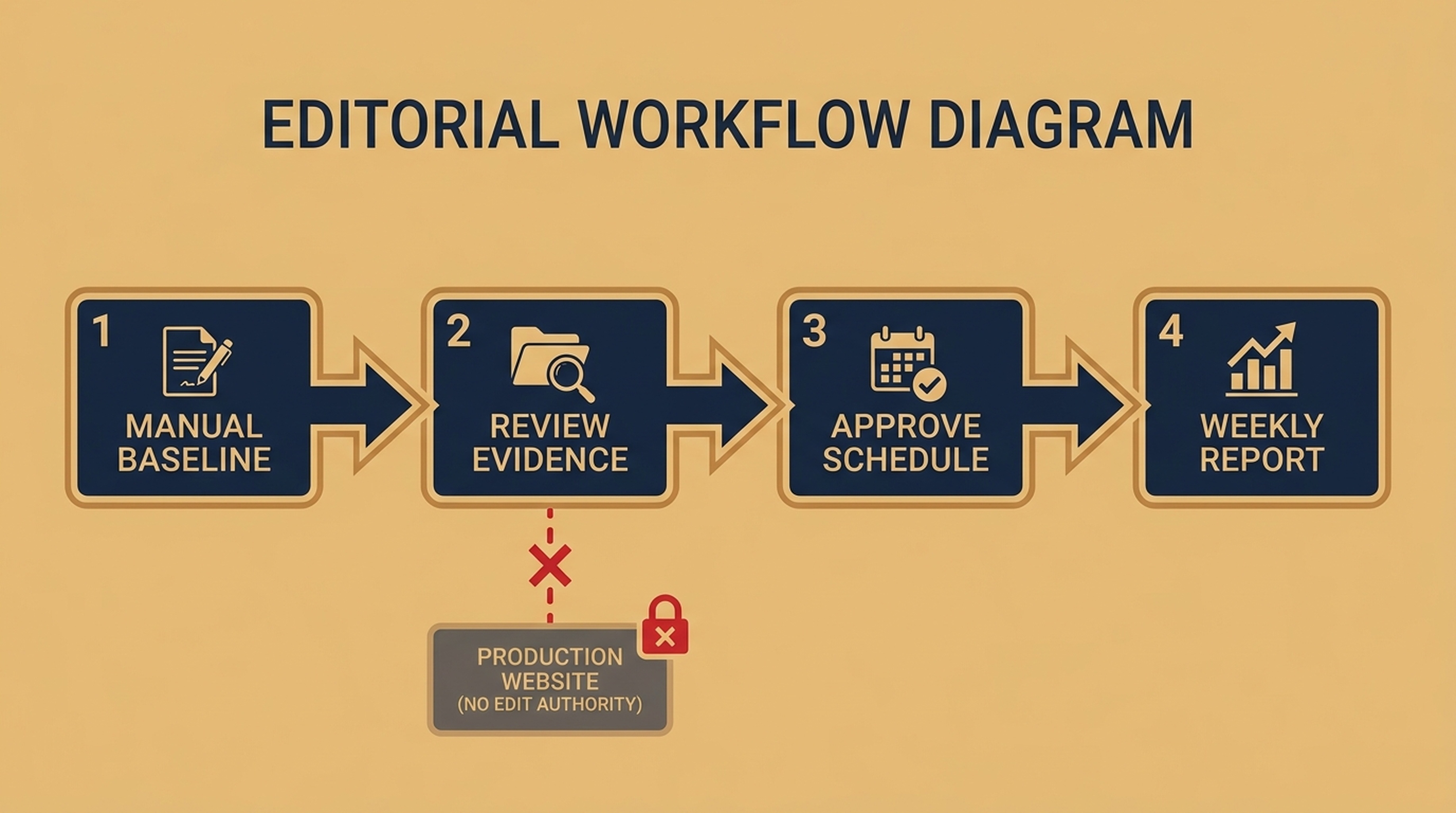
Schedule a confirmed measurement, not an agent with broad website access.
Use this as the instruction to Hermes after the manual baseline is accepted:
Create a proposed weekly PageSpeed baseline schedule, but do not activate it yet.

Use the exact manual scope and command from my approved report. Run in the same
isolated environment. Store each run beneath
$HOME/hermes-pagespeed-reports/weekly/YYYY-MM-DD/ and retain reports for 90
days. Deliver only report.md and summary.json to the approved owner channel.

Show the schedule, command, environment assumptions, report path, and failure
notification behavior. Do not include PAGESPEED_API_KEY in any output. Wait for
my explicit approval before writing or enabling the schedule.
Expected decision: either approve the schedule or keep the workflow manual. Quality check: its command names the same target scope and output isolation as the baseline. Recovery: if Hermes proposes a browser login, a repository edit, a broad crawl, or an open chat delivery, decline it and restate the read-only report boundary.
Use the report to create a separate repair brief
Send the report, not an autonomous repair order, to Hermes or your implementation team:
Read this PageSpeed evidence folder: [REPORT PATH]. Create a repair brief only.
For each repeated or high-impact opportunity, state the affected URLs, the lab
or field evidence, a likely mechanism, the developer owner, expected benefit,
risk, test method, and rollback signal. Flag assumptions. Do not edit code,
content, configuration, or a deployment.
This preserves a useful division of labor: Hermes collects a stable baseline; people review causality and approve implementation in the system that owns the website.
Verification checklist
- [ ] The Hermes skill is at
~/.hermes/skills/pagespeed-seo-baseline/and its name matches the directory. - [ ]
PAGESPEED_API_KEYis declared but absent from files, chat history, and report output. - [ ] A manual report has mobile and desktop rows, raw JSON, a recorded final URL, and a clear scope.
- [ ] CrUX is labeled as page-level or origin-level only when it is returned.
- [ ] Sitemap sampling is disclosed, or a curated URL list defines the scope.
- [ ] Any schedule was reviewed before activation and can write only to the approved report location.
- [ ] No CMS, repository, deployment, or hosting operation was granted to the audit skill.
Troubleshooting
Four failures show up often with this workflow, and each has a recovery path.
- The cronjob task never runs. Symptom: no new report directory on the scheduled day. Cause: the task was created before the skill was installed, or its command points at a path the scheduled environment cannot reach. Recovery: run the skill once manually in
hermes chat, confirm the report appears, then recreate the task with the same command and verify that the scheduled environment hasPAGESPEED_API_KEYand network access. - PageSpeed Insights API quota is exhausted. Symptom: HTTP 429 responses and "quota exceeded" rows in the report. Cause: too many requests for the current quota. Recovery: check the quota dashboard in Google Cloud, shrink the URL sample, space runs across days, and only then rebuild the schedule around the confirmed limit.
- The skill is not recognized. Symptom:
hermes skills listdoes not show the skill, or Hermes treats its command as unknown. Cause: theSKILL.mdfile is not at the expected path, the frontmatter is malformed, or thenamefield does not match the directory. Recovery: verify~/.hermes/skills/pagespeed-seo-baseline/SKILL.mdexists, thatname: pagespeed-seo-baselinematches the folder name, and that the frontmatter declares bothnameanddescription, then restart or refresh the local Hermes session. - Every API request returns HTTP 403. Symptom: the whole run fails before any data. Cause: the PageSpeed Insights API is not enabled for the project, or the key restriction blocks it. Recovery: enable the API in Google Cloud Console and confirm the restricted key covers the
pagespeedonline.googleapis.comservice.
Each fix ends with the same rule as the rest of this article: rerun one manual baseline and review the report before rescheduling anything.
Copy the finished skill here
The tutorial above builds the skill step by step. This section provides the finished SKILL.md in one block, ready to paste and install. It follows the same steps: confirm the scope, read the API key from the environment, call the PageSpeed Insights API for mobile and desktop, save raw JSON, and return a dated Markdown report. The API key appears nowhere in the skill file; the runtime reads it from PAGESPEED_API_KEY, so create a restricted key in Google Cloud Console and set that variable in the environment that starts Hermes. If you have not installed Hermes yet, start with the series primer, How to set up your first Hermes SEO Agent, before continuing.
---
name: hermes-pagespeed-audit
description: Run a read-only PageSpeed Insights audit for one public URL, a supplied URL list, or a controlled sitemap sample, save raw JSON and a dated Markdown report that separates Lighthouse lab data from CrUX field data, and cover website speed, Core Web Vitals, Lighthouse, and recurring performance-baseline requests without ever editing a site, repository, CMS, hosting configuration, or deployment.
required_environment_variables:
  - PAGESPEED_API_KEY
---

# Hermes PageSpeed Audit

Audit public pages with the Google PageSpeed Insights API and return an evidence packet: one raw JSON file per run plus a dated Markdown report. The skill is read-only. It never edits a website, repository, CMS, or deployment, and it never creates a schedule without human approval.

## Step 1: Confirm the scope

Ask the operator for one of:

1. A single public URL.
2. A URL list, one URL per line in a text file.
3. A sitemap URL with a maximum sample (default 10 URLs).

Confirm the report directory. Default: `$HOME/hermes-pagespeed-reports/<page-or-site>-<YYYY-MM-DD>`.

## Step 2: Read the API key from the environment

The PageSpeed Insights API requires an API key. Read `PAGESPEED_API_KEY` from the runtime environment; the operator creates a restricted key in Google Cloud Console and sets this variable locally, and no real key value appears in this file or in chat. Never print, message, save, or commit the key.

## Step 3: Call the API for every URL and strategy

Run both `mobile` and `desktop` for each URL, requesting the performance, accessibility, best-practices, and seo categories. Example:

    curl -sS -G "https://www.googleapis.com/pagespeedonline/v5/runPagespeed" \
      --data-urlencode "url=<URL>" \
      --data-urlencode "strategy=mobile" \
      --data-urlencode "category=performance" \
      --data-urlencode "category=accessibility" \
      --data-urlencode "category=best-practices" \
      --data-urlencode "category=seo" \
      --data-urlencode "key=$PAGESPEED_API_KEY" \
      -o "<report-dir>/raw/<number>-<strategy>.json"

Save every successful response under `raw/` before summarizing it. Retry up to three times on HTTP 429 and 5xx with a short backoff. If a request still fails, record the error in the report and continue with the remaining URLs.

## Step 4: Write the dated report

Create `report.md` in the report directory with:

- Run timestamp in UTC and the scope description (single URL, supplied list, or sitemap sample with the number sampled and excluded).
- One table row per URL and strategy: requested URL, final URL, performance score, LCP, INP, CLS, TBT, page-level CrUX (LCP / INP / CLS), origin-level CrUX (LCP / INP / CLS), and status.
- Failed requests listed with their error.
- A scope note: Lighthouse is a point-in-time lab measurement; CrUX appears only when Google returned it.

Verify that every `raw/` file is non-empty JSON before writing the report. Also write `summary.json` with the scope, the tested URLs, and the per-record status, without embedding full API responses.

## Step 5: Report back

Return the report path and the compact table from Step 4. Label every repair suggestion as a hypothesis until a developer verifies it. If the operator asks for a schedule, show the proposed command, cadence, retention rule, and delivery target, and wait for explicit confirmation before creating the task.

## Boundaries

- Read the API key from the environment only. Never print, message, save, or commit it.
- Do not use browser logins, SSH, CMS, hosting, Git write, deployment, or website-editing tools. A performance report is not approval to repair a site.
- Do not create or change a schedule until a human has reviewed one successful manual report and named the recurring scope, cadence, report path, and delivery destination.
Install and confirm it is registered
Save the block above as ~/.hermes/skills/seo/hermes-pagespeed-audit/SKILL.md (the seo folder is an organizational choice; Hermes discovers a skill by its SKILL.md file), then list your skills:
mkdir -p ~/.hermes/skills/seo/hermes-pagespeed-audit
hermes skills list
The list should show hermes-pagespeed-audit with the description from the frontmatter. If it does not, apply the "skill is not recognized" fix from the troubleshooting section above.
Run it once
In hermes chat, invoke the skill with one sentence, for example:
Run the PageSpeed audit skill on https://www.example.com/ and save the report under $HOME/hermes-pagespeed-reports/.Schedule it
After a human has reviewed one manual report, ask Hermes to create a cronjob task that calls the same skill on the approved cadence, with the same report directory and delivery target. Cronjob syntax changes between releases, so confirm the current options in the official Hermes documentation (https://hermes-agent.nousresearch.com/docs) before enabling the task, and wait for explicit approval before activating it.
Or let Hermes build it for you
Send this article's URL, or paste its text, into hermes chat and say:
Follow this article and build the PageSpeed audit skill for me.Hermes reads the tutorial, creates the skill, and verifies it. Review the result with hermes skills list before scheduling anything.
Frequently asked questions
Can Hermes check every page in my sitemap?
It can process more URLs, but that is not automatically useful or safe. PageSpeed requests consume quota and sitemap URLs often mix templates, archived pages, and low-priority content. Start with one page per template or a limited stratified sample, then expand deliberately.
Does a higher PageSpeed score guarantee better rankings?
No. Performance is one part of page experience and technical quality. The report identifies performance risks and opportunities; it does not predict rankings, conversions, or traffic.
Why should I keep the raw PageSpeed responses?
The report is a convenient summary. Raw JSON lets a developer inspect the original audit details, confirm what Google returned, and compare later runs without relying on an agent's interpretation.
Is a container safer than a local Hermes run?
It can be a useful isolation boundary, but it is not automatically safer. The container still needs network access and, if you pass the API key into it, code inside can read the key. Use a small tool profile and a restricted key either way.
Official references
- Hermes Agent skills documentation
- Hermes Agent security documentation
- Google PageSpeed Insights API
- Chrome UX Report documentation
Author: Julian Mercer, Technical SEO Practitioner at Auspia. Julian writes practical operating guides that make automated SEO evidence easier to review before teams make production changes.


