


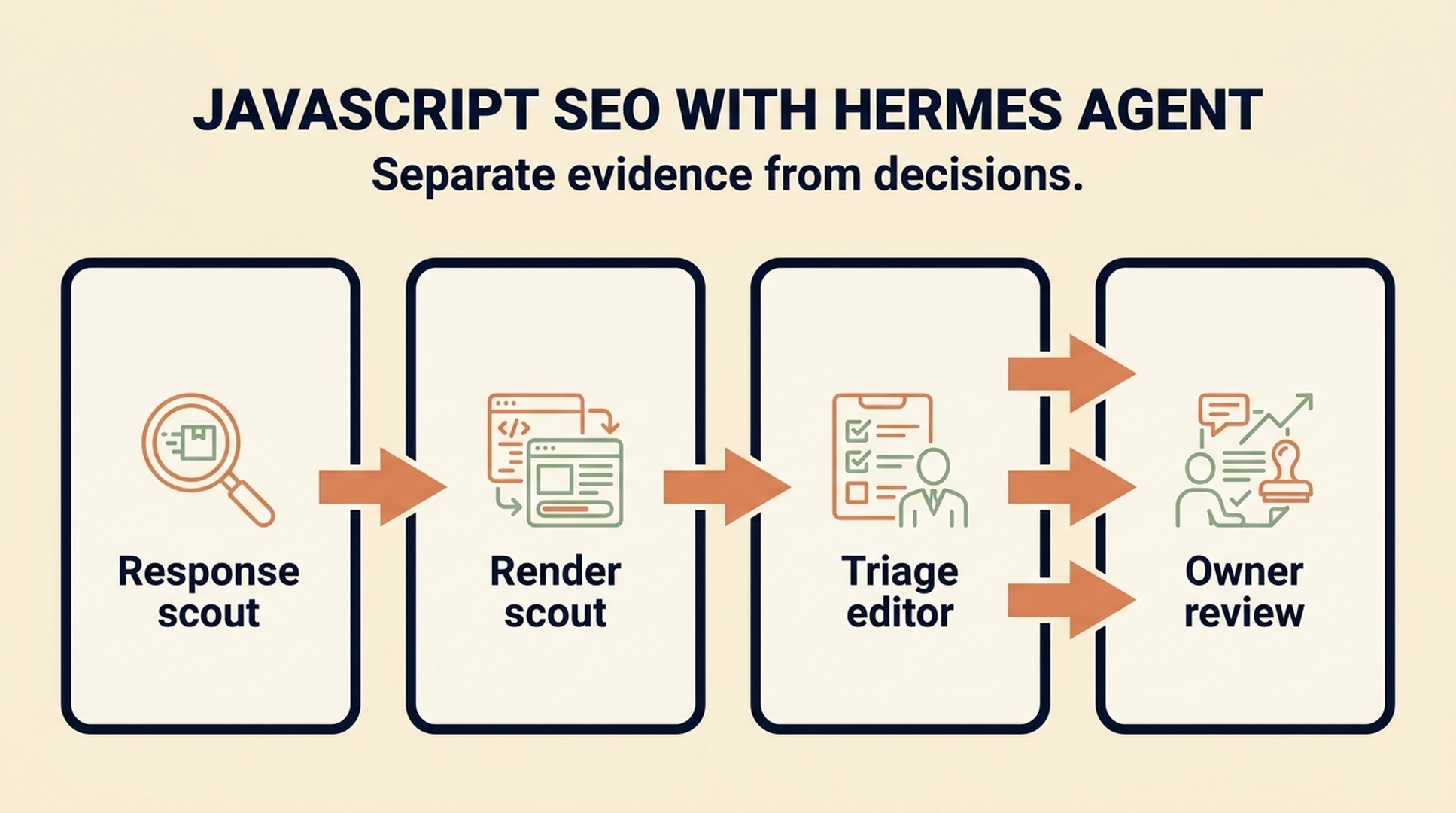
JavaScript SEO goes wrong most often at handoffs. One person sees content in a browser, another finds a missing link in source, and a developer gets a vague ticket saying "Google cannot see the page." Hermes Agent, the open-source AI agent framework from Nous Research, is useful when it turns that loose investigation into small, named assignments with an evidence trail. You work with it through the hermes chat CLI or the app interface, and as of mid-2026 it ships the pieces this runbook relies on: web search and extract tools for response facts, browser automation for rendered pages, skills for packaging a repeatable workflow, a cron scheduler for the weekly loop, and MCP servers for connecting data sources such as Search Console or logs. The official docs cover each of these in detail: https://hermes-agent.nousresearch.com/docs
This is a team runbook, not an instruction to let several agents repair a site at once. The finished result is a one-page JavaScript SEO case file: what was observed, what remains unknown, which owner should decide, and one approved next action. It does not prove indexation or promise rankings.
Target reader | Technical SEO leads, developers, and content owners who run JavaScript-heavy pages and want a repeatable, evidence-first way to triage issues with an agent |
Result | A one-page JavaScript SEO case file (evidence-backed findings, owner questions, one approved next action) plus a reusable three-role workflow and an installable Hermes skill the team can run on any page |
Prerequisites | A Hermes CLI or app session, the target URL or supplied page evidence, and authorized access to the data sources the case needs (Search Console, logs, crawl or repository files) |
Estimated time | About 30 minutes for a first page, then roughly 15 to 20 minutes per page once the loop is routine |
Definition of done | Every finding names an evidence source, every unknown has a named owner, the review card carries one approved next action, and the page story is updated with the result |
Start with the page story, not a pile of checks
JavaScript SEO is the work of making a page's important URLs, content, links, and page signals reliably available to search systems. A browser can assemble a page after scripts run; a search system still has to discover the URL, fetch the response, process allowed resources, and make sense of what it finds. Google's JavaScript SEO basics documentation (https://developers.google.com/search/docs/crawling-indexing/javascript/javascript-seo-basics) describes the crawl and render pipeline this runbook checks against.
For a first investigation, write a short page story before opening an agent task:
Field | Example |
|---|---|
Page |
|
Visitor job | Compare products and reach product pages |
Content that must appear | Category title, product names, prices, product links |
Signals that must agree | 200 response, canonical URL, indexable robots directive, title |
Out of scope | Replatforming, publishing, robots.txt changes, bulk edits |
That small brief prevents a common agent mistake: reporting every possible SEO consideration while missing the one thing the page exists to do.
Give Hermes three separate jobs
Hermes is better suited to a repeated operational loop than to one giant "fix JavaScript SEO" request. Split the work so that each output can be checked by the next person.
Role | Reads | Produces | Must not do |
|---|---|---|---|
Response scout | URL response, source, redirects | Response facts and signal conflicts | Infer Google index status |
Render scout | Rendered page or supplied browser evidence | Content and link availability notes | Change components or routing |
Triage editor | The two reports and approved exports | P0-P3 case file and owner questions | Merge findings into invented facts |
The roles can be separate Hermes agents, separate tasks, or simply three ordered prompts. What matters is that the response scout does not quietly become the implementer. Parallel work is only useful when its inputs and outputs are explicit. For the rendering half of the story, Google's rendering documentation (https://developers.google.com/search/docs/crawling-indexing/rendering) explains which resources a search system can process after scripts run.
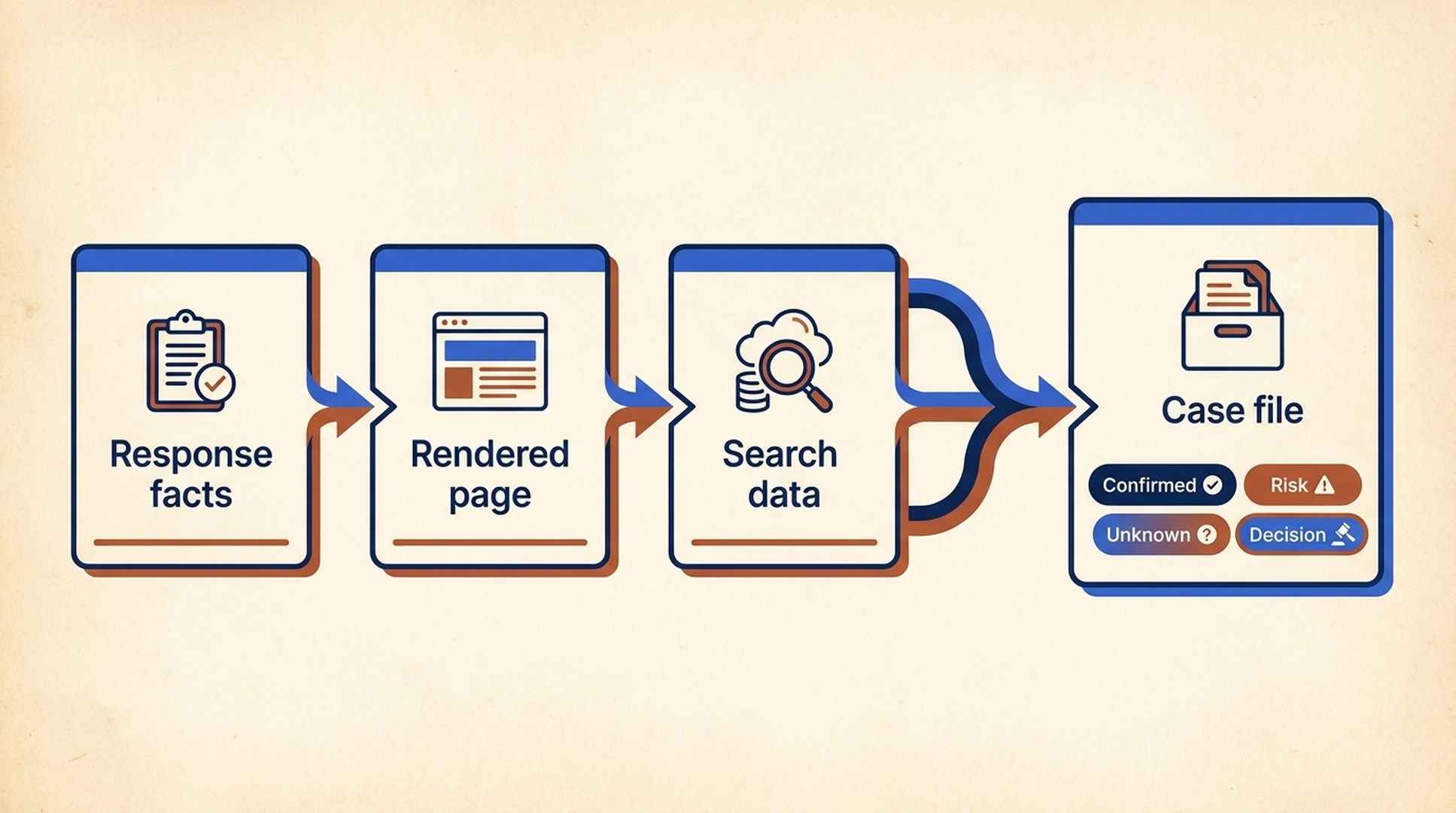
A case file keeps separate evidence sources and uncertainty states visible before a technical decision.
Use this Hermes assignment card
Paste the following prompt into a Hermes task after you have supplied the page story. It is intentionally written for read-only investigation.
You are the [RESPONSE SCOUT / RENDER SCOUT / TRIAGE EDITOR] on one JavaScript SEO case.

Target page: [URL OR SUPPLIED PAGE EVIDENCE]
Visitor job: [ONE SENTENCE]
Required page elements: [LIST]
Allowed evidence: [SOURCE HTML, RENDERED DOM, HAR, SCREENSHOT, CRAWL EXPORT, OR REPOSITORY FILES]

Stay read-only. Do not edit files, use write-capable tools, publish content, submit URLs,
change a CMS, or access accounts not explicitly authorized.

Return a table with: observation, evidence source, status (confirmed / risk / unknown),
why it matters for the visitor job, and the smallest next check. Mark missing Search
Console, log, field-performance, or crawl data as UNKNOWN. Do not claim that a search
engine indexed, rendered, or ranked the page without supplied evidence.
Expected output: a short report that another person can audit. Quality check: every row names an evidence source. Recovery path: if an agent returns advice instead of evidence, resend the assignment with only the page story and require the table again.
Assemble a case file before you discuss fixes
The triage editor should combine reports without flattening uncertainty. Use four states:
State | Meaning | Escalate to |
|---|---|---|
Confirmed | The response or rendered page shows the condition | Technical SEO owner |
Risk | The supplied evidence suggests a failure path | Developer and page owner |
Unknown | Required evidence was not provided | Search Console, crawl, log, or analytics owner |
Design decision | More than one architecture choice could work | Engineering owner |
For JavaScript pages, the early questions are usually concrete: does the source or rendered DOM contain the main product or article content? Are important destinations ordinary a href links? Do status, canonical, and robots instructions agree? Does infinite scroll expose stable page paths? Do lazy-loaded images and links appear without an arbitrary user action?
Keep SSR, prerendering, and framework migration questions out of Hermes prompts until an engineer has described the actual system. Those are design choices, not generic repairs.
Put the human gate between triage and action
Use a review card that names one proposed action. The owner should approve or reject it in writing.
Finding ID: JS-01
Evidence: [specific response, DOM, or code observation]
Visitor impact: [what a visitor or search system may fail to reach]
Proposed minimum action: [one bounded change]
Affected template or system: [known / unknown]
Tests: [response, rendered DOM, functional link, preview check]
Rollback: [how to restore the prior behavior]
Decision owner: [name or role]
Status: WAITING FOR APPROVAL
Hermes can prepare this card, but it cannot own the decision. An agent schedule or memory feature does not turn a technical change into a safe unattended action.
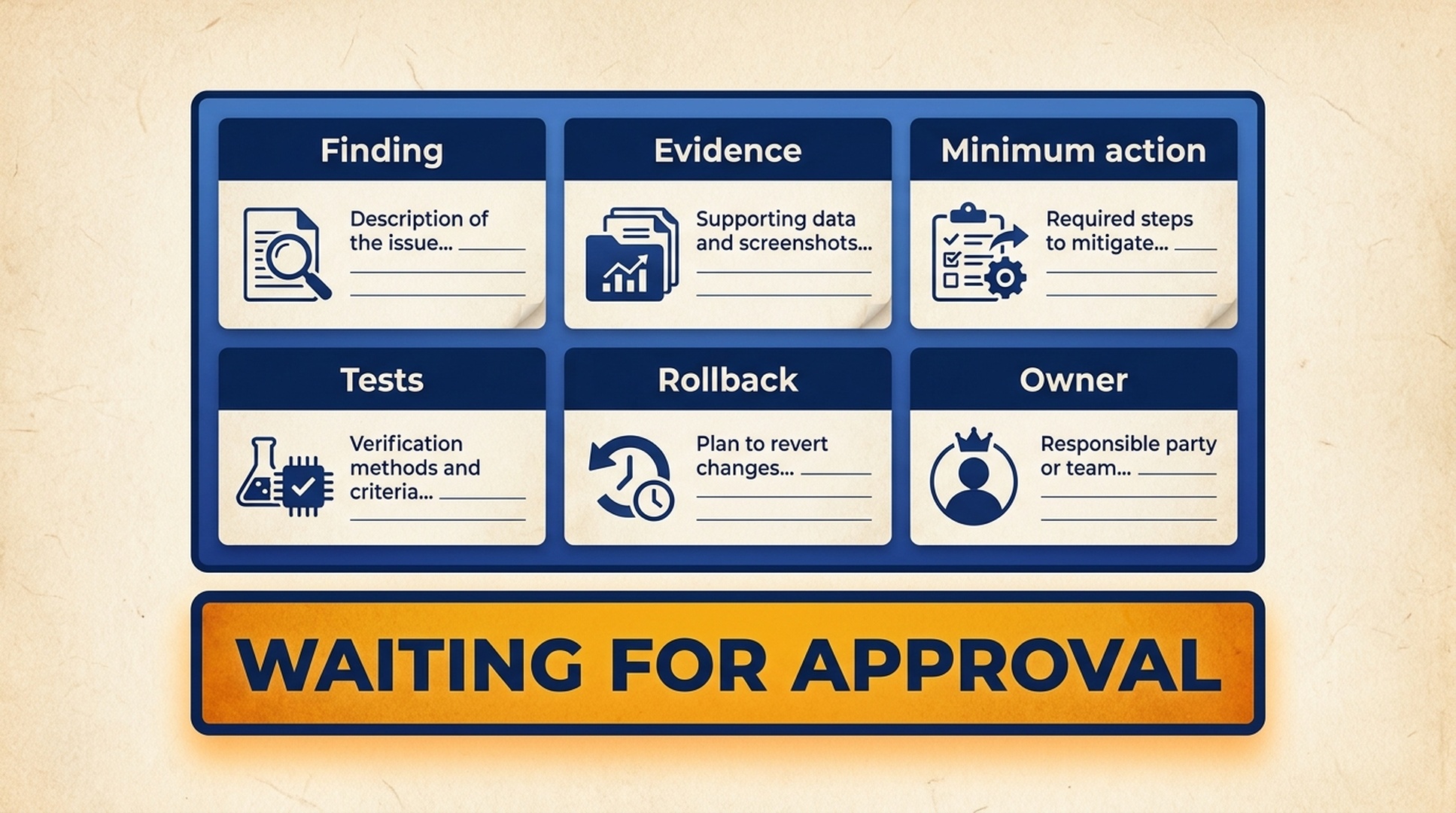
A bounded approval card turns an agent finding into a decision a named owner can review.
Run a calm weekly loop
Choose one representative template each week. Keep the loop boring on purpose: collect evidence, assign named tasks, record a decision, test one approved change, and compare authorized data later. When several pages show the same confirmed mechanism, create a new case with explicit scope evidence rather than declaring a site-wide defect from a single URL.
Run this runbook as a Hermes skill
This runbook condenses into a Hermes skill: a named workflow the agent loads on demand, so the triage steps, the evidence requirements, and the human review gate stay identical every time the team runs them. The SKILL.md below distills the three-role loop, the case-file format, and the approval card into one executable file. It pairs with the setup guide from our Hermes SEO series (https://auspia.ai/blog/set-up-hermes-seo-agent), which walks through installing Hermes and preparing a supervised SEO workspace.
---
name: hermes-javascript-seo-triage
description: Triage one JavaScript SEO case into an evidence-backed P0-P3 case file with a single approved next action, ready for a named owner to review.
---

# JavaScript SEO Triage

You are the triage editor for one JavaScript SEO case. Produce a one-page case file with observations, evidence sources, owner questions, and one approved next action. You stay read-only: you do not fix the site, and you never claim indexation or rankings without supplied evidence.

## 1. Gather the case inputs

Ask the user for, or reuse from this session:

- Target page URL, or supplied page evidence: source HTML, rendered DOM, HAR, screenshot, crawl export, or repository files
- The visitor job, in one sentence
- The page elements that must appear: category title, product names, prices, product links, or article content
- Authorized data sources: Search Console, server logs, crawl data, field-performance data

When a required input is missing, mark the affected rows UNKNOWN and ask for the evidence instead of guessing.

## 2. Response scout pass

- Use the web search and extract tools to pull the raw response and source, or read the supplied evidence files
- Record the HTTP status, canonical, robots directives, title, and whether the required elements and ordinary `a href` links exist in the source
- Note redirects and any mismatch between the served URL and the expected URL

## 3. Render scout pass

- Use browser automation to load the URL and execute scripts, or accept a supplied rendered DOM, screenshot, or HAR
- Record which required elements appear after rendering, which links are reachable, and whether lazy-loaded items or infinite scroll need an arbitrary user action
- Compare with the source pass and note disagreements, such as content present in the DOM but missing from the source

## 4. Assign one evidence state to every finding

- Confirmed: the response or rendered page shows the condition
- Risk: the supplied evidence suggests a failure path
- Unknown: the required evidence was not provided
- Design decision: more than one architecture choice could work

Every row names its evidence source. Missing Search Console, log, field-performance, or crawl data is UNKNOWN.

## 5. Produce the case file

Return a table with columns: finding ID, observation, state, evidence source, visitor impact, and smallest next check.

Order by severity:

- P0: confirmed problem that blocks the visitor job
- P1: likely blocks the visitor job
- P2: degrades the visitor job
- P3: quality or consistency issue

## 6. Review before action

For each proposed action, fill one review card:

```text
Finding ID:
Evidence:
Visitor impact:
Proposed minimum action:
Affected template or system: known / unknown
Tests: response, rendered DOM, functional link, preview check
Rollback:
Decision owner:
Status: WAITING FOR APPROVAL
```

Recommend one approved next action only. Keep SSR, prerendering, and framework migration comparisons out of the recommendation until an engineer has described the actual system.

## Constraints

- Read-only: do not edit files, publish content, change a CMS, or access unauthorized accounts
- Every claim cites an evidence source; missing evidence is UNKNOWN
- Never claim a search engine indexed, rendered, or ranked the page without supplied evidence
- End with the one-page case file and a clear question to the named decision owner
Install it in three steps
- Copy the SKILL.md block above into a new file at
~/.hermes/skills/seo/hermes-javascript-seo-triage/SKILL.md(as of mid-2026, Hermes discovers skills from the~/.hermes/skillsdirectory). - Run
hermes skills listand confirmhermes-javascript-seo-triageappears. - Open
hermes chatand say: "Use the hermes-javascript-seo-triage skill to triage the JS rendering issues."
No skill setup needed
To skip installation entirely, send this article URL (https://auspia.ai/blog/javascript-seo-hermes-agent) or paste the full text into hermes chat and say: "Follow this article and run the triage for my site." The agent reads the runbook from the message and applies the same evidence-first steps.
Verify and troubleshoot
- The agent returns advice instead of a table. Resend the assignment with only the page story and require the observation, evidence source, and status columns again. A report with no evidence source column is not a case file.
- The rendered DOM shows content that the source does not. Record both observations, label the difference as a rendering gap, and ask the developer whether the content depends on client-side fetching before a search system processes the response.
- A finding is marked Confirmed without Search Console, log, or crawl evidence. Send the case file back to the triage editor and re-mark the claim Unknown. Indexation and ranking are never inferred from a browser view or source file alone.
- The review card is missing a rollback step. Return it to the owner with the rollback field required. A bounded change without a restore path is not a bounded change.
FAQ
Should Hermes agents work in parallel on one page?
They can, if they have different read-only roles and a shared case-file format. Route instructions to a developer through one owner so the same implementation area never receives competing requests.
Can Hermes tell whether Google indexed my JavaScript page?
Not from a browser view or source file alone. Provide authorized inspection, crawl, log, or Search Console evidence; otherwise label that question unknown.
What is the best first Hermes task for a beginner?
Assign one response scout to a single high-value URL. Require a response-facts table, then decide whether a separate rendered-page investigation is justified.
Author: Julian Mercer, Technical SEO Practitioner at Auspia. Julian writes about crawlability, schema, rendering, site architecture, and technical foundations for AI-readable content.


