The simple idea
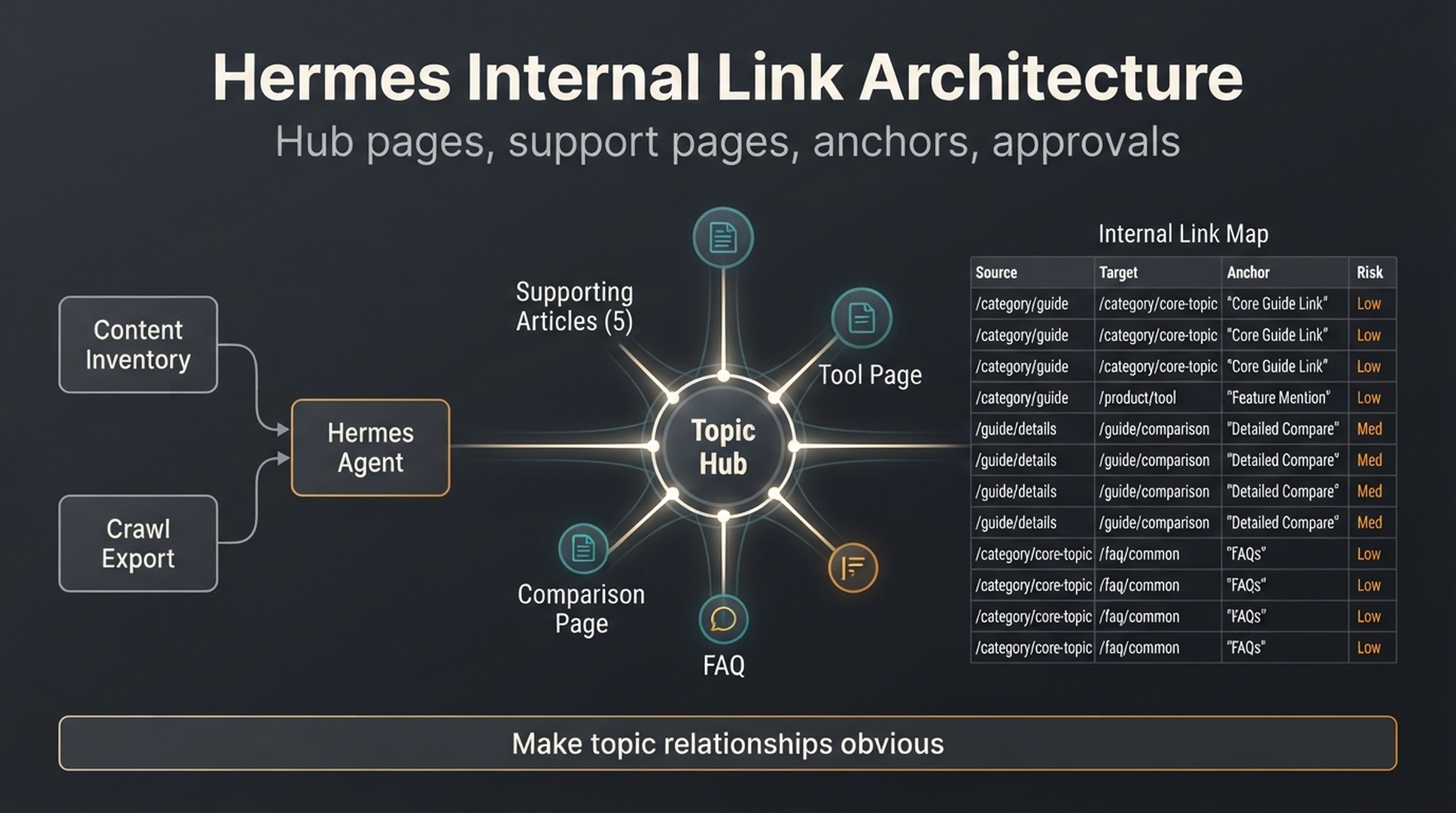
Internal linking is not just a way to pass users from one article to another. It tells search engines and AI retrieval systems how your topics relate, which pages are central, and which pages support a larger answer.
Hermes is an open source AI agent framework from NousResearch. You run it from the terminal with hermes chat, and it can search the web (web_search), extract page content (web_extract), drive a browser, load reusable skills, run scheduled tasks with cron, and connect to MCP toolsets. See the official docs at https://hermes-agent.nousresearch.com/docs and the source at https://github.com/NousResearch/hermes-agent.
Hermes can help because internal linking is a structured matching problem. It needs a content inventory, a crawl export, topic clusters, page roles, anchor text options, and a QA gate. The output should be an internal link map that a human can approve, not a pile of random "related articles."
The beginner rule: every internal link needs a reader reason. Add a link only when Hermes can explain why it helps the reader.
What you will get out of this guide
Who this is for: content editors, SEOs, and technical marketers planning internal links for a site with a few hundred pages.
What you will have when you finish:
- A content inventory and crawl export that Hermes can read
- Page roles for every URL (hub, supporting, tool, template, comparison, refresh)
- A prioritized internal link map with anchors, reader reasons, SEO and GEO roles, and approval owners
- A reusable QA gate for every future link batch
Prerequisites: a working Hermes install (hermes chat responds), a content inventory CSV, and a crawl export or sitemap.
Estimated time: 3-5 hours for the first pass; later passes are faster once the files exist.
Done when: every accepted link has a reader reason, rejected links are logged, and the first batch of 10-20 links passes the QA gate.
What you need before planning links
Start with four files:
/hermes-seo-agent
  /data
    content-inventory.csv
    crawl-export.csv
    keyword-clusters.csv
    top-pages-gsc.csv
  /reports
    internal-link-map.md
    orphan-pages.md
  /qa
    anchor-text-rules.md
    internal-link-quality-gate.md
  /prompts
    internal-linking-prompt.md
Minimum fields:
File | Useful columns |
|---|---|
| URL, title, page type, topic cluster, target keyword, last updated, conversion goal |
| URL, status code, indexability, inlinks, outlinks, canonical, title, word count |
| Cluster, primary keyword, supporting keywords, page type, hub page, supporting pages |
| URL, clicks, impressions, CTR, average position, top query |
If you do not have all four files, start with a manual content inventory. Hermes can still help, but it should mark missing data.
Step 1: assign page roles
Before links, define roles. A topic cluster usually has several page types.
Page role | Job | Example |
|---|---|---|
Hub page | Explains the broad topic and links to deeper pages | Complete guide to GEO |
Supporting article | Answers one narrow question | How to build a GEO prompt map |
Tool page | Converts users who need a product workflow | AI Search Visibility Checker |
Template page | Gives a reusable asset | Weekly SEO/GEO report template |
Comparison page | Helps users choose between options | SEO vs GEO vs AEO |
Refresh page | Existing page that needs updates | Old guide with strong impressions |
Hermes prompt:
Read /data/content-inventory.csv and /data/keyword-clusters.csv.

Assign a page role to every URL:
- Hub page
- Supporting article
- Tool page
- Template page
- Comparison page
- Refresh page
- Other

Return:
1. URL
2. Current title
3. Topic cluster
4. Assigned page role
5. Reason
6. Confidence: low, medium, high
7. Missing information

Do not recommend links yet.
This step makes the site architecture visible. Without roles, Hermes may link everything to everything.
Step 2: find hub-and-spoke gaps
A hub-and-spoke structure is simple:
Hub page -> supporting pages
Supporting pages -> hub page
Related supporting pages -> each other only when useful
Tool or conversion page -> linked when reader intent is close enough
Prompt:
Using the assigned page roles, find hub-and-spoke gaps.

Return:
1. Topic clusters with no hub page
2. Hub pages with too few supporting links
3. Supporting pages that do not link back to a hub
4. Tool pages that should be linked from informational pages
5. Pages that look isolated from their cluster
6. Recommended architecture fix

Do not recommend exact anchors yet.
Output table:
| Cluster | Gap | Evidence | Recommended fix | Risk |
|---|---|---|---|---|
Example:
Cluster | Gap | Evidence | Recommended fix | Risk |
|---|---|---|---|---|
AI search visibility | Supporting articles do not link to tool page | Three articles mention checking AI visibility but no link to tool page | Add one contextual link from each article to the tool page | Low |
GEO basics | No clear hub page | Several articles define GEO separately | Choose one hub and link supporting pages back to it | Medium |
Step 3: identify orphan and weakly linked pages
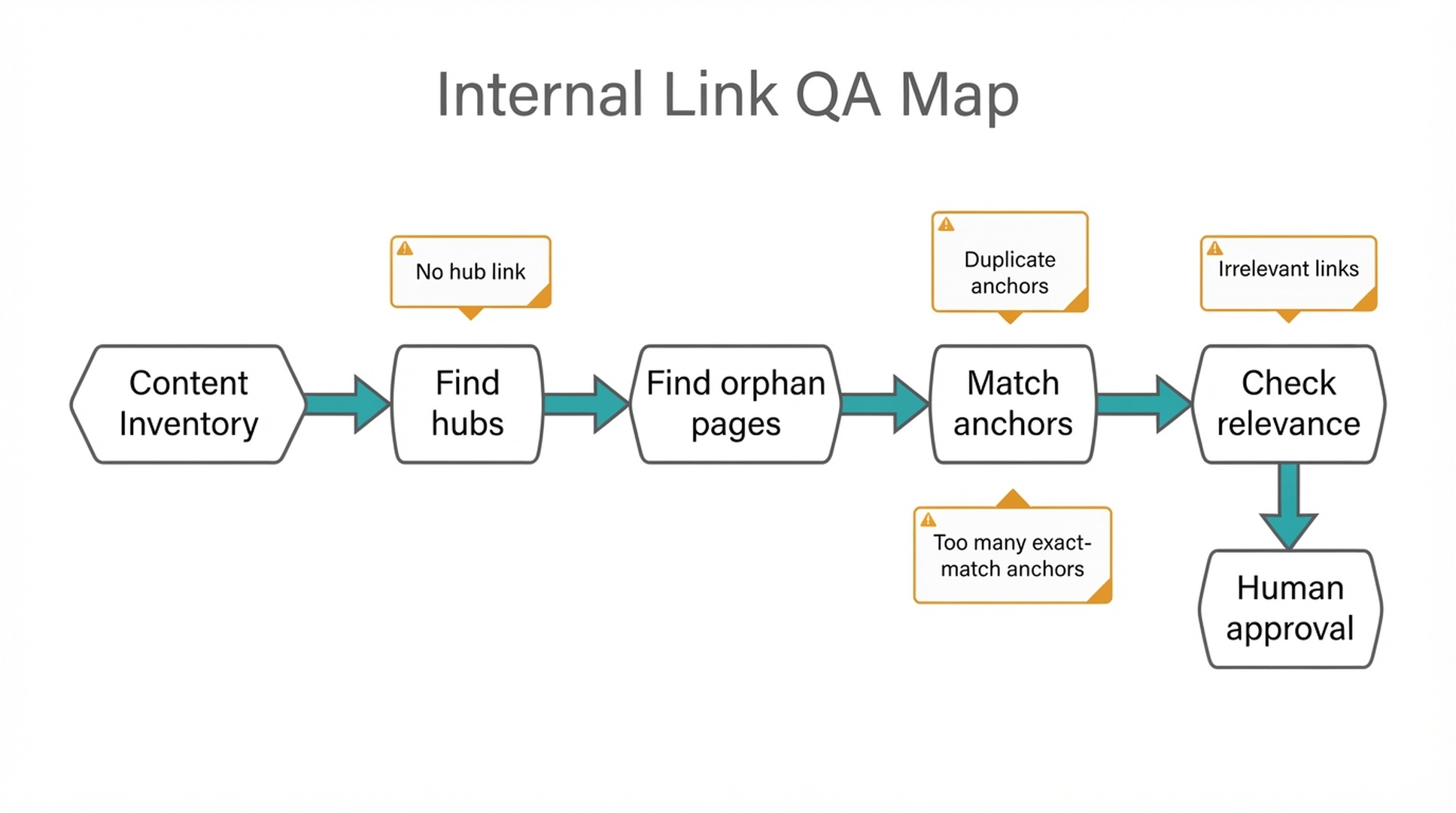
An orphan page has no internal links pointing to it. A weakly linked page may have one or two links, but not enough context from relevant pages.
Use crawl data, for example an export from Screaming Frog (https://www.screamingfrog.co.uk) or your sitemap:
Analyze /data/crawl-export.csv.

Find:
1. Indexable pages with zero internal inlinks.
2. Important pages with fewer than 3 relevant internal inlinks.
3. Pages with many outlinks but weak inbound links.
4. Pages in a topic cluster that are not linked from the hub.
5. Pages with internal links from irrelevant sections.

For each page, include evidence, topic cluster, likely impact, and recommended next action.
Write the findings to reports/orphan-pages.md with URL, topic cluster, inlink count, likely impact, and recommended source page.
Fix orphan pages with contextual links from relevant hubs, guides, templates, comparisons, or sections where the reader naturally needs the next page. Random footer links hide the problem instead of solving it.
Step 4: generate source-target link candidates
Now ask Hermes for candidate links.
Create internal link candidates for the approved topic clusters.

For each recommendation, include:
1. Source URL
2. Source section, if known
3. Target URL
4. Suggested anchor text
5. Reader reason
6. SEO role
7. GEO role
8. Risk level
9. Approval required

Rules:
- Do not force links.
- Avoid repeated exact-match anchors.
- Prefer links that help a reader take the next step.
- Do not link to a conversion page unless the section has relevant intent.
- Mark uncertain recommendations as "review manually".
Use this table:
| Source URL | Source section | Target URL | Anchor text | Reader reason | SEO role | GEO role | Risk | Approval |
|---|---|---|---|---|---|---|---|---|
A good recommendation explains the reader reason:
Weak | Strong |
|---|---|
Link to AI Search Visibility Checker for SEO. | In the section explaining how to test prompt visibility, link to AI Search Visibility Checker because the reader needs a practical way to run the check. |
Add link to GEO guide. | Link the phrase "what GEO means in practice" to the GEO guide because the current page uses the term before explaining it. |
If the reason is vague, reject the link.
Step 5: create anchor text rules
Anchor text should be clear, natural, and varied. Ask Hermes to suggest natural phrasing instead of exact-match keyword stuffing.
Create qa/anchor-text-rules.md:
# Anchor text rules

Good anchors:
- Describe the target page clearly.
- Fit naturally in the sentence.
- Help the reader understand what happens after clicking.
- Vary across source pages.

Avoid:
- Repeating the same exact-match anchor everywhere.
- Generic anchors like "click here" or "read more" when context is unclear.
- Anchors that promise something the target page does not provide.
- Links inserted only for SEO without reader value.
- Multiple links to the same target in one short section.
Prompt:
Review the suggested anchor text against /qa/anchor-text-rules.md.

Return:
1. Anchors to approve
2. Anchors to rewrite
3. Anchors that overuse exact-match keywords
4. Anchors that misrepresent the target page
5. Safer alternatives
Anchor variation table:
Target page | Possible anchors |
|---|---|
GEO prompt map guide | GEO prompt map, AI search prompt library, prompt tracking workflow, map AI search questions |
Data supervision guide | SEO/GEO data supervision, weekly action queue, GSC and GA4 monitoring workflow |
Content refresh guide | content refresh workflow, refresh old SEO pages, add GEO answer blocks |
The target page matters. The anchor should match what the page actually delivers.
Step 6: add GEO meaning to internal links
For GEO, links help clarify entity and topic relationships. A link from a prompt map article to a data supervision article tells humans and machines that prompt tracking belongs inside a broader measurement system.
Ask Hermes to label the GEO role of each link:
GEO link role | Meaning |
|---|---|
Entity definition | Explains a term, tool, brand, or concept |
Evidence path | Points to proof, data, source, case, or method |
Workflow continuation | Sends the reader to the next step in a process |
Topic hierarchy | Connects a supporting page to the hub |
Product application | Connects an educational page to a relevant tool or use case |
Prompt:
For each internal link candidate, assign a GEO link role:
- Entity definition
- Evidence path
- Workflow continuation
- Topic hierarchy
- Product application

If no GEO role exists, explain whether the link should still be added for reader value.
This keeps the plan from becoming mechanical. Not every link needs a grand GEO purpose, but the useful ones usually have a clear relationship.
Step 7: build the internal link map
Create reports/internal-link-map.md:
# Internal link map

Date:
Website:
Clusters reviewed:
Data sources:
Reviewer:

## Summary
- Clusters reviewed:
- Orphan pages found:
- High-priority links:
- Links requiring manual review:
- Links rejected:

## Approved link candidates
| Priority | Source URL | Section | Target URL | Anchor | Reader reason | SEO role | GEO role | Risk | Owner |
|---|---|---|---|---|---|---|---|---|---|

## Links needing review
| Source URL | Target URL | Issue | Reviewer needed |
|---|---|---|---|

## Rejected links
| Source URL | Target URL | Reason rejected |
|---|---|---|

## Orphan pages
| URL | Cluster | Recommended source page | Reason |
|---|---|---|---|
Hermes prompt:
Create reports/internal-link-map.md from the approved link candidates.

Prioritize:
1. Links from hubs to important supporting pages.
2. Links from supporting pages back to hubs.
3. Links to high-value converting pages where reader intent is relevant.
4. Links to orphan pages with business or SEO value.
5. Links that clarify GEO entity or workflow relationships.

Do not include rejected links in the approved section.
Step 8: apply links in small batches
Apply the links in small batches. Start with 10-20 high-confidence links, then run the cycle again for the next batch.
Batch template:
# Internal link implementation batch

Batch date:
Owner:
Pages affected:
Number of links:
Risk level:
Rollback needed: yes/no

| Source URL | Section | Target URL | Anchor | Status |
|---|---|---|---|---|
Use approval levels:
Change | Approval |
|---|---|
Add link inside existing article body | Editor or SEO owner |
Add link to tool/product page | Marketing owner if conversion copy changes |
Add navigation or footer links | Site owner or developer |
Change breadcrumbs or taxonomy | Technical/SEO owner |
Remove many links | SEO owner and editor |
Internal links are usually low-risk, but sitewide links, navigation changes, and taxonomy changes are not beginner tasks.
Step 9: run the internal link QA gate
Create qa/internal-link-quality-gate.md:
# Internal link quality gate

- [ ] Every link has a reader reason.
- [ ] Source and target pages are topically related.
- [ ] Anchor text is natural and accurate.
- [ ] Exact-match anchors are not overused.
- [ ] The target page actually satisfies the anchor promise.
- [ ] No page is overloaded with unnecessary links.
- [ ] Conversion links appear only where intent is relevant.
- [ ] Orphan page fixes use contextual links, not random footer links.
- [ ] Technical/navigation changes have the right approval.
- [ ] Changes are logged for future measurement.
Prompt:
Review the internal link implementation batch against qa/internal-link-quality-gate.md.

Return:
1. Pass/fail for each item
2. Links to approve
3. Links to revise
4. Links to reject
5. Anchor text alternatives
6. Any approval concerns
If Hermes cannot explain a link's reader reason, remove it.
Step 10: measure the internal link update
Internal linking does not always produce an immediate ranking change. Measure several signals in Google Search Console (https://search.google.com/search-console), your analytics, and the crawl export.
Window | What to check |
|---|---|
7 days | Broken links, page rendering, link placement, accidental duplicate links |
14-28 days | Crawl behavior, GSC impressions, page discovery, early query changes |
30-60 days | Clicks, average position, engagement, conversion path movement |
90 days | Cluster-level growth, hub/supporting page performance, orphan page recovery |
Measurement prompt:
Create a measurement plan for this internal link batch.

Use the implementation log, GSC data, GA4 data, and crawl export.

Return:
1. Baseline metrics
2. Pages to monitor
3. Metrics to check at the 7-day, 14-28-day, 30-60-day, and 90-day marks
4. Expected positive signals
5. Possible negative signals
6. Follow-up actions
Keep internal linking in perspective. It is one part of a larger content and technical system, so read the results together with the other content and technical changes you shipped.
Beginner example: a Hermes SEO/GEO cluster
Cluster: Hermes SEO/GEO tutorials
This cluster mirrors our Hermes tutorial series, starting with Set up Hermes SEO Agent (https://auspia.ai/blog/set-up-hermes-seo-agent).
Page | Role | Link behavior |
|---|---|---|
Hermes SEO/GEO operator guide | Hub/intro | Links to setup, data supervision, keyword clustering, prompt map, refresh |
Set up Hermes SEO Agent | Supporting how-to | Links back to operator guide and forward to data supervision |
Data monitoring with GSC/Bing/GA4 | Measurement guide | Links to prompt map and content refresh when discussing action queues |
Keyword clustering calendar | Planning guide | Links to prompt map and content refresh |
GEO prompt map | GEO planning guide | Links to data supervision and content refresh |
Content refresh | Execution guide | Links back to data supervision, prompt map, and website score checker |
Example link candidate:
| Source URL | Section | Target URL | Anchor | Reader reason | SEO role | GEO role | Risk |
|---|---|---|---|---|---|---|---|
| /blog/hermes-geo-prompt-map | Step 7: run manual AI visibility checks | /blog/hermes-seo-geo-data-monitoring-gsc-bing-ga | weekly SEO/GEO action queue | Reader needs a way to turn prompt checks into recurring actions | Connects planning to measurement | Workflow continuation | Low |
This is a good link because the next page continues the workflow.
Common mistakes
Mistake | Why it hurts | Better approach |
|---|---|---|
Linking every article to every other article | Creates noise and weakens reader flow | Link by role, intent, and next step |
Using the same exact anchor everywhere | Looks forced and may mislead users | Vary anchors naturally |
Adding links with no reader reason | Distracts from the page | Require a reader reason for every link |
Only linking from new pages | Leaves old strong pages unused | Use high-authority existing pages as sources |
Ignoring orphan pages | Good pages stay hidden | Find and fix valuable orphan pages |
Sending informational readers to product pages too early | Hurts trust and conversions | Link to product pages when intent is relevant |
Troubleshooting the linking pass
These are the failures we have seen most often when teams run this workflow, with the fix that gets each one back on track.
The crawl export is older than the content inventory
Symptom: Hermes flags recent articles as orphan pages, or misses links that already exist on the site.
Fix: re-crawl the site before step 3, then confirm the newest URLs are present in crawl-export.csv before trusting any orphan count.
Hermes suggests targets that are not in the inventory
Symptom: candidates point at product or landing pages that content-inventory.csv never listed.
Fix: add one line to the step 4 prompt: only targets in the inventory are eligible. Then re-run the candidate pass with the inventory as the source of truth.
The same exact-match anchor repeats across many candidates
Symptom: step 5 approves anchors that are just the target page title, repeated on several source pages.
Fix: run the anchor rules review before the link map step and merge the rewritten anchors back into the candidate table.
The QA gate blocks a link that looks fine
Symptom: a good workflow link fails because its reader reason is generic, like "useful for the reader".
Fix: rewrite the reason as the concrete next step, for example "the reader needs the measurement template right after the setup checklist", and run the gate again.
Run this linking pass as a Hermes skill
Everything above can be packaged into one reusable skill. Instead of pasting prompts into every conversation, save the workflow once and Hermes runs the full pass: inventory check, role assignment, gap and orphan analysis, candidate generation, anchor and GEO checks, and the QA gate. The skill doubles as team documentation, since the steps and rules are plain text anyone can read.
Save this file to ~/.hermes/skills/seo/hermes-internal-linking-architecture/SKILL.md:
---
name: hermes-internal-linking-architecture
description: Review internal linking and site architecture by reading a content inventory, crawl export, keyword clusters, and GSC data, assigning page roles, finding hub and orphan gaps, generating source-target link candidates with reader reasons, checking anchor text, labeling GEO roles, and running the QA gate; use this skill when the user wants to plan or audit internal links, fix orphan pages, or build a site architecture link map.
---

# Internal linking and site architecture review

Run this skill when the user asks to plan or audit internal links, fix orphan pages, or review site architecture.

## Required files

Check that these files exist before starting. Ask the user for any file that is missing:

- `data/content-inventory.csv`: URL, title, page type, topic cluster, target keyword, last updated, conversion goal
- `data/crawl-export.csv`: URL, status code, indexability, inlinks, outlinks, canonical, title, word count
- `data/keyword-clusters.csv`: cluster, primary keyword, supporting keywords, page type, hub page, supporting pages
- `data/top-pages-gsc.csv`: URL, clicks, impressions, CTR, average position, top query
- `qa/anchor-text-rules.md`: anchor quality rules (created on first run)

## Steps

1. Assign a page role to every URL: hub page, supporting article, tool page, template page, comparison page, refresh page, or other. Report the role, the reason, and a confidence level.
2. Find hub-and-spoke gaps: clusters without a hub, hubs with too few supporting links, supporting pages that do not link back to a hub, tool pages missing from informational pages, and isolated pages.
3. Identify orphan pages (zero internal inlinks) and weakly linked pages (fewer than 3 relevant inlinks). Write them to `reports/orphan-pages.md`.
4. Generate source-target link candidates with source URL, source section, target URL, anchor text, reader reason, SEO role, GEO role, risk, and approval level.
5. Check anchors against `qa/anchor-text-rules.md`: no repeated exact-match anchors, no generic anchors, and the anchor must match what the target page delivers.
6. Label each link with a GEO role: entity definition, evidence path, workflow continuation, topic hierarchy, or product application.
7. Build `reports/internal-link-map.md` with sections for approved candidates, links needing review, rejected links, and orphan page fixes.
8. Run the QA gate below and return pass or fail for each item.

## Rules

- Every link needs a reader reason. If no reason holds, reject the link.
- Only suggest targets that exist in the content inventory.
- Prefer one contextual link where the reader takes the next step over link stuffing.
- Mark uncertain recommendations as "review manually".
- Return a final table with source, target, anchor, reader reason, SEO role, GEO role, risk, and approval.

## QA gate checklist

- [ ] Every link has a reader reason
- [ ] Source and target are topically related
- [ ] Anchor text is natural and accurate
- [ ] No repeated exact-match anchors
- [ ] Target page satisfies the anchor promise
- [ ] No page is overloaded with links
- [ ] Conversion links only where intent is relevant
- [ ] Orphan fixes use contextual links

## Output format

Return a summary block:

- Clusters reviewed
- Orphan pages found
- High-priority links
- Links needing review
- Links rejected

Then return the approved candidates as a markdown table with columns: Source URL, Section, Target URL, Anchor, Reader reason, SEO role, GEO role, Risk, Approval.
Confirm the skill is registered:
hermes skills listhermes-internal-linking-architecture should appear in the list. To run it, open hermes chat and say:
Use the hermes-internal-linking-architecture skill to review my site's internal links
If installing skills feels like too much setup, there is a simpler path. Send Hermes this article by URL or paste the full text, then say "Follow this article and run the internal linking review." Hermes reads the steps and prompts directly and produces the same reports and QA gate.
Auspia take
Hermes is useful for internal linking because the job is structured but tedious. It can read a content inventory, assign roles, find orphan pages, suggest anchors, and flag risky links. The human still decides whether the link belongs in the sentence.
The best internal link map is not the one with the most links. It is the one where a reader can move through the topic naturally: definition, how-to, measurement, tool, next action.
If a link does not help that journey, leave it out.
FAQ
Can Hermes automatically add internal links to my site?
It can prepare link recommendations, but beginners should not let Hermes edit live pages automatically. Review source page, target page, anchor text, and reader reason before adding links.
How many internal links should I add to one article?
There is no fixed number. Add links where they help the reader. A short article may need only 2-3 links. A long hub page may need more. Avoid link stuffing.
What is an orphan page?
An orphan page is a page with no internal links pointing to it. Search engines and users may have trouble discovering it, especially if it is not well represented in navigation, sitemap, or related pages.
Should every supporting page link back to the hub page?
Usually yes, if the hub page is useful and relevant. Supporting pages should help readers understand where the narrow topic fits in the larger topic.
How does internal linking help GEO?
Internal links clarify entity relationships, topic hierarchy, evidence paths, and workflow steps. That can make your site easier to understand when AI systems retrieve and summarize content.
Is exact-match anchor text bad?
Exact-match anchor text is not automatically bad, but repeating the same anchor across many pages looks unnatural and can reduce clarity. Use descriptive, natural variation.
What should Hermes include in an internal link recommendation?
Each recommendation should include source URL, source section, target URL, anchor text, reader reason, SEO role, GEO role, risk level, and approval requirement.
Author: David Sinclair, Topical Authority Strategist Across 500+ Topic Clusters at Auspia. David writes about topic clusters, authority building, coverage planning, and internal architecture for organic growth teams.