The refresh rule
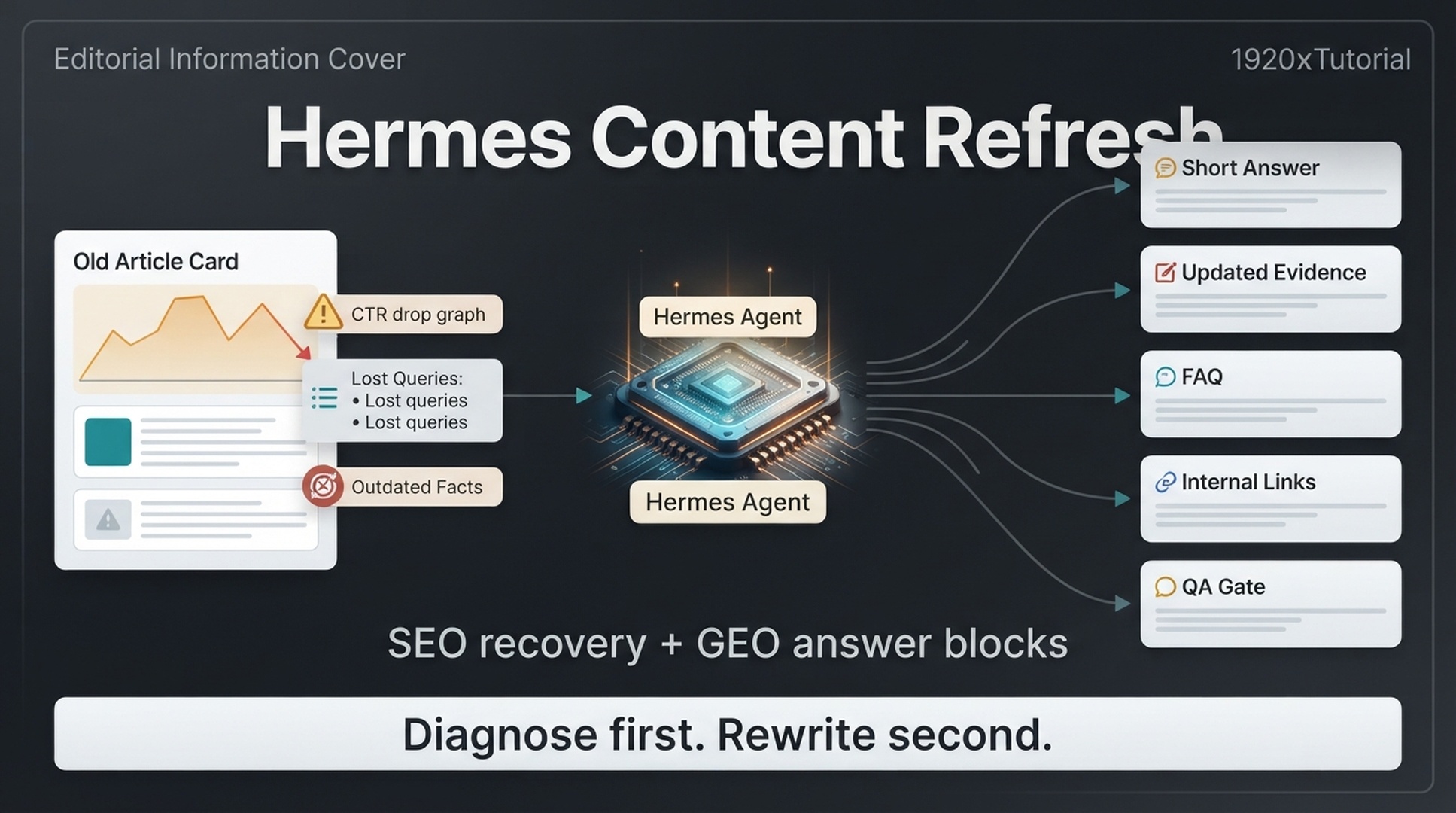
Ask Hermes to diagnose the old article before asking for any rewrite. Diagnosis first, rewrite second.
A good content refresh starts with evidence: Google Search Console trends, GA4 behavior, crawl data, current page structure, outdated facts, missing internal links, and GEO prompt gaps. Once Hermes knows what is broken, it can recommend targeted updates: a better title, a clearer answer block, a new table, updated evidence, stronger FAQ answers, or a better internal link path.
The beginner rule is simple: diagnose first, rewrite second, publish only after approval.
What you get from this guide
Item | Detail |
|---|---|
Target reader | Content editors and SEO people with published posts, Google Search Console access, and a working Hermes setup |
Result | A diagnosis, an approved refresh plan, rewritten sections only, a passing QA gate, and a post-publish measurement plan for one article |
Prerequisites | Hermes installed and answering in |
Estimated time | About 60-90 minutes per page, most of it human review |
Definition of done | Plan approved, drafted changes match the plan, QA gate passes, and a human approves the final draft before the CMS update |
What Hermes is
Hermes is an open-source AI agent framework by Nous Research. You drive it from the command line with hermes chat, and it browses the web through web_search and web_extract tools, automates a real browser, runs reusable skills, schedules recurring work with cronjob tasks, and loads MCP toolsets such as Google Search Console. As of mid-2026, that covers the whole refresh loop in this guide. Start with the official docs at https://hermes-agent.nousresearch.com/docs and the repository at https://github.com/NousResearch/hermes-agent.
When an old article is worth refreshing
Not every old page deserves work. Use Hermes to find pages where a refresh can actually matter.
Signal | What it may mean | Refresh action |
|---|---|---|
High impressions, low CTR | The page is visible but not earning clicks | Test title/meta and improve snippet alignment |
Clicks declining | The page may be stale or intent has shifted | Update sections, examples, and query coverage |
Ranking positions 4-15 | The page is close enough to improve | Strengthen intent match and internal links |
Organic traffic but weak engagement | The page attracts visitors but fails the next step | Improve intro, CTA, structure, or promise match |
AI prompts mention competitors | Your page may lack evidence or answer clarity | Add answer blocks, proof, comparison, or entity clarity |
Crawl issues or missing metadata | Technical problems may limit performance | Fix metadata or technical issue after approval |
Avoid refreshing pages with no demand, no business relevance, and no useful role in your topic cluster. Sometimes the best action is to leave a page alone, merge it, or remove it after a separate content audit.
Step 1: collect the refresh files
Create a refresh folder for each page:
/hermes-seo-agent
  /refresh
    /page-name
      current-article.md
      gsc-last-28-days.csv
      gsc-previous-28-days.csv
      ga4-landing-page.csv
      crawl-row.csv
      geo-prompt-gaps.csv
      prompts/content-refresh-diagnosis.md
      refresh-plan.md
      qa/content-refresh-gate.md
      qa-report.md
Minimum files:
File | What it contains |
|---|---|
| The current article text or exported Markdown |
| Query/page data from the recent period |
| Query/page data from the previous comparable period |
| Organic sessions, engagement, and key events if available |
| Status code, indexability, title, meta, canonical, word count, inlinks |
| Prompts where the page is missing, weak, uncited, or inaccurate |
If you only have the article and GSC data, start there. Hermes can mark the rest as missing. Export query and page rows from Google Search Console, and check the Search Central documentation when a crawl issue needs precise terminology.
Step 2: ask Hermes for a diagnosis, not a rewrite
Create prompts/content-refresh-diagnosis.md:
You are diagnosing an old article for SEO and GEO refresh.

Read the files in /refresh/[page-name].

Do not rewrite the article yet.
Do not invent missing data.
If a file or metric is missing, write "missing".

Return:
1. Current page summary
2. Search performance diagnosis
3. Query changes from GSC
4. CTR issues
5. Ranking or impression shifts
6. GA4 engagement or conversion issues, if data exists
7. Crawl or metadata issues, if data exists
8. GEO prompt gaps
9. Sections to keep
10. Sections to update
11. Sections to remove or merge
12. New answer blocks needed
13. Internal links to add or review
14. Risk level
15. Approval needed before rewriting
A useful diagnosis should name the specific problem. A weak diagnosis says "update the article for freshness." Ask for evidence when that happens.
Example:
| Issue | Evidence | Likely cause | Action |
|---|---|---|---|
| CTR is low for "gsc ga4 dashboard" | 6,200 impressions, 1.1% CTR, position 5.8 | Title promises a guide but users likely want a template or dashboard example | Add template preview section and test a title with "dashboard template" |
| GEO prompt gap | Prompt "How do I connect GSC and GA4 for SEO reporting?" has no clear step list in article | Page explains concepts but not workflow | Add 6-step answer block |
Step 3: separate SEO fixes from GEO fixes
A refresh can fail when everything gets blended into one vague task. Make Hermes separate the work.
Fix type | Example | Approval |
|---|---|---|
SEO title/meta | Rewrite title to match high-impression query | Editor or SEO owner |
Search intent section | Add missing workflow, template, comparison, or example | Editor |
GEO answer block | Add direct answer for high-priority prompt | Editor |
Evidence update | Add current data, official source, screenshot, or example | Editor/source reviewer |
Internal link | Link from hub page to refreshed article | SEO/editor |
Technical metadata | Fix canonical, noindex, schema, or crawl issue | Technical reviewer |
Prompt:
Split the refresh recommendations into SEO fixes and GEO fixes.

For each fix, include:
- Section affected
- Evidence
- Exact recommended change
- Expected SEO impact
- Expected GEO impact
- Risk level
- Approval owner

Do not combine unrelated fixes into one recommendation.
This makes the update easier to review. It also stops Hermes from rewriting parts of the page that already work.
Step 4: create a refresh plan
Before any rewriting, create refresh-plan.md.
Template:
# Content refresh plan

Page:
Current URL:
Primary goal:
Main SEO issue:
Main GEO issue:
Risk level:
Approval owner:

## Keep
| Section | Why keep it |
|---|---|

## Update
| Section | Problem | Change | Evidence |
|---|---|---|---|

## Add
| New section | Purpose | SEO role | GEO role |
|---|---|---|---|

## Remove or merge
| Section | Reason | Destination |
|---|---|---|

## Title/meta tests
| Current | Proposed | Reason |
|---|---|---|

## Internal links
| Source page | Target page | Anchor | Reason |
|---|---|---|---|

## Approval checklist
- [ ] Facts verified
- [ ] Sources checked
- [ ] No invented claims
- [ ] Technical changes reviewed
- [ ] Final draft approved
Hermes prompt:
Create refresh-plan.md for this page.

Use the diagnosis report.
Only recommend changes supported by evidence.
If a change is based on judgment rather than data, label it "editorial judgment".
Do not write the updated article yet.
The plan should be approved before drafting.
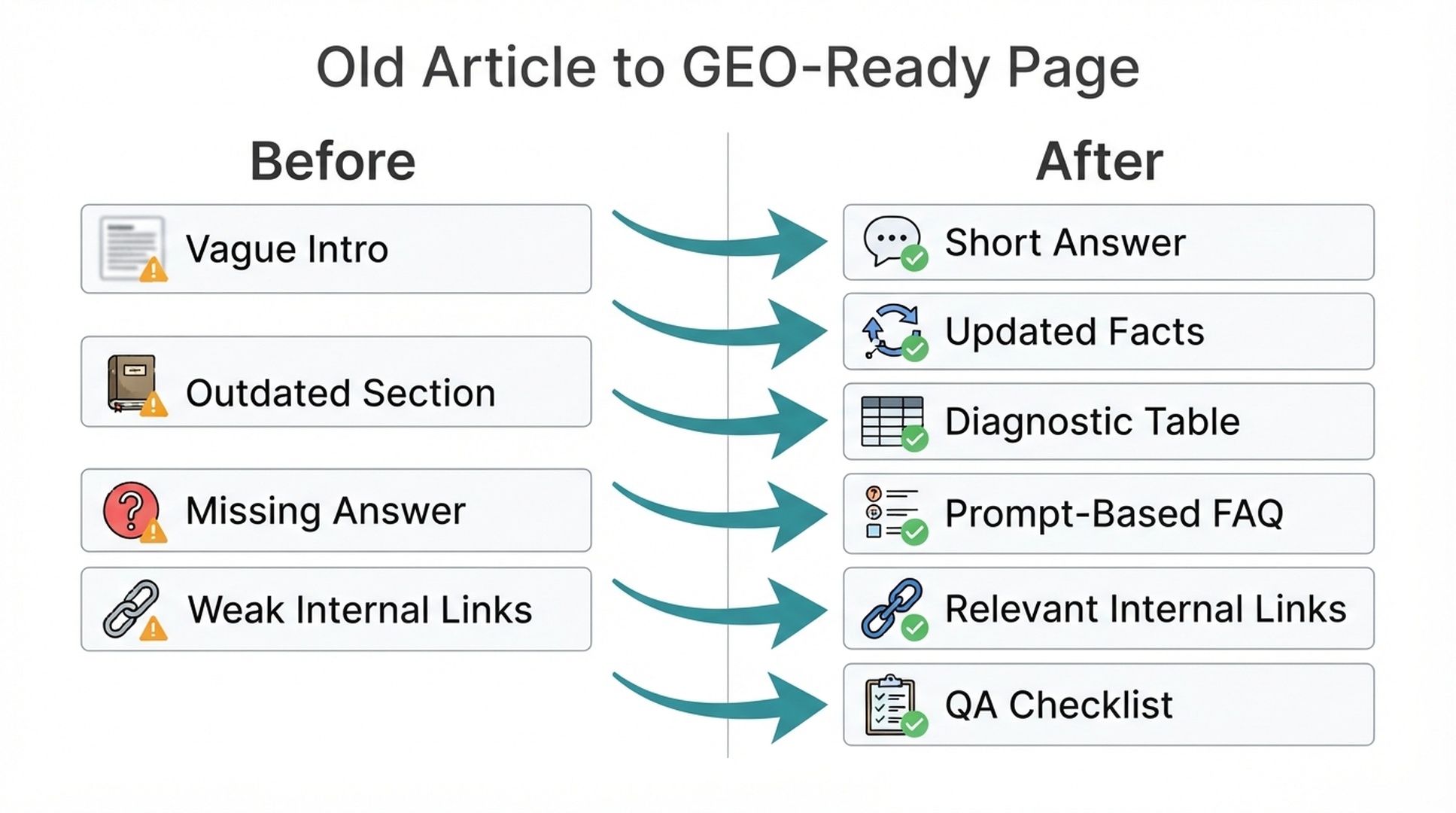
Step 5: add GEO answer blocks
A GEO answer block is a short, direct section that answers a real prompt. It should help readers first. AI extractability is a side benefit.
Use this format:
## Short answer

[Answer the prompt in 2-4 plain sentences. Name the topic, the problem, the recommended action, and one constraint.]
For problem-solving prompts, use a diagnostic table:
| Symptom | Likely cause | What to check | Fix |
|---|---|---|---|
For comparison prompts, use a decision table:
| Situation | Choose this | Why |
|---|---|---|
Prompt Hermes:
Create GEO answer blocks for the approved refresh plan.

For each answer block, include:
1. The prompt it answers
2. The recommended location in the article
3. The answer block text
4. Any supporting table or checklist
5. Evidence or source needed

Rules:
- Keep the answer direct.
- Do not add unsupported claims.
- Do not use vague language like "improve visibility" without explaining how.
- Make the answer useful to a human reader.
Example:
## Short answer

If your page has high impressions but low clicks in Google Search Console, the page is visible but not persuasive enough in the search result. Check the top query, title tag, meta description, current snippet, and whether the page actually matches the user's intent. Start with a title/meta test before rewriting the whole article.
Step 6: refresh the title and meta description carefully
Title and meta changes can help CTR, but they can also mislead users if they overpromise. Ask Hermes for tests, not final answers.
Prompt:
Create title and meta description test options for this refreshed article.

Use the GSC query data and refresh plan.

Return:
1. Current title and meta, if available
2. Three title options
3. Three meta description options
4. Query or intent each option targets
5. Risk of overpromising
6. Recommended option

Do not stuff keywords.
Do not promise outcomes the article cannot deliver.
Decision table:
Option | Good when | Risk |
|---|---|---|
Query-led title | The page has strong impressions for one query | May narrow the page too much |
Benefit-led title | The article solves a practical task | Can overpromise if too broad |
Template-led title | Users clearly want a reusable asset | Needs a real template in the article |
Comparison-led title | Search intent is evaluation | Needs a fair comparison table |
Step 7: update internal links
Old articles often lose performance because they are isolated. Hermes should check both directions:
- Which pages should link to the refreshed article?
- Which pages should the refreshed article link to?
Prompt:
Create an internal link update plan for this refreshed article.

Use:
- Existing page inventory
- Current article
- Refresh plan
- Target cluster

Return:
1. Source pages that should link to this article
2. Target pages this article should link to
3. Suggested anchor text
4. Reason the link helps the reader
5. SEO benefit
6. GEO benefit
7. Risk of irrelevance

Avoid repetitive anchor text.
Do not force links that do not fit the section.
Internal link table:
| Source URL | Target URL | Anchor text | Reader reason | SEO role | GEO role | Approval |
|---|---|---|---|---|---|---|
Keep links natural. A bad internal link is a distraction, not an optimization.
Step 8: draft only the changed sections
Beginners often ask Hermes to rewrite the whole article. That can erase useful parts. Start with changed sections only.
Prompt:
Rewrite only the approved sections from refresh-plan.md.

Rules:
- Preserve sections marked "keep".
- Only edit sections marked "update" or "add".
- Keep the original useful examples unless they are outdated.
- Add answer blocks where approved.
- Add tables or checklists only where they improve clarity.
- Mark any claim that needs source verification.
- Return the updated sections, not the full article.
After the section edits are approved, ask Hermes to assemble the full article.
Assemble the refreshed article using:
- Original sections marked keep
- Approved rewritten sections
- Approved new sections
- Approved internal links

Return the full Markdown draft and a change log.
The change log matters:
## Change log
| Section | Change | Reason | Evidence |
|---|---|---|---|
Step 9: run the refresh QA gate
Create qa/content-refresh-gate.md:
# Content refresh QA gate

## Data and diagnosis
- [ ] Refresh was based on GSC, GA4, crawl, or prompt gap evidence.
- [ ] Missing data was marked as missing.
- [ ] The plan was approved before rewriting.

## SEO
- [ ] Search intent is clearer than before.
- [ ] Title/meta options do not overpromise.
- [ ] Internal links are relevant.
- [ ] No cannibalization risk was introduced.

## GEO
- [ ] High-priority prompts have direct answer blocks.
- [ ] Entities are named clearly.
- [ ] Evidence, tables, or examples support important claims.
- [ ] FAQ questions are based on real prompts or queries.

## Safety
- [ ] No invented statistics.
- [ ] No fake citations.
- [ ] Outdated facts were updated or removed.
- [ ] Technical changes were approved by a technical reviewer.
- [ ] Final draft is approved before CMS update.
Prompt:
Review the refreshed draft against qa/content-refresh-gate.md.

Return:
1. Pass/fail for each item
2. Specific sections that fail
3. Claims needing source verification
4. Overpromising title/meta risks
5. Internal link concerns
6. Whether the draft is safe to publish after human review
Save the review output as qa-report.md in the page folder. If the QA gate fails, hold the publish and ask for section-level fixes, then re-run the gate.
Step 10: measure after publishing
Refresh work needs follow-up. Add a measurement note before publishing.
# Post-refresh measurement plan

Page:
Publish date:
Baseline period:
Comparison period:
Primary SEO metric:
Secondary SEO metric:
Primary GEO prompt:
Secondary GEO prompts:
Conversion or engagement metric:
Next review date:
Recommended check windows:
Window | What to check |
|---|---|
7 days | Indexing, rendering, broken links, obvious tracking issues |
14-28 days | GSC impressions, clicks, CTR, query mix |
30-60 days | Engagement, conversions, internal link impact, prompt visibility |
90 days | Whether to keep, expand, merge, or refresh again |
Prompt Hermes:
Create a post-refresh measurement plan for this page.

Use the baseline data from GSC, GA4, crawl, and prompt checks.

Return:
1. Metrics to watch
2. Baseline values if available
3. Review dates
4. Expected signals
5. What to do if performance improves
6. What to do if performance does not improve
Expect results over weeks, not days. The point is to create a feedback loop.
Troubleshooting
Problem | Likely cause | Fix |
|---|---|---|
GSC export comes back empty | Wrong date range, or the page has no impressions in that period | Re-export with a wider range; if it is still empty, mark the metric as "missing" in the diagnosis |
Hermes says it cannot find the input files | Paths in the prompts do not match the folder layout | Keep every file under /hermes-seo-agent/refresh/[page-name] and use the prompts/ and qa/ paths exactly as written in the steps |
The diagnosis ignores GA4 or crawl data | A file name mismatch, for example ga4-landing-page.CSV | Rename files to the exact names in the folder list and re-run the diagnosis prompt |
A rewritten section changes content marked "keep" | The assembly prompt was run without a change log check | Ask for the change log and a section-level diff before approving |
The QA gate keeps failing | Missing evidence or invented claims in the draft | Ask for section-level fixes, verify each claim's source, then re-run the gate; publish only after it passes |
Beginner example: refreshing a low-CTR article
Scenario: An article about GSC and GA4 reporting has good impressions but weak CTR.
Input | Evidence |
|---|---|
GSC | Query |
GA4 | Page gets organic sessions but few key events |
GEO prompt check | Prompt "How do I connect GSC and GA4 for SEO reporting?" does not cite the page |
Crawl | Title is generic, meta description missing |
Hermes recommendation:
Fix | Reason |
|---|---|
Add short answer block | The page needs a direct workflow explanation |
Add 6-step setup section | The query suggests how-to intent |
Add diagnostic table | Helps readers understand why GSC and GA4 differ |
Test title with "GSC + GA4 SEO reporting" | Better matches the high-impression query |
Add CTA to analytics template | GA4 shows weak conversion path |
Add internal link from SEO dashboard article | Strengthens the reporting cluster |
This is a targeted refresh. It is not a full rewrite.
Common mistakes
Mistake | Why it hurts | Better approach |
|---|---|---|
Rewriting the whole article first | Erases useful content and hides the real issue | Diagnose before rewriting |
Updating only the publish date | Adds little value | Update facts, structure, examples, and answers |
Ignoring GSC query shifts | Misses changed search intent | Compare recent and previous periods |
Adding FAQs without prompt evidence | Creates filler | Use real queries and prompt gaps |
Overpromising in the title | May raise CTR briefly but hurt trust | Match the actual page value |
Publishing without QA | Lets invented claims or weak links slip through | Run the refresh gate |
Auspia take
Content refresh is one of the best first uses for Hermes because the inputs are concrete. You have an existing article, performance data, prompt gaps, and a visible page structure. Hermes can compare those inputs and propose precise fixes.
The useful pattern is not "make this better." The useful pattern is: diagnose, plan, approve, rewrite changed sections, QA, publish, measure.
If you make that loop repeatable, old content stops being a backlog and becomes a compounding asset.
Run this refresh pass as a Hermes skill
You can package everything above as a reusable Hermes skill, so a beginner triggers the whole workflow with one sentence instead of copying prompts between sessions. If you have not set up the agent yet, start with our Hermes SEO agent setup guide in the same series.
---
name: hermes-content-refresh-seo-geo
description: Refresh one old article for SEO and GEO with a diagnosis-first workflow, Search Console evidence, approved section rewrites, a QA gate, and a post-publish measurement plan.
---

# Content refresh for SEO and GEO

Refresh one old article with a diagnosis-first workflow: gather evidence, diagnose, plan, rewrite approved sections, pass a QA gate, and measure after publishing.

## When to use
- The user asks to refresh, update, or modernize an old post for search or AI visibility.
- A page has declining clicks, low CTR, ranking in positions 4-15, or weak answers in AI prompts.

## Workflow

### 1. Collect inputs
Create folder `refresh/<page-name>/` with:
- `current-article.md`: the article as Markdown
- `gsc-last-28-days.csv` and `gsc-previous-28-days.csv`: query/page rows from Google Search Console
- `ga4-landing-page.csv`: organic sessions and engagement if available
- `crawl-row.csv`: status, indexability, title, meta, canonical, word count, inlinks
- `geo-prompt-gaps.csv`: prompts where the page is missing, weak, or uncited

If a file is unavailable, record it as missing and continue.

### 2. Diagnose, then rewrite
Write `prompts/content-refresh-diagnosis.md` with this prompt:

You are diagnosing an old article for SEO and GEO refresh. Read the files in refresh/[page-name]. Return:
1. Current page summary
2. Search performance diagnosis
3. Query changes from GSC
4. CTR issues
5. Ranking or impression shifts
6. GA4 engagement issues, if data exists
7. Crawl or metadata issues, if data exists
8. GEO prompt gaps
9. Sections to keep
10. Sections to update
11. Sections to remove or merge
12. New answer blocks needed
13. Internal links to add or review
14. Risk level
15. Approval needed before rewriting

### 3. Separate SEO fixes from GEO fixes
For each recommended fix return: section affected, evidence, exact recommended change, expected SEO impact, expected GEO impact, risk level, and approval owner. Keep unrelated fixes in separate recommendations.

### 4. Create refresh-plan.md
Include sections: Keep, Update, Add, Remove or merge, Title/meta tests, Internal links, and an approval checklist. Label any judgment-based change as "editorial judgment".

### 5. Draft changed sections only
Rewrite only sections marked "update" or "add". Preserve "keep" sections and useful examples. Return the updated sections plus a change log, not the full article.

### 6. Run the QA gate
Write `qa/content-refresh-gate.md` and check:
- Data: refresh based on GSC, GA4, crawl, or prompt gap evidence; missing data marked as missing; plan approved before rewriting
- SEO: search intent clearer, title/meta options do not overpromise, internal links relevant, no cannibalization risk
- GEO: priority prompts have direct answer blocks, entities named clearly, evidence supports claims, FAQ questions come from real prompts
- Safety: no invented statistics, no fake citations, outdated facts fixed, technical changes approved, final draft approved before CMS update

Review the draft against the gate. If any item fails, return section-level fixes and re-run the gate.

### 7. Save outputs and report
Write `qa-report.md` with pass/fail per gate item and claims needing verification. Present the plan and draft for human approval. Publishing stays manual.

## Quality gates
- The diagnosis names the specific problem with evidence.
- A human approves the plan before drafting.
- The draft contains only approved sections.
- The QA gate passes before publish.
- A measurement plan lists baseline, review dates, and expected signals.

## Output format
Return Markdown files:
- `refresh-plan.md`
- Updated sections with a change log table
- `qa-report.md`
- Post-refresh measurement plan with 7, 14-28, 30-60, and 90 day checkpoints
Install it once:
- Save the block above to
~/.hermes/skills/seo/hermes-content-refresh-seo-geo/SKILL.md - Confirm it is registered with
hermes skills list - Start
hermes chatand say: "Use the hermes-content-refresh-seo-geo skill to refresh my old posts"
Prefer no installation? Paste this article's URL or body into a hermes chat session and say: "Follow this article and run the refresh workflow on my content." Hermes reads the steps and runs the workflow with you.
FAQ
Should Hermes rewrite the full article during a refresh?
Not at first. Ask Hermes to diagnose the article, create a refresh plan, and rewrite only approved sections. Full rewrites can remove useful content and introduce new errors.
What data should I use for a content refresh?
Start with the current article, GSC query/page data, GA4 landing page behavior, crawl data, and GEO prompt gaps. If some data is missing, Hermes should mark it as missing instead of guessing.
What is a GEO answer block?
A GEO answer block is a short, direct answer to a real AI search prompt or reader question. It usually appears near the top of a section and may include a table, checklist, or diagnostic summary.
How often should old articles be refreshed?
Review important pages every 3-6 months, or sooner if GSC shows a large drop in clicks, impressions, CTR, or query coverage. Refresh based on evidence, not just age.
Can updating a title hurt performance?
Yes. A title change can reduce relevance if it no longer matches the page or query intent. Treat title changes as tests and record the baseline before publishing.
How do I know if a refresh worked?
Track GSC clicks, impressions, CTR, average position, GA4 engagement, conversions, and GEO prompt visibility after publishing. Use 14-28 days for early search signals and 30-60 days for stronger behavior signals.
Can Hermes publish the refreshed article automatically?
Keep publishing manual in a beginner workflow. Hermes can prepare the refreshed draft and QA report, but a human should approve the final version before CMS updates.
Author: Miles Carter, Content Decay Analyst Across 10k+ URLs at Auspia. Miles writes about updating old posts, content decay, freshness planning, and evidence-led refresh workflows.