


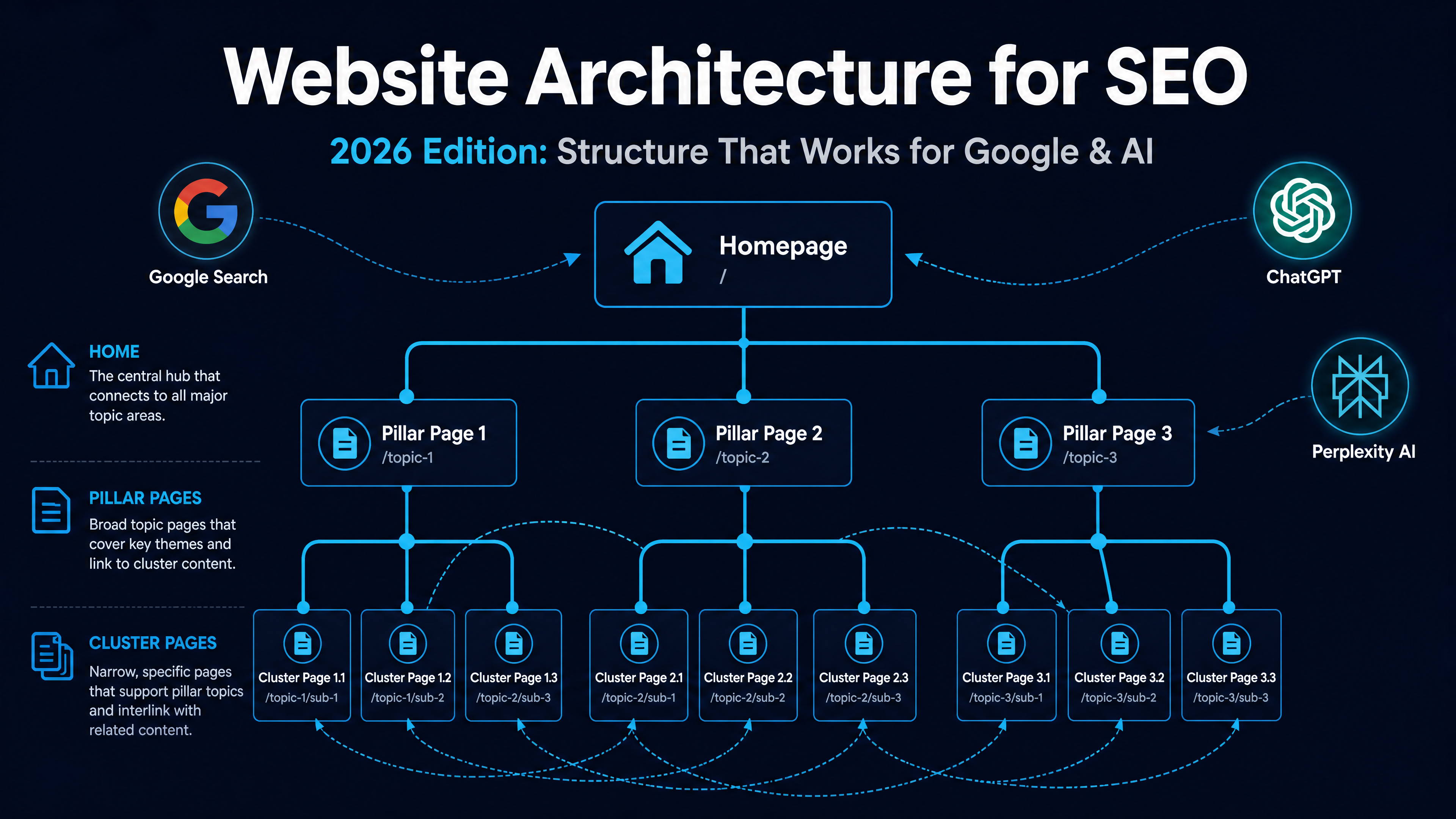
How to Structure Your Website Architecture for SEO (2026 Edition)
If you build a house without a blueprint, you get crooked walls and doors that don't close. Websites work the same way. Without a clear structure, search engines struggle to find your pages, visitors leave confused, and your content never reaches the people who need it.
But here is what changed in 2026: your website structure now feeds two audiences at once — traditional search engines like Google, and AI search engines like ChatGPT, Perplexity, and Gemini. A well-organized site doesn't just rank higher. It gets cited as a source when AI answers user questions.
This guide walks you through building that structure from scratch. Every major section includes a Codex agent prompt you can copy and run — no coding skills needed. If you can open a terminal, you can follow along.
1. Start With the Basics
Before you open any tool, write down the answer to one question:
What is this website for?
Not "to get traffic" or "to make money." What does a visitor do after landing on your homepage? Buy a product? Book a consultation? Read a guide? Your answer determines every structural decision that follows.
Every website, no matter how complex, needs three pages at its foundation:
Page | Why It Matters |
|---|---|
About | Tells search engines who operates this site. Google's Quality Rater Guidelines reward clear ownership signals. |
Blog / Resources | Where your topical depth lives. A blog isn't a diary — it's your authority-building engine. |
Contact | A trust signal. Sites without contact information trigger lower quality assessments in both Google and AI crawlers. |
Your primary service or product page needs to be one click from the homepage. Not three levels deep in a dropdown. Not behind a login wall. One click.
Flat vs. Deep: Pick Your Shape
A flat architecture means most pages are reachable in 1–3 clicks from the homepage. A deep architecture means users click through 4, 5, or more layers to reach important content.
In 2026, flat wins almost every time:
- Crawl budget: Google allocates a finite crawl budget to every site. Pages buried 5+ clicks deep may never get crawled.
- Link equity: Each click dilutes the authority passed from your homepage. A page at depth 4 receives a fraction of what a page at depth 2 receives.
- AI extraction: AI crawlers (OAI-SearchBot, ClaudeBot, PerplexityBot) prioritize shallow, well-linked pages. Deep pages rarely make it into AI answers.
The rule: every important page should be reachable within 3 clicks from your homepage. If you need more depth, you probably need a better category structure.
Codex prompt — plan your basic structure:
You are an SEO architect. Help me plan the basic page structure for my website.

My website is about: [describe your topic/business]
My main goal is: [e.g., sell products, get consulting clients, build an audience]
My target audience is: [describe who you're writing for]

Please output:
1. The 3-5 essential pages I must have (Home, About, Blog, Contact, and any key service/product pages)
2. A flat URL hierarchy showing how pages connect (max 3 levels deep)
3. A recommended main navigation menu structure
4. Which pages need the most internal link support

Do not invent traffic numbers. Mark any assumptions clearly.
2. Build Topic Clusters, Not Just Pages
The old way of structuring a site went like this: write a blog post targeting a keyword, write another targeting a related keyword, publish both, and hope Google connects the dots.
That does not work in 2026.
Google now evaluates topical authority — whether your site comprehensively covers a subject, not just whether you have one optimized page. AI search engines take this further: they build a mental map of your site's expertise by tracing internal links between related pages.
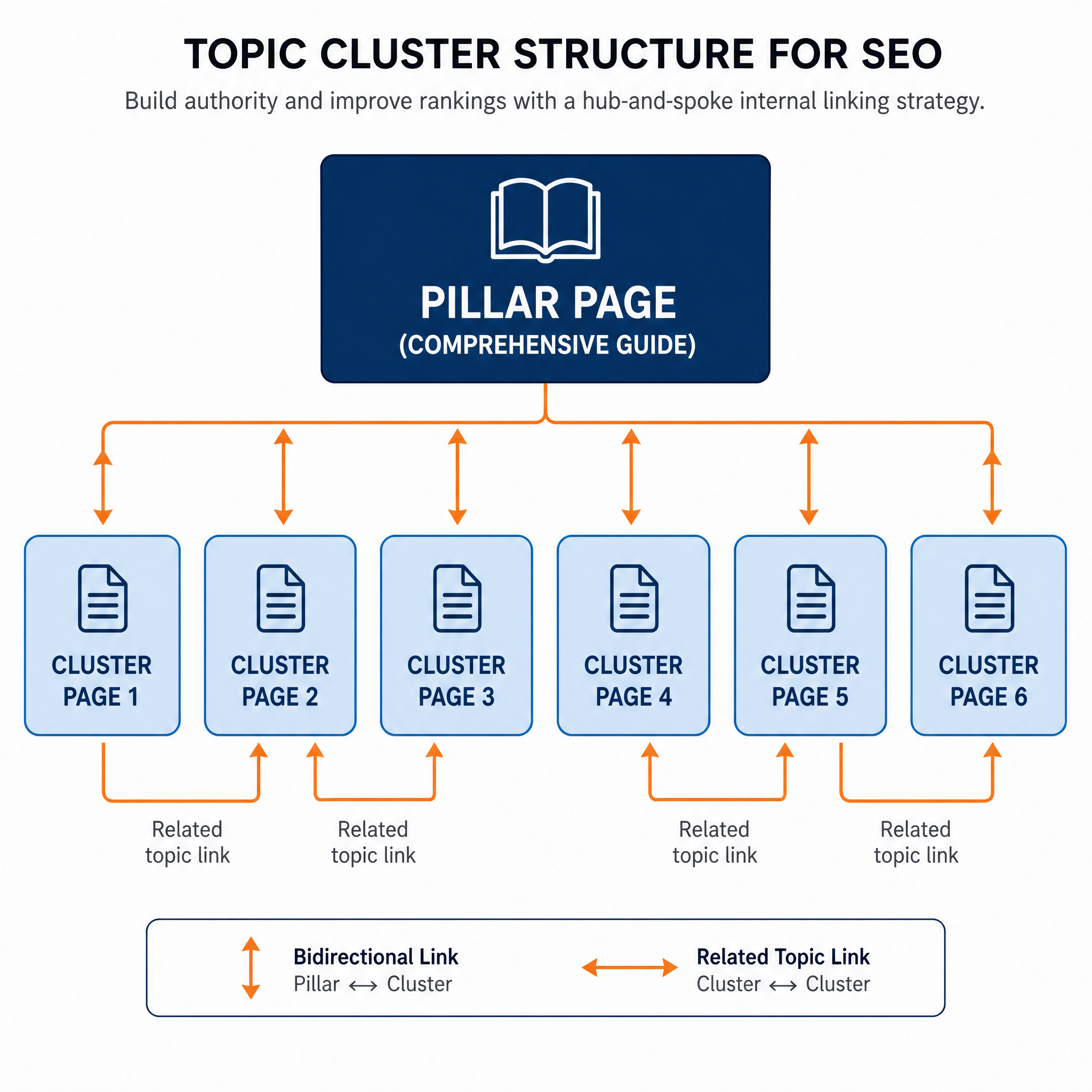
The new approach is called a topic cluster:
- One pillar page — a comprehensive guide (2,000–4,000 words) covering a broad topic at a high level.
- 6–12 cluster pages — shorter, focused articles on specific subtopics, each linking back to the pillar.
- Bidirectional linking — the pillar links down to every cluster page, and every cluster page links back up to the pillar.
Here is what that looks like for a site about home gardening:
/gardening-for-beginners/          ← Pillar page (broad overview)
  ├── /soil-preparation/            ← Cluster (links to pillar)
  ├── /choosing-plants-by-climate/  ← Cluster (links to pillar)
  ├── /watering-schedules/          ← Cluster (links to pillar)
  ├── /organic-pest-control/        ← Cluster (links to pillar)
  └── /seasonal-planting-calendar/  ← Cluster (links to pillar)
This structure signals to Google that your site is a legitimate resource on gardening — not a one-off article farm. For AI engines, it creates a clear citation path: if ChatGPT needs information about pest control, it traces your internal links from the broad topic down to the specific answer.
Early GEO measurement data from 2025–2026 suggests that sites with clear topic clusters get cited in AI answers roughly 3× more often than sites with disorganized content. The data is still noisy and AI citation patterns shift month to month — but the direction is consistent enough to act on.
Codex prompt — build your topic clusters:
You are an SEO content architect. Help me design topic clusters for my website.

My website topic is: [your broad topic]
My target audience is: [describe readers]
My market/language is: [e.g., United States / English]

Steps:
1. Identify 3-5 pillar topics that cover my subject comprehensively.
2. For each pillar, suggest 6-12 cluster subtopics — specific, narrower angles a real person would search for.
3. Recommend a pillar page title and slug for each pillar topic.
4. Show the internal linking pattern: which pages link to which.
5. Flag any subtopics that are too thin to justify a standalone page — suggest merging them.

Output as a structured table with Pillar Topic, Cluster Topics, Pillar URL, and Linking Notes columns.

Use your own knowledge of common search behaviors and topic relationships. Do not fabricate search volume numbers. Mark gaps in my topic coverage clearly.
3. Sketch Your Architecture Before You Build
You would not build a house by nailing boards together and hoping for the best. Yet most websites grow exactly like that — a new page here, a new category there, with no master plan.
Take 20 minutes to sketch your site structure before you write a single line of code or publish a single page. Here is how:
Step 1: List every page and section you plan to create. Start broad (Home, About, Blog, Contact, Services) then drill down (Blog → Category pages → Individual posts).
Step 2: Draw the hierarchy. Use a mind-mapping tool like MindMeister, a simple Google Drawing, or even pen and paper. Each node is a page or section. Lines between nodes show parent-child relationships.
Step 3: Check your depth. Count clicks from the homepage to every important page. If anything takes more than 3 clicks, restructure.
Step 4: Mark internal link paths. For each cluster page, identify which pillar page it connects to. Draw those connection lines — they matter as much as the hierarchy.
Codex prompt — generate a site architecture diagram description:
You are a website architecture planner. I will describe my website, and you will produce a detailed, text-based architecture diagram.

My website: [describe your site — topic, audience, goals, approximate number of pages]

Output requirements:
1. A text-based tree diagram showing the full site hierarchy, with indentation representing depth levels.
2. Depth labels for every page (Home = depth 0, main nav pages = depth 1, etc.)
3. Internal link connection notes: mark which pages should cross-link to each other (not just parent-child, but lateral links between related cluster pages).
4. A "depth check" report: flag any important page at depth 4 or deeper.
5. Suggested URL structure for each section (e.g., /blog/category-name/, /services/service-name/).

Use consistent indentation and clear labels. This will serve as my site blueprint.
4. Internal Linking: Your Invisible Architecture
If site structure is the skeleton, internal links are the circulatory system. They carry authority from your strongest pages to the ones that need it, and they tell search engines which pages matter most.
In 2026, internal linking got more complex — and more important. Your internal links now serve three systems simultaneously:
System | What It Needs From Your Links |
|---|---|
Google PageRank | Clear paths from high-authority pages to important but less-linked pages. |
AI reasoning models (ChatGPT, Claude, Gemini) | Semantic cues: descriptive anchor text that explains what the linked page is about, not just "click here." |
Human visitors | Intuitive paths to related content. Links that answer the next logical question a reader would ask. |
This is what practitioners now call a Link Reasoning Architecture (LRA) — internal links designed to work across all three systems, not just Google.
Anchor Text Rules for 2026
Anchor text is the clickable words in a link. It is also the most underused internal linking lever. Here is what a healthy distribution looks like for links pointing to a given page:
Anchor Text Type | Target Share | Example |
|---|---|---|
Exact match | 15–25% | "website structure guide" linking to your structure guide |
Partial match | 30–40% | "planning your site structure" linking to the same page |
Semantic variant | 25–35% | "how to organize website pages" linking to the same page |
Generic / natural | Under 10% | "this guide" or "learn more" |
If every internal link to a page uses the exact same anchor text, Google's classifiers may flag it as over-optimized. If every link says "click here," AI engines cannot understand what the destination page covers.
How to Link Within a Topic Cluster
Every cluster page should:
- Link up to its pillar page (anchor text: the pillar topic, naturally phrased).
- Link laterally to 1–3 related cluster pages (anchor text: describe the relationship — "once you understand soil pH, choosing the right fertilizer becomes easier").
- Receive a link from the pillar page (anchor text: the cluster subtopic, naturally phrased).
Here is a concrete example for a gardening site:
Pillar: /gardening-for-beginners/
  ↓ links to each cluster page with anchor: "choosing the right soil for your garden"

Cluster: /soil-preparation/
  ↑ links to pillar with anchor: "return to our complete gardening guide"
  ↔ links to /choosing-plants-by-climate/ with anchor: "plants that thrive in your soil type"
  ↔ links to /watering-schedules/ with anchor: "how soil type affects your watering schedule"
Codex prompt — audit your internal links:
You are an internal linking analyst. Audit the internal link structure of a specific page on my website.

Page to audit: [URL of your page]
My topic cluster structure: [describe your pillar pages and which cluster pages belong to each]

Please check and report:
1. How many internal links point TO this page from other pages on my site? (List source pages if I provide them, otherwise explain how to check this.)
2. How many internal links point FROM this page to other pages? List them with their anchor text.
3. Anchor text distribution: what percentage of inbound links use exact-match, partial-match, semantic, or generic anchor text?
4. Orphan risk: is this page reachable within 3 clicks from the homepage?
5. Cluster compliance: does this page link up to its pillar and laterally to 1-3 related cluster pages?
6. Recommended fixes: which links should I add, which anchor text should I change, and where?

If I have not provided enough information to answer a question, tell me exactly what data I need to collect (e.g., "run a Screaming Frog crawl and share the internal link report").
5. Content-Layer Elements That Strengthen Structure
Structure is not just about which page links to which. It is also about the signals embedded within each page — the metadata, navigation aids, and content formatting that tell search engines how your site is organized.
Title Tags and Meta Descriptions
Every page needs a unique title tag and meta description. In 2026, these do two things:
- Google SERPs: the title and description that appear in blue-link results.
- AI answer attribution: when ChatGPT or Perplexity cites your page, it often pulls from your title tag as the citation label.
Title tag formula: [Page Topic] | [Site Name] or [Page Topic] — [Site Name]. Keep titles under 60 characters. Meta descriptions under 160 characters. Write for humans first, keywords second.
Breadcrumbs
Breadcrumbs show users (and search engines) where a page sits within your site hierarchy:
Home > Blog > Gardening > Soil Preparation for BeginnersThey add structured data to your pages automatically when implemented correctly, and they appear in Google's search results as a navigation trail. Most CMS platforms (WordPress, Webflow, Shopify) support breadcrumbs natively or with a one-click setting.
SEO-Friendly URLs
Your URL structure is your site architecture made visible. A URL like this:
/gardening/soil-preparation/Tells search engines: this page belongs to the Gardening section, and it is about soil preparation. A URL like this:
/blog/?p=8472Tells search engines nothing. Use words, not IDs. Use hyphens, not underscores. Keep it short.
Table of Contents
For any page over 1,000 words, add a table of contents with jump links. This serves three purposes:
- Readers can jump to the section they need.
- Google may display TOC links as "jump to" sitelinks in search results.
- AI crawlers use heading hierarchy and TOC links to understand page structure for passage extraction.
Author Bios and E-E-A-T
Google's E-E-A-T framework (Experience, Expertise, Authoritativeness, Trustworthiness) is not a direct ranking factor — but the signals that support it are. Every article should include a real author byline with a short bio explaining why this person knows what they are talking about. For AI engines, author bios provide entity disambiguation: they confirm that a real, qualified person wrote the content.
Direct Answer Blocks
AI search engines extract clean, self-contained passages from pages. Help them by including direct answer blocks: a concise 2–4 sentence answer to a specific question, placed near the top of a section, marked with a clear heading.
### How Often Should I Water a Vegetable Garden?

Most vegetable gardens need 1–2 inches of water per week, delivered in 2–3 deep
watering sessions rather than daily light sprinkling. Deep watering encourages
roots to grow downward, making plants more drought-resistant. The best time to
water is early morning, before the sun evaporates moisture from the soil surface.
This is easily extractable by both Google's featured snippets and AI models scanning for answers.
Codex prompt — audit a page's content-layer elements:
You are an on-page SEO auditor. Review the content-layer elements of a page I describe.

Page topic: [describe your page]
Page length: [approximate word count]
Page URL structure: [e.g., /blog/category/post-slug/]

Check and recommend:
1. Title tag: what should it be? (max 60 chars)
2. Meta description: draft one (max 160 chars)
3. Breadcrumb trail: what should the breadcrumb path be?
4. URL review: is the URL clean, readable, and keyword-relevant? If not, suggest a better structure.
5. Table of contents: should this page have one? If yes, draft the TOC headings.
6. Direct answer opportunities: identify 2-3 questions a reader might ask that this page should answer directly in a dedicated answer block.
7. Author bio: does the topic benefit from a credential signal? If yes, what type of expertise should the author bio emphasize?

Base all recommendations on the topic I described. Do not fabricate the page content — mark gaps where you need more information.
6. Technical Architecture That Works for Google and AI
The technical foundation of your site matters more in 2026 than it did five years ago — not because the basics changed, but because there are more systems to satisfy. A mistake that only affected Google in 2020 might now affect whether you appear in ChatGPT, Perplexity, and Google simultaneously.
HTTPS: Still Non-Negotiable
Google made HTTPS a ranking signal in 2014. In 2026, it is table stakes. AI crawlers prioritize secure connections too — a site without HTTPS will not be cited as a trustworthy source. If your site is still on HTTP, fix this before anything else.
Sitemap.xml + IndexNow: Dual Submission
Your XML sitemap tells search engines which pages exist on your site. But in 2026, submitting a sitemap to Google is only half the job.
IndexNow is a push protocol that instantly notifies Bing (and by extension, ChatGPT Search and Microsoft Copilot) when you publish, update, or delete a page. Without IndexNow, Bing discovers changes through its regular crawl cycle — which can take 1–4 weeks. With IndexNow, Bing is notified within seconds and typically recrawls within 3–7 days.
The setup takes less than 10 minutes:
- Generate an API key (a simple hex string, e.g.,
a1b2c3d4e5f6...). - Upload the key as a text file to your site's root directory.
- Install an IndexNow plugin (WordPress: Rank Math, CrawlWP; or a one-line server config for other platforms).
- Submit your sitemap URL through the IndexNow endpoint.
Google does not support IndexNow — continue submitting through Google Search Console. But for AI visibility through Bing-powered channels (ChatGPT, Copilot), IndexNow is the fastest path from publish to citation.
Robots.txt in the AI Era
Your robots.txt file now controls whether AI search engines can access your content. Each major AI company operates at least two bots — one for search/citation retrieval, and one for model training:
Bot | Company | Purpose | Allow for AI Citations? |
|---|---|---|---|
OAI-SearchBot | OpenAI | Powers ChatGPT Search citations | Yes — required |
GPTBot | OpenAI | Model training | Optional (blocking does not affect citations) |
ClaudeBot | Anthropic | Search retrieval + training | Yes |
PerplexityBot | Perplexity | Search and citations | Yes |
Google-Extended | Gemini training (separate from Googlebot) | Optional | |
Googlebot | Google Search + AI Overviews | Yes — never block |
A safe, modern robots.txt for maximum AI visibility looks like this:
User-agent: OAI-SearchBot
Allow: /

User-agent: ClaudeBot
Allow: /

User-agent: PerplexityBot
Allow: /

User-agent: GPTBot
Disallow: /

User-agent: Google-Extended
Disallow: /

User-agent: *
Allow: /
Disallow: /wp-admin/
Disallow: /private/

Sitemap: https://yoursite.com/sitemap.xml
This configuration allows all citation bots (you appear in AI answers), blocks training bots (your content is not used for model training), and allows Googlebot for standard search.
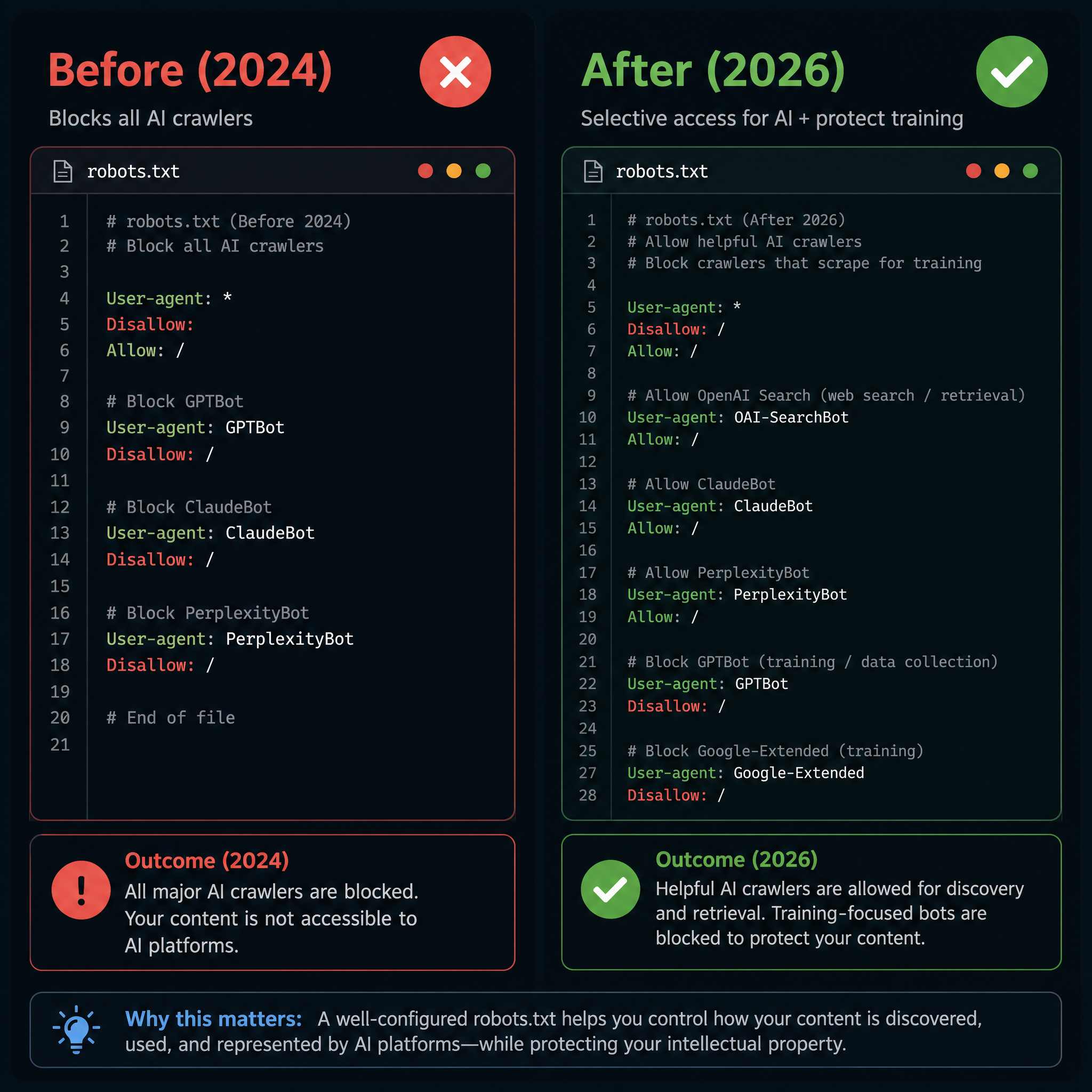
Important: If you use Cloudflare, check your "AI Crawl Control" settings. Cloudflare's default managed robots.txt can inject AI crawler blocks that override your origin file. Turn managed AI crawl control off or manually configure it.
Mobile-First and Core Web Vitals
Google uses mobile-first indexing — it primarily evaluates the mobile version of your site. Core Web Vitals (LCP under 2.5s, INP under 200ms, CLS under 0.1) are confirmed ranking signals. Use responsive design. Test your site on an actual phone, not just in a browser emulator.
Canonical Tags
If the same content appears at multiple URLs (common with ecommerce filters, UTM parameters, or HTTP/HTTPS duplicates), use canonical tags to tell search engines which URL is the "real" one. Without them, you dilute your own ranking signals across duplicate pages.
Structured Data
Structured data (JSON-LD schema markup) helps search engines understand what your content is, not just what words it contains. In 2026, the most impactful schema types for most sites are:
- Article — for blog posts and news articles.
- BreadcrumbList — powers the breadcrumb trail in search results.
- FAQ — for pages with question-and-answer content (can appear as expandable results).
- Organization / LocalBusiness — clarifies who operates the site.
- HowTo — for step-by-step instructional content.
Schema does not guarantee rich results or AI Overview inclusion. But it removes ambiguity about your content type, which helps every system — Google, Bing, and AI crawlers — process your pages correctly.
llms.txt: The New Entry Point for AI
The llms.txt standard (proposed in late 2024, widely adopted through 2025–2026) gives AI systems a machine-readable summary of your site. Think of it as a robots.txt for LLMs — but instead of blocking access, it guides AI to your most important content.
Create an llms.txt file at your site root:
# My Website Name
A brief description of what this site offers and who it is for.

## Core Pages
- https://yoursite.com/about/ | About us, mission, and team
- https://yoursite.com/services/ | Our main services and pricing
- https://yoursite.com/blog/gardening-for-beginners/ | Complete gardening guide (pillar)

## Documentation
- https://yoursite.com/blog/ | All articles and guides on gardening, soil, and plant care

## Optional: llms-full.txt
A longer, more detailed version of the same information is available at /llms-full.txt
This is a simple text file. It takes five minutes to create and signals to AI systems that your site is AI-aware and well-organized.
Codex prompt — technical audit checklist:
You are a technical SEO auditor. Run through a checklist for my website.

My website URL: [your URL]
My platform: [e.g., WordPress, Webflow, custom, Shopify]

Please produce a technical audit covering:
1. HTTPS: is the site fully on HTTPS? Any mixed content warnings?
2. Sitemap: is an XML sitemap present and submitted to Google Search Console?
3. IndexNow: is IndexNow configured? If not, provide setup instructions for my platform.
4. Robots.txt: review the current file. Are AI citation bots (OAI-SearchBot, ClaudeBot, PerplexityBot) allowed? Are training bots (GPTBot, Google-Extended) handled according to my preference? Is Cloudflare overriding anything?
5. Core Web Vitals: what should I check and how? List the three metrics (LCP, INP, CLS) with their thresholds.
6. Canonical tags: are there duplicate content risks that need canonical tags?
7. Structured data: which schema types should this site implement?
8. llms.txt: provide the content for an llms.txt file tailored to my site, based on what I have described.
9. Mobile: is the site responsive? What to test on a real phone.

For any check where I have not provided enough information, explain what tool to use and what to look for (e.g., "Run PageSpeed Insights and share the Lab Data section for LCP, INP, and CLS").
7. Audit Your Structure (And Keep Auditing)
Site structure is not a one-time project. Pages get added. Categories shift. Old content decays. Links break. Without periodic audits, your clean architecture gradually turns into a mess.
What to Audit
Monthly (15–30 minutes):
- Crawl your site with Screaming Frog or Sitebulb to find orphan pages (pages with zero internal links pointing to them).
- Check that your top 10 most-trafficked pages each link to 3–5 related pages within their cluster.
- Fix any broken internal links (404 errors from within your own site sever authority pathways).
- Verify that new content published in the last 30 days has been linked from at least one existing page.
Quarterly (1–2 hours):
- Review your pillar-to-cluster coverage. Every pillar should link to every cluster page in its topic group, and vice versa.
- Audit anchor text distribution for your top 20 pages. If more than 30% of links use identical anchor text, diversify.
- Check crawl depth. Are any important pages now deeper than 3 clicks from the homepage?
- Review IndexNow submission logs. Are your new pages being indexed within a week?
Annually (3–4 hours):
- Revisit your topic cluster map. Are there new subtopics you should cover? Have any pillar pages become outdated?
- Review your robots.txt, sitemap, and llms.txt for accuracy.
- Run a full Core Web Vitals audit and fix regressions.
- Check AI citation rates (if you have access to GEO tracking tools) to see which pages AI engines reference most.
The Simplest Audit: Crawl and Scan
If you do nothing else, do this once a month: run a Screaming Frog crawl, export the internal link report, and scan for pages with zero inbound internal links. Every orphan page is a missed ranking opportunity.
Codex prompt — monthly structure audit:
You are an SEO site structure auditor. I will describe my recent crawl or site changes, and you will produce a prioritized fix list.

My site: [describe your site and any recent changes — new pages, removed pages, category restructures]

Please produce:
1. A prioritized checklist of things to verify (most critical first).
2. For each item: what tool to use, what to look for, and what "fixed" looks like.
3. An orphan page check: how to find pages with no internal links pointing to them.
4. A cluster coverage check: does every pillar page link to every cluster page in its group?
5. A depth check: are any important pages deeper than 3 clicks from the homepage?
6. A link freshness check: have all pages published in the last 30 days received at least one internal link?

Adapt the checklist to the information I provided. Mark any items I need to verify manually with specific instructions.
The 2026 Website Structure Checklist
Here is everything in one place. Bookmark this and run through it whenever you launch a new site or restructure an existing one.
Foundation:
- [ ] About, Blog, and Contact pages exist and are one click from the homepage.
- [ ] Primary service/product page is in the main navigation.
- [ ] Every important page is reachable within 3 clicks from the homepage.
Topic Clusters:
- [ ] 3–5 pillar pages cover my main topics.
- [ ] Each pillar has 6–12 cluster pages with specific, focused subtopics.
- [ ] Bidirectional links exist between every pillar and its cluster pages.
- [ ] Lateral links connect related cluster pages to each other.
Internal Linking:
- [ ] No orphan pages (zero internal links pointing to them).
- [ ] Anchor text is diverse: roughly 15–25% exact, 30–40% partial, 25–35% semantic, under 10% generic.
- [ ] Top 10 pages each link to 3–5 related pages within their cluster.
Content Layer:
- [ ] Every page has a unique title tag (under 60 chars) and meta description (under 160 chars).
- [ ] Breadcrumbs are implemented and visible on every content page.
- [ ] URLs are clean, readable, and follow a logical hierarchy.
- [ ] Pages over 1,000 words have a table of contents.
- [ ] Direct answer blocks are placed under clear question-based headings.
- [ ] Every article has an author byline with a short expertise-relevant bio.
Technical:
- [ ] HTTPS is enabled sitewide with no mixed content.
- [ ] XML sitemap is submitted to Google Search Console.
- [ ] IndexNow is configured and submitting to Bing.
- [ ] Robots.txt allows OAI-SearchBot, ClaudeBot, and PerplexityBot.
- [ ] Training bots (GPTBot, Google-Extended) are blocked or allowed based on your policy.
- [ ] Cloudflare AI Crawl Control is verified — not overriding your robots.txt.
- [ ] Site is mobile-responsive and passes Core Web Vitals thresholds.
- [ ] Canonical tags are in place for any duplicate content.
- [ ] Structured data (Article, BreadcrumbList, Organization) is implemented.
- [ ] llms.txt file exists at the site root with core page summaries.
Ongoing:
- [ ] Monthly orphan page scan.
- [ ] Monthly broken internal link fix.
- [ ] Quarterly anchor text diversity check.
- [ ] Annual full-structure review and topic cluster update.
Final Thoughts
Website structure used to be a technical SEO checkbox — set it once, forget it until the next redesign. In 2026, it is an active, strategic system that feeds two audiences: traditional search engines and AI models that decide whether to cite your content.
The good news: the fundamentals have not changed. Clear hierarchy, logical grouping, descriptive anchors, and clean technical infrastructure still work. What changed is that the upside of getting it right is larger than ever — you rank in Google and get cited in ChatGPT, Perplexity, and AI Overviews.
Start with the basics. Build your topic clusters. Link deliberately. Audit monthly. And if you get stuck, the Codex prompts in this guide are ready to run.
Author: Morgan Keane, 12-Year Technical SEO Practitioner at Auspia. Writes about site architecture, crawl optimization, and making technical SEO accessible to beginners.


