


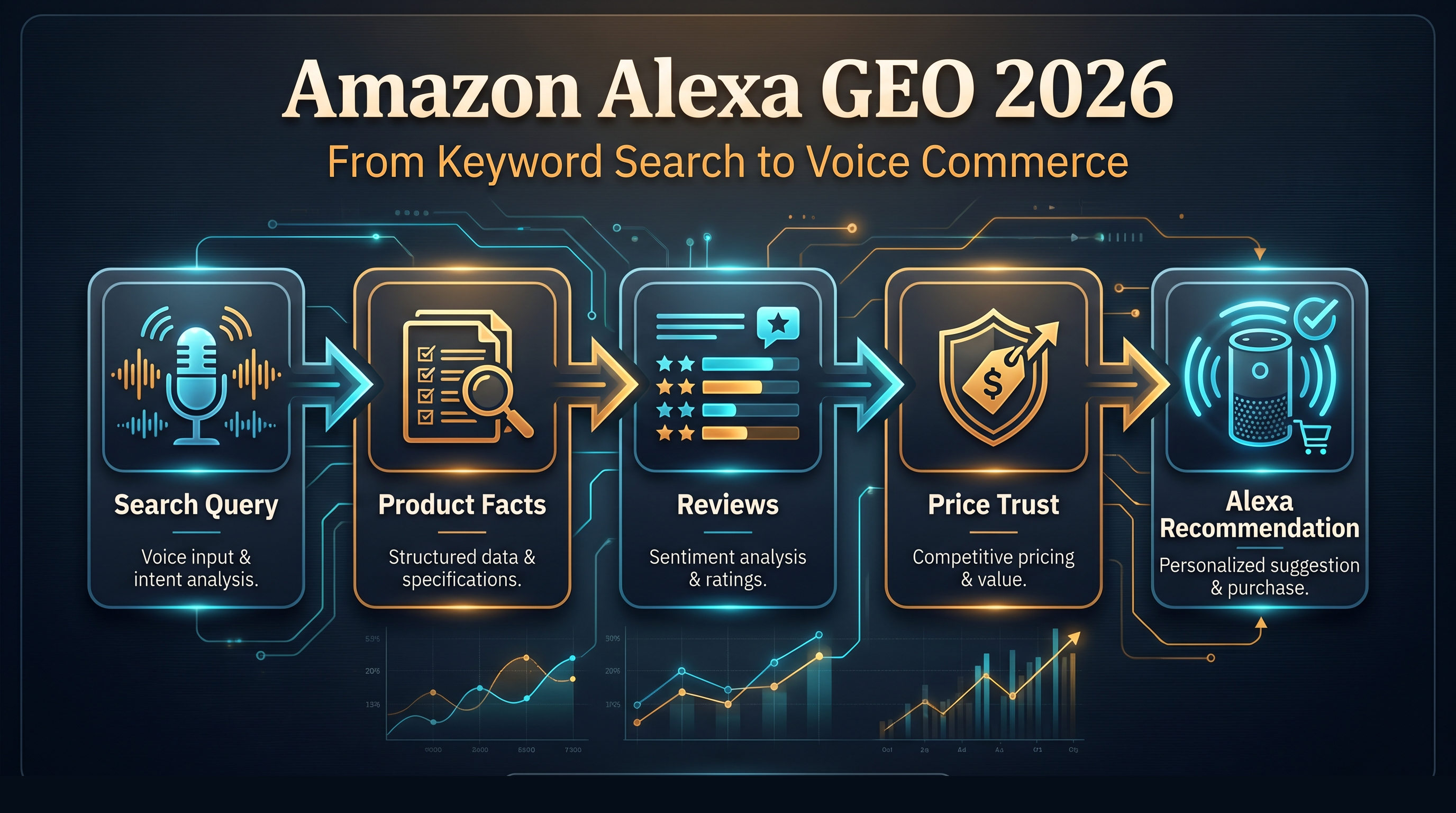
Amazon did not simply remove Rufus. In May 2026, Amazon began folding Rufus into Alexa for Shopping, a broader AI shopping assistant available in the Amazon Shopping app, Amazon.com, and Echo Show. The visible brand may be Alexa, but the seller problem is the same and bigger: Amazon is training shoppers to ask for outcomes, comparisons, and purchase help instead of typing short product keywords.
That changes Amazon GEO. A product listing now has to work as a human sales page, a machine-readable product record, and a source for AI summaries. The winning listing is not the one that repeats "portable charger" the most. It is the one Alexa can confidently match to a buyer's situation, compare against alternatives, explain in plain language, and trust enough to recommend.
What changed in 2026
On May 13, 2026, Amazon announced Alexa for Shopping and described it as a combination of Rufus, Alexa+, product knowledge, web information, shopping capabilities, personal preferences, shopping history, and prior conversations. Amazon also says customers can ask questions directly in the main search bar, get shopping guides, see product and category insights, generate comparisons, view up to a year of price history, and automate deal-finding or routine purchase actions.
A separate Amazon price-history update says Rufus was renamed Alexa for Shopping on May 13, 2026, and that customers can now see 30, 90, and 365 days of price history in supported markets.
For sellers, the headline is not "Rufus is gone." The headline is that Rufus-style product reasoning is being moved into Alexa, search, product pages, smart displays, and repeat purchase workflows.
The new shopping behavior: describe the job, not the keyword
Traditional Amazon search compresses intent into a phrase:
Old search behavior | Alexa-style shopping behavior | What the assistant must understand |
|---|---|---|
"power bank" | "I need a compact charger for a three-day conference and an iPhone" | use case, device fit, capacity, portability |
"coffee grinder" | "Find a grinder for espresso, but I live in an apartment and need it quiet" | brew method, noise constraint, buyer context |
"kids tablet case" | "What case is good for a five-year-old who drops things?" | durability, age fit, grip, reviews |
"standing desk mat" | "I stand six hours a day and want less foot fatigue" | pain point, material, size, comfort evidence |
This is why Amazon Alexa GEO is different from basic Amazon SEO. You still need keywords, but keywords are no longer enough. Alexa has to translate a messy life situation into a small set of recommended products. If your listing does not state who the product is for, where it works, what problem it solves, and what tradeoffs it makes, the assistant has less to use.
A quick seller diagnosis
If Alexa or a Rufus-style assistant had to explain your product in one sentence, could it do that without guessing?
Most weak listings fail this test for boring reasons:
- the title names the category but not the strongest use case;
- the bullets list features without saying what each feature helps the buyer do;
- A+ content looks polished but hides practical details in images the AI may not parse well;
- reviews mention real use cases, but the listing copy does not echo them;
- coupons and price swings create a deal story that looks less trustworthy over a 365-day view.
The practical fix is not to write for robots. It is to make the listing specific enough that both a shopper and an assistant can understand the same facts.
What Alexa is likely to pull from
Amazon has not published a seller-facing scoring formula for Alexa for Shopping recommendations. Still, the public feature set tells us which information surfaces matter.
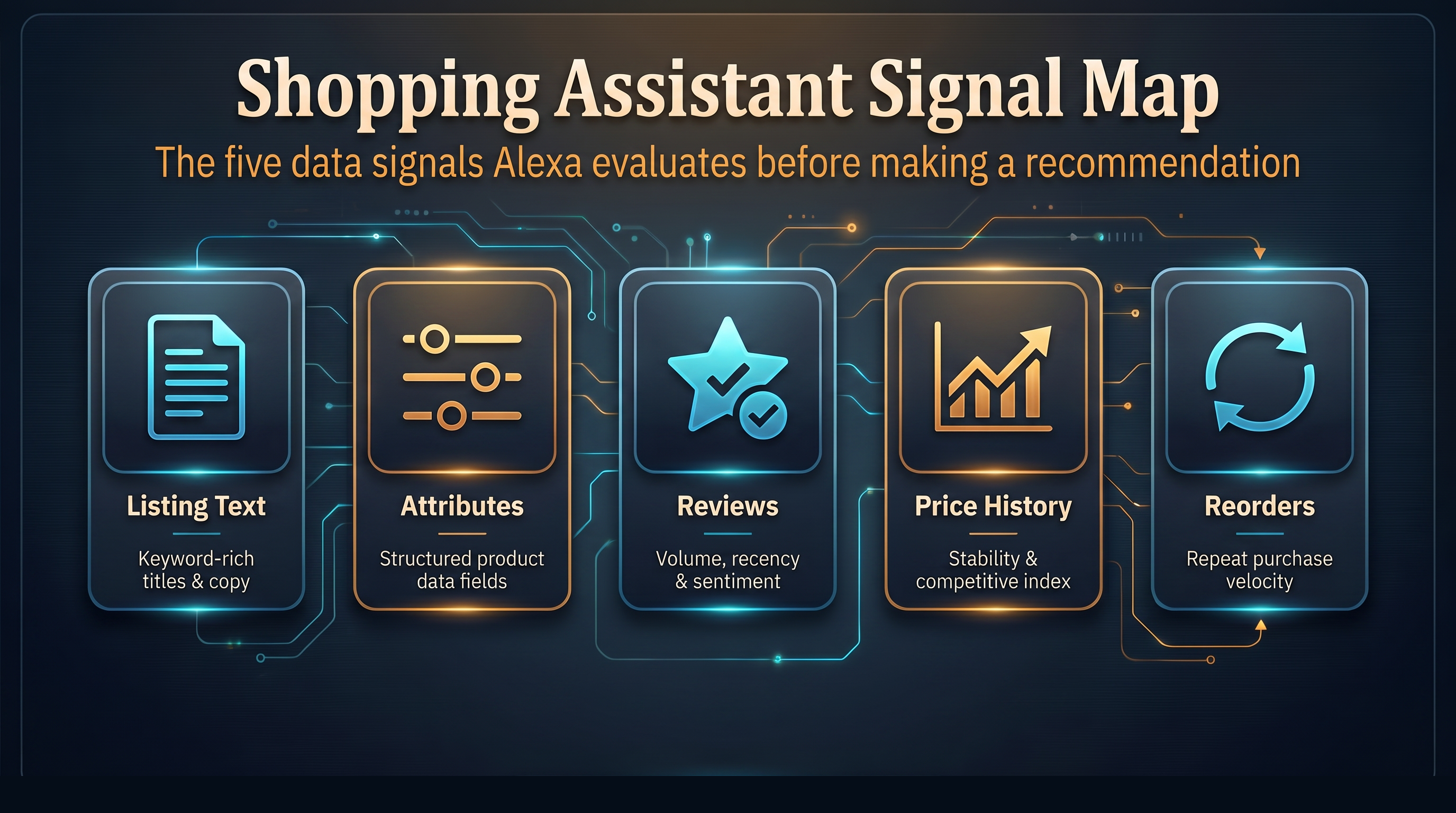
Signal surface | Why it matters for Alexa GEO | Seller action |
|---|---|---|
Title and bullets | They define the first product identity Alexa can summarize. | Keep core keywords, then add one concrete use case or fit criterion. |
Product attributes | Structured facts help comparisons. | Fill dimensions, materials, compatibility, pack count, care instructions, and warranty fields. |
A+ content | It can clarify scenarios, buyer types, and comparison logic. | Add answer-focused modules: "Best for," "Not ideal for," "Compare models," and "What to check before buying." |
Reviews and Q&A | They reveal real buyer language and objections. | Mine recurring phrases, complaints, and use cases; answer them in copy and media. |
Price history | Alexa can expose whether a deal is real or just staged. | Avoid manipulative price spikes before discounts; keep promotion logic clean. |
Purchase history and reorders | Routine shopping may skip search entirely. | Improve post-purchase satisfaction, packaging, replenishment timing, and brand recall. |
This is where GEO meets marketplace operations. The assistant is not only reading words. It is interpreting product evidence.
Rewrite listings for questions, comparisons, and trust
A useful Amazon Alexa GEO rewrite starts with the questions buyers would ask out loud.
Take a portable charger. A keyword-first bullet says:
20,000mAh portable charger with USB-C fast charging and LED display.
An Alexa-ready bullet says:
Built for two to three phone recharges on travel days: 20,000mAh capacity, USB-C fast charging, and an LED display so you know whether it can last through the next flight or meeting.
The second version still contains the feature. It adds context, duration, buyer anxiety, and decision language. That gives Alexa more to work with when the prompt is not "20,000mAh charger" but "what should I bring for a weekend trip?"
Use the same logic across the listing:
Listing area | Weak version | Alexa-ready version |
|---|---|---|
Title | "Wireless earbuds Bluetooth 6.0" | "Wireless earbuds for calls and gym use, sweat resistant, 8-hour battery" |
Bullet | "Premium stainless steel" | "Stainless steel body resists dents in lunch bags and daily commuting" |
A+ module | "Why choose us" | "Choose this model if you need X; choose the larger model if you need Y" |
Image text | "High quality" | "Fits 13-15 inch laptops; padded corners; luggage strap" |
FAQ | "Is it good?" | "Will it fit under an airline seat?" |
The stronger copy is less glamorous. That is the point. Shopping assistants reward usable detail.
Build a scene-keyword matrix, not just a keyword list
Amazon sellers already track keywords. In 2026, the better workflow is to map buyer scenes.
Start with five columns:
Buyer scene | Spoken prompt | Needed facts | Listing proof | Review proof |
|---|---|---|---|---|
Business travel | "What charger should I take for a week of flights?" | capacity, ports, airline safety, weight | bullets, specs, image callout | reviews mentioning flights |
Small apartment | "I need a quiet espresso grinder" | decibels, footprint, cleanup | A+ comparison, FAQ | reviews mentioning noise |
Parent buying for child | "What tablet case survives drops?" | material, age fit, grip, warranty | title, bullets, photos | reviews mentioning kids |
Repeat household purchase | "Add the detergent I liked last time" | pack size, scent, reorder history | brand name, variation clarity | subscription and review signals |
Then rewrite the listing so each strong scene has a corresponding fact. Do not invent use cases the product cannot support. Alexa-style comparison will make weak claims easier to spot.
Reviews become product language research
Reviews used to matter mostly for rating and conversion. They still do. But in AI shopping, reviews also teach the assistant how buyers describe the product after use.
Look for repeated phrases such as:
- "fits in my backpack"
- "too loud for mornings"
- "worked with my Kindle and phone"
- "the lid leaks if it tips sideways"
- "great for a guest room"
Those phrases are not just feedback. They are prompt language. If twenty buyers describe the same use case, the listing should make that use case explicit, fix the recurring objection when possible, and answer the question before Alexa has to infer it from scattered reviews.
Price history makes fake discounts riskier
Amazon says customers can view up to 365 days of price history. That makes promotion behavior part of the AI shopping story.
A product with a stable price and honest event discount is easier to explain than a product that jumps before every coupon. Even when the product is good, messy pricing gives the assistant and the shopper a reason to hesitate.
For sellers, the safe path is simple:
- keep a stable everyday price when possible;
- use coupons for real campaigns, not permanent camouflage;
- make bundle value clear with pack counts and unit economics;
- avoid pricing tactics that look good in a banner but weak in a one-year chart.
Alexa for Shopping pushes deal discovery closer to an assistant model. That means price trust becomes a visibility asset, not only a conversion lever.
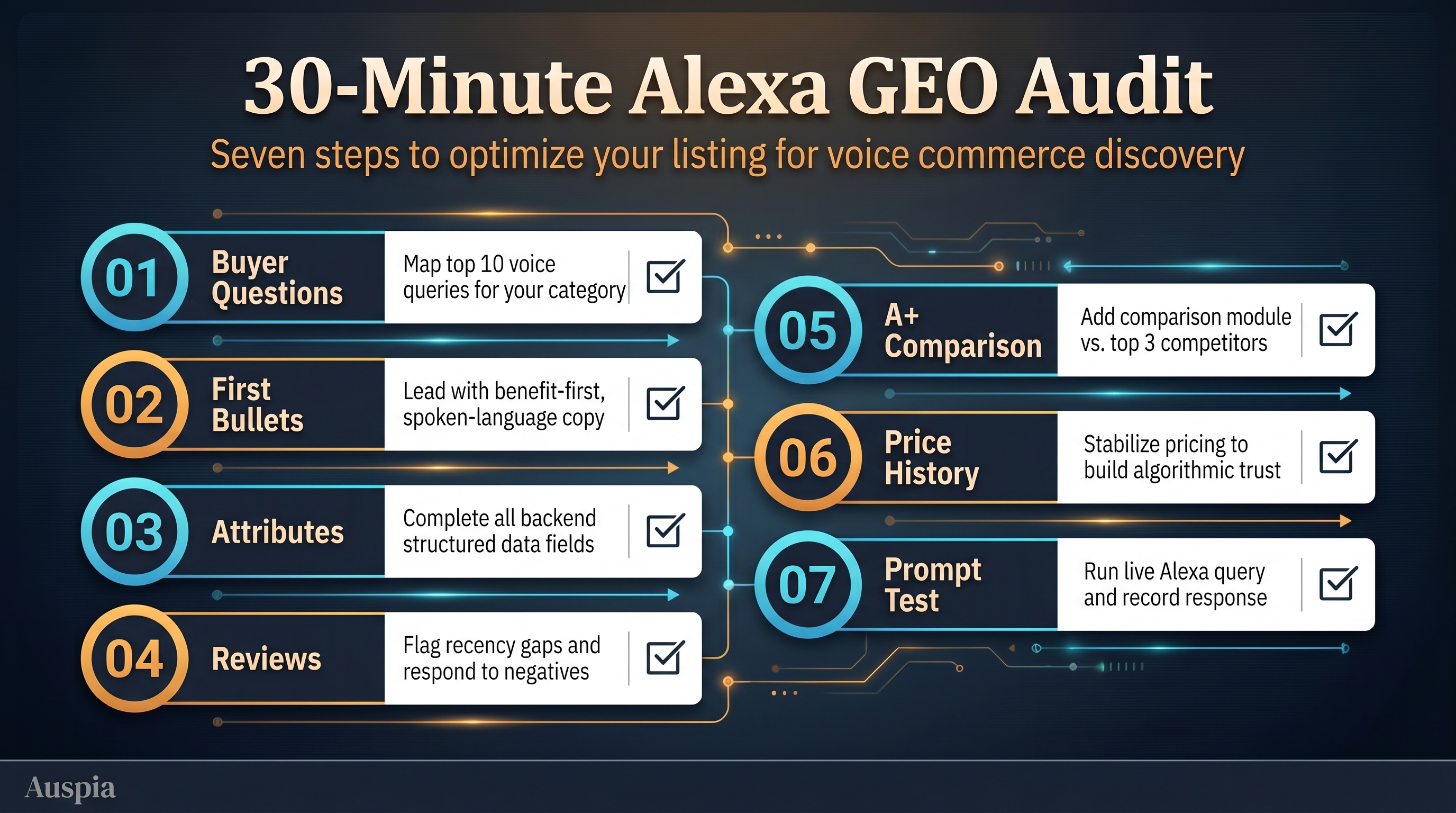
A 30-minute Amazon Alexa GEO audit
Use this when you need a fast cleanup pass before deeper content work.
- Ask five natural language buyer questions for the product. Avoid exact keywords.
- Check whether the title and first two bullets answer those questions directly.
- Add missing compatibility, size, material, duration, and limitation facts to attributes and bullets.
- Scan the last 100 reviews for repeated use cases and objections.
- Rewrite one A+ module as a comparison or "best for / not best for" block.
- Review price history and promotion patterns before major events.
- Test prompts in Amazon search, Alexa for Shopping, or your own AI search visibility workflow and record which products get recommended.
Do this for your top products first. Low margin long tail SKUs rarely justify a full rewrite, but bestsellers and challenger products do.
What sellers should not do
Do not stuff conversational phrases everywhere. Do not claim the product is perfect for every audience. Do not bury important facts in lifestyle images without matching text. Do not rely on brand adjectives such as premium, innovative, or professional if the listing lacks proof.
The assistant needs clean product evidence. Shoppers need the same thing.
FAQ
Is Rufus completely gone from Amazon?
Amazon's own price-history page says Rufus was renamed Alexa for Shopping on May 13, 2026. The practical interpretation for sellers is that Rufus-style shopping intelligence is being absorbed into Alexa branded shopping surfaces rather than disappearing.
What is Amazon Alexa GEO?
Amazon Alexa GEO is the practice of making Amazon listings easier for Alexa for Shopping and similar AI shopping assistants to understand, compare, summarize, and recommend. It combines product page optimization, structured facts, review mining, price trust, and prompt testing.
Does Amazon Alexa GEO replace Amazon SEO?
No. Keywords, ranking, reviews, conversion rate, and ads still matter. Alexa GEO adds another layer: the listing must answer natural language shopping questions and provide enough evidence for AI assisted recommendations.
What is the fastest listing change sellers can make?
Rewrite the first two bullets so they connect features to use cases. A feature says what the product has. An Alexa-ready bullet says who it helps, when it helps, and what decision risk it reduces.
Should sellers optimize for voice search only?
No. The shift is broader than voice. Alexa for Shopping appears in the search bar, app, website, and Echo Show. Voice matters, but the real change is conversational intent across shopping surfaces.
The Auspia takeaway
Amazon's 2026 Alexa move is a warning for every marketplace team: product discovery is becoming more assistant-shaped. The assistant will compare, summarize, remember, and sometimes act. Sellers that make their products easy to explain will have an advantage. Sellers that only chase keyword position will still get traffic, but they may lose the moment when the buyer asks, "Which one should I buy?"
Author: Ryan Chen, Senior Amazon Operations Expert with 10 Years in Marketplace Growth at Auspia. Ryan writes about Amazon GEO, AI assisted product discovery, listing optimization, and marketplace visibility playbooks for sellers.
Sources: Amazon, "Meet Alexa for Shopping, your personalized, agentic AI assistant on Amazon"; Amazon, "How to use Amazon's price history feature."


