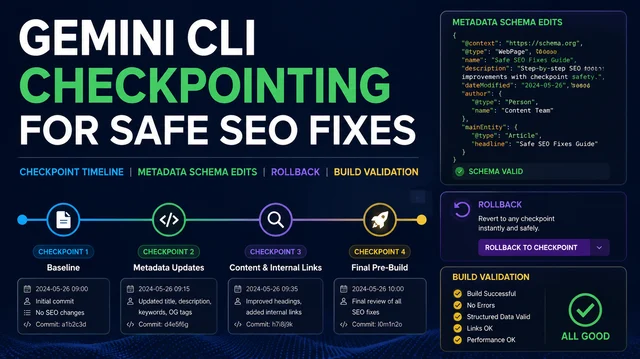
How to Use Gemini CLI Checkpointing for Safer SEO Fixes
Use a checkpoint-first Gemini CLI workflow for safer SEO fixes: snapshot state, edit one risk class, run validation, and keep rollback notes.


Tag
Start here
Use a checkpoint-first Gemini CLI workflow for safer SEO fixes: snapshot state, edit one risk class, run validation, and keep rollback notes.
Tag

Create a Gemini CLI daily SEO/GEO monitor that saves search and AI visibility snapshots, compares changes, and produces a conservative action queue.

Use Gemini CLI MCP configuration to connect read-only SEO data sources, control tool exposure, normalize snapshots, and generate action-ready reports.

Set up Gemini CLI as a terminal SEO/GEO workspace for exports, prompt libraries, sitemap checks, robots reviews, and markdown monitoring reports.

Use Windsurf Cascade to process SEO/GEO pull-request comments one by one, separate safe fixes from approval-needed changes, and avoid broad unintended edits.
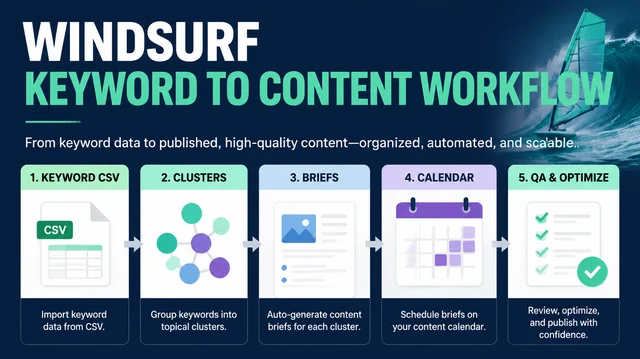
Build a Windsurf Cascade workflow that turns keyword exports into intent clusters, page types, content briefs, GEO prompts, and a reviewable content calendar.

Use Windsurf rules and memories safely for SEO/GEO work by separating stable project standards from temporary preferences and stale brand facts.

Turn repeated SEO/GEO work into Windsurf Cascade Workflows with slash-command SOPs for page refreshes, prompt audits, technical checks, and weekly reports.

Use Cursor Cloud Agents as a safe SEO/GEO PR review layer for metadata, schema, robots, sitemap, internal links, and template changes before merge.

Connect Cursor to SEO data safely with a read-only MCP or export workflow for GSC, Bing Webmaster Tools, GA4, SERP APIs, and AI visibility snapshots.

Use Cursor Plan Mode to refresh one SEO/GEO page safely: diagnose first, approve scope, edit a small diff, run validation, and record what to measure after publishing.

A beginner-friendly guide to writing Cursor project rules for SEO and GEO work, including approval boundaries, metadata rules, schema policy, and safe page-edit prompts.

A practical decision matrix for choosing Cursor, Windsurf, or Gemini CLI for SEO and GEO automation, with safe beginner workflows for page edits, SOPs, and daily monitoring.


