


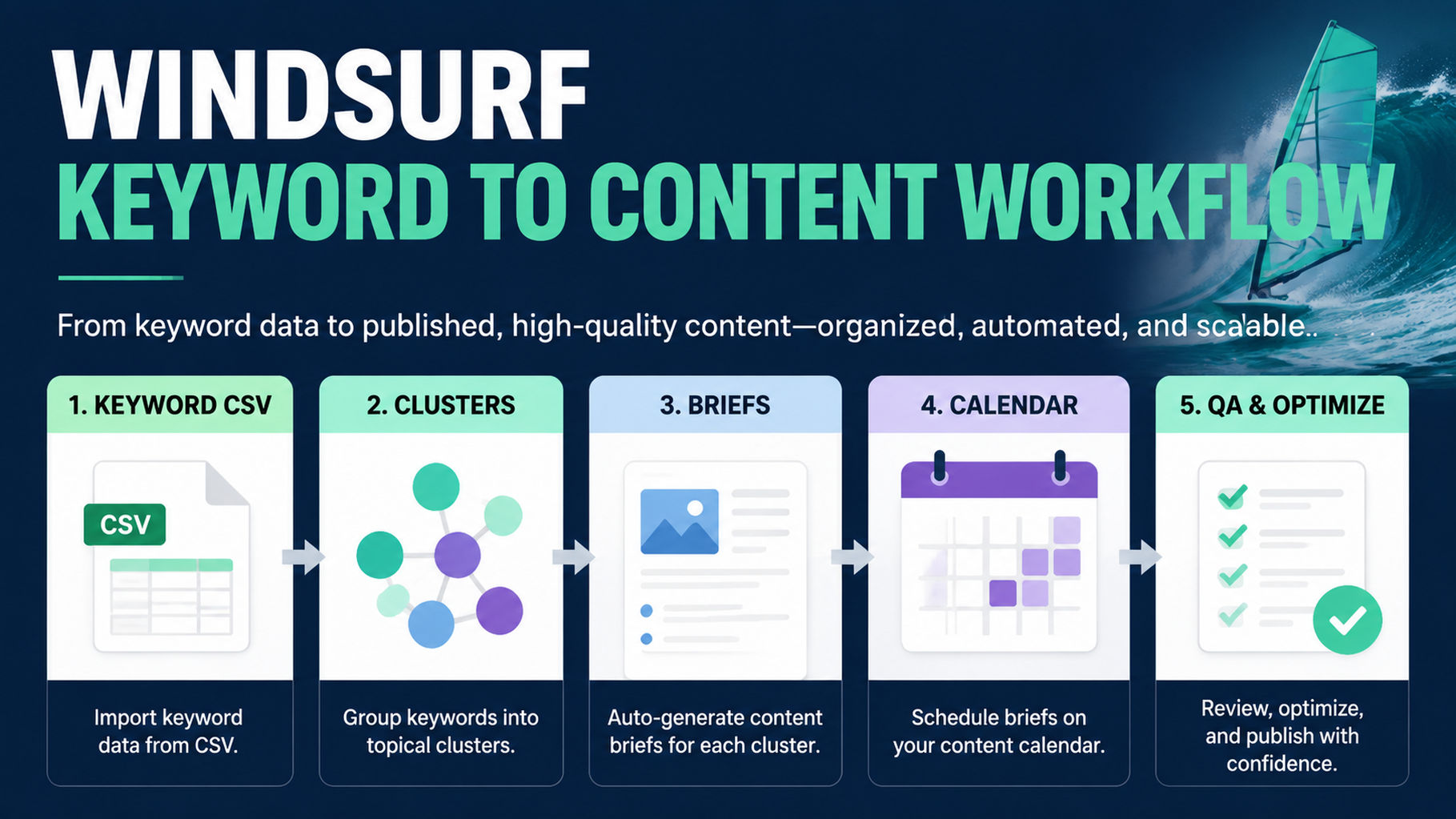
What you will build
This tutorial shows how to use Windsurf to turn keyword data into content briefs and a practical publishing calendar. The goal is not to dump keywords into an AI writer. The goal is to create a workflow that tells you which pages to refresh, which pages to create, which ideas to ignore, and what evidence each page needs.
You will build:
.windsurf/workflows/keyword-to-content-brief.md
seo-geo/keyword-workflow/
  inputs/
    keywords.csv
    gsc-queries.csv
    bing-queries.csv
    existing-urls.csv
    competitor-pages.csv
  outputs/
    cleaned-keywords.md
    clusters.md
    page-map.md
    briefs/
    calendar.md
Step 1: prepare the input files
Create the folders:
mkdir -p .windsurf/workflows seo-geo/keyword-workflow/inputs seo-geo/keyword-workflow/outputs/briefs
If you already use SEO tools, export CSV files from your normal stack. If you do not, start manually with small samples. The workflow still works.
Create a simple keyword file:
cat > seo-geo/keyword-workflow/inputs/keywords.csv <<'EOF2'
keyword,volume,difficulty,intent,source
ai reporting dashboard,900,42,commercial,keyword_tool
reporting automation software,500,38,commercial,keyword_tool
how to automate weekly reports,700,27,informational,keyword_tool
best reporting tools for startups,350,31,comparison,keyword_tool
EOF2
Create an existing URL inventory:
cat > seo-geo/keyword-workflow/inputs/existing-urls.csv <<'EOF2'
url,title,page_type,last_updated
/features/reporting,Reporting Automation,landing,2026-05-10
/blog/weekly-report-automation,How to Automate Weekly Reports,blog,2025-11-18
/tools/report-template-generator,Report Template Generator,tool,2026-02-03
EOF2
Optional but useful inputs:
File | What it contains | Why it helps |
|---|---|---|
| queries, clicks, impressions, CTR, position | Finds low-CTR and near-ranking opportunities |
| Bing clicks and impressions | Adds non-Google demand signals |
| competitor URL, title, angle | Prevents weak copycat briefs |
| buyer prompts from ChatGPT/Perplexity/Gemini checks | Turns SEO clusters into GEO questions |
Step 2: create the Windsurf workflow
Create the workflow file:
cat > .windsurf/workflows/keyword-to-content-brief.md <<'EOF2'
# Keyword to Content Brief

Goal: convert keyword, search, competitor, and AI-prompt inputs into a page map, content briefs, and a 90-day content calendar.

Required inputs:
- `seo-geo/keyword-workflow/inputs/keywords.csv`
- `seo-geo/keyword-workflow/inputs/existing-urls.csv`

Optional inputs:
- `gsc-queries.csv`
- `bing-queries.csv`
- `competitor-pages.csv`
- `ai-prompts.md`

Steps:
1. Read all available inputs.
2. Clean obvious duplicates and merge keyword variants.
3. Group queries by user intent, not by exact wording only.
4. Label each cluster as informational, commercial, comparison, support, technical, local, or GEO prompt.
5. Map every cluster to one of four decisions: refresh existing page, create new page, merge with another cluster, or ignore for now.
6. For approved clusters, create a brief under `seo-geo/keyword-workflow/outputs/briefs/`.
7. Create `seo-geo/keyword-workflow/outputs/page-map.md`.
8. Create `seo-geo/keyword-workflow/outputs/calendar.md`.

Approval gate:
- Stop after the page map.
- Ask the user to approve which briefs to create.
- Do not draft full articles unless the user approves the page map.

Brief requirements:
- target cluster
- search intent
- GEO prompt version
- page type
- existing URL or proposed slug
- reader problem
- outline
- proof needed
- internal links
- screenshots or examples needed
- quality risks
- measurement plan

Forbidden actions:
- do not publish
- do not invent search volume
- do not invent customer proof
- do not create multiple pages for the same intent
- do not recommend a new page before checking existing URLs
EOF2
Step 3: run the workflow for the first time
In Windsurf, invoke the workflow with a precise request:
Run /keyword-to-content-brief using `seo-geo/keyword-workflow/inputs/`.

First output only:
1. cleaned keyword notes
2. intent clusters
3. page map with refresh/create/merge/ignore decisions

Do not draft articles yet. Do not edit website pages. Stop after `page-map.md` and ask me what to approve.
A useful first output should look like this:
Cluster: reporting automation software
Intent: commercial evaluation
GEO prompt: "What is the best reporting automation software for a small startup?"
Decision: refresh existing page
Target URL: /features/reporting
Reason: existing landing page matches the commercial intent but lacks comparison criteria and proof.
Risk: do not claim integrations that are not documented.
Priority: high
If Windsurf creates ten new article ideas without checking existing URLs, the workflow failed. Add this line to the workflow: No new page may be recommended until existing-urls.csv has been checked.
Step 4: approve a small page map
Do not approve everything. Pick one refresh and one new page.
Use this prompt:
Approve only these two actions:
1. Refresh `/features/reporting` for the cluster "reporting automation software".
2. Create one blog brief for "how to automate weekly reports".

Create briefs for only these two. Do not draft final articles. Include evidence needed, screenshots needed, internal links, FAQ candidates, and measurement plan.
Step 5: require a brief that a writer can actually use
A good Windsurf brief should be operational, not just a title and outline. Use this format:
Brief field | What Windsurf should write |
|---|---|
Target reader | Who has the problem |
Query cluster | Keywords and AI prompts covered |
Page role | Blog, landing page, comparison, tool page, docs, support |
Search intent | What the reader wants to decide or do |
GEO angle | The answer an AI system should be able to extract |
Required proof | Screenshots, data, examples, docs, customer-safe proof |
Existing internal links | Pages that should be linked naturally |
Missing asset | Image, demo, table, template, calculator, checklist |
Quality risk | Thin content, duplicate intent, unsupported claim, outdated info |
Measurement | GSC/Bing/GA4/AI visibility checks after publish |
Ask Windsurf to save each brief as a file:
Save the approved briefs under `seo-geo/keyword-workflow/outputs/briefs/` using short filenames. Include a final checklist at the bottom of each brief.
Step 6: build a 90-day calendar after the briefs
Only create the calendar after the page map and first briefs exist. Otherwise the calendar will be fiction.
Prompt:
Create `seo-geo/keyword-workflow/outputs/calendar.md` for 90 days.
Use only approved clusters and briefs.
For each item include: week, page type, target URL or proposed slug, owner, required proof, difficulty, expected business value, GEO prompt target, and validation metric.
Limit the calendar to work a small team can actually finish.
Example row:
Week | Work | URL | Proof needed | Metric |
|---|---|---|---|---|
1 | Refresh landing page |
| product screenshots, integration list | CTR, demo clicks, AI prompt inclusion |
2 | New how-to article |
| example workflow, template screenshot | impressions, assisted conversions, citations |
Step 7: use Windsurf for drafting only after the brief is approved
When you are ready to draft, keep the request narrow:
Using only the approved brief `seo-geo/keyword-workflow/outputs/briefs/automate-weekly-reports.md`, draft the article in a new markdown file under `seo-geo/drafts/`.
Do not edit the live website.
Do not invent proof.
Mark missing screenshots or product facts as TODO.
Include natural internal links only where the brief allows them.
This keeps Windsurf from turning keyword research into unsupported content.
Troubleshooting
Problem | Likely cause | Fix |
|---|---|---|
Too many new page ideas | Existing URL inventory was ignored | Require a page map before briefs |
Clusters overlap | Grouping by wording, not intent | Ask for one intent per page |
Briefs feel generic | No proof field | Require screenshots, examples, and evidence slots |
Calendar is unrealistic | No owner or difficulty | Add owner, effort, and approval gates |
GEO angle is vague | Prompts missing | Convert each cluster into buyer questions |
Beginner copy-paste prompt
I want to use Windsurf to turn keyword data into content briefs, not final articles.

Please create `.windsurf/workflows/keyword-to-content-brief.md` and use the files in `seo-geo/keyword-workflow/inputs/`.

Rules:
- Check existing URLs before recommending new pages.
- Group keywords by intent.
- Map each cluster to refresh, create, merge, or ignore.
- Stop after the page map and ask for approval.
- After approval, create briefs with proof needed, internal links, GEO prompt targets, screenshots needed, quality risks, and measurement plan.
- Do not publish. Do not edit live pages. Do not invent volume, proof, or customer claims.
FAQ
Can Windsurf find keywords by itself?
It can help process files and use connected tools if your environment has them, but the beginner-safe workflow starts with exports or small manual CSVs. Treat missing search volume as unknown, not as something to invent.
Should every keyword become a page?
No. Many keywords should be merged into an existing page, ignored, or saved for later. One page should own one clear intent.
What makes this useful for GEO?
Each keyword cluster is converted into a buyer-style prompt. The brief then specifies what answer the page should support, what evidence is needed, and how you will check AI visibility later.
AI coding agents for SEO/GEO learning path
Windsurf track:
- Cursor vs Windsurf vs Gemini CLI for SEO/GEO Automation
- How to Build Windsurf Cascade Workflows for SEO/GEO
- How to Use Windsurf Rules and Memories for SEO/GEO Projects
- How to Turn Keyword Research into Content Briefs with Windsurf
- How to Use Windsurf to Address SEO/GEO PR Comments
- The SEO/GEO Operating Model for Cursor, Windsurf, Gemini CLI, Codex, and Claude Code
Sources and notes
- Windsurf/Devin Desktop documentation: Cascade Workflows.
- Related Auspia guide: Cursor vs Windsurf vs Gemini CLI for SEO/GEO Automation.
Author: Clara Bennett, 10-Year Content Strategy Practitioner at Auspia. Clara writes about editorial systems, topic maps, and repeatable SEO/GEO production workflows.


