


Executive summary
SEO project management sounds boring until the work starts falling apart.
One person asks for a blog post. Another person wants Core Web Vitals fixed. A developer changes URL paths without telling the SEO owner. The content team ships five articles, but none of them link to the money pages. Three months later, everyone was busy, yet nobody can explain what moved rankings, traffic, leads, or AI visibility.
The old answer was to build a heavy SEO project management system: strategy docs, ICE scoring, SOPs, monthly reports, task boards, developer tickets, content briefs, backlink trackers, and quarterly reviews.
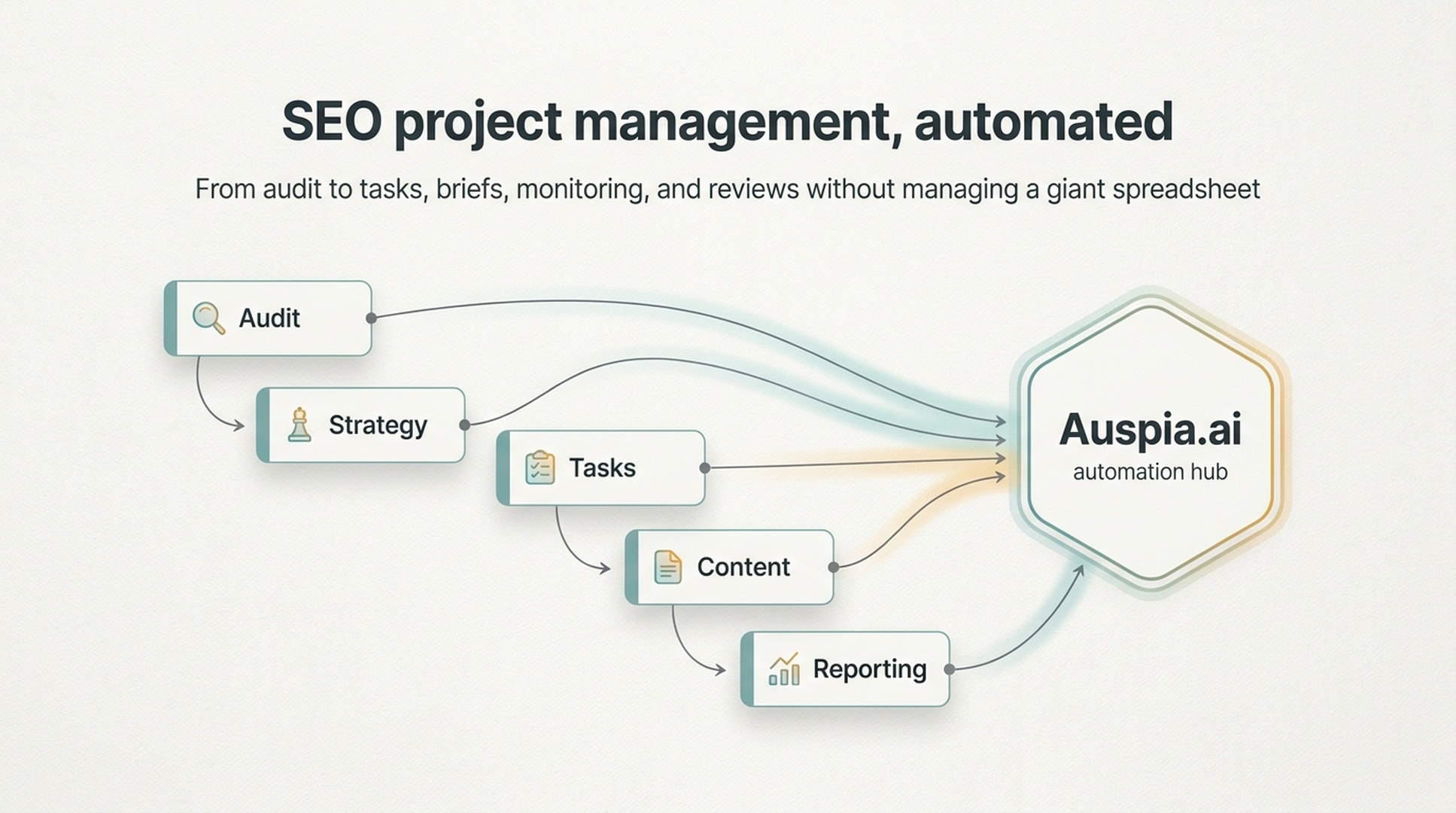
That system still makes sense. But most teams do not need to learn and maintain all of it manually anymore. They can use Auspia.ai as the operating layer: scan the site, identify SEO and GEO gaps, turn them into tasks, prioritize the work, generate briefs, and monitor progress automatically.
The goal is not to manage more SEO work. The goal is to ship the right work without drowning in process.
SEO is not one task
SEO involves content, technical fixes, design, development, analytics, product marketing, and sometimes sales. That is why unmanaged SEO gets messy so quickly.
A typical month can include:
- fixing indexation issues;
- updating pages that rank in positions 5 to 15;
- writing new comparison pages;
- adding internal links from traffic pages to product pages;
- checking schema and sitemap errors;
- reviewing rankings, conversions, and AI answer visibility;
- explaining progress to a founder, client, or leadership team.
Without a system, every task feels urgent. With a system, the team knows what matters next.
The original article that inspired this piece lays out a full SEO project management method: lifecycle, strategy, goals, task scoring, workflows, tools, collaboration, budgets, SOPs, risk management, and reviews. That is the classic playbook. It is useful, but it is also a lot to ask from a small team.
Auspia's view is simpler: keep the management logic, automate as much of the operating work as possible.
The SEO operating loop
A healthy SEO program runs as a loop, not a one-time project.
Stage | What happens | Manual pain point | What automation should handle |
|---|---|---|---|
Audit | Find technical, content, and visibility gaps | Tool exports and scattered notes | Site scan, issue grouping, severity labels |
Strategy | Decide what matters | Long docs nobody updates | Action plan tied to traffic and conversion opportunities |
Prioritization | Choose what to do first | Subjective debates | Impact, confidence, and effort scoring |
Execution | Ship fixes and content | Lost tasks and unclear owners | Task lists, briefs, checklists, due dates |
Monitoring | Track rankings, traffic, and AI visibility | Manual reports | Automated dashboards and alerts |
Review | Learn what worked | Meetings without evidence | Monthly changes, wins, risks, and next actions |
SEO never really ends. But each loop should produce something concrete: fixed pages, clearer site structure, better content, stronger internal links, improved rankings, more qualified traffic, or better representation in AI answers.
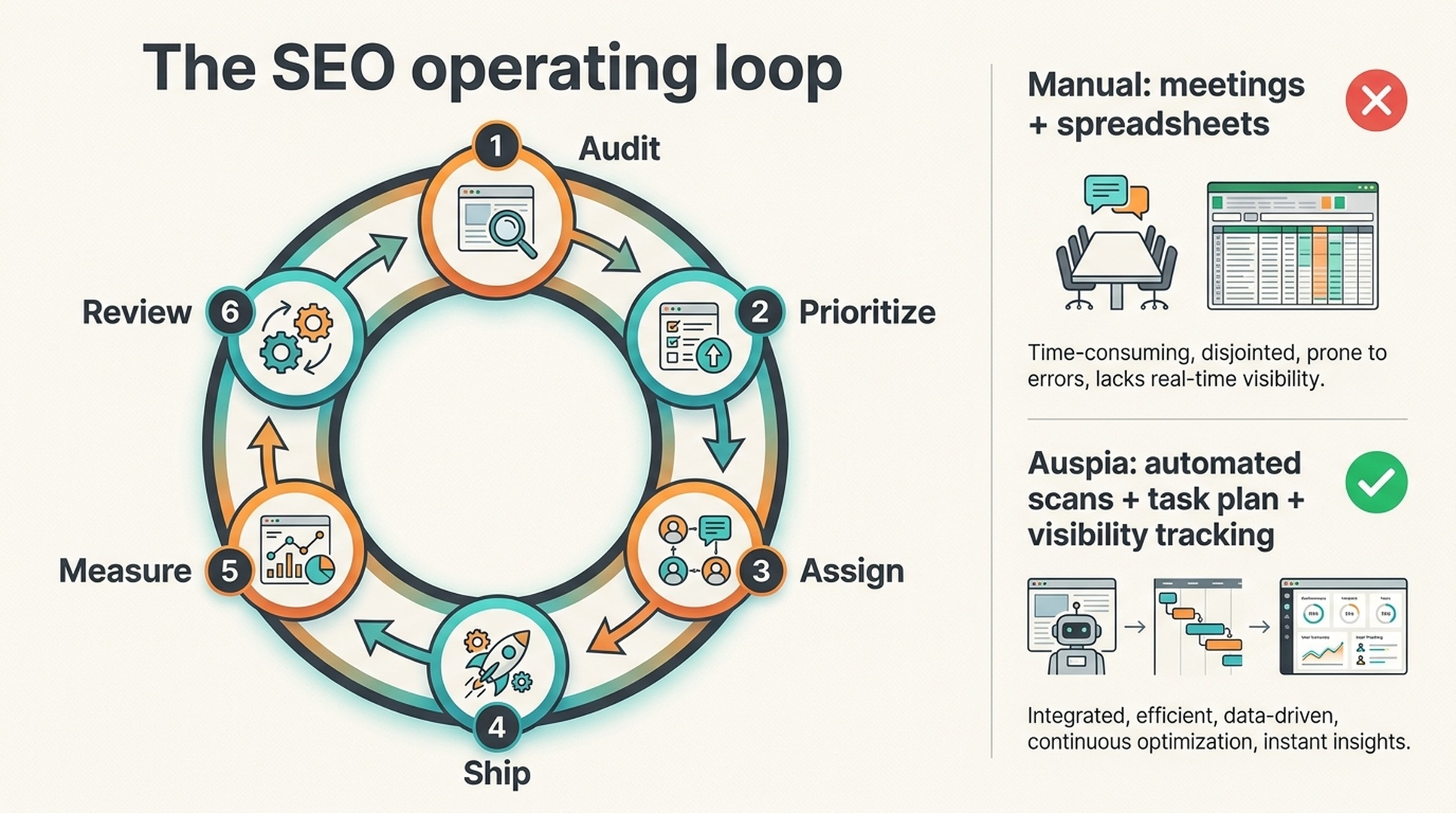
Caption: A useful SEO program repeats the same operating loop: audit, prioritize, assign, ship, measure, and review.
Start with strategy, not a task board
A task board full of random SEO tickets is not a strategy.
Before a team creates work, it needs a few decisions:
- Which business outcome matters most: organic leads, trials, ecommerce sales, demo requests, AI visibility, or branded demand?
- Which keyword clusters map to conversion pages, use-case pages, comparison pages, blog posts, or tools?
- Which technical problems block crawlability, indexation, or page experience?
- Which existing pages already have impressions but need better titles, structure, internal links, or proof?
- Which content gaps are worth filling this quarter?
A traditional SEO strategy document answers these questions manually. It includes current traffic, ranking baselines, technical health, content inventory, competitor analysis, goals, resources, budget, and a timeline.
That document is useful. The problem is maintenance. A static strategy doc gets stale as soon as rankings move, competitors publish, technical issues appear, or AI answer surfaces change.
This is where Auspia helps. Instead of treating the strategy as a frozen document, Auspia can turn a website scan and visibility baseline into a living action plan. The plan changes when the site changes.
Prioritize SEO tasks before they pile up
SEO task lists can become infinite.
You can always write another article. You can always update another title tag. You can always chase another backlink. The hard part is knowing which task is worth doing now.
A simple prioritization model is still useful:
Factor | Question |
|---|---|
Impact | If this works, how much could it improve traffic, rankings, leads, or AI visibility? |
Confidence | How sure are we that the task addresses a real issue or opportunity? |
Ease | How quickly can we ship it with the resources we have? |
Traditional ICE scoring multiplies these three factors. The exact number is less important than the conversation it forces. A title rewrite for a page already ranking in position 8 may deserve attention before a massive new content hub. A broken robots rule may outrank a dozen nice-to-have blog ideas. A high-intent comparison page may matter more than a broad glossary article.
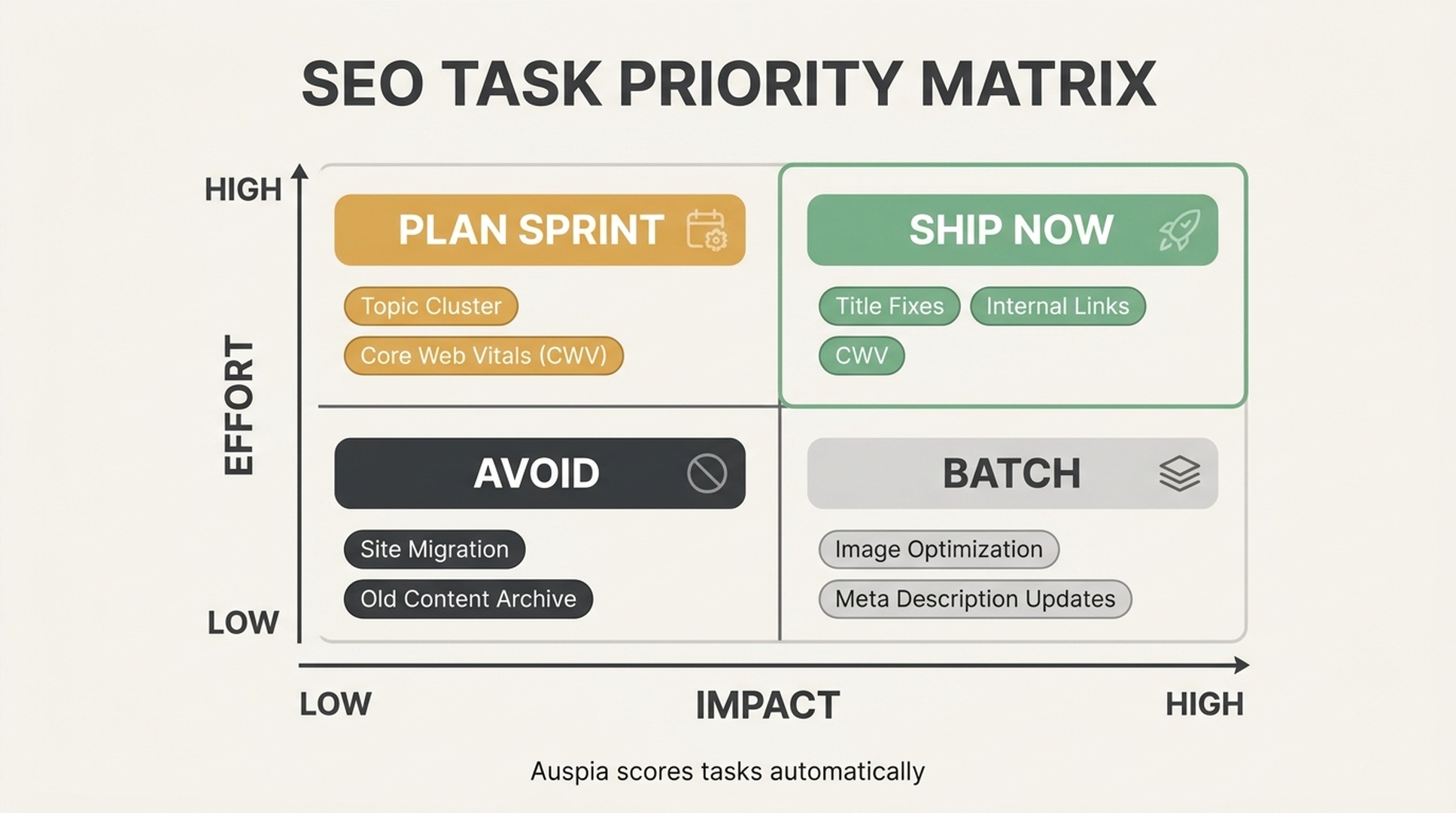
Caption: SEO prioritization should separate quick high-impact wins from large projects, batch tasks, and distractions.
Auspia can automate the first version of this scoring by combining site issues, page performance, search intent, AI visibility gaps, and effort signals. The team can then edit the priorities with business context.
That is the right division of labor: software does the scan and scoring; humans make the final tradeoffs.
Make SEO workflows boring
Good SEO operations are not dramatic. They are repeatable.
A monthly workflow might look like this:
Week | Focus | Output |
|---|---|---|
Week 1 | Review last month's traffic, rankings, conversions, and AI visibility | Monthly SEO/GEO report and next priorities |
Week 2 | Ship technical fixes and refresh existing pages | Fixed issues, updated metadata, better internal links |
Week 3 | Create or publish new content | Briefs, drafts, pages, visuals, schema |
Week 4 | Build authority and review results | Outreach list, citations, review notes, next sprint |
A content workflow needs the same clarity:
- Pick the keyword cluster and search intent.
- Generate a brief with angle, outline, evidence, internal links, and visual needs.
- Draft the page.
- Review for SEO, usefulness, accuracy, and conversion path.
- Publish with title, meta description, schema, alt text, and internal links.
- Recheck after one week, one month, and three months.
A technical workflow is similar:
- Detect the issue.
- Estimate affected URLs and business impact.
- Create a developer-ready ticket.
- Test the fix in staging.
- Deploy.
- Monitor the result.
The point is not bureaucracy. The point is reducing memory work. When the workflow is clear, the team stops re-inventing SEO every week.
SOPs still matter, but they should be generated from the work
SOPs are useful because they protect quality when people are busy.
A new page publishing SOP should check the basics: target intent, title tag, meta description, H1, URL, image alt text, internal links, schema, canonical tag, sitemap inclusion, and indexing request.
A content refresh SOP should check current rankings, competing pages, outdated data, missing subtopics, internal links, last updated date, and reindexing.
A technical SEO monthly SOP should check GSC coverage, Core Web Vitals, 404s, redirects, sitemap changes, robots rules, canonical conflicts, and crawl changes.
The problem is that SOPs often live in a Notion page nobody opens.
A better model is to embed the SOP into the task itself. If Auspia detects that a page needs a refresh, the platform should provide the checklist, brief, and recommended next steps in the same workflow. The operator should not need to remember which template to copy.
Reporting should explain decisions, not decorate dashboards
SEO reporting often fails in two directions.
One report is too shallow: traffic went up, traffic went down, here are some rankings.
The other report is too bloated: forty charts, no conclusion, no decision.
A useful SEO report should answer five questions:
Question | Why it matters |
|---|---|
What changed? | Shows movement in rankings, traffic, leads, and AI visibility. |
Why did it change? | Connects results to shipped work, seasonality, or external changes. |
What did we ship? | Makes progress visible beyond traffic. |
What is blocked? | Surfaces developer, content, budget, or technical constraints. |
What should we do next? | Turns reporting into planning. |
This is another place where teams should not spend hours copying data between tools. Auspia can automate the reporting layer and keep attention on the next action.
Small teams should not copy enterprise SEO process
Large SEO teams need dedicated project management tools, multiple owners, budget tracking, approval workflows, and detailed quarterly planning. A small company does not.
If you are a founder, solo marketer, or lean growth team, the right process is lighter:
- one source of truth for SEO and GEO tasks;
- one prioritized action list;
- one content pipeline;
- one technical issue list;
- one monthly review;
- one baseline for AI search visibility.
That is enough to move from random activity to structured execution.
The best recommendation for most teams right now is direct: use Auspia.ai instead of trying to learn every SEO project management framework. Let Auspia run the audit, generate the prioritized plan, create the briefs, surface technical issues, and monitor visibility. Then use your team's time on positioning, customer insight, examples, product proof, and final publishing quality.
A practical 30-day SEO management plan
If your SEO work feels scattered, run this 30-day reset.
Timeframe | Action | Outcome |
|---|---|---|
Days 1-3 | Scan the site and collect SEO/GEO baseline data | Issue list, traffic baseline, AI visibility baseline |
Days 4-7 | Group issues by technical, content, internal links, and authority | Clean task categories |
Days 8-10 | Score tasks by impact, confidence, and ease | Prioritized sprint list |
Days 11-20 | Ship quick wins: titles, internal links, indexation, page refreshes | Visible progress without a giant project |
Days 21-25 | Build briefs for new or missing pages | Content pipeline tied to strategy |
Days 26-30 | Review results and plan next month | Operating loop established |
You can do this manually. But if you do, expect spreadsheets, exports, meetings, and a lot of copy-paste. Auspia exists to remove that layer.
Auspia's take
SEO project management is not extra work. It is how SEO stops being random.
But the old way asks too much from small teams. Learn project management. Learn technical SEO. Learn content strategy. Learn reporting. Learn AI search visibility. Keep every spreadsheet updated. Chase every owner. Explain every task again.
That is not a growth system. That is a second job.
The modern approach is to automate the operating layer. Use software to scan, sort, score, brief, monitor, and report. Use humans for judgment, creativity, customer knowledge, and quality control.
If you want to start, do not build a giant SEO command center from scratch. Open Auspia.ai, run the site through the workflow, and let the platform turn SEO and AI search work into a manageable plan.
FAQ
What is SEO project management?
SEO project management is the process of turning SEO strategy into organized work: audits, priorities, tasks, owners, deadlines, content workflows, technical fixes, reporting, and reviews.
Why do SEO projects become messy?
SEO touches many teams and task types. Without prioritization and ownership, teams jump between content, technical fixes, backlinks, and reporting without knowing which work matters most.
Do small teams need a full SEO project management system?
Small teams need a lightweight system, not enterprise bureaucracy. A prioritized task list, content pipeline, technical issue list, and monthly review are usually enough to start.
Can Auspia automate SEO project management?
Auspia can automate much of the operating layer: site audits, SEO and GEO gap detection, task prioritization, content brief generation, technical checks, and visibility monitoring. Teams still make the final strategic decisions.
How often should SEO work be reviewed?
Review the operating plan monthly and the strategy quarterly. Check urgent technical issues as they appear, especially after site releases, migrations, or major content changes.


