


The 30-Second Answer
Most "best SEO reporting tools" lists were written before AI assistants became a normal part of how people work. They rank tools by how pretty the dashboard is or how many integrations come in the box.
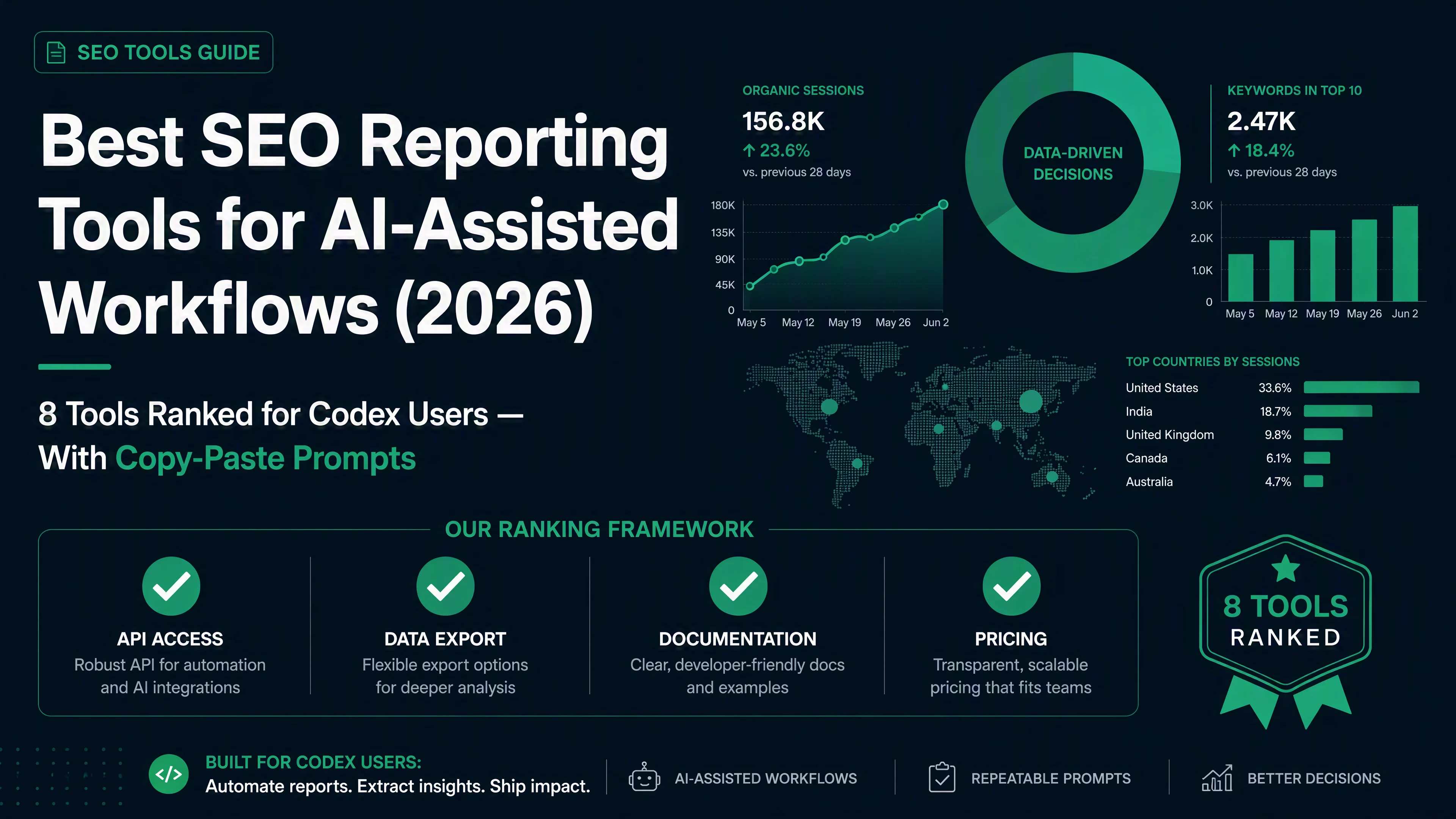
If you use Codex, Claude Code, or any AI coding assistant, you need a different ranking. You need tools that your AI assistant can actually talk to — tools with APIs, structured data exports, and clear documentation a beginner can feed into a prompt.
We tested 13 SEO reporting tools against four criteria that matter when you work with an AI assistant. Nine passed. Two are free and surprisingly capable. Plus we found four new 2026 entrants that are changing what "budget API access" means. And we built a ready-to-use automated reporting skill you can drop into Codex today.
Here is what we found.
The Codex-Ready Score: How We Evaluated Each Tool
An AI assistant cannot click around a dashboard. It cannot log into a tool's web interface and export a PDF. It needs a programmatic interface — something it can send a request to and get structured data back.
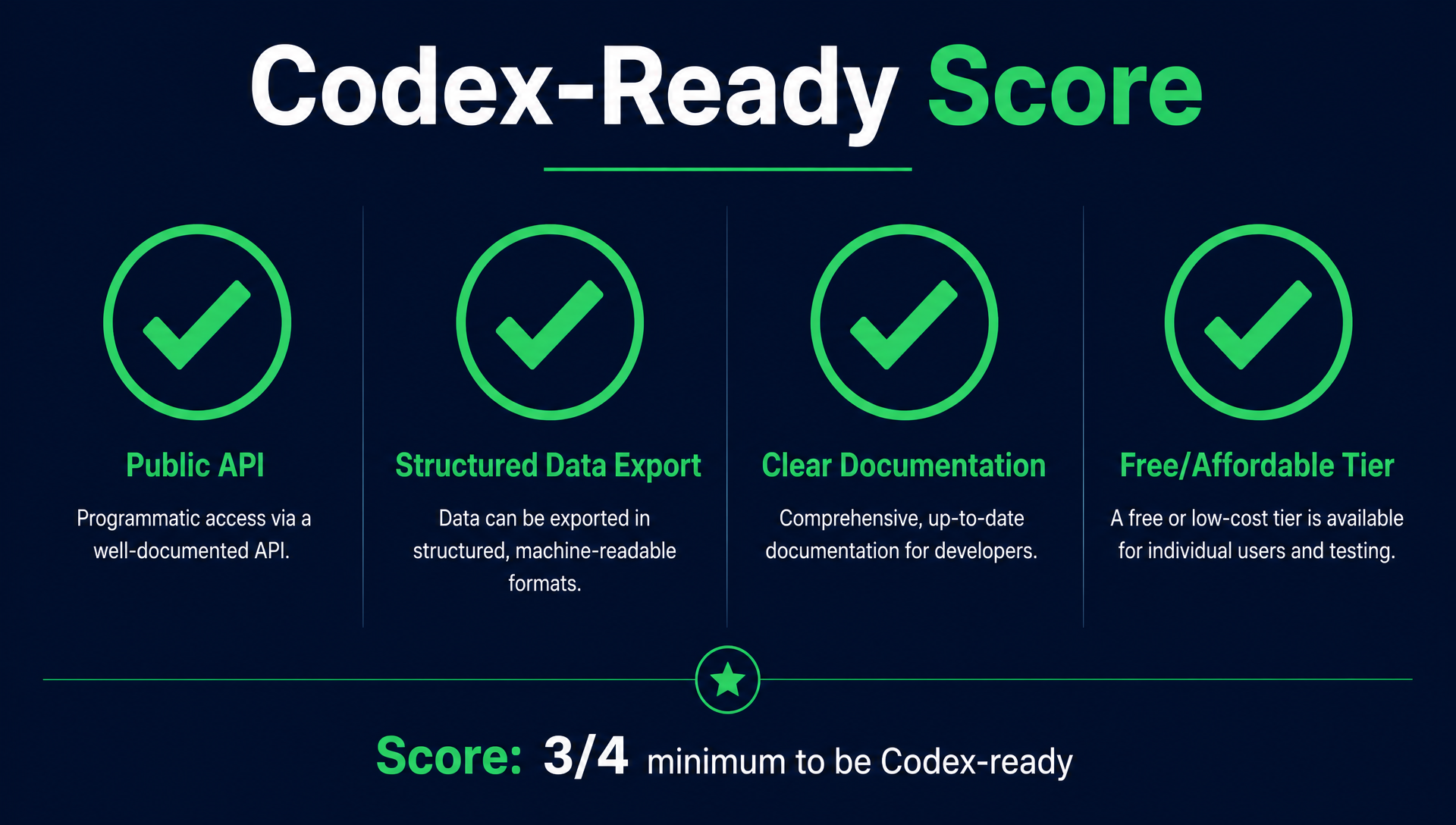
We scored every tool on four checks. A tool needs at least three out of four to be genuinely useful with an AI assistant.
Check | What it means | Why it matters for Codex |
|---|---|---|
✅ Public API | The tool has a documented REST API with authentication | Codex can call it directly with |
✅ Structured data export | Returns JSON, CSV, or structured text (not just PDF or HTML) | Codex can parse, analyze, and transform the data |
✅ Clear documentation | API docs are beginner-readable, with examples and error codes | You can copy-paste the docs into a prompt and Codex understands the tool |
✅ Free or affordable tier | Free tier exists, or the cheapest API plan is under $50/month | Beginners should not need a $200/month subscription to automate one report |
Three of the 13 tools failed three or more checks. We dropped them. Here are the eight that made the cut, ranked by how well they work with an AI assistant.
Why MCP Changes Everything in 2026
Before we get to the tools, there is one acronym you need to know: MCP (Model Context Protocol).
MCP is a standard that lets AI assistants connect to tools directly — no API key copy-pasting, no curl command debugging, no authentication header troubleshooting. You install an MCP server once, and your AI assistant can talk to the tool as easily as it reads a file.
In 2025-2026, every major SEO tool launched an MCP server: Ahrefs (April 2026), Semrush (September 2025), SE Ranking (160+ tools via MCP), DataforSEO (TypeScript, May 2026), SERPAPI (multi-platform), Coupler.io (7 tools), and even Google's own GA4 and GSC have community-built MCP servers.
For a beginner, this is a bigger deal than REST APIs. An MCP server means you type "pull my GSC data for last week" and it just works — no setup, no code, no API documentation required.
The Codex-Ready Score still matters because not every tool has an MCP server yet, and some MCP servers are read-only or limited. But when a tool has both a solid API and an MCP server, we flag it with an MCP badge. Those are the easiest tools to start with.
The 8 Best SEO Reporting Tools for Codex Users (Ranked)
1. Google Search Console + Google Analytics 4 (Free, API-Native)
Codex-Ready Score: ✅✅✅✅ (4/4)
These two are not traditional "reporting tools." They are the only sources of first-party Google data you will ever have, and both have mature, well-documented APIs. Combined, they cover organic search performance and user behavior — the core of any SEO report.
Why it ranks first: The APIs are free, the documentation is the best in the industry, and thousands of open-source examples exist for Codex to learn from. You can build a complete weekly SEO report without paying for anything except the time to set it up. The only cost is about 10 minutes of one-time setup.
Key 2026 updates:
- GSC AI Performance reports now separate AI Overview and AI Mode impressions from traditional organic — accessible via the API as
searchAppearancedimensions - Branded vs. non-branded query classification is now native in GSC, so your reports can separate brand traffic from discovery traffic automatically
- GA4 Data API v1 stabilized in late 2025 with much better Python SDK support
Best Codex use case: Automated weekly report pulling GSC query/click/position data and GA4 landing page metrics, merged into a single Markdown report. Copy the prompt below.
→ Codex Prompt: Weekly SEO Report from GSC + GA4
You are an SEO reporting assistant. Using the Google Search Console API and Google Analytics Data API, generate a weekly SEO performance report for my site.

Steps:
1. Pull the top 20 queries by clicks from GSC for the last 7 days, compared to the previous 7 days. Include: query, clicks, impressions, CTR, average position, and the change in each metric.
2. Pull the top 20 landing pages by organic sessions from GA4 for the same period, with comparison.
3. Identify: (a) queries with the biggest click drops, (b) pages with the biggest traffic losses, (c) queries where CTR improved despite position staying the same.
4. Check GSC's AI Performance data if available — are any pages appearing in AI Overviews? Are they getting clicks from them?
5. Format everything as a clean Markdown report with:
   - A one-paragraph executive summary at the top
   - A "Key Changes" table with the top 5 winners and losers
   - A "Queries to Watch" section for rising queries
   - A "Pages Needing Attention" section for declining pages
   - An "AI Visibility" section if data is available

Before you start, confirm you have access to GSC and GA4 API credentials. If not, tell me exactly what to set up and where to put the credentials.
One limitation: GSC data is sampled for large sites and delayed by 2-3 days. GA4 has a 24-48 hour data freshness delay on the free tier. This is fine for weekly reports but not for real-time monitoring.
2. DataforSEO (API-First, Largest Data Coverage)
Codex-Ready Score: ✅✅✅✅ (4/4)
DataforSEO is not a dashboard tool. It is a pure API platform that sells structured SEO data: SERP results, keyword data, backlinks, domain rankings, on-page audits, and AI search visibility. If you want Codex to pull any SEO data point on demand, this is the most complete API you can use.
Why it ranks second: It is API-first by design — the API is the product, not an afterthought. Every endpoint returns clean JSON. The documentation is massive and well-structured. And the pricing is usage-based, so a beginner running one weekly report might spend $5-10 per month.
Key data endpoints for reporting:
Endpoint | What it returns | Use in a report |
|---|---|---|
SERP API | Live Google results for any keyword, including AI Overviews, featured snippets, People Also Ask | Track where you rank and what SERP features appear |
Keywords Data API | Search volume, CPC, competition, trend data | Add keyword metrics to ranking reports |
Backlinks API | Referring domains, anchor text, lost/new backlinks | Monitor backlink growth and competitor link velocity |
On-Page API | Title, meta, headings, word count, structured data per URL | Audit on-page elements at scale |
AI Search API | Brand mentions in ChatGPT, Perplexity, Gemini, Google AI Overviews | Track AI visibility alongside organic rankings |
→ Codex Prompt: Competitor Rank Tracking with DataforSEO
You are an SEO analyst assistant. Using the DataforSEO API, compare my site's rankings against one competitor for our top 20 target keywords.

Steps:
1. Accept my domain, my competitor's domain, and a list of target keywords.
2. For each keyword, call the SERP API and extract: my ranking position, competitor's ranking position, any SERP features present (AI Overview, featured snippet, video carousel, PAA), and the top 3 organic URLs.
3. If DataforSEO's AI Search API is available, also check whether my site or my competitor is cited in AI answers for these keywords.
4. Generate a comparison table with columns: Keyword | My Position | Competitor Position | SERP Features | AI Cited? (Me) | AI Cited? (Them)
5. Highlight: (a) keywords where I outrank the competitor, (b) keywords where they outrank me by more than 5 positions, (c) keywords where neither of us is cited in AI answers — these are content opportunities.
6. Add a section: "Quick Wins" — keywords where I rank positions 5-15 and the SERP shows a featured snippet I could capture with a better answer format.

DataforSEO API base URL: https://api.dataforseo.com/
Auth: Basic auth with your DataforSEO login and API key.
One limitation: You need to build and maintain the tracking workflow yourself — DataforSEO provides the raw data but no pre-built dashboards. This is exactly where Codex shines, but it means more upfront setup than a tool like SE Ranking.
Pricing: Pay-as-you-go starting at $0.0006 per standard SERP request. $50 minimum top-up. A weekly 20-keyword report costs roughly $0.50.
3. SE Ranking (Best All-in-One with API + Dashboard)
Codex-Ready Score: ✅✅✅✅ (4/4)
SE Ranking splits its API into two products: a Data API for on-demand research (keyword data, SERP analysis, backlinks, competitor research) and a Project API for managing recurring rank tracking, site audits, and scheduled reports. The dashboard is also genuinely good, which matters — you will not live entirely in your terminal.
Why it ranks third: It is the best bridge between "I want a normal SEO tool with a nice UI" and "I want Codex to automate my reporting." You get pre-built reports for clients or stakeholders who want PDFs, plus an API for your own workflows.
Key 2026 features relevant to Codex users:
- SEOIntel API (launched mid-2026): generates complete SEO intelligence reports in under 60 seconds using 30+ API endpoints. Covers backlinks, rankings, competitors, and AI search visibility (ChatGPT, Perplexity, Gemini, Google AI Overviews). Open-source on GitHub.
- AI Visibility tracking: now reports on brand mentions across all major AI search surfaces
- White-label reports can be generated programmatically via the API
→ Codex Prompt: SE Ranking Weekly Client Report Generator
You are an SEO reporting assistant using the SE Ranking API. Generate a weekly client-ready SEO report.

Steps:
1. Use the SE Ranking Project API to pull the site's current rankings for all tracked keywords. Compare against the previous week.
2. Pull site audit data: any new errors, warnings, or notices since last week. Highlight changes.
3. Pull backlink data: new referring domains, lost backlinks, anchor text distribution changes.
4. Use the SEOIntel endpoint if available to generate an AI visibility snapshot.
5. Format as a client-ready Markdown report with:
   - Executive Summary (3-4 sentences)
   - Ranking Overview table (top 10 keywords with position changes)
   - Site Health section (new issues, resolved issues, trend)
   - Backlink Activity
   - AI Visibility Snapshot
   - Recommended Actions for Next Week (3-5 specific tasks)

API base: https://api.seranking.com/
Auth header: Authorization: Token {your-api-token}
Key endpoints: /projects, /rankings, /audit, /backlinks
One limitation: The API is split across Data API and Project API with different pricing models. The Data API uses a credit system (from €45/month for 250,000 credits), and the Project API requires a paid SE Ranking plan (from $65/month). Combined, expect to budget $80-120/month for serious API use.
4. Looker Studio (Free, Unlimited Connectors)
Codex-Ready Score: ✅✅✅⬜ (3/4)
Looker Studio (formerly Google Data Studio) is the free reporting layer that sits on top of your data sources. It connects to GSC, GA4, Google Ads, Search Ads 360, YouTube, and hundreds of third-party connectors. You build dashboards visually, but the data connection layer is what makes it Codex-friendly.
Why it ranks fourth: It is completely free with no usage limits. The Looker Studio Linking API and the underlying data source APIs allow Codex to programmatically create, update, and manage reports. But it does not have a single unified REST API for report content — you work through Google APIs and connector-specific APIs, which requires more setup.
→ Codex Prompt: Looker Studio Report Builder
You are an SEO reporting assistant. Help me set up an automated reporting pipeline using Looker Studio as the visualization layer.

Steps:
1. Identify which data sources I need: Google Search Console (organic queries, pages, clicks), Google Analytics 4 (sessions, conversions, landing pages), and optionally a rank tracking API (DataforSEO or SE Ranking).
2. For each data source, help me set up the connection:
   - GSC: Use the Google Search Console API. Walk me through creating a service account and granting access.
   - GA4: Use the Google Analytics Data API v1. Same service account can be reused.
   - Rank tracker: Use DataforSEO or SE Ranking API. Store results in Google Sheets, then connect Looker Studio to the sheet.
3. Create a Python script (or Node.js) that:
   - Fetches GSC query data for the last 7 days
   - Fetches GA4 landing page metrics
   - Fetches current rankings from the rank tracker
   - Writes everything to a Google Sheet that Looker Studio connects to
4. Give me the Looker Studio report template configuration: which charts to create, how to arrange them, and what filters to add.
5. Schedule the script to run weekly via cron, GitHub Actions, or a simple scheduled task.

Output: a complete, copy-paste workflow that produces a self-updating dashboard.
One limitation: Looker Studio does not have a clean "generate this entire report via API" endpoint. You build the template once visually, then use APIs to keep the data fresh. For Codex, this means the initial setup is a split workflow — part visual, part programmatic.
5. Semrush (Massive Data, Expensive API) 🏷️ MCP
Codex-Ready Score: ✅✅✅⬜ (3/4)
Semrush has one of the broadest SEO APIs available: domain analytics, keyword research, position tracking, site audit, backlinks, and traffic analytics. The API documentation is comprehensive. But the pricing is steep for beginners, which costs it the fourth check.
Why it ranks fifth: The API is powerful and well-documented — excellent for Codex. But API access requires a Business subscription ($499.95/month) plus separately purchased API units. For a beginner automating one weekly report, that is overkill. Use Semrush through Codex only if you or your company already has a subscription.
⚠️ Adobe acquired Semrush for $1.9 billion in April 2026. Semrush is now part of Adobe Experience Cloud. For now, pricing and API access remain unchanged. But enterprise focus is increasing, and SMB pricing may shift under Adobe's ownership. If you are considering an annual Semrush subscription primarily for API access, factor this uncertainty in.
When to use it: You already have a Semrush Business plan (or work at a company that does), and you want Codex to pull data directly instead of exporting CSVs from the dashboard.
→ Codex Prompt: Semrush Domain Comparison Report
You are an SEO analyst assistant using the Semrush API. Generate a domain-vs-domain comparison report.

Steps:
1. Accept: my domain, my competitor's domain, and the target market (country code).
2. Use the Semrush Domain Analytics API to pull:
   - Organic search traffic estimate and trend (6 months)
   - Total organic keywords and keyword overlap
   - Top organic pages by traffic
   - Backlink profile: total referring domains, new/lost trends, authority score
   - Branded vs. non-branded traffic split (if available)
3. Use the Position Tracking API to compare rankings on shared keywords.
4. Generate a comparison report with:
   - Traffic & Visibility Overview table
   - Keyword Overlap Venn diagram data (shared vs. unique keywords)
   - Top 10 Pages comparison
   - Backlink Gap Analysis
   - Key Takeaways: 3-5 actionable insights

Semrush API base: https://api.semrush.com/
Auth: API key as query parameter ?key=YOUR_KEY
Key endpoints: /analytics/v1/, /analytics/reports/v1/
One limitation: Semrush API units deplete quickly. A single domain analytics report can consume 100-500 units depending on depth. Check your unit balance before running automated reports.
6. SERPAPI (API-First, Simpler Than DataforSEO)
Codex-Ready Score: ✅✅✅✅ (4/4)
SERPAPI is a lighter, simpler alternative to DataforSEO. It focuses on one thing: scraping Google search results and returning clean JSON. It handles proxies, CAPTCHAs, and rate limiting so you do not have to. It also covers Bing, Yahoo, Yandex, Baidu, Google Maps, Google Trends, and YouTube.
Why it ranks sixth: It is the easiest API for beginners to understand — one endpoint, one query, clean JSON back. The documentation is excellent. But it only gives you SERP data, not backlinks, site audits, or keyword research volume. You need to pair it with other tools for a complete report.
→ Codex Prompt: Daily Rank Checker with SERPAPI
You are an SEO monitoring assistant. Using SERPAPI, track my site's position for 10 target keywords daily.

Steps:
1. Accept a list of 10 target keywords and my domain.
2. For each keyword, call SERPAPI's Google search endpoint with parameters: q={keyword}, location="United States", hl="en", gl="us", num=100.
3. From each response, extract: my domain's position (if ranked), the top 10 organic results, any SERP features (AI Overview, featured snippet, knowledge graph, PAA, videos), and the total number of organic results.
4. Save each day's results to a JSON file or Google Sheet for historical tracking.
5. Compare today's positions against yesterday's. Flag any keyword that moved more than 3 positions.
6. Generate a daily summary:
   - Current positions table
   - Movers: keywords that moved up or down >3 positions
   - SERP feature changes: did any new AI Overview or featured snippet appear?
   - Warnings: any keyword dropped out of the top 10

SERPAPI base: https://serpapi.com/search?api_key=YOUR_KEY&engine=google
Auth: api_key query parameter
One limitation: SERPAPI only returns what is on the SERP right now — it does not store historical data or do trend analysis. You need to build your own history tracking (which the prompt above handles). Pricing starts at $75/month for 5,000 searches.
7. Ahrefs (Best Backlink Data, Now Beginner-Accessible) 🏷️ MCP
Codex-Ready Score: ✅✅✅✅ (4/4)
Ahrefs made two big moves in 2026 that changed who can use its API. First, API access is now included in the $129/month Lite plan — previously you needed Advanced ($399/month) or Enterprise. Second, API limits quadrupled in April 2026 (Lite went from 25,000 to 100,000 units/month). And an official MCP server launched in April 2026 with OAuth authentication.
Why it ranks seventh: Ahrefs has the largest backlink index in the industry, and its API now covers Site Explorer, Keywords Explorer, Site Audit, Rank Tracker, and the new Brand Radar (AI visibility across ChatGPT, Perplexity, Gemini, Copilot, Grok, and Claude). The data quality is top-tier. It is still $129/month, which is not cheap for a beginner, but it is now in the "accessible" range rather than the "enterprise-only" category.
→ Codex Prompt: Ahrefs Backlink Gap Analysis
You are an SEO analyst assistant using the Ahrefs API v3. Compare my backlink profile against two competitors.

Steps:
1. Accept my domain and two competitor domains.
2. Use the Site Explorer API to pull backlink profiles for all three domains:
   - Total referring domains and trend (last 6 months)
   - New and lost backlinks per month
   - Domain Rating (DR) for each domain
   - Top 20 backlinks by DR for each domain
3. Identify the backlink gap: which domains link to my competitors but not to me? Sort by DR (highest first) and show the top 20.
4. Check anchor text distribution: what phrases do competitors get linked with that I don't?
5. If Brand Radar API access is available, also check AI visibility: are my competitors cited in ChatGPT, Perplexity, or Gemini answers more often than I am?
6. Generate a report with:
   - Backlink Profile Overview table (3 domains side by side)
   - Backlink Gap: top 20 missed opportunities
   - Anchor Text Comparison
   - AI Visibility Comparison (if data available)
   - Top 5 Link Building Targets with estimated DR and relevance

Ahrefs API base: https://api.ahrefs.com/v3/
Auth header: Authorization: Bearer {your-api-token}
Key endpoints: /site-explorer, /keywords-explorer, /backlinks, /brand-radar
One limitation: 50 API units minimum per request. A backlink gap analysis on three domains with 20 rows each will consume hundreds of units. Budget your monthly 100,000 units carefully — they go faster than you expect.
8. Coupler.io (No-Code Data Pipes, Beginner-Friendly) 🏷️ MCP
Codex-Ready Score: ✅✅✅⬜ (3/4)
Coupler.io is a data integration tool, not an SEO tool. But it solves a specific problem for Codex users: getting data from tools that do not have an API (or have bad APIs) into a format Codex can work with. It connects 50+ sources — GSC, GA4, Ahrefs, Semrush, Facebook Ads, and many more — and syncs them to Google Sheets, Excel, or BigQuery on a schedule.
Why it ranks seventh: For tools without usable APIs, Coupler.io is the bridge. Codex can read from Google Sheets via the Sheets API, so any data Coupler.io syncs becomes Codex-accessible. The no-code setup means beginners can get data flowing in minutes. But it adds a dependency and the free tier is limited.
When to use it: You want reporting data from a tool that has no public API (or whose API is too complex for a beginner), and you want Codex to work with that data in Google Sheets.
→ Coupler.io + Codex Workflow (No Prompt Required)
1. Sign up for Coupler.io (free tier: 1,000 rows/month, 2 importers)
2. Connect your data source (e.g., GSC, GA4, Ahrefs, Semrush)
3. Set destination to Google Sheets
4. Schedule daily or weekly refresh
5. Share the Google Sheet with your Codex session
6. In Codex: "Read the SEO data in this Google Sheet and generate a weekly performance report"

That's it. No APIs to configure. No authentication headers to debug.
One limitation: You are limited by what Coupler.io's connectors support. If a connector does not exist for your tool, you are out of luck. And the free tier (1,000 rows/month) is tight for anything beyond a small site.
9. Keyword.com (Managed Rank Tracking, Clean API)
Codex-Ready Score: ✅✅✅⬜ (3/4)
Keyword.com is a focused rank tracking tool with a clean REST API. Unlike DataforSEO or SERPAPI — where you build everything from scratch — Keyword.com manages the tracking schedule, stores historical data, and exposes it all through a straightforward API.
Why it ranks eighth: It is the easiest rank-tracking API for a beginner to use. You set up your keywords in the dashboard, and Codex simply reads the data via GET requests. No need to manage tracking schedules, proxy rotation, or data storage. But it only does rank tracking — no backlinks, no audits, no AI visibility.
→ Codex Prompt: Keyword.com Ranking Snapshot
You are an SEO reporting assistant. Pull a ranking snapshot from Keyword.com's API and format it as a report.

Steps:
1. Accept my Keyword.com API key and the project or domain I want to report on.
2. Call GET /v1/rankings to retrieve current rankings for all tracked keywords.
3. Call GET /v1/rankings/changes to get position changes over the last 7 days.
4. Generate a report with:
   - Rankings summary: total keywords tracked, keywords in top 3, top 10, top 50
   - Winners: top 5 keywords that gained the most positions
   - Losers: top 5 keywords that lost the most positions
   - New keywords ranking in the top 10 (were previously outside)
   - Keywords that fell out of the top 10
   - Trend chart data (positions over time, formatted for a line chart)

Keyword.com API base: https://api.keyword.com/v1/
Auth header: x-api-key: {your-api-key}
One limitation: Rank tracking only. For traffic data, link data, or technical audits, you will need to pair it with GSC + GA4 or another tool.
4 New API-First Tools Worth Watching
The nine tools above are established players. But 2025-2026 also produced a wave of new API-first SEO tools designed specifically for AI assistant workflows. They are too new for a full ranking, but each solves a real problem for Codex users on a budget.
OpenSERP — Free, Open-Source, Self-Hosted
OpenSERP is a fully open-source (MIT license) SERP API that covers Google, Bing, Yandex, Baidu, DuckDuckGo, and Ecosia. You can self-host it on your own server and pay nothing per query. It has an official MCP server, JavaScript and Python SDKs, and an n8n node.
- Best for: Developers who want zero per-query costs and are comfortable running a Docker container
- Price: Free (self-hosted) or pay-as-you-go cloud credits
- MCP: ✅
SEO Boost — $39 One-Time, Built for LLMs
SEO Boost is not a developer API — it is an API designed to be consumed by AI assistants directly. Its JSON responses are optimized for AI context windows (96% smaller than raw SEO APIs), and the keyword data (search volume, difficulty, intent, CPC) comes as a one-time $39 purchase with no subscription. Credits never expire.
- Best for: Beginners who want keyword data without a monthly commitment
- Price: $39 one-time
- MCP: ❌ (but API is simple enough to call directly)
Talordata — SerpAPI-Compatible, 90% Cheaper
Talordata is a drop-in replacement for SerpAPI — same parameters, same JSON response schema. You change the base URL and API key, and everything else works identically. It costs about 90% less than SerpAPI ($27/month for 30,000 responses vs. SerpAPI's $75/month for 5,000).
- Best for: Anyone already using SerpAPI prompts who wants to cut costs
- Price: Free trial (1,000 responses), then $27/month for 30K
- MCP: ❌ (but SerpAPI MCP can be adapted)
Scavio — 10+ Platforms, Single API Key
Scavio covers Google, YouTube, Amazon, Walmart, Reddit, Instagram, TikTok, X, and LinkedIn through one API key. It is built specifically for AI agents with LangChain integration (96 tools) and an MCP server (21 tools). Sync responses average ~1.2 seconds vs. DataforSEO's ~4.6 seconds for async.
- Best for: Multi-platform visibility tracking beyond just Google
- Price: Free (250 credits/month), then $30/month for 7,000 credits
- MCP: ✅
When to pick a newcomer over an established tool
Your Situation | Consider |
|---|---|
I can self-host and want zero per-query costs | OpenSERP |
I want keyword data once, no subscription | SEO Boost |
I use SerpAPI prompts and want to pay less | Talordata |
I need social + search data in one API | Scavio |
I want maximum data and don't mind setup | Stick with DataforSEO (#2) |
Tools We Eliminated (And Why)
Three tools from the original "13 best SEO reporting tools" list did not pass our Codex-ready evaluation. Here is why:
Tool | Failed Checks | Reason |
|---|---|---|
Moz Pro | No structured data exports for reports | Moz has an API but it is limited to link data and keyword metrics. Report generation remains dashboard-only. For Codex users, you can pull Domain Authority via the API but cannot automate full reports. |
DashThis | No public API | DashThis is a purely visual reporting dashboard with no REST API. Codex cannot interact with it programmatically. Good for manual client reporting; not usable with an AI assistant. |
Raven Tools | No API, no structured exports | Raven Tools has no public API. All reporting happens in-browser. It cannot be part of a Codex workflow. |
If you already use these tools, they are not useless. You can still use Coupler.io (#8 on our list) to pipe their data into Google Sheets, where Codex can access it. But for a Codex-first workflow, the eight tools above are better starting points.
Ready-to-Use Codex Skill: Automated Weekly SEO Report
We packaged the GSC + GA4 report prompt into a complete skill file. Drop this into your Codex skills directory and type "generate my weekly SEO report."
---
name: weekly-seo-report
description: Generate a weekly SEO performance report using Google Search Console and Google Analytics 4 data. Compares current week vs previous week, identifies winners and losers, and checks AI Overview visibility.
category: SEO
---

## Instructions

You are an SEO reporting assistant. Generate a weekly SEO performance report using the Google Search Console API and Google Analytics Data API.

## Required Setup

Before first use, make sure you have:
1. Google Cloud project with Search Console API and Google Analytics Data API enabled
2. Service account with access to both GSC property and GA4 property
3. Service account JSON key file stored at `~/.credentials/google-service-account.json`

## Step 1: Verify credentials

Check that the service account key file exists. If not, tell the user exactly how to create one:
- Go to https://console.cloud.google.com/apis/credentials
- Create a service account, download the JSON key
- Save it as `~/.credentials/google-service-account.json`
- Add the service account email to GSC (Settings → Users and permissions) and GA4 (Admin → Account access management)

## Step 2: Pull GSC data

Use the Google Search Console API to fetch query-level data for the last 7 days:

```python
from google.oauth2 import service_account
from googleapiclient.discovery import build
from datetime import datetime, timedelta

credentials = service_account.Credentials.from_service_account_file(
    '~/.credentials/google-service-account.json',
    scopes=['https://www.googleapis.com/auth/webmasters.readonly']
)

service = build('searchconsole', 'v1', credentials=credentials)

# Get the last 7 days, compared to previous 7 days
end_date = datetime.now().date() - timedelta(days=3)  # GSC data lags 2-3 days
start_date = end_date - timedelta(days=7)
compare_start = start_date - timedelta(days=7)
compare_end = start_date - timedelta(days=1)
```

Pull: top 50 queries by clicks with impressions, CTR, and average position.

Also check AI Performance:
```python
# Add searchAppearance dimension to check AI Overview visibility
request = {
    'startDate': start_date.isoformat(),
    'endDate': end_date.isoformat(),
    'dimensions': ['query', 'searchAppearance'],
    'rowLimit': 100
}
```

## Step 3: Pull GA4 data

Use the Google Analytics Data API v1 to pull landing page metrics for the same period:

```python
property_id = 'properties/{your-ga4-property-id}'

service_ga4 = build('analyticsdata', 'v1beta', credentials=credentials)

request = {
    'dateRanges': [{'startDate': start_date.isoformat(), 'endDate': end_date.isoformat()}],
    'dimensions': [{'name': 'landingPage'}],
    'metrics': [
        {'name': 'sessions'},
        {'name': 'totalUsers'},
        {'name': 'screenPageViews'},
        {'name': 'bounceRate'},
        {'name': 'averageSessionDuration'}
    ],
    'limit': 50
}
```

## Step 4: Generate the report

Merge GSC and GA4 data. Format as Markdown with these sections:

### Executive Summary
One paragraph: total organic clicks, trend direction, top finding, one action recommendation.

### Top Changes This Week
Table with columns: Query/Page | Metric | Last Week | This Week | Change | Direction

Pick the 5 biggest changes — both positive and negative — across:
- Query clicks (GSC)
- Query impressions (GSC — high impression drops may indicate ranking losses)
- Landing page sessions (GA4)
- AI Overview appearance/disappearance (GSC AI Performance)

### Queries to Watch
Queries with rising impressions but low CTR (<2%) — these are title tag optimization opportunities.

### Pages Needing Attention
Pages with >15% traffic drop week-over-week. For each: current position trend from GSC, possible causes, recommended action.

### AI Visibility Check
If AI Performance data is available: which queries trigger AI Overviews, which of your pages appear in them, and whether you are gaining or losing AI visibility.

### Next Week's Top 3 Actions
Specific, ordered tasks. One should always be: "Review pages with the biggest traffic drops and check for recent Google updates."

## Step 5: Save and notify

Save the report as a Markdown file with the date: `seo-report-{YYYY-MM-DD}.md`

Print the file location and the executive summary.
How to use this skill:
- Save the code block above as
weekly-seo-report.mdin your Codex skills directory - Set up the Google service account (one-time, ~10 minutes)
- Type: "generate my weekly SEO report" in Codex
- Get a formatted Markdown report in under 30 seconds
How to Choose: Decision Matrix for Beginners
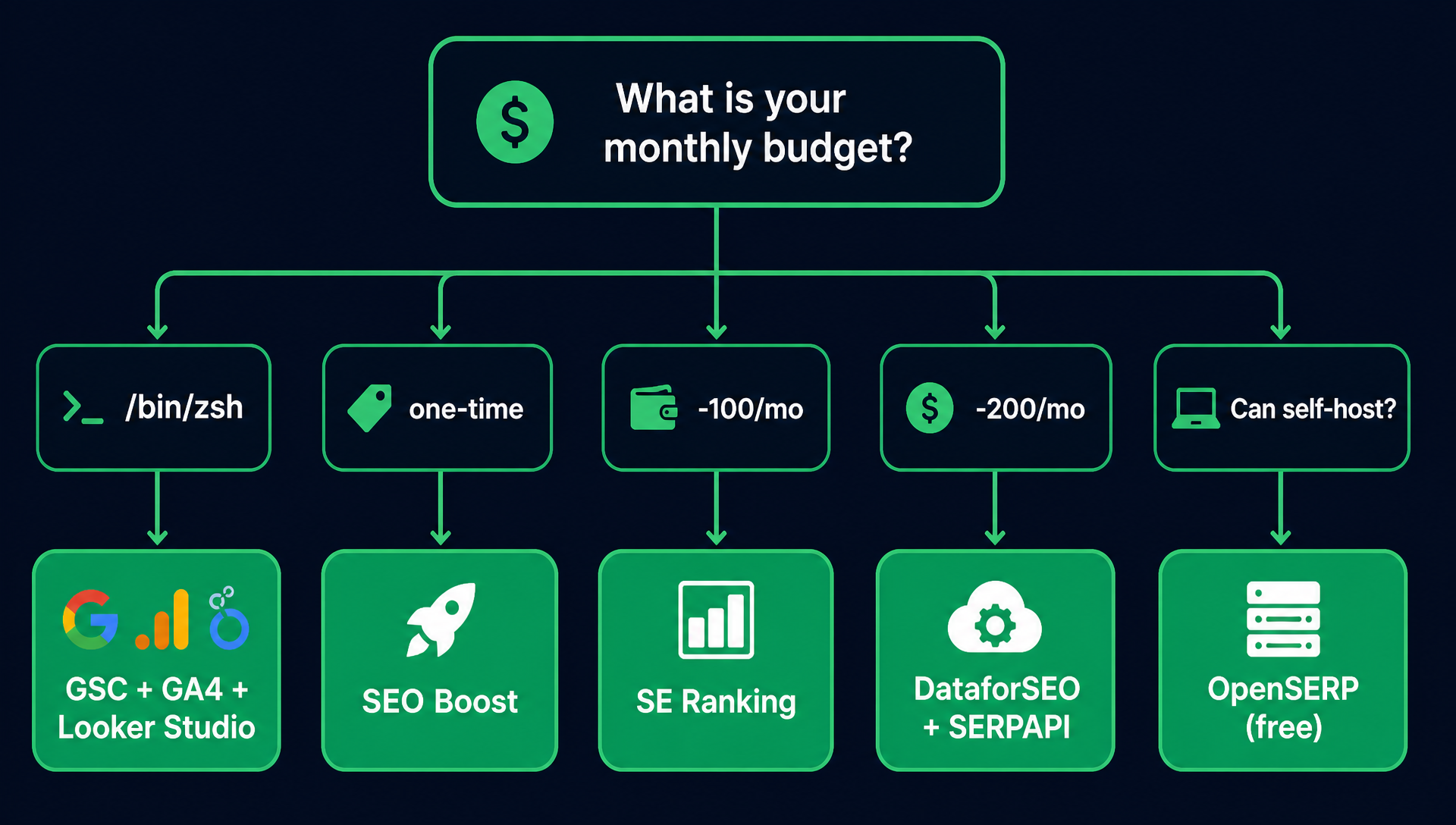
If you are new to both SEO reporting and AI assistants, here is the simplest way to pick:
Your Situation | Start With | Why |
|---|---|---|
I have no budget and one website | GSC + GA4 + Looker Studio | Free, first-party data, the weekly report skill above works out of the box |
I have no budget but want more data | GSC + GA4 + DataforSEO (pay-as-you-go) | Use the free stack for core reporting, add DataforSEO for rank tracking at ~$5/month |
I want a one-time purchase, no subscription | GSC + GA4 + SEO Boost ($39) | One-time keyword data, no monthly fees; pair with free Google tools |
I have $50-100/month | SE Ranking ($65/mo plan) + GSC + GA4 | Get a proper dashboard for manual checks plus an API for Codex automation |
I have $100-200/month | DataforSEO ($50 top-up) + SERPAPI ($75/mo) + GSC + GA4 | Full API coverage: SERPs, rankings, backlinks, AI visibility, and Google data |
I need backlink data specifically | Ahrefs Lite ($129/mo) + GSC + GA4 | Largest backlink index, now beginner-accessible with MCP server |
I already have Semrush/Ahrefs | Keep it + Coupler.io (free tier) + Codex | Pipe existing tool data into Google Sheets for Codex access; do not buy a new tool |
I just want rank tracking, nothing else | Keyword.com ($48/mo) + GSC + GA4 | Simple, clean API for position data; pair with free Google tools for traffic context |
I can self-host and want zero API costs | OpenSERP (free) + GSC + GA4 | Open-source SERP API, no per-query billing, MCP server included |
One Thing Every Beginner Should Know
The tool is 20% of the outcome. The prompt is 80%.
A $500/month Semrush subscription with a bad prompt produces worse reports than free GSC + GA4 with a good prompt. The prompts and skill in this article are starting points — improve them as you learn what matters for your site.
Here is the quickest way to get better: after Codex generates a report, ask it to critique its own work.
"Review this report. What three things would make it more useful for a site owner who wants to grow organic traffic? Apply those improvements to the next report."
That single follow-up prompt will teach you more about SEO reporting than any tool's feature list.
FAQ
Q: Do I need to know how to code to use these tools with Codex?
No. That is the point of using an AI assistant. You describe what you want in plain English — "pull my top 20 queries from GSC for last week and compare them to the week before" — and Codex writes the API calls for you. The prompts in this article are copy-paste ready. You do need to set up API credentials once (usually creating an API key in the tool's settings), but that takes a few minutes and the prompts walk you through it.
Q: Which tool should I start with if I have zero budget?
Google Search Console + Google Analytics 4 + Looker Studio. All three are free. GSC gives you first-party Google ranking and click data. GA4 gives you user behavior on your pages. Looker Studio stitches them into a dashboard. The weekly report skill in this article uses only GSC and GA4 — you can have an automated report running today without spending anything.
Q: The free tools give me enough data. Why would I ever pay?
Free tools cover your own site's performance. They do not tell you what your competitors rank for, how many backlinks they have, what keywords you are missing, or whether AI search engines cite your brand. If you are serious about growing organic traffic, you eventually need competitor and market data. Start free, then add DataforSEO or SE Ranking when you hit the limits of what GSC can tell you.
Q: Can Codex replace my SEO reporting tool entirely?
No — and you would not want it to. Codex replaces the manual work of pulling data, formatting reports, and spotting patterns. But you still need the tools for data collection, scheduled tracking, and data storage. Think of Codex as your analyst, not your database. The tools gather the data; Codex makes sense of it.
Q: How often should I run SEO reports?
Weekly for most sites. Daily is too noisy — rankings fluctuate day to day — and monthly is too slow to catch problems before they hurt traffic. The skill in this article is built for weekly cadence. If you run a news site or ecommerce store with thousands of SKUs, consider a daily rank-tracking alert for your top 20 money keywords using the SERPAPI prompt.
Author: Alice Monroe, AI SEO Tools Analyst Covering 150+ Tools at Auspia. Alice writes about SEO software, API-driven workflows, and how AI assistants change which tools are worth paying for.


