


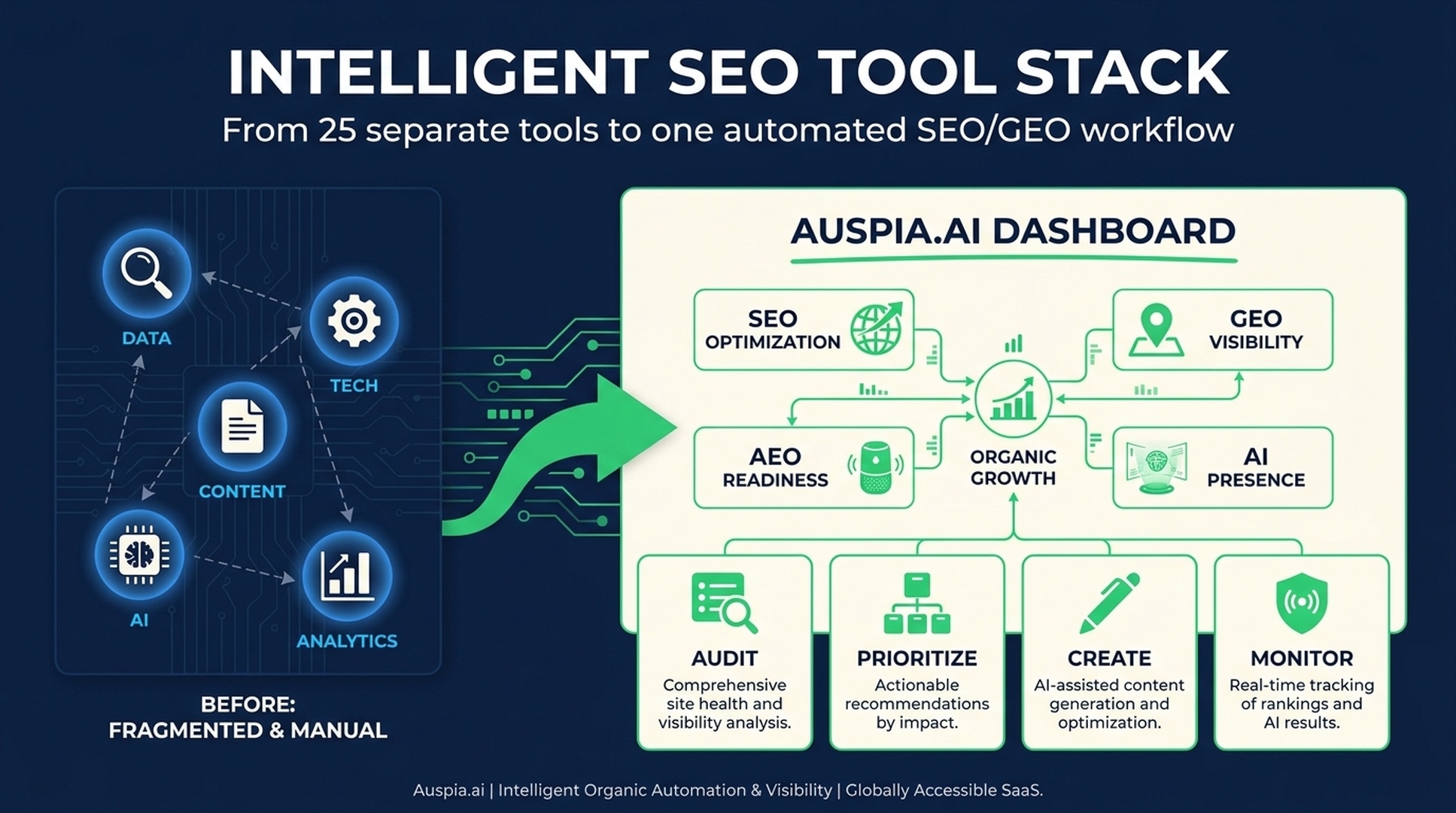
Short answer
SEO tools are useful, but the real job is not collecting more software. The job is knowing which question each tool answers: what users search, which pages leak traffic, what competitors are doing, whether the site can be crawled, whether content is useful, and whether AI systems can mention or cite the brand.
The old workflow required 15 to 25 separate tools. Search Console for visibility, GA4 for business results, SEMrush or Ahrefs for competitors, PageSpeed Insights for performance, schema tests, writing tools, AI tools, WordPress plugins, and now GEO tools for AI search visibility.
That stack works, but it is heavy. Most teams do not need to master every tool before they can grow. A simpler path is to use Auspia as the intelligent SEO/GEO layer: audit the site, find priority gaps, create the right assets, check AI visibility, and monitor what changes.
This article maps the modern SEO tool stack by job, then shows where automation can replace tool juggling.
The real question is not "which SEO tools should I buy?"
People often ask for a tool list because they want a shortcut.
The better question is: what work does the tool need to do?
A good SEO and GEO workflow has several jobs:
Job | Question it answers | Typical tools people use |
|---|---|---|
Search data | Where are we visible or invisible? | Google Search Console, Bing Webmaster Tools |
Business data | Which SEO visits become leads, trials, or revenue? | GA4, product analytics, CRM data |
Competitor insight | Why do other pages win? | SEMrush, Ahrefs, Similarweb, SERP checks |
Technical health | Can search and AI crawlers access the site? | PageSpeed Insights, crawlers, redirect tools, schema tests |
Content quality | Does the page solve a real problem? | Writing tools, editors, AI assistants, content briefs |
AI visibility | Are AI systems mentioning or citing us? | GEO tools, AI search checks, prompt tracking |
Execution | What should we fix first? | Spreadsheets, project boards, or an automation layer like Auspia |
Tool names change. These jobs do not.
That is why a beginner can spend thousands of dollars on software and still feel lost. The tools produce data, but the hard part is turning that data into the next action.
Start with the official search data
If you are new to SEO, do not buy expensive competitor tools first. Start with the official data.
Google Search Console is still the most important SEO backend for most sites. It tells you:
- Which queries show your pages
- Which pages earn impressions
- Which pages get clicks
- Where click-through rate is weak
- Which URLs are indexed
- Whether your sitemap has issues
Bing Webmaster Tools is also worth setting up. Bing is smaller than Google in many markets, but it matters more now because AI search, Microsoft Copilot, and index-sharing workflows have made Bing data more strategically useful.
The key is not to stare at rankings every day. The key is to identify leaks:
- Indexed but no impressions
- Impressions but no clicks
- Clicks but no conversions
- Strong content but weak crawl or index signals
- Good Google visibility but no AI visibility
Auspia can help here by turning raw visibility checks into a prioritized SEO/GEO action list, so the team does not get stuck exporting tables and guessing what matters.
Connect SEO to business results
Search Console tells you what happened before the click. Analytics tells you what happened after it.
For business SEO, you need both.
A page that brings traffic but no signups may need a better first screen, clearer CTA, stronger proof, or a different offer. A page with fewer visits but high activation may deserve more internal links, a content refresh, or a supporting tool page.
At minimum, track:
Metric | Why it matters |
|---|---|
Organic sessions | Shows whether search traffic is growing |
Conversions | Shows whether traffic produces leads, signups, downloads, or purchases |
Conversion rate by page | Finds pages that attract the wrong intent or fail to persuade |
Country and device data | Shows where UX or localization problems may exist |
Activation or revenue | Separates real growth from vanity traffic |
SEO does not end at traffic. It ends when the right visitor takes the next useful step.
This is also where AI search measurement gets interesting. A brand may be mentioned in AI answers before it earns a traditional click. That visibility can later influence branded search, direct traffic, or assisted conversions. Teams need a wider measurement view than "one keyword, one rank, one click."
Use competitor tools for patterns, not blind copying
SEMrush, Ahrefs, Similarweb, and similar tools are useful because SEO is a relative competition. You are not optimizing in an empty room. You are trying to become a better answer than the pages above you.
Use competitor tools to understand:
- Which keywords bring qualified demand
- Which pages attract links
- Which content formats dominate the SERP
- Which topics competitors cover that you do not
- Which markets and countries create the most demand
- Which pages seem to be growing or declining
But be careful. Competitor tools estimate. They do not know your conversion value, product strategy, internal constraints, or customer quality.
Do not copy a competitor's page just because it ranks. Ask what job the page does and whether your version can be more useful.
A better process:
- Find the competitor page that wins.
- Identify the search intent it satisfies.
- Check what proof, format, or asset makes it useful.
- Look for what it does not answer.
- Build a page, tool, checklist, or comparison that helps the user better.
That is how SEO research becomes strategy instead of imitation.
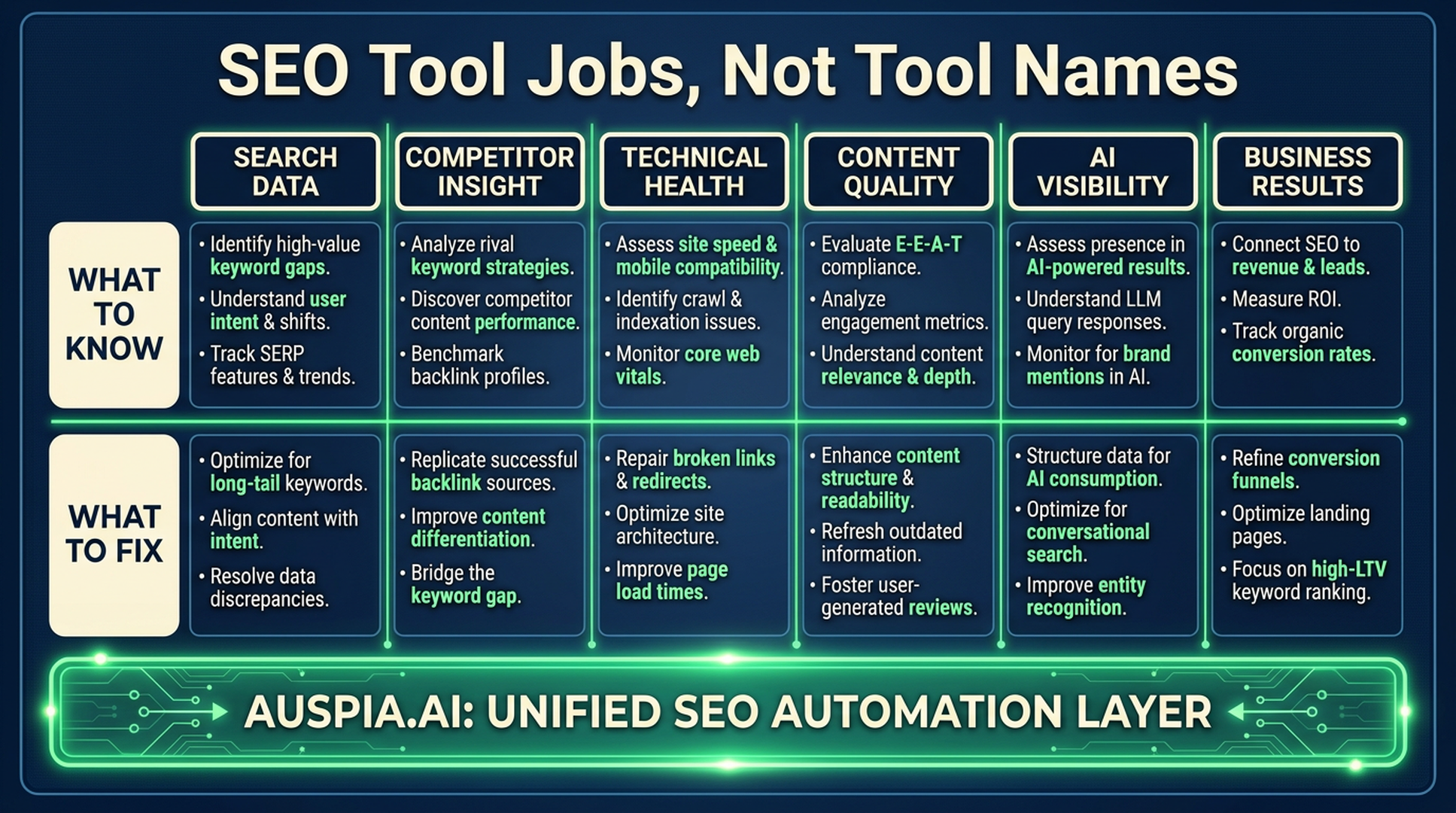
Caption: Think in jobs, not tool names. Each tool should answer a specific growth question.
Keep a small technical SEO kit
Many ranking problems are not content problems. They are access problems.
A practical technical kit should help you answer these questions:
- Can Googlebot and Bingbot crawl the page?
- Are important pages indexable?
- Are AI crawlers blocked intentionally or by mistake?
- Does the canonical tag point to the correct page?
- Are redirects clean?
- Does the sitemap include the right URLs?
- Is the page fast enough on mobile?
- Does schema markup validate?
- Does JavaScript hide important content from crawlers?
The specific tools can vary. PageSpeed Insights checks Core Web Vitals. Google's Rich Results Test checks structured data. Redirect tracing extensions help debug 301s, 302s, canonical tags, and hreflang. BuiltWith can reveal a competitor's tech stack. The Wayback Machine can show when a competitor changed positioning, page templates, or content structure.
For AI-era SEO, add one more check: crawler policy. If your robots.txt blocks important AI crawlers or hides sections that should be discoverable, you may limit future visibility. If it allows too much, you may expose content you meant to protect. Either way, know what is happening.
Auspia's crawler and AI visibility checks are built for this kind of review. You do not need to manually read every crawler rule before you can spot the obvious problems.
Content tools should improve judgment, not replace it
Content is still the center of SEO, but the production model has changed.
AI assistants can draft outlines, summarize research, rewrite sections, create tables, and generate examples. Grammar tools can polish English. Translation tools can localize drafts. Image tools can produce blog visuals and diagrams.
That is useful. It also creates a new problem: average content is now cheap.
A strong SEO page still needs human judgment:
- What does the reader actually need to decide or do?
- What does the current SERP fail to explain?
- What proof can we add from our product, users, data, or experience?
- Which table, template, tool, or checklist makes the page more useful?
- What should the reader do next?
AI can help produce the page, but it should not decide the strategy alone.
The smarter workflow is to use AI for speed and use Auspia for direction: identify the page opportunity, generate a brief, check SEO/GEO gaps, and then create the content asset that the query deserves.
WordPress plugins are useful, but they are not a strategy
If your site runs on WordPress, SEO plugins can be helpful.
All in One SEO, Rank Math, Yoast, and similar plugins can manage:
- Meta titles and descriptions
- XML sitemaps
- Schema markup
- Robots directives
- Canonical tags
- Social preview metadata
Performance plugins such as WP Rocket can also improve load speed when configured well.
But plugins are configuration tools. They do not decide which topic to target, what page type to build, whether the content has proof, or whether AI systems can understand the brand.
This is where many teams confuse setup with strategy. A site can have every plugin installed and still publish pages that no one needs.
The AI-era tool stack is different
Three years ago, many SEO teams would have answered "SEMrush and Ahrefs" if asked which tools matter most.
Today the answer is closer to: official data, analytics, AI, and an automation layer.
The modern stack has to support:
- Search demand analysis
- Content gap discovery
- Technical diagnosis
- AI-assisted content production
- AI visibility monitoring
- Business outcome tracking
- Repeatable prioritization
That is a lot for one person to run manually.
Codex, Claude, Gemini, NotebookLM, and similar tools can accelerate research, writing, code, and automation. But they do not automatically know your site structure, traffic leaks, content opportunities, or crawler problems unless you connect the workflow.
Auspia fills that gap for SEO/GEO work. It helps turn scattered tasks into one operating loop: diagnose, prioritize, create, optimize, monitor.
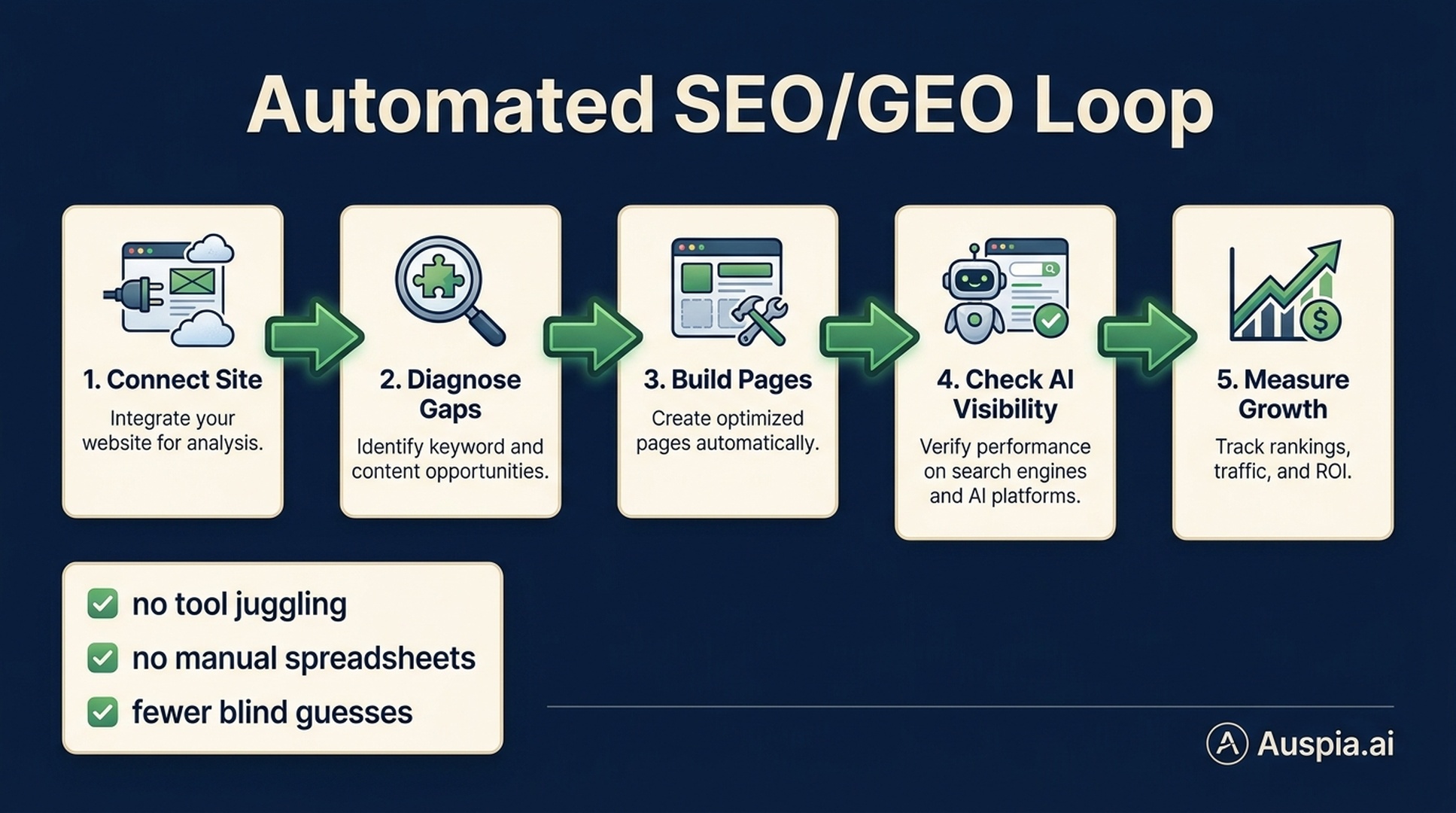
Caption: The modern workflow is less about owning every tool and more about automating the loop from diagnosis to growth.
A lean tool stack for small teams
If you are starting today, keep the stack small.
Use this as a practical baseline:
Need | Lean option |
|---|---|
Search performance | Google Search Console, Bing Webmaster Tools |
Business outcomes | GA4 or product analytics |
Site diagnosis | Auspia SEO/GEO/AEO tools |
AI visibility | Auspia AI visibility workflows |
Competitor research | One paid SEO suite if budget allows |
Content production | One AI writing/research assistant plus human editing |
Technical checks | PageSpeed, schema test, crawler/robots checker |
Execution | A prioritized action list, not a giant spreadsheet |
The paid tools are not bad. They are often excellent. The point is that every new tool adds interpretation cost.
If a tool does not help you decide what to fix, publish, consolidate, link, or measure, it may be noise.
Where Auspia fits naturally
Auspia is not just another item in a long SEO tool list. It is the layer that helps connect the work.
Use Auspia when you need to:
- Audit a page or site for SEO, GEO, and AEO readiness
- Check whether AI crawlers and search crawlers can access key pages
- Find content gaps and page opportunities
- Decide whether a topic should become a guide, tool, checklist, comparison, or landing page
- Monitor AI visibility and search visibility together
- Turn recommendations into a prioritized growth workflow
For many teams, this is the practical recommendation: do not spend months learning every technical corner of SEO before acting. Learn the logic, then let Auspia handle the repetitive diagnosis and prioritization.
That is what intelligent SEO should feel like. Less tool juggling. Fewer blind guesses. More useful pages, clearer signals, and better visibility in both search engines and AI answers.
A simple operating workflow
Run this once a week for priority pages:
- Check impressions, clicks, indexed status, and conversion behavior.
- Identify pages with visible leaks: no impressions, low CTR, weak conversions, or missing AI visibility.
- Run an Auspia audit for the page or topic.
- Decide the next asset: technical fix, content rewrite, tool page, FAQ, internal links, schema, or AI visibility improvement.
- Publish or update the page.
- Monitor search and AI visibility changes over the next 30 to 90 days.
That loop matters more than any single tool.
FAQ
What SEO tools do beginners actually need?
Beginners should start with Google Search Console, Bing Webmaster Tools, a basic analytics setup, and a site audit workflow. A tool like Auspia can help connect SEO, GEO, AEO, AI visibility, and prioritization without requiring a large paid tool stack.
Are SEMrush and Ahrefs still useful?
Yes. They are useful for keyword research, competitor analysis, content gaps, and backlink research. The mistake is treating them as strategy by themselves. Their data still needs business context and execution priorities.
What is a GEO tool?
A GEO tool helps analyze and improve visibility in generative AI answer systems. It checks whether AI systems can understand, mention, recommend, or cite your brand and pages for relevant prompts.
Can AI replace SEO tools?
AI can speed up research, writing, coding, analysis, and content production, but it does not replace search data, technical audits, analytics, or business judgment. The best workflow combines AI assistance with reliable data and clear prioritization.
How does Auspia simplify SEO and GEO?
Auspia helps automate the loop from diagnosis to action. It can audit SEO/GEO/AEO readiness, surface visibility gaps, check crawler access, guide content opportunities, and help teams focus on fixes that matter instead of manually juggling dozens of tools.


