Short answer
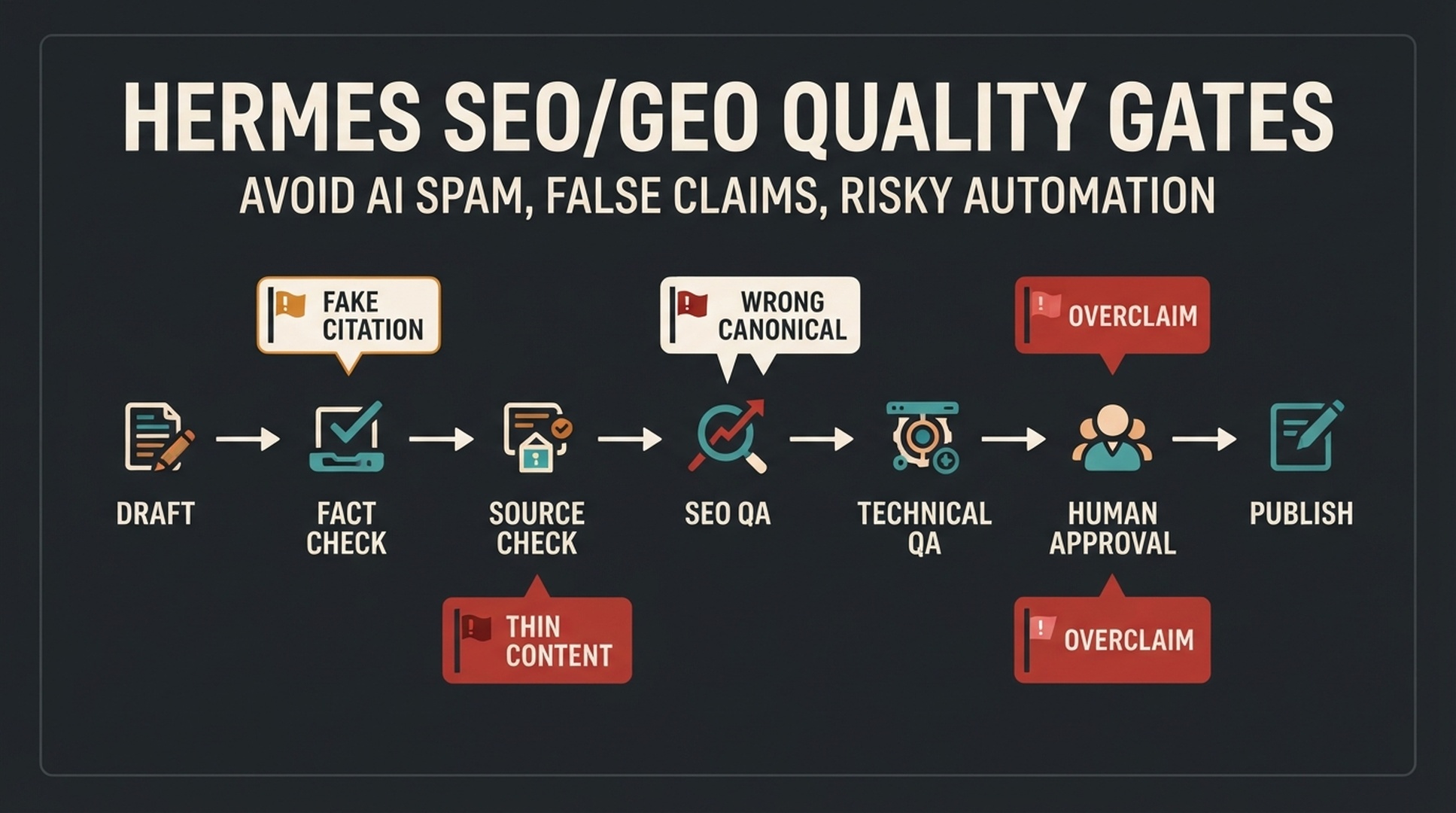
Quality gates are checkpoints that stop an AI agent before it publishes, invents sources, rewrites brand claims, or changes technical settings. This article gives you a complete, reusable gate system for Hermes SEO/GEO work: an approval policy, six gate checklists, a risk matrix, a final QA report, and an installable Hermes skill.
Hermes is the open-source AI agent framework from Nous Research. You drive it from the terminal with hermes chat, and it can search the web, extract page content, automate a browser, follow skills, run scheduled jobs with cronjobs, and connect to MCP toolsets. Docs: https://hermes-agent.nousresearch.com/docs
What | Details |
|---|---|
Who this is for | SEO/GEO practitioners running Hermes (or any AI writing agent) against a live website |
What you get | A reusable quality-gate system: an approval policy, six gate checklists, a risk matrix, a final report template, and an installable Hermes skill |
Prerequisites | Hermes installed with |
Time | About 30 to 45 minutes to set up the policy and gate files, then a few minutes per draft |
Done when | Every gate file exists and is readable by agents; a test draft run returns a pass/fail line per gate; any blocked item stops publishing until a human clears it |
The operating rule
Hermes gets more useful as it gets more constrained. A strong SEO/GEO agent should not be free to publish, invent sources, rewrite brand claims, change technical settings, or create bulk pages without review.
Quality gates are the checkpoints that stop bad automation before it reaches a live website. They are not bureaucracy. They are how a team uses AI agents without turning SEO into spam, fiction, or technical risk.
The rule is simple: anything that affects public pages, search eligibility, factual claims, brand trust, or conversion paths needs a gate.
What can go wrong without gates
Risk | Example | Damage |
|---|---|---|
Thin AI page | Agent creates a generic page for every keyword | Low user value, spam risk, wasted crawl attention |
Fake citation | Agent invents a source or misstates a source | Trust loss and factual errors |
Unsupported claim | Agent says a tool guarantees AI citations | Overpromising and legal or brand risk |
Wrong technical change | Agent removes noindex or changes canonical | Indexation and ranking damage |
Bad internal links | Agent adds irrelevant product links everywhere | Poor reader experience and weaker trust |
Bulk publishing | Agent publishes many drafts without QA | Quality inconsistency and scaled content risk |
As of mid-2026, Google's spam policies and its guidance on AI-generated content do not ban AI-assisted content. The problem is using automation to create low-value or manipulative content. Your Hermes workflow should make that distinction visible.
Step 1: create a master approval policy
Create approval-policy.md:
# Hermes SEO/GEO approval policy

Hermes may create:
- Research notes
- Briefs
- Drafts
- QA reports
- Internal link suggestions
- Technical audit findings
- Publish packages

Hermes may not directly:
- Publish CMS pages
- Edit live pages
- Change robots.txt
- Add or remove noindex
- Change canonicals
- Add redirects
- Modify structured data
- Submit URLs for indexing
- Invent sources, metrics, or customer results
- Create bulk pages from keyword lists

Human approval is required for:
- Public content updates
- Metadata changes
- Internal link additions
- Technical SEO changes
- Claims based on external sources
- Product comparisons
- Case-study or results claims
- Final publishing
Put this file where every agent can read it.
Step 2: add a fact and source gate
Create qa/fact-source-gate.md:
# Fact and source gate

- [ ] Every external claim has a source.
- [ ] Every statistic has a source or is removed.
- [ ] Every quoted claim is checked against the original source.
- [ ] No source is invented.
- [ ] No customer result is invented.
- [ ] No competitor claim is made without evidence.
- [ ] Platform rules are linked to official documentation where possible.
- [ ] Outdated facts are updated or removed.
Hermes prompt:
Review this draft against qa/fact-source-gate.md.

Return:
1. Claims with verified sources
2. Claims needing sources
3. Claims that should be removed
4. Possible invented or vague sources
5. Platform claims that need official documentation
6. Pass/fail recommendation

Block publishing if source-critical claims are unresolved.
A source gate should be strict. A draft can survive a missing flourish. It should not survive fake evidence.
Step 3: add a content usefulness gate
Create qa/content-usefulness-gate.md:
# Content usefulness gate

- [ ] The page solves a specific reader problem.
- [ ] The target reader is named clearly.
- [ ] Search intent is clear.
- [ ] GEO prompt intent is clear.
- [ ] The page adds examples, steps, tables, templates, or original explanation.
- [ ] The page is not just a paraphrase of existing pages.
- [ ] The page has a clear next step.
- [ ] The content is not created only because a keyword exists.
Prompt:
Review this page against qa/content-usefulness-gate.md.

Return:
1. Specific reader problem
2. Search intent
3. GEO prompt intent
4. Useful assets included
5. Generic or thin sections
6. Sections that should be rewritten or removed
7. Pass/fail decision
This gate blocks the most common AI SEO failure: pages that sound polished but do not help anyone.
Step 4: add an SEO/GEO extraction gate
Create qa/seo-geo-extraction-gate.md:
# SEO/GEO extraction gate

- [ ] The page gives a direct answer near the top.
- [ ] Important entities are named consistently.
- [ ] Headings describe real questions or decisions.
- [ ] Tables and lists make complex information easy to extract.
- [ ] FAQ questions are based on real queries or prompts.
- [ ] Internal links clarify topic relationships.
- [ ] The page does not overpromise rankings or AI citations.
Prompt:
Review this draft for SEO and GEO extraction readiness.

Return:
1. Whether the first section answers the main question
2. Entities that are unclear
3. Headings that should be more specific
4. Tables or lists that would improve extractability
5. FAQ questions to keep, remove, or rewrite
6. Internal link recommendations
7. Any overpromising claims
GEO-ready content is not robotic. It is clear enough for both humans and retrieval systems.
Step 5: add a technical risk gate
Create qa/technical-risk-gate.md:
# Technical risk gate

High-risk changes require technical approval:
- robots.txt
- noindex
- canonical tags
- redirects
- sitemap changes
- structured data changes
- navigation or footer links
- URL structure changes
- pagination or faceted navigation
- CMS template changes

Every technical recommendation must include:
- URL
- Evidence
- Expected benefit
- Risk
- Rollback plan
- Technical owner
Prompt:
Review the proposed SEO/GEO changes for technical risk.

Classify each change as:
- Low risk
- Medium risk
- High risk
- Blocked until developer review

Explain why.
Block any high-risk change without a rollback plan.
Let content agents prepare work, but route every technical decision through a named technical owner.
Step 6: add a publishing gate
Create qa/publishing-gate.md:
# Publishing gate

- [ ] Final draft approved.
- [ ] Category selected.
- [ ] Tags selected and relevant.
- [ ] Featured image exists.
- [ ] OG image exists.
- [ ] Inline images have alt text.
- [ ] Sources are included or claims are removed.
- [ ] Internal links are reviewed.
- [ ] Technical QA passed if needed.
- [ ] No private data is visible in screenshots.
- [ ] Human reviewer approved publishing.
Prompt:
Review the final publish package against qa/publishing-gate.md.

Return pass/fail for each item.
Do not approve publishing if images, sources, taxonomy, technical review, or human approval are missing.
This gate is boring until it saves you from publishing a draft with a fake source, missing image, or private screenshot.
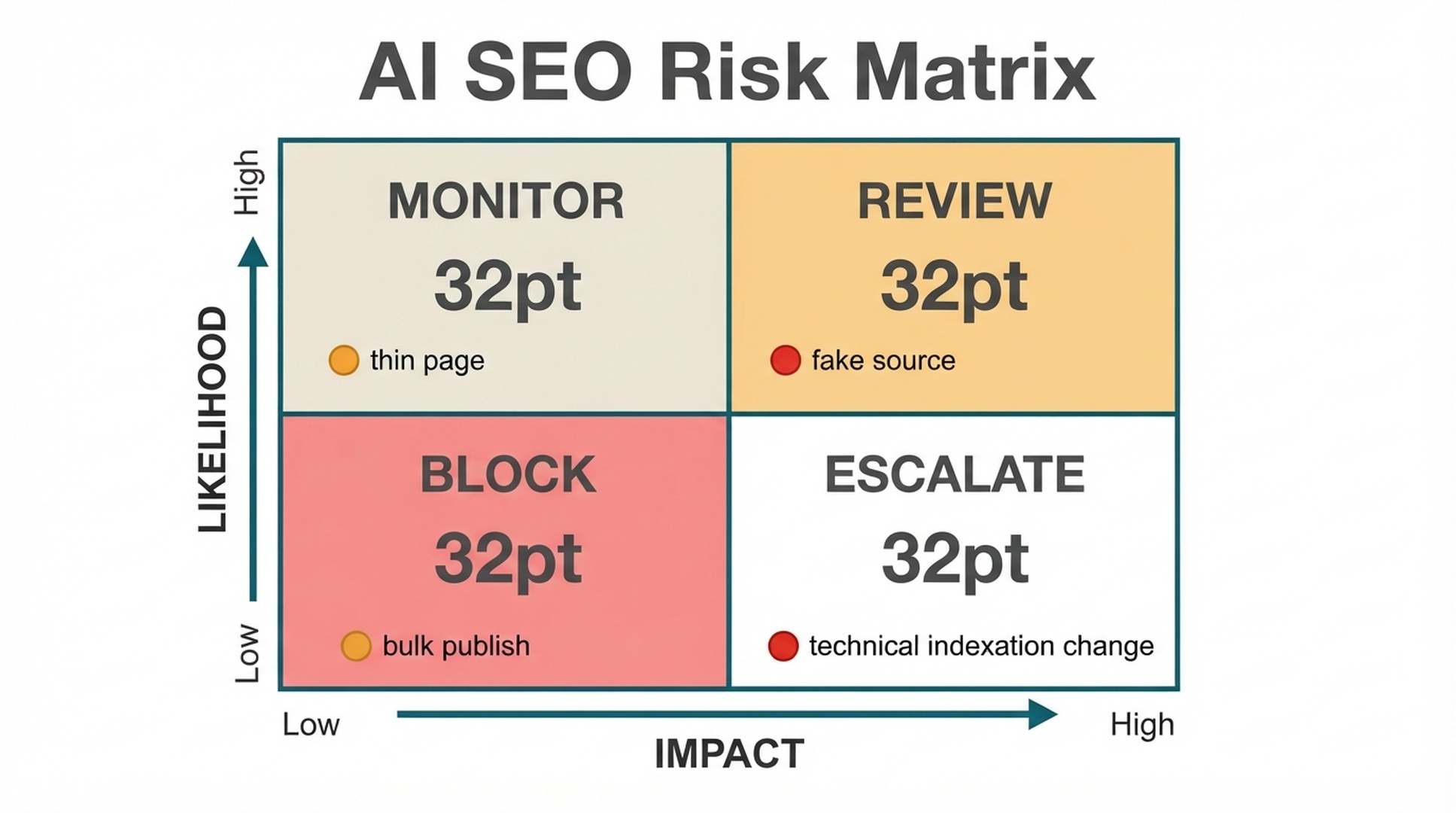
Step 7: use a risk matrix
Use a simple 2x2 model:
Zone | Meaning | Action |
|---|---|---|
Monitor | Low impact, low likelihood | Track only |
Review | Low/medium impact, uncertain likelihood | Human review |
Block | High impact, high likelihood | Do not proceed |
Escalate | High impact, uncertain ownership | Send to owner or specialist |
Examples:
Risk | Zone | Reason |
|---|---|---|
Missing alt text | Review | Easy to fix, low risk |
Fake citation | Block | High trust risk |
Bulk publishing 100 AI pages | Block | High quality and spam risk |
Canonical change on money page | Escalate | High technical impact |
Weak FAQ section | Review | Editorial issue |
Hermes prompt:
Classify all unresolved issues in this workflow using the risk matrix.

Return:
- Monitor
- Review
- Block
- Escalate

For each issue, include owner, reason, and next step.
Step 8: create a final quality report
Final report template:
# Hermes SEO/GEO quality report

Page:
Slug:
Reviewer:
Date:

## Gate summary
| Gate | Status | Blockers |
|---|---|---|
| Fact/source | | |
| Content usefulness | | |
| SEO/GEO extraction | | |
| Technical risk | | |
| Publishing | | |

## Blockers
| Issue | Risk | Owner | Required fix |
|---|---|---|---|

## Approved changes
| Change | Approved by | Notes |
|---|---|---|

## Final decision
- [ ] Publish
- [ ] Revise
- [ ] Block
This report should travel with the article. It is the receipt that quality work happened.
Beginner example: blocking a bad Hermes recommendation
Bad recommendation:
Create 50 pages for every variation of "AI search visibility tool" and publish them this week.Quality gate result:
Gate | Result |
|---|---|
Content usefulness | Fail: duplicate intent and thin pages |
Fact/source | Not applicable yet |
SEO/GEO extraction | Fail: no distinct reader problem |
Technical risk | Medium: bulk pages may affect crawl and site quality |
Publishing | Blocked |
Better action:
Create one hub page, one tool page, one comparison page, and one prompt-map guide. Build internal links between them. Review performance before expanding.The quality gate does not kill the idea. It turns a risky idea into a controlled plan.
Common mistakes
Mistake | Why it hurts | Better approach |
|---|---|---|
Treating QA as proofreading | Misses source, technical, and spam risks | Use separate gates |
Letting the same agent approve itself | Weak assumptions survive | Use role separation |
Publishing with source-needed notes | Creates factual risk | Resolve or remove claims |
Ignoring screenshots | Private data may leak | Review every screenshot |
No rollback plan for technical changes | Hard to recover from mistakes | Require owner and rollback |
Using gates only after writing | Too late to fix strategy | Gate at brief, draft, QA, and publish stages |
Verify the gates: failures and recovery
A gate system only counts once a failed run actually stops something. Test it against a deliberately bad draft before trusting it. These are the failures you are most likely to hit:
Failure | What happens | Recovery |
|---|---|---|
The agent never reads the gate files | It reviews against a checklist it already passed and approves itself | Pass the gate file contents inside the prompt and require a report file as output |
The agent invents a passing verdict | A claim cannot be verified, but the report marks it PASS | Add "if a claim cannot be verified, mark it FAIL and remove it" to the fact and source gate |
The same agent writes and approves | Weak assumptions survive review | Separate the roles: one agent drafts, one agent gates, one human approves |
A high-risk technical change has no rollback path | A canonical or robots.txt change breaks pages and cannot be undone | The technical gate blocks changes without a rollback plan; keep a copy of the previous state before applying anything |
Install these gates as a Hermes skill
The same checkpoints work as an installed Hermes skill, so a draft is gated automatically before it gets close to publishing. Hermes reads the skill, runs each gate item, and returns a pass/fail report with blockers. That keeps the discipline in the agent's reusable setup instead of relying on a prompt you have to rewrite each time.
If you do not have a Hermes SEO agent set up yet, start with our setup guide first (https://auspia.ai/blog/set-up-hermes-seo-agent), then install the skill below. Save this file:
---
name: hermes-seo-geo-quality-gates
description: Gate an SEO/GEO draft or publish package against the six quality gates (fact and source, content usefulness, SEO/GEO extraction, technical risk, publishing) plus a risk matrix, and return a pass/fail report per gate with blockers.
---

# Hermes SEO/GEO quality gates

Run this skill before a draft or publish package touches a live site. Goal: a per-gate pass/fail report a human reviewer can act on.

## Inputs

- The draft, publish package, or list of proposed changes.
- The approval policy at approval-policy.md and the gate files under qa/, when they exist.

## Gate 1: fact and source

Check every claim:

1. Every external claim has a source.
2. Every statistic has a source or is removed.
3. Every quoted claim is checked against the original source.
4. No source is invented; flag any source you cannot verify.
5. No customer result is invented.
6. No competitor claim is made without evidence.
7. Platform rules link to official documentation where possible.
8. Outdated facts are updated or removed.

Pass only when every claim is sourced and no source is invented.

## Gate 2: content usefulness

1. The page solves a specific reader problem.
2. The target reader is named clearly.
3. Search intent is clear.
4. GEO prompt intent is clear.
5. The page adds examples, steps, tables, templates, or original explanation.
6. The page is not a paraphrase of existing pages.
7. The page has a clear next step.
8. The content is not created only because a keyword exists.

## Gate 3: SEO/GEO extraction

1. The page gives a direct answer near the top.
2. Important entities are named consistently.
3. Headings describe real questions or decisions.
4. Tables and lists make complex information easy to extract.
5. FAQ questions are based on real queries or prompts.
6. Internal links clarify topic relationships.
7. The page does not overpromise rankings or AI citations.

## Gate 4: technical risk

Classify each proposed change as low risk, medium risk, high risk, or blocked until developer review:

- robots.txt, noindex, canonical tags, redirects, sitemap changes
- structured data changes, navigation or footer links, URL structure changes
- pagination or faceted navigation, CMS template changes

Every technical recommendation must include URL, evidence, expected benefit, risk, rollback plan, and technical owner. Block any high-risk change without a rollback plan.

## Gate 5: publishing

1. Final draft approved.
2. Category selected.
3. Tags selected and relevant.
4. Featured image exists.
5. OG image exists.
6. Inline images have alt text.
7. Sources are included or claims are removed.
8. Internal links are reviewed.
9. Technical QA passed if needed.
10. No private data is visible in screenshots.
11. Human reviewer approved publishing.

## Risk matrix

Classify every unresolved issue:

- Monitor: low impact, low likelihood. Track only.
- Review: low/medium impact, uncertain likelihood. Human review.
- Block: high impact, high likelihood. Do not proceed.
- Escalate: high impact, uncertain ownership. Send to owner or specialist.

For each issue include owner, reason, and next step.

## Report

Return a report in this shape:

```markdown
Page: <title or URL>
Gate summary:
| Gate | Status | Blockers |
|---|---|---|
| Fact/source | PASS/FAIL | <list> |
| Content usefulness | PASS/FAIL | <list> |
| SEO/GEO extraction | PASS/FAIL | <list> |
| Technical risk | PASS/FAIL | <list> |
| Publishing | PASS/FAIL | <list> |

Blockers:
- <issue> | <risk> | <owner> | <required fix>

Final decision: PUBLISH / REVISE / BLOCK
```

## Failure handling

- Any FAIL or BLOCK: stop, list the blockers, and do not publish.
- Unverifiable source: treat as failed and suggest removal.
- Missing rollback plan on a high-risk technical change: block.
- No human approval recorded: block publishing.
- Missing inputs (no draft or no policy): ask for them before checking.
Then install and invoke:
- Save the block above to
~/.hermes/skills/seo/hermes-seo-geo-quality-gates/SKILL.md. - Confirm Hermes sees it with
hermes skills list. - In
hermes chat, say: "Use the hermes-seo-geo-quality-gates skill to gate this draft."
Prefer not to install anything? Paste this article's URL into hermes chat (or give it the full text) and tell it: "Follow this article and apply the quality gates to my draft." Hermes will run the same checkpoints in one session, and the gates live in the prompt instead of in files.
Auspia take
Quality gates are what make Hermes suitable for real SEO/GEO work. Without gates, an agent is just a faster way to create risk. With gates, it becomes a useful operator that can prepare work, expose assumptions, and stop before the dangerous part.
The best gate is not complicated. It asks: is this useful, true, sourced, technically safe, and approved?
If the answer is not yes, hold the publish until the blockers clear.
FAQ
Does using AI content hurt SEO?
Using AI is not the issue by itself. The risk comes from low-value, manipulative, inaccurate, or mass-produced content. Use AI for support, but gate the output for usefulness, accuracy, and safety.
What is the most important quality gate?
The fact and source gate. A page with weak structure can be improved. A page with invented claims or fake sources can damage trust quickly.
Should Hermes be allowed to approve its own work?
No. Hermes can run checks and produce QA reports, but a human reviewer should approve publication and any high-risk changes.
Which technical changes need approval?
Robots.txt, noindex, canonical tags, redirects, sitemap changes, structured data, navigation, URL structure, and template changes need technical review.
How do quality gates help GEO?
They make pages clearer, more accurate, easier to extract, and safer to cite. GEO depends on useful answers, clear entities, evidence, and crawlable pages.
Can quality gates slow down publishing?
Yes, at first. They also prevent rework, bad pages, private data leaks, and risky technical mistakes. Once templates exist, the process gets faster.
What should block publishing immediately?
Fake citations, invented metrics, unsupported product claims, private data in screenshots, unresolved technical risks, missing human approval, and thin pages created only for keyword coverage.
Sources used
- Google guidance on using generative AI content: https://developers.google.com/search/docs/fundamentals/using-gen-ai-content
- Google spam policies for web search: https://developers.google.com/search/docs/essentials/spam-policies
- Google guidance on creating helpful content: https://developers.google.com/search/docs/fundamentals/creating-helpful-content
- Hermes Agent documentation: https://hermes-agent.nousresearch.com/docs/
Author: Grace Miller, AI Search Risk Analyst Tracking 200+ Policy Shifts at Auspia. Grace writes about platform rules, content risk, policy-aware optimization, and safe AI search workflows.