


The Privacy Answer First
Alexa Shopping Privacy GEO is about understanding what shopping information can be heard, shown, announced, saved, or triggered in a shared household. For buyers, the practical rule is simple: review shopping notifications, voice purchasing, household profiles, voice history, and gift privacy before using Alexa for shopping.
Most people think about Alexa shopping as convenience. Privacy adds a second question: who else can hear, see, or trigger the shopping flow? A shared smart speaker in a kitchen, living room, dorm, or family home can involve more people than the Amazon account owner.
DataForSEO research for this article showed amazon alexa privacy as an informational keyword. Earlier Alexa shopping research also surfaced questions about turning off Amazon shopping notifications on Alexa. That combination points to a clear buyer need: people want the convenience of lists and reorders without exposing order details or creating accidental household purchases.
What Privacy Means In Alexa Shopping
Privacy is not only about voice recordings. For shopping, privacy includes several layers.
Privacy layer | Buyer question |
|---|---|
Voice data | What did Alexa hear and save? |
Shopping notifications | Can Alexa announce order names, delivery status, or gifts? |
Household access | Who can speak to the device or use the account? |
Purchase controls | Can someone buy by voice, reorder, or add to cart? |
App visibility | Who can open the list, cart, or order history? |
Gift privacy | Can a surprise order be revealed by a notification? |
If you use Alexa for shopping, review all of these layers instead of only asking whether voice purchasing is on.
The Household Shopping Privacy Checklist
Start with the household reality, not the device settings. A device in a shared room needs stricter controls than a device in a private office.
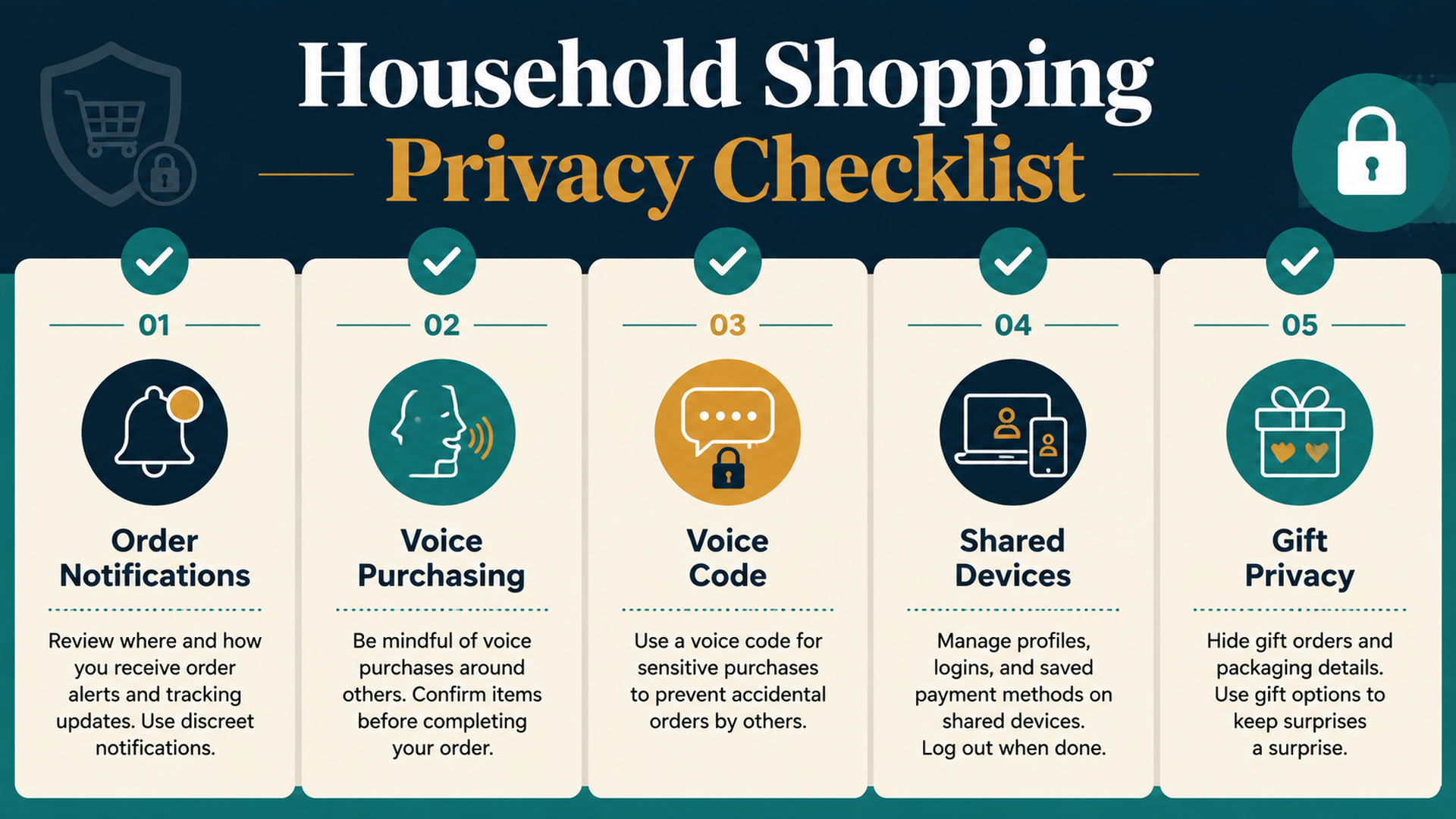
Use this checklist:
Check | What to decide |
|---|---|
Order notifications | Should Alexa announce product names, delivery updates, or only generic alerts? |
Voice purchasing | Should purchases by voice be off, on, or protected by a code? |
Shared devices | Can children, guests, roommates, or TV audio trigger shopping actions? |
Shopping lists | Who can view, edit, or share household lists? |
Gift privacy | Should gift orders be hidden from spoken or screen notifications? |
Reorders | Should repeat purchases require manual review? |
Voice history | Should you review or delete shopping-related voice history? |
The right answer depends on household risk. A solo apartment, a family kitchen, and a shared office should not use the same settings.
Notifications Can Reveal More Than You Expect
Shopping notifications are useful because they tell you when orders ship or arrive. They can also reveal gifts, personal items, household plans, or purchases you do not want announced aloud.
Review notification behavior when:
- You buy gifts for someone in the home.
- Alexa devices have screens.
- Delivery notifications are spoken in shared rooms.
- Multiple people use the same Amazon account.
- Children can ask Alexa about orders.
- You share a household but not every purchase.
A good privacy setting does not remove all notifications. It decides which notifications should be specific and which should stay generic.
Voice Purchasing Needs A Household Rule
Voice purchasing should match the people who can access the device. If anyone can speak near the device, purchasing should not depend only on good intentions.
Household situation | Better purchasing setup |
|---|---|
Kids or guests can speak near Alexa | Turn voice purchasing off or require a code |
Shared apartment | Require manual cart review |
Private adult-only device | Voice code plus order review may be enough |
Gift-heavy household | Limit order announcements and review notifications |
Frequent reorders | Use cart review before confirmation |
The rule should be easy to explain: “Alexa can add to the list, but purchases need review.”
Shopping Lists Are Shared Memory
Shopping lists feel harmless, but they can reveal habits, medical needs, diet choices, household plans, or surprise purchases. If multiple people can see or edit the list, treat it as shared memory.
Examples of list privacy risks:
- Gift items appear before the surprise.
- Personal-care products appear on a shared list.
- A child adds joke items or expensive items.
- A roommate deletes items by mistake.
- A vague list item turns into the wrong purchase later.
For sensitive items, use a private note, private cart, or manual purchase workflow instead of a shared Alexa list.
Voice History And Shopping Requests
Alexa shopping requests may appear in voice history depending on settings and account behavior. Buyers who care about privacy should know where to review voice history and how to delete entries if needed.
A practical review routine:
- Check recent Alexa activity after unusual shopping behavior.
- Review whether Alexa heard the right command.
- Delete sensitive or mistaken voice entries if desired.
- Tighten voice purchasing and notification settings.
- Use clearer commands next time.
Voice history is especially useful after a mistaken list item, reorder, or accidental purchase attempt.
Gift Privacy: The Common Blind Spot
Gift privacy is one of the easiest Alexa shopping mistakes to overlook. A gift can be revealed by a spoken delivery update, screen notification, shared order history, or household account visibility.
Before buying a gift:
- Check whether Alexa can announce order contents.
- Check whether Echo Show or app notifications may display item names.
- Use a separate account or gift settings where appropriate.
- Avoid adding gift items to a shared shopping list.
- Monitor delivery notifications manually.
The goal is not secrecy for every purchase. It is preventing a device from announcing a surprise at the wrong time.
Buyer-Side GEO: Clear Commands Protect Privacy
GEO usually describes how AI systems understand content. Buyers can apply the same principle to privacy: clear commands reduce accidental exposure.
Risky command | Safer command |
|---|---|
“Order the usual.” | “Add my usual coffee filters to my shopping list.” |
“Buy a gift for mom.” | Use the app manually for gift purchases |
“Reorder medicine.” | Review privately in the app before buying |
“What did I order?” | Check order history privately if others are nearby |
“Add personal items.” | Use a private list or app note |
Privacy-aware shopping is not slower for every item. It is slower for items that deserve privacy.
A 10-Minute Privacy Review
Use this once if you are new to Alexa shopping, then repeat after major household changes.
Minute | Task |
|---|---|
1-2 | Check voice purchasing status |
3 | Check whether a voice code or confirmation is enabled |
4 | Review order notification settings |
5 | Check shared devices and household profiles |
6 | Review shopping lists and who uses them |
7 | Check gift notification risk |
8 | Review voice history settings |
9 | Decide which items should never be bought by voice |
10 | Explain the household rule to anyone who uses the device |
A simple household rule prevents most privacy mistakes.
FAQ
Can Alexa announce my Amazon orders?
Depending on settings and device behavior, Alexa may provide order or delivery notifications. Buyers should review notification settings, especially in shared households or before buying gifts.
How do I make Alexa shopping more private?
Review voice purchasing, voice codes, notifications, household profiles, shared lists, voice history, and gift-related notification behavior.
Should I turn off voice purchasing for privacy?
If you share a device with children, guests, roommates, or family members, turning off voice purchasing or requiring a code is often safer.
Are Alexa shopping lists private?
They can be shared or visible depending on account and household setup. Do not put sensitive or surprise items on a shared list unless you are comfortable with others seeing them.
How does this relate to GEO?
For buyers, GEO means understanding how AI and voice systems interpret requests. Clearer commands and stricter settings reduce accidental purchases and unwanted disclosure.
Auspia Takeaway
Alexa shopping privacy is not one setting. It is a household system: notifications, voice purchasing, shared devices, lists, reorders, gifts, and voice history all matter.
Use Alexa for convenience, but decide where convenience stops. A private purchase, a surprise gift, or a shared household device deserves more review than a simple grocery reminder.
Author: Grace Miller, AI Search Risk Analyst Tracking 200+ Policy Shifts at Auspia. Grace writes about AI search risk, platform rules, safer content patterns, and practical guardrails for everyday AI-assisted workflows.


