


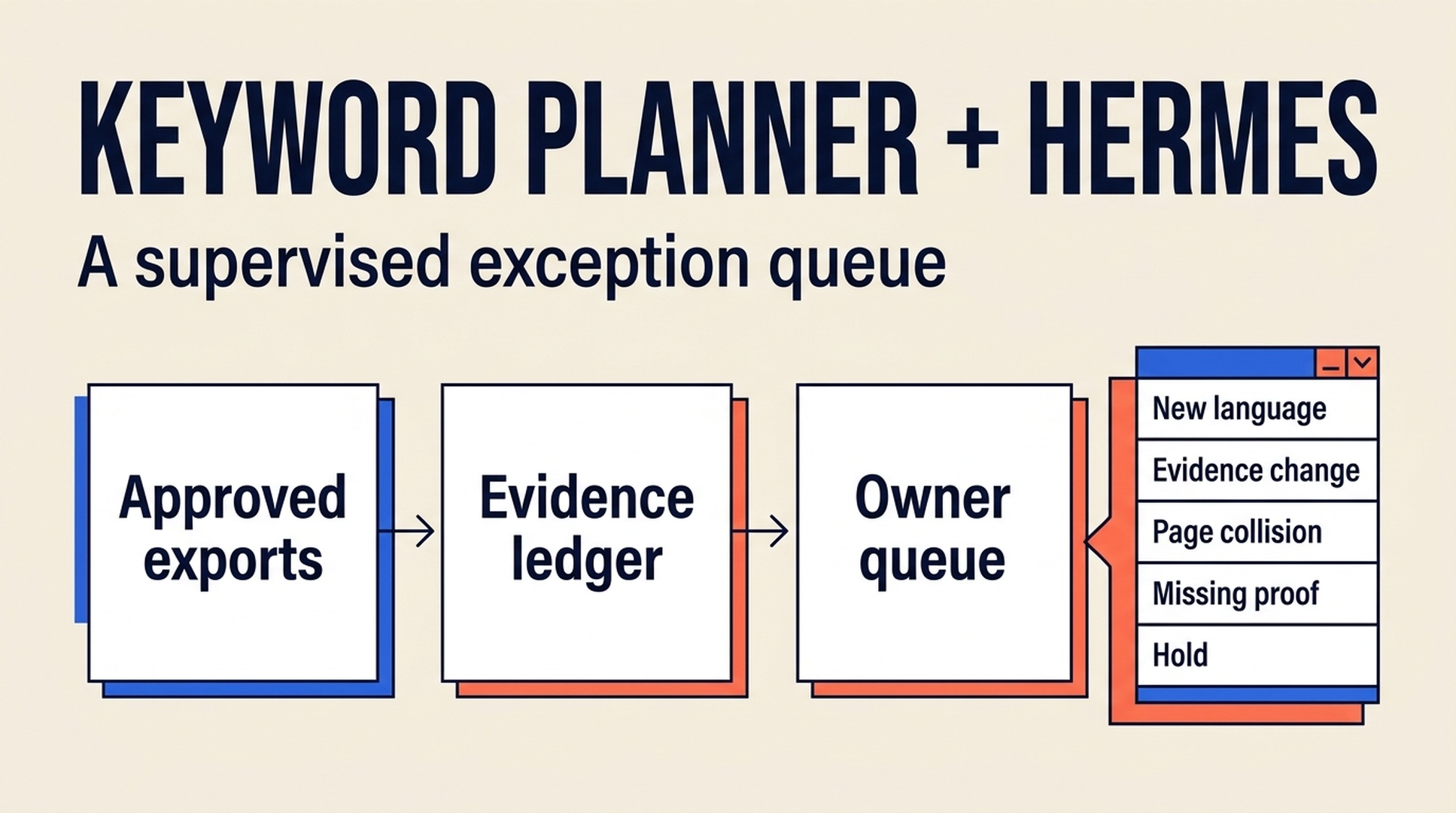
Read the export as a weekly exception queue
Google Keyword Planner can produce a list. As of mid-2026, opening it still requires a Google Ads account, and its export options shift between releases, so treat the tool's exact behavior as a moving target. A list is not yet a work system. Hermes becomes useful after the first export when the same research job returns each week or month and someone needs to see what changed, what needs a decision, and what should wait.
Hermes is an open-source AI agent framework from NousResearch, driven from the command line with hermes chat. It can search the web and extract from pages, automate a browser, reuse packaged skills, run scheduled jobs, and work with MCP toolsets. The official documentation at https://hermes-agent.nousresearch.com/docs describes each capability in detail.
This workflow turns approved Keyword Planner exports into a small exception queue. Hermes compares the new export with the last reviewed pack, records what is new or unresolved, and prepares a limited set of items for a human owner. The final keyword choice, any direct Google Ads access, and publishing stay with a human.
Use this when | You revisit one topic, market, or product area on a regular schedule |
|---|---|
Who this is for | An editor or small content team that reviews one recurring keyword lane with Hermes |
You will finish with | A weekly opportunity queue with evidence, owners, and escalation rules |
Prerequisites | Two approved exports from the same lane, or one export plus a prior review log |
Estimated time | About 30 minutes for the first setup, then 10 to 15 minutes per reviewed cycle |
Definition of done | Every queue item says what changed, why it matters, what is unknown, and who must decide |
Start with one research lane, such as "US English keywords for independent-consultant bookkeeping." A recurring system built on a fuzzy category only automates confusion.
Establish the evidence ledger before Hermes sees a file
Create a folder for one recurring lane. Keep source exports separate from agent output:
keyword-lane/
  source/
    2026-07-01-keyword-planner-us-en.csv
    2026-07-08-keyword-planner-us-en.csv
  context/
    lane-brief.md
    prior-decisions.csv
  output/
    weekly-opportunity-queue.md
    weekly-opportunity-queue.csv
The lane-brief.md should name the business question, target market, language, approved seeds, audiences to exclude, and a maximum number of weekly recommendations. The prior-decisions.csv is equally important. It prevents Hermes from reintroducing a query that the team already rejected because of product fit, policy, or duplicate-page risk.
Use this minimum ledger schema:
Field | Why it stays visible |
|---|---|
| Shows which export supports the row |
| Stops incomparable runs from being mixed |
| Separates a new row from an actual change in evidence |
| Retains the human decision from an earlier run |
| Gives Hermes a bounded task, not a vague priority score |
| Makes a stuck item somebody's responsibility |
Quality check
Open the two source exports yourself. Confirm they describe the same market and language before asking for a comparison. If not, treat them as separate lanes, even when the query text overlaps.
Recovery path
If you only have one export, Hermes can still prepare a first queue. Label every row baseline only and treat any rise, fall, or seasonality claim as unsupported.
Run the first supervised cycle
Hermes is an agent runtime that can retain reusable instructions and run recurring work, but that does not make it an independent source of search evidence. Give it a file-bound task with a short output limit.
Read only the files in source/ and context/ for this keyword lane.

Create output/weekly-opportunity-queue.csv and output/weekly-opportunity-queue.md.
Compare rows only when market, language, seed set, and provider/report context match.

For every queue item, include:
- query or cluster label;
- source file names and retrieval times;
- observed change or BASELINE ONLY;
- likely searcher job as a hypothesis;
- prior decision, if present;
- one next step: validate SERP, inspect existing page, request owner facts,
  prepare a brief, or hold;
- owner and escalation reason;
- data limits.

Return no more than eight items. Stay within the source folder, do not use Google Ads
or unapproved web sources, and do not invent metrics, predict rankings, or publish.
Put unclear rows in HOLD.
The constrained list is a feature. A queue of 70 "opportunities" simply hands a different spreadsheet to the same overwhelmed owner.
Classify exceptions before you prioritize them
Ask Hermes to categorize inputs instead of collapsing them into one score. An exception queue needs categories because the right next step differs.
Exception type | Example trigger | Safe next step | Human question |
|---|---|---|---|
New language | A query family appears that was not in the last pack | Inspect the wording and audience | Does this describe a customer problem we serve? |
Evidence change | A provider-reported field changes within comparable exports | Verify the context and timing | Is this change large enough to revisit the page plan? |
Page collision | A cluster resembles an existing URL | Compare intent and page purpose | Refresh, consolidate, or keep separate? |
Missing proof | A promising phrase needs product, policy, or customer evidence | Request source material | Can the team substantiate the answer? |
Stale hold | A prior "research more" item has no new evidence | Keep it out of the active queue | Who closes or extends the hold? |
This is where persistent memory can help, but only if the durable record is a file the team can inspect. Prefer that inspectable file over a conversational recollection of why a keyword was rejected three months ago.
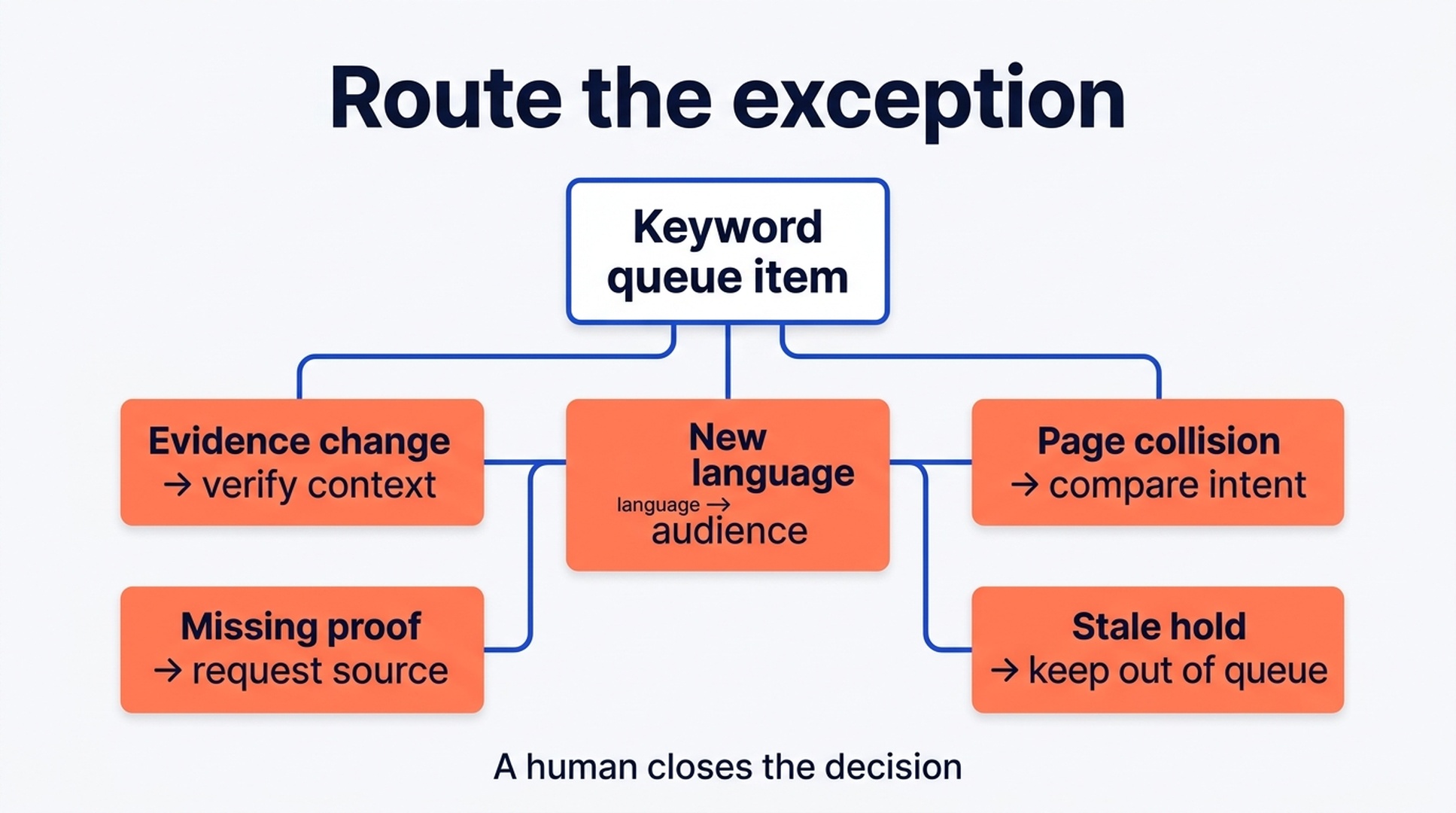
Route each exception to one safe next step, then let a human close the decision.
Let the queue move through owners, not through endless prompts
For each item, use a handoff pattern. A content strategist owns page route; a subject-matter owner confirms product facts; an SEO owner checks current result fit; an editor turns an approved route into a brief. One person may do several jobs on a small team, but the decisions should still be distinct.
Queue item: [cluster]
Evidence: [source filenames and context]
What changed: [observed change or baseline]
What is unknown: [metric, SERP, product fact, or page overlap]
Proposed next step: [one action]
Decision owner: [role]
Escalate if: [specific condition]
Close when: [acceptance condition]
Hermes can prepare this record each cycle and keeps unresolved items in HOLD instead of converting them into content tasks. A HOLD is a legitimate outcome when the evidence is thin.
Know when the system has matured enough to schedule work
Use a maturity check instead of jumping from one export to a calendar:
Level | What you have | What you should do next |
|---|---|---|
Baseline | One export and a lane brief | Build an evidence ledger; make no trend claims |
Comparable | Two consistent exports and named prior decisions | Run a supervised exception queue |
Reviewed | A queue with owners and closed decisions | Create briefs for only approved items |
Measured | Post-publication outcomes tied back to decisions | Review whether the lane still produces useful work |
The common mistake is scheduling content at the baseline stage. First prove that the lane produces distinct, supportable page decisions.
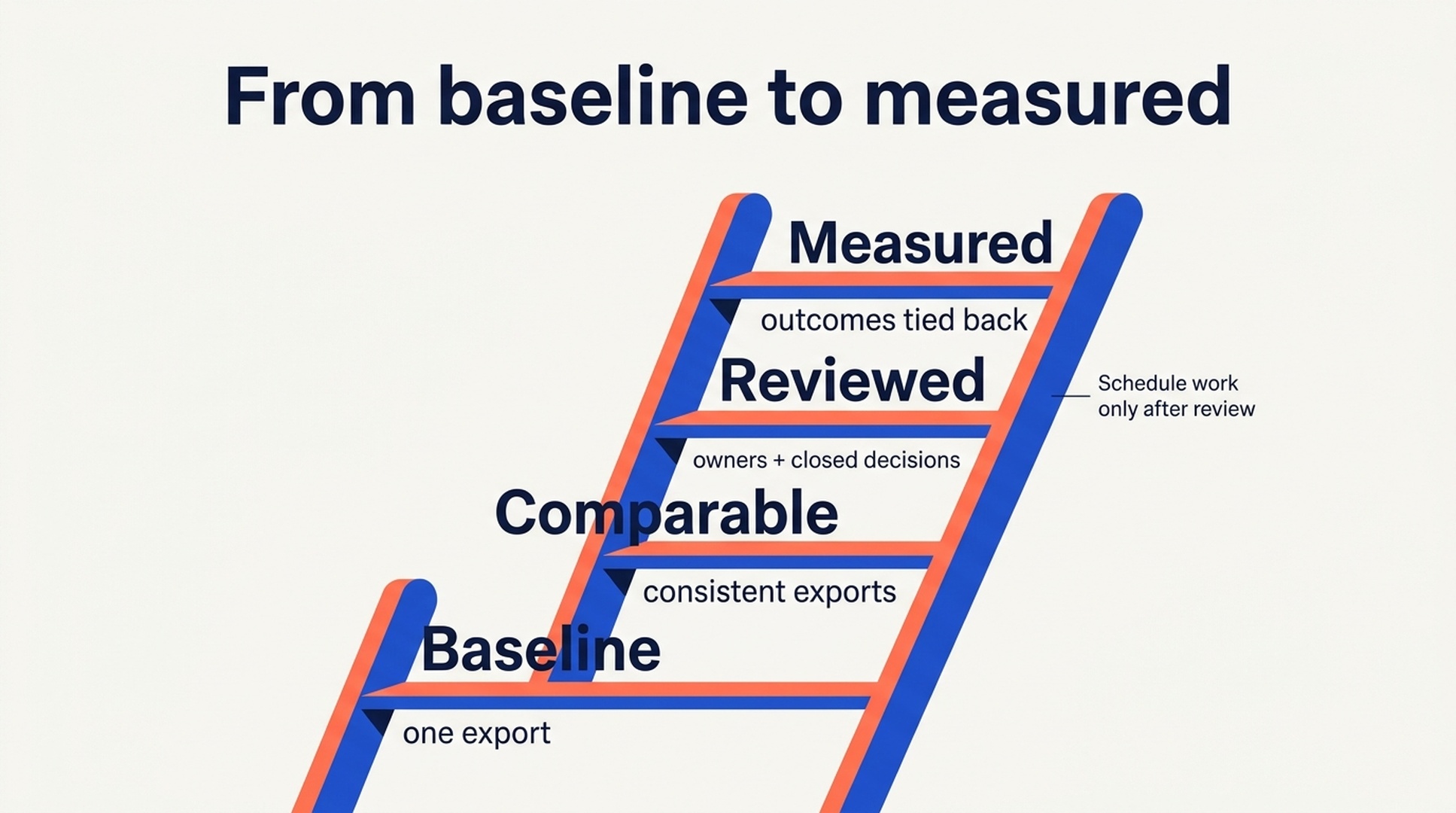
The maturity ladder keeps scheduling downstream of comparable evidence and owner review.
Verify a cycle before scheduling the next one
Before you mark the week complete, check the following:
- Every active row names its source files, market, language, and retrieval time.
- No provider number was converted into a ranking or traffic promise.
- Every searcher-job label is marked as a hypothesis or supported by an approved SERP note.
- The queue has a stated limit and includes
HOLDitems where needed. - Every active recommendation has an owner, a next step, and a close condition.
- No page brief exists until the relevant owner has approved it.
If Hermes is scheduled to run again, have it create a fresh dated queue rather than overwrite the prior one. The history is the point: it lets a human see whether the agent is repeating a bad recommendation or whether the evidence genuinely changed.
Run this Keyword Planner workflow as a Hermes skill
The workflow above is a good candidate for packaging as a reusable Hermes skill. A SKILL.md file carries the steps, the prompt, the quality gates, and the output format in one place, so every weekly cycle runs the same way without retyping instructions. The skill also keeps the review discipline visible in a file the whole team can read, edit, and version.
---
name: hermes-keyword-planner-workflow
description: Turn approved Google Keyword Planner exports into a weekly keyword exception queue with evidence, owners, and escalation rules.
---

# Keyword Planner Exception Queue

Turn one recurring keyword lane's approved Google Keyword Planner exports into a small, reviewable opportunity queue. Compare the newest export against the last reviewed pack, record what changed, and prepare a bounded set of items for a human owner.

## When to run

Run this skill when a team reviews one topic, market, or product area on a regular schedule and has approved exports to compare.

## Prerequisites

- Two comparable exports (same market, language, seed set, and provider or report context), or one export plus a prior review log.
- A lane brief (context/lane-brief.md) naming the business question, target market, language, approved seeds, audiences to exclude, and a maximum number of weekly recommendations.
- A prior decisions log (context/prior-decisions.csv) listing queries the team already rejected.

## Ledger layout

keyword-lane/
  source/
    2026-07-01-keyword-planner-us-en.csv
    2026-07-08-keyword-planner-us-en.csv
  context/
    lane-brief.md
    prior-decisions.csv
  output/
    weekly-opportunity-queue.md
    weekly-opportunity-queue.csv

## Steps

1. Read only the files in source/ and context/ for this keyword lane.
2. Verify the exports describe the same market, language, seed set, and provider or report context. If they do not match, stop and report a lane mismatch.
3. Compare the newest export with the last reviewed pack, or with the baseline on a first run.
4. Classify every row into one exception type: New language, Evidence change, Page collision, Missing proof, or Stale hold.
5. Write a fresh dated queue file in output/ and never overwrite the prior one.
6. Return no more than eight items, or the lane brief maximum. Put unclear rows in HOLD.
7. For every queue item, include:
   - query or cluster label;
   - source file names and retrieval times;
   - observed change or BASELINE ONLY;
   - likely searcher job as a hypothesis;
   - prior decision, if present;
   - one next step: validate SERP, inspect existing page, request owner facts, prepare a brief, or hold;
   - owner and escalation reason;
   - data limits.
8. If only one export exists, label every row BASELINE ONLY and treat trend claims as unsupported.
9. Close the run by listing the count per exception type and any rows that could not be classified.

## Quality gates

- Every active row names its source files, market, language, and retrieval time.
- No provider number is converted into a ranking or traffic promise.
- Every searcher-job label is marked as a hypothesis or supported by an approved SERP note.
- The queue has a stated limit and includes HOLD items where needed.
- Every active recommendation has an owner, a next step, and a close condition.
- No page brief exists until the relevant owner has approved it.

## Output format

Queue item: [cluster]
Evidence: [source filenames and context]
What changed: [observed change or baseline]
What is unknown: [metric, SERP, product fact, or page overlap]
Proposed next step: [one action]
Decision owner: [role]
Escalate if: [specific condition]
Close when: [acceptance condition]

## Boundaries

- Stay within the source/ and context/ folders of the lane.
- Keep passwords, cookies, and API keys out of prompts; work only from approved files.
- Do not access Google Ads, unapproved web sources, or publishing systems.
- Do not invent metrics, predict rankings, or publish content.
- Treat the ledger files, not conversational memory, as the authority on prior decisions.
Save that file as ~/.hermes/skills/seo/hermes-keyword-planner-workflow/SKILL.md. In the next hermes chat session, run hermes skills list to confirm the skill is registered, then say: "Use the hermes-keyword-planner-workflow skill to plan keywords for my campaign." For installation details and the full capability list, see the Hermes docs (https://hermes-agent.nousresearch.com/docs) and the source repository (https://github.com/NousResearch/hermes-agent).
If you prefer to skip the skill file, send this article's URL or full text to Hermes and say: "Follow this article and run the keyword planning workflow." Hermes will execute the same ledger, queue, and review steps described in this post.
For help choosing the seeds that feed this lane before the queue runs, see How to Choose Keywords for Your Hermes SEO Agent (https://auspia.ai/blog/how-to-choose-keywords-for-seo-hermes-agent).
Troubleshooting a stalled cycle
These are the failures we have seen most often with this workflow as of mid-2026. Google Ads and Keyword Planner change over time, so re-check the current behavior before relying on these fixes.
- Keyword Planner will not open without an active Google Ads account. The planner is gated behind an Ads login. Recovery: create the Ads account without launching any campaigns; the planner and its CSV export then become available. The Google Ads help center (https://support.google.com/google-ads) documents the current account requirements.
- Volumes come back as ranges instead of numbers. Keyword Planner reports average volumes in bands (for example 1K to 10K) rather than exact figures. Recovery: treat the ranges as relative evidence, compare bands only across comparable exports, and keep the raw file unchanged in
source/. - CSV columns differ between exports. Export options and column order can vary from run to run and across releases. Recovery: pin the export columns in the lane brief, validate the header row during the verify step, and fail the cycle if the headers no longer match.
- A new export covers a different market or language. Recovery: treat it as a separate lane, label every row
baseline only, and keep it out of the comparison until a matching second export exists.
FAQ
Can Hermes pull data directly from Google Keyword Planner?
Only when a user deliberately configures and authorizes such access through Google Ads (https://ads.google.com). As of mid-2026 that remains possible, but the interface and API details change over time. This workflow starts with approved exports because they are easier to preserve, compare, and review. Expect Hermes to work only from those approved files, never from passwords, cookies, or API keys typed into a prompt.
Should Hermes create a content calendar from every queue?
No. A queue surfaces exceptions and decisions. Create a brief only after a human has confirmed the searcher job, page route, and available evidence. A calendar should be downstream of those approvals.
What if Hermes remembers an old decision incorrectly?
Treat the ledger file as the authority. Require the source file and prior decision ID beside every recommendation. If the record disagrees with an agent summary, correct the record and rerun the cycle.
How often should the queue run?
Run it only as often as you can review and act on it. Weekly may fit a changing product category; monthly is often better for a small editorial team. More runs do not create more evidence.
Author: Camille Rhodes, Architect of 300+ AI Content Workflows at Auspia. Camille writes about approval-aware automation, editorial systems, and practical AI operating rules.


