


Recommendation at a glance
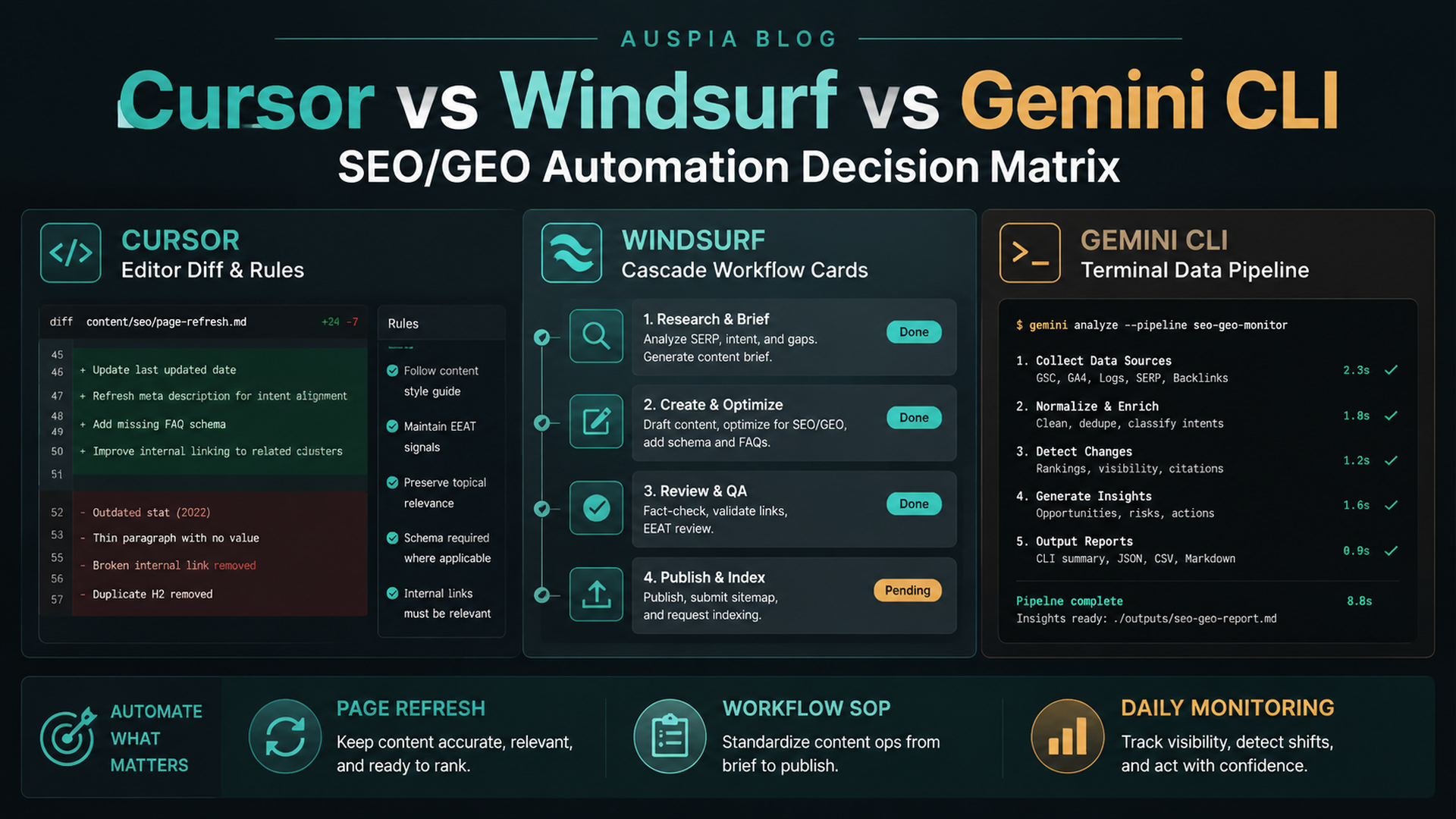
If you want an AI coding agent for SEO/GEO work, do not choose by model hype. Choose by workflow shape.
- Choose Cursor when the work happens inside a code editor: page refreshes, metadata components, schema helpers, internal link components, and PR-style diffs.
- Choose Windsurf when the work should become a repeatable SOP: keyword-to-brief workflows, GEO prompt audits, content refresh steps, and PR comment handling.
- Choose Gemini CLI when the work is terminal-native: reading exports, running scripts, comparing snapshots, calling MCP tools, and producing daily monitoring reports.
All three can help with SEO/GEO automation. They should not be used the same way. A beginner-safe setup keeps data read-only at first, asks the agent to plan before editing, and requires human approval before publishing, deploying, changing indexing rules, or modifying claims.
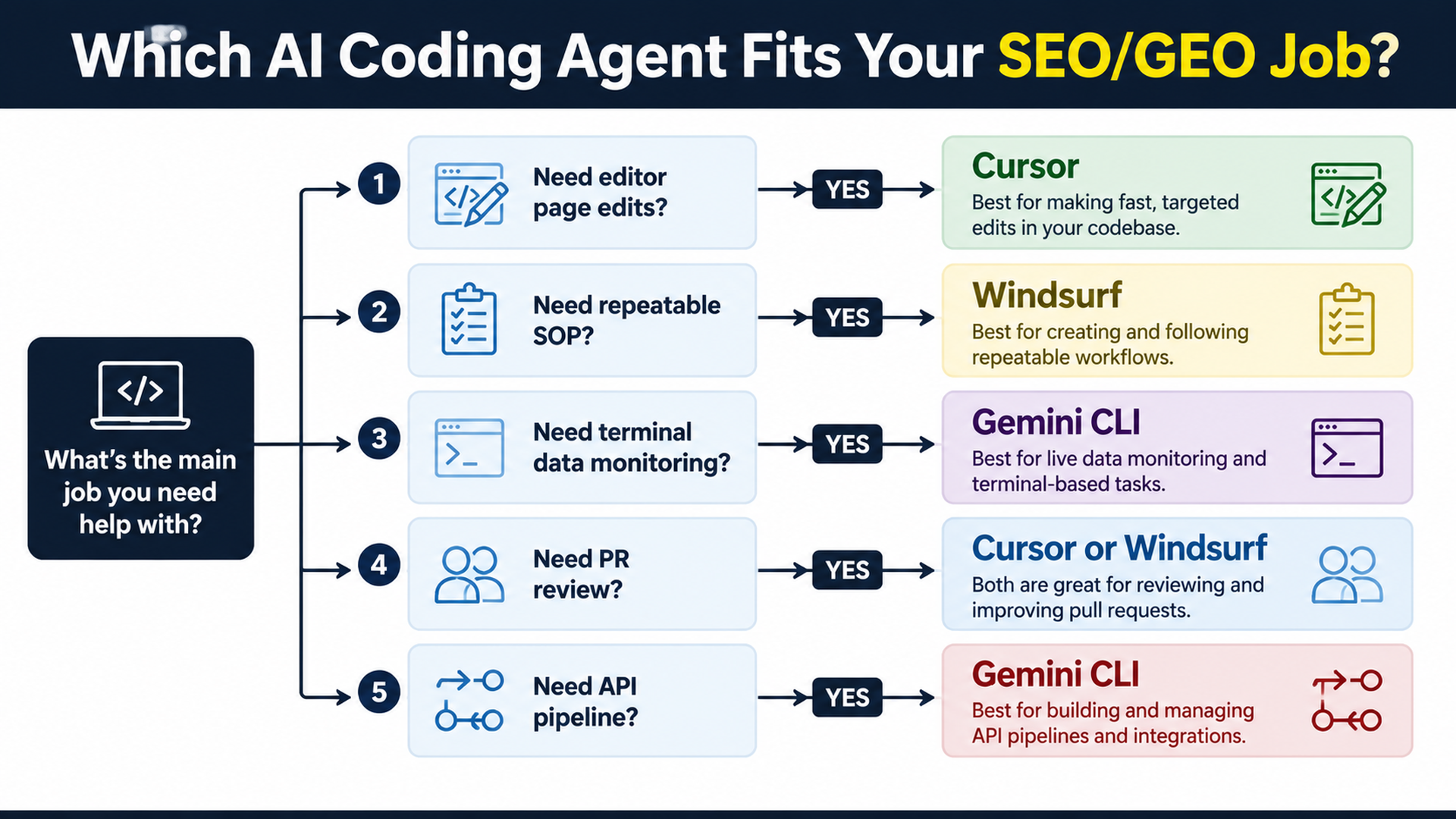
Caption: Match the agent to the job: editor edits, workflow SOPs, or terminal data monitoring.
The quick decision table
Your SEO/GEO job | Best first choice | Why |
|---|---|---|
Refresh one landing page | Cursor | You can inspect files, ask for a plan, review editor diffs, and run build checks. |
Fix metadata/schema components | Cursor | Component-level code edits are easier in an editor-first workflow. |
Turn keyword research into a repeated brief workflow | Windsurf | Cascade Workflows are built for repeatable slash-command procedures. |
Train a content team on one standard process | Windsurf | Rules, memories, and workflows help turn SOPs into reusable operations. |
Compare GSC, Bing, GA4, and AI visibility exports every day | Gemini CLI | Terminal tools fit scripts, snapshots, file comparisons, and reports. |
Build an MCP data pipeline | Gemini CLI | MCP configuration and CLI execution are natural for API-driven data workflows. |
Review SEO/GEO PR changes | Cursor or Windsurf | Cursor is stronger for editor diffs; Windsurf is strong when PR comments map to workflows. |
Run a safe first experiment as a non-developer | Cursor | The editor makes file scope and diffs easier to understand. |
Run a recurring technical SEO monitor | Gemini CLI | Shell commands, crawls, and dated reports are easier to automate in a terminal. |
The common mistake is trying to make one agent do every job. That leads to vague prompts such as “optimize my website for SEO and GEO.” A better operating model assigns each platform a specific lane.
What Cursor is best for
Cursor is the strongest fit when the SEO/GEO work is close to code and page files. Its documentation centers on agents, rules, MCP, skills, CLI, and background agents. Practically, that means Cursor can sit inside the editor while you inspect the exact page, component, or metadata helper that needs work.
Use Cursor for:
- refreshing a homepage, feature page, comparison page, or use-case page;
- improving title tags, meta descriptions, Open Graph fields, and canonicals;
- editing schema helpers or JSON-LD components;
- adding answer blocks, FAQ sections, and comparison tables to existing pages;
- reviewing a diff before a pull request;
- connecting read-only SEO data through MCP when page decisions need data.
A beginner prompt for Cursor should look like this:
Inspect the currently open page and related metadata files.

Do not edit yet. First return:
1. Page purpose and likely search intent.
2. Metadata/schema/internal link issues.
3. GEO extractability issues: missing direct answer, weak proof, unclear entity facts, or absent comparison.
4. Files you would edit.
5. Validation command to run after the edit.
6. Changes that require my approval.

Wait for approval before editing.
Cursor is not the best first tool for daily data monitoring. It can connect data, but if the core work is scripts and snapshots, a CLI is cleaner.
What Windsurf is best for
Windsurf is strongest when the same SEO/GEO process needs to be repeated by a team. The important platform idea is not “ask Cascade to optimize content.” It is “turn a proven procedure into a Workflow.”
Windsurf/Devin Desktop documentation describes Workflows as markdown-based procedures that can be invoked with slash commands and stored under .windsurf/workflows/. The docs also note that workflows are manually invoked rather than automatically triggered by Cascade. That matters for SEO/GEO: a workflow can standardize the process without giving the agent permission to run unsupervised.
Use Windsurf for:
/seo-page-refreshworkflow;/geo-prompt-auditworkflow;/keyword-cluster-to-briefworkflow;/technical-seo-checkworkflow;/pr-seo-comment-fixworkflow;- team rules and memories that preserve process consistency.
A starter Windsurf workflow could be:
# .windsurf/workflows/seo-page-refresh.md

Goal: Refresh one approved page for SEO and GEO without changing business claims.

Steps:
1. Read the selected URL/page file and related metadata/schema files.
2. Diagnose intent, metadata, internal links, answer extraction, proof, and technical risks.
3. Ask for approval before editing.
4. Apply only approved edits.
5. Run build or lint checks.
6. Return changed files, risks, and post-publish metrics to monitor.

Never:
- invent testimonials, logos, statistics, pricing, or legal claims;
- change robots, canonicals, redirects, or analytics without explicit approval;
- publish or deploy automatically.
Windsurf is not just another editor agent in this series. Its best SEO/GEO value is process reuse.
What Gemini CLI is best for
Gemini CLI is best when the work is terminal-native. Its official documentation describes it as an interactive command-line REPL that brings Gemini models to the terminal and includes tools for file system operations, shell commands, and web fetching. Its MCP documentation explains that MCP servers can expose external tools and data sources to the CLI.
Use Gemini CLI for:
- reading GSC/Bing/GA4 exports;
- calling approved APIs or MCP tools;
- comparing daily snapshots;
- generating markdown reports;
- auditing sitemap, robots, status codes, and internal links;
- creating a daily SEO/GEO action queue.
A beginner folder structure:
seo-geo/
  exports/
    gsc/
    bing/
    ga4/
    ai-visibility/
  prompts/
    core-prompts.md
  scripts/
    fetch-search-data.mjs
    fetch-ai-visibility.mjs
    compare-snapshots.mjs
  reports/
A useful Gemini CLI prompt:
Read the latest files in seo-geo/exports/ and seo-geo/prompts/.
Compare today's snapshot with the previous snapshot.

Return a report with:
1. URLs gaining or losing search visibility.
2. Queries with high impressions and low CTR.
3. AI answer prompts where the brand is mentioned, missing, or cited.
4. Technical anomalies from sitemap or crawl checks.
5. Recommended actions ranked P0-P3.

Do not edit website files unless I explicitly approve a follow-up task.
Gemini CLI is not the best first choice if the user needs visual diff review inside an editor. It is the best choice when the work feels like a data pipeline.
SEO/GEO task matrix
Task | Cursor | Windsurf | Gemini CLI |
|---|---|---|---|
One-page SEO refresh | Excellent | Good if workflow exists | Possible, less visual |
Metadata/schema component fix | Excellent | Good | Possible |
Keyword clustering | Good with data | Excellent as workflow | Excellent as script/report |
Content brief generation | Good | Excellent | Good |
GEO prompt map | Good | Excellent | Excellent |
AI visibility daily monitor | Possible | Good as workflow | Excellent |
PR comment handling | Good | Excellent | Possible |
Technical crawl report | Good | Good | Excellent |
Team SOP training | Good with rules | Excellent | Moderate |
Non-developer review comfort | High | Medium-high | Medium-low |
Use this matrix to prevent tool misuse. Cursor is not bad at reports. Gemini CLI is not bad at edits. Windsurf is not bad at code. But each platform has a center of gravity.
The safety model: three gates before automation
SEO/GEO automation can damage a website if it changes indexing, claims, or templates too broadly. Use three gates across all platforms.
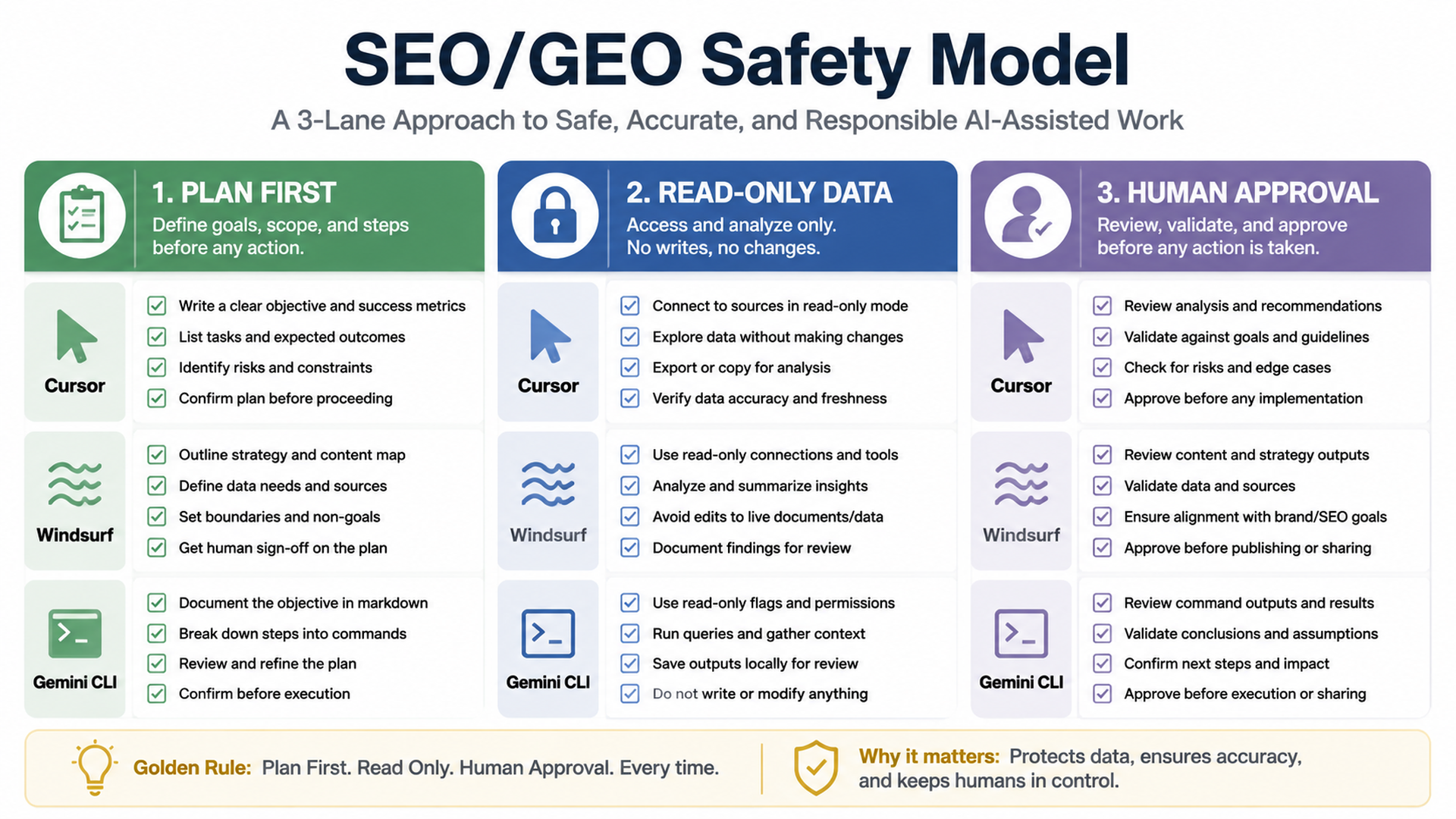
Caption: Plan first, keep data read-only first, and require human approval for risky changes.
Gate | Cursor example | Windsurf example | Gemini CLI example |
|---|---|---|---|
Plan first | Plan Mode or “diagnose before edit” prompt | Workflow step 1 returns diagnosis only | First run returns report only |
Read-only data | MCP tools limited to reading analytics | Workflow reads exports, does not publish | MCP |
Human approval | Review diff before applying | Workflow asks before edits | Follow-up task required before file changes |
Never allow first-run automation to change:
- robots.txt;
- canonical logic;
- redirects;
- sitemap generation;
- pricing;
- legal claims;
- customer proof;
- analytics scripts;
- production deployment settings.
A practical 7-day adoption plan
Day 1: Choose one lane
Pick the platform that matches your most urgent workflow:
- Cursor: one important page refresh;
- Windsurf: one repeatable workflow;
- Gemini CLI: one daily monitoring report.
Do not start with all three.
Day 2: Write rules
Create basic rules for:
- brand facts;
- prohibited claims;
- files that need approval;
- commands to run;
- report format;
- data privacy.
Day 3: Run a read-only diagnosis
Ask the agent to inspect and report without editing. If the report is vague, fix the prompt or workflow before continuing.
Day 4: Approve one small change
Edit one page, one workflow, or one report script. Keep the diff reviewable.
Day 5: Add validation
Run build, lint, schema checks, crawl checks, or report sanity checks. Document commands.
Day 6: Add measurement
Connect the change to GSC, Bing, GA4, or AI visibility prompts. Record what should improve.
Day 7: Decide whether to repeat
Only convert the process into a broader workflow after one small run works.
How this fits with Codex and Claude Code
If you already use the Auspia Codex and Claude Code SEO/GEO series, think of this new platform set as complementary:
- Codex is strong for structured coding-agent execution, repository instructions, MCP, subagents, and quality gates.
- Claude Code is strong for
CLAUDE.md, editor workflows, subagents, hooks, MCP, GitHub Actions, and terminal monitoring. - Cursor is strongest when the SEO/GEO work is happening inside the editor and you want a direct page/component diff.
- Windsurf is strongest when you want repeatable Cascade Workflows for a team.
- Gemini CLI is strongest when you want terminal-native monitoring and data processing.
The operating model is not “replace one agent with another.” It is “assign the right agent to the right layer.”
FAQ
Which tool should a complete beginner start with?
Start with Cursor if the website is in a code repository and the beginner can review editor diffs. Start with Windsurf if the team already uses Cascade. Start with Gemini CLI only if the user is comfortable with terminal commands and files.
Which is best for GEO specifically?
For GEO prompt research and repeatable audits, Windsurf and Gemini CLI are strong. For implementing the resulting page changes, Cursor is often easier because the editor diff is visible.
Can these tools connect to GSC, Bing Webmaster Tools, and GA4?
Yes, but the safe first version is exports or read-only MCP. Do not give write-capable access until the workflow is proven and approval boundaries are clear.
Should one agent publish content automatically?
No. Let the agent prepare the diff, report, or PR. Humans should approve publishing, deployment, indexing changes, and factual claims.
What is the best combined stack?
A practical stack is Cursor for page and component edits, Windsurf for team workflows, and Gemini CLI for daily monitoring. Add Codex or Claude Code where your engineering team already has strong agent governance.
AI coding agents for SEO/GEO learning path
This page is a full-series map for Cursor, Windsurf, and Gemini CLI SEO/GEO automation. Use it to jump between platform tracks:
1. Cursor vs Windsurf vs Gemini CLI for SEO/GEO Automation
2. How to Set Up Cursor Rules for SEO/GEO Work
3. How to Use Cursor Plan Mode to Refresh SEO Pages Safely
4. How to Connect Cursor to SEO Data with MCP
5. How to Use Cursor Cloud Agents for SEO/GEO PR Reviews
6. How to Build Windsurf Cascade Workflows for SEO/GEO
7. How to Use Windsurf Rules and Memories for SEO/GEO Projects
8. How to Turn Keyword Research into Content Briefs with Windsurf
9. How to Use Windsurf to Address SEO/GEO PR Comments
10. How to Set Up Gemini CLI for SEO/GEO Automation
11. How to Connect Gemini CLI to SEO Data with MCP
12. How to Run Daily SEO/GEO Monitoring with Gemini CLI
13. How to Use Gemini CLI Checkpointing for Safer SEO Fixes
14. The SEO/GEO Operating Model for Cursor, Windsurf, Gemini CLI, Codex, and Claude Code
Where to go next
Next in this path: How to Set Up Cursor Rules for SEO/GEO Work
Sources and notes
- Cursor documentation: Cursor Docs, including the public documentation hub for Agent, Rules, MCP, Skills, CLI, and related capabilities.
- Windsurf/Devin Desktop documentation: Cascade Workflows, which describes slash-command workflows stored as markdown files.
- Gemini CLI documentation: Gemini CLI Docs and MCP servers with Gemini CLI.
Author: Alice Monroe, AI SEO Tools Analyst Covering 150+ Tools at Auspia. Alice writes about AI SEO tools, software workflows, and practical platform selection for growth teams.


