ひと目でわかるおすすめ
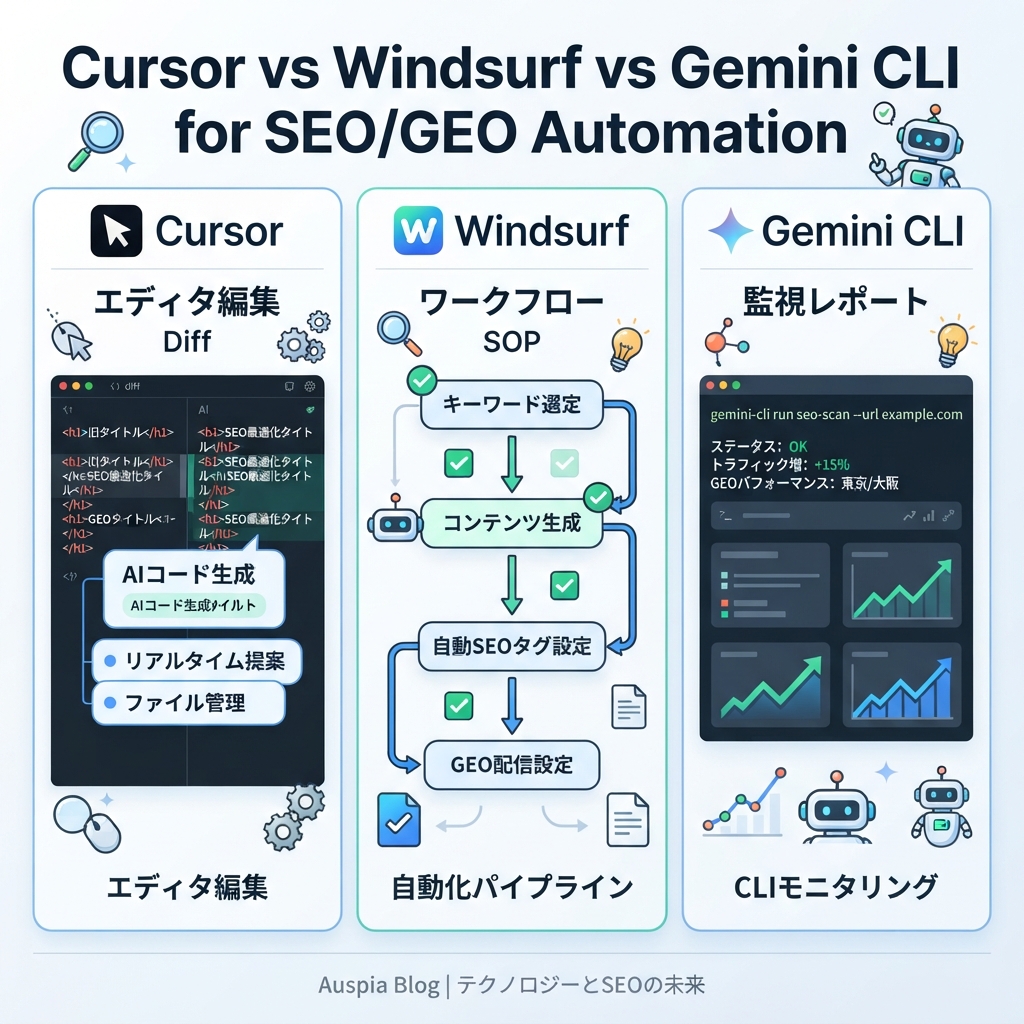
SEO/GEO作業にAI coding agentを使うなら、モデルの話題性だけで選ばないでください。選ぶ基準は「どの形のワークフローを回したいか」です。
- Cursorを選ぶべき場面: 作業がコードエディタ内で完結する場合。ページ更新、metadata component、schema helper、内部リンクcomponent、PR形式のdiff確認に向いています。
- Windsurfを選ぶべき場面: 作業を繰り返し使えるSOPにしたい場合。keyword-to-brief workflows、GEO prompt audit、content refresh steps、PR comment対応に向いています。
- Gemini CLIを選ぶべき場面: 作業がterminal-nativeな場合。exportの読み込み、script実行、snapshot比較、MCP tool呼び出し、daily monitoring report作成に向いています。
3つともSEO/GEO自動化に使えます。ただし同じ使い方をしてはいけません。初心者に安全な始め方は、最初はdataをread-onlyにし、編集前にplanを出させ、公開、deploy、indexing rule変更、claim変更の前に人間の承認を必須にすることです。
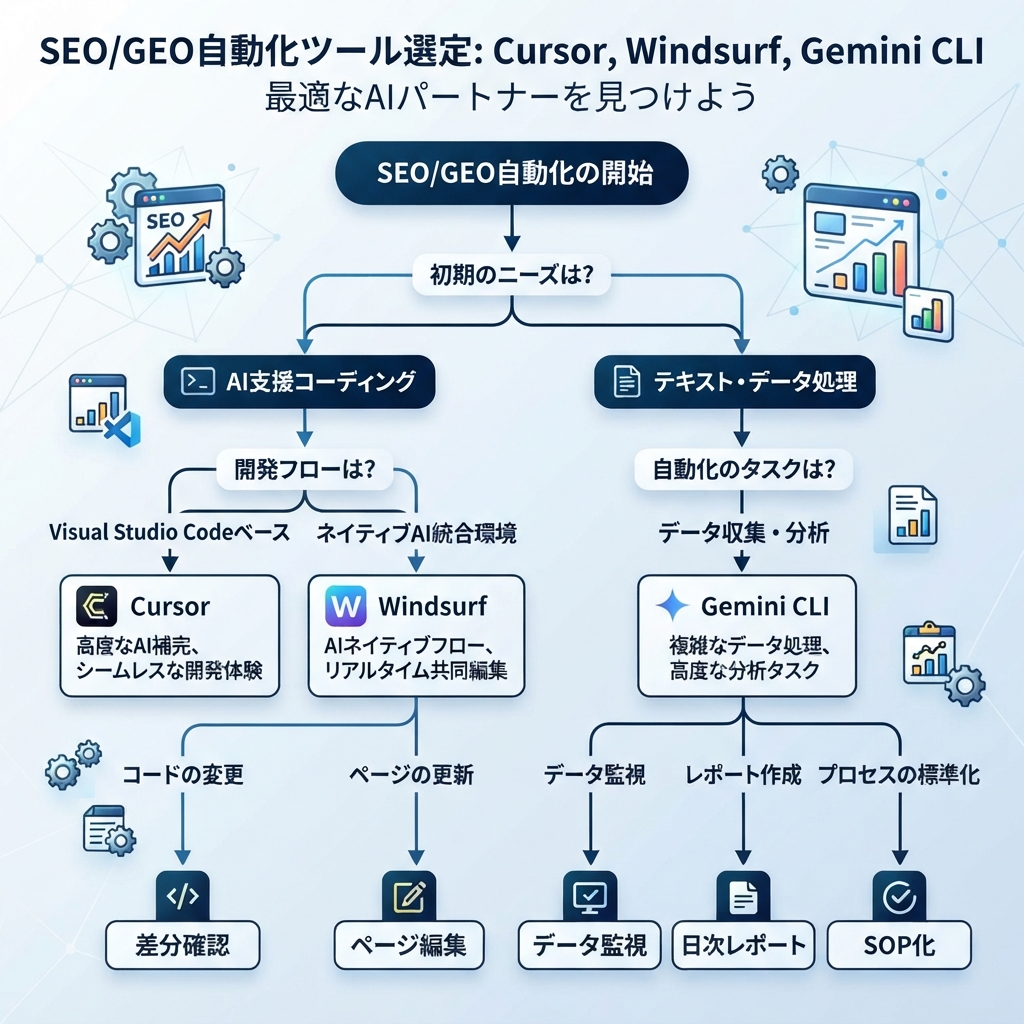
キャプション: agentを仕事に合わせます。editorでの編集、workflow SOP、terminal data monitoringを分けて考えます。
クイック判断表
SEO/GEOの作業 | 最初のおすすめ | 理由 |
|---|---|---|
ランディングページを1つ更新する | Cursor | ファイルを見て計画を出し、エディタ上の差分を確認し、ビルド確認を走らせやすいからです。 |
metadata/schema componentを直す | Cursor | component単位のcode editはeditor-first workflowのほうが扱いやすいです。 |
keyword researchを繰り返しbrief workflowにする | Windsurf | Cascade Workflowsはslash-command型の反復手順に向いています。 |
content teamに標準プロセスを教える | Windsurf | rules、memories、workflowsがSOPを再利用可能なoperationに変えます。 |
GSC、Bing、GA4、AI visibility exportを毎日比較する | Gemini CLI | terminal toolsはscript、snapshot、file comparison、reportに向いています。 |
MCP data pipelineを作る | Gemini CLI | MCP設定とCLI実行はAPI-driven data workflowと相性が良いです。 |
SEO/GEO PR changeをreviewする | CursorまたはWindsurf | Cursorはeditor diffに強く、WindsurfはPR commentをworkflow化すると強いです。 |
非エンジニアが安全に最初の実験をする | Cursor | file scopeとdiffを理解しやすいです。 |
recurring technical SEO monitorを回す | Gemini CLI | shell command、crawl、dated reportを自動化しやすいです。 |
よくある失敗は、1つのエージェントにすべての仕事を任せようとすることです。その結果、「サイト全体をSEOとGEO向けに改善して」のような曖昧な指示になります。より良い運用モデルは、プラットフォームごとに担当レーンを決めることです。
Cursorが最も得意なこと
Cursorは、SEO/GEO作業がcodeやpage fileに近いときに最も強い選択肢です。Cursorのdocsはagents、rules、MCP、skills、CLI、background agentsを中心に説明しています。実務では、修正したいpage、component、metadata helperを見ながらeditor内で作業できるということです。
Cursorに向く作業です。
- homepage、feature page、comparison page、use-case pageのrefresh
- title tag、meta description、Open Graph field、canonicalの改善
- schema helperやJSON-LD componentの編集
- answer block、FAQ section、comparison tableの追加
- pull request前のdiff review
- page decisionにdataが必要な場合のread-only SEO data MCP接続
初心者向けのCursor promptは次のようにします。
Inspect the currently open page and related metadata files.

Do not edit yet. First return:
1. Page purpose and likely search intent.
2. Metadata/schema/internal link issues.
3. GEO extractability issues: missing direct answer, weak proof, unclear entity facts, or absent comparison.
4. Files you would edit.
5. Validation command to run after the edit.
6. Changes that require my approval.

Wait for approval before editing.
Cursorはdaily data monitoringの最初の選択肢ではありません。data接続はできますが、中心作業がscriptやsnapshotならCLIのほうがきれいです。
Windsurfが最も得意なこと
Windsurfは、同じSEO/GEO processをteamで繰り返す必要があるときに強いです。重要なのは「Cascadeにcontent optimizationを頼む」ことではありません。「実証済みの手順をWorkflowにする」ことです。
Windsurf/Devin Desktop documentationでは、Workflowsはmarkdown-based procedureで、slash commandから呼び出せ、.windsurf/workflows/に保存されると説明されています。またworkflowはCascadeが自動起動するのではなく、手動で呼び出すものです。これはSEO/GEOでは重要です。workflowはprocessを標準化しますが、agentに無人実行の許可を与えません。
Windsurfに向く作業です。
/seo-page-refreshworkflow/geo-prompt-auditworkflow/keyword-cluster-to-briefworkflow/technical-seo-checkworkflow/pr-seo-comment-fixworkflow- process consistencyを保つteam rulesとmemories
starter workflowの例です。
# .windsurf/workflows/seo-page-refresh.md

Goal: Refresh one approved page for SEO and GEO without changing business claims.

Steps:
1. Read the selected URL/page file and related metadata/schema files.
2. Diagnose intent, metadata, internal links, answer extraction, proof, and technical risks.
3. Ask for approval before editing.
4. Apply only approved edits.
5. Run build or lint checks.
6. Return changed files, risks, and post-publish metrics to monitor.

Never:
- invent testimonials, logos, statistics, pricing, or legal claims;
- change robots, canonicals, redirects, or analytics without explicit approval;
- publish or deploy automatically.
Windsurfはこのseriesにおける「もう1つのeditor agent」ではありません。SEO/GEOでの最大価値はprocess reuseです。
Gemini CLIが最も得意なこと
Gemini CLIは、作業がterminal-nativeなときに最も向いています。official documentationでは、Gemini modelsをterminalに持ち込むinteractive command-line REPLであり、file system operations、shell commands、web fetchingのtoolsを含むと説明されています。MCP documentationでは、MCP serversが外部toolsやdata sourcesをCLIに公開できると説明されています。
Gemini CLIに向く作業です。
- GSC/Bing/GA4 exportsを読む
- 承認済みAPIやMCP toolsを呼び出す
- daily snapshotsを比較する
- markdown reportsを生成する
- sitemap、robots、status code、internal linksを監査する
- daily SEO/GEO action queueを作る
初心者向けのfolder structureです。
seo-geo/
  exports/
    gsc/
    bing/
    ga4/
    ai-visibility/
  prompts/
    core-prompts.md
  scripts/
    fetch-search-data.mjs
    fetch-ai-visibility.mjs
    compare-snapshots.mjs
  reports/
使いやすいGemini CLI promptです。
Read the latest files in seo-geo/exports/ and seo-geo/prompts/.
Compare today's snapshot with the previous snapshot.

Return a report with:
1. URLs gaining or losing search visibility.
2. Queries with high impressions and low CTR.
3. AI answer prompts where the brand is mentioned, missing, or cited.
4. Technical anomalies from sitemap or crawl checks.
5. Recommended actions ranked P0-P3.

Do not edit website files unless I explicitly approve a follow-up task.
ユーザーがeditor内でvisual diff reviewをしたいなら、Gemini CLIは最初の選択肢ではありません。data pipelineのような作業には最適です。
SEO/GEO task matrix
Task | Cursor | Windsurf | Gemini CLI |
|---|---|---|---|
1ページのSEO refresh | Excellent | workflowがあればGood | 可能だがvisual性は弱い |
metadata/schema component修正 | Excellent | Good | 可能 |
keyword clustering | dataがあればGood | workflowとしてExcellent | script/reportとしてExcellent |
content brief generation | Good | Excellent | Good |
GEO prompt map | Good | Excellent | Excellent |
AI visibility daily monitor | 可能 | workflowとしてGood | Excellent |
PR comment handling | Good | Excellent | 可能 |
technical crawl report | Good | Good | Excellent |
team SOP training | rulesがあればGood | Excellent | Moderate |
非エンジニアのreviewしやすさ | High | Medium-high | Medium-low |
このmatrixはtool misuseを防ぐために使います。Cursorがreportに弱いわけではありません。Gemini CLIがeditに弱いわけでもありません。Windsurfがcodeに弱いわけでもありません。ただし、それぞれ重心が違います。
Safety model: 自動化前の3つのgate
SEO/GEO automationは、indexing、claim、templateを広く変更するとWebサイトに損害を与えます。すべてのplatformで3つのgateを使います。

キャプション: まずplanを出し、最初はdataをread-onlyにし、危険な変更には人間の承認を必須にします。
Gate | Cursor example | Windsurf example | Gemini CLI example |
|---|---|---|---|
Plan first | Plan Modeまたは「edit前にdiagnose」prompt | Workflow step 1はdiagnosisだけ返す | 初回実行はreportだけ返す |
Read-only data | MCP toolsはanalytics読み取りに限定 | Workflowはexportsを読むがpublishしない | MCP |
Human approval | apply前にdiffをreview | Workflowがedit前に確認する | file change前にfollow-up taskを必須にする |
初回自動化で変更してはいけないものです。
robots.txt- canonical logic
- redirects
- sitemap generation
- pricing
- legal claims
- customer proof
- analytics scripts
- production deployment settings
実用的な7日間導入plan
Day 1: 1つのlaneを選ぶ
最も急ぎのworkflowに合わせてplatformを選びます。
- Cursor: 重要ページを1つrefreshする
- Windsurf: 繰り返しworkflowを1つ作る
- Gemini CLI: daily monitoring reportを1つ作る
3つ同時に始めないでください。
Day 2: rulesを書く
基本rulesを作ります。
- brand facts
- prohibited claims
- approvalが必要なfiles
- 実行するcommands
- report format
- data privacy
Day 3: read-only diagnosisを実行する
agentに編集なしでinspectとreportを依頼します。reportが曖昧なら、続ける前にpromptまたはworkflowを直します。
Day 4: 小さな変更を1つ承認する
1つのpage、1つのworkflow、または1つのreport scriptだけを編集します。diffをreviewできる大きさに保ちます。
Day 5: validationを追加する
ビルド、lint、schema確認、クロール確認、レポートの妥当性確認を実行します。コマンドを文書化します。
Day 6: measurementを追加する
変更をGSC、Bing、GA4、AI visibility promptsに接続します。何が改善するべきか記録します。
Day 7: 繰り返すか判断する
1回の小さなrunが機能してから、広いworkflowに変換します。
CodexとClaude Codeとの関係
AuspiaのCodex SEO/GEO seriesやClaude Code SEO/GEO seriesをすでに読んでいるなら、この新しいplatform setは補完関係として考えます。
- Codexはstructured coding-agent execution、repository instructions、MCP、subagents、quality gatesに強いです。
- Claude Codeは
CLAUDE.md、editor workflows、subagents、hooks、MCP、GitHub Actions、terminal monitoringに強いです。 - Cursorは、SEO/GEO作業がeditor内で進み、page/component diffを直接見たいときに最も強いです。
- Windsurfは、team向けにrepeatable Cascade Workflowsを作りたいときに最も強いです。
- Gemini CLIは、terminal-native monitoringとdata processingを行いたいときに最も強いです。
運用モデルは「あるagentを別のagentで置き換える」ことではありません。「正しいagentを正しいlayerに割り当てる」ことです。
FAQ
完全な初心者はどのtoolから始めるべきですか?
Webサイトがcode repositoryにあり、editor diffをreviewできるならCursorから始めます。teamがすでにCascadeを使っているならWindsurfから始めます。terminal commandとfile操作に慣れている場合だけ、Gemini CLIを最初に選びます。
GEOにはどれが一番向いていますか?
GEO prompt researchとrepeatable auditならWindsurfとGemini CLIが強いです。その結果をpage changeとして実装する場合は、editor diffが見えるCursorが使いやすいことが多いです。
これらのtoolsはGSC、Bing Webmaster Tools、GA4に接続できますか?
はい。ただし安全な最初のversionはexportまたはread-only MCPです。workflowが実証され、approval boundaryが明確になるまで、write-capable accessは与えないでください。
1つのagentにcontentを自動公開させるべきですか?
いいえ。agentにはdiff、report、PRを準備させます。公開、deployment、indexing change、factual claimは人間が承認します。
最も実用的なcombined stackは何ですか?
実用的なstackは、page/component editにCursor、team workflowにWindsurf、daily monitoringにGemini CLIです。engineering teamに強いagent governanceがあるなら、CodexやClaude Codeも追加します。
Sources and notes
- Cursor documentation: Cursor Docs。Agent、Rules、MCP、Skills、CLIなどのpublic documentation hubを含みます。
- Windsurf/Devin Desktop documentation: Cascade Workflows。markdown fileとして保存されるslash-command workflowを説明しています。
- Gemini CLI documentation: Gemini CLI Docs and MCP servers with Gemini CLI。
Author: Alice Monroe, Auspiaで150以上のtoolsを調査するAI SEO Tools Analyst。AliceはAI SEO tools、software workflows、growth team向けの実践的なplatform選定について執筆しています。