快速建議
如果你想用 AI coding agent 做 SEO/GEO 工作,不要只看 model hype。請先看 workflow shape。
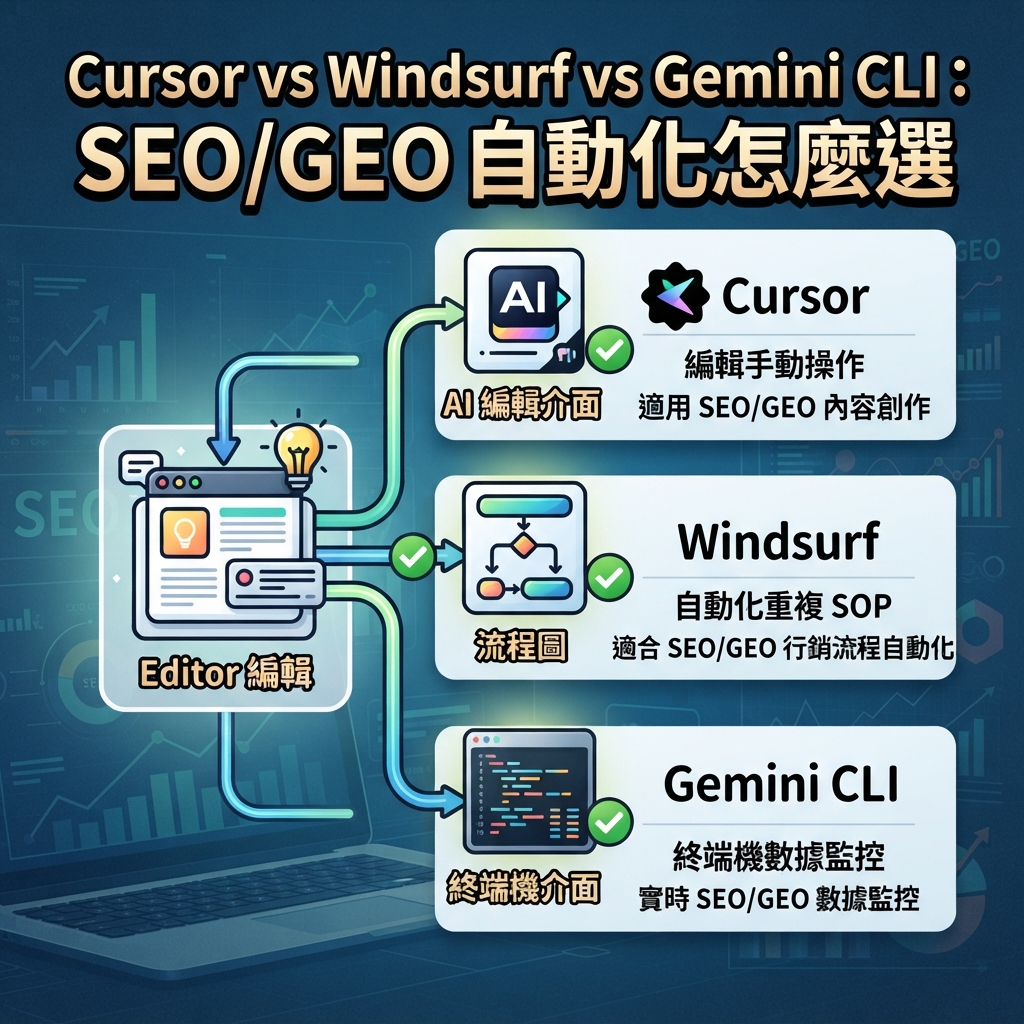
- 如果工作發生在 code editor 裡,選 Cursor:page refreshes、metadata components、schema helpers、internal link components、PR-style diffs。
- 如果工作應該變成 repeatable SOP,選 Windsurf:keyword-to-brief workflows、GEO prompt audits、content refresh steps、PR comment handling。
- 如果工作是 terminal-native,選 Gemini CLI:讀 exports、跑 scripts、比較 snapshots、呼叫 MCP tools、產生 daily monitoring reports。
三者都可以幫 SEO/GEO automation,但不應該用同一種方式使用。初學者安全 setup 應先保持 data read-only,要求 agent 編輯前先 plan,並在 publishing、deploying、changing indexing rules 或 modifying claims 前要求 human approval。
圖說:把 agent 對應到工作:editor edits、workflow SOPs,或 terminal data monitoring。
快速 decision table
你的 SEO/GEO 工作 | 最適合先選 | 原因 |
|---|---|---|
Refresh 一個 landing page | Cursor | 可以 inspect files、要求 plan、review editor diffs,並跑 build checks。 |
Fix metadata/schema components | Cursor | Component-level code edits 在 editor-first workflow 裡更容易。 |
把 keyword research 變成重複 brief workflow | Windsurf | Cascade Workflows 適合 repeatable slash-command procedures。 |
訓練 content team 使用一套標準流程 | Windsurf | Rules、memories 和 workflows 能把 SOP 變成 reusable operations。 |
每天比較 GSC、Bing、GA4 和 AI visibility exports | Gemini CLI | Terminal tools 適合 scripts、snapshots、file comparisons 和 reports。 |
建立 MCP data pipeline | Gemini CLI | MCP configuration 和 CLI execution 很適合 API-driven data workflows。 |
Review SEO/GEO PR changes | Cursor 或 Windsurf | Cursor 適合 editor diffs;Windsurf 適合把 PR comments 對應到 workflows。 |
非工程師做安全 first experiment | Cursor | Editor 讓 file scope 和 diffs 更容易理解。 |
跑 recurring technical SEO monitor | Gemini CLI | Shell commands、crawls、dated reports 在 terminal 裡更容易 automation。 |
常見錯誤是想讓一個 agent 做所有工作。這會導致 vague prompts,例如「optimize my website for SEO and GEO」。更好的 operating model,是給每個 platform 指派 specific lane。
Cursor 最適合什麼
當 SEO/GEO 工作接近 code 和 page files 時,Cursor 最合適。它的 docs 圍繞 agents、rules、MCP、skills、CLI 和 background agents。實務上,這代表 Cursor 可以待在 editor 裡,讓你 inspect 正在處理的 exact page、component 或 metadata helper。
用 Cursor 做:
- refresh homepage、feature page、comparison page 或 use-case page;
- 改善 title tags、meta descriptions、Open Graph fields 和 canonicals;
- 編輯 schema helpers 或 JSON-LD components;
- 在現有 pages 加 answer blocks、FAQ sections 和 comparison tables;
- pull request 前 review diff;
- 當 page decisions 需要 data 時,透過 MCP 接 read-only SEO data。
Cursor 初學者 prompt 應該像這樣:
Inspect the currently open page and related metadata files.

Do not edit yet. First return:
1. Page purpose and likely search intent.
2. Metadata/schema/internal link issues.
3. GEO extractability issues: missing direct answer, weak proof, unclear entity facts, or absent comparison.
4. Files you would edit.
5. Validation command to run after the edit.
6. Changes that require my approval.

Wait for approval before editing.
Cursor 不是 daily data monitoring 的最佳 first tool。它可以 connect data,但如果核心工作是 scripts 和 snapshots,CLI 會更乾淨。
Windsurf 最適合什麼
當同一套 SEO/GEO process 需要被 team 重複執行時,Windsurf 最強。重要 platform idea 不是「叫 Cascade optimize content」,而是「把已驗證 procedure 變成 Workflow」。
Windsurf/Devin Desktop documentation 把 Workflows 描述成 markdown-based procedures,可以透過 slash commands 呼叫,並存放在 .windsurf/workflows/。Docs 也說明 workflows 是 manually invoked,不是由 Cascade 自動觸發。這對 SEO/GEO 很重要:workflow 可以標準化 process,但不會讓 agent 無人監督地自行執行。
用 Windsurf 做:
/seo-page-refreshworkflow;/geo-prompt-auditworkflow;/keyword-cluster-to-briefworkflow;/technical-seo-checkworkflow;/pr-seo-comment-fixworkflow;- 保持 process consistency 的 team rules and memories。
Starter Windsurf workflow 可以是:
# .windsurf/workflows/seo-page-refresh.md

Goal: Refresh one approved page for SEO and GEO without changing business claims.

Steps:
1. Read the selected URL/page file and related metadata/schema files.
2. Diagnose intent, metadata, internal links, answer extraction, proof, and technical risks.
3. Ask for approval before editing.
4. Apply only approved edits.
5. Run build or lint checks.
6. Return changed files, risks, and post-publish metrics to monitor.

Never:
- invent testimonials, logos, statistics, pricing, or legal claims;
- change robots, canonicals, redirects, or analytics without explicit approval;
- publish or deploy automatically.
Windsurf 在這個系列裡不只是另一個 editor agent。它在 SEO/GEO 裡最大的價值是 process reuse。
Gemini CLI 最適合什麼
當工作是 terminal-native,Gemini CLI 最適合。官方 docs 把它描述成 interactive command-line REPL,把 Gemini models 帶到 terminal,並包含 file system operations、shell commands 和 web fetching 等 tools。MCP documentation 說明 MCP servers 可以把 external tools 和 data sources 暴露給 CLI。
用 Gemini CLI 做:
- 讀取 GSC/Bing/GA4 exports;
- 呼叫 approved APIs 或 MCP tools;
- 比較 daily snapshots;
- 產生 markdown reports;
- audit sitemap、robots、status codes 和 internal links;
- 建立 daily SEO/GEO action queue。
初學者 folder structure:
seo-geo/
  exports/
    gsc/
    bing/
    ga4/
    ai-visibility/
  prompts/
    core-prompts.md
  scripts/
    fetch-search-data.mjs
    fetch-ai-visibility.mjs
    compare-snapshots.mjs
  reports/
有用的 Gemini CLI prompt:
Read the latest files in seo-geo/exports/ and seo-geo/prompts/.
Compare today's snapshot with the previous snapshot.

Return a report with:
1. URLs gaining or losing search visibility.
2. Queries with high impressions and low CTR.
3. AI answer prompts where the brand is mentioned, missing, or cited.
4. Technical anomalies from sitemap or crawl checks.
5. Recommended actions ranked P0-P3.

Do not edit website files unless I explicitly approve a follow-up task.
如果使用者需要在 editor 裡 review visual diff,Gemini CLI 不是最佳 first choice。當工作像 data pipeline 時,它才是最佳選擇。
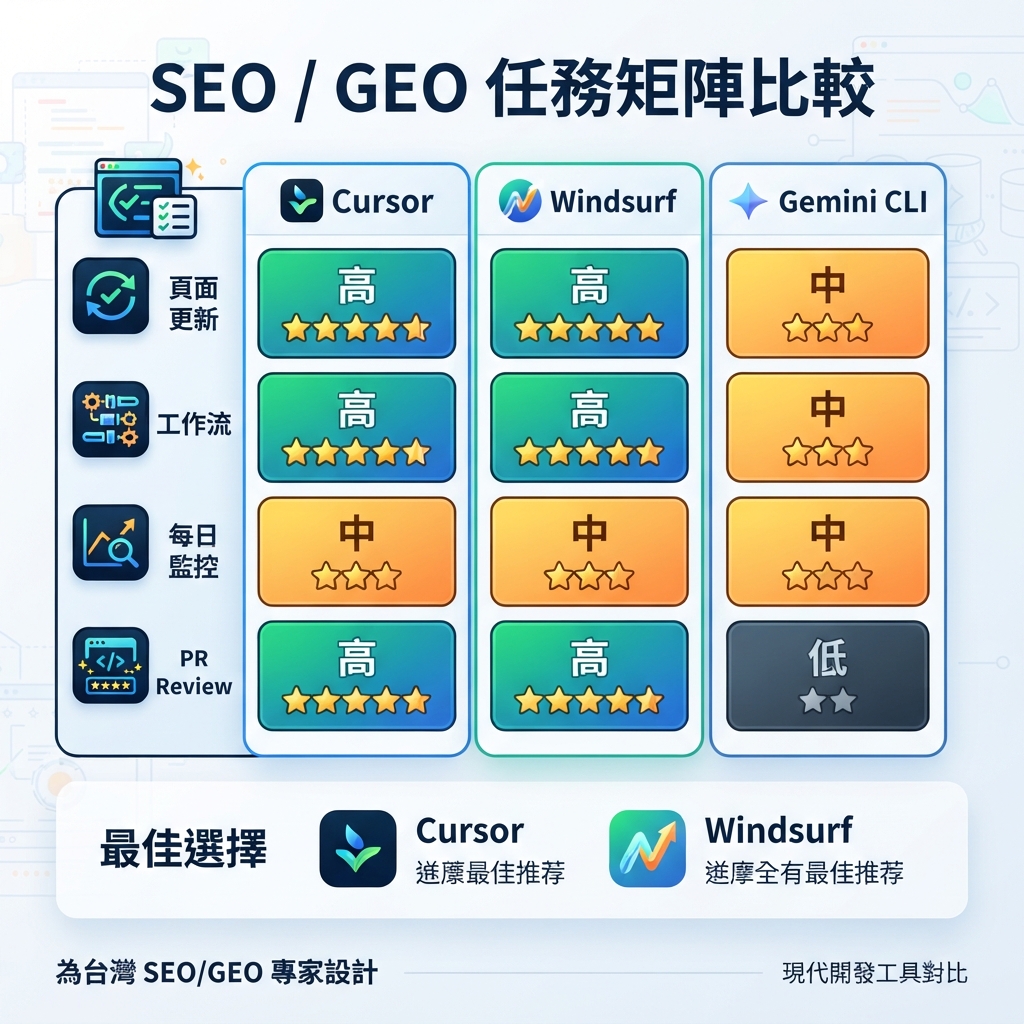
SEO/GEO task matrix
Task | Cursor | Windsurf | Gemini CLI |
|---|---|---|---|
One-page SEO refresh | 極佳 | 有 workflow 時不錯 | 可以,但較不 visual |
Metadata/schema component fix | 極佳 | 不錯 | 可以 |
Keyword clustering | 有 data 時不錯 | 作為 workflow 極佳 | 作為 script/report 極佳 |
Content brief generation | 不錯 | 極佳 | 不錯 |
GEO prompt map | 不錯 | 極佳 | 極佳 |
AI visibility daily monitor | 可以 | 作為 workflow 不錯 | 極佳 |
PR comment handling | 不錯 | 極佳 | 可以 |
Technical crawl report | 不錯 | 不錯 | 極佳 |
Team SOP training | 有 rules 時不錯 | 極佳 | 中等 |
Non-developer review comfort | 高 | 中高 | 中低 |
用這張 matrix 避免 tool misuse。Cursor 不是不會做 reports;Gemini CLI 也不是不會 edits;Windsurf 也不是不會 code。但每個 platform 都有自己的 center of gravity。
Safety model:automation 前的三道 gates
SEO/GEO automation 如果大範圍改 indexing、claims 或 templates,可能傷害網站。三個 platforms 都應使用這三道 gates。

圖說:先 plan,data 初期保持 read-only,風險變更要 human approval。
Gate | Cursor example | Windsurf example | Gemini CLI example |
|---|---|---|---|
Plan first | Plan Mode 或 “diagnose before edit” prompt | Workflow step 1 只回傳 diagnosis | First run 只回傳 report |
Read-only data | MCP tools 只允許讀 analytics | Workflow 讀 exports,不 publish | MCP includeTools 和 excludeTools 限制 actions |
Human approval | Applying 前 review diff | Workflow edits 前先詢問 | File changes 前需要 follow-up task |
第一次 automation 永遠不要允許 agent 修改:
- robots.txt;
- canonical logic;
- redirects;
- sitemap generation;
- pricing;
- legal claims;
- customer proof;
- analytics scripts;
- production deployment settings。
實用 7 天 adoption plan
Day 1:選一條 lane
選擇最符合 urgent workflow 的 platform:
- Cursor:一個重要 page refresh;
- Windsurf:一個 repeatable workflow;
- Gemini CLI:一份 daily monitoring report。
不要一開始三個都用。
Day 2:寫 rules
建立 basic rules:
- brand facts;
- prohibited claims;
- 需要 approval 的 files;
- 要跑的 commands;
- report format;
- data privacy。
Day 3:跑 read-only diagnosis
要求 agent inspect and report,不要 editing。如果 report vague,先修 prompt 或 workflow。
Day 4:核准一個 small change
Edit 一個 page、一個 workflow,或一個 report script。保持 diff reviewable。
Day 5:加 validation
跑 build、lint、schema checks、crawl checks 或 report sanity checks。記錄 commands。
Day 6:加 measurement
把 change 連到 GSC、Bing、GA4 或 AI visibility prompts。記錄應該改善什麼。
Day 7:決定是否 repeat
只有當一個 small run 成功後,才把 process 擴展成 broader workflow。
它如何搭配 Codex 和 Claude Code
如果你已經使用 Auspia Codex 和 Claude Code SEO/GEO series,可以把這個新的 platform set 視為 complementary:
- Codex 強在 structured coding-agent execution、repository instructions、MCP、subagents 和 quality gates。
- Claude Code 強在
CLAUDE.md、editor workflows、subagents、hooks、MCP、GitHub Actions 和 terminal monitoring。 - Cursor 最適合 SEO/GEO work 發生在 editor 裡,而且你想要 direct page/component diff。
- Windsurf 最適合 team repeatable Cascade Workflows。
- Gemini CLI 最適合 terminal-native monitoring 和 data processing。
Operating model 不是「用一個 agent 取代另一個」。而是「把正確 agent 分配到正確 layer」。
FAQ
完全初學者應該從哪個 tool 開始?
如果 website 在 code repository 裡,而且初學者能 review editor diffs,先從 Cursor 開始。如果 team 已經使用 Cascade,先從 Windsurf 開始。只有當使用者熟悉 terminal commands 和 files 時,才從 Gemini CLI 開始。
哪個最適合 GEO?
GEO prompt research 和 repeatable audits,Windsurf 與 Gemini CLI 都很強。實作 resulting page changes 時,Cursor 通常更容易,因為 editor diff 可見。
這些 tools 可以接 GSC、Bing Webmaster Tools 和 GA4 嗎?
可以,但安全 first version 是 exports 或 read-only MCP。不要給 write-capable access,直到 workflow 已被證明可行,approval boundaries 也很清楚。
應該讓一個 agent 自動 publish content 嗎?
不要。讓 agent 準備 diff、report 或 PR。Publishing、deployment、indexing changes 和 factual claims 應由人核准。
最好的 combined stack 是什麼?
實用 stack 是:Cursor 負責 page and component edits,Windsurf 負責 team workflows,Gemini CLI 負責 daily monitoring。當 engineering team 已經有 strong agent governance 時,再加入 Codex 或 Claude Code。
AI coding agents for SEO/GEO 學習路徑
這篇是 Cursor、Windsurf、Gemini CLI SEO/GEO automation 的 full-series map。你可以用它在不同 platform tracks 之間跳轉:
- Cursor vs Windsurf vs Gemini CLI:SEO/GEO 自動化怎麼選
- 如何設定 Cursor Rules 做 SEO/GEO 工作
- 如何用 Cursor Plan Mode 安全更新 SEO 頁面
- 如何用 MCP 將 Cursor 接上 SEO 資料
- 如何用 Cursor Cloud Agents 做 SEO/GEO PR Reviews
- 如何建立 Windsurf Cascade Workflows 做 SEO/GEO
- 如何把 Windsurf Rules and Memories 用在 SEO/GEO Projects
- 如何用 Windsurf 把 Keyword Research 變成 Content Briefs
- 如何用 Windsurf 處理 SEO/GEO PR Comments
- 如何設定 Gemini CLI SEO/GEO Automation 工作區
- 如何用 MCP 將 Gemini CLI 接上 SEO 資料
- 如何用 Gemini CLI 做每日 SEO/GEO Monitoring
- 如何用 Gemini CLI Checkpointing 安全修 SEO
- Cursor、Windsurf、Gemini CLI、Codex、Claude Code 的 SEO/GEO 營運模型
下一篇
下一篇:如何設定 Cursor Rules 做 SEO/GEO 工作
Sources and notes
- Cursor documentation: Cursor Docs,包含 Agent、Rules、MCP、Skills、CLI 與 related capabilities 的公開文件。
- Windsurf/Devin Desktop documentation: Cascade Workflows,說明 slash-command workflows 會以 markdown files 儲存。
- Gemini CLI documentation: Gemini CLI Docs and MCP servers with Gemini CLI。
Author: Alice Monroe, Auspia AI SEO Tools Analyst Covering 150+ Tools。Alice 撰寫 AI SEO tools、software workflows 與 growth teams 的 practical platform selection。