


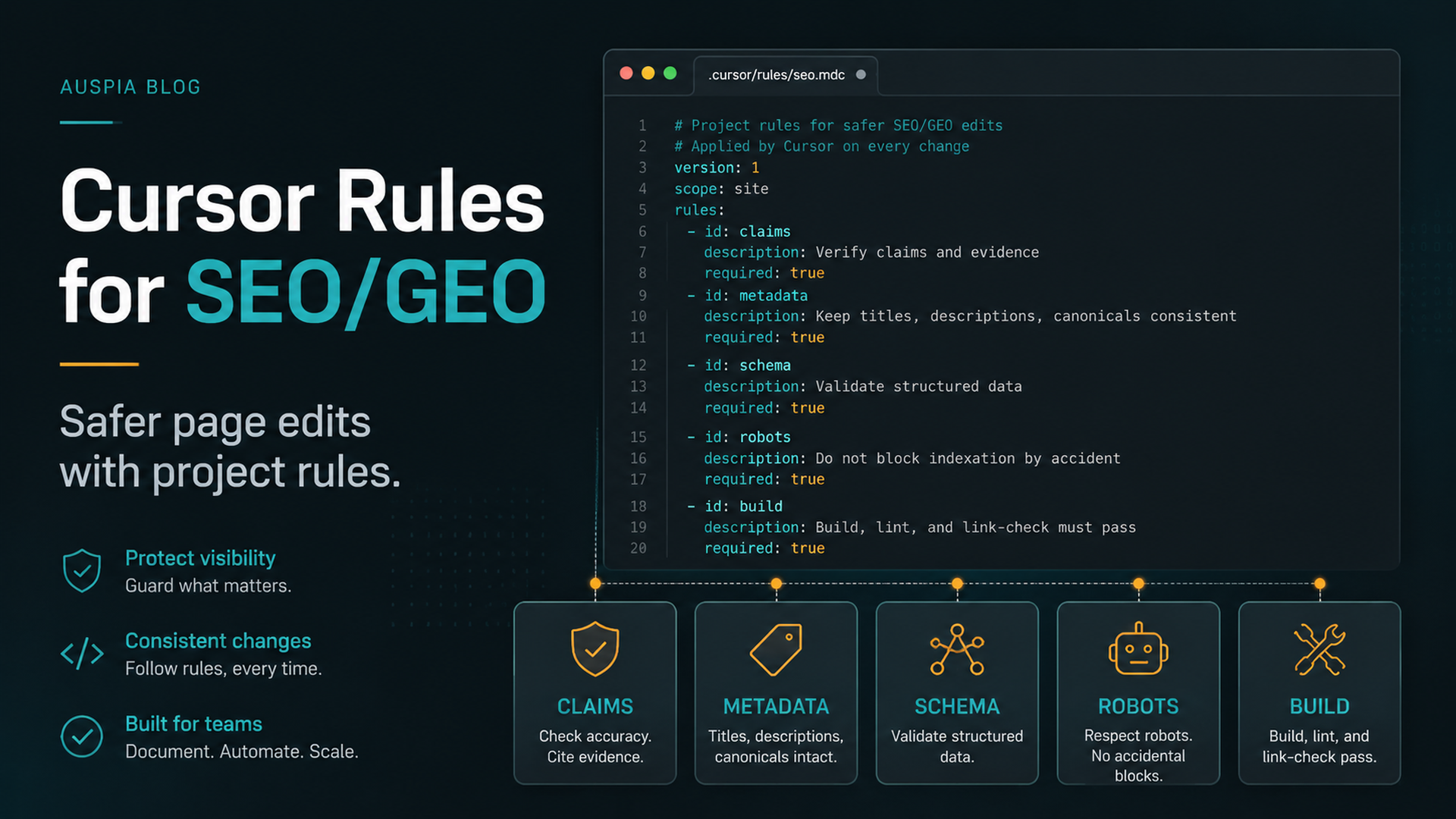
The rule: Cursor should know your SEO/GEO boundaries before it edits a page
Cursor is useful for SEO/GEO because it works where many website changes actually happen: inside the editor, next to page files, metadata helpers, schema components, content collections, and pull-request diffs. But that power is also the risk. If Cursor does not know your rules, it may treat pricing copy, robots rules, customer proof, schema, and page content as equally safe to edit.
The beginner-safe setup is to create a Cursor rule stack before you ask Agent to optimize anything. The stack should tell Cursor what the site is, where important files live, what it can edit, what it must ask about, and how to validate work.
Use Cursor rules for stable project instructions. Use the task prompt for the specific page or workflow. Do not put secrets, API keys, or full analytics exports in rules.
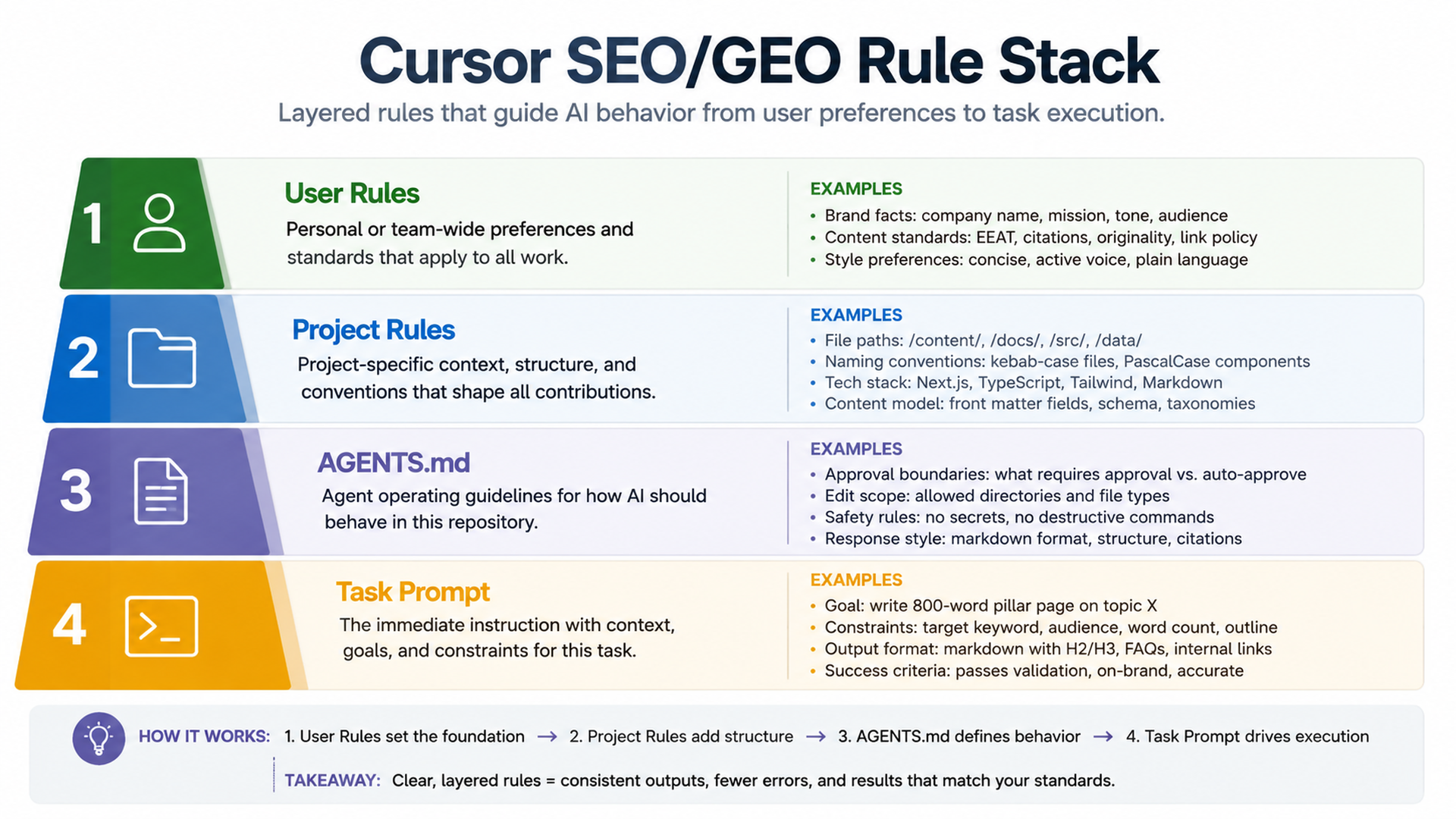
Caption: Rules should define the operating boundaries; the task prompt should define the current job.
What your Cursor rule stack should contain
A practical SEO/GEO rule setup has four layers:
Layer | What belongs there | Example |
|---|---|---|
User-level preference | Personal working style | “Always show a plan before edits.” |
Project rules | Website-specific SEO/GEO standards | Brand facts, file paths, claims policy, validation commands |
Repo docs or | Shared team conventions | Build commands, review process, release policy |
Task prompt | The current page or workflow | “Refresh |
The biggest mistake is putting everything into one giant instruction file. Cursor should not need to read a 40-page SEO manual before changing a title tag. Keep project rules short, then reference separate SOP files when needed.
Create a dedicated SEO/GEO project rule
In your website repository, create a rule file for SEO/GEO work. Depending on your Cursor version and team setup, your rules UI or file path may differ, so use this as the content model rather than a rigid file path. If your project uses a .cursor/rules/ folder, this can be a project rule such as:
.cursor/rules/seo-geo.mdc
Start with this rule:
# SEO/GEO working rules

## Website context
- Brand: [brand name]
- Domain: https://example.com
- Category: [product/service category]
- Primary audience: [ICP]
- Main conversion goal: [demo / signup / tool usage / contact]

## File map
- Pages live in: [path]
- Metadata lives in: [path]
- Schema helpers live in: [path]
- Blog/content lives in: [path]
- Sitemap/robots logic lives in: [path]
- Analytics code lives in: [path]

## SEO/GEO standards
- Every important page needs a clear title, meta description, canonical, H1, and internal links.
- Prefer concise answer blocks, comparison tables, proof sections, and useful FAQs when they match search intent.
- Make brand facts, product category, audience, use cases, and evidence easy for AI answer systems to extract.
- Do not keyword-stuff headings or create generic sections that could fit any company.

## Approval boundaries
Ask before changing:
- pricing, legal claims, testimonials, customer logos, statistics, guarantees, or competitor claims;
- robots.txt, noindex logic, canonicals, redirects, sitemap generation, analytics, or tracking scripts;
- shared components that affect many pages;
- production deployment configuration.

Never invent:
- customers, reviews, ratings, awards, integrations, revenue numbers, screenshots, or case-study results.
Mark missing evidence as TODO.

## Validation
Before final response after edits:
- summarize changed files;
- run the detected build/lint/typecheck command when available;
- explain any skipped validation;
- list remaining SEO/GEO risks.
This rule does not make Cursor “smarter” in a magical way. It gives the agent fewer ways to make unsafe assumptions.
Ask Cursor to inspect the repo before writing the rule
If you are not sure where pages or metadata live, ask Cursor to inspect first:
Inspect this repository for SEO/GEO work.

Do not edit files yet. Return:
1. Framework and routing system.
2. Where pages, content, metadata, schema, sitemap, robots, analytics, and components live.
3. Build/lint/typecheck commands from package files.
4. Files that should require approval before modification.
5. A proposed Cursor SEO/GEO project rule.
6. Unknowns I need to confirm.

Do not invent paths. If you are unsure, say so.
Then review the proposed rule. Check whether Cursor correctly found the framework, page folders, and commands. If it guesses wrong, fix the rule manually before using Agent mode for SEO work.
The approval gate beginners should use
Some SEO edits are low risk. Others can damage traffic or create legal problems. Put the distinction directly in your rules.
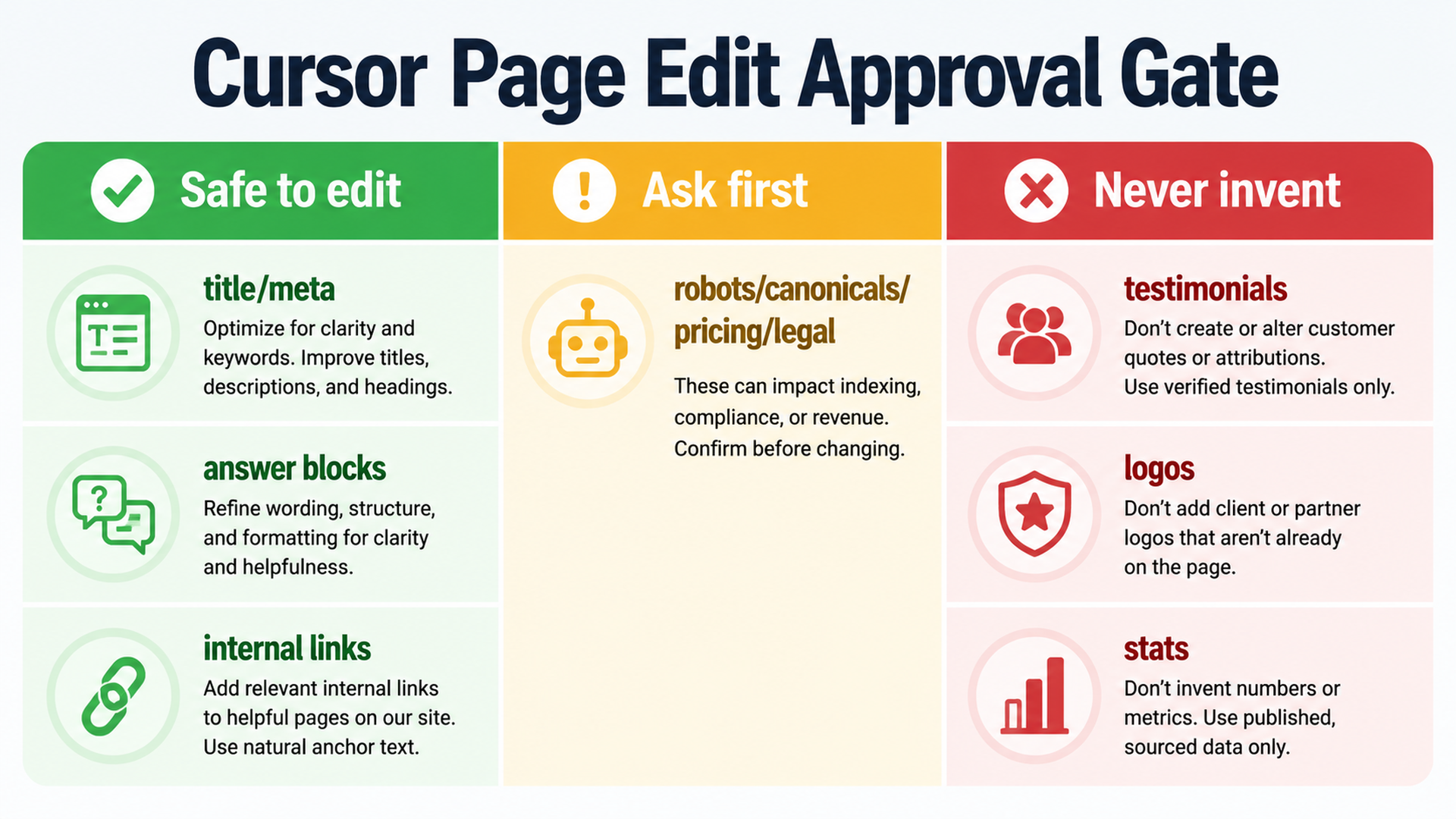
Caption: Let Cursor edit low-risk items, ask before strategic/indexing changes, and never invent proof.
Safe to propose and edit after approval | Ask first | Never invent |
|---|---|---|
title/meta drafts | robots.txt changes | testimonials |
answer blocks | canonical strategy | customer logos |
FAQ improvements | redirects | statistics |
internal link suggestions | pricing or legal claims | awards |
alt text | analytics/tracking | third-party endorsements |
page-level schema draft | shared templates | case-study outcomes |
For the first week, require approval before any edit. After you trust the workflow, allow low-risk page-level edits, but keep indexing and claims behind explicit approval.
A better Cursor prompt for SEO page work
Do not prompt Cursor with this:
Optimize this page for SEO and GEO.
Use this instead:
Use the SEO/GEO project rules.

Task: refresh only this page: [URL or file path].

Before editing, return a diagnosis table with:
- current search intent
- likely target keyword or query theme
- GEO question this page should answer
- title/meta issue
- H1/H2 issue
- missing answer block or comparison section
- internal link opportunities
- schema risks
- claims that need proof
- files you plan to edit

Wait for my approval before making changes.
After you approve the plan, use a second prompt:
Apply only the approved page-level edits.

Constraints:
- Do not change pricing, legal claims, testimonials, or analytics.
- Do not edit shared components unless you ask first.
- Mark missing proof as TODO.
- Keep the page useful for humans, not just search engines.
- Run the build or explain why it cannot run.

Final response should include changed files, validation results, risks, and what to measure after publishing.
This split prompt is slower than one-click automation, but it teaches beginners how to review the agent.
Example: rules for a SaaS use-case page
Suppose the page is /use-cases/ai-search-visibility. A good Cursor diagnosis might produce:
Area | Diagnosis | Suggested action |
|---|---|---|
Search intent | User wants to understand how to track AI search visibility | Add direct answer near top |
GEO extractability | Brand category and workflow are not stated clearly | Add 80-word “what this product does” block |
Proof | Page says “trusted by teams” without evidence | Replace with TODO proof slot |
Internal links | No link to related measurement guide | Add one relevant internal link |
Schema | FAQ schema exists but questions are generic | Rewrite FAQ or remove schema if unsupported |
CTA | CTA says “Get started” but offer is an audit | Change CTA copy to match offer |
Then Cursor can edit the page with a narrow diff. This is better than asking for a full rewrite because it preserves scope and reviewability.
Add a rule for internal links
SEO/GEO teams often overdo internal links when an AI agent helps. Add a rule like this:
## Internal link policy
- Add internal links only when they help the reader take the next logical step.
- Prefer 1-3 relevant links per article or page section, not a dense link block.
- Use descriptive anchor text.
- Do not force links to tools or service pages unless the page intent supports it.
- If suggesting a new link target, explain why it helps SEO/GEO and the user journey.
This prevents Cursor from turning every article into a link farm.
Add a rule for schema
Schema errors can spread if a shared helper is changed. Use this rule:
## Schema policy
- Use schema only when the page content supports it.
- Do not add fake ratings, reviews, prices, organizations, authors, or FAQs.
- Ask before changing shared schema helpers.
- After schema edits, explain the schema type, required fields, and validation risk.
For beginners, schema is not a place to be clever. Make the page accurate first.
Add a rule for GEO answer blocks
GEO-focused pages should be easy for answer engines to extract, but they still need to read naturally.
## GEO answer blocks
When useful, add one concise answer block near the top of important pages.
The block should answer:
- what the product/page/topic is;
- who it is for;
- what problem it solves;
- what evidence supports it;
- what the reader should do next.
Keep it factual and avoid exaggerated claims.
This gives Cursor a repeatable content pattern without forcing every page into the same template.
How to test whether your Cursor rules work
Run a dry task:
Using the current project rules, review `/pricing` for SEO/GEO issues.
Do not edit. Tell me which changes would require approval and why.
A good answer should refuse to directly rewrite pricing claims and should flag legal, conversion, and evidence risks. If Cursor treats pricing like normal marketing copy, strengthen the rules.
Run another dry task:
Using the current project rules, review one blog article and suggest safe improvements only.
Do not edit. Separate safe edits from approval-needed edits.
A good answer should separate metadata, headings, internal links, evidence, schema, and publishing risks.
Common mistakes
- Writing vague rules. “Make SEO better” is not a rule.
- Skipping file paths. Cursor needs to know where pages, metadata, schema, and commands live.
- Putting secrets in rules. Rules are not a credential store.
- Letting Cursor edit shared templates too early. One template change can affect hundreds of URLs.
- Not requiring validation. Every code-affecting SEO task should run build/lint/typecheck when available.
- Letting rules become stale. Review rules after framework changes, site migrations, or positioning updates.
Where this fits in the larger AI-agent stack
This Cursor setup is the page-editing lane. Use it after you have chosen Cursor from the broader Cursor vs Windsurf vs Gemini CLI SEO/GEO comparison. Use Windsurf when you want repeatable team workflows. Use Gemini CLI when you want terminal data monitoring. Use Cursor when a real page or component needs a careful, visible diff.
FAQ
Should Cursor rules include my keyword list?
Only include stable category language and strategic query themes. Keep full keyword lists in dated CSV or markdown files, because keyword data changes.
Can Cursor rules replace a human SEO review?
No. Rules reduce avoidable mistakes. Humans still approve claims, indexing changes, pricing language, and production deployment.
Should I let Cursor edit all SEO pages at once?
Not at the beginning. Start with one page, one diagnosis, one approved diff, and one validation report.
What is the most important rule for GEO?
Do not invent proof. GEO depends on clear, supported entity facts. If evidence is missing, Cursor should mark it as TODO instead of making it up.
AI coding agents for SEO/GEO learning path
This page belongs to the Cursor SEO/GEO track. Follow these Cursor-focused tutorials first, then continue to Windsurf or the operating model when you need a broader stack:
1. Cursor vs Windsurf vs Gemini CLI for SEO/GEO Automation
2. How to Set Up Cursor Rules for SEO/GEO Work
3. How to Use Cursor Plan Mode to Refresh SEO Pages Safely
4. How to Connect Cursor to SEO Data with MCP
5. How to Use Cursor Cloud Agents for SEO/GEO PR Reviews
6. How to Build Windsurf Cascade Workflows for SEO/GEO
7. The SEO/GEO Operating Model for Cursor, Windsurf, Gemini CLI, Codex, and Claude Code
Where to go next
Previous in this path: Cursor vs Windsurf vs Gemini CLI for SEO/GEO Automation
Next in this path: How to Use Cursor Plan Mode to Refresh SEO Pages Safely
Sources and notes
- Cursor documentation hub: Cursor Docs, including public documentation for Agent, Rules, MCP, Skills, CLI, and related capabilities.
- Related Auspia guide: Cursor vs Windsurf vs Gemini CLI for SEO/GEO Automation.
Author: Alice Monroe, AI SEO Tools Analyst Covering 150+ Tools at Auspia. Alice writes about AI SEO tools, software workflows, and practical platform selection for growth teams.


