


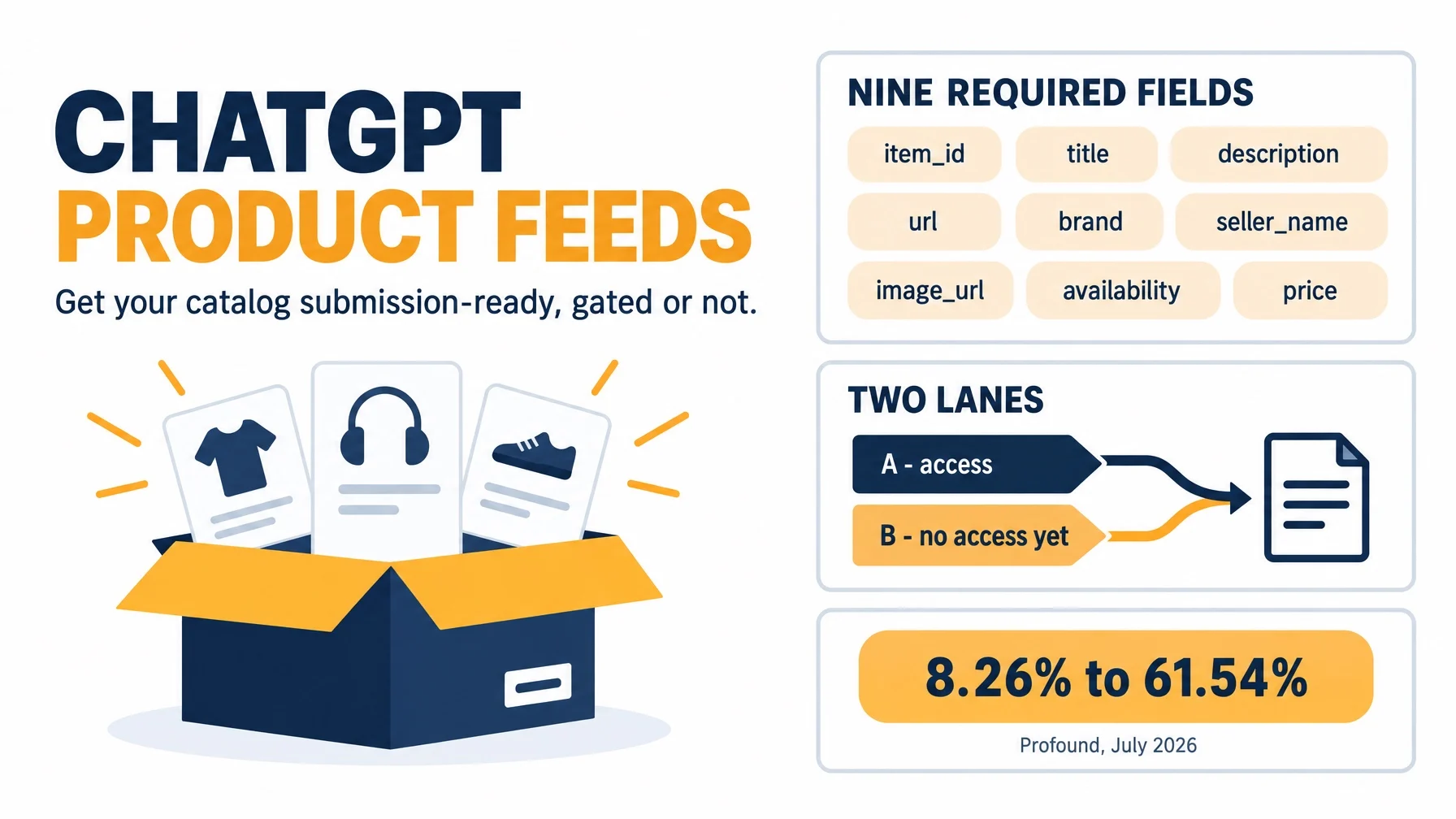
In July 2026, ChatGPT's shopping recommendations changed their primary source. If your catalog data is not ready for that, no amount of product page optimization compensates for it. This workflow gets your catalog to a validated, submission-ready state, and it works whether or not you can submit a feed today.
Who this is for | Ecommerce SEO managers, feed managers, and merchant operations owners responsible for product data across roughly 500 to 100,000 SKUs |
The outcome | A validated product file that passes all nine required field checks, plus an exception list of blocked SKUs with named owners |
Prerequisites | Ability to export your catalog as CSV, TSV, or JSONL; a staging directory; the ability to edit |
Access assumption | You may not be able to submit a feed today. OpenAI's feed program is gated, checkout is a separately enabled integration, and standard upload currently targets the US. This workflow produces the file either way |
Time | Four to six hours for a first pass on a catalog under 5,000 SKUs. The field audit is the slow part, not the technical setup |
Definition of done | Every row passes the nine required-field checks, every skipped SKU sits on a named exception list, OpenAI's search crawler can fetch a sampled product URL and read real data from it, and the run is reproducible from a saved export |
What changed, and the one decision it forces
OpenAI released its ChatGPT 5.6 models on July 9, 2026. The next day, the share of ChatGPT Shopping recommendations drawn from merchant product feeds rather than open web search jumped from 8.26% to 61.54%, according to research published by Profound, which tracked 1,757,723 ChatGPT shopping prompts across July 2026. In one day, feed-integrated retrieval went from a minority source to the dominant one.
That number is third-party measurement, not an OpenAI disclosure. OpenAI has not confirmed a July 10 change or published any retrieval split, and the sections at the end of this article lay out what the data does and does not support. Take the direction seriously and the precision loosely.
What the direction forces is a single reframe: product data now has to be correct as data, not only as content. A beautifully written product page with a missing GTIN check digit is, to a feed-based recommender, a row that failed validation.
Everything below is a workflow. Every step in it is worth doing whether or not the July 10 numbers hold up, because a clean, complete, machine-readable catalog is useful to every shopping surface you will ever care about.
Find out which lane you are in
The workflow splits into two lanes, and you need to know yours before you start, because it changes what "done" means for you. Lane A can prove ingestion. Lane B can only prove readiness. Both produce the same file.
The four-item access test
Answer each of these honestly.
Question | What counts as a yes | What does not |
|---|---|---|
Have you registered with OpenAI and received written confirmation of feed access? | A confirmation naming your feed | "I filled in the interest form" |
Is your catalog US-market eligible? | Confirmed for the current standard upload scope | An assumption that it applies to your market |
Has a checkout integration been separately enabled for you? | Explicit confirmation during onboarding | Turning on a flag yourself |
Have you submitted a sample or full file and had it acknowledged? | A response referencing your submission | Sending it and hearing nothing |
If any answer is not backed by something you can point to, you are in Lane B. That is the default position and it is not a failure state. Two important clarifications: enabling an eligibility flag does not complete checkout onboarding, and registration supplies only your merchant display name, not the rest of your feed.
Lane A: you have confirmed feed access
You will get a registration-specific field list and an onboarding-confirmed submission channel. The submission mechanism itself is confirmed during onboarding. Published vendor accounts disagree on whether it is SFTP or an encrypted HTTPS push to an allow-listed endpoint, so do not build a pipeline against either description until OpenAI tells you which one applies to you.
Lane B: you do not, and here is what is not wasted
Three things are open to you today with no permission required: crawler access, structured data and description quality on the product pages themselves, and the validated file. The catalog work in the middle of this article has no gate on it at all. You build and lint the file now, and the day access arrives you submit something that already passes.
If you are on Shopify, product data reaches ChatGPT through Shopify Catalog with no additional merchant-side work. A direct feed is for freshness and for fields the default does not carry. One caveat: a secondary source dates that syndication to March 2026 and the date is unconfirmed, so treat it as a conversation starter rather than a fact to plan around.
Open the door for the crawler that reads your products
This is the first step that takes effect immediately in both lanes, and it is the cheapest win available to you.
Open your robots.txt and check the directives for OpenAI's agents. OAI-SearchBot is the one that matters for product visibility. If it is blocked, your content will not appear in ChatGPT product results regardless of how clean your feed is. It is not used for model training, so blocking it protects nothing.
The four agent names worth an explicit decision:
Agent | What it does | Product visibility impact |
|---|---|---|
| Indexes content for search surfaces | Blocking it hides your products regardless of feed quality |
| Fetches pages a user explicitly asks about | Blocking it breaks live page reads |
| Training crawler | Unrelated to shopping visibility |
| Agentic browsing | Affects agent-driven checkout paths |
The quality check that matters most here is not `robots.txt`. It is whether a permitted crawler can actually read anything once it arrives. Fetch a representative product URL with the crawler's user agent and inspect the response body. If you get an app shell with no server-rendered title, price, availability, or description, the crawl succeeds and returns nothing useful. Many storefronts render product data client-side only, and those stores are invisible to feedless discovery no matter what their robots file says.
You can run that check with Auspia's OpenAI search crawler simulator, which fetches a public page as OpenAI's crawler and shows you what it can read.
Recovery path. If robots.txt is locked by your platform or your agency, log the change request with a date and keep going. The step becomes evidence for your Lane B record rather than a blocker.
Make your product pages machine-readable
The feed is not the only route into shopping recommendations, and for Lane B merchants it is not currently available at all. Structured data on the page is.
Add Product structured data in JSON-LD to every product template, and populate it from the same source your catalog export uses. That last clause is the part teams skip. If your schema is maintained by hand in the theme and your feed comes from the PIM, the two will disagree within a quarter, and disagreeing price and availability signals are worse than absent ones.
Include at minimum name, description, image, SKU, brand, and an offers block carrying price, price currency, and availability. Mirror the values you would put in the feed. Where your catalog has GTIN, condition, material, color, size, or dimensions, include those too, because these are the attributes conversational queries actually use.
Quality check. Validate three product URLs, one from each of your most different categories, using the same rendering path a crawler sees rather than your logged-in browser.
Recovery path. If your platform will not let you inject JSON-LD into the product template, put it in the head via your tag manager and log it as technical debt. It works, it is fragile, and someone should own removing it.
Rewrite descriptions for conversational queries
This is the step where SEO discipline actively hurts you.
Catalog descriptions are usually written for keyword coverage and shelf appeal: brand voice, a keyword-stuffed title, a bullet list of claims. Conversational shopping queries look nothing like that. Someone asks for "a quiet mechanical keyboard for an open-plan office under $150" and the attributes that answer the question are noise level, switch type, and form factor. Those attributes have to be present and factual to be extractable.
Write product descriptions as a factual specification with a short human opening. Lead with one sentence on what the product is and who it suits. Then state attributes plainly, without marketing modifiers. "Weight: 780 g" beats "incredibly lightweight construction." If you make a claim, make it specific and checkable.
One thing to know before you invest heavily here: OpenAI's shopping documentation notes that ChatGPT may generate simplified product titles and descriptions. Your copy is an input to the recommendation, not a guaranteed output. Write clean, factual source data and accept that the surface may paraphrase it.
Quality check. Pull your ten highest-revenue products and, for each, list the four attributes a buyer would need to make a decision. If fewer than three appear in the description, the description is not doing the job.
Recovery path. If your descriptions come from a supplier feed you do not control, rewrite the top decile by revenue by hand and let the long tail follow. Partial coverage beats a stalled project.
Build the field contract before you touch a row
Now to the feed itself. Before you export anything, write down what "correct" means, once. This turns the audit into a mechanical pass instead of an argument.
The nine required fields and where each one breaks
Every row needs these nine. This table is the contract.
Field | Accepted form | Most common failure | Consequence |
|---|---|---|---|
| Stable unique string per item or variant | Reused across variants, or regenerated on each export | Duplicate and orphaned rows |
| Plain string, aim for 150 characters or fewer | Truncation mid-word, or a title carrying price | Rejected or mis-matched row |
| Plain text, up to 5,000 characters | HTML or markdown left in from the CMS | Rejected row |
| Product page URL | Tracking parameters, or a URL that redirects | Row resolves to nothing |
| Brand name string | Missing entirely on unbranded SKUs | Rejected row |
| Merchant name string | Inconsistent spellings across the catalog | Weak merchant signal |
| Direct image URL | A placeholder, or a URL requiring a session | Row with no visual |
| One of | A custom value from your internal stock vocabulary | Row rejected |
|
| Thousands separators, or a bare number with no currency | Row rejected |
Two entries deserve emphasis because they fail silently and take whole product lines with them.
The availability field accepts exactly five values. Omitted, empty, or unrecognized values reject the row. If your platform exports IN STOCK or available or 1, every one of those rows fails. Map your internal vocabulary onto the five accepted values explicitly, and route anything you cannot map to a manual queue rather than defaulting it to unknown. unknown is a legal value, but it is a deliberate state, not a catch-all.
The price field is amount, a space, then an uppercase currency code. That means 79.99 USD, not $79.99, not 79,99 USD, and not 7.999e1. No thousands separators, no exponent notation.
The rules that reject rows quietly
Four more constraints worth writing into your validation checks:
GTIN. Exactly 8, 12, 13, or 14 digits including a valid check digit. ISBN-10 is not accepted. Preserve leading zeros, which means keeping the column as text everywhere it travels. This is the single most common silent breaker in the whole spec, because spreadsheets and CSV exports strip leading zeros by default.
Sale price. Must be greater than zero and strictly less than the regular price, in the same currency. A sale price equal to the regular price, or a promo row where the regular price was left empty, fails.
Title length. Aim for 150 characters or fewer. When you truncate, truncate on a word boundary.
Date fields do not schedule anything. The spec is explicit that dates in the contract do not schedule price or availability changes. If you want a promotion to switch on at midnight, your pipeline has to push the new value.
Decide your eligibility flags deliberately
Three flags control what happens to a row after it validates.
Flag | Default when omitted or empty | What it does |
|---|---|---|
|
|
|
| Requires search eligibility |
|
| Disabled | Controls the separate ads processing path |
You may also encounter these as enable_search, enable_checkout, and is_eligible_ads. They are aliases, so do not treat a template using the older spelling as a different field.
The practical advice: sync is_eligible_search to whichever system already knows a product is discontinued or suppressed. If you run a separate "hide from channel" list and it never reaches the feed, you will ship stale listings into recommendations.
Which optional groups to turn on, and in what order
There are roughly fifty optional fields. Ranked by return per hour of work, not by spec order:
- Variants (
group_id,listing_has_variations,variant_dict,offer_id,gtin,mpn). Highest priority if you sell apparel, footwear, home, or anything with size or color. - Item information (
condition,product_category,material,color,size,gender,age_group, and the dimension and weight fields). This is what makes conversational matching work. - Media (
additional_image_urls). - Returns (
accepts_returns,return_deadline_in_days,return_policy). - Reviews (
review_count,star_rating), plus store-levelstore_review_countandstore_star_rating. - Fulfillment, merchant, and geo (
shipping_price,shipping,seller_url,target_countries,store_country). - Setup-gated fields.
marketplace_seller,size_system,accepts_exchanges,is_digital, the ads pair (is_ads_eligible,ads_metadata), and the checkout pair (is_eligible_checkout,seller_privacy_policy,seller_tos) all require confirmation during onboarding. They are not self-serve. Leave them out of your first pass.
Quality check. Every one of the nine required fields should map to a catalog column that resolves to real data on at least 95% of your SKUs. Fields below that threshold are not mapping tasks, they are sourcing decisions.
Recovery path. If a required field has no source at all, such as brand on an unbranded range, stop and settle the sourcing question with a business owner before building the file. Format work cannot fix absent data.
Which file format you are actually allowed to send
Use the format OpenAI confirms for your registered feed during onboarding. Beyond that, there is a Google-compatible path that accepts UTF-8 tab-delimited .txt or .tsv files, or comma-delimited .csv, with gzip support for .txt.gz, .txt.gzip, .tsv.gz, and .csv.gz.
JSON, spreadsheets, XML, RSS, and Atom are not supported on that compatibility path. Use one format for the entire upload rather than mixing formats row by row.
Normalize the four fields that break the most rows
Pull one frozen export
Export once, timestamp the file, and compute a hash. Every subsequent step runs against that frozen file. Reproducibility is what makes the audit defensible three weeks later when someone asks why a SKU is missing.
The four normalizations
GTIN leading zeros. Export the column as text, then verify digit count is 8, 12, 13, or 14, and verify the check digit. This is where the majority of silent failures live.
Price formatting. Strip thousands separators, keep the decimal point, remove any exponent notation, and append the currency code as a separate token. Run the result through a regex that only accepts ^\d+\.\d{2} [A-Z]{3}$ and queue the rest.
Availability mapping. Map your internal vocabulary onto the five accepted values explicitly. Count how many rows land in each bucket and how many fall through to manual review. A high manual-review count means your stock vocabulary needs a mapping table, not that your feed is broken.
Title and description cleanup. Truncate titles at 150 characters on a word boundary. Strip markup from descriptions and cap at 5,000 characters of plain text.
Quality check. Re-import the normalized file into a fresh spreadsheet and confirm the GTIN column still shows leading zeros. This catches the export-as-number trap that survives every other check.
Recovery path. If your feed platform or PIM performs these normalizations for you, validate its output with the same checks rather than trusting its success message.
Audit every row and keep an exception list
Now run the checks across the whole file. This is the step that turns a catalog into a work plan.
The nine mechanics you can check without a validator
For every row: all nine required fields present and non-empty; availability in the five-value enum; gtin digit count and check digit valid; price matching the amount-and-currency shape; sale_price strictly less than price and greater than zero, same currency; title at or under 150 characters; description plain text at or under 5,000 characters; url returning 200 and rendering product data server-side; image_url resolving to an actual image rather than a placeholder.
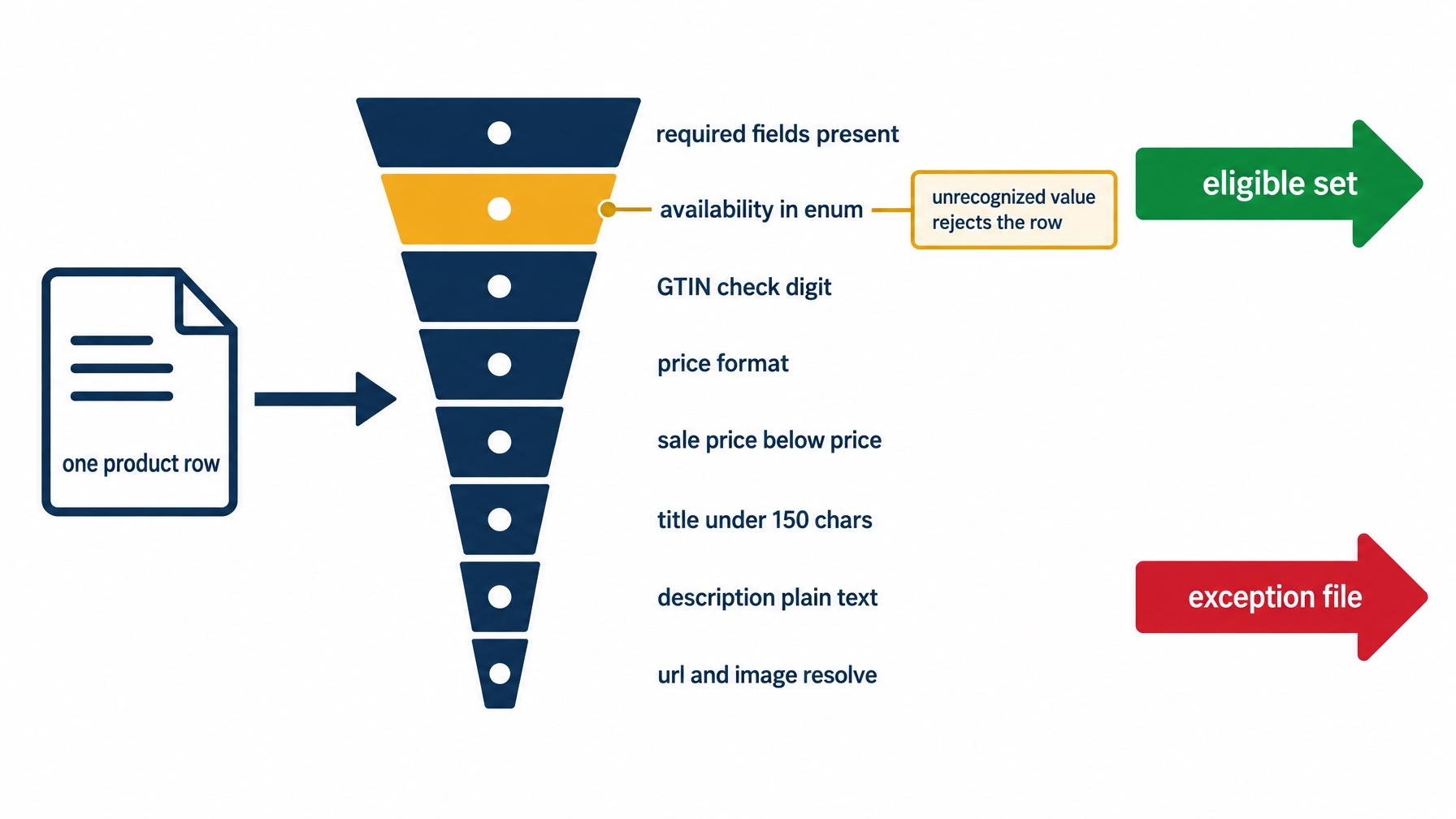
A single row either clears every gate or lands in the exception file with the failing gate named. The availability gate rejects the most rows, because custom stock vocabulary is the most common way a catalog fails.
Build the exception file, not a perfect catalog
Two columns and an owner: item_id, blocker, and who fixes it.
Quality check. On a reasonably clean catalog, the exception file should be under 10% of rows. If it is over 30%, the problem is upstream data governance, and the honest move is to fix the source system rather than patch the file.
Recovery path. If a required field is missing across an entire category rather than scattered SKUs, treat it as a sourcing decision with a business owner. Do not mark those rows unknown to clear the audit, because unknown is a legitimate value that means something specific, and using it to pass a check pollutes your own data.
One honest note on refresh: the spec states no update cadence, and it does not say whether feeds are full snapshots or incremental updates. Published vendor accounts make confident claims about both that are not in OpenAI's documentation. What the spec does tell you to do is submit the current price, update when a sale starts or ends, and update availability when an item sells out or returns. Build your pipeline around those two events and confirm the cadence question at onboarding.
Validate the file the way the platform will
Re-parse the exact bytes you intend to submit, in the format you intend to submit, and count rows in against rows out.
This catches the failure a spreadsheet hides. A file that opens cleanly in Excel is not the same file that parses as CSV, because unescaped delimiters and line breaks inside description fields break parsing while looking fine on screen.
Quality check. Rows in equals rows out, and the automated checks agree with your manual audit. A gap between the two means one of them is wrong, and it is usually the manual pass.
Recovery path. Encoding failures are almost always solved by re-exporting as UTF-8. Quoting failures are almost always unescaped delimiters or stray line breaks in descriptions.
If your team has a coding agent available, this is the one place a small script earns its keep, because it turns the audit from a quarterly project into a re-run.
Verify it worked
What you can prove depends on your lane, and it is worth being precise about the difference rather than blurring it.
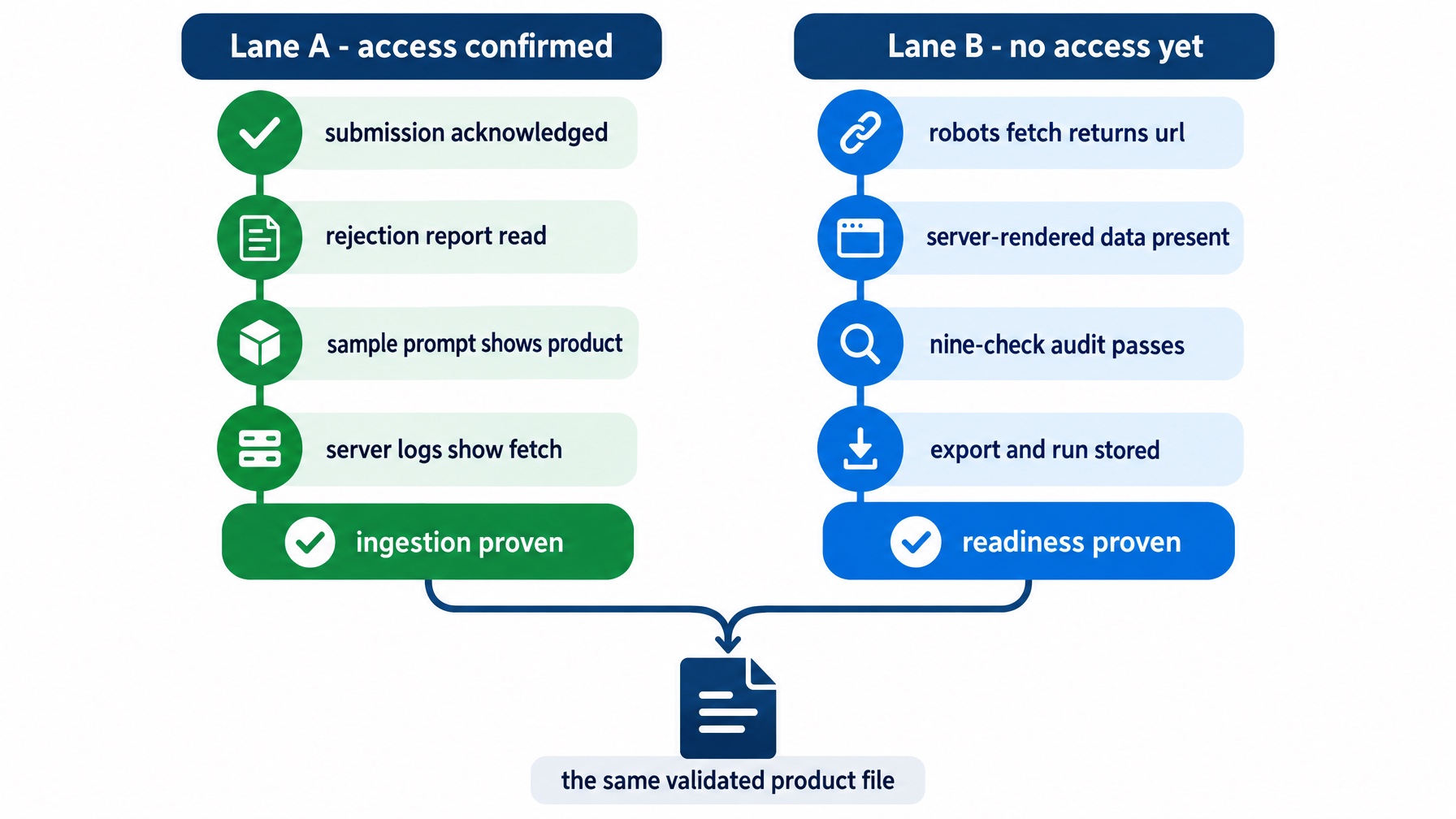
Lane A can prove ingestion. Lane B can prove readiness. Neither the lane nor the branch changes the file, which is the point of building it before you have access.
If you have access (Lane A)
Four checks. Your submission was acknowledged. The row-level rejection report was read and every rejection resolved or logged. A sample shopping prompt now surfaces one of your products. Your server logs show the retrieval agent fetching product URLs.
If you do not (Lane B)
Four checks. A robots.txt fetch returns a product URL to OAI-SearchBot. A server-rendered fetch of that URL contains title, price, availability, and description. The nine-check audit passes. The frozen export and the check run are stored somewhere the next person can reproduce them.
Readiness is a real, falsifiable result. It is just not the same result as ingestion, and you should not report it as though it were.
The one number that matters at the end
Outbound links from ChatGPT carry utm_source=chatgpt.com automatically. That makes your own analytics the only first-party proof that a click happened. Set up the filter now, before you need the data.
Be clear about what it measures. It is traffic attribution from a click, not a visibility metric. A product can be recommended many times and clicked zero times, and a product that is not eligible can never be clicked at all.
What this workflow does not control
It does not control ranking inside the feed set. The spec defines a row contract. It does not define an ordering rule. Passing every field check makes a product eligible to be retrieved. It says nothing about which of ten compliant rows gets shown. The research cited at the top measures retrieval source, not ranking within a retrieved set.
The July 10 numbers are observational and come from one vendor. They describe Profound's tracked prompt panel, not real shopper sessions or purchase journeys. OpenAI has not confirmed the change and has not disclosed any retrieval split. A GPT-6 Astra rollout began September 3, 2026, which overlaps the later measurement window in that research and is a genuine confound.
The concentration figures carry the same limits. The rise in top-10 store references from 22.5% to 41.8% and the decline in unique merchants from 13,524 to 10,607 both come from that same panel. And the finding that retrieval-source changes explained 83% of visibility variation across 517 moving customers is an explanatory share within the panel, not a causal coefficient to plan against.
Some claims circulating in vendor blogs are not in the spec. Treat each of these with caution:
Claim | Source | Status |
|---|---|---|
Feeds refresh every 15 minutes, 96x more often than daily feeds | Vendor blogs | Not in OpenAI's spec, which states no cadence |
Feeds are full snapshots, not incremental updates | One vendor, citing no OpenAI documentation | Unresolved; confirm at onboarding |
A sample of about 100 products is required | Vendor blogs | OpenAI's help text mentions an initial sample or full feed with no quantity |
Submission happens over SFTP | One vendor; another says encrypted HTTPS push | Sources conflict; the mechanism is confirmed during onboarding |
| One aggregated source | Not in the spec's field list. The spec's review fields are |
Structured feeds convert about twice as well as scraped data | Unsourced vendor claim | Do not plan against it |
It does not control how your copy is rendered. ChatGPT may generate simplified product titles and descriptions. And shopping results are selected independently by ChatGPT and are not ads, which answers a question about commercial influence rather than about retrieval source. If paid placement is what you are after, OpenAI does operate a separate ads path built from product feeds. That is a different workflow and this article is not it.
FAQ
Can I submit a product feed to ChatGPT today?
Not on demand. Access is confirmed per merchant, checkout requires a separately enabled integration, and standard upload currently targets the US. Registration supplies your merchant display name only, and you can be registered without having live upload access. Run the four-item access test above to place yourself.
How often should I refresh the feed?
The spec states no cadence. Two vendor blogs claim fifteen minutes, and that number does not appear in OpenAI's documentation. The practical answer is to drive refreshes off your own price and availability events, because those are the two things the spec explicitly tells you to keep current.
Do I send a full file or only the rows that changed?
Unresolved. One vendor asserts full snapshots and cites no OpenAI documentation for it. Confirm this at onboarding before you build a pipeline that depends on either answer.
Is the 100-product sample requirement real?
OpenAI's help text mentions an initial sample or full feed submission with no quantity attached. The 100-product figure comes from vendor blogs. If you prepare a sample, make it representative by covering each optional-group case rather than hitting a specific count.
Will a good feed make my products rank higher in ChatGPT shopping results?
Not in the sense the question usually implies. A feed makes a product eligible and describable. Ranking inside the retrieved set is not documented, and the public research measures retrieval source rather than ordering. Treat field compliance as a prerequisite, not a lever.
Do I need any of this if I sell on Shopify?
Not for basic syndication, since product data reaches ChatGPT through Shopify Catalog without merchant-side work. A direct feed is for freshness and for fields the default does not carry.
Author: Eva Laurent, Ecommerce Search Strategist for 10k+ Product Pages at Auspia. Eva writes about ecommerce search, product discovery, and how product data reaches AI shopping surfaces.


