


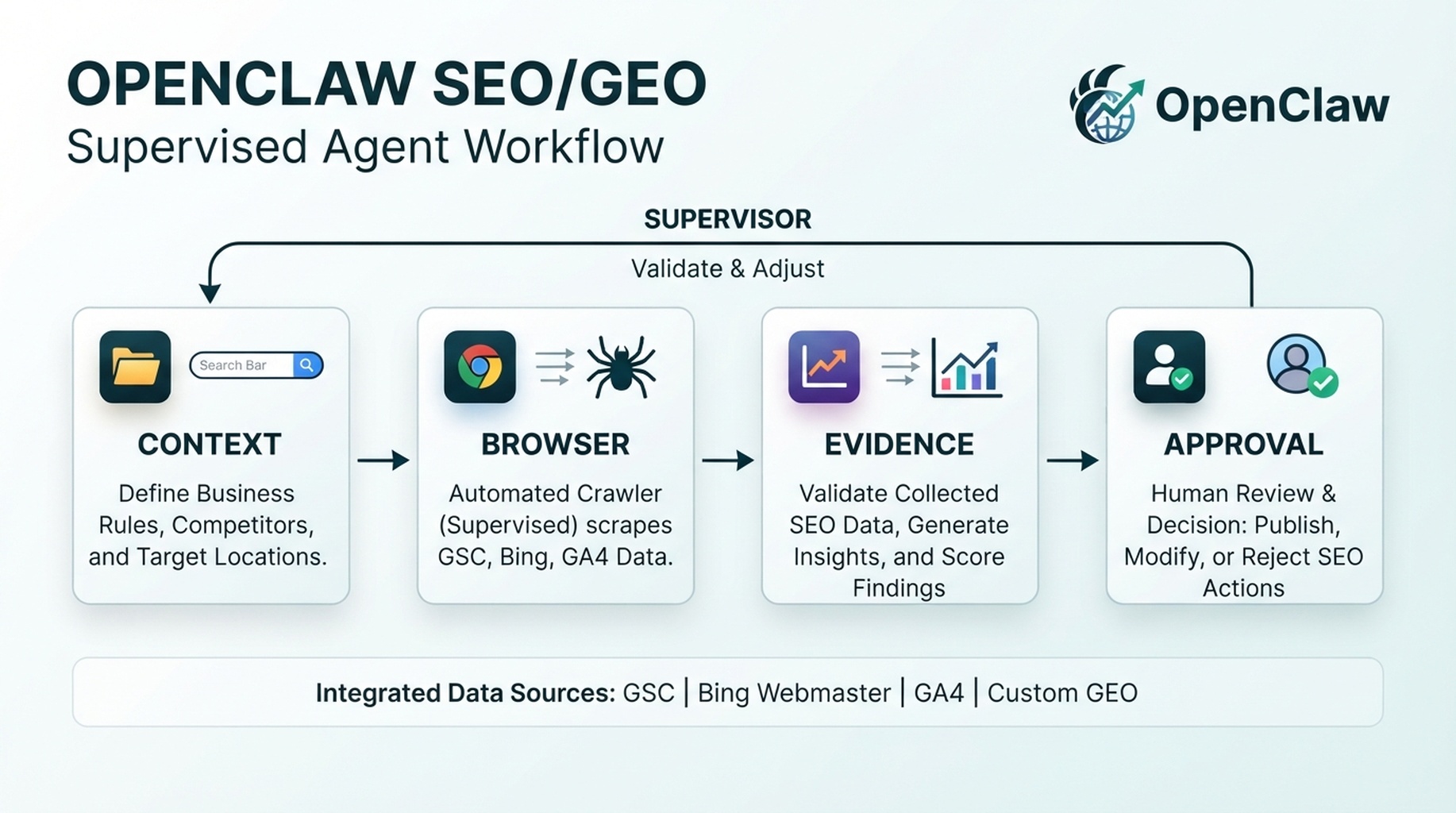
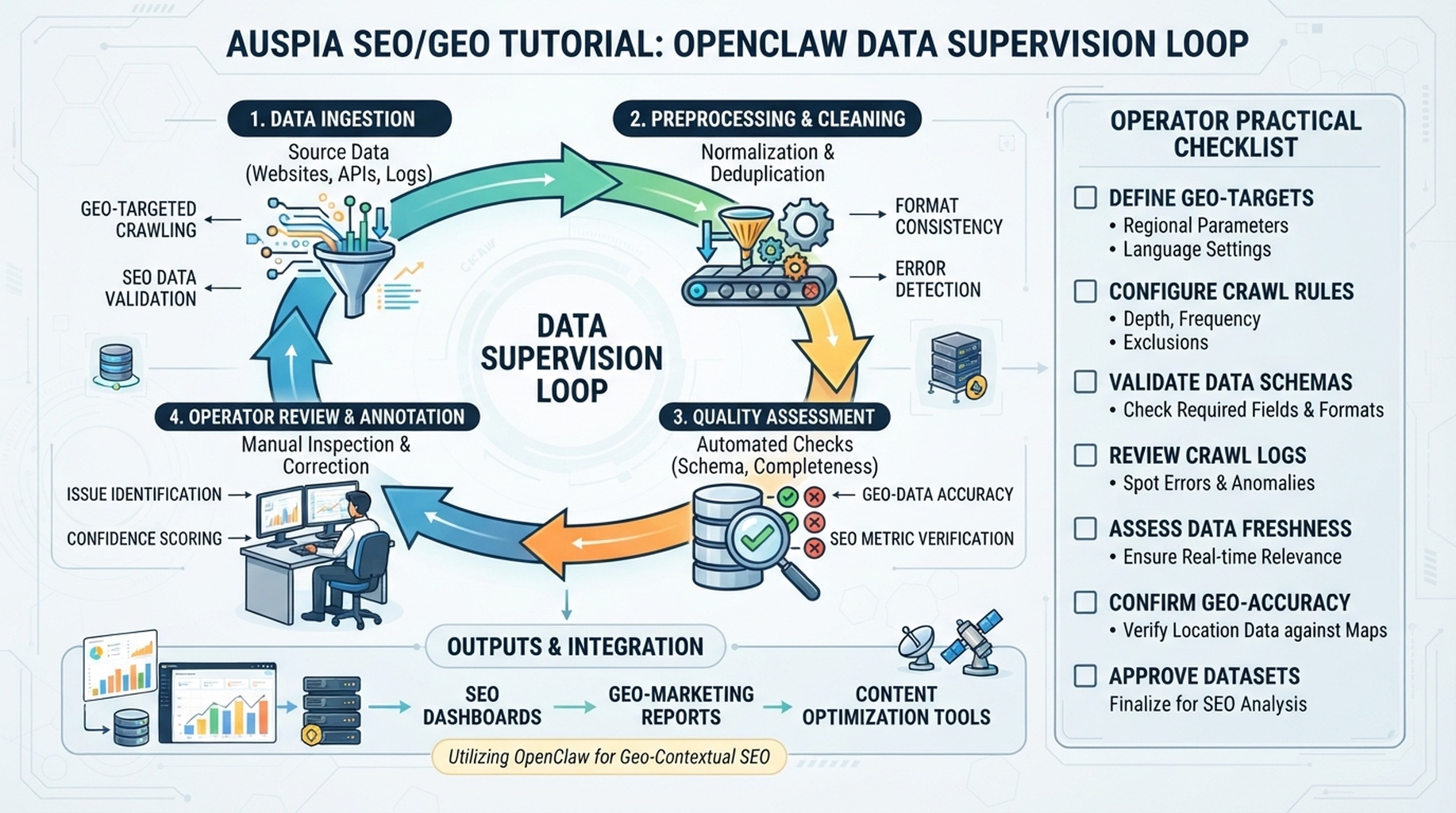
OpenClaw data supervision loop: collect, validate, diagnose, and queue human-approved actions.
The job is not “connect more dashboards”
The useful version of this workflow is a data supervision loop. OpenClaw should not simply pull GSC, Bing Webmaster Tools, GA4, and keyword data into one long report. It should check whether the data is trustworthy, compare signals, explain what changed, and create a short action queue.
The beginner mistake is to connect every account and ask, “What should I do?” That produces vague advice. A better workflow asks OpenClaw to answer four specific questions every week:
- Which pages are losing qualified search visibility?
- Which queries have high impressions but weak CTR or weak answer coverage?
- Which pages get traffic but fail to support conversions or GEO citation readiness?
- Which data source is missing, stale, or contradictory?
Start with CSV exports. Move to read-only connectors only after the report format is useful.
The data map OpenClaw should build first
Ask OpenClaw to create a data-map.md before it analyzes anything. The file prevents the agent from mixing incompatible metrics.
Source | Pull or export | Key fields | What it can prove | What it cannot prove |
|---|---|---|---|---|
Google Search Console | Queries and pages, last 28/90 days | clicks, impressions, CTR, position, page, query | Search demand and Google visibility | On-page engagement or revenue |
Bing Webmaster Tools | Queries, pages, crawl/index signals where available | clicks, impressions, CTR, page, query, crawl notes | Bing visibility and crawl health | Google demand or conversions |
GA4 | Landing page report | sessions, engaged sessions, conversions, revenue if tracked | Whether visits matter | Search ranking cause |
Keyword database | Keyword export or API | keyword, volume, difficulty, CPC, intent, SERP features | Market demand and topic opportunity | Your actual ranking performance |
GEO prompt tests | Manual or scheduled prompt runs | prompt, answer, citations, competitors, missing sources | AI-answer visibility gaps | Search volume |
Use this query:
Act as the `seo-operator` agent. Build `data-map.md` for my SEO/GEO monitoring workspace.

For each available source, list fields, date range, freshness, permissions, and what the source can and cannot prove.

Do not recommend fixes yet. First tell me whether the data is safe to compare.
Read-only setup order
Do not start with API automation. Use this order:
Phase | What to do | Why |
|---|---|---|
1. CSV baseline | Export GSC pages/queries, Bing pages/queries, GA4 landing pages, and keyword data | Fast, safe, no auth complexity |
2. Field normalization | Ask OpenClaw to map columns into a common schema | Prevents metric confusion |
3. Small connector test | If using MCP/API, test one source and one tiny date range | Confirms permissions and output shape |
4. Cross-source diagnosis | Compare query/page/landing-page patterns | Finds real opportunities |
5. Weekly automation | Schedule only the final report, not account changes | Keeps humans in the approval loop |
If a connector asks for write access, stop. SEO monitoring should not need permission to publish, submit URLs, change settings, or edit analytics configuration.
Normalize the data before analysis
OpenClaw should create a normalized table before diagnosing. Otherwise it may compare GA4 sessions to GSC clicks as if they mean the same thing.
Use this schema:
Field | Example | Notes |
|---|---|---|
|
| Never merge rows without source |
|
| Required for every row |
|
| Canonicalize trailing slashes |
|
| Empty for page-only rows |
|
| Search sources only |
|
| Search sources only |
|
| Recalculate when possible |
|
| Search sources only |
|
| Analytics only |
|
| Analytics only |
|
| Agent-assigned, must be reviewable |
|
| Based on freshness and source match |
Prompt:
Normalize these exports into one SEO/GEO monitoring table.

Rules:
- Do not average GSC and Bing position together.
- Do not treat GA4 sessions as search clicks.
- Keep source labels visible.
- Flag rows with missing URLs, mixed date ranges, or suspicious zeros.
- Output a clean table and a data-quality note before any recommendation.
The weekly diagnosis logic
Once the data is normalized, ask OpenClaw to score pages by decision type, not by raw traffic.
Pattern | How OpenClaw detects it | Likely action |
|---|---|---|
High impressions, low CTR | GSC/Bing impressions up, CTR below page baseline | Rewrite title/meta and improve answer promise |
Ranking drop with stable demand | Impressions stable, average position worse | Refresh content, improve internal links, check technical issues |
Traffic without value | GSC/Bing clicks present, GA4 engagement or conversion weak | Improve page fit, CTA, or intent match |
Google/Bing mismatch | One engine sees page, the other does not | Check crawl/index signals and page accessibility |
GEO citation gap | Prompt tests cite competitors but not your page | Add extractable answer blocks, evidence, entity clarity |
Keyword opportunity without page | Keyword export shows demand, no matching URL | Create or consolidate content brief |
OpenClaw should produce one decision per row: refresh, rewrite snippet, merge, create, monitor, technical review, or no action.
A practical OpenClaw prompt
Run the weekly data supervision workflow as `seo-operator`.

Inputs:
- data-map.md
- normalized GSC export
- normalized Bing Webmaster Tools export
- GA4 landing page export
- keyword database export if available
- GEO prompt tracking sheet if available
- previous action-queue.md

Tasks:
1. Validate date ranges and missing fields.
2. Identify pages with meaningful changes, not noise.
3. Compare Google, Bing, analytics, and GEO prompt signals.
4. Create a short diagnosis for each priority URL.
5. Assign one next action: refresh, title/meta rewrite, internal link review, technical review, new page brief, monitor, or no action.
6. Append only high-confidence actions to action-queue.md.
7. Put uncertain findings in the data-quality section.

Do not publish, submit URLs, change settings, or edit files outside the SEO workspace.
What the output should look like
Priority | URL | Evidence | Diagnosis | Recommended action | Confidence | Approval |
|---|---|---|---|---|---|---|
High |
| GSC impressions +31%, CTR down from 4.2% to 1.8% | Snippet promise no longer matches query intent | Rewrite title/meta and first answer block | High | Required |
High |
| Bing clicks flat, Google position dropped 5.4 to 9.1 | Content may be stale or internally underlinked | Refresh comparison table and add 3 contextual links | Medium | Required |
Medium |
| GA4 sessions strong, conversions weak | Search intent may be informational, CTA too aggressive | Add mid-page educational CTA | Medium | Required |
Monitor |
| GEO prompts cite page in 2/20 runs | Not enough evidence yet | Add to prompt map, retest next week | Low | No change |
Experience notes that save time
- Use the same date windows every week. Mixed windows create fake trends.
- Separate branded and non-branded queries before prioritizing content work.
- Do not let one noisy keyword trigger a rewrite. Look for page-level patterns.
- Treat GA4 conversion data as a page-value signal, not a ranking signal.
- Keep a “data missing” section. Missing data is often the most important finding.
- If OpenClaw cannot name the source row behind a recommendation, move the item to review, not the action queue.
FAQ
Should I connect APIs immediately?
No. Start with CSV exports and a weekly report template. Add read-only API or MCP connectors after you know which report is worth automating.
Can OpenClaw submit URLs to Bing or Google after the report?
Not by default. URL submission is an account action. Keep it human-approved and separate from monitoring.
How many pages should the first report cover?
Start with 20 to 50 important URLs. A full-site report is usually too noisy for a first workflow.
OpenClaw SEO/GEO learning path
This article is part of the OpenClaw SEO/GEO operator series. Follow the sequence if you are building the workflow from scratch:
- Use OpenClaw as an SEO/GEO operator
- Set up your first OpenClaw SEO agent
- Connect OpenClaw to GSC, Bing Webmaster, GA4, and SEO data
- Use OpenClaw browser automation for SEO and GEO research
- Build keyword clusters and a 90-day content calendar
- Use Google Trends for daily content ideas
- Create a GEO prompt map
- Refresh old content for SEO and GEO
- Improve internal linking and site architecture
- Run a technical SEO/GEO audit
- Build an OpenClaw SEO/GEO agent swarm
- Run daily SEO/GEO monitoring
- Add SEO/GEO quality gates
Where to go next
- Previous: How to Set Up Your First OpenClaw SEO Agent
- Next: How to Use OpenClaw Browser Automation for SEO and GEO Research
- Safety layer: OpenClaw SEO/GEO Quality Gates
Sources and notes
Use the official OpenClaw docs as the source of truth for current command syntax and capabilities:
- OpenClaw official site: https://openclaw.ai/
- OpenClaw GitHub README: https://github.com/openclaw/openclaw
- OpenClaw agents CLI docs: https://docs.openclaw.ai/cli/agents
- OpenClaw browser docs: https://docs.openclaw.ai/tools/browser
- OpenClaw cron CLI docs: https://docs.openclaw.ai/cli/cron
- OpenClaw scheduled tasks docs: https://docs.openclaw.ai/automation/cron-jobs
- OpenClaw Skills docs: https://docs.openclaw.ai/tools/skills
- OpenClaw ClawHub docs: https://docs.openclaw.ai/clawhub
Author: Jules Tan, GEO Measurement Lead Across 500+ Prompts at Auspia. He writes about turning messy search and AI visibility data into small, reviewable decisions.


