


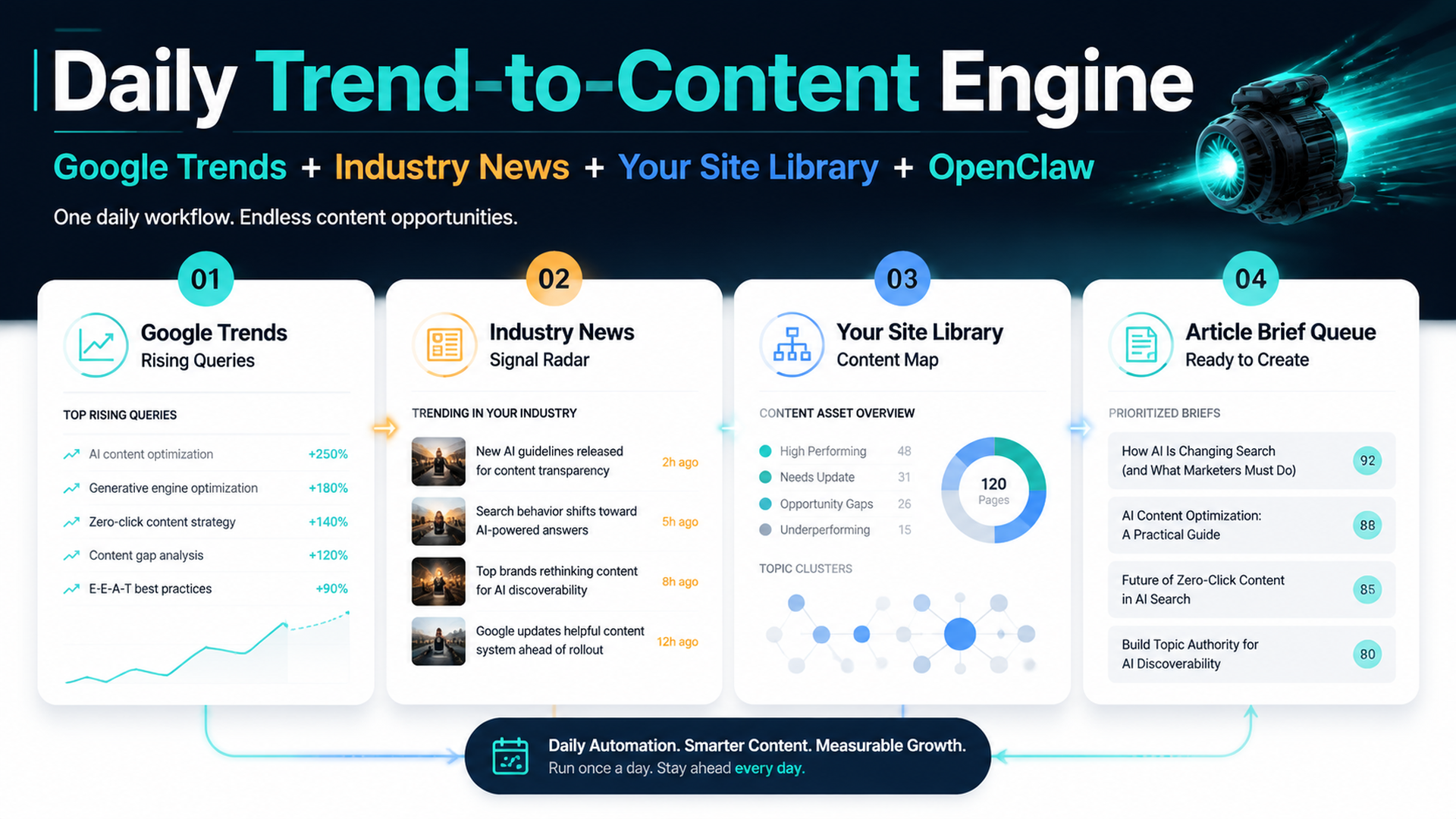
Daily Trend-to-Content Engine: Google Trends, industry news, your site library, and OpenClaw brief queue.
The practical idea
Use OpenClaw as a daily trend-to-content operator. Every morning, it should read Google Trends, collect current industry news, compare those trends against your website's existing pages, and create a short queue of article ideas or refresh briefs. The agent should not publish automatically. It should tell you which trend is worth acting on, which page it connects to, what angle to take, and what evidence the article needs.
This is useful because most “trending topic” workflows fail in two ways:
- they chase viral topics that have no connection to the website
- they ignore timely news until competitors already own the angle
The better workflow is not “write about everything trending.” It is “find rising topics that overlap with our audience, our existing authority, and our conversion paths.”
What OpenClaw should read every day
Use a stable set of sources. The agent needs trends, industry evidence, and your own site context.
Source | What OpenClaw collects | Why it matters |
|---|---|---|
Google Trends Trending Now | Rising searches by region, category, and time window | Finds fresh demand and public attention |
Google Trends Explore | Interest over time, related queries, related topics | Checks whether a term is rising, seasonal, or fading |
Industry news sources | New launches, policy changes, product updates, funding, platform changes | Gives the trend a credible reason to exist |
Search or news APIs | Felo Search, Perplexity Search API, Bing/Google news results, SERP APIs | Adds current source-backed context |
Your sitemap or URL inventory | Existing pages, hubs, product pages, old posts | Prevents irrelevant content ideas and duplicate pages |
GSC/Bing query exports | Queries where your site already has impressions | Finds trend-adjacent pages with existing visibility |
GEO prompt map | Questions you want AI-answer systems to associate with your brand | Turns trends into AI-search-ready content angles |
Google's own Trends surfaces can show trending searches, related queries, related topics, and news context. They are good for detecting attention, not for proving business value. That is why OpenClaw must match trends against your site before suggesting content.
Step 1: create a daily trend workspace
Ask OpenClaw to create a dedicated trend folder inside your SEO agent workspace.
Act as my `seo-operator` agent. Create a daily trend-to-content workspace.

Create these files and folders:
- trends/source-list.md
- trends/site-content-map.csv
- trends/trend-snapshots/
- trends/news-snapshots/
- trends/briefs/
- trends/rejected-ideas.md
- trends/editorial-rules.md

Do not publish content. Do not edit existing pages. Only create the workspace and starter templates.
Suggested structure:
openclaw-seo-workspace/
  trends/
    source-list.md
    site-content-map.csv
    editorial-rules.md
    trend-snapshots/
      2026-07-04-google-trends.json
    news-snapshots/
      2026-07-04-industry-news.json
    briefs/
      2026-07-04-ai-search-trend-brief.md
    rejected-ideas.md
Step 2: map your website before chasing trends
This step matters. If OpenClaw does not understand your site, it will recommend articles that are trendy but irrelevant.
Ask it to build site-content-map.csv:
Read my sitemap, blog index, product pages, and priority landing pages.
Create `trends/site-content-map.csv` with:
- url
- page title
- page type: hub, product, glossary, tutorial, comparison, case, tool, news
- target audience
- primary topic
- related entities
- funnel stage
- freshness sensitivity: low, medium, high
- trend hooks that would make sense for this page

Do not recommend new articles yet. First create the content map.
Example:
URL | Page type | Primary topic | Freshness sensitivity | Trend hooks |
|---|---|---|---|---|
| tutorial | daily GEO monitoring | high | AI search APIs, Perplexity, Google Trends, search volatility |
| tutorial | content planning | medium | rising keywords, seasonal campaigns, industry news |
| tool | AI search visibility | high | AI citations, brand mentions, answer engines |
| technical guide | crawl/index readiness | medium | crawler updates, robots rules, indexing bugs |
Step 3: define the daily trend collection task
OpenClaw should collect trends and industry news separately. Trends show demand; news explains why the demand is happening.
Create a daily trend collection plan.

Every day, collect:
1. Google Trends rising searches for my target regions and categories.
2. Related queries and related topics for any term that matches my industry.
3. Industry news from approved sources and search APIs.
4. Search result snapshots for the top candidate topics.
5. Any related questions that could become SEO or GEO article angles.

For every item, store:
- source
- timestamp
- region
- trend term
- related queries
- related news URLs
- why it may matter
- confidence

Do not write articles yet.
If you use OpenClaw cron, schedule it daily:
openclaw cron create "0 7 * * *" \
  "Run the daily Google Trends and industry-news collection workflow from trends/source-list.md. Store raw snapshots, match trends to site-content-map.csv, create a scored idea queue, and do not publish anything." \
  --name "Daily trend-to-content ideas" \
  --agent seo-operator
Step 4: use industry filters so the agent does not chase noise
Trending topics are noisy. A celebrity trend may be huge and useless. A small platform update may be perfect for a B2B site.
Put filters in trends/editorial-rules.md:
Rule | Example |
|---|---|
Must connect to a priority audience | SEO teams, founders, content leads, AI search operators |
Must connect to an existing page or planned cluster | OpenClaw, AI SEO tools, GEO monitoring, content automation |
Must have source-backed context | official docs, credible news, API/search results, product update |
Must be explainable within the brand's expertise | no unrelated entertainment, politics, or medical claims |
Must create a useful article, not only a timely headline | tutorial, teardown, checklist, brief, update, comparison |
Must pass risk review | no unsupported claims, legal/medical/financial advice, or rumor-only posts |
Prompt:
Score today's trends against `editorial-rules.md` and `site-content-map.csv`.
Reject trends that are high-volume but irrelevant. Keep a rejected-ideas log so we can see what was filtered out and why.
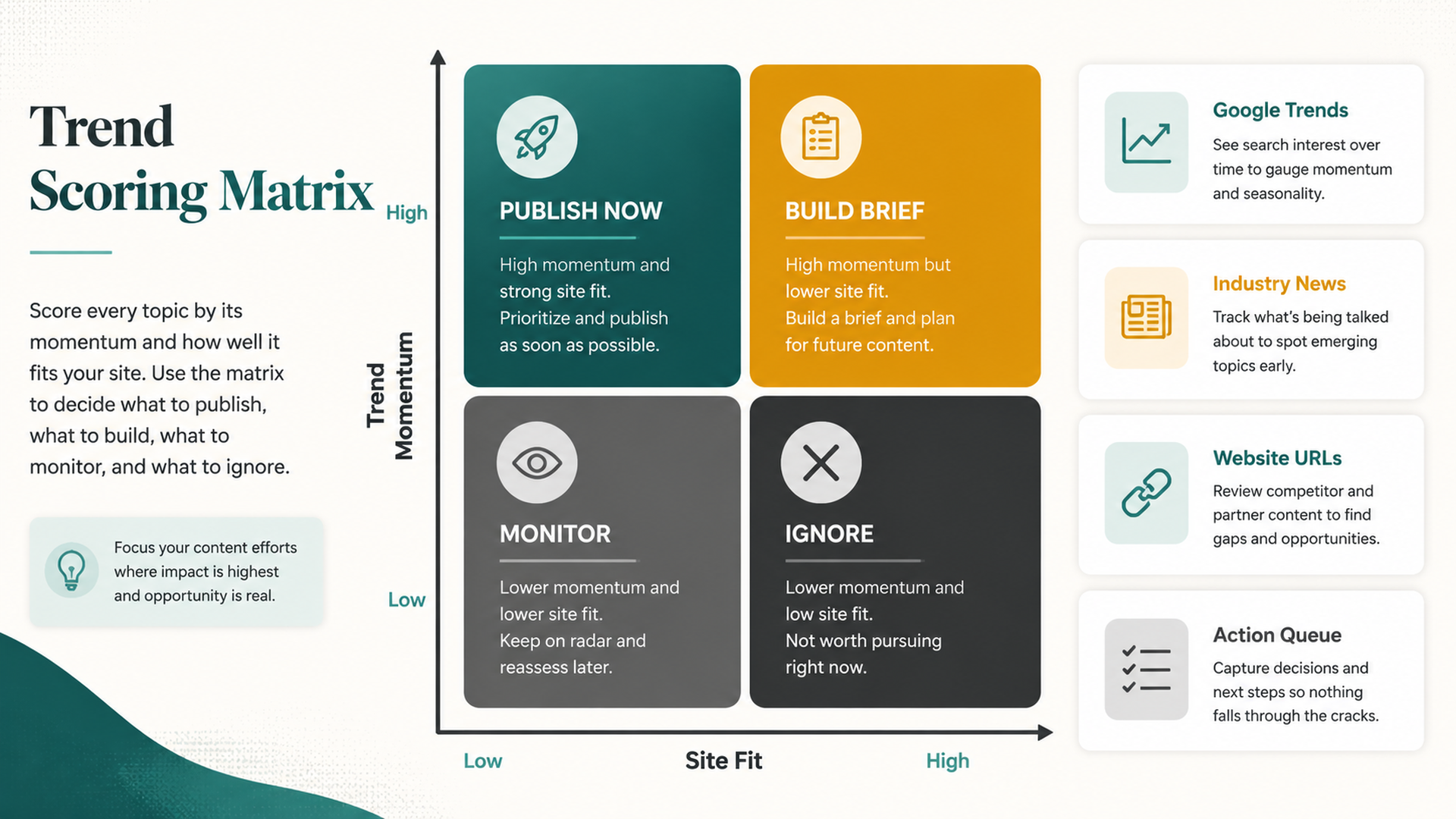
Trend scoring matrix: publish now, build brief, monitor, or ignore based on trend momentum and site fit.
Step 5: score trends before writing briefs
Use a simple scoring model. The score should decide whether OpenClaw creates a brief, monitors the topic, or rejects it.
Score | Question | 1 means | 5 means |
|---|---|---|---|
Trend momentum | Is attention rising now? | flat or unclear | clearly rising today |
Site fit | Does it match your existing topics? | unrelated | direct match to page/cluster |
Audience value | Would your audience care? | curiosity only | solves a real problem |
Evidence quality | Are there reliable sources? | rumor or thin sources | official/source-backed context |
Content gap | Can you add something useful? | no unique angle | clear practical angle |
Business relevance | Could it support conversion or authority? | no | strong connection to product/service |
GEO value | Could AI answers cite this page? | unlikely | strong answer/citation opportunity |
Risk | Could this be wrong, sensitive, or off-brand? | high risk | low risk |
Output action:
Result | Action |
|---|---|
High momentum + high site fit | Create a same-day article brief |
Medium momentum + high site fit | Create a refresh brief for an existing page |
High momentum + low site fit | Monitor or reject |
Low momentum + high strategic value | Add to backlog, not today |
Low evidence quality | Do not write; collect more sources |
Step 6: match each trend to a content action
OpenClaw should not default to “write a new blog post.” Often the right action is a page refresh, internal link update, comparison section, FAQ addition, or social post.
Trend match | Best content action |
|---|---|
Trend matches an existing guide | Refresh the intro, add a dated note, add new FAQ |
Trend exposes a new buyer question | Create a new article brief |
Trend connects to a product/tool | Add a use-case section or landing page FAQ |
Trend is newsy but temporary | Write a short daily brief, not evergreen guide |
Trend is high-risk or unverified | Monitor only |
Trend is unrelated to your audience | Reject |
Prompt:
For each scored trend, choose one content action:
- new article brief
- refresh existing page
- add FAQ section
- add internal link
- create short daily brief
- monitor
- reject

Explain the page or cluster it connects to. If no page connects, reject or monitor unless the business relevance is very high.
Step 7: create trend-aware article briefs
A good brief should combine the trend with your site's content strategy. It should not be a generic news rewrite.
Use this brief template:
## Trend-aware article brief

Date:
Trend source:
Trend term:
Related queries:
Related news/source URLs:
Target audience:
Matched site page or cluster:
Recommended content action:

## Proposed title
[Clear, non-clickbait title]

## Search/GEO angle
- What question does this answer?
- Why now?
- What should the reader do?
- Which AI-answer prompt could this support?

## Evidence to include
- Official source:
- News/source-backed context:
- Existing site page:
- Data or screenshot needed:

## Draft outline
1.
2.
3.
4.

## Internal links
- Existing page to link from:
- Existing page to link to:

## Risk check
- Unsupported claims:
- Sensitive claims:
- Time-sensitive facts that need date labels:

## Approval
- Publish today:
- Refresh existing page:
- Monitor only:
Ask OpenClaw:
Create briefs only for today's top 3 approved trend opportunities. Each brief must connect the trend to an existing site page, audience need, and source-backed evidence. Do not draft full articles unless I approve a brief.
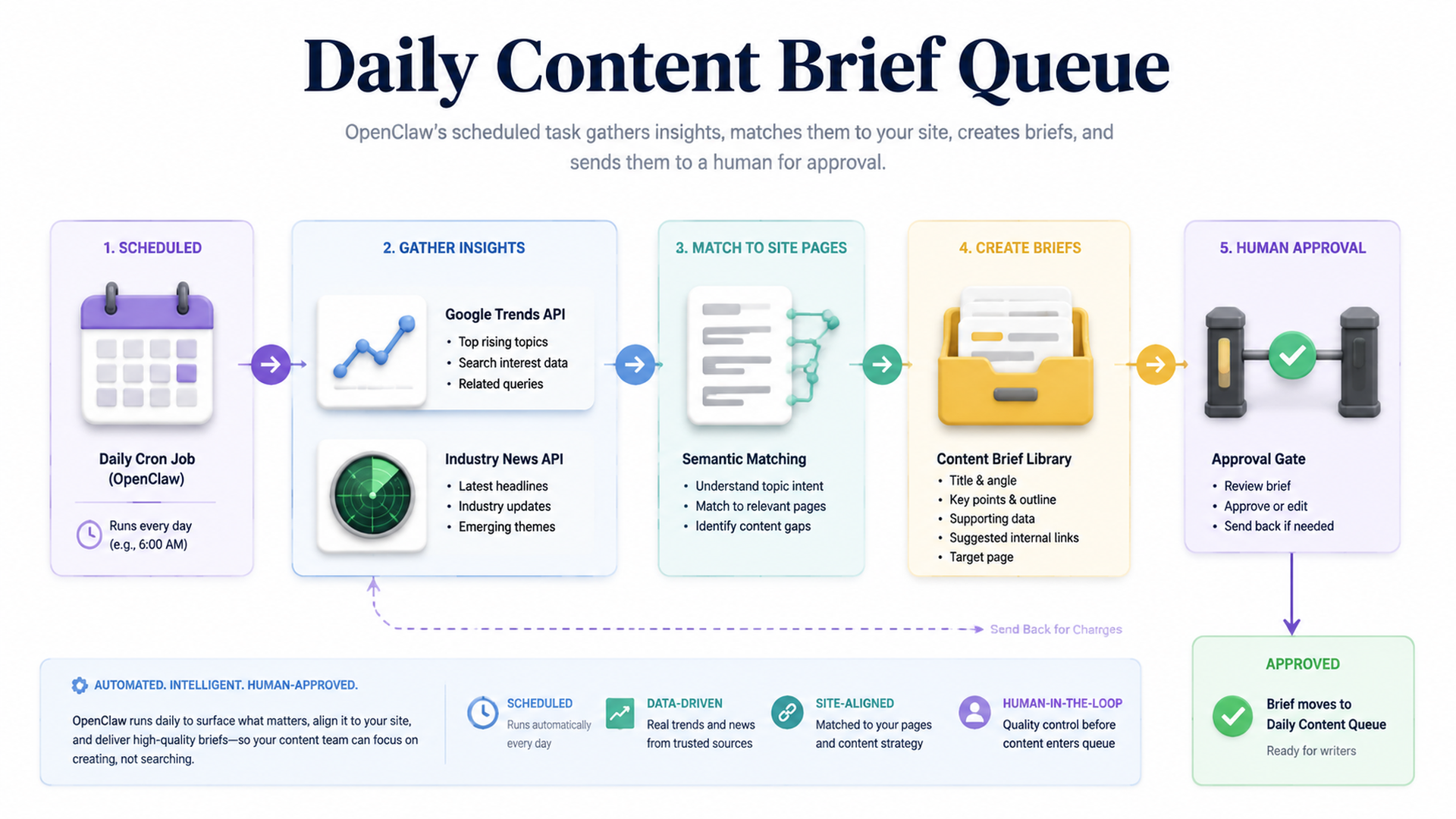
Daily content brief queue: trends and news become approved briefs, not automatic spam.
Step 8: use industry news for depth, not just freshness
Google Trends tells you what people are searching. Industry news tells you what changed. OpenClaw should combine both.
Example workflow:
Trend | Industry context | Better article angle |
|---|---|---|
“Perplexity API” rising | Perplexity launches or updates Search/Sonar docs | How to monitor AI-search citations with daily API checks |
“Google AI Mode” rising | Google rolls out AI search feature changes | What AI Mode means for SEO/GEO measurement |
“robots.txt AI crawler” rising | Publishers discuss crawler controls | How to audit AI crawler access without blocking useful bots |
“Google Trends election spike” rising | High public interest but off-topic | Reject for an SEO tools site unless there is a clear search-data lesson |
The best trend content does not repeat the news. It translates the news into a practical action for your audience.
Step 9: daily report format
The daily trend report should be short. Editors should see what to act on today.
## Daily Trend-to-Content Report

Date:
Regions:
Sources used:
Sources failed:

## Top opportunities
| Priority | Trend | Site match | Recommended action | Why now | Approval |
| --- | --- | --- | --- | --- | --- |

## Briefs created
| Brief | Target page/cluster | Evidence quality | Risk | Owner |
| --- | --- | --- | --- | --- |

## Refresh candidates
| Existing URL | Trend hook | Update needed | Approval |
| --- | --- | --- | --- |

## Rejected trends
| Trend | Reason |
| --- | --- |

## Data quality notes
- Missing region data
- API failures
- Weak evidence
- Topics to monitor tomorrow
Step 10: avoid trend-chasing mistakes
Mistake | Why it hurts | Better approach |
|---|---|---|
Writing every trending topic | Dilutes topical authority | Filter by site fit and audience value |
Publishing without source context | Creates thin trend spam | Require related news and source URLs |
Creating new pages for every trend | Causes cannibalization and content decay | Refresh existing pages when possible |
Ignoring date labels | Makes old trend posts confusing | Add dates and “what changed” sections |
Letting OpenClaw publish automatically | Risky for brand and factual accuracy | Use brief queue and human approval |
Using trends without your site map | Produces irrelevant ideas | Match every idea to URL, cluster, or product |
A full OpenClaw prompt for the daily job
Run the daily trend-to-content workflow as `seo-operator`.

Inputs:
- trends/source-list.md
- trends/editorial-rules.md
- trends/site-content-map.csv
- sitemap or URL inventory
- latest GSC/Bing query export if available
- GEO prompt map if available

Tasks:
1. Collect Google Trends rising topics for approved regions/categories.
2. Collect industry news and source-backed context using approved search/news APIs.
3. Match each trend to existing site pages, clusters, tools, or GEO prompts.
4. Score each trend by momentum, site fit, audience value, evidence quality, business relevance, GEO value, and risk.
5. Reject irrelevant or weakly sourced trends and record why.
6. Create briefs for the top 3 approved opportunities.
7. Identify existing pages that should be refreshed because of today's trend.
8. Write `trends/reports/daily-trend-report-YYYY-MM-DD.md`.
9. Do not publish, rewrite live pages, or edit production files.

Output a short editor-ready report and save raw trend/news snapshots.
FAQ
Should OpenClaw write the full article automatically?
Not at first. Let it create briefs, source lists, angles, outlines, and refresh recommendations. A human should approve the brief before a full draft is created.
Is Google Trends enough for content ideas?
No. Google Trends is useful for detecting attention. You still need industry news, search intent checks, your site content map, and editorial judgment.
How many trend ideas should the daily task produce?
Three strong briefs are better than thirty weak ideas. The daily report can track more trends, but only a few should become action items.
Should every trend become a new article?
No. Many trends should refresh existing content, add FAQs, update examples, improve internal links, or simply stay on a watch list.
How does this help GEO?
Trend-aware articles can answer current questions that AI systems and users are asking. If the page includes clear definitions, evidence, dates, and source-backed context, it becomes more useful for AI-answer extraction and citation.
OpenClaw SEO/GEO learning path
This article is part of the OpenClaw SEO/GEO operator series. Follow the sequence if you are building the workflow from scratch:
- Use OpenClaw as an SEO/GEO operator
- Set up your first OpenClaw SEO agent
- Connect OpenClaw to GSC, Bing Webmaster, GA4, and SEO data
- Use OpenClaw browser automation for SEO and GEO research
- Build keyword clusters and a 90-day content calendar
- Use Google Trends for daily content ideas
- Create a GEO prompt map
- Refresh old content for SEO and GEO
- Improve internal linking and site architecture
- Run a technical SEO/GEO audit
- Build an OpenClaw SEO/GEO agent swarm
- Run daily SEO/GEO monitoring
- Add SEO/GEO quality gates
Where to go next
- Previous: How to Build Keyword Clusters and a 90-Day Content Calendar with OpenClaw
- Next: How to Create a GEO Prompt Map with OpenClaw
- Related: How to Run Daily SEO/GEO Monitoring with OpenClaw
- Safety layer: OpenClaw SEO/GEO Quality Gates
Sources and notes
Use the official docs and provider pages as the source of truth for current interface details, exports, API authentication, and rate limits:
- Google Trends: https://trends.google.com/trends/
- Google Search Central guide to finding rising retail categories and related terms with Google Trends: https://developers.google.com/search/docs/monitor-debug/search-trends
- OpenClaw cron CLI docs: https://docs.openclaw.ai/cli/cron
- OpenClaw scheduled tasks docs: https://docs.openclaw.ai/automation/cron-jobs
- OpenClaw agents CLI docs: https://docs.openclaw.ai/cli/agents
- OpenClaw browser docs: https://docs.openclaw.ai/tools/browser
- Felo Search OpenClaw skill page: https://felo.ai/skills/openclaw/felo-search
- Perplexity Search API docs: https://docs.perplexity.ai/docs/search/quickstart
Author: Mara Venn, 14-Year Technical SEO Practitioner at Auspia. She writes practical content systems that connect live search demand, editorial judgment, and AI-search visibility.


