


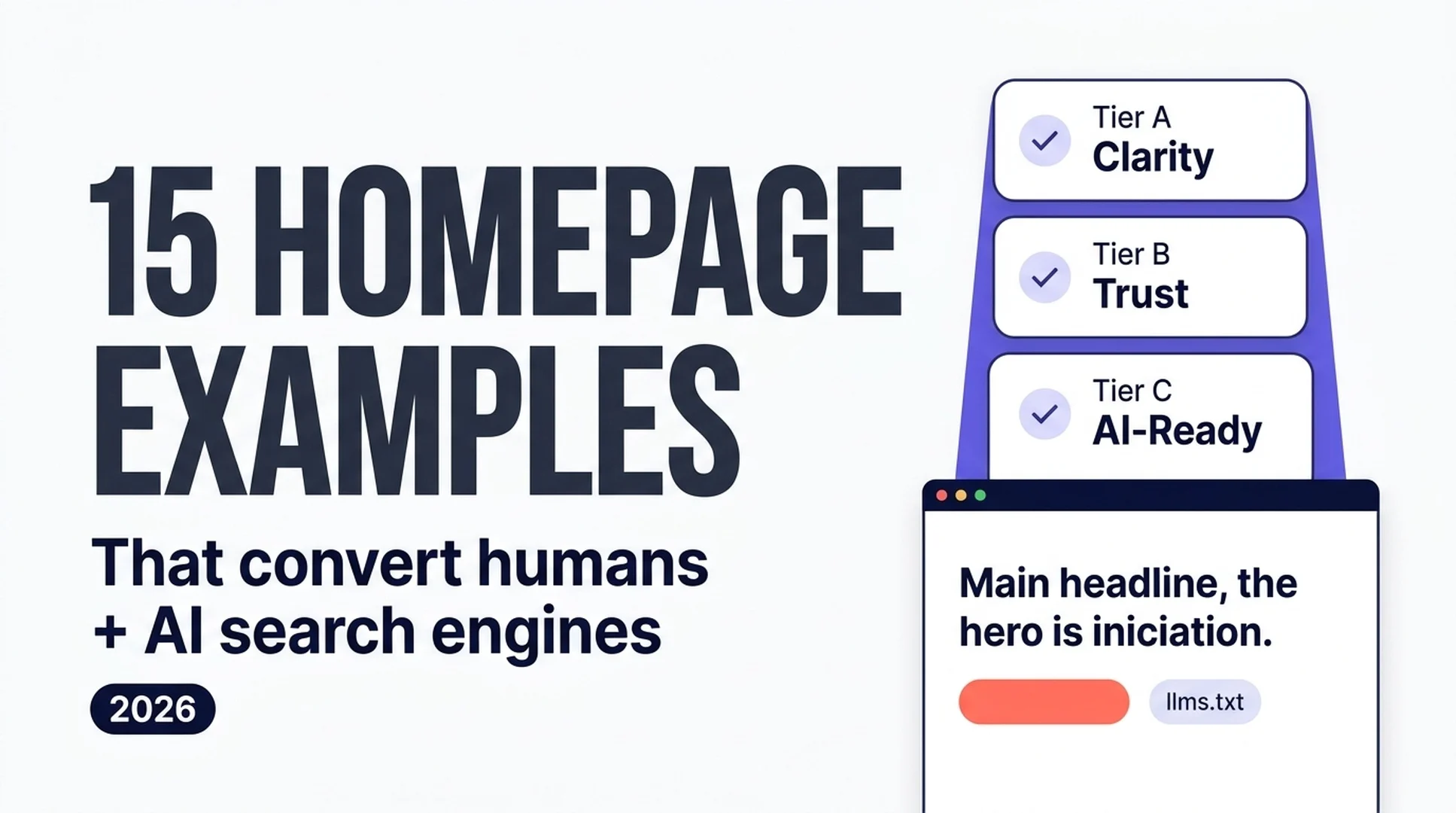
The Short Answer
A homepage that converts in 2026 has to win two readers at once: the human who lands on it and the AI engine that decides whether to recommend it. Here is the part people miss: the same design choices serve both. Clarity, proof, speed, clean structure. You do not have to choose between a good homepage and an AI-readable one.
If you are a beginner and your homepage is underperforming, work through these three tiers in order:
- Tier A — Clarity & positioning (5 examples): say exactly who you are, who it is for, and what the visitor should do next.
- Tier B — Trust & proof (5 examples): back every claim with named customers, dated numbers, and real people.
- Tier C — Built for AI engines & mobile (5 examples): make the page readable by machines — semantic HTML,
llms.txt, schema, fast loading, mobile-first layout.
Do those 15 things and you have a homepage that works for humans, for AI search, and for your bottom line. Keep reading for the examples, a 15-point checklist, and a Codex skill that does the whole job for you.
🎬 Watch the 76-Second Video Summary
>
Prefer to watch? We made a narrated explainer that walks through the two readers, the three tiers, and the 15-point checklist.
>
▶ Watch the video
Why Your Homepage Now Has Two Readers
Ten years ago, homepage design advice was aimed at one audience: the person looking at the screen. Your goal was a strong hero, a clear value proposition, and a call-to-action. That advice is still true. It is just incomplete.
In 2026, AI search engines — ChatGPT, Perplexity, Google AI Overviews, Gemini, Claude — read your homepage too, and they read it before most humans ever see it. As practitioners observed in 2026, AI agents read a site through three channels:
Channel | What the AI sees | Why it matters for your homepage |
|---|---|---|
Raw HTML / DOM | Tags, headings, nesting, links | Semantic structure tells the model what is a heading, a button, or a definition. "Div soup" says nothing. |
Accessibility tree | Roles, names, states of interactive elements | This is the high-confidence channel — the same API screen readers use. If it is broken for accessibility, it is broken for AI. |
Screenshots | A rendered image a vision model interprets | Slow and error-prone; a fallback, not a strategy. |
The practical translation: a homepage that is "beautiful for humans" but has no semantic headings, no clear sentences about what the company does, and heavy client-side JavaScript is almost invisible to AI search. The diagram below shows the two readers your homepage has to serve and what each one pays attention to.
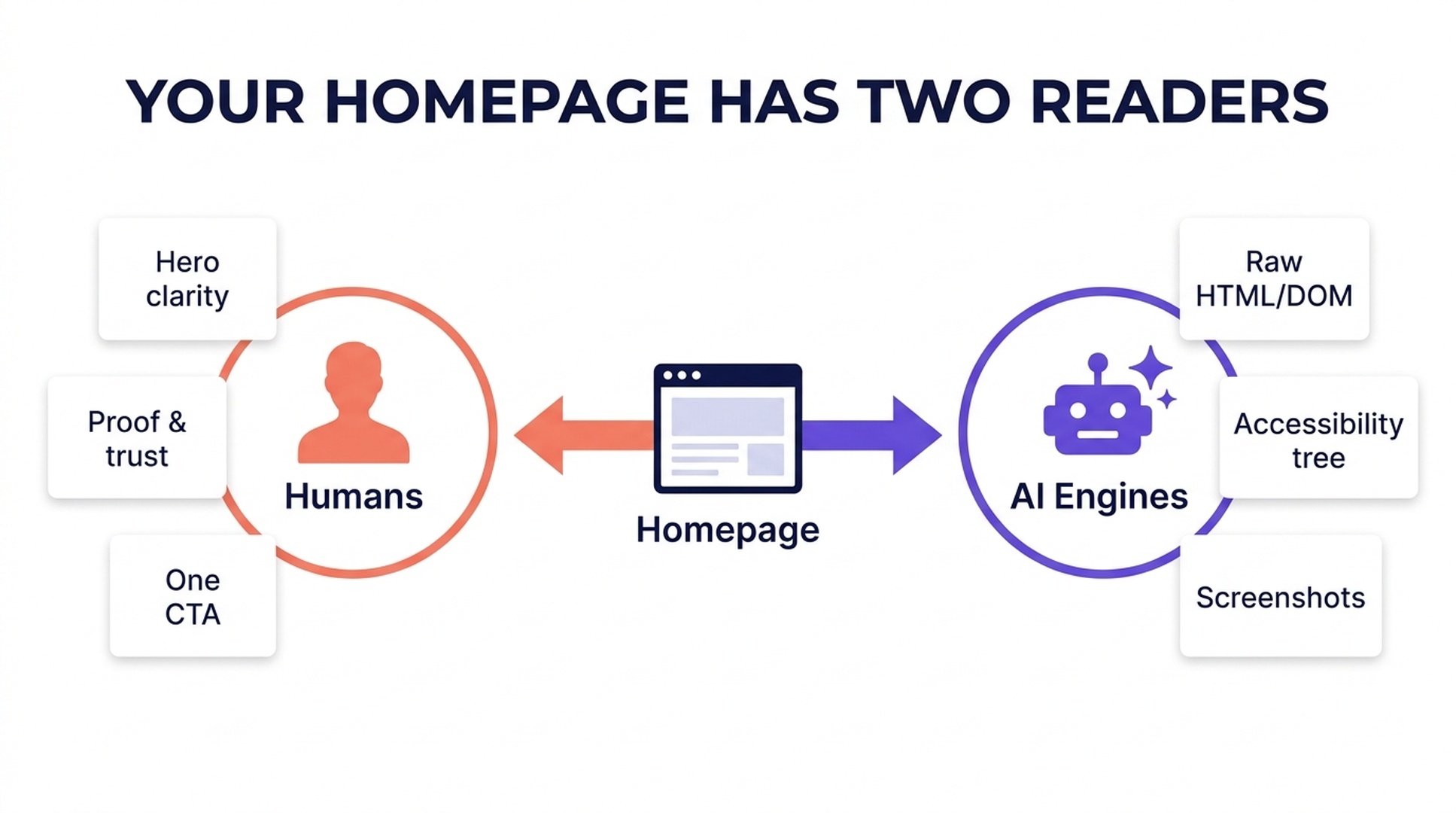
Your homepage has two readers: the human who converts and the AI engine that decides whether to recommend you. Practitioners put it bluntly: if your brand is not cited in AI answers, you practically do not exist online. The homepage carries a disproportionate share of that risk because it is the page with the most internal links and backlinks pointing to it.
This is not a reason to design for machines instead of people. It is a reason to design for both at once. If you want the deeper background on how AI engines read pages and cite them, our guide on how to rank in AI Overviews walks through the citation mechanics, and semantic SEO in 2026 covers why clean structure and entity clarity matter more than schema alone. The 15 examples below are organized around choices that help both readers.
Tier A: Clarity & Positioning (5 Examples)
The fastest conversion and AI-readability wins come from being explicit. Vague copy ("growth infrastructure for modern teams") fails with humans and with models. Specific copy ("A tool for SEO teams that turns competitor research into a prioritized fix list") works for both. Start here.
1. Lead with an answer-first hero
A homepage hero should complete this sentence in under five seconds: what you offer, who it is for, and what to do next. The best 2026 homepages put a benefit-driven headline, one short supporting sentence, and a single primary CTA in the hero.
Copy this: one H1 that names the product and the outcome, one supporting sentence, one primary CTA. No carousel — autoplaying slides hurt conversion and add layout shift.
2. Add a "What is [company]?" block right below the hero
This is the single most underused AI-readability move. A 50–80 word block that states the company name, what it does, who it serves, and the named outcome gives AI engines a clean, quotable definition — and gives humans a second chance to understand you.
Copy this: an <h2> like "What is Acme?" followed by one plain-language paragraph: "Acme is a [category] for [audience] that helps [outcome]."
3. Keep exactly one primary CTA
Too many competing buttons ("Get a demo" / "Start free" / "Book a call") cause decision paralysis. Pick one primary action, repeat it once mid-page and once at the end, and let secondary CTAs serve lower-intent visitors.
Copy this: restate the benefit in the button ("Get my free quote") instead of a generic "Submit" or "Learn more."
4. Write in your target audience's language
Research the words your customers actually use and mirror them. Avoid jargon and internal shorthand. For AI engines, plain, entity-rich sentences are easier to extract than clever slogans.
Copy this: a "who this is for" line near the top naming the audience explicitly — "Built for marketing teams at B2B SaaS companies with 10–50 employees."
5. Make your value proposition verifiable
"Best-in-class" proves nothing. "Median time-to-first-value: 8 minutes" is something both a human and a model can repeat. Replace superlatives with specific, checkable claims.
Copy this: put one specific, defensible number in the hero or its supporting block, with a date or source when you have one.
Tier B: Trust & Proof (5 Examples)
Both humans and AI engines make trust judgments. Humans scan for social proof; AI engines triangulate across sources — your site, reviews, press, directories — to decide who you are. Consistency is the through-line.
6. Show real customer logos
Logo walls still work, but make them real and ideally linkable. Unverifiable "trusted by" rows teach readers to discount everything else on the page.
Copy this: a logo strip near the first scroll depth, with real, named customers and a link or proof page where practical.
7. Publish dated numbers
"10,000+ customers" is stronger as "10,000+ customers as of June 2026." A date makes the claim checkable and keeps it honest as it ages.
Copy this: add a visible date or "as of" to every headline statistic.
8. Use real people, not stock
Stock photography that appears on every competitor's site erodes trust. Original product screenshots, team photos, and real customer faces build it.
Copy this: one authentic photo of your product or team near the value proposition, never a recycled stock hero.
9. Earn media and real links
Press mentions and third-party reviews matter to AI engines because they corroborate who you are. Show them with actual links, not logos alone.
Copy this: a "as featured in" row that links to the actual coverage.
10. Put trust signals next to the point of action
A security badge next to a form, a review score next to the pricing section, a guarantee next to the buy button — proof lands best where the decision happens.
Copy this: place one trust signal within the same visual zone as each primary CTA.
Tier C: Built for AI Engines & Mobile (5 Examples)
This is where 2026 design separates from the 2010s checklist. The homepages that win citations and conversions are the ones AI can actually read and mobile users can actually use.
11. Write semantic HTML
Use real <h1>, <h2>, <nav>, <button>, and <main> elements. The accessibility tree — and therefore AI agents — sees these roles clearly. A <div class="btn"> tells a model nothing.
Copy this: run your homepage through a heading-outline checker; if there is no single H1 and no logical H2 progression, fix the markup before anything else.
12. Publish llms.txt and let AI bots in
llms.txt is a plain markdown file at your domain root that tells AI engines what your site is and which pages matter. Check your robots.txt and firewall settings: many setups accidentally block GPTBot, OAI-SearchBot, PerplexityBot, ClaudeBot, Google-Extended, and other crawlers.
Copy this: allow the AI crawler user agents in robots.txt, add an llms.txt file, and submit your sitemap.
13. Add Organization schema and keep your entity consistent
JSON-LD Organization markup (name, logo, social profiles, contact info) tells AI systems who you are. Just as important: use the same name, description, and NAP across your site, LinkedIn, and directories. Conflicting descriptions make AI engines default to whatever version appears most often.
Copy this: add Organization schema, and audit that your company description is identical across every public profile.
14. Make the largest contentful paint fast
The hero image is almost always the LCP element. Serve it as WebP/AVIF, keep it under ~200KB, preload it, and skip the autoplay hero video. LCP under 2.5s is Google's "good" threshold; conversion-focused teams target under 2.0s.
Copy this: compress and preload the hero asset, and run a PageSpeed or Lighthouse check on mobile.
15. Design mobile-first with thumb-sized CTAs
Around 60–70% of traffic is mobile, and Google indexes mobile-first. Your mobile hero must not truncate, CTAs should be at least 44×44px, and the primary action should stay reachable as the visitor scrolls.
Copy this: audit the page at 375px wide; if the hero or CTA breaks, fix the mobile layout before the desktop one.
The 15-Point Homepage Checklist
Copy this table into a doc, work down it, and check every box before you call your homepage done. The three tiers as a single visual:
# | Check | Good = |
|---|---|---|
1 | Answer-first hero | H1 + one sentence + one CTA in 5 seconds |
2 | "What is [company]?" block | 50–80 word plain-language definition under H2 |
3 | One primary CTA | Single main action, repeated 3× max |
4 | Audience language | Reads like the customer, no jargon |
5 | Verifiable value prop | A specific, checkable number or claim |
6 | Real logos | Named customers, linkable proof |
7 | Dated numbers | "As of June 2026" on every stat |
8 | Real people | Original photos, no recycled stock |
9 | Real links | Media row links to actual coverage |
10 | Trust at the action | Badge/review/guarantee near each CTA |
11 | Semantic HTML | One H1, logical H2/H3, real buttons/nav |
12 |
| AI crawlers allowed, llms.txt live |
13 | Organization schema | JSON-LD + consistent entity across the web |
14 | Fast LCP | Hero under ~200KB, preloaded, <2.5s mobile |
15 | Mobile-first | 375px layout intact, 44px+ CTAs |
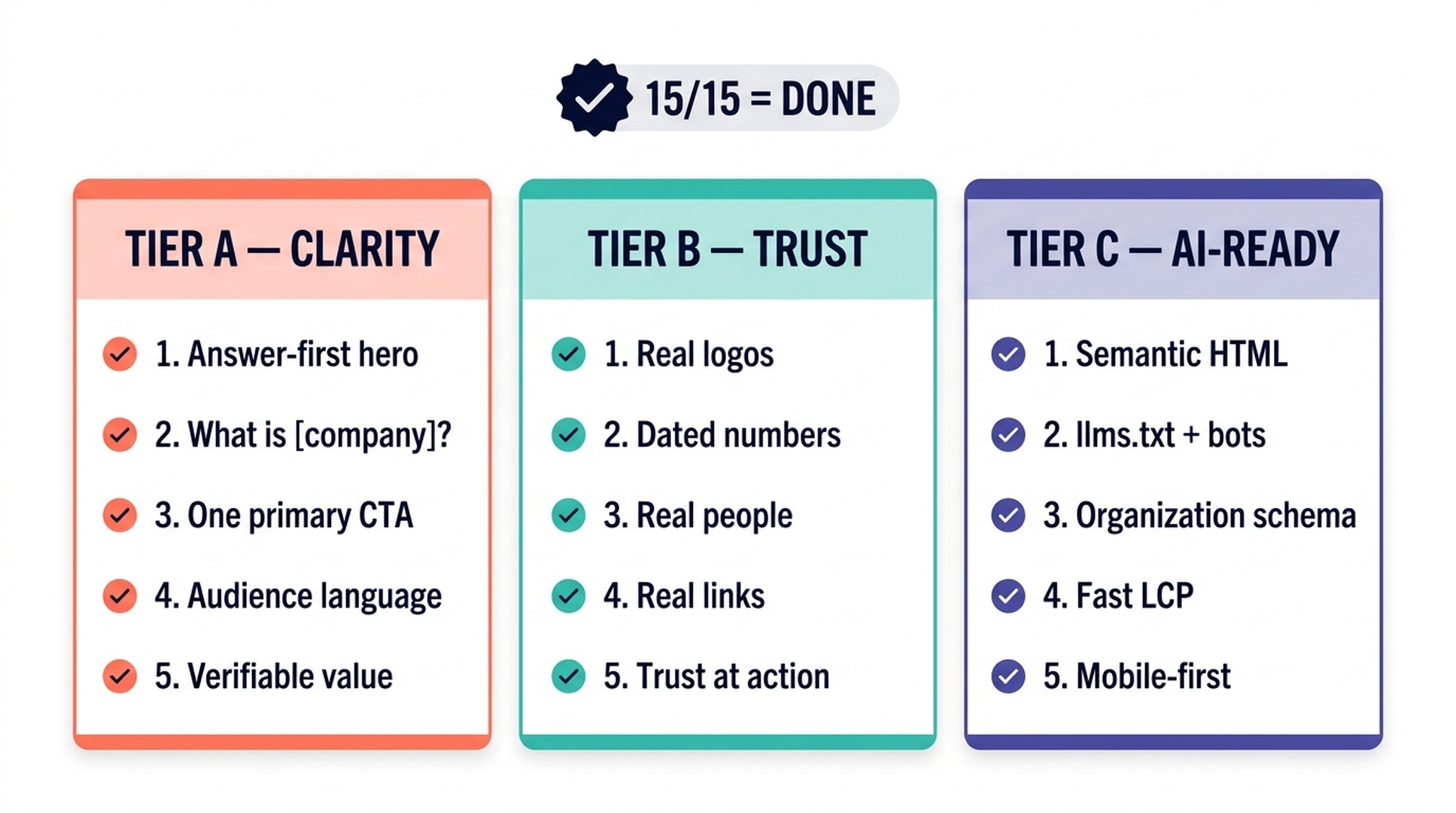
The 15-point checklist grouped into three tiers: clarity, trust, and AI-readiness.
Hand the Whole Job to Codex
If you are a beginner, you do not have to implement the 15 points by hand. Codex — OpenAI's coding agent that runs in your terminal and edits files directly — can run this exact workflow. Install Codex, point it at your site's repository, give it the SKILL.md below, and it will audit your homepage, apply the fixes it can, and report what still needs a human decision.
Here is the complete, copy-pasteable skill:
---
name: homepage-design-audit-and-fix-2026
description: Audit and improve a website homepage so it converts human visitors and gets cited by AI search engines. Use when a user wants a 2026 homepage review, wants to implement the 15-point homepage checklist, or asks to fix a homepage that gets traffic but no conversions or AI citations.
---

# Homepage Design Audit And Fix (2026)

Turn a homepage into a two-reader asset: clear for humans, readable by AI engines. Do not invent metrics, customer results, or product capabilities. When data is unavailable, report it as unavailable.

## Inputs (collect before starting)

- Repository path or site source access: ____
- Live homepage URL: ____
- What the business sells, in one sentence: ____
- Primary audience: ____
- Primary goal (demo request, purchase, signup, call): ____
- Allowed external data sources (e.g., PageSpeed Insights API, Google Search Console export): ____

## Prerequisites

- Run only with user-authorized access to the repo and any external data source.
- Never ask for, print, or write API keys, tokens, cookies, or credentials into logs, files, or output.
- If an external data source is not authorized or not configured, skip it and mark that item as "not checked — no data source."

## Steps

1. **Extract the current state.** Read the homepage source (HTML/template) and note: hero copy, H1/H2 structure, CTA count, trust elements, image assets, schema, robots.txt, and whether an llms.txt exists.
2. **Score against the 15-point checklist.** Evaluate each of the 15 checks (answer-first hero, "What is [company]?" block, one primary CTA, audience language, verifiable value prop, real logos, dated numbers, real people, real links, trust at the action, semantic HTML, llms.txt + bots, Organization schema, fast LCP, mobile-first). For each: PASS, FAIL, or NOT CHECKED with a one-line reason.
3. **Fix what is safe to change.** Implement code-level fixes in the repo: semantic heading structure, one primary CTA, adding/rewriting the "What is [company]?" block, compressing and preloading the hero image, adding Organization schema, adding an llms.txt, and updating robots.txt to allow AI crawler user agents. Do not publish, merge, or deploy without user approval.
4. **Verify locally.** Run a local rendering or static check after edits: confirm one H1, logical heading order, no broken links introduced, and that the page still renders at 375px width.
5. **Report.** Return a table of the 15 checks with PASS/FAIL/NOT CHECKED status, a list of files changed and exactly what changed, anything that needs a human decision (copy approval, real customer logos, media links, date on statistics), and any data sources used with their retrieval time.

## Output

- Homepage scorecard (15-point table).
- Diff summary: files changed, before → after.
- Human-decision queue: items only a person can resolve.
- Data-source log: provider, what was queried, when, and whether results were estimates.

## Limitations

- Never fabricate conversion rates, rankings, AI citations, customer counts, or product capabilities.
- Do not claim schema or llms.txt guarantee AI Overviews, AI Mode, or any ranking.
- Do not touch production, push commits, or deploy without explicit user approval.
How to run it: copy the block above into a file named SKILL.md inside your project's .claude/skills/ folder (or ~/.codex/skills/ for Codex), then tell Codex: "Run the homepage-design-audit-and-fix-2026 skill on this repo." It will follow the steps, edit files in a branch, and hand you a scorecard and a human-decision queue instead of a generic report. If you are new to agent-driven SEO work, our SEO reports for clients with Codex explains the workflow basics, and SEO forecasting for beginners shows how to set realistic expectations before you start changing pages.
What Beginners Get Wrong
- Designing for the desktop hero only. If the mobile view breaks, you lose 60–70% of visitors and tell Google's mobile-first index your page is broken.
- Multiple competing CTAs. Every extra button is a decision you force on the visitor; one primary action converts better.
- Treating AI search as optional. A homepage AI engines cannot read is a homepage that does not get recommended. Semantic HTML,
llms.txt, and bot access are not optional in 2026. - Unverifiable claims. "Market leader" and stock photos teach readers to trust nothing. Named customers, dated numbers, and real links compound trust.
- Skipping the "What is [company]?" block. The single cheapest AI-readability win is also the one most homepages skip.
- Letting the hero load slowly. A heavy hero image is your LCP bottleneck; every 100ms of load time measurably costs conversions.
FAQ
Do I need a redesign to get AI citations? No. The highest-impact fixes are content and structure changes — a clearer hero, a "What is [company]?" block, semantic headings, schema, and llms.txt — not a visual redesign.
Will schema or llms.txt guarantee my homepage appears in AI answers? No. They improve your chances of being read and understood, but no single tactic guarantees AI Overviews, AI Mode, or rankings.
I am not a developer. Can I still do this? Yes. The copy-level fixes (hero, "What is" block, dated numbers) you can do in any CMS. The technical fixes are exactly what the Codex skill above automates.
How often should I review my homepage? At minimum quarterly, and after any major product or brand change. AI search behavior and Google's features evolve quickly, so treat the 15-point checklist as a recurring audit, not a one-time task.
What is the most important tier for a new site? Tier A (clarity). If people and AI engines cannot tell what you do, nothing else on the page matters.
Author: Leah Foster, Conversion SEO Strategist for 400+ Landing Pages at Auspia. Leah writes about homepage conversion paths, content-to-demo journeys, and design choices that win both human readers and AI search engines.


