


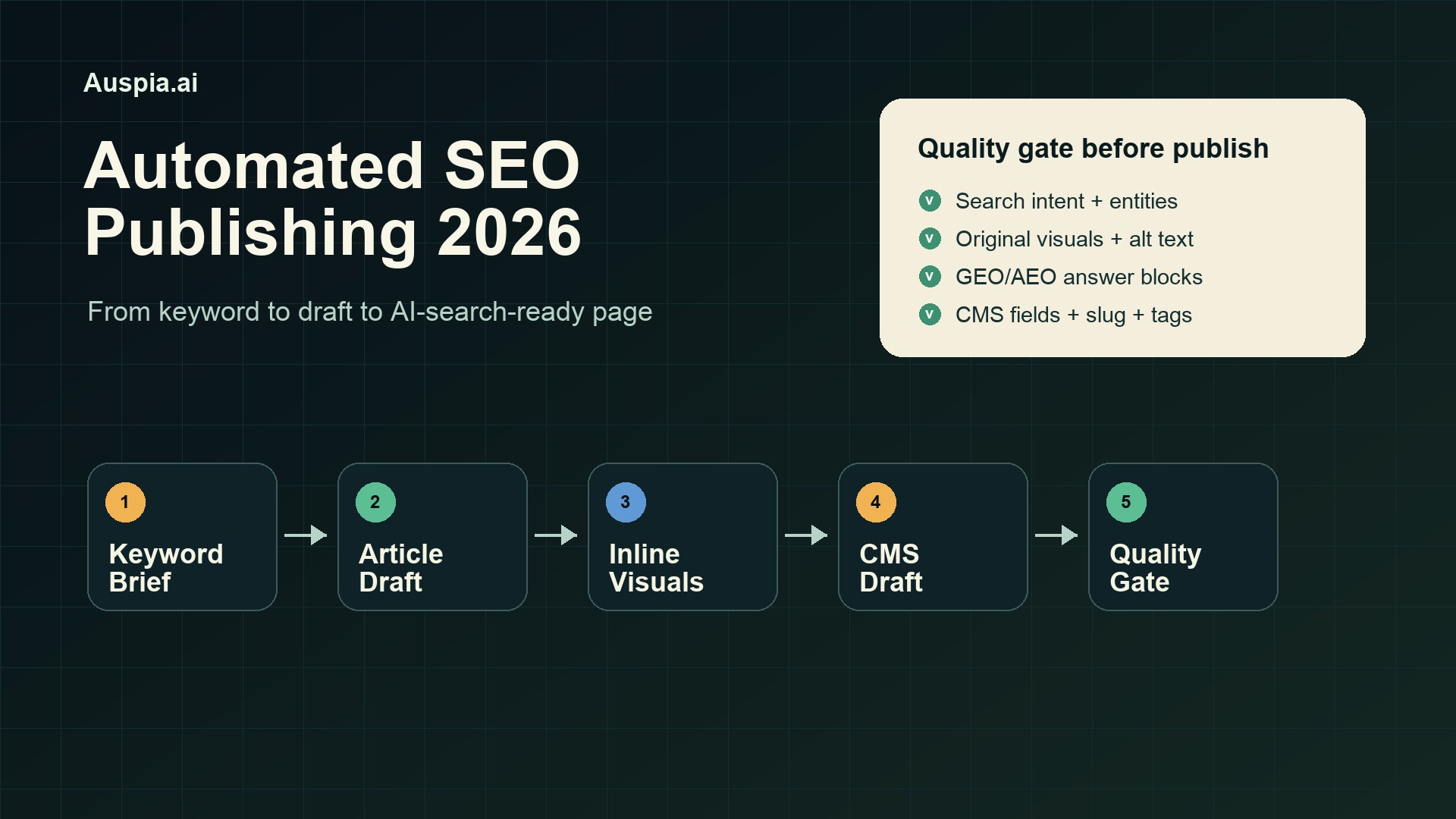
The short version
Automated SEO publishing works best when you stop treating the agent like a magic writer and start treating it like a production operator.
The reliable 2026 workflow is simple:
- Give the agent one keyword, one audience, one offer, and one search intent.
- Ask it to produce the article package: title, SEO title, meta description, slug, body, FAQ, and image slots.
- Generate original inline visuals instead of reusing stock images.
- Save the article as a CMS draft, not a published page.
- Run a final quality gate for missing fields, bad formatting, weak answers, image issues, and GEO/AEO readiness.
That last step matters. Most failed automation projects do not fail because the model cannot write. They fail because the CMS post goes live with a missing image, a broken slug, no category, a weak meta description, or a body that looks fine in Markdown but breaks on the site.
This article breaks down two practical ways to build an automated SEO publishing system in 2026: a controllable browser-agent workflow and a managed AI publishing workflow. Both can work. The right choice depends on how much control, repeatability, and review your team needs.
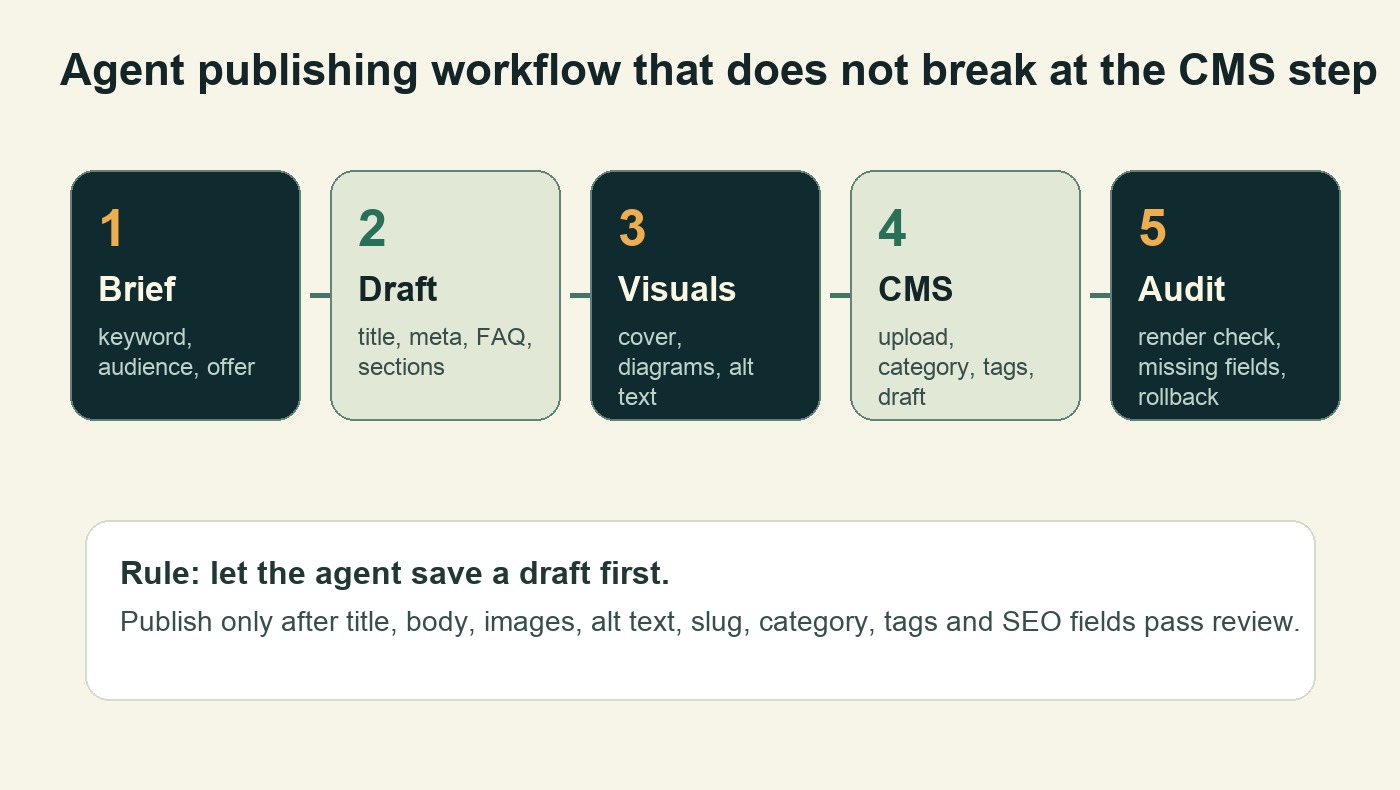
The safest automation path is not "write and publish." It is "brief, draft, visualize, save, inspect, then publish."
Why automated SEO publishing is different in 2026
A few years ago, SEO automation usually meant content spinning, keyword templates, or bulk AI drafts. That approach is too fragile now.
Search results, AI Overviews, answer engines, and LLM assistants reward pages that are easy to understand, easy to cite, and tied to a clear entity. Thin posts can still be indexed, but they rarely become trusted answers. The bar has moved from "can we generate 100 articles?" to "can we generate and maintain useful pages that pass both human review and machine extraction?"
A good automated publishing system now has to handle more than body copy:
Layer | What the agent must produce | Why it matters |
|---|---|---|
Search intent | Main query, reader problem, article angle | Prevents generic posts that do not match demand |
SEO metadata | Title, meta description, slug, headings | Helps search engines and users understand the page |
GEO/AEO structure | Direct answers, summaries, tables, FAQ | Makes the page easier for AI systems to quote or summarize |
Visual assets | Cover, diagrams, screenshots, alt text | Improves clarity and supports social/OG sharing |
CMS fields | Category, tags, featured image, draft status | Prevents publishing errors and orphaned content |
Review loop | Render check, missing-field check, factual check | Keeps automation from shipping broken pages |
The goal is not to remove human judgment. The goal is to remove repetitive production work so the human can review strategy, accuracy, and brand fit.
Method one: build a controllable browser-agent workflow
The first approach is to use a browser-capable agent as an operator. The agent writes the article package, creates visuals, opens the CMS, fills the fields, uploads images, saves a draft, and returns the edit link.
This is the better path when you want control and repeatability.
Before you start, prepare three things:
- A CMS account with draft, upload, category, tag, and SEO-field permissions.
- A model or agent environment that can write, browse, create files, and interact with the CMS.
- A standard prompt or skill that defines your brand, article format, metadata rules, image requirements, and final inspection checklist.
Do not begin with a giant instruction like "write an SEO article and publish it." That usually creates a messy failure. Split the workflow into five steps.
Step 1: generate the SEO article package
The first step should produce text only. Ask for a complete article package, not just a body draft.
A practical input brief looks like this:
Target keyword: automated SEO publishing
Audience: B2B growth teams and founders
Year marker: 2026
Brand: Auspia.ai helps teams automate SEO, GEO, and AI-search visibility
Search intent: user wants a practical workflow, not a definition
Output: title, SEO title, meta description, slug, excerpt, article body, FAQ, image slots, category, tags
Tone: practical, specific, no hype
The output should include planned image slots such as:
[Insert visual 1: workflow diagram]
[Insert visual 2: quality gate checklist]
This small detail makes the later CMS step much easier. The agent knows where each image belongs, and the human reviewer can see whether the visuals actually support the argument.
Step 2: generate original article visuals
Automated content should not look like a wall of text. For SEO and AI-search readiness, visuals help explain the model, process, checklist, or comparison that the article is teaching.
For this kind of post, three visual types work well:
- A workflow diagram showing the production pipeline.
- A quality gate checklist showing what blocks publication.
- A comparison table showing when to use agent execution versus a managed platform.
The safest rule is simple: every image should carry information. Avoid generic gradients, fake dashboards, or decorative robots. Also avoid reusing source article images. If an outside article inspired the structure, create new diagrams that express your own process.
Step 3: export images into real web files
If your agent creates HTML diagrams, presentation slides, or canvas graphics, make it export real images before entering the CMS.
Use a fixed ratio such as 16:9 for covers and diagrams. For a blog post, 1200 x 675 or 1920 x 1080 works well. Then check:
- The text is readable on desktop and mobile.
- There is no large empty area around the diagram.
- The file is not blurry.
- The filename is descriptive.
- The alt text explains the image, not the decoration.
If one image fails, stop the workflow. Do not let the agent publish a half-finished post just because the text is ready.
Step 4: fill the CMS and save a draft
Only after the article package and images exist should the agent open the CMS.
For a typical blog CMS, the agent should fill:
- Article title
- URL slug
- Excerpt
- SEO title
- Meta description
- Category
- Tags
- Featured image
- Body content
- Inline images with alt text
- FAQ section
- Draft status
Saving as a draft is the safer default. It gives the automation system a clear finish line without giving it permission to ship mistakes directly to production.
For mature teams, direct publishing can work, but only after the workflow has passed repeated dry runs and has a rollback process.
Step 5: run a pre-publish quality gate
The quality gate is where most automation systems become useful instead of risky.
Ask the agent to inspect the saved draft before it finishes. It should check whether the title is present, the body is complete, headings are preserved, the FAQ appears near the end, images are inserted, alt text exists, category and tags are set, the SEO title and meta description are filled, and the edit URL is returned.
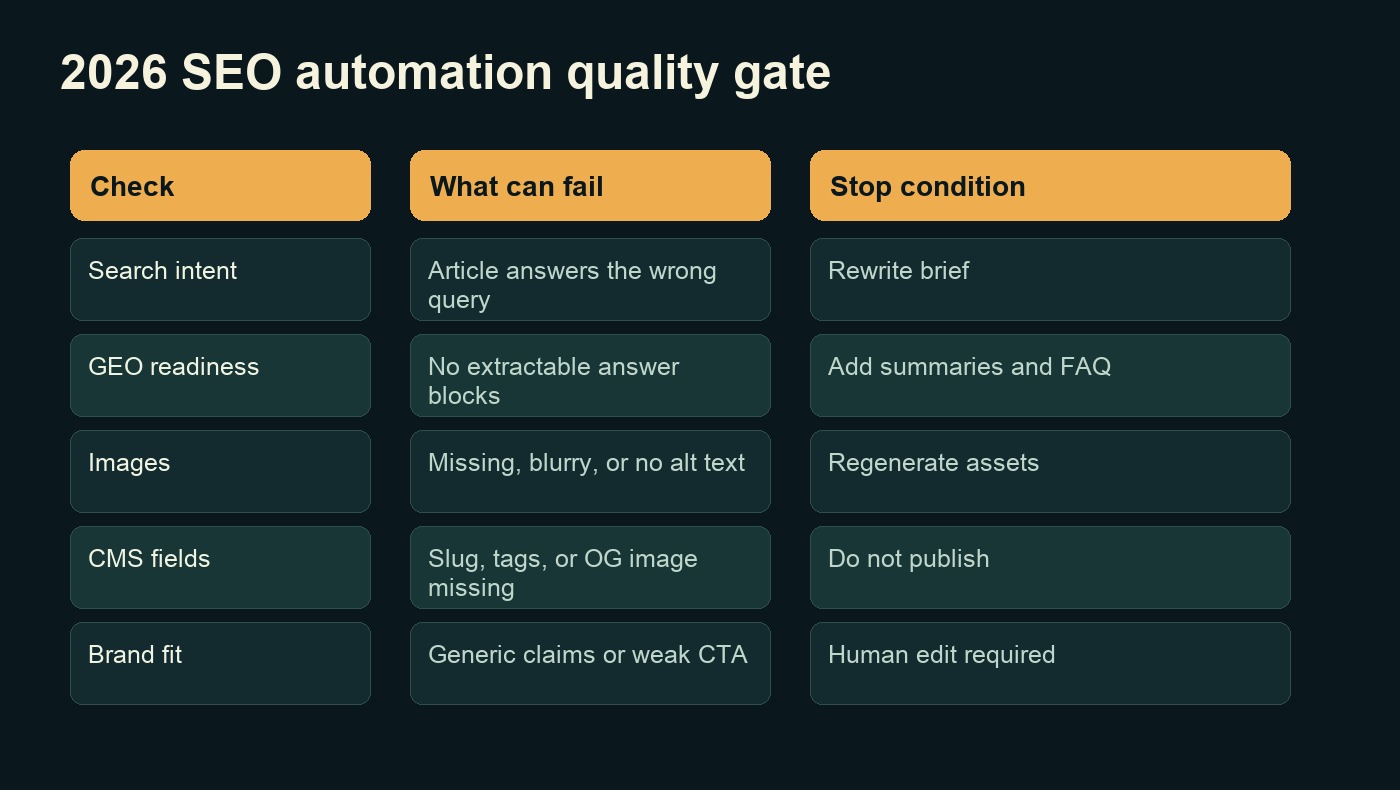
A useful quality gate tells the agent when to stop. Missing images, missing SEO fields, and weak answer blocks should block publishing.
Here is a compact checklist your team can reuse:
Check | Pass condition | If it fails |
|---|---|---|
Search intent | The intro answers the target query directly | Rewrite the brief |
Metadata | Title, SEO title, meta description, and slug exist | Fill before draft save |
Structure | H2/H3 hierarchy is preserved | Reformat the body |
Visuals | Images are inserted with descriptive alt text | Re-upload or regenerate |
GEO/AEO | Summary, tables, and FAQ are extractable | Add answer blocks |
Taxonomy | Category and tags are set | Stop before publish |
Brand fit | CTA is relevant and not overpromising | Human edit required |
This is where the system starts to feel like an internal publishing skill rather than a one-off prompt.
Method two: use a managed AI publishing workflow
The second approach is to use a managed AI agent or AI publishing platform that handles more of the browser work for you.
This is faster to test. You log into the CMS, give the agent a task, and let it attempt the full path: write, create visuals, fill the backend, and save a draft.
The advantage is speed. A founder or marketer can validate the workflow in an afternoon.
The tradeoff is control. Managed agents can be less predictable when your CMS has custom fields, strict taxonomy, unusual image handling, or multi-step review rules. They may also be harder to turn into a stable internal process that your team can reuse every week.
A practical way to decide:
If your goal is... | Better choice |
|---|---|
Quick proof of concept | Managed AI publishing workflow |
Long-term repeatable process | Controllable browser-agent workflow |
Complex CMS rules | Controllable workflow |
Low setup effort | Managed workflow |
Strict brand and SEO governance | Controllable workflow with review gate |
Many teams should start with the managed path for validation, then rebuild the successful parts into a more controlled workflow.
What most teams miss
The common mistake is measuring automation by how many articles it can generate.
That is the wrong metric.
A better metric is how many publish-ready pages the system can create without missing fields, broken formatting, weak intent matching, or generic claims. One clean draft that passes review is more useful than twenty thin posts that need manual repair.
For 2026 SEO and GEO work, the operating standard should be:
- Every article has a specific search intent.
- Every article has a direct answer near the top.
- Every article includes metadata and taxonomy.
- Every article has original visual support.
- Every article has extractable sections for AI answers.
- Every article is saved as a draft until the quality gate passes.
This is how automated publishing becomes a system, not a content gamble.
How Auspia thinks about automated SEO/GEO publishing
Auspia's view is that most companies do not need to become SEO technicians to benefit from SEO, GEO, and AI-search optimization. They need a system that can turn business knowledge into structured, searchable, answer-ready pages.
That system should handle the boring parts automatically: keyword-to-brief conversion, article structure, metadata, GEO/AEO answer blocks, internal-link suggestions, image requirements, and publishing checks.
The human role is still important, but it changes. Instead of manually formatting posts, chasing image sizes, or filling SEO fields one by one, the human reviews the strategy and the final draft.
If your team wants this without building the whole workflow from scratch, Auspia.ai is built for automated SEO/GEO execution. It helps teams move from manual SEO knowledge work to intelligent SEO operations, including AI-search visibility, content automation, and answer-ready page production.
A reusable prompt for your first automated SEO draft
Use this as a starting point:
You are creating a CMS-ready SEO article draft for 2026.

Topic: [topic]
Target keyword: [keyword]
Audience: [audience]
Brand: [brand description]
Offer or product: [offer]
Search intent: [what the reader wants]

Create:
- Article title
- SEO title
- Meta description
- URL slug
- Excerpt
- Category and tags
- Article body with H2 sections
- FAQ
- Two inline visual briefs with alt text
- Final quality checklist

Rules:
- Answer the main query in the first section.
- Include one summary table.
- Do not publish directly. Save as draft.
- Stop if images, alt text, slug, category, tags, or SEO fields are missing.
The prompt is not the full system. It is the first brick. Once it works, turn it into a reusable internal skill and add CMS-specific instructions.
FAQ
Can agents fully automate SEO publishing in 2026?
They can automate much of the production workflow: briefs, drafts, visuals, uploads, metadata, and CMS draft creation. Teams should still keep a review gate for accuracy, brand fit, and compliance.
Should automated SEO posts be published directly?
Usually no. Draft-first is safer. Direct publishing only makes sense after repeated successful runs, strict checks, and a rollback process.
What is the difference between SEO automation and GEO automation?
SEO automation focuses on search visibility signals such as intent, metadata, internal links, and page structure. GEO automation also prepares pages to be extracted, summarized, and cited by AI answer systems through clear answer blocks, tables, entity context, and FAQ sections.
How many images should an automated article include?
For a practical article, one featured image and one or two inline explanatory visuals are enough. The images should explain the workflow, checklist, comparison, or data model. Decorative images add little value.
What is the safest first workflow to automate?
Start with draft creation, not direct publishing. Ask the agent to create the article package, generate visuals, fill the CMS, save a draft, inspect the draft, and return the edit link.
Final recommendation
Automated SEO publishing is useful when it behaves like a production line with inspection, not a content generator with a publish button.
For 2026, the winning setup is keyword brief, article package, original visuals, CMS draft, and quality gate. Once that works, you can scale the workflow across SEO, GEO, and AEO pages without asking every team member to master technical SEO.
Auspia.ai is designed for that exact shift: fully automated SEO/GEO execution, no specialist knowledge required, and intelligent SEO workflows that help teams produce search-ready and AI-answer-ready pages with less manual work.


