Grocery GEO Rule: Use Alexa for Capture, Then Review Before Checkout
Alexa can make grocery shopping easier, but the safest workflow is not “say a vague grocery word and buy whatever appears.” The better habit is: capture items by voice, clarify the details while the need is fresh, check the pantry, review substitutions, and confirm the final cart in the app before money leaves the account.
That is the buyer-side version of Alexa Grocery Shopping GEO. It is not only about ranking for a keyword. It is about understanding the real questions people ask when they are tired, cooking, sharing a household list, replacing a staple, or trying not to overbuy food they already have.
Amazon’s own help pages separate several related actions: Alexa can support lists, voice purchasing settings, purchase controls, and orders from order history or cart. For buyers, that distinction matters. A list command is usually low risk. A purchase command needs more review, especially for groceries where brand, size, flavor, freshness, and delivery timing change the outcome.
A small research note: in this DataForSEO run, direct “Alexa grocery shopping” query data was sparse. That is normal for specific voice-assistant behaviors. The useful intent still shows up through related list, reorder, voice shopping, pantry, and “how do I” questions. For this article, I treat those as practical buyer tasks rather than stuffing the same keyword into every heading.
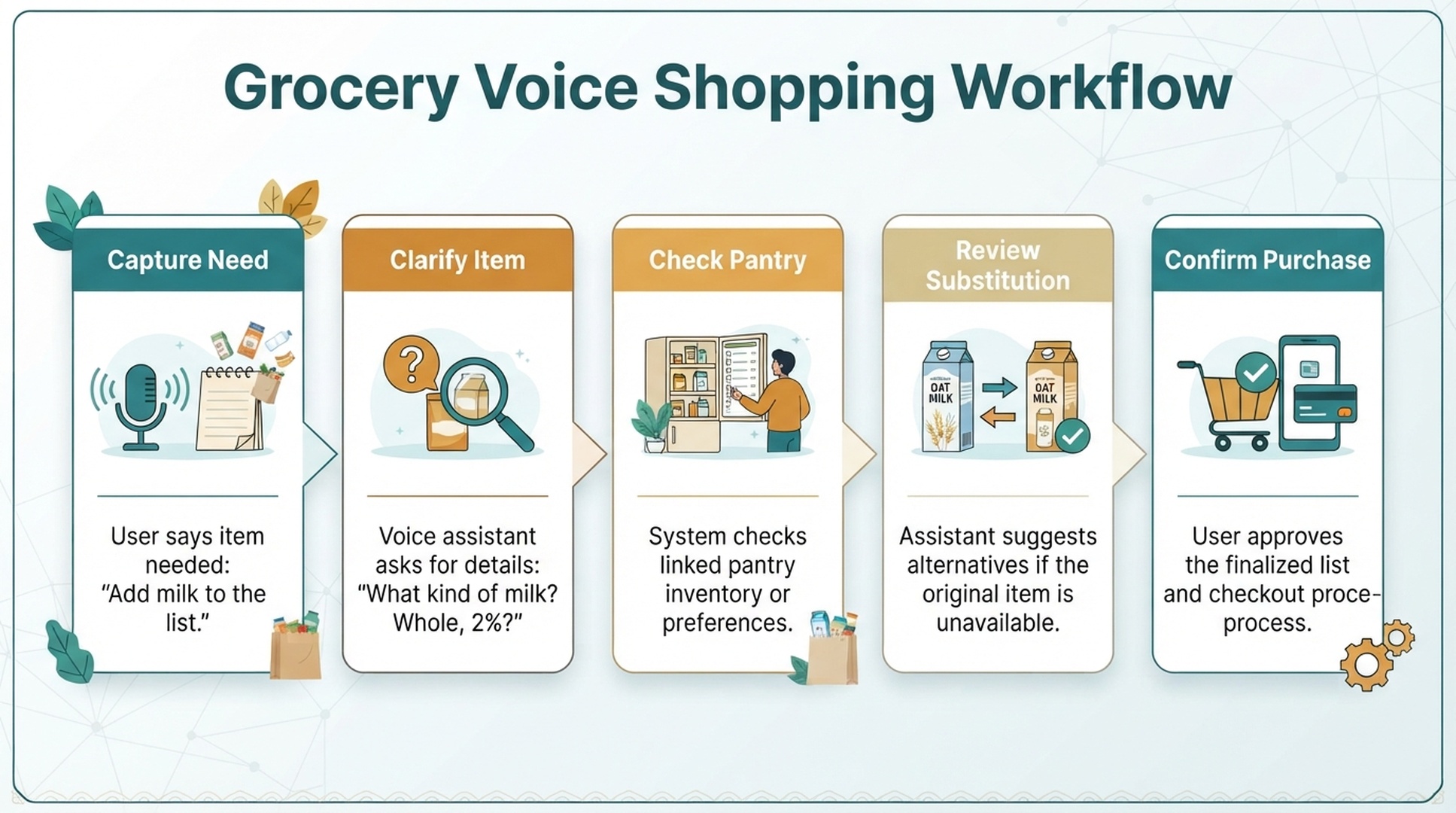
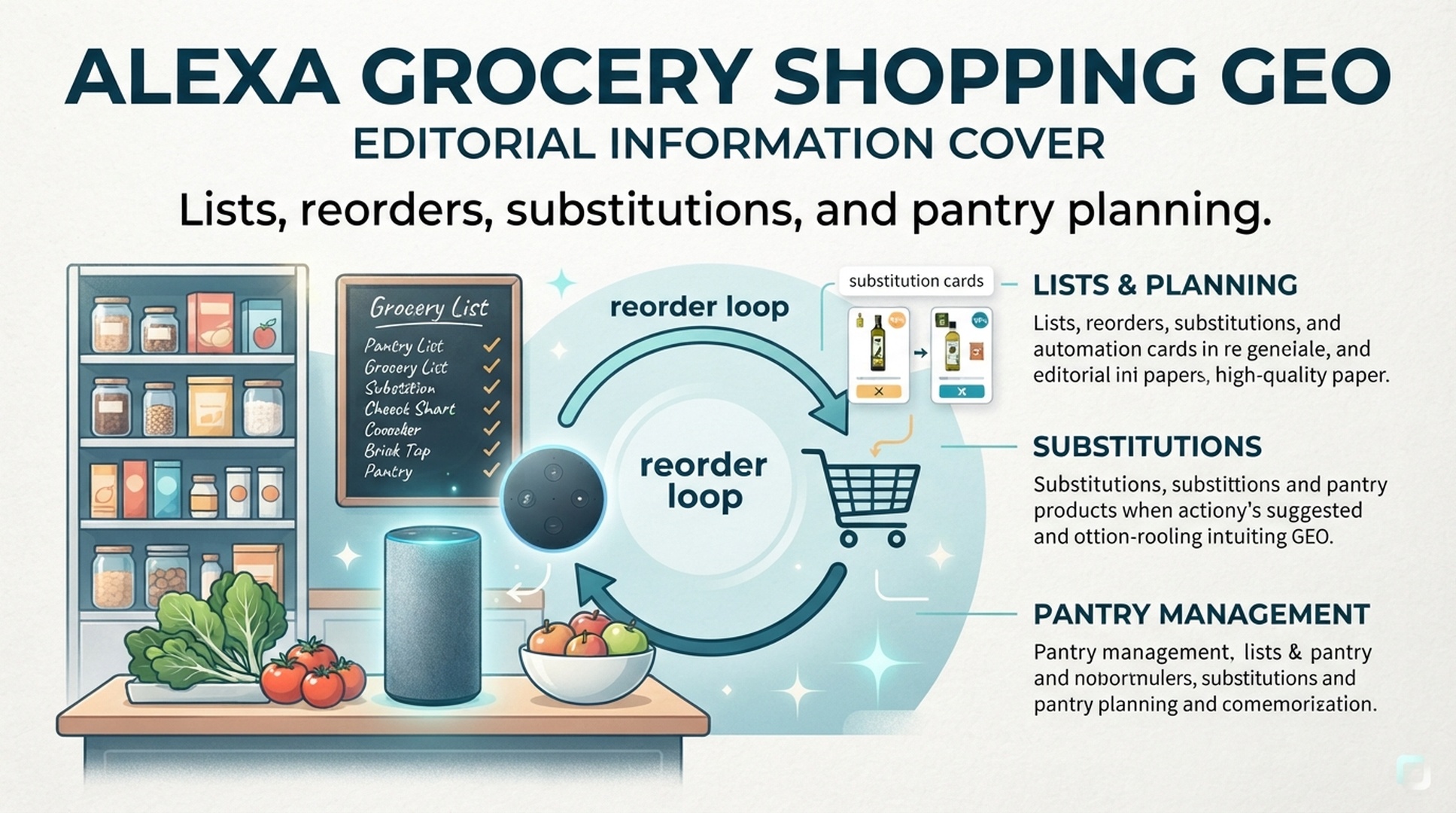
Caption: A safe grocery voice workflow starts with capturing the need, then clarifying the item, checking the pantry, reviewing substitutions, and confirming the final purchase.
Why Grocery Voice Shopping Is Different From Buying Batteries
Grocery is a messy category for voice shopping because many items sound simple but contain hidden choices.
“Add milk” can mean whole milk, 2%, oat milk, lactose-free milk, a half gallon, a gallon, a specific brand, or the cheapest available option. “Order bread” can mean sandwich bread, sourdough, gluten-free bread, hamburger buns, or the same loaf bought last week. “Get snacks” is not a product request at all. It is a mood.
That is why grocery voice shopping should be treated as a planning layer first and a checkout layer second.
Grocery task | Good Alexa use | Risk level | Best review step |
|---|---|---|---|
Remembering missing items | Add to a list by voice | Low | Check list in the Alexa or Amazon app |
Reordering shelf-stable staples | Use order history | Medium | Confirm size, quantity, and price |
Buying fresh food | Ask for help, then review manually | High | Review freshness, delivery window, and substitutions |
Household planning | Shared list capture | Medium | Remove duplicates before checkout |
Pantry management | Maintain recurring staple list | Low to medium | Compare list against what is already at home |
Amazon’s Alexa help explains that lists can be managed by voice or in the Alexa app, while separate voice purchasing controls govern whether purchases can be made by voice. Buyers should keep those two concepts separate: list capture is convenient; payment authorization deserves guardrails.
The Buyer’s Grocery Loop
A reliable Alexa grocery workflow has five parts.
1. Capture the item at the moment of need
The biggest benefit of voice is timing. You notice the cereal is gone while making breakfast. You notice the olive oil is low while cooking. You notice the dog food is almost empty when feeding the dog.
Good commands:
- “Alexa, add unsweetened oat milk to my grocery list.”
- “Alexa, add low-sodium chicken broth to my shopping list.”
- “Alexa, add dishwasher detergent pods to my pantry list.”
- “Alexa, add bananas, Greek yogurt, and eggs to my grocery list.”
The extra words matter. “Unsweetened,” “low-sodium,” “pods,” and “Greek” reduce ambiguity later.
2. Clarify before the list gets crowded
A grocery list becomes less useful when it fills with vague items.
Weak list items:
- milk
- snacks
- cereal
- bread
- fruit
- coffee
Better list items:
- 2% milk, half gallon
- nut-free school snacks
- plain oatmeal cereal
- whole wheat sandwich bread
- bananas and strawberries
- medium roast ground coffee
The goal is not to make voice commands long. The goal is to include the detail that would cause the wrong product to arrive.
3. Check the pantry before buying
Alexa can help you remember needs, but it cannot always know what is already in the cabinet, refrigerator, or freezer unless your household maintains that habit manually. Before converting a list into an order, do a short pantry pass.
Use a quick three-zone scan:
- Fridge: milk, eggs, produce, leftovers, cheese, sauces
- Freezer: meat, frozen vegetables, breakfast items, prepared meals
- Pantry: grains, pasta, canned goods, snacks, baking supplies, cleaning products
This is where grocery GEO becomes practical: the buyer’s real question is rarely “Alexa grocery shopping GEO.” It is closer to “How do I stop buying duplicate groceries because my voice list is messy?”
4. Review substitutions as rules, not surprises
Substitutions are one of the biggest sources of grocery frustration. The wrong replacement can be harmless for paper towels and completely unacceptable for allergies, dietary restrictions, baby products, pet food, or a recipe-specific ingredient.
Before checkout, decide which items can be substituted and which cannot.
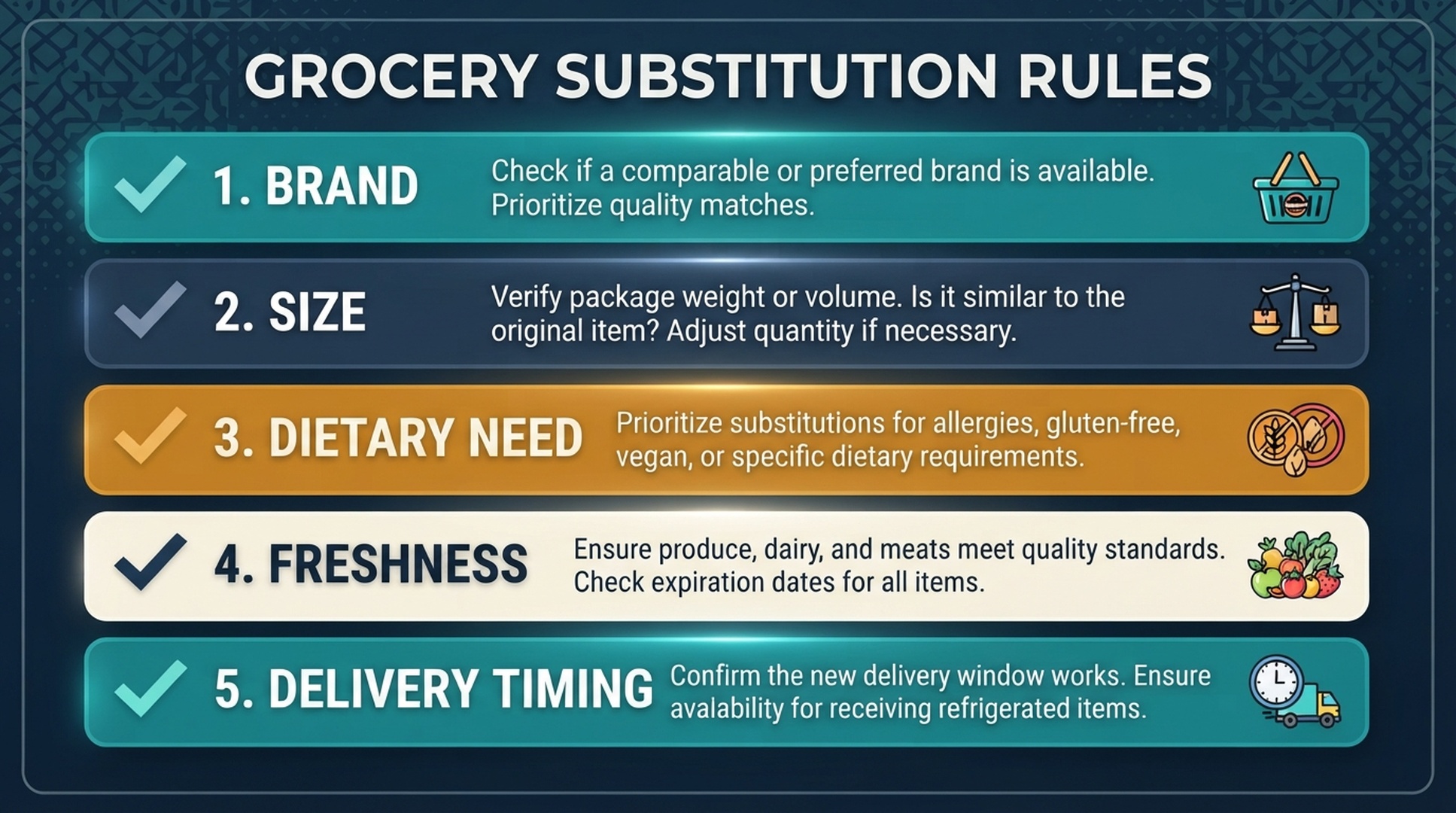
Caption: Grocery substitutions should be reviewed against brand, size, dietary need, freshness, and delivery timing before checkout.
5. Confirm purchase settings and final cart
If you use voice purchasing, review your controls. Amazon provides settings for turning Alexa voice purchasing on or off, adding a voice code, and managing recognized voices for purchases. Those controls are especially important in shared households, homes with children, guest access, or devices placed in kitchens and living rooms.
A simple rule works well: use voice for capture, use the app for money.
A Better Grocery List System for Families
Shared households create a different problem: everyone adds items, but no one owns cleanup.
A family grocery system should define four rules.
Rule | Why it matters | Example |
|---|---|---|
Name the list | Avoid mixing groceries, gifts, and household supplies | Grocery, Costco, Pantry, Pet Supplies |
Add enough detail | Prevent wrong product choices | “large brown eggs,” not “eggs” |
Mark urgent items | Separate “need today” from “buy soon” | “baby formula today” |
Review duplicates | Stop three people from adding the same thing | “milk” plus “oat milk” plus “2% milk” |
If multiple people add to the same list, make one person responsible for final cart review. That person does not need to do all the shopping. They just need to turn a messy voice list into a clean purchase decision.
Pantry Planning With Alexa: The Staple List Method
For grocery buyers, the most useful Alexa habit may be a staple list rather than a one-time shopping list.
Create a repeatable list of items your household almost always needs:
- Breakfast staples: oats, cereal, eggs, yogurt, coffee
- Lunch staples: bread, wraps, deli items, fruit, snacks
- Dinner staples: rice, pasta, canned tomatoes, broth, frozen vegetables
- Cleaning staples: paper towels, dish soap, detergent, trash bags
- Pet staples: food, treats, litter, waste bags
Then maintain a simple “running low” habit. Instead of waiting for a full weekly planning session, add the item when the shelf tells you.
Useful commands:
- “Alexa, add brown rice to my pantry restock list.”
- “Alexa, add trash bags to my household supplies list.”
- “Alexa, add cat food to my pet supplies list.”
- “Alexa, add coffee filters to my grocery list.”
This method helps reduce emergency orders and duplicate purchases because the list reflects real consumption instead of guesswork.
What Groceries Are Safe to Reorder by Voice?
Voice reorders work best when the item is stable, repeatable, and low ambiguity.
Good reorder candidates:
- paper towels
- detergent
- trash bags
- coffee pods or filters
- pet food with the same formula
- shelf-stable snacks your household buys repeatedly
- canned goods with the same size and brand
Riskier reorder candidates:
- fresh produce
- meat or seafood
- bakery items
- dairy with short expiration windows
- baby formula if size or availability changes
- allergy-sensitive foods
- recipe-specific specialty items
The question is not “Can Alexa reorder it?” The question is “Would I be comfortable receiving the same item again without inspecting alternatives?” If the answer is no, use Alexa to add the item to a list, not to complete the purchase.
Grocery Commands That Work Better
Specificity makes Alexa more useful. These examples are deliberately plain because they match how people talk at home.
Situation | Better command |
|---|---|
You used the last egg | “Alexa, add large eggs to my grocery list.” |
You need a recipe item | “Alexa, add unsalted butter for baking to my grocery list.” |
You are avoiding allergens | “Alexa, add nut-free granola bars to my shopping list.” |
You want a recurring staple | “Alexa, add our usual dog food to the pet supplies list.” |
You are not ready to buy | “Alexa, add dish soap to my household list.” |
You want to prevent a bad substitute | “Alexa, add lactose-free milk, no substitution, to my grocery list.” |
You need quantity clarity | “Alexa, add two cans of black beans to my grocery list.” |
You are planning a delivery | “Alexa, add fresh strawberries for Friday delivery review.” |
For buyers, better prompts reduce cleanup. For sellers, these prompts reveal how product pages should answer real grocery questions: size, flavor, pack count, dietary suitability, freshness, usage occasion, and reorder confidence.
Where GEO Fits for Grocery Buyers and Brands
From the buyer side, GEO means understanding how AI assistants and answer systems interpret real shopping intent. A grocery shopper does not think in tidy SEO keywords. They think in moments:
- “We are out of this.”
- “Can I use a substitute?”
- “Did we already buy it?”
- “Which size should I choose?”
- “Can the kids accidentally order this?”
- “Is this the same product as last time?”
For brands and retailers, those moments are content opportunities. Product detail pages, A+ modules, FAQ sections, comparison tables, and support content should answer the questions a voice shopper would need before trusting a recommendation.
Good grocery GEO content covers:
- exact product name and variant
- size, count, and unit economics
- flavor, texture, and ingredient details
- dietary and allergen notes
- storage instructions
- freshness expectations
- substitution guidance
- reorder suitability
- household use cases
The best grocery content is not louder. It is easier for a buyer, assistant, or answer engine to verify.
FAQ
Can Alexa help with grocery shopping?
Yes. Alexa can help capture grocery items on lists, support shopping-related requests, and work with voice purchasing settings depending on your account and device setup. For groceries, the safest habit is to use Alexa for list capture and then review the cart in the app before checkout.
Is adding groceries to Alexa the same as ordering them?
No. Adding an item to a list is different from placing an order. Amazon’s help pages treat lists, voice purchasing, purchase controls, and orders as separate workflows. Buyers should understand which action they are taking before relying on voice commands.
How do I make Alexa grocery lists more accurate?
Use specific item language. Add brand, size, flavor, quantity, dietary need, or use case when it matters. “Add lactose-free milk, half gallon” is more useful than “add milk.”
What grocery items are safe to reorder?
Shelf-stable, repeatable, low-ambiguity items are safer for reorders: paper goods, detergent, coffee filters, pet food, canned goods, and snacks your household buys repeatedly. Fresh, allergy-sensitive, or recipe-specific items deserve manual review.
How should I handle grocery substitutions?
Set rules before checkout. Review brand, size, dietary requirements, freshness, and delivery timing. For allergy-sensitive or recipe-critical products, choose no substitution or review alternatives manually.
Should fresh food be bought by voice?
Voice can help you remember fresh food, but app review is safer for the final purchase. Produce, meat, seafood, bakery, and dairy often require freshness, delivery-window, and substitution checks that are hard to express in a short voice command.
Auspia Takeaway
Alexa grocery shopping works best when buyers separate remembering from buying. Let voice capture the need. Let a clean list organize the household. Let the app handle final review, substitutions, purchase controls, and delivery timing.
For GEO teams, grocery is a reminder that real search intent is often hidden inside routine behavior. The winning content is not the page that repeats “Alexa grocery shopping” the most. It is the page that answers the buyer’s next practical question before the assistant has to guess.
Sources: Amazon Customer Service pages on Alexa Lists, Shopping with Alexa, Place Orders with Alexa, Voice Purchasing settings, and Voice Code purchase controls.
Author: Simon Vale, 11-Year Search Intent Researcher at Auspia. Simon writes about buyer queries, SERP patterns, intent mapping, and content alignment for SEO and GEO programs.