


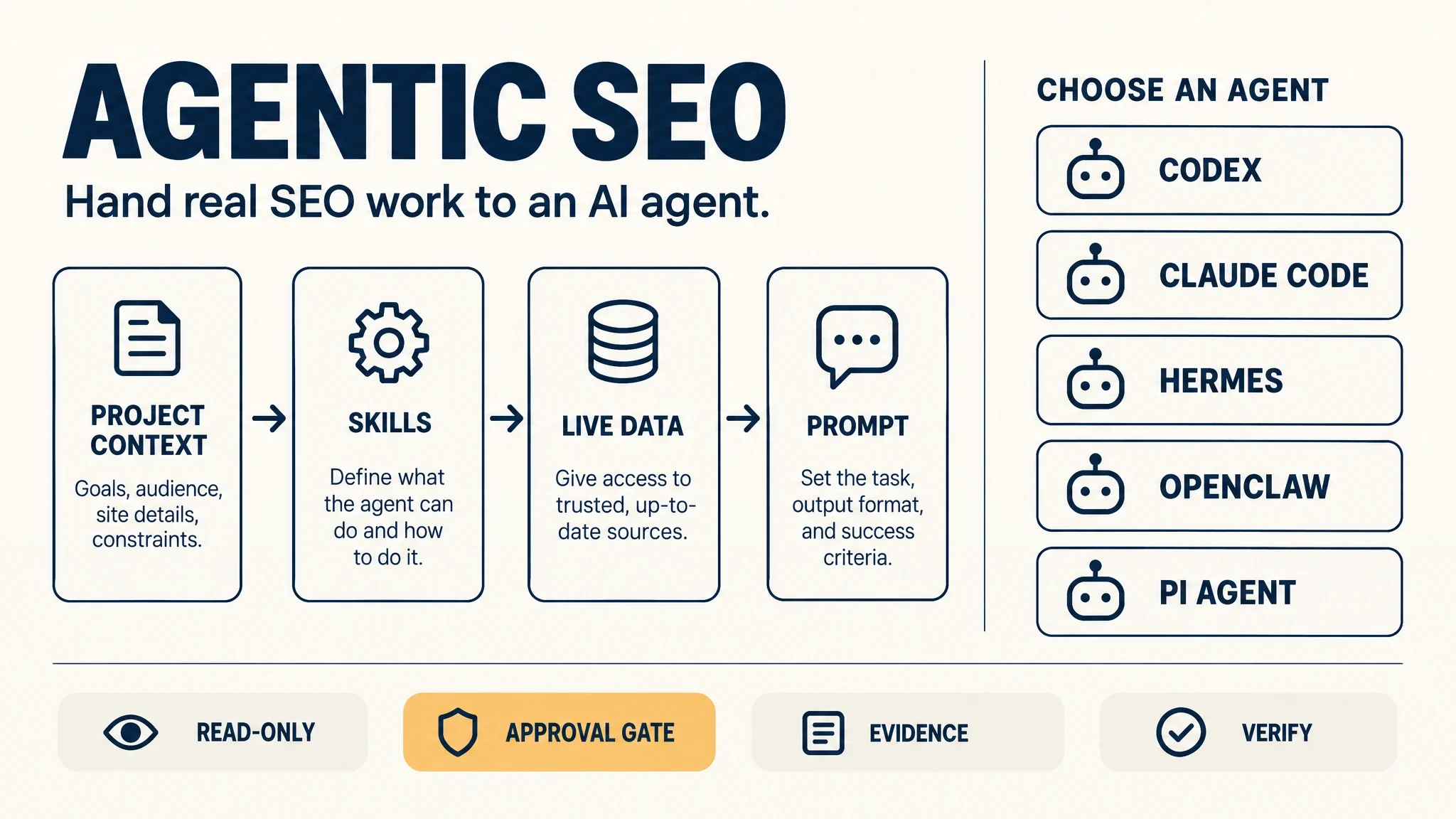
Most teams who say they "do agentic SEO" are running a long prompt in a chat window. That works fine the first time. Then the second run comes back shaped differently, the data is a week old, and nobody can tell whether the numbers moved or the prompt drifted.
The version that holds up differs in one specific way. The method lives in a file, not in your message. You write the procedure once, point an agent at it, and the same checks fire every run whether or not you remembered to ask for them.
That is the whole idea. What follows is how to build it, which agent to point at which job, and where it quietly breaks.
What "agentic" actually changes
Three things can be automated, and they are not the same thing.
Workflow automation | AI-assisted SEO | Agentic SEO | |
|---|---|---|---|
Who picks the steps | You, in advance | You, every conversation | You, once, in a written method |
Where data comes from | Wired integrations | Whatever you paste | The agent retrieves it |
On an unexpected input | Breaks | Depends on your phrasing | Follows a rule, or escalates |
Run-to-run consistency | Perfect and rigid | Low | High, and still adaptable |
Best for | High-volume, unchanging tasks | Exploration, one-off questions | Recurring analysis that needs judgment |
The practical difference shows up in what you stop doing. In a chat workflow you re-explain the site, the audience, the priority rules, and the output format every single time. Each re-explanation is a chance to forget one. In an agentic workflow those live in files the agent reads on every run, and your prompt shrinks to one line: run the content decay check for September.
There is a real cost to this. If a task is genuinely different every time you do it, there is no method to write down, and building one is overhead with no payoff. Checking 50,000 URLs for a status code is a job for a script, not an agent. The line is whether the task repeats and whether it needs judgment. Both true, and agentic wins. Either false, and you should not bother.
The four layers, and what each one is for
Every agentic SEO setup that survives has the same four parts. Skip one and you get a specific, predictable failure.
- Project context. A folder holding the things that do not change: the site, the markets it serves, who buys and why, what counts as a conversion, who the real competitors are, the editorial rules. This is what stops the agent writing generic advice for a business it does not understand. Miss this layer and you get confident, plausible, useless output.
- Skills. Written procedures. Each one says when to use it, what data it needs, the ordered steps, the scoring rules, the output format, and which actions need your approval. This is the layer that makes the workflow repeatable, and it is the one most teams skip.
- Live data access. Connectors that let the agent pull current numbers instead of waiting for you to export and paste. Search Console for your own performance. Analytics for behaviour. A rank or SERP source for what you cannot see in your own property. A crawler or CMS connection for page-level facts. Without this you have a very good analyst working from last month's spreadsheet.
- The prompt. The current task, nothing else. If your prompt is carrying context or method, those belong in layers one and two.
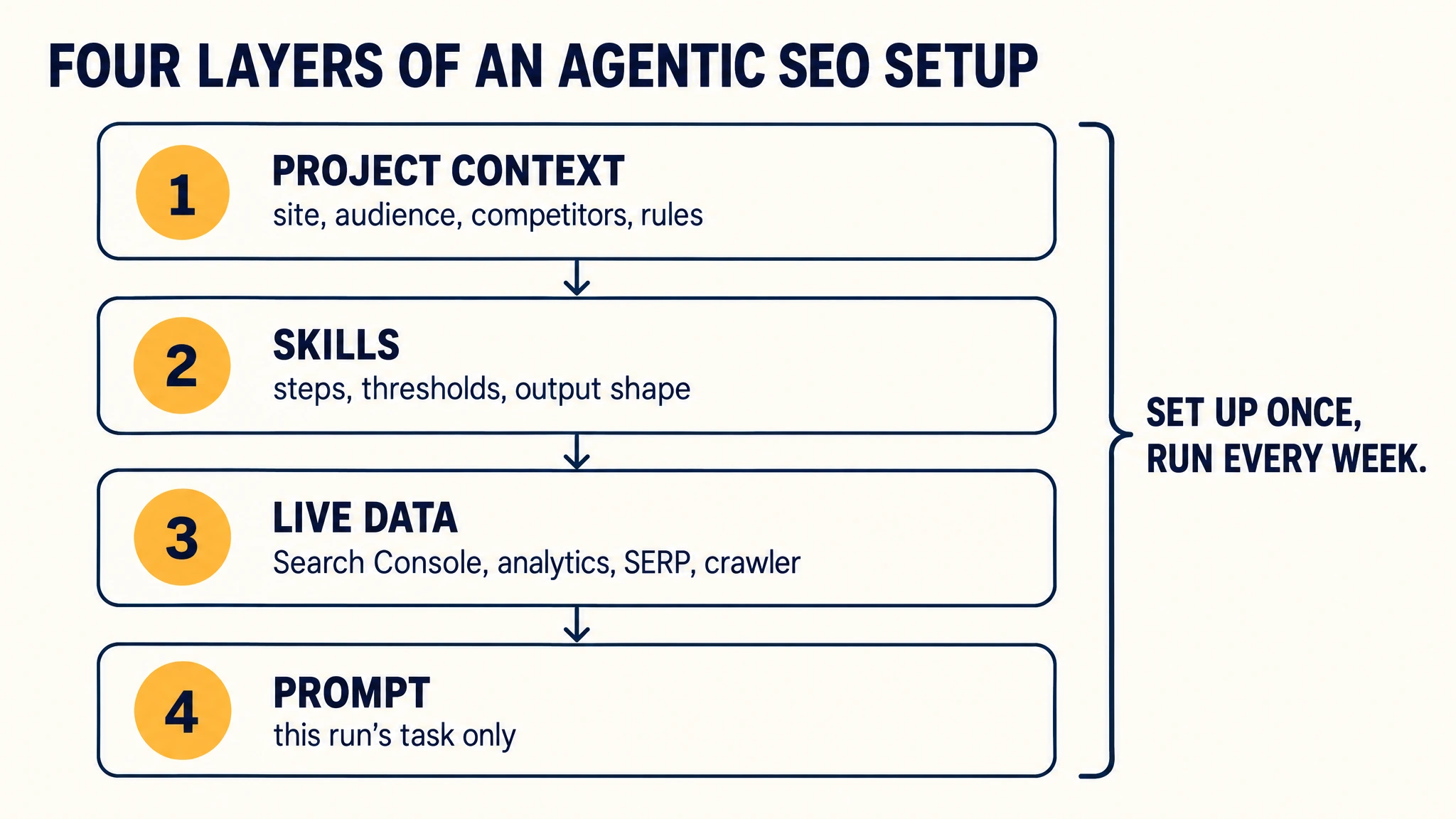
Set the four layers up once and the weekly run is one line. When a run comes back wrong, ask which layer failed before you rewrite the prompt.
Auspia's view: the four-layer model is the most useful idea in this category, and it is also where most teams stop too early. They build the context folder, skip the skills, and end up with a well-informed chatbot. The skill is the product. Everything else is plumbing.
Which agent for which job
This is the question we get asked most, and the honest answer is that the differences matter less than the setup. All of these can do most SEO jobs if you push hard enough. What separates them is where each one is least awkward, which is what decides whether you are still using it in week three.
Agent | Strongest at | Access model | Sensible first SEO job |
|---|---|---|---|
Codex | Repository work, scheduled runs, reviewed diffs | Local files, terminal, git, automations | Store weekly snapshots in a repo and open a pull request with the report |
Claude Code | Long-context review against an explicit written policy | Terminal, project memory file, MCP connectors | Read Search Console exports plus page source and produce a documented verdict |
Hermes Agent | Repeatable skills with memory across sessions | Open-source agent with a skills system and persistent memory | Install one skill and run the same workflow on the same cadence |
OpenClaw | Browser evidence collection under tight permissions | Browser access first, local files second | Capture what a query actually returns on mobile, then stop |
Pi Agent | Staying small and predictable across months | Minimal core, Markdown skills as the extension point | Run a narrow, readable procedure where you want to audit everything it can do |
Two caveats. This category changes monthly, so check current limits and pricing on each vendor's own docs before you commit a team to one. And the table is a starting point, not a ceiling.
If you want the beginner-safe version of each, we keep full walkthroughs for Codex, Claude Code, Hermes Agent, and OpenClaw. All four use the same shape: read-only first, one approved change at a time, verify before it ships.
The practical selection rule is about where your work already lives. Site in a git repository, and the page changes are code changes: start with Codex or Claude Code. Work is mostly exports, conversations, and judgment: start with a skills-based agent. You need to see what a real browser returns: you need browser access and a hard permission boundary. You want the smallest possible surface you can read end to end in one sitting: Pi Agent's minimal core is the point of the design, and the tradeoff is that anything you need lives in a skill you add yourself.
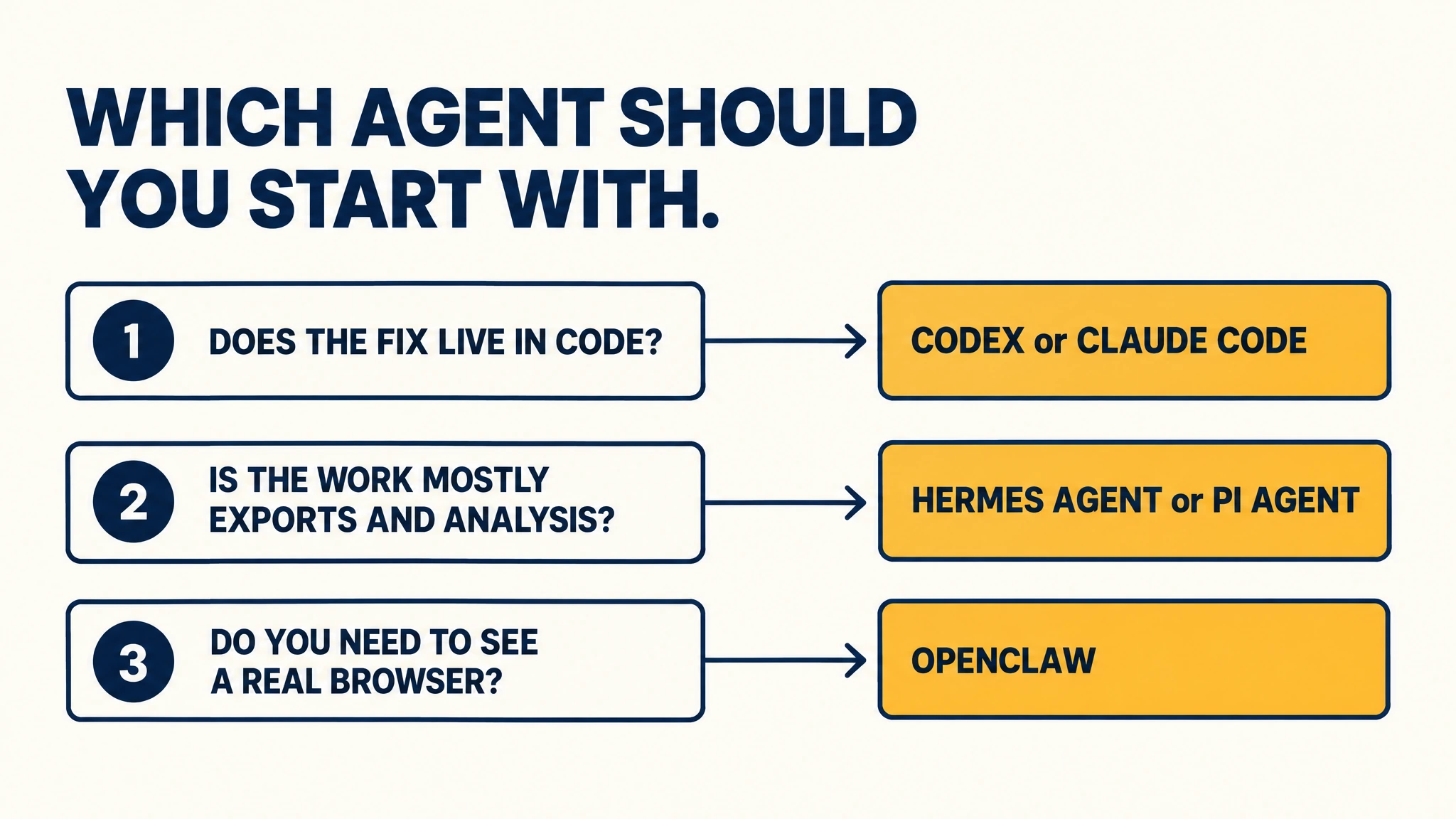
Three questions narrow five agents down to one. Answer them before you compare feature lists.
The jobs worth handing over first
Do not start with the interesting one. Start with the boring one that repeats on a schedule and produces something a person reads. Those pay back fastest.
Content decay triage. Pull period-over-period performance, drop everything under a materiality floor, check indexation before anything else, then look at rankings, demand, links, and cannibalization. You get a ranked table of URLs with clicks lost, the likely cause, the evidence, and a primary and fallback action. A page that lost rankings needs a rewrite. A page that lost demand needs nothing. A page that lost its canonical needs a five-minute fix. Teams mix those three up constantly, and it is not a cheap mistake.
Technical issue triage. Group issues by root cause rather than by issue type, join the affected URLs to traffic and rankings, score impact against effort, and verify the top items against live pages before you write the fix list. The grouping is the whole value. Ten separate "temporary redirect" rows are usually one root cause, and fixing one template beats fixing ten URLs.
Competitor movement. Isolate the pages and keywords behind a traffic change, separate branded from non-branded, and test each change against a named driver: new content, improved rankings, seasonality, a migration, a data artifact. The driver and the confidence level are the answer. A big number with low confidence is a reason to look closer, not a reason to react.
Internal linking and orphan pages. Build a candidate pool from pages that already rank or earn links, find passages directly related to each destination, and apply a reader-value test: would someone partway through this sentence actually want to go there next? The structural half of the output is often worth more than the links themselves. Finding that your second-biggest page has no internal links pointing at it is a five-minute fix with an outsized effect.
Citation gap mapping. Group prompts by topic and buying stage, find the domains and pages cited most often, separate the source types, and read the cited pages to work out what would actually earn a mention. Expect a chunk of the output to be sources where the right answer is no outreach at all. Forums and competitor-owned properties are not pitch targets.
Post-release regression checks. Compare a pre-release crawl against a post-release crawl with matching settings, confirm they are comparable before you diff anything, then classify each difference as expected, expected but implemented wrong, or unplanned. The classification is what makes the report usable. Without it you get a wall of differences and no decision.
We keep deeper walkthroughs on the ones that come up most: weekly ranking reports, daily monitoring, backlink profile work, and alert design that does not drown you.
Start with one skill, not a department
The most common failure is building eight skills, seven connections, and a scheduler before running anything once. Then nothing works and it is unclear which of the sixteen parts is at fault.
Do it in this order instead.
Pick one job with a visible output. Technical issue triage is the fastest to prove out, because you can point it at a crawl you already have and judge the result in minutes. Content decay is second easiest if you have Search Console history.
Write the skill before you connect anything. The skill file should fit on a page and answer six questions: when to use it, what data it needs, the ordered steps, the scoring or threshold rules, the output format, and which actions need approval. If you cannot get it onto a page, the job is not defined well enough to automate yet.
Connect one data source. The one the skill actually needs. Connectors you are not using just widen the surface area.
Run it read-only and check the output by hand. Take two findings and verify them yourself against the source data. If the agent's explanation does not match what you see, the problem is in the skill, not the model.
Add the approval gate before you add the second skill. Every write action (publishing, redirecting, deleting, editing code, merging, sending external messages) should stop and wait. Build that habit while the stakes are still one skill.
The guardrails that keep it from going wrong
These are the rules we would put in the project instructions on day one. They are boring on purpose, which is the point.
- Keep production tools read-only until you approve a write action.
- Require a plan before any multi-step workflow starts.
- Retrieve evidence with connected tools instead of relying on assumptions.
- Follow the relevant skill when one exists, rather than improvising.
- Retry a failed tool call once, then surface the error instead of working around it.
- Explain the supporting evidence for each finding in one sentence.
- Separate confirmed findings from hypotheses, in the output itself.
- Flag missing data and low-confidence conclusions rather than filling the gap.
- Stop when the workflow exceeds an agreed URL, row, or API-unit limit.
- Ask for approval before publishing, redirecting, deleting, editing code, merging, or sending anything external.
Two of those do more work than the rest. Separating confirmed findings from hypotheses is what makes the output trustworthy enough to act on. The spend limit is what stops a misconfigured loop from burning an API budget overnight.
Where this breaks
Thin conversion data. A content portfolio decision engine that classifies every URL as keep, update, consolidate, redirect, remove, or investigate needs conversion data to make the call. If tracking is not set up properly it returns a lot of zeros, and the report is not useful until that is fixed. The agent did its job. The input was wrong.
Structural judgment. An agent can find four things a human brief missed, including a keyword that brings up a completely different kind of search result and does not belong on the page. It cannot decide how to structure the article. That call stays with a person, and pretending otherwise produces content that reads like it was assembled from parts.
Silent explanation errors. Agents fail loudly at the data step and quietly at the explanation step. A missing export throws an error. A confident wrong cause does not. That is why the evidence-per-finding rule matters more than it looks.
Tool gaps you did not plan for. Some data is not reachable through a connector at all. A rank-data connector may not be able to create a crawl project, trigger a crawl, or export a full crawled URL set. Plan the workflow around what the connection can actually return, or the skill stalls halfway.
Verify the result before you trust the loop
Run this check the first three times, then once a month.
- Pick two findings at random and verify them against the source data by hand.
- Confirm the agent cited a source and a date for every claim that depends on data.
- Check that at least one finding was labelled low-confidence. An agent that is confident about everything is not discriminating.
- Confirm the output shape matches the previous run. If it drifted, the skill file changed or the agent stopped following it.
- Confirm nothing was written, published, or sent without an approval step firing.
If all five pass three runs in a row, you have a workflow. If any of them fail, fix the layer that caused it instead of rewriting the prompt.
FAQ
What is agentic SEO? Agentic SEO is handing a defined SEO workflow to an AI agent that retrieves its own data, follows a written method, and returns the same shaped analysis every time it runs. The defining feature is not autonomy, it is repeatability: the method lives outside the conversation so the same checks apply whether or not you remembered to ask.
How is agentic SEO different from AI-assisted SEO? The difference is who decides what happens next. In AI-assisted SEO you choose the steps in each conversation and paste in the data. In agentic SEO you define the method once, the agent retrieves its own data, and it follows a documented rule when it hits an unexpected input. Workflow automation is a third thing: perfect consistency, no adaptability.
Do I need a coding agent for this? No. Coding agents such as Codex and Claude Code are the better fit when the fix is a code change or the site lives in a repository. If your work is mostly exports, analysis, and judgment, a skills-based agent covers it without touching a terminal.
How many skills should I build first? One. Pick a job with a visible output, write the skill so it fits on a page, connect only the data source it needs, and run it read-only until the output is trustworthy. Teams that build eight skills before running one usually abandon the project.
Can an agentic SEO workflow publish content on its own? It can, and it should not. Keep publishing, redirecting, deleting, editing code, merging, and external messaging behind an explicit approval gate. The value of the workflow is the evidence it assembles, not the permission it has.
What does this cost to run? It depends on the data sources rather than the agent. Search Console is free for your own property. Rank data, SERP data, and crawling services are where the recurring cost sits, and most of them have free tiers that are enough to prove out one workflow before you commit.
Author: Aaron Wolfe, Organic Growth Systems Designer with 15 Years in SEO/GEO at Auspia. Aaron writes about how teams structure AI agents, data, and review steps into search workflows that survive a quarterly planning cycle.


