


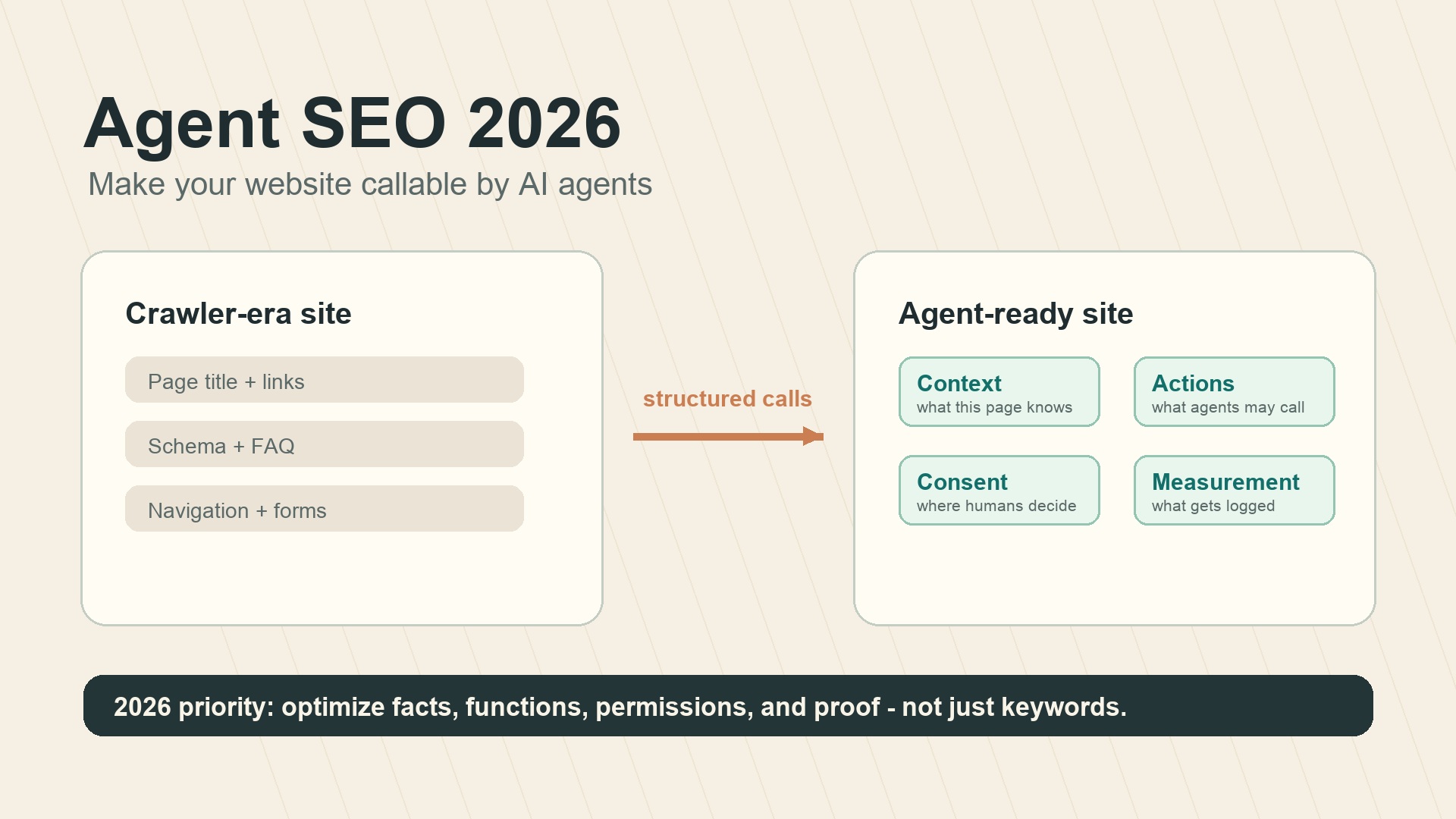
The short version
Agent SEO in 2026 is no longer only about helping crawlers read your pages. It is about helping AI agents understand what your website can do, which actions are safe to call, and when a human must approve the next step.
The original web was built for readers. SEO made it legible to search engines. GEO and AEO made it easier for answer systems to cite. The next layer is more operational: agents want to search, compare, configure, book, quote, and buy. If your site only exposes a visual interface, the agent has to guess its way through screenshots, buttons, hidden states, forms, and loading spinners. If your site exposes structured context and callable actions, the agent can work faster and with fewer mistakes.
That does not mean every website should rush to publish a full agent API this week. It does mean growth, SEO, product, and engineering teams should start treating agent readability as part of technical SEO.
Why websites suddenly have a second audience
A website used to serve two obvious audiences: humans and search crawlers. In 2026, there is a third one: AI agents acting on behalf of users.
This matters because agents do not behave like normal visitors. A human can tolerate a confusing filter panel if the product is good enough. A crawler can index a page even if it cannot complete a checkout. An agent is different. It needs to know:
- what the page is about;
- what data can be trusted;
- what actions are available;
- which actions are read-only;
- which actions require consent;
- what result came back after an action.
That is why agent SEO sits between technical SEO, structured data, product UX, and API design. It is not a replacement for classic SEO. It is the next practical layer on top of it.
The old way: agents operate websites like tired interns
Most browser agents still use a fragile loop. They look at the screen, infer what controls might mean, click something, wait, inspect the new state, and repeat. Sometimes they also inspect the DOM. That helps, but it still leaves too much ambiguity.
A button labeled "Continue" may mean continue checkout, continue onboarding, continue a subscription upgrade, or continue a destructive admin workflow. A visual card may be a product, an ad, a recommendation, or a disabled state. A price may be stale until the user selects a location.
This is workable for demos. It is messy in production.
The source article that inspired this piece uses the image of an older relative learning a smartphone. That is a useful mental model. Many agents can see the screen, but they do not always understand the intention behind the interface. Agent SEO is the work of giving them a manual, not just a prettier screen.
The new way: make the site callable
The direction is clear across several 2025-2026 web and AI standards efforts. Anthropic's Model Context Protocol made tool use a common language for AI applications. Microsoft introduced NLWeb as a way for websites to expose natural-language interfaces and MCP-compatible endpoints. Browser-focused proposals such as WebMCP explore how pages could expose context and actions directly inside the browser environment.
Some of these standards are still early. Details will change. But the pattern is stable: websites are moving from documents that agents scrape to systems that agents query or call.
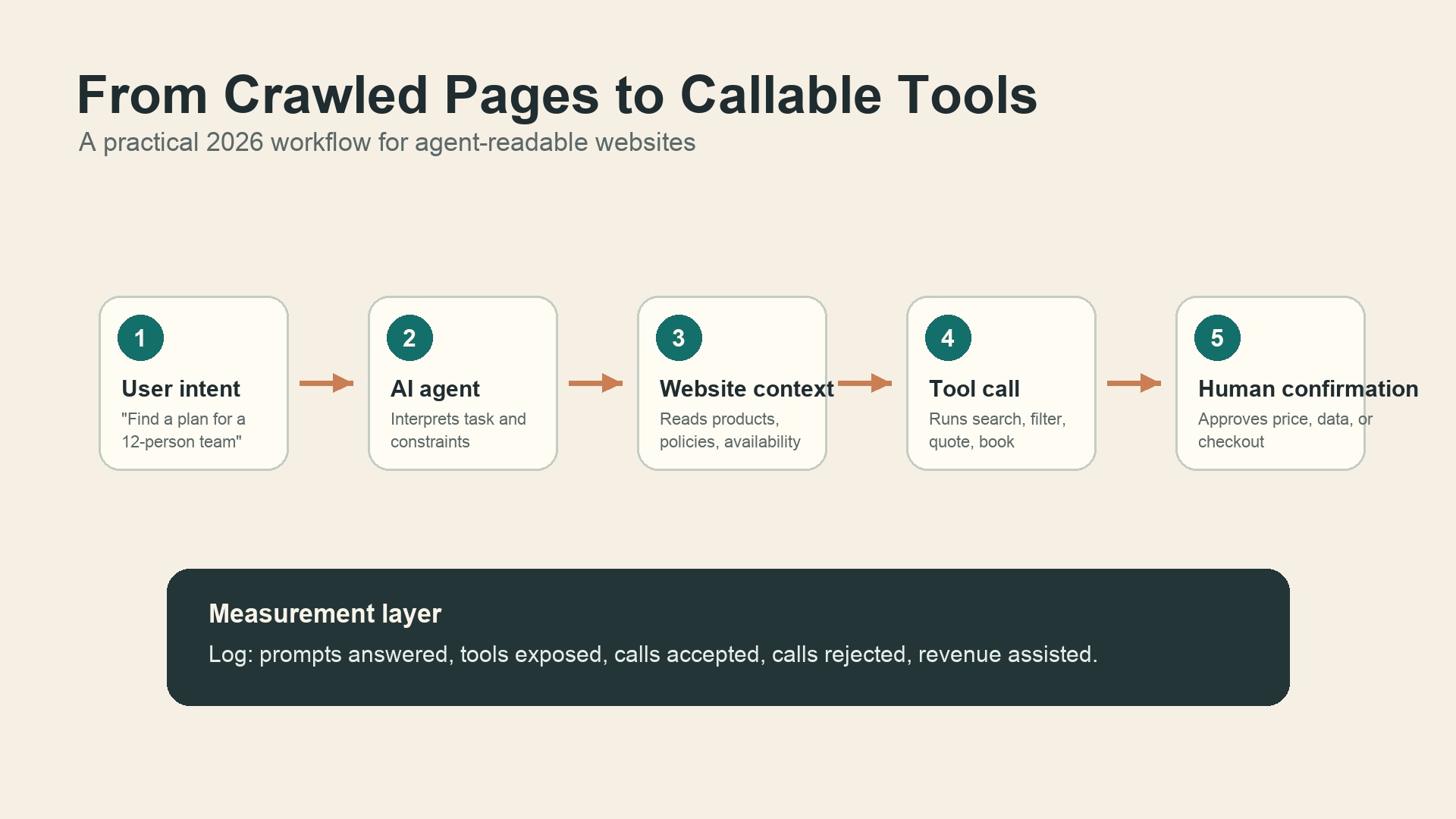
Caption: Agent SEO turns pages, internal search, forms, and product logic into structured steps an AI system can understand.
What Agent SEO actually includes
Agent SEO is the practice of making a website discoverable, understandable, callable, safe, and measurable for AI agents.
That sounds broad, so here is the practical breakdown.
Layer | What it means | Example |
|---|---|---|
Discoverable | Agents can find the right page, entity, product, or policy | Clean internal links, schema, XML sitemaps, crawlable pages |
Understandable | Agents can extract the right facts without guessing | Product attributes, pricing rules, availability, comparison tables |
Callable | Agents can trigger useful actions through a structured contract | Search inventory, check eligibility, generate a quote, reserve a demo |
Safe | Risky actions require permission and scoped access | Read-only tools by default, confirmation for purchases or data changes |
Measured | Teams can see which prompts, tools, and pages drive agent activity | Tool-call logs, accepted/rejected actions, assisted conversions |
This is why the phrase "Agent SEO" can be misleading if it is treated as a keyword trick. The real work is closer to product architecture.
A realistic 2026 example
Imagine a user asks an AI assistant: "Find project management software for a 40-person agency, under $20 per user, with client approval workflows."
A traditional SEO page might rank for "project management software for agencies." Good. That is still useful.
A GEO-ready article might give a clear comparison table, cite pricing, and answer the question directly. Better.
An agent-ready site goes further. It lets the assistant query the product catalog, filter by team size, check current pricing rules, open the relevant feature page, and ask the user before starting a trial or booking a sales call.
That is a very different conversion path. The page is no longer just a destination. It becomes a working surface.
The three building blocks
Most teams can start with three layers before they worry about advanced browser APIs.
First, strengthen context. Publish clean schema, product facts, policy pages, comparison pages, and answer-focused sections. If your own site does not clearly explain what a product does, an agent will improvise.
Second, expose high-value actions. Start with read-only or low-risk tools: search inventory, retrieve a product spec, compare plans, check shipping areas, calculate an estimate, or generate a shortlist. Do not begin with checkout or account deletion.
Third, design consent. Agents are useful because they reduce work, but users still need control. Any action that changes money, data, permissions, identity, or legal status should pause for human confirmation.
This is also where GEO and agent readiness overlap. A page that is easy for an AI answer engine to cite is often the same page that gives an agent enough factual context to act responsibly.
WebMCP, NLWeb, MCP: how to think about the stack
The terminology is noisy, so keep the distinction simple.
MCP is a general protocol for connecting AI systems to tools and data sources. It is useful beyond websites.
NLWeb is Microsoft's open project for adding natural-language interfaces to websites. Its reference implementation supports MCP, which means a website can become queryable by AI agents through a more standardized surface.
WebMCP is the browser-facing idea: instead of forcing agents to infer every action from the page UI, a webpage can expose structured context and tools from inside the browser environment. Early discussions and implementations reference patterns such as registering tools with JavaScript and adding declarative metadata to forms.
For a growth team, the exact standard name matters less than the operating question: if an AI agent visits your website tomorrow, does it get a structured explanation of what it can do, or does it have to guess?
What most teams will get wrong
The first mistake is exposing too much. A site does not become agent-ready by turning every internal action into a public tool. That creates security problems and noisy agent experiences. Start with the small set of actions that map to high-intent tasks.
The second mistake is treating agent SEO as a developer-only project. Engineers can expose the interface, but marketing and product teams must define the language: tool names, descriptions, constraints, eligibility rules, and success states.
The third mistake is ignoring logs. If agents start using your site, you need to know which pages and actions they relied on. Otherwise, you will not know whether agent traffic is helping discovery, conversions, support deflection, or nothing at all.
A practical readiness checklist
Use this as a first-pass audit before building anything complicated.
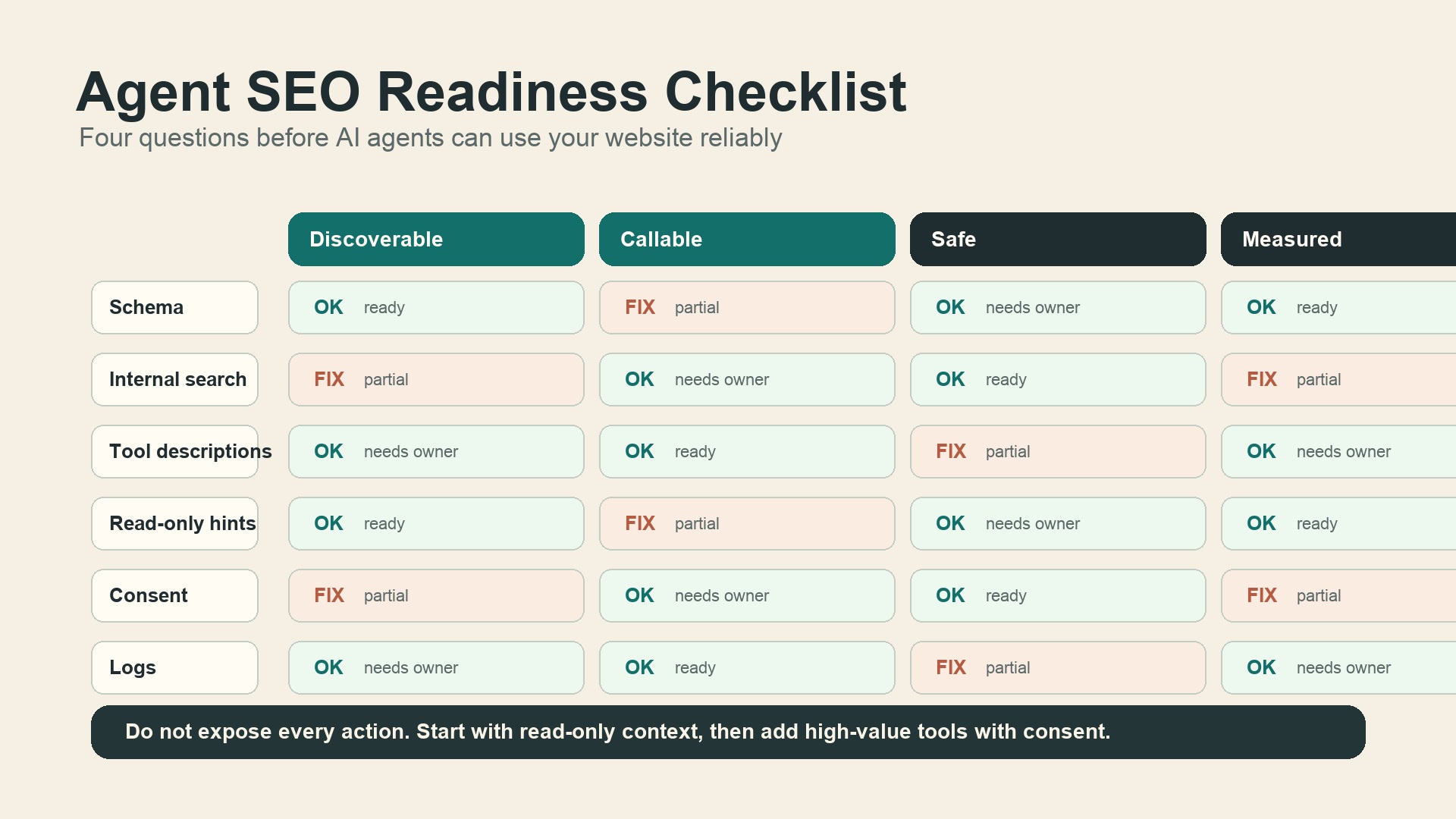
Caption: Start with boring, reliable foundations before exposing high-risk actions to agents.
Question | Good sign | Risk sign |
|---|---|---|
Can agents identify your core entities? | Products, services, plans, policies, and company facts are consistent | Pages use vague language, outdated pricing, or conflicting names |
Can agents answer buyer questions from your site? | Comparisons, FAQs, specs, and constraints are explicit | Important answers are hidden in images, tabs, or sales calls |
Can agents call useful actions? | Search, quote, compare, and booking flows have structured inputs | Agents must click through complex UI states with no contract |
Are risky actions controlled? | Read-only defaults, scoped permissions, consent prompts | Agents can trigger changes without clear user review |
Can you measure agent activity? | Logs connect prompts, pages, tool calls, and outcomes | Agent visits look like random bot traffic |
The Auspia operating model for Agent SEO
Auspia's view is simple: do not start with the protocol. Start with the user job.
Pick five tasks that a serious buyer, researcher, or customer would ask an AI assistant to complete. For each task, map the current path on your website. Then ask what the agent would need to know or do at each step.
A clean workflow might look like this:
- List the top buyer prompts your brand should answer.
- Map those prompts to pages, entities, and existing tools.
- Fix the facts first: schema, tables, definitions, eligibility rules, and pricing notes.
- Add read-only callable actions before write actions.
- Add consent rules for checkout, lead submission, account changes, and personal data.
- Track tool calls and compare them with organic search, AI search visibility, and conversions.
If you want to diagnose this before building custom infrastructure, start with an AI search visibility check. It will not replace an agent-readiness audit, but it helps reveal whether AI systems can already understand and cite your brand accurately.
What to do in the next 30 days
If you manage growth or SEO, do not wait for every browser standard to stabilize. The safe work is useful either way.
Clean up entity facts. Make your brand, product, pricing, policies, and audience definitions consistent across the site.
Turn important pages into answerable assets. Add direct summaries, comparison tables, constraints, and FAQs where they genuinely help.
Audit high-intent actions. Identify the forms, calculators, internal search flows, and booking paths an agent would want to use.
Define which actions are read-only, which need confirmation, and which should never be exposed.
Instrument logs. Even a simple event model for agent-like visits, internal search queries, form starts, and conversion assists will help later.
The teams that win agent SEO will not be the ones that rename old SEO checklists. They will be the ones that make their websites easier to understand, safer to operate, and more useful when the user is represented by an AI assistant.
FAQ
Is Agent SEO replacing SEO?
No. Classic SEO still helps pages get discovered. Agent SEO adds a layer for AI systems that need to understand and use website functions, not just read text.
Is WebMCP already a mature production standard?
No. Browser-level agent APIs are still early and may change. The safer 2026 move is to improve structured data, entity clarity, internal search, answerable pages, and low-risk callable workflows while monitoring standards such as MCP, NLWeb, and WebMCP.
What is the difference between GEO and Agent SEO?
GEO focuses on being cited or recommended in AI-generated answers. Agent SEO focuses on making a website usable by agents that need to complete tasks. They overlap, but they are not identical.
Which websites should care first?
Ecommerce, travel, SaaS, marketplaces, local services, finance, healthcare, education, and any site where users compare options or complete multi-step workflows should care first.
What is the safest first action to expose?
Start with read-only actions: search products, compare plans, retrieve policy details, calculate estimates, or check availability. Add write actions only after consent and logging are designed.


