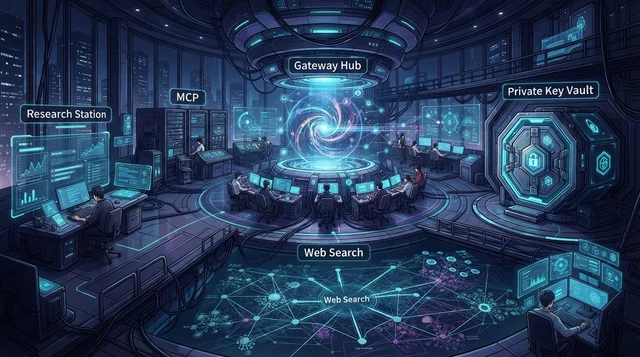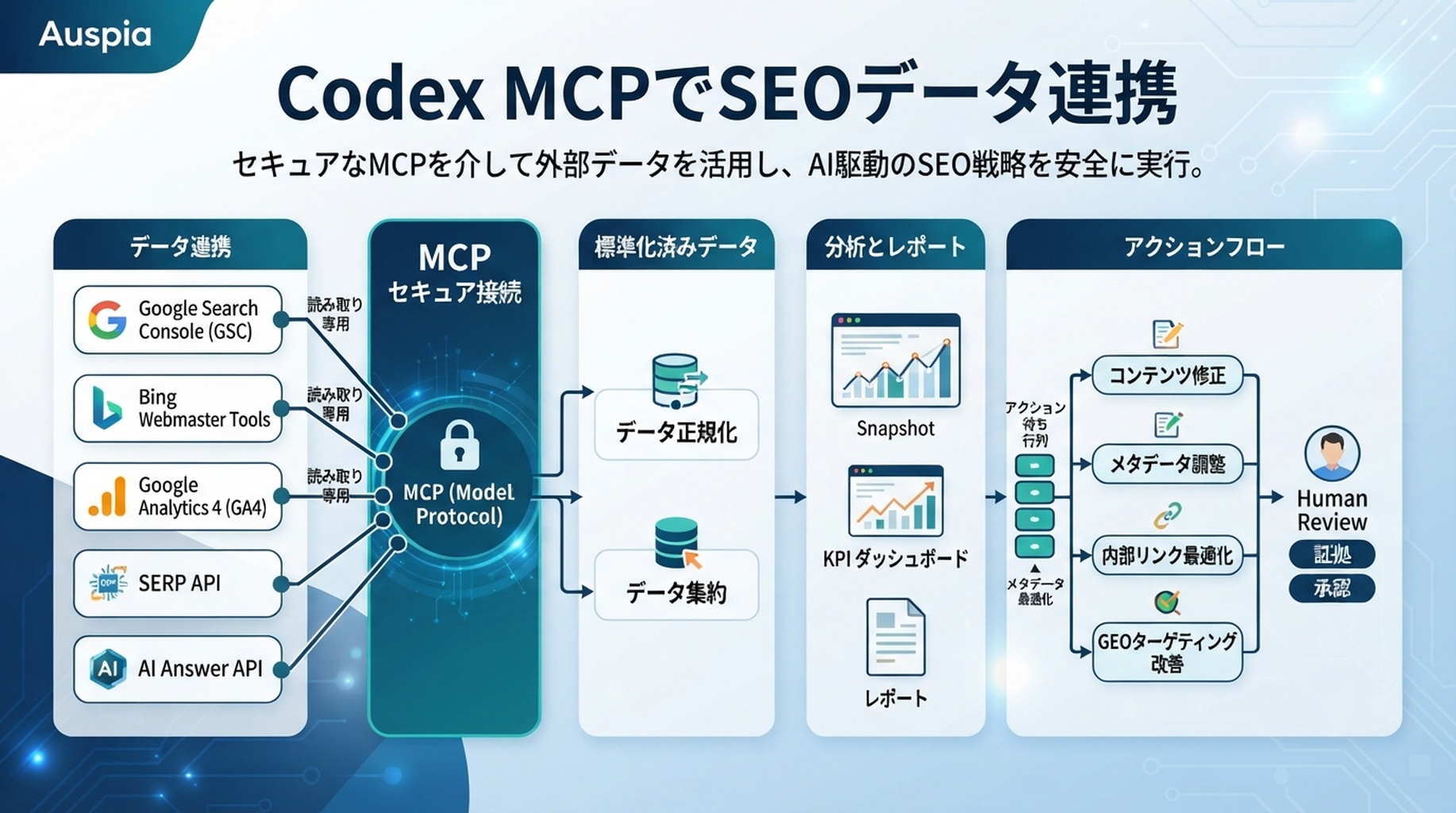
Codex MCPデータループ:読み取り専用connector、正規化snapshot、証拠テーブル、action queue。
作るもの
このチュートリアルでは、危険な権限を与えずにCodexをSEO/GEOデータへ接続する方法を扱います。初心者向けの安全な形では、まずCSVエクスポートから始めます。次にローカルの読み取り専用データスクリプトを追加します。データの形が明確になってから、MCP serverを導入します。
作る構成は次のとおりです。
.codex/
  config.toml
AGENTS.md
seo/
  data-map.md
  exports/
    YYYY-MM-DD/
  snapshots/
  reports/
scripts/
  normalize-seo-snapshot.mjs
  mcp-seo-data-server.mjs
MCPは、繰り返し使う読み取りアクセスのために使います。monitoring connectorに、公開、deploy、analytics設定変更、URL送信、ページ削除、本番ファイル編集の権限を与えてはいけません。
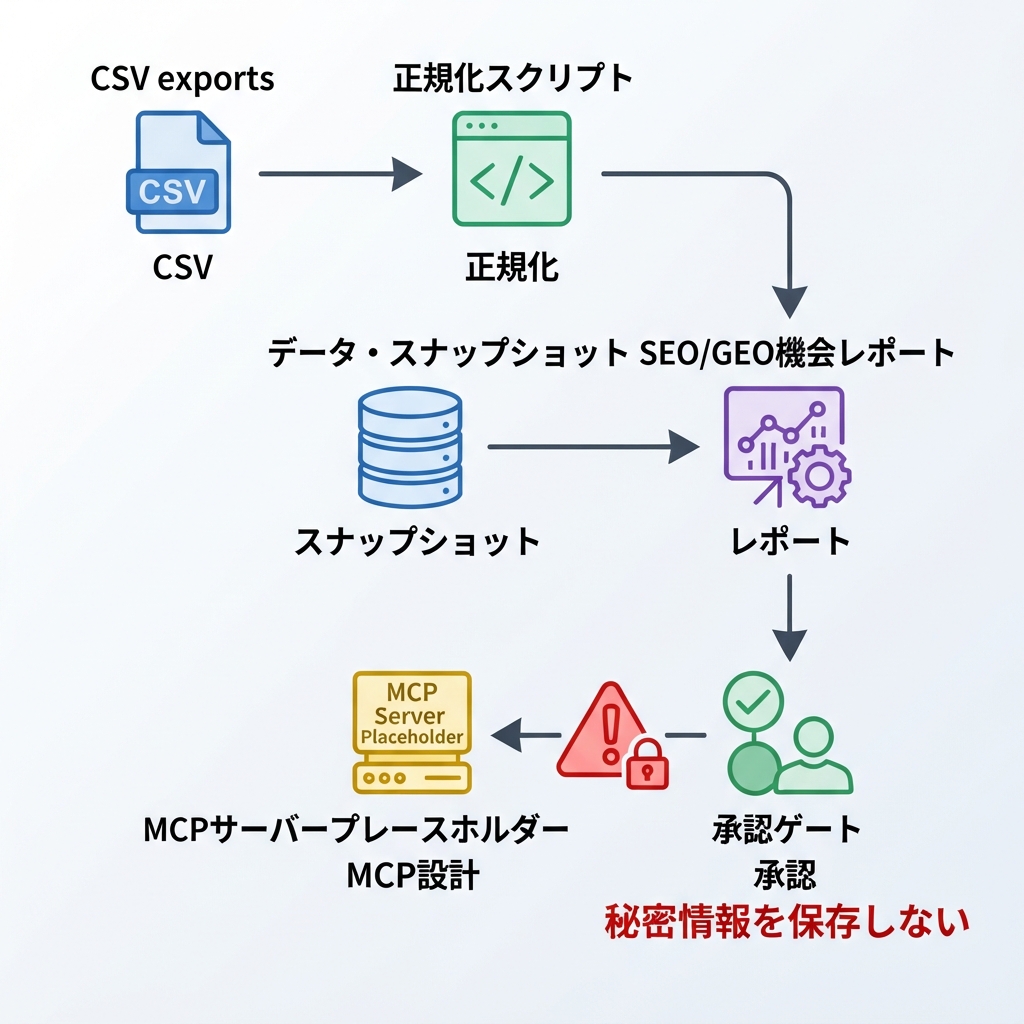
Codex MCPはconnector layerとして使い、SEO/GEOデータへの読み取り専用アクセスを安定化させます。
Step 1: データフォルダを作る
Webサイトのリポジトリルートで実行します。
mkdir -p .codex seo/exports/$(date +%F) seo/snapshots seo/reports scripts
初心者の場合、最初からAPI credentialを扱わないでください。まずはエクスポートから始めます。
seo/exports/YYYY-MM-DD/
  gsc-pages.csv
  gsc-queries.csv
  bing-pages.csv
  bing-queries.csv
  ga4-landing-pages.csv
  ai-answer-snapshots.json
すべてのsourceがなくても構いません。持っているものから始めます。足りないデータは発明せず、missing dataとして記録します。
Step 2: data mapを書く
seo/data-map.md を作ります。
cat > seo/data-map.md <<'EOF2'
# SEO/GEO Data Map

| Source | First access method | Later access method | What it proves | Write access? |
|---|---|---|---|---|
| Google Search Console | CSV export | read-only API / MCP | queries, pages, impressions, CTR, position | no |
| Bing Webmaster Tools | CSV export | read-only API / MCP | Bing queries, pages, crawl hints | no |
| GA4 | CSV export | read-only API / MCP | landing-page engagement and conversions | no |
| SERP API | JSON export | read-only API / MCP | ranked URLs and SERP features | no |
| AI answer checks | JSON notes | Felo Search / Perplexity / other API | brand mentions and citations | no |

Rules:
- Monitoring can read data only.
- URL submission is not part of this connector.
- Publishing is not part of this connector.
- Production edits require a separate approval task.
EOF2
このデータマップは、Codexが「どのデータが何を証明できるか」を誤解しないための表です。GSCはGoogle検索におけるクエリ別・ページ別の需要を見るために使います。AI回答APIの観測は、ブランド言及や引用の有無を見るために使います。同じものとして扱ってはいけません。
Step 3: AGENTS.md にルールを追加する
すでに AGENTS.md がある場合は、このsectionを追加します。ない場合は作成します。
cat >> AGENTS.md <<'EOF2'

## SEO/GEO data access policy

For SEO/GEO data tasks:
- read exports from `seo/exports/`
- write normalized outputs to `seo/snapshots/`
- write reports to `seo/reports/`
- never invent missing metrics
- never submit URLs, publish content, deploy, or change production files during data analysis
- separate SEO metrics, analytics metrics, SERP snapshots, and AI answer observations
- cite the source file for every recommendation
EOF2
これが重要なのは、Codexが AGENTS.md をリポジトリ内の永続的な作業ガイドとして参照できるからです。MCP connectorはtoolを提供します。AGENTS.md は運用上の境界を提供します。
Step 4: サンプルエクスポートを作る
可能なら実データを使います。テストだけなら、小さなサンプルファイルを作ります。
TODAY=$(date +%F)
cat > seo/exports/$TODAY/gsc-pages.csv <<'EOF2'
url,clicks,impressions,ctr,position
/blog/reporting-automation,34,4200,0.008,8.2
/features/reporting,18,1900,0.009,11.4
EOF2

cat > seo/exports/$TODAY/bing-queries.csv <<'EOF2'
query,clicks,impressions,ctr,position
reporting automation software,4,230,0.017,6.8
automate weekly reports,2,180,0.011,9.3
EOF2

cat > seo/exports/$TODAY/ai-answer-snapshots.json <<'EOF2'
[
  {
    "prompt": "What is the best reporting automation software for small teams?",
    "surface": "manual-check",
    "brand_mentioned": false,
    "citation_url": null,
    "competitors": ["Competitor A", "Competitor B"],
    "notes": "Category is mentioned, brand is absent."
  }
]
EOF2
この段階では、データをきれいにすることが目的です。実データがない箇所をCodexに推測させないでください。
Step 5: 戦略を頼む前に正規化する
raw API responseは比較しにくいので、まずsimple normalizerを作ります。
cat > scripts/normalize-seo-snapshot.mjs <<'EOF2'
#!/usr/bin/env node
import { readFileSync, writeFileSync, mkdirSync, existsSync } from 'node:fs';
import { join } from 'node:path';

const date = process.argv[2] || new Date().toISOString().slice(0, 10);
const dir = join('seo', 'exports', date);
const out = join('seo', 'snapshots', `${date}-normalized.csv`);
mkdirSync('seo/snapshots', { recursive: true });

const rows = ['source,date,query_or_prompt,target_url,metric,value,evidence_url,confidence,raw_file'];

function addCsv(source, file, columns) {
  const path = join(dir, file);
  if (!existsSync(path)) return;
  const lines = readFileSync(path, 'utf8').trim().split(/
?
/);
  const headers = lines.shift().split(',');
  for (const line of lines) {
    const values = line.split(',');
    const row = Object.fromEntries(headers.map((h, i) => [h, values[i] || '']));
    rows.push([
      source,
      date,
      row.query || '',
      row.url || '',
      columns.metric,
      row[columns.value] || '',
      row.url || '',
      'medium',
      file
    ].map(v => JSON.stringify(v)).join(','));
  }
}

addCsv('gsc', 'gsc-pages.csv', { metric: 'clicks', value: 'clicks' });
addCsv('bing', 'bing-queries.csv', { metric: 'clicks', value: 'clicks' });

const aiPath = join(dir, 'ai-answer-snapshots.json');
if (existsSync(aiPath)) {
  const items = JSON.parse(readFileSync(aiPath, 'utf8'));
  for (const item of items) {
    rows.push([
      'ai-answer',
      date,
      item.prompt || '',
      '',
      'brand_mentioned',
      String(Boolean(item.brand_mentioned)),
      item.citation_url || '',
      'low',
      'ai-answer-snapshots.json'
    ].map(v => JSON.stringify(v)).join(','));
  }
}

writeFileSync(out, rows.join('
'));
console.log(`Wrote ${out}`);
EOF2
chmod +x scripts/normalize-seo-snapshot.mjs
node scripts/normalize-seo-snapshot.mjs $(date +%F)
これで、Codexが調べられる予測可能なファイルが1つできます。
Step 6: 読み取り専用のopportunity reportをCodexに依頼する
リポジトリルートでCodexを開き、次を貼り付けます。
Read AGENTS.md, seo/data-map.md, and the latest file in seo/snapshots/.

Create `seo/reports/YYYY-MM-DD-opportunity-report.md`.

For each recommendation, include:
- source file
- affected URL or prompt
- signal
- interpretation
- confidence
- action type: refresh, create, internal link, technical ticket, monitor, ignore
- what data is missing

Do not edit website files. Do not write final copy. Do not publish. Do not submit URLs.
使える出力は、具体的です。
URL: /blog/reporting-automation
Signal: high impressions, low CTR in GSC sample
Interpretation: title/meta may not match query intent
Action: refresh metadata and opening answer block after approval
Evidence: seo/exports/2026-07-06/gsc-pages.csv
Confidence: medium
弱い出力は、source fileなしで「SEOを改善する」と言います。その場合は、すべての行に証拠を引用してやり直すようCodexに依頼します。
Step 7: CSVループが動いてからplaceholder MCP serverを作る
snapshot/report loopが役に立つと確認するまで、live APIを接続しないでください。次に、tool名と読み取り専用境界を文書化するplaceholder serverを作ります。
cat > scripts/mcp-seo-data-server.mjs <<'EOF2'
#!/usr/bin/env node
// Placeholder for a real read-only MCP server.
// Implement tools later: get_gsc_pages, get_bing_queries, get_ga4_landing_pages,
// get_serp_snapshot, get_ai_answer_snapshot.
console.error('SEO/GEO MCP server placeholder: read-only tools only.');
setInterval(() => {}, 1000);
EOF2
chmod +x scripts/mcp-seo-data-server.mjs
盲目的に実装させるのではなく、設計を依頼します。
Design a read-only MCP server for the SEO/GEO data map.

For each tool, specify:
- name
- input parameters
- output schema
- credentials needed
- minimum scope
- rate limit
- failure behavior
- why it must be read-only

Do not implement API calls until I approve the schema.
Step 8: project configでCodex MCPを設定する
Codex MCP設定は config.toml にあります。global configでも、信頼できるproject-scoped .codex/config.toml でも使えます。このチュートリアルではproject-scopedにします。
cat > .codex/config.toml <<'EOF2'
[mcp_servers.seo_data]
command = "node"
args = ["scripts/mcp-seo-data-server.mjs"]
enabled = true
tool_timeout_sec = 60
default_tools_approval_mode = "prompt"
EOF2
次にCodexを開き、/mcp を実行してserverが見えるか確認します。placeholder serverが起動してもtoolを公開していないなら、それは想定どおりです。schema、credential、permissionが承認されてからplaceholderを置き換えます。
実API serverでは、credentialはリポジトリにcommitするファイルではなく、環境変数で渡します。後の設定は次のように見えるかもしれません。
[mcp_servers.seo_data.env]
GSC_CLIENT_EMAIL = "..."
ただし多くのチームでは、secretをconfigへ直接保存するより、environment variable forwardingやsecret managementを優先します。
Step 9: reportでsource typeを分ける
すべてのsignalを1つのmagic scoreにまとめないでください。これらのsourceは、別々の質問に答えます。
Source | Good for | Not good for |
|---|---|---|
GSC | Google query/page需要 | AI citationの証拠 |
Bing Webmaster | Bing visibilityとcrawl clue | Google専用判断 |
GA4 | engagementとconversion | それ単体でのranking診断 |
SERP API | visible competitorとfeature | conversion quality |
AI answer API/checks | mentionとcitation | classic rank tracking |
Codexには次を依頼します。
Rewrite the report so SEO metrics, analytics metrics, SERP observations, and AI answer observations are separate sections. Only combine them in the final action queue after showing the evidence.
Troubleshooting
Problem | Likely cause | Fix |
|---|---|---|
Codexがmissing metricsを発明する | data policyが明示されていない |
|
reportが曖昧 | normalized snapshotがない | 分析前にnormalizerを実行する |
MCP serverが起動しない | command、cwd、timeoutが間違っている |
|
secretがchatに出る | credentialを貼り付けた | credentialをenv varへ移し、漏れたkeyをrotateする |
recommendationが攻めすぎる | reportにapproval boundaryがない | action typeとapproval statusを必須にする |
初心者向けコピペプロンプト
I want to connect Codex to SEO/GEO data safely.

Please inspect this repo and set up a read-only workflow:
1. Create or verify `seo/data-map.md`.
2. Create folders for exports, snapshots, and reports.
3. Create a simple normalizer script for CSV/JSON exports.
4. Generate a read-only opportunity report from the latest snapshot.
5. Draft a placeholder MCP plan only after the CSV workflow works.

Rules:
- Do not edit production website files.
- Do not publish or deploy.
- Do not submit URLs.
- Do not store secrets in the repo.
- Do not invent missing data.
- Cite source files for every recommendation.
FAQ
初日からMCPは必要ですか?
不要です。CSVエクスポートでワークフローを検証できます。MCPは、同じデータ取得を毎週または毎日繰り返すようになったときに役立ちます。
CodexはGSC、Bing、GA4へ直接接続できますか?
設定したscriptやMCP serverを通じて使えます。toolは読み取り専用にし、minimum scopeを使います。URL送信、公開、本番編集は別の承認済みworkflowとして扱います。
AI answer APIとclassic SEO metricsを1つのscoreにすべきですか?
最初はしないでください。sourceを分けたまま扱い、最後のaction queueで各recommendationの根拠を説明します。
Codex SEO/GEO 学習パス
この記事は Codex SEO/GEO オペレーターシリーズの一部です。ゼロから構築する場合は、次の順番で進めてください。
- 2026年にCodexで自動GEOを実践する方法
- CodexでSEOを自動化する方法
- AGENTS.mdでCodex SEOワークスペースを作る方法
- MCPでCodexをSEOデータに接続する方法
- 2026年版:最も実用的なCodex GEO Skill
- キーワードクラスタリング用のCodex Skillを作る方法
- SERP、コンテンツ、テクニカルSEOでCodex Subagentsを使う方法
- 本番を壊さずにCodexでテクニカルSEOを修正する方法
- Codex Automationsで毎日のSEO/GEO監視を行う方法
- Codex SEO/GEO品質ゲート:Diff、証拠、テスト、人間の承認
- CodexでSEO/GEO対応のWebサイトを作成・デプロイする方法
参考情報
現在の構文や製品挙動については、OpenAIの公式Codexドキュメントを信頼できる情報源として確認してください。
- Codex CLI: https://developers.openai.com/codex/cli
- AGENTS.md: https://developers.openai.com/codex/guides/agents-md
- Codex MCP: https://developers.openai.com/codex/mcp
- Codex configuration: https://developers.openai.com/codex/config-reference
Author: Camille Rhodes, Auspiaで300以上のAIコンテンツワークフローを設計してきたアーキテクト。Camilleは、成長チーム向けにAI支援コンテンツシステム、自動化、編集品質管理について執筆しています。