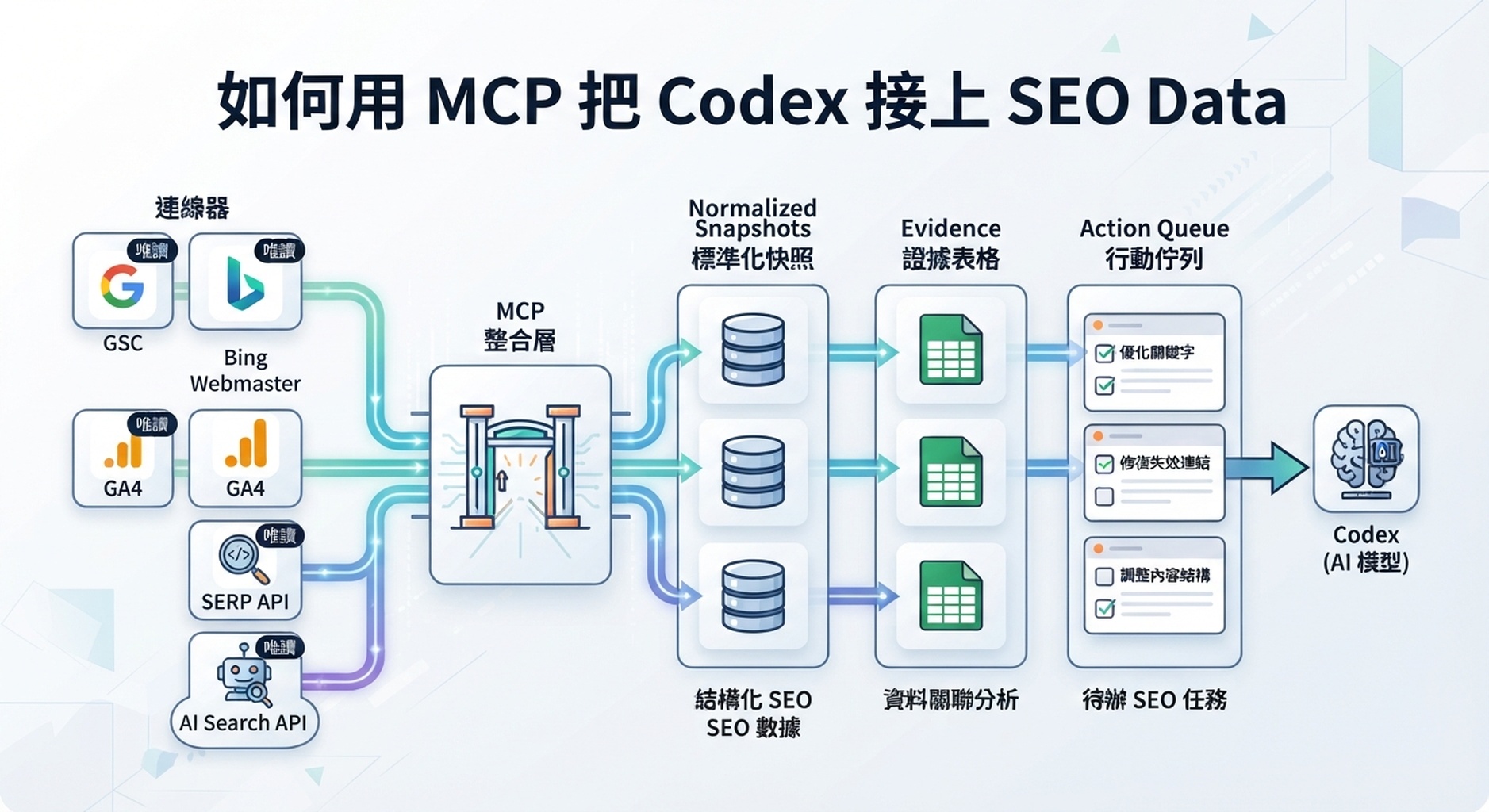
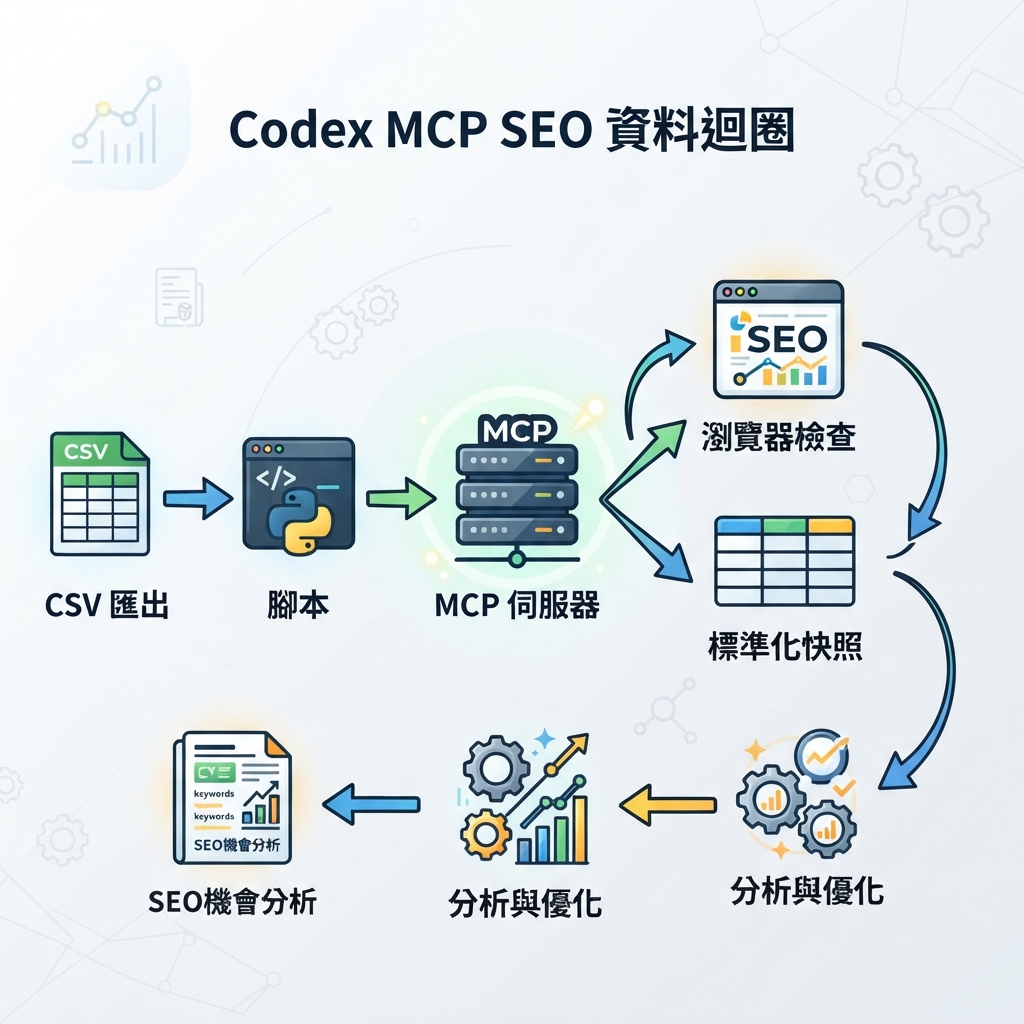
Codex MCP data loop:read-only connectors、normalized snapshots、evidence tables 與 action queue。
實用設定
Codex 不應該靠貼上的 screenshots 和記憶做 SEO decisions。它應該讀 source data:GSC exports、Bing Webmaster data、GA4 landing-page reports、keyword exports、SERP API results,以及 GEO prompt observations。MCP 是把 Codex 接到 external tools 與 context 的方式之一,而且不用每次都 copy-paste。
對初學者最安全的 pattern 是 staged:
- 從 CSV exports 開始。
- 加入 read-only scripts。
- 為可重複 data access 加入 MCP connectors。
- 保持 write actions blocked。
Codex MCP documentation 展示了這個 workflow 使用的 connector layer,用於 read-only SEO/GEO data access。
選對 data path
Method | Best for | Pros | Watch out |
|---|---|---|---|
CSV export | First setup、小團隊 | Easy、auditable、不需要 connector work | Manual refresh |
Local script | 可重複 API pulls | Versioned、testable | 需要 API handling |
MCP server | 持續 tool access | Codex 可以 query structured context | 必須 scope permissions |
Browser check | Rendered page evidence | 顯示 users 與 crawlers 看到的內容 | 不適合 bulk analytics |
MCP 應用於可重複的 read access。不要給 daily monitor 權限去 publish、submit URLs、change account settings 或 edit production files。
先建立 source map
接線前,先建立 seo/data-map.md:
# SEO/GEO Data Map

| Source | Access method | File or tool | What it proves | Write access? |
| --- | --- | --- | --- | --- |
| Google Search Console | export/API | gsc-queries.csv | queries, impressions, CTR | no |
| Bing Webmaster Tools | export/API | bing-pages.csv | Bing clicks and crawl hints | no |
| GA4 | export/API | ga4-landing-pages.csv | engagement and conversion | no |
| SERP API | API | serp-snapshots.json | ranked URLs and SERP features | no |
| AI search API | API | geo-answer-snapshots.json | citations and brand mentions | no |
這份 data map 會讓 Codex 知道每個 source 能證明什麼,也能提醒它不要把不同 data types 混在一起。
要求 Codex 安全地設計 connector
Design a read-only SEO data connector plan for this workspace.
Use AGENTS.md and seo/data-map.md.
For each data source, specify:
- access method
- minimum required permission
- output file schema
- refresh cadence
- validation step
- risks
Do not write connector code until I approve the plan.
這段 prompt 的重點,是先要 plan,不要先寫 connector code。尤其當牽涉 GSC、Bing、GA4 或付費 API keys 時,permission scope 應該先被寫清楚。
分析前先 normalize
Raw API responses 很難比較。請 Codex 先寫 normalized snapshot schema:
Field | Meaning |
|---|---|
| GSC、Bing、GA4、DataForSEO、SERP API、Felo Search、Perplexity |
| pull date |
| exact query or AI prompt |
| page you care about |
| clicks、impressions、position、citation、mention、rank |
| numeric or boolean value |
| result/citation URL when available |
| high、medium、low |
| raw response path |
Prompt:
Normalize these SEO and GEO exports into seo/snapshots/YYYY-MM-DD-normalized.csv.
Keep source labels visible. Do not merge GSC performance with AI citation observations.
Flag missing data and partial API responses in seo/data-quality-log.md.
Example analysis request
Using the normalized snapshot, identify SEO/GEO opportunities for the next seven days.
Group by page.
For each recommendation, include:
- source data
- affected URL
- whether this is SEO, GEO, conversion, or technical
- confidence
- action type: create, refresh, link, monitor, technical ticket, ignore
Do not write final copy or edit production files.
Report 應該包含什麼
## SEO/GEO Data Opportunity Report

Date:
Sources used:
Sources missing:

## Page opportunities
| URL | Signal | Evidence | Interpretation | Recommended action | Approval |
| --- | --- | --- | --- | --- | --- |

## Data quality notes
- stale exports
- missing markets
- failed API calls
- low confidence observations

## Action queue candidates
這份 report 的重點,是把 recommendation 連回 evidence。沒有 evidence 的建議,只能放進 observation,不能直接進入 action queue。
常見錯誤
- 把所有 APIs 當成可互換。GSC、Bing、GA4、SERP APIs 與 AI answer APIs 證明的是不同事情。
- 把 write permissions 給 read-only monitoring workflow。
- 把 AI answer citations 當成 classic rank positions 來比較。
- 因為一次 noisy data pull 就刪除或 rewrite pages。
- Summary raw API responses,卻沒有保存原始資料。
FAQ
第一天就需要 MCP 嗎?
不需要。CSV exports 足以建立第一個 workflow。當同一個 data pull 每週或每天重複時,MCP 才會變得有用。
Codex 可以直接連 GSC 和 Bing 嗎?
Codex 可以使用你提供的 scripts、MCP servers 或 exported files。除非你有另一套 approval workflow,否則保持 read-only access。
AI search APIs 和 classic SERP APIs 應該合成一個 score 嗎?
一開始不要。先分開保存,再在 decision memo 裡比較 patterns。
Codex SEO/GEO learning path
這篇文章是 Codex SEO/GEO operator series 的一部分。如果你要從零建立 workflow,建議照這個順序讀:
- 如何在 2026 年用 Codex 做自動化 GEO
- 如何用 Codex 做自動化 SEO
- 如何用 AGENTS.md 建立 Codex SEO Workspace
- 如何用 MCP 把 Codex 接上 SEO Data
- 2026 年最佳 Codex GEO Skill
- 如何建立 Codex Keyword Clustering Skill
- 如何用 Codex Subagents 做 SERP、內容與技術 SEO
- 如何用 Codex 修 Technical SEO 且不破壞 Production
- 如何用 Codex Automations 跑每日 SEO/GEO Monitoring
- Codex SEO/GEO Quality Gates:Diff、Evidence、Tests 與 Human Approval
下一步
- 上一篇:如何用 AGENTS.md 建立 Codex SEO Workspace
- 下一篇:2026 年最佳 Codex GEO Skill
- 相關:如何用 Codex Automations 跑每日 SEO/GEO Monitoring
Sources and notes
請以 OpenAI 官方 Codex documentation 作為 current syntax 與 product behavior 的準確來源:
- Codex CLI: https://developers.openai.com/codex/cli
- AGENTS.md: https://developers.openai.com/codex/guides/agents-md
- Codex Skills: https://developers.openai.com/codex/skills
- Codex MCP: https://developers.openai.com/codex/mcp
- Codex subagents: https://developers.openai.com/codex/subagents
- Codex configuration: https://developers.openai.com/codex/config-reference
Author: Camille Rhodes, Auspia 300+ AI Content Workflows 架構師。Camille 撰寫 AI-assisted content systems、automation 與 growth teams 的 editorial quality control。