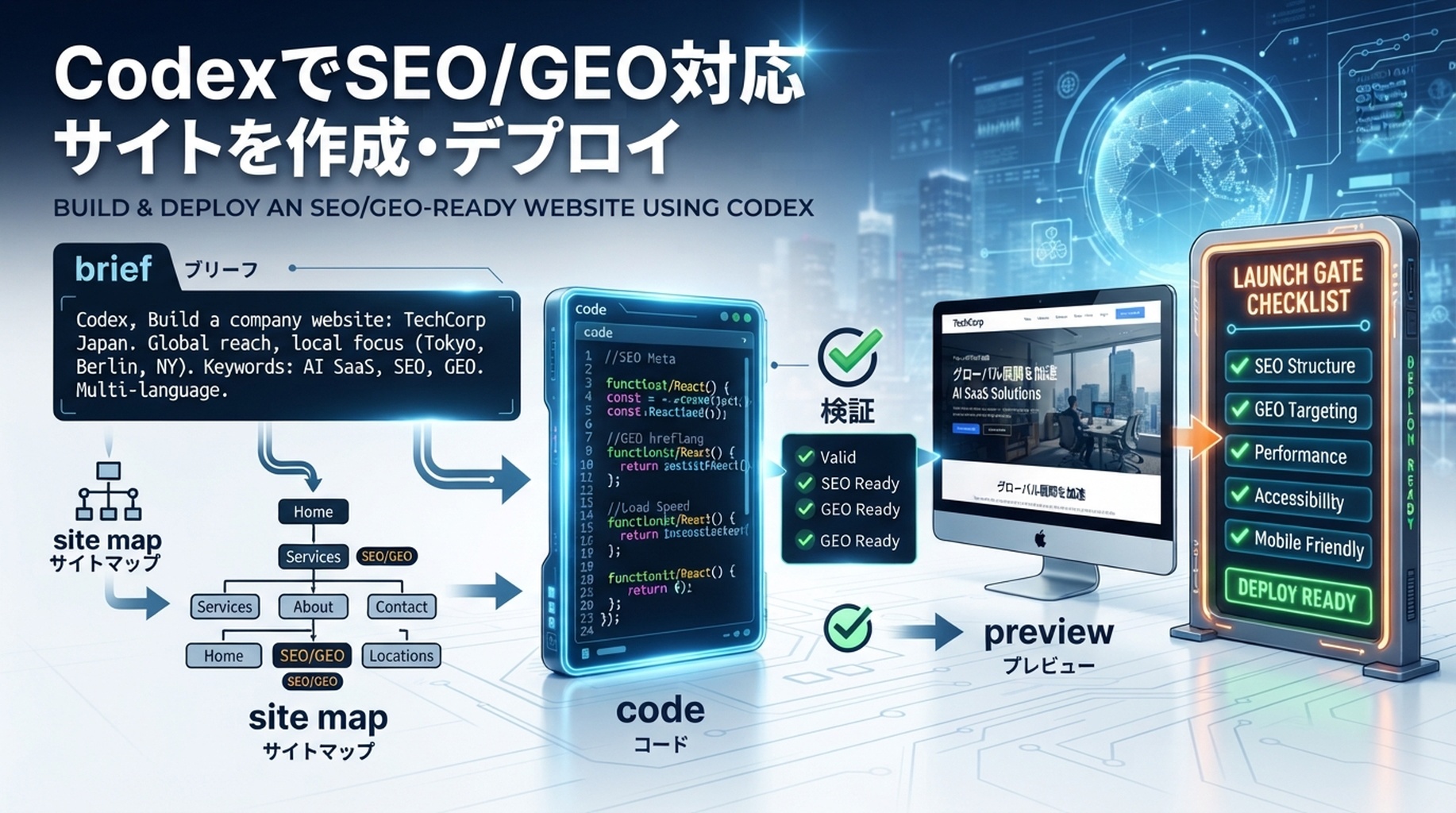
Codexで会社サイトを作るときの実務フロー:brief、site map、実装、SEO/GEO launch gate、preview deploy。
成果物:きれいなモックアップではなく、公開できるWebサイト
Codexで強い会社サイトを作ることはできます。ただし、最初のプロンプトを「きれいなhomepageを作って」ではなく、product brief、SEO brief、GEO brief、deployment briefを1つにまとめたものとして扱う必要があります。目的は、見た目の良いトップページを作ることではありません。明確なpositioning、crawl可能な構造、AIが抽出しやすいanswer block、schemaにしやすいcontent、そしてdeployまでの道筋を持つサイトを作ることです。
初心者向けの安全な流れは次のとおりです。
- コードを書く前に、CodexへWebサイト計画を作らせる。
- brand facts、audience、offers、keywords、GEO questions、proofを渡す。
- 小さいが完成したsite architectureを作らせる。
- page planを確認してから、実装を依頼する。
- local checksを実行し、diffを直し、previewをdeployし、その後analyticsを接続する。
Codexは、自分の作業を検証できるときに最も力を発揮します。OpenAIのCodex prompting guidanceでは、validation stepsを含め、複雑な作業を小さく分けることが推奨されています。Webサイト構築では、プロンプトにdesign tasteだけでなく、build command、lint check、accessibility check、deployment acceptance criteriaを含めるということです。
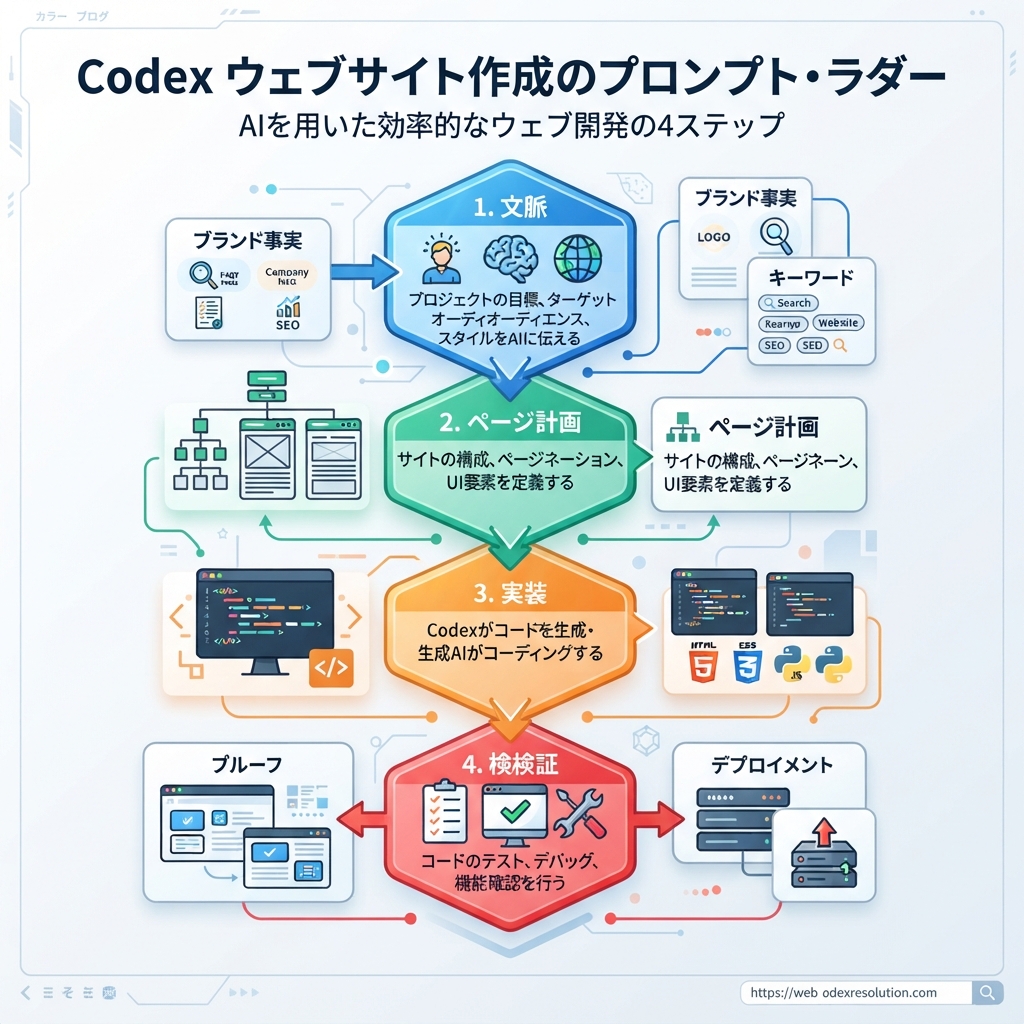
Caption: prompt ladderを使います。contextを先に、page planを次に、codeをその後に、最後にvalidationを行います。
Codexを開く前に、6つの入力を準備する
弱いプロンプトは、Codexにbusinessを発明させます。強いプロンプトは、Codexにsource of truthを渡します。
開始前に、短い website-brief.md を用意します。粗くても構いませんが、次の6項目を入れてください。
Input | 書く内容 | SEO/GEOで重要な理由 |
|---|---|---|
Business facts | company name、category、必要ならlocation、product、pricing model、customer type | 検索エンジンとAI systemsがentityを明確に理解しやすくなる |
Primary audience | 誰が買うか、誰が調べるか、誰が購入を止めるか | page language、examples、CTAを決める |
Offers | product/service pages、lead magnet、demo、audit、free tool、newsletter | generic brochureになるのを防ぐ |
Keyword targets | 5〜20個のseed keywordsと5〜10個のbuyer questions | random headingではなくsearch intent mapをCodexに渡せる |
Proof | customer types、public examples、裏付けできるstats、integrations、screenshots、testimonials | trustを高め、AI answersが引用できる証拠を作る |
Constraints | tech stack、brand tone、作りたくないpages、避けるlegal claims | risky copyと不要なdependenciesを減らす |
Google Search Console、Bing Webmaster Tools、GA4、CRM notes、sales-call questionsがすでにあるなら、短いexport summaryを追加します。まだない場合は、customer questionsとcompetitor SERP observationsから始めます。
最初のCodexプロンプト:コードではなくWebサイト計画を依頼する
最初はplanning promptから始めます。これにより、Codexがすぐにgeneric landing pageを作り始めるのを防げます。
次のプロンプトをコピーし、角括弧の部分を置き換えてください。
I want to build a new company website that is strong for both SEO and GEO.

You are acting as a senior product-led SEO strategist, technical SEO reviewer, and frontend implementer.

Do not write code yet. First, read the brief below and produce a website plan.

Business context:
[Paste company facts, product, audience, market, offer, proof, and constraints]

Target outcomes:
- The website should explain the product clearly to a first-time visitor.
- It should be crawlable and indexable.
- It should include pages that match real search intent.
- It should include answer-style sections that AI search systems can extract.
- It should include entity signals: About, product facts, use cases, pricing or CTA, and evidence.
- It should be deployable to Vercel or Netlify.

Please produce:
1. Recommended tech stack and why.
2. Site architecture with URLs.
3. Page-by-page purpose, target keyword, GEO question, CTA, and required proof.
4. Homepage wireframe section order.
5. SEO/GEO checklist for title tags, meta descriptions, schema, internal links, sitemap, robots.txt, llms.txt, and analytics.
6. Deployment plan with build command and output directory.
7. Risks or missing information I should provide before implementation.

Do not invent unsupported claims. Mark missing proof as TODO.
実装を承認する前に、この計画を読みます。計画の中に /solutions、/features、/blog のようなURLがあり、明確なintentがない場合は、そのまま進めないでください。各URLが存在する理由をCodexに説明させます。
強いCodex生成サイトマップに含めるべきもの
小規模SaaS、agency、tool、B2B websiteの最初のversionは、巨大である必要はありません。多くの場合、6〜10個の耐久性のあるpageで十分です。
Page | Purpose | SEO/GEO job |
|---|---|---|
| businessをpositioningし、visitorを誘導する | 明確なcategory、primary offer、proof、core CTA |
| productが何をするか説明する | feature/entity clarityとcomparison-ready facts |
| buyer situationに合わせる | long-tail intentとAI-answer scenarios |
| purchase ambiguityを減らす | pricing intent、plan comparison、objections |
| entity trustを作る | brand facts、team/company facts、contact signals |
| educational assetsを公開する | topical authorityとinternal-link hub |
| calculators、checklists、templatesを提供する | linkable utility pagesとcitation assets |
| demandをconversionへつなげる | lead captureとlocal/business credibility |
GEOでは、重要なpageが具体的な質問にきれいなblockで答える必要があります。たとえば次のような質問です。
- この会社は何をしているのか。
- 誰向けなのか。
- どんな問題を解決するのか。
- alternativeと何が違うのか。
- どんな証拠が主張を支えているのか。
- userは次に何をすべきか。
この回答構造は重要です。AI検索システムは、明確な事実、定義、比較、証拠が見えるページから、短く直接的な説明を合成することが多いからです。
実装プロンプト:guardrails付きでCodexに作らせる
計画が良ければ、実装を依頼します。実装プロンプトには、作るfile、避けること、検証方法を入れます。
Implement the approved website plan in this repository.

Build requirements:
- Use [Next.js/Astro/Vite/etc.] with TypeScript if appropriate.
- Keep the site fast, static-first, and easy to deploy.
- Create reusable components for navigation, footer, SEO metadata, FAQ blocks, CTA sections, and schema helpers.
- Create pages exactly from the approved URL map.
- Add title tags, meta descriptions, canonical URLs, Open Graph data, structured data where appropriate, sitemap generation, robots.txt, and llms.txt.
- Add internal links from the homepage to product/use-case pages and from blog/resource pages back to commercial pages.
- Add answer blocks for GEO: concise definitions, comparison tables, FAQ sections, and evidence sections.
- Use accessible HTML: semantic headings, readable contrast, labels, alt text, and keyboard-friendly navigation.
- Do not add unsupported claims, fake testimonials, fake logos, fake customer names, or made-up statistics.
- Do not install heavy UI libraries unless you explain why.

Design direction:
[Describe visual style: bold editorial, calm enterprise, technical docs-like, premium agency, etc.]

Validation:
- Run install if needed.
- Run the build command.
- Run lint/typecheck if available.
- Report changed files, commands run, errors fixed, and remaining TODOs.
- Stop before deployment and wait for my review.
生成されたサイトが汎用的に見える場合、「make it better」と頼まないでください。より具体的なデザイン・コンバージョン改善プロンプトを渡します。
The current site is too generic. Rework the homepage so it feels specific to [category].

Keep the same technical stack, but improve:
1. Above-the-fold message: name the exact customer, pain, product category, and outcome.
2. Proof: replace vague claims with TODO proof slots I can fill.
3. Section rhythm: avoid repeated card grids; use a mix of comparison, workflow, checklist, and objection sections.
4. SEO/GEO: add one extractable answer block after the hero and one comparison table near the middle.
5. Conversion: make the primary CTA match the offer, not a generic "Get started".
6. Visuals: use CSS-created diagrams or simple product placeholders, not fake screenshots.

Run the build again and summarize only the meaningful changes.
だいたい良い結果を出すhomepage prompt
初心者がCodexで作るWebサイトは、homepageで失敗しがちです。hero、3つのbenefit、3枚のcard、testimonial、FAQ、CTAで終わることが多いですが、それだけでは不十分です。
説得の流れを持つhomepageを依頼します。
Create the homepage using this section order:

1. Hero: one-sentence positioning, specific audience, primary CTA, secondary CTA, 3 trust signals.
2. Problem diagnosis: show the symptoms the buyer recognizes.
3. Product mechanism: explain how the product solves the problem in 3-5 concrete steps.
4. Use-case routing: link to the main use-case pages with intent-specific copy.
5. Proof section: include supported proof only; use TODO placeholders where proof is missing.
6. Comparison section: compare our approach with the old/manual/alternative approach.
7. SEO/GEO answer block: answer "What is [brand/product/category]?" in 60-90 words.
8. FAQ: answer buying, implementation, pricing, and risk questions.
9. Final CTA: repeat the offer with a low-friction next step.

For every section, include:
- H2 or H3 heading
- 1 short paragraph
- bullets or a table when useful
- internal links where relevant
- notes for what proof or screenshot should be added later
このプロンプトは、装飾的なlayoutではなくconversion pathをCodexに渡します。
Codexに生成させるpage-level SEO/GEO checklist
Codexに seo-geo-checklist.md をrepo内に作成させ、構築しながら記入させます。このfileがreview sheetになります。
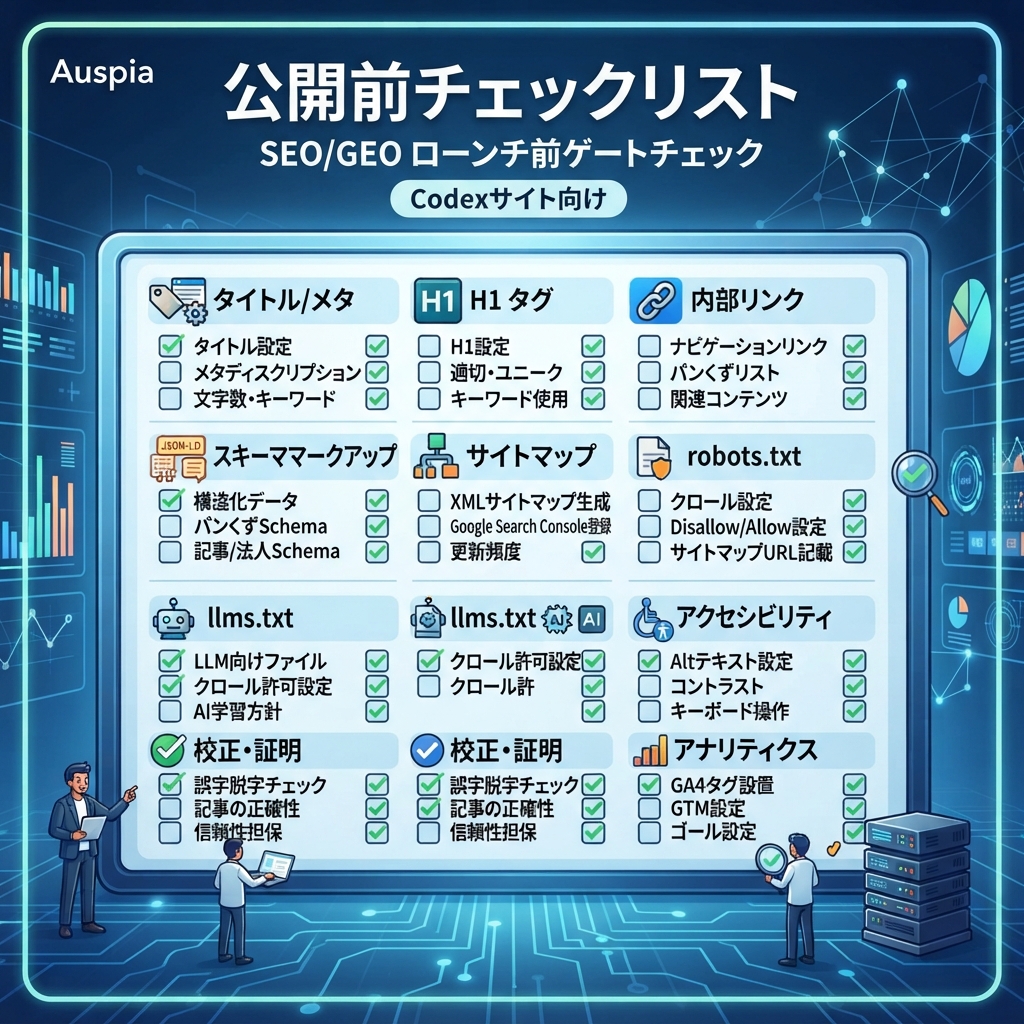
Caption: custom domainを接続したりindexingへ送信したりする前に、launch gateを確認します。
checklistには次を含めます。
Check | Beginner pass condition |
|---|---|
Page titles | すべてのpageに、可能なら約60文字以内のuniqueでdescriptiveなtitleがある |
Meta descriptions | 重要pageごとにspecific summaryとCTAがある |
H1 | page intentに合う明確なH1が1つある |
Internal links | homepageから商用ページへ、教育系ページから関連するconversionページへリンクがある |
Schema | Organization、WebSite、BreadcrumbList、FAQPage、Article、Product schemaを適切な場所だけで使う |
Sitemap | buildまたはdeploy後に |
Robots |
|
llms.txt |
|
Canonicals | canonical URLがproduction domainと一致する |
Performance | buildが通り、明らかな巨大assetやblocking scriptがない |
Accessibility | imagesにalt textがあり、formsにlabelsがあり、headingsが論理的である |
Proof | claimsがsupportされているか、TODOとして明記されている |
Analytics | GA4、GSC、Bing Webmaster、またはprivacy-friendly analytics planが文書化されている |
実装後に、Codexへ次のreviewを依頼できます。
Audit the generated website against seo-geo-checklist.md.

Return a table with:
- Issue
- URL/file
- Why it matters
- Suggested fix
- Risk level
- Whether you can fix it now

Fix only low-risk code/content issues. Do not change positioning, pricing, legal claims, or unsupported proof without asking me first.
Deployment:Codexサイトをonlineにする方法
初心者にわかりやすいdeployment pathは次のとおりです。
- repositoryをGitHubへpushする。
- repositoryをVercelまたはNetlifyへimportする。
- framework、install command、build command、output directoryを確認する。
- まずpreview URLへdeployする。
- previewをCodexでreviewする。
- previewが通ってからcustom domainを接続する。
- sitemapをGoogle Search ConsoleとBing Webmaster Toolsへ送信する。
Vercelでは、多くのframeworkを自動検出し、妥当なbuild settingsを設定できます。必要ならproject settingsでbuild commandとoutput directoryを上書きできます。Netlifyでも同じ考え方です。projectが単純なroot-level siteでない場合は、build command、publish directory、base directoryを設定します。
最初のpreview URLができたら、このdeployment promptを使います。
Review this deployed preview URL: [paste preview URL].

Check it as a launch reviewer for SEO, GEO, usability, and deployment quality.

Please inspect:
1. Homepage message clarity.
2. Navigation and internal links.
3. Page titles, meta descriptions, canonical URLs, robots.txt, sitemap.xml, and llms.txt.
4. Mobile layout issues.
5. Broken links or missing images.
6. Whether important claims need proof.
7. Whether AI search systems can extract a clear answer about the company.
8. What should be fixed before connecting the production domain.

Return a prioritized launch checklist. Do not make changes until I approve the fixes.
Codex cloudを使う場合、cloud tasksはisolated containerで動き、repositoryをcheckoutします。OpenAIのCodex cloud environment docsでは、setup scriptsでdependenciesをinstallできること、agent internet accessが別途制御されることが説明されています。deployment workflowでは、secretをpromptへ貼らず、hosting provider側に保存してください。
Deploy後:search、AI search、人間にとって使えるサイトにする
deployはゴールではありません。最初の1日以内に次を行います。
Task | Tool | What to confirm |
|---|---|---|
Indexing setup | Google Search Console | Domain propertyがverifiedで、sitemapがsubmitted |
Bing setup | Bing Webmaster Tools | siteが追加され、sitemapがsubmitted |
Analytics | GA4またはprivacy-friendly analytics | pageviews、conversions、eventsが記録されている |
Crawl check | Screaming Frog、Sitebulb、またはsimple script | 重要pageが200を返し、誤ったnoindexがない |
AI visibility baseline | ChatGPT、Perplexity、Gemini、Felo Search、またはSERP API | brand/category promptsのstarting snapshotがある |
Conversion check | Manual browser test | forms、calendar links、email links、CTAsが動く |
その後、recurring Codex taskを作ります。
Every week, review this website for SEO/GEO launch quality.

Inputs:
- Production URL: [domain]
- Sitemap: [sitemap URL]
- GSC export: [file or connector]
- Bing export: [file or connector]
- GA4 export: [file or connector]
- AI visibility prompt set: [file]

Return:
1. Indexing changes.
2. Pages gaining or losing impressions.
3. Queries with high impressions and low CTR.
4. AI answers that mention or miss the brand.
5. Content updates to improve extractability.
6. Technical fixes that need approval.
7. A 7-day action queue.

Do not publish changes automatically.
CodexにWebサイト作成を依頼するときのよくある失敗
- 戦略より先に美しさを求める。 Codexはpolishedに見えるサイトを作れますが、messageが曖昧なままになることがあります。
- Codexにproofを発明させる。 fake testimonialsやfake customer logosはtrustを壊し、legal riskを作ります。
- page intentを飛ばす。 すべてのURLには存在理由が必要です。
- deployment detailsを忘れる。 Codexがframeworkとbuild commandを知らないと、localでは動いてもVercelやNetlifyで失敗します。
- 巨大な1プロンプトで済ませる。 plan、implement、audit、deployは分けるべきです。
- diffをreviewしない。 初心者はdeploy前にchanged filesとrisky decisionsをCodexへ要約させるべきです。
- analyticsを無視する。 indexing、traffic、citations、conversionsを観測できるまで、サイトはSEO/GEO-readyではありません。
Codexに貼り付けられる初心者向け完全プロンプト
空のrepositoryまたはstarter repositoryからサイトを作りたい場合は、これを使います。
I want you to help me create a professional company website that is ready for SEO, GEO, and deployment.

Work in phases. Do not skip ahead.

Phase 1: Planning only
- Read my business brief.
- Ask up to 10 clarification questions if needed.
- Recommend a simple tech stack.
- Create a site map with URLs, search intent, GEO questions, CTA, and proof needed.
- Create a homepage wireframe and page templates.
- Create an SEO/GEO launch checklist.

Phase 2: Implementation after I approve the plan
- Build the website in the selected stack.
- Add semantic HTML, responsive layout, reusable components, metadata, schema, sitemap, robots.txt, and llms.txt.
- Use TODO markers for unsupported proof instead of inventing facts.
- Keep dependencies minimal.

Phase 3: Validation
- Run install, lint/typecheck if available, and build.
- Fix build errors.
- Review SEO/GEO checklist.
- Summarize changed files and remaining launch risks.

Phase 4: Deployment support
- Give me exact deployment settings for Vercel and Netlify: framework preset, install command, build command, output directory, environment variables, and domain steps.
- After I share the preview URL, audit it before production launch.

Business brief:
[Paste your website-brief.md content here]
Codex SEO/GEO 学習パス
この記事は Codex SEO/GEO オペレーターシリーズの一部です。ゼロから構築する場合は、次の順番で進めてください。
- 2026年にCodexで自動GEOを実践する方法
- CodexでSEOを自動化する方法
- AGENTS.mdでCodex SEOワークスペースを作る方法
- MCPでCodexをSEOデータに接続する方法
- 2026年版:最も実用的なCodex GEO Skill
- キーワードクラスタリング用のCodex Skillを作る方法
- SERP、コンテンツ、テクニカルSEOでCodex Subagentsを使う方法
- 本番を壊さずにCodexでテクニカルSEOを修正する方法
- Codex Automationsで毎日のSEO/GEO監視を行う方法
- Codex SEO/GEO品質ゲート:Diff、証拠、テスト、人間の承認
- CodexでSEO/GEO対応のWebサイトを作成・デプロイする方法
次に読むべき記事
前の記事: Codex SEO/GEO品質ゲート:Diff、証拠、テスト、人間の承認
参考情報
- OpenAI Codex docs: Prompting, AGENTS.md guidance, Codex cloud environments。
- Vercel docs: Configuring a build, Project configuration。
- Netlify docs: Build configuration overview。
Author: Leah Foster, Auspiaで400以上のlanding pagesを支援してきたconversion SEO strategist。Leahは、SEO/GEOチーム向けにlanding pages、conversion paths、content-to-demo journeysについて執筆しています。