成果:一個可上線網站,而不只是漂亮 mockup
如果你把第一個 prompt 當成 product brief、SEO brief、GEO brief 與 deployment brief 的綜合體,就可以用 Codex 建立強的 company website。目標不是要求「一個漂亮 homepage」。目標是給 Codex 足夠 context,讓它建立有清楚 positioning、crawlable structure、extractable answer blocks、schema-ready content 與 deployment path 的網站。
初學者安全 workflow 是:
- 要求 Codex 在寫 code 前先 plan website。
- 給它 brand facts、audience、offers、keywords、GEO questions 與 proof。
- 讓它建立小而完整的 site architecture。
- Review page plan,批准後才要求 implementation。
- Run local checks、fix diff、deploy preview,最後 connect analytics。
Codex 在能驗證自己工作時表現最好。OpenAI 的 Codex prompting guidance 建議包含 validation steps,並把 complex tasks 拆成更小、更聚焦的 requests。對 website build 來說,prompts 應包含 build commands、lint checks、accessibility checks 與 deployment acceptance criteria,而不只是 design taste。
Caption: 使用 prompt ladder:先 context,再 page plan,再 code,最後 validation。
打開 Codex 前:準備這六個 inputs
弱 prompt 會要求 Codex 發明 business。強 prompt 會給 Codex 一份可信的事實來源。
開始前先準備一份簡短 website-brief.md。它可以粗糙,但應包含六個 sections:
Input | 要寫什麼 | 為什麼對 SEO/GEO 重要 |
|---|---|---|
Business facts | Company name、category、location if relevant、product、pricing model、customer type | 幫助 search engines 與 AI systems 清楚識別 entity |
Primary audience | 誰購買、誰研究、誰阻擋採購 | 影響 page language、examples 與 CTAs |
Offers | Product/service pages、lead magnet、demo、audit、free tool、newsletter | 防止網站變成 generic brochure |
Keyword targets | 5-20 seed keywords 與 5-10 buyer questions | 給 Codex search-intent map,而不是 random headings |
Proof | Customer types、public examples、可支持 stats、integrations、screenshots、testimonials | 提升 trust,並給 AI answers 可引用 evidence |
Constraints | Tech stack、brand tone、不想要的 pages、要避免的 legal claims | 降低 risky copy 與不必要 dependencies |
如果你已經有 Google Search Console、Bing Webmaster Tools、GA4、CRM notes 或 sales-call questions,加入短 export summary。如果沒有,就先從 customer questions 與 competitor SERP observations 開始。
第一個 Codex prompt:先要 website plan,不要要 code
從 planning prompt 開始,避免 Codex 立刻建立 generic landing page。
複製這段 prompt,並替換 brackets:
I want to build a new company website that is strong for both SEO and GEO.

You are acting as a senior product-led SEO strategist, technical SEO reviewer, and frontend implementer.

Do not write code yet. First, read the brief below and produce a website plan.

Business context:
[Paste company facts, product, audience, market, offer, proof, and constraints]

Target outcomes:
- The website should explain the product clearly to a first-time visitor.
- It should be crawlable and indexable.
- It should include pages that match real search intent.
- It should include answer-style sections that AI search systems can extract.
- It should include entity signals: About, product facts, use cases, pricing or CTA, and evidence.
- It should be deployable to Vercel or Netlify.

Please produce:
1. Recommended tech stack and why.
2. Site architecture with URLs.
3. Page-by-page purpose, target keyword, GEO question, CTA, and required proof.
4. Homepage wireframe section order.
5. SEO/GEO checklist for title tags, meta descriptions, schema, internal links, sitemap, robots.txt, llms.txt, and analytics.
6. Deployment plan with build command and output directory.
7. Risks or missing information I should provide before implementation.

Do not invent unsupported claims. Mark missing proof as TODO.
批准 implementation 前,先讀 plan。如果 plan 只有 /solutions、/features、/blog,卻沒有 clear intent,請 push back。要求 Codex 解釋每個 URL 為什麼值得存在。
強的 Codex-generated site map 應該包含什麼
對多數 small SaaS、agency、tool 或 B2B websites 來說,好的 first version 不需要很大。通常是 6-10 個 durable pages:
Page | Purpose | SEO/GEO job |
|---|---|---|
| 定位 business 並引導 visitors | 清楚 category、primary offer、proof 與 core CTA |
| 說明 product 做什麼 | Feature/entity clarity 與 comparison-ready facts |
| Match buyer situations | Long-tail intent and AI-answer scenarios |
| Reduce purchase ambiguity | Pricing intent、plan comparison、objections |
| Establish entity trust | Brand facts、team/company facts、contact signals |
| Publish educational assets | Topical authority and internal-link hub |
| 提供 calculators、checklists、templates | 可被連結的 utility pages 與 citation assets |
| Convert demand | Lead capture and local/business credibility |
對 GEO 來說,每個重要 page 都應該用乾淨 blocks 回答 specific questions。例如:
- 這家公司做什麼?
- 適合誰?
- 解決什麼問題?
- 跟 alternatives 有什麼不同?
- 有什麼 evidence 支持 claim?
- 使用者下一步該做什麼?
這種答案結構很重要,因為 AI 搜尋系統常從清楚呈現 facts、definitions、comparisons 與 proof 的頁面,合成短而直接的說明。
Implementation prompt:讓 Codex 帶著 guardrails 建立網站
Plan 足夠好之後,再要求 Codex implement。Implementation prompt 應告訴它要建立哪些 files、避免什麼、如何驗證 site。
Implement the approved website plan in this repository.

Build requirements:
- Use [Next.js/Astro/Vite/etc.] with TypeScript if appropriate.
- Keep the site fast, static-first, and easy to deploy.
- Create reusable components for navigation, footer, SEO metadata, FAQ blocks, CTA sections, and schema helpers.
- Create pages exactly from the approved URL map.
- Add title tags, meta descriptions, canonical URLs, Open Graph data, structured data where appropriate, sitemap generation, robots.txt, and llms.txt.
- Add internal links from the homepage to product/use-case pages and from blog/resource pages back to commercial pages.
- Add answer blocks for GEO: concise definitions, comparison tables, FAQ sections, and evidence sections.
- Use accessible HTML: semantic headings, readable contrast, labels, alt text, and keyboard-friendly navigation.
- Do not add unsupported claims, fake testimonials, fake logos, fake customer names, or made-up statistics.
- Do not install heavy UI libraries unless you explain why.

Design direction:
[Describe visual style: bold editorial, calm enterprise, technical docs-like, premium agency, etc.]

Validation:
- Run install if needed.
- Run the build command.
- Run lint/typecheck if available.
- Report changed files, commands run, errors fixed, and remaining TODOs.
- Stop before deployment and wait for my review.
如果生成的網站很 generic,不要只說「讓它更好」。請給 Codex 更精準的設計與轉換 prompt:
The current site is too generic. Rework the homepage so it feels specific to [category].

Keep the same technical stack, but improve:
1. Above-the-fold message: name the exact customer, pain, product category, and outcome.
2. Proof: replace vague claims with TODO proof slots I can fill.
3. Section rhythm: avoid repeated card grids; use a mix of comparison, workflow, checklist, and objection sections.
4. SEO/GEO: add one extractable answer block after the hero and one comparison table near the middle.
5. Conversion: make the primary CTA match the offer, not a generic "Get started".
6. Visuals: use CSS-created diagrams or simple product placeholders, not fake screenshots.

Run the build again and summarize only the meaningful changes.
通常更有效的 homepage prompt
Homepage 是多數 beginner Codex websites 失敗的地方。它們會得到 hero、三個 benefits、三張 cards、testimonials、FAQ 與 CTA。這還不夠。
請要求 Codex 建立有 persuasive sequence 的 homepage:
Create the homepage using this section order:

1. Hero: one-sentence positioning, specific audience, primary CTA, secondary CTA, 3 trust signals.
2. Problem diagnosis: show the symptoms the buyer recognizes.
3. Product mechanism: explain how the product solves the problem in 3-5 concrete steps.
4. Use-case routing: link to the main use-case pages with intent-specific copy.
5. Proof section: include supported proof only; use TODO placeholders where proof is missing.
6. Comparison section: compare our approach with the old/manual/alternative approach.
7. SEO/GEO answer block: answer "What is [brand/product/category]?" in 60-90 words.
8. FAQ: answer buying, implementation, pricing, and risk questions.
9. Final CTA: repeat the offer with a low-friction next step.

For every section, include:
- H2 or H3 heading
- 1 short paragraph
- bullets or a table when useful
- internal links where relevant
- notes for what proof or screenshot should be added later
這個 prompt 給 Codex conversion path,而不是 decorative layout。
Codex 應產生的 page-level SEO/GEO checklist
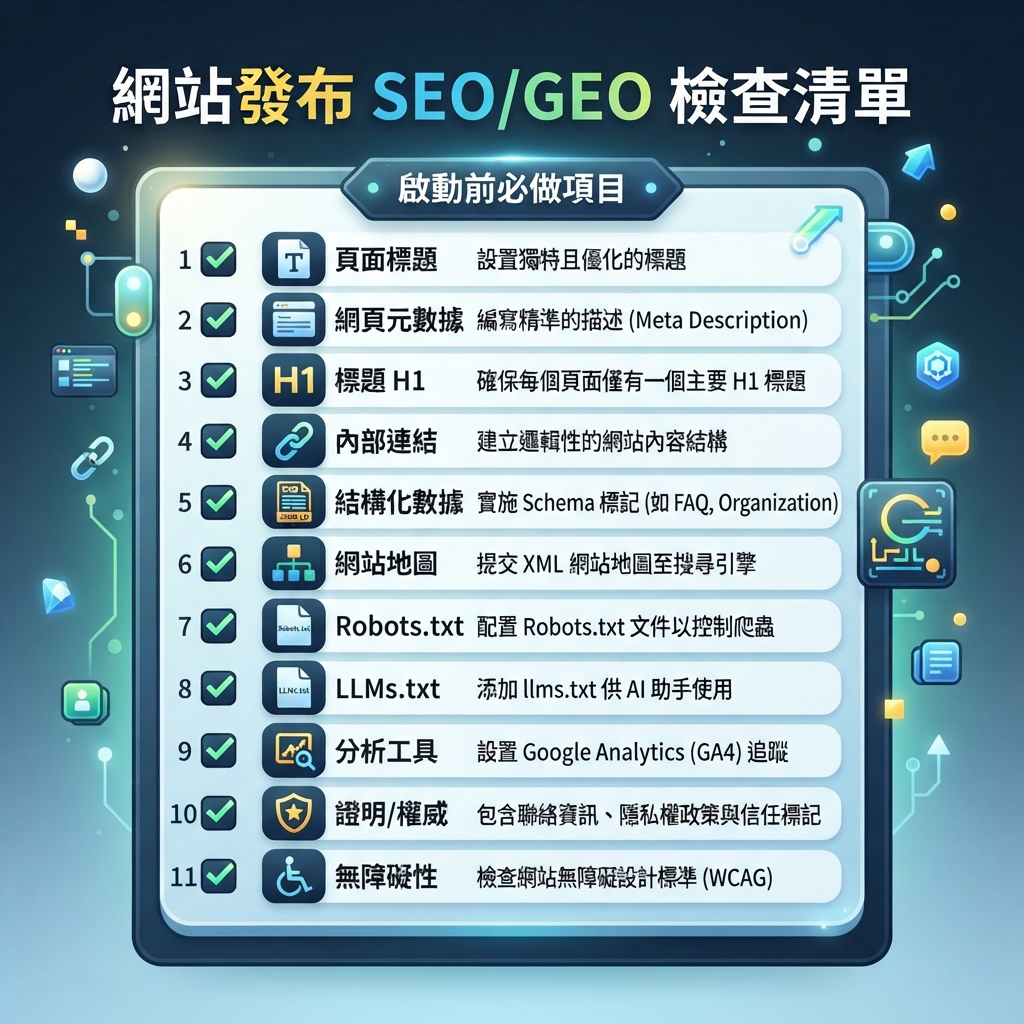
要求 Codex 在 repo 裡建立 seo-geo-checklist.md,並在 build 過程中填寫。這個 file 會變成你的 review sheet。
Caption: 連 custom domain 或提交 indexing 前,先 review launch gate。
Checklist 應包含:
Check | Beginner pass condition |
|---|---|
Page titles | 每個 page 都有 unique、descriptive title,可能時控制在約 60 characters 內 |
Meta descriptions | 每個重要 page 都有 specific summary 與 CTA |
H1 | 每頁一個 clear H1,並符合 page intent |
Internal links | 首頁連到商業頁;教育內容頁連到相關轉換頁 |
Schema | Organization、WebSite、BreadcrumbList、FAQPage、Article 或 Product schema 只在適合處使用 |
Sitemap | build 或 deploy 後存在 |
Robots |
|
llms.txt |
|
Canonicals | Canonical URLs match production domain |
Performance | Build passes;沒有明顯 oversized assets 或 blocking scripts |
Accessibility | Images 有 alt text;forms 有 labels;headings logical |
Proof | Claims 有 support 或標記 TODO |
Analytics | GA4、GSC、Bing Webmaster 或 privacy-friendly analytics plan 已記錄 |
Implementation 後,可以要求 Codex 跑這個 review:
Audit the generated website against seo-geo-checklist.md.

Return a table with:
- Issue
- URL/file
- Why it matters
- Suggested fix
- Risk level
- Whether you can fix it now

Fix only low-risk code/content issues. Do not change positioning, pricing, legal claims, or unsupported proof without asking me first.
Deployment:如何讓 Codex site 上線
Beginner-friendly deployment path:
- Push repository to GitHub。
- Import repository into Vercel or Netlify。
- Confirm framework、install command、build command 與 output directory。
- 先 deploy preview URL。
- 用 Codex review preview。
- Preview pass 後再 connect custom domain。
- Submit sitemap to Google Search Console and Bing Webmaster Tools。
Vercel 官方 docs 說,Vercel 可以自動偵測許多 frameworks,並配置合理的 build settings;必要時也能在 project settings override build command 與 output directory。Netlify build configuration docs 也說明相同核心概念:當 project 不是簡單 root-level site 時,要設定 build command、publish directory 與 base directory。
第一次 preview URL 上線後,使用這段 deployment prompt:
Review this deployed preview URL: [paste preview URL].

Check it as a launch reviewer for SEO, GEO, usability, and deployment quality.

Please inspect:
1. Homepage message clarity.
2. Navigation and internal links.
3. Page titles, meta descriptions, canonical URLs, robots.txt, sitemap.xml, and llms.txt.
4. Mobile layout issues.
5. Broken links or missing images.
6. Whether important claims need proof.
7. Whether AI search systems can extract a clear answer about the company.
8. What should be fixed before connecting the production domain.

Return a prioritized launch checklist. Do not make changes until I approve the fixes.
如果你使用 Codex cloud,請記得 cloud tasks 會在 isolated container 裡執行並 checkout repository。OpenAI 的 Codex cloud environment docs 說明 setup scripts 可以安裝 dependencies,而 agent internet access 另行控制。Deployment workflow 裡,secrets 應放在 hosting provider,不要貼進 prompts。
Deployment 後:讓網站可被 search、AI search 與 humans 使用
Deployment 不是終點。第一天內完成這些 steps:
Task | Tool | What to confirm |
|---|---|---|
Indexing setup | Google Search Console | Domain property verified;sitemap submitted |
Bing setup | Bing Webmaster Tools | Site added;sitemap submitted |
Analytics | GA4 or privacy-friendly analytics | Pageviews、conversions、events are recording |
Crawl check | Screaming Frog、Sitebulb 或 simple script | Important pages return 200;no accidental noindex |
AI visibility baseline | ChatGPT、Perplexity、Gemini、Felo Search 或 SERP API | Brand/category prompts have starting snapshot |
Conversion check | Manual browser test | Forms、calendar links、email links 與 CTAs work |
接著建立 recurring Codex task:
Every week, review this website for SEO/GEO launch quality.

Inputs:
- Production URL: [domain]
- Sitemap: [sitemap URL]
- GSC export: [file or connector]
- Bing export: [file or connector]
- GA4 export: [file or connector]
- AI visibility prompt set: [file]

Return:
1. Indexing changes.
2. Pages gaining or losing impressions.
3. Queries with high impressions and low CTR.
4. AI answers that mention or miss the brand.
5. Content updates to improve extractability.
6. Technical fixes that need approval.
7. A 7-day action queue.

Do not publish changes automatically.
要求 Codex 建站時的常見錯誤
- 先要美感,後想策略。 Codex 可以做出 polished site,但 message 仍然 vague。
- 讓 Codex invent proof。 Fake testimonials 與 fake customer logos 會傷害 trust,也可能有 legal risk。
- 跳過 page intent。 每個 URL 都應該有存在理由。
- 忘記 deployment details。 如果 Codex 不知道 framework 與 build command,site 可能本地可跑,卻在 Vercel 或 Netlify fail。
- 使用一個巨大 prompt。 Plan、implement、audit、deploy 應該分成不同 steps。
- 不 review diff。 Beginners 應要求 Codex 在 deployment 前 summarize changed files 與 risky decisions。
- 忽略 analytics。 網站要能 observe indexing、traffic、citations 與 conversions,才算 SEO/GEO-ready。
可直接貼進 Codex 的完整 beginner prompt
當你想讓 Codex 從 empty 或 starter repository 建立網站時,用這段:
I want you to help me create a professional company website that is ready for SEO, GEO, and deployment.

Work in phases. Do not skip ahead.

Phase 1: Planning only
- Read my business brief.
- Ask up to 10 clarification questions if needed.
- Recommend a simple tech stack.
- Create a site map with URLs, search intent, GEO questions, CTA, and proof needed.
- Create a homepage wireframe and page templates.
- Create an SEO/GEO launch checklist.

Phase 2: Implementation after I approve the plan
- Build the website in the selected stack.
- Add semantic HTML, responsive layout, reusable components, metadata, schema, sitemap, robots.txt, and llms.txt.
- Use TODO markers for unsupported proof instead of inventing facts.
- Keep dependencies minimal.

Phase 3: Validation
- Run install, lint/typecheck if available, and build.
- Fix build errors.
- Review SEO/GEO checklist.
- Summarize changed files and remaining launch risks.

Phase 4: Deployment support
- Give me exact deployment settings for Vercel and Netlify: framework preset, install command, build command, output directory, environment variables, and domain steps.
- After I share the preview URL, audit it before production launch.

Business brief:
[Paste your website-brief.md content here]
Codex SEO/GEO learning path
這篇文章是 Codex SEO/GEO operator series 的一部分。如果你要從零建立 workflow,建議照這個順序讀:
- 如何在 2026 年用 Codex 做自動化 GEO
- 如何用 Codex 做自動化 SEO
- 如何用 AGENTS.md 建立 Codex SEO Workspace
- 如何用 MCP 把 Codex 接上 SEO Data
- 2026 年最佳 Codex GEO Skill
- 如何建立 Codex Keyword Clustering Skill
- 如何用 Codex Subagents 做 SERP、內容與技術 SEO
- 如何用 Codex 修 Technical SEO 且不破壞 Production
- 如何用 Codex Automations 跑每日 SEO/GEO Monitoring
- Codex SEO/GEO Quality Gates:Diff、Evidence、Tests 與 Human Approval
- 如何用 Codex 建立並部署 SEO/GEO-Ready Website
下一步
上一篇:Codex SEO/GEO Quality Gates:Diff、Evidence、Tests 與 Human Approval
Sources and notes
- OpenAI Codex docs: Prompting, AGENTS.md guidance, and Codex cloud environments.
- Vercel docs: Configuring a build and Project configuration.
- Netlify docs: Build configuration overview.
Author: Leah Foster, Auspia 400+ Landing Pages Conversion SEO Strategist。Leah 撰寫 landing pages、conversion paths,以及 SEO/GEO teams 的 content-to-demo journeys。