The short version
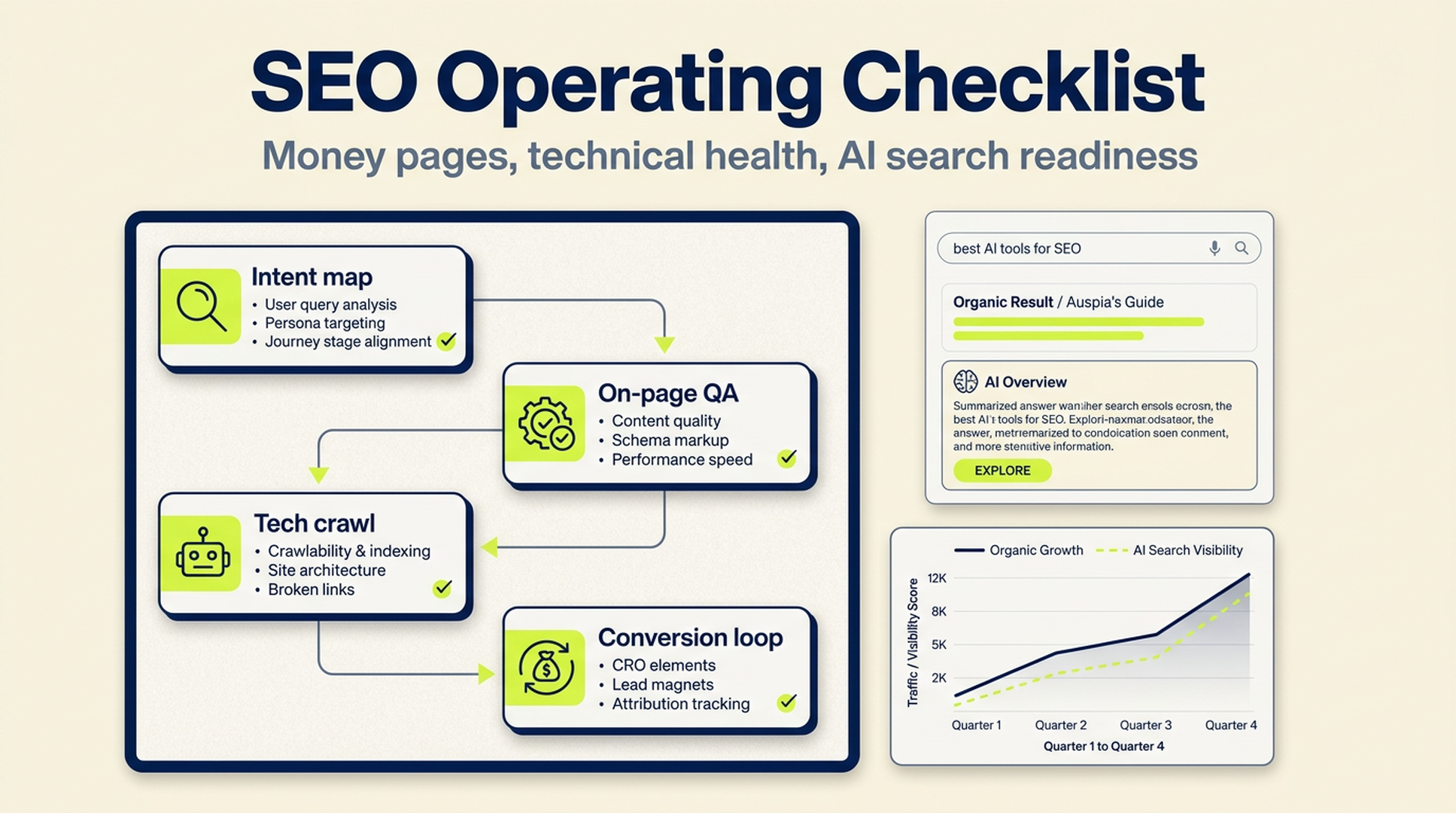
For SaaS and AI tool websites, SEO should not start with a giant blog calendar. Start with the pages closest to revenue: pricing, comparison, alternatives, use cases, product-led tool pages, and integration pages. Then build the supporting content system around those pages.
A good operating rhythm looks like this:
- Map keywords by intent, not just search volume.
- Build and improve money pages before publishing broad learning content.
- Run weekly on-page and indexability checks.
- Keep Core Web Vitals, structured data, internal links, and crawl paths clean.
- Track conversion events from organic traffic, not just rankings.
- Add AI search readiness to the same workflow: clear entities, concise answers, original examples, and crawlable evidence.
The source pattern for this article is a simple idea: a short checklist, a deeper checklist, and a 5W2H execution plan. We are adapting that structure for global SaaS, AI tool, and content-led growth teams.
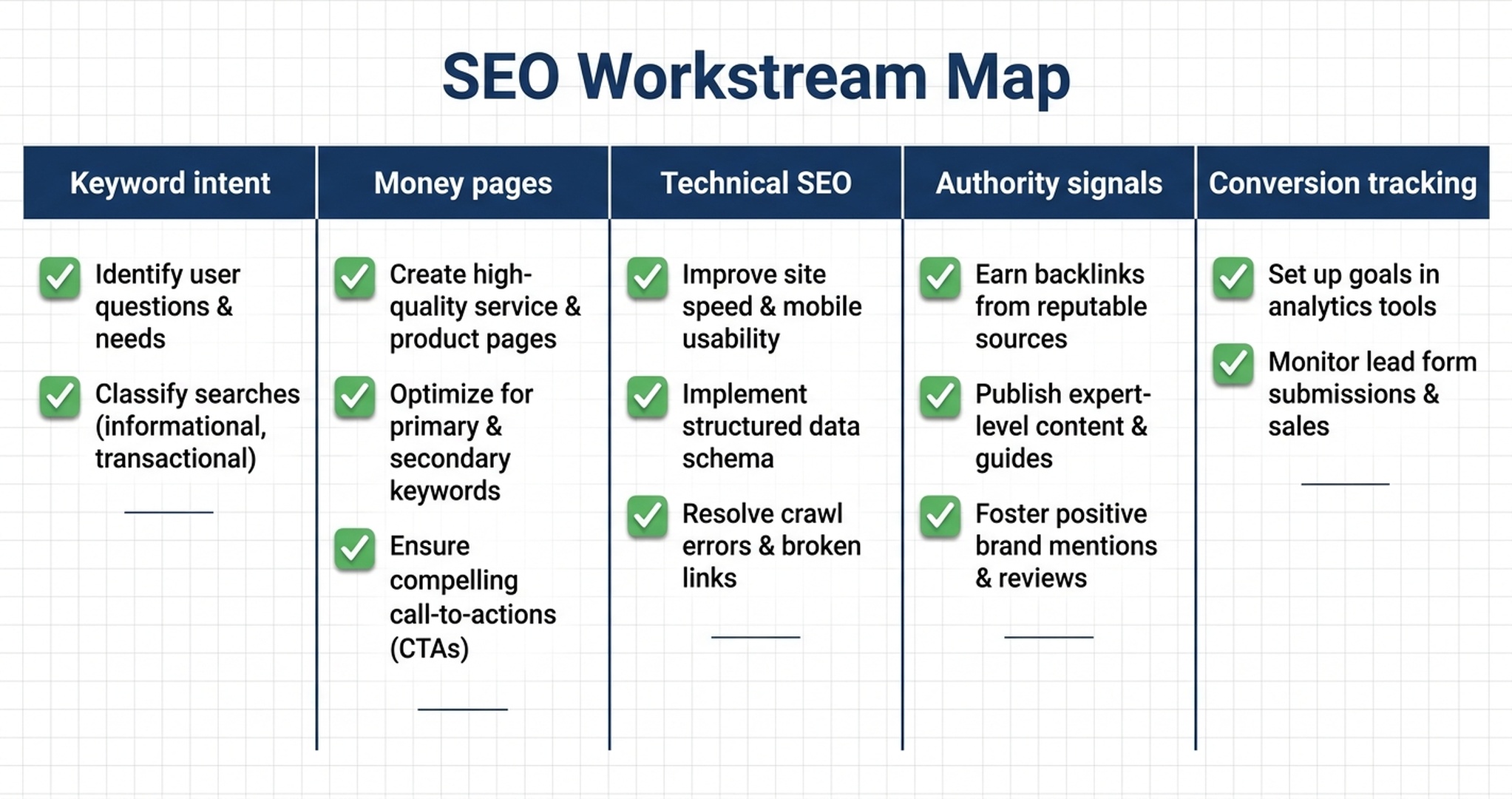
Caption: SEO works best when keyword intent, page production, technical health, authority signals, and conversion tracking run as one operating system.
The 10 checks every growth team should review weekly
These are the checks that catch most avoidable SEO losses. They are not glamorous. That is why teams skip them.
Check | What good looks like | Why it matters |
|---|---|---|
Title tags | Each indexable page has a unique, search-aligned title | Titles still influence clicks and page understanding |
H1 | One clear H1 that matches the page's actual promise | Avoids confusing users and crawlers |
Search intent | Each page serves one primary intent | Prevents mixed pages that rank for nothing |
Internal links | Money pages receive links from related guides and tools | Helps discovery, authority flow, and user paths |
Index status | Important pages are indexed; thin or duplicate pages are controlled | Crawl budget and index quality matter more as sites scale |
Core Web Vitals | LCP, INP, and CLS stay within Google's recommended ranges | Slow or unstable pages lose users before they convert |
Structured data | Article, FAQ, Product, SoftwareApplication, or Breadcrumb schema is used where appropriate | Helps machines interpret page type and relationships |
Content freshness | High-value pages show recent updates and accurate details | Old screenshots, pricing, and claims reduce trust |
Backlink quality | New mentions come from relevant, credible sources | Authority still compounds, but low-quality links create risk |
Conversion tracking | Organic visits can be tied to trials, demos, signups, or qualified events | Ranking without business impact is not a growth system |
Auspia's view: if you only have one hour per week, check index status, title/H1 drift, money-page internal links, and conversion tracking. Those four items usually expose the biggest gaps.
The full 100-point operating checklist
Use this as a working audit. Do not try to fix everything in one sprint. Mark each item as Done, Needs work, or Not relevant.
A. Keyword system and content architecture
- Your product lines and primary use cases are listed in one keyword map.
- Each product or feature has a money keyword group.
- Keywords are grouped by intent: informational, commercial, transactional, and navigational.
- Commercial pages include comparison, alternative, pricing, use case, integration, and best-tool queries.
- Each keyword has a target country or language where relevant.
- Each keyword has a funnel stage: top, middle, or bottom.
- You have a separate priority list for keywords closest to trial, demo, or purchase intent.
- You have reviewed competitor pages that already rank for those keywords.
- You know which SERPs show AI answers, product carousels, videos, forums, or review sites.
- You have chosen which pages should rank and which pages should support them.
- Every major topic cluster has one pillar page.
- Every cluster page links back to the pillar page with natural anchor text.
- Pillar pages link to the most useful cluster pages, not every article on the site.
- You have planned page types before article titles.
- You have a repeatable brief for product, comparison, alternatives, and guide pages.
- Each brief includes search intent, user pain, product relevance, proof, and CTA.
- You avoid targeting the same keyword with several similar pages.
- You have a process for merging or redirecting overlapping content.
- You update the keyword map monthly with GSC data.
- You track which keyword groups produce leads, not just traffic.
B. On-page SEO and answer quality
- URLs are lowercase, short, and readable.
- Each important page has one primary keyword target.
- The title tag is specific and not stuffed.
- The meta description states the problem, value, and next action.
- Each page has one H1.
- H2s answer real user questions or break down real decision criteria.
- The first 100 words explain who the page is for and what it helps them do.
- Pages include original examples, screenshots, templates, or data where possible.
- Claims are specific enough to be evaluated.
- Vague phrases like "all-in-one solution" are replaced with concrete capabilities.
- Images use descriptive alt text.
- Image filenames describe the content.
- Tables are used where comparison or extraction matters.
- FAQs answer real long-tail questions instead of repeating the article.
- Product pages include use cases, constraints, and fit notes.
- Comparison pages define evaluation criteria before naming winners.
- Alternatives pages explain who should switch and who should not.
- Tool pages include input, output, workflow, and limitations.
- Every page has a next step that matches intent.
- CTAs are visible near the top, middle, and end on long pages.
- Social proof appears where it helps a buyer decide.
- Internal links point to related pages with meaningful anchor text.
- External references support data, definitions, or standards.
- Old or unsupported claims are removed.
- The page reads naturally out loud.
C. Technical SEO and crawl health
robots.txtdoes not block important pages or resources.- XML sitemaps include only canonical, indexable URLs.
- Sitemaps are submitted in Google Search Console.
- Important pages are not accidentally marked
noindex. - Canonical tags point to the preferred version.
- Duplicate pages are consolidated, redirected, or canonicalized.
- Navigation exposes core product, tool, and category pages.
- Important pages are reachable within a few clicks from the homepage or hub pages.
- Broken internal links are fixed.
- Redirect chains are shortened.
- JavaScript-rendered content is visible to crawlers.
- CSS and JS required for rendering are crawlable.
- Pagination and faceted pages are handled deliberately.
- Large image files are compressed and served in modern formats.
- Above-the-fold images are prioritized correctly.
- Non-critical scripts are delayed when possible.
- Core Web Vitals are monitored at template level, not only by single URLs.
- LCP issues are traced to the real element causing the delay.
- INP issues are traced to scripts, event handlers, or heavy interactions.
- CLS is checked after ads, banners, embeds, and dynamic components load.
- Mobile layouts keep CTAs readable and tappable.
- Breadcrumbs reflect the real site hierarchy.
- Structured data validates without critical errors.
- International pages use correct
hreflangand self-referencing tags. - Migrations have a complete redirect map before launch.
Google's current Core Web Vitals documentation treats Interaction to Next Paint as the responsiveness metric that replaced First Input Delay in March 2024. If your team still reports FID as the main responsiveness metric, your SEO dashboard is already behind. Reference: https://web.dev/articles/inp
D. Authority, trust, and distribution
- You know which pages need authority support.
- You separate brand PR goals from link equity goals.
- You track unlinked brand mentions.
- You have a short list of relevant directories, review sites, and software marketplaces.
- You collect customer proof that can be used on money pages.
- You publish at least one linkable asset per quarter: data, benchmarks, templates, or research.
- You pitch expert comments where your team has real expertise.
- Guest posts are judged by relevance and audience, not only domain metrics.
- Community posts answer the question first and mention the product only when useful.
- Review profiles are accurate and up to date.
- Backlink reports are reviewed for quality every quarter.
- Toxic or irrelevant outreach campaigns are avoided.
- Your best guides are repurposed into newsletters, social posts, and sales enablement assets.
- Founder or expert viewpoints are connected back to owned content.
- Brand search demand is monitored alongside non-brand traffic.
E. Content maintenance and AI search readiness
- Every important article has a last-reviewed date in the CMS or tracking sheet.
- Pages with declining impressions are reviewed before they lose ranking completely.
- Pages with high impressions and low CTR get title and snippet testing.
- Pages with traffic but no conversions get CTA and intent review.
- Old product screenshots are replaced.
- Pricing, plan, and feature references are checked monthly.
- Pages that no longer match the product are rewritten or retired.
- AI-search-friendly summaries are added near the top of complex pages.
- Definitions are short, direct, and easy to quote.
- Entity names are consistent across pages.
- Author, company, product, and category information is clear.
- Original examples make the page more citable than generic summaries.
- FAQ answers are concise enough for answer engines to extract.
- You monitor visibility in AI search tools, not only classic SERPs.
- Your SEO backlog includes crawlability for AI agents where relevant, including robots rules and LLM-facing documentation.
For teams working on GEO and AI answer visibility, this is where SEO and AI search meet. Clean crawl paths, trustworthy evidence, clear entities, and concise answer blocks help both classic search and AI answer systems. You can use Auspia's AI Search Visibility Checker to spot early visibility gaps.
A 5W2H SEO execution plan
A checklist only helps if someone owns it. Here is the operating version.
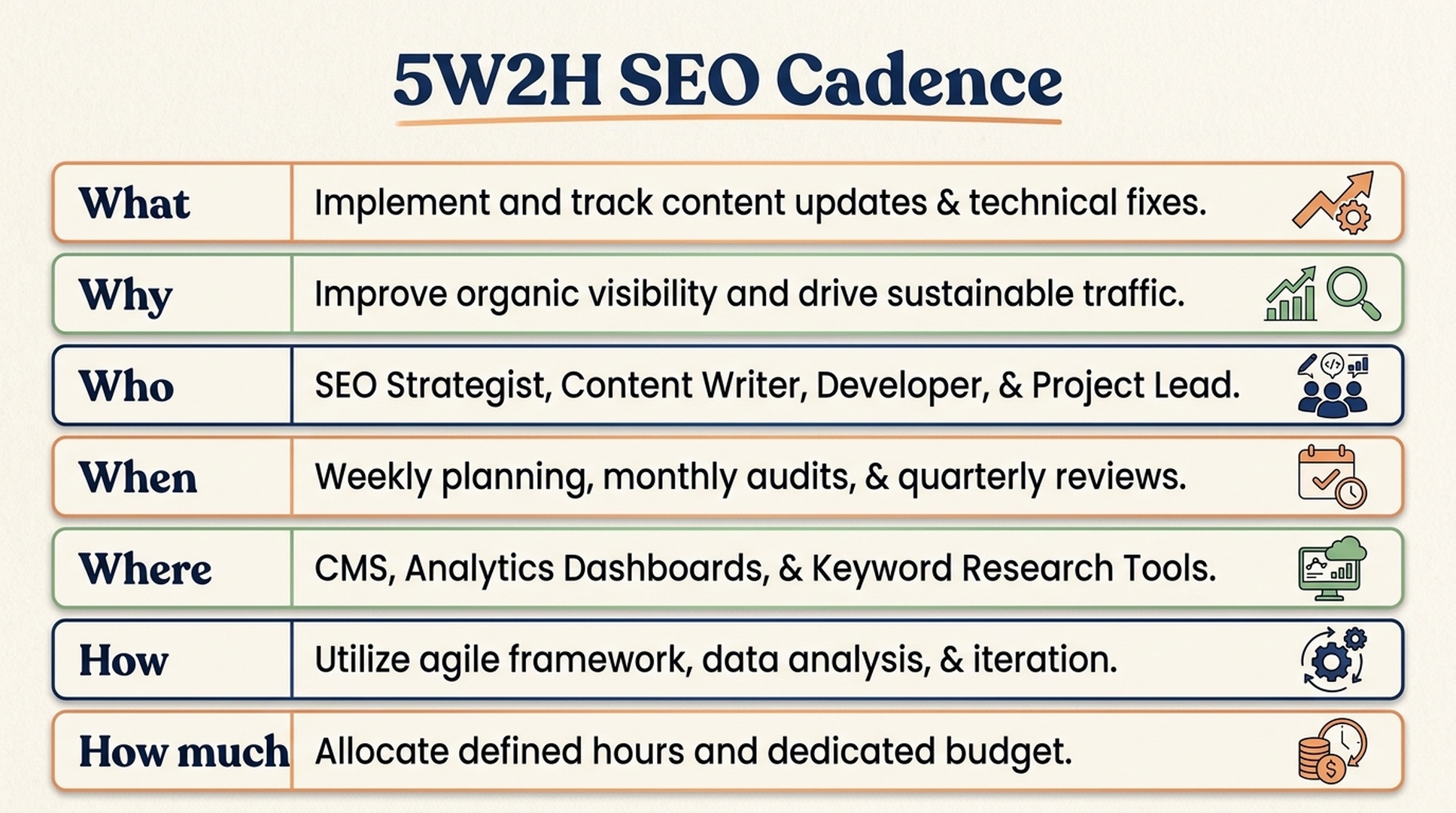
Caption: Turn the checklist into a repeatable cadence, with owners, tools, budget, and review periods.
What should the SEO team do?
Build a search system that turns relevant demand into qualified product actions. That includes keyword mapping, page production, technical health, authority building, content maintenance, and conversion measurement.
The order matters. For a SaaS or AI tool site, the first 10 pages should usually be closer to revenue than education:
Page type | Example query | Why build it early |
|---|---|---|
Product or tool page | "AI search visibility checker" | High intent and product fit |
Use case page | "SEO workflow for AI tools" | Connects problem to product value |
Comparison page | "Tool A vs Tool B" | Captures evaluation-stage buyers |
Alternatives page | "Alternative to Tool A" | Captures switch intent |
Pricing or plan page | "product pricing" | Supports conversion and branded search |
Template page | "SEO checklist template" | Attracts repeatable operational demand |
Why does it matter now?
Search is more fragmented than it was a few years ago. Users still search Google, but they also ask ChatGPT, Perplexity, Gemini, YouTube, Reddit, and vertical communities. Google also documents AI features in Search and explains how site owners can control previews and snippets using existing Search controls. Reference: https://developers.google.com/search/docs/appearance/ai-features
That means the job is no longer "publish more articles." The job is to create pages that are easy to crawl, easy to understand, useful enough to cite, and strong enough to convert.
Who should own each part?
SEO fails when every task belongs to "marketing." Split ownership:
Owner | Responsibilities |
|---|---|
SEO lead | Keyword map, priorities, briefs, reporting, QA |
Content lead | Drafts, examples, updates, internal links, editorial quality |
Product marketer | Positioning, comparison logic, proof, CTA fit |
Developer | Site performance, schema, redirects, rendering, crawlability |
Designer | Page layouts, visual clarity, mobile conversion paths |
Founder or domain expert | Original opinions, examples, quotes, and trust signals |
Small teams can combine roles, but they should not combine responsibilities into a vague bucket.
When should the work happen?
Use a cadence that is easy to keep:
Frequency | Work |
|---|---|
Daily | Check major indexation, uptime, and analytics anomalies if the site is high value |
Weekly | Review GSC, rankings, new pages, broken links, and conversion events |
Monthly | Run technical crawl, update keyword priorities, refresh underperforming pages |
Quarterly | Review content decay, backlink quality, topic clusters, and revenue attribution |
A useful rule: create less content than you can maintain. A site with 80 accurate, linked, conversion-aware pages often beats a site with 800 neglected posts.
Where should the work happen?
Use the fewest tools that cover the workflow:
- Google Search Console for indexing, queries, impressions, and click data.
- Analytics and product events for conversion quality.
- A crawler such as Screaming Frog or Sitebulb for technical checks.
- A keyword tool such as Ahrefs, Semrush, or DataForSEO for market and competitor research.
- A CMS or content tracker with owner, status, keyword, URL, update date, and next action.
- An AI search visibility workflow to test whether your brand appears in relevant answer engines.
If you need a fast first pass, run your domain through the Website SEO Score Checker, then move the findings into your backlog.
How should the team execute?
A simple 30-day sprint works well.
Week 1: map the money pages. List the pages closest to revenue. Check whether each has a clear keyword, title, H1, CTA, schema, internal links, and proof.
Week 2: fix technical blockers. Repair noindex mistakes, broken links, sitemap gaps, redirect chains, slow templates, and missing structured data.
Week 3: publish or rebuild the highest-intent pages. Prioritize comparison, alternatives, use case, integration, and tool pages before broad education pieces.
Week 4: connect the system. Add internal links from guides to money pages, refresh decaying content, review conversions, and update the next month's backlog.
The page-level brief should be short enough that people use it:
Primary keyword:
Search intent:
Target reader:
Page type:
User problem:
Product relevance:
Required proof:
Internal links in:
Internal links out:
CTA:
Schema type:
Refresh date:
How much should a team budget?
For an early-stage SaaS or AI tool site, the monthly budget often falls into three buckets:
Budget item | Lean version | Growth version |
|---|---|---|
Tools | GSC, analytics, one crawler | Keyword suite, crawler, rank tracking, AI visibility tests |
Content | 4 to 8 strong pages or updates | 10 to 20 pages plus design and SME review |
Technical work | A few developer hours | Dedicated SEO engineering sprint time |
Authority | Founder-led comments and directories | Digital PR, data assets, partner content |
Do not spend heavily on backlinks while your money pages are thin, slow, or poorly tracked. That is like buying fuel for a car with no steering.
What most teams miss
The biggest SEO mistake in SaaS is separating "traffic content" from "revenue pages." The blog team publishes guides. The product marketing team owns comparison pages. Developers only touch SEO when something breaks. Analytics tracks sessions, but not qualified actions. Each part looks fine in isolation. The system leaks.
Auspia recommends one shared backlog with five labels:
- Revenue page
- Supporting content
- Technical fix
- Authority asset
- Conversion improvement
Every SEO task should belong to at least one of those labels. If it belongs to none of them, it is probably busywork.
Common mistakes
- Starting with low-intent blog posts because they are easier to write.
- Treating AI Overviews or AI answer engines as a reason to abandon SEO instead of improving page quality and citation readiness.
- Reporting rankings without pipeline or signup data.
- Building hundreds of pages before fixing crawl, speed, and duplication issues.
- Using the same CTA on every page, regardless of user intent.
- Publishing comparison pages without transparent evaluation criteria.
- Letting old articles continue ranking with outdated product facts.
FAQ
What is an SEO operating checklist?
An SEO operating checklist is a repeatable set of checks for keyword intent, on-page quality, technical health, authority, content maintenance, and conversion tracking. It turns SEO from occasional publishing into a managed growth workflow.
Should SaaS companies build blog posts or money pages first?
Most SaaS and AI tool companies should build money pages first: product, pricing, use case, comparison, alternatives, and integration pages. Blog posts then support those pages with internal links, examples, and broader education.
How often should SEO pages be updated?
High-value product, comparison, and pricing-related pages should be reviewed monthly. Evergreen guides can be reviewed every 6 to 12 months, unless impressions, clicks, rankings, or conversions drop sooner.
Does AI search change the SEO checklist?
Yes, but it does not replace the basics. AI search adds more emphasis on clear entities, concise answer blocks, original evidence, crawlability, and trustworthy references. Those improvements also help traditional SEO.
What should a small team do first?
Pick five revenue-adjacent pages, run the 10-point weekly check, fix technical blockers, add better internal links, and make conversion tracking reliable. Then expand into supporting content.
Auspia takeaway
SEO is a compounding channel only when the operating system is maintained. For SaaS and AI tool teams, that means fewer random articles, better money pages, cleaner technical foundations, clearer proof, and tighter conversion loops.
Start with the 10 weekly checks. Use the 100-point list for monthly audits. Then run the 5W2H cadence so the work has owners, timing, tools, and budget.