


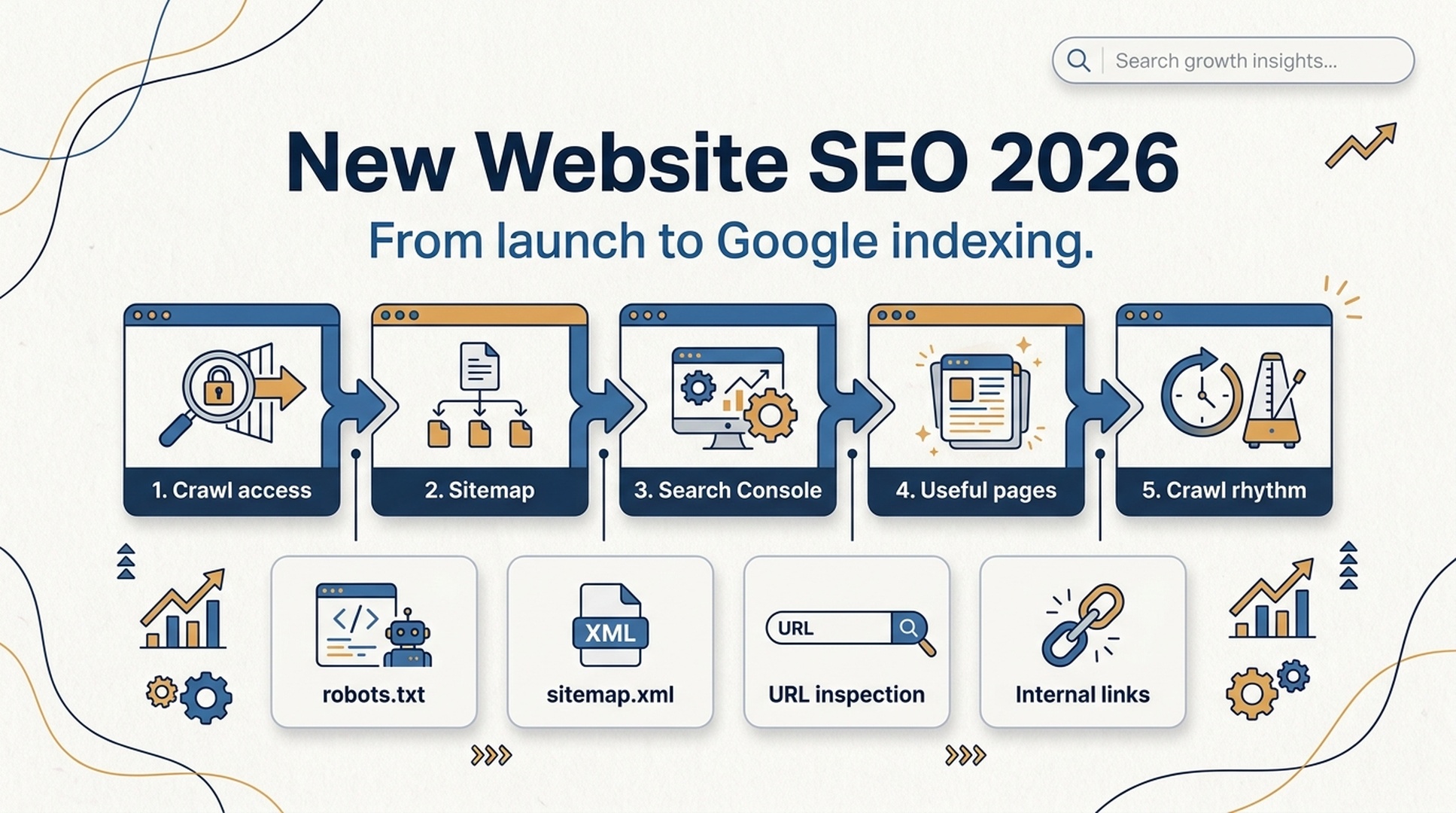
Quick answer: what a new website needs in 2026
A new website does not earn Google traffic the day it launches. First it has to be discovered, crawled, indexed, and then ranked for real queries. In 2026, the fastest practical path is still boring: make the site crawlable, submit the right signals in Google Search Console, publish a small set of useful pages, connect them with internal links, and prove over time that the site is maintained by people who know the topic.
The mistake is treating indexing like a trick. It is closer to onboarding. Google has to find the site, render enough of it, understand what each page is about, decide whether the page belongs in the index, and later test whether it deserves impressions.
For teams building with modern JavaScript, AI-generated content workflows, or programmatic pages, the bar is a little higher. Your pages need to be both technically accessible and worth keeping.
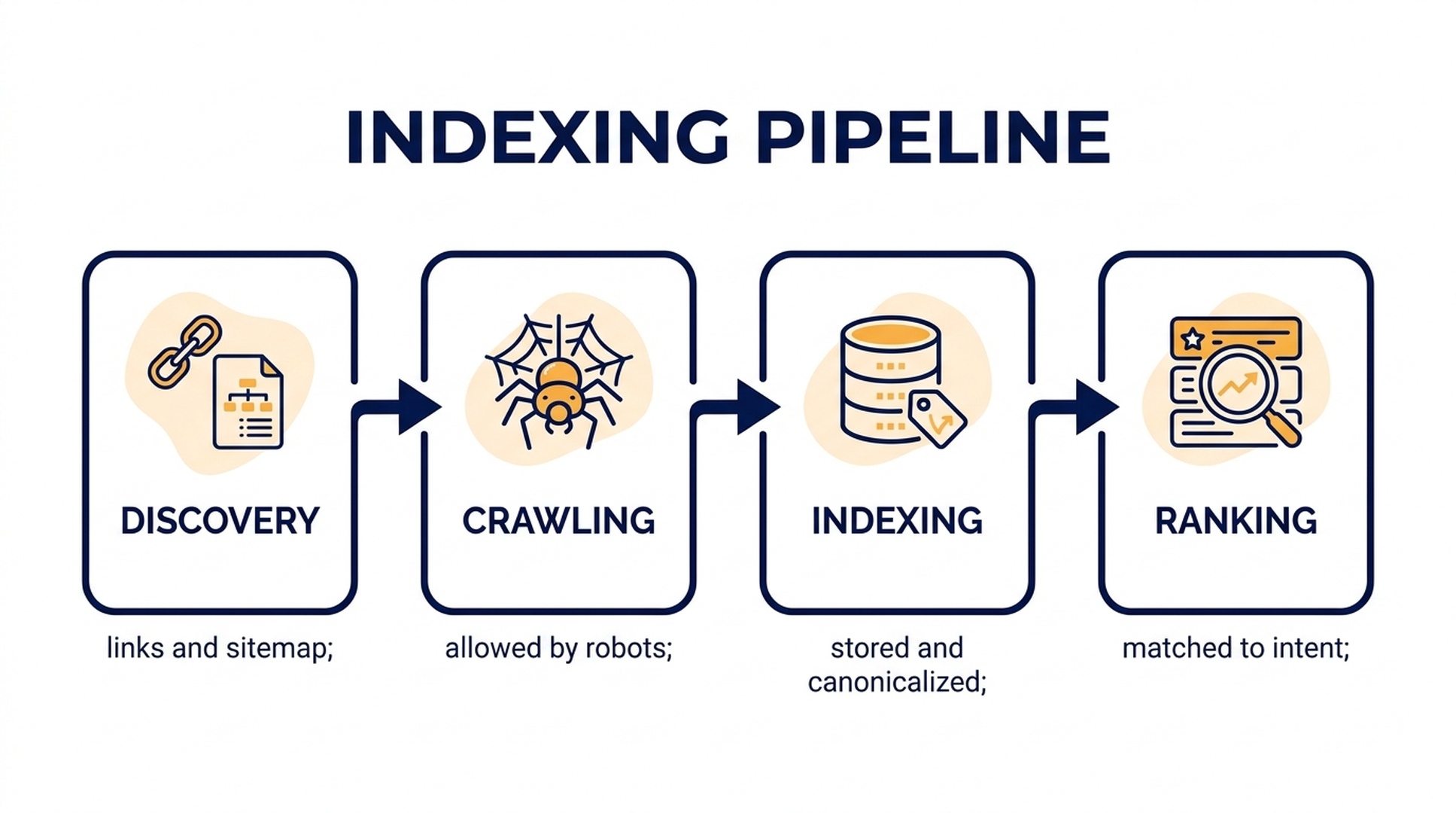
Caption: New-site SEO starts before ranking. Discovery, crawling, indexing, and ranking are separate checkpoints.
What "indexed" actually means
Google explains search in stages: it discovers URLs, crawls them, processes and indexes content, then serves results when a query matches. That means "Google indexed my page" is not the same as "Google ranks my page."
A simple way to think about it:
Stage | What Google is doing | What you can control |
|---|---|---|
Discovery | Finding that a URL exists | Sitemap, links, Search Console, clean navigation |
Crawling | Requesting the page and its resources | Robots.txt, server status, renderable HTML, speed, no accidental blocks |
Indexing | Deciding what the page is and whether to store it | Canonical tags, unique content, useful answers, structured pages |
Ranking | Choosing whether to show it for a query | Search intent, authority, internal links, content quality, user usefulness |
If the page is not indexed, ranking is impossible. If the page is indexed but thin, duplicated, or unclear, it may sit in the index without meaningful traffic.
Step 1: make sure Google can enter the site
Before writing more content, check access. Many new-site SEO problems are technical, not strategic.
Start with robots.txt. A staging rule like this can kill the launch if it reaches production:
User-agent: *
Disallow: /
Use a browser and Google Search Console to check whether important pages can be crawled. Also confirm that the pages return 200 status codes, not soft 404s, redirects to irrelevant pages, or login walls.
For modern front ends, do not assume Google sees the same thing your browser shows after several seconds of JavaScript execution. Google can render JavaScript, but rendering costs time and resources. For a new domain with no crawl history, server-side rendering, static generation, or pre-rendered HTML is usually safer than making the crawler wait for the whole app to assemble itself.
A quick technical launch check:
- The homepage, main category pages, and first content pages return
200. - Navigation links are real links, not click-only buttons with no crawlable href.
- Important copy appears in the initial HTML or renders reliably without user actions.
- CSS and JavaScript resources needed for rendering are not blocked.
- Canonical tags point to the correct public URL.
- No
noindextag remains from staging.
Auspia users can also run a crawl-readiness pass with the Website SEO Score Checker before submitting a new site to Search Console.
Step 2: submit the right signals, not every URL you own
Google Search Console is still the launch control room for a new website. Add the domain property, verify ownership, submit the XML sitemap, then use the URL Inspection tool for the most important pages.
Do not request indexing for hundreds of weak URLs on day one. That teaches the wrong lesson. Submit the pages that explain the site clearly:
- Homepage.
- Main product, service, or category pages.
- About or author pages if trust matters in your niche.
- Five to ten strong content pages that answer real long-tail questions.
Your sitemap should be clean. If it contains test URLs, tag archives, duplicate parameter pages, empty programmatic pages, or old staging paths, fix it before submission. A sitemap is a hint, not a command, but low-quality hints make the site harder to understand.
Step 3: publish answer pages before chasing head terms
New websites often target huge keywords too early: "SEO," "AI search," "CRM," "project management," "best software." Those queries are usually crowded, ambiguous, and dominated by sites with years of links and content depth.
A better first content set is specific:
- "why is my new website not indexed by Google"
- "how to submit a sitemap in Search Console"
- "robots.txt disallow slash fix"
- "SEO checklist before launching a SaaS website"
- "how long does Google indexing take for a new domain"
Each page should answer one question clearly. Do not write a vague encyclopedia page that tries to cover the whole topic. A good launch article has a narrow problem, a direct answer, screenshots or examples where useful, and a next step.
For AI-era visibility, this matters beyond blue links. Answer engines and AI search systems prefer pages with extractable facts, clear definitions, and visible evidence. If your article buries the answer under a long preamble, it is harder for both humans and machines to use.
Step 4: build a crawl path Google can learn
A new website should not be a pile of disconnected posts. It needs a simple structure:
Homepage -> topic hub or category page -> supporting article -> related article.
Internal links help Google discover pages, but they also explain priority. If every page links to every other page with generic anchors like "click here," the signal is weak. Link from a relevant paragraph using words that describe the target page.
Example:
Source page | Natural internal link | Target page |
|---|---|---|
New website indexing guide | "submit an XML sitemap" | Sitemap tutorial |
Robots.txt troubleshooting | "check whether AI and search crawlers are blocked" | Crawler access guide |
SaaS launch SEO checklist | "measure AI search visibility" | AI visibility workflow |
If AI search is part of your growth strategy, add a parallel check with Auspia's AI Search Visibility Checker. Traditional indexing and AI-answer visibility are different signals, but both depend on clean entities, clear answers, and crawlable pages.
Step 5: create a 30-day crawl rhythm
Google has said that update frequency by itself is not a ranking shortcut. Publishing every day does not make weak pages rank. Still, a steady publishing and internal-linking rhythm gives crawlers more chances to revisit the site and gives users more reasons to trust it.
For the first 30 days, use a small operating cadence:
- Week 1: fix crawl access, submit the sitemap, publish the core site pages.
- Week 2: publish five answer pages for long-tail launch problems.
- Week 3: add internal links between related pages, improve titles and introductions from Search Console data.
- Week 4: publish three to five deeper guides based on real questions from users, sales calls, communities, or support tickets.
This is not about volume. It is about building a site Google can revisit without finding the same empty shell.
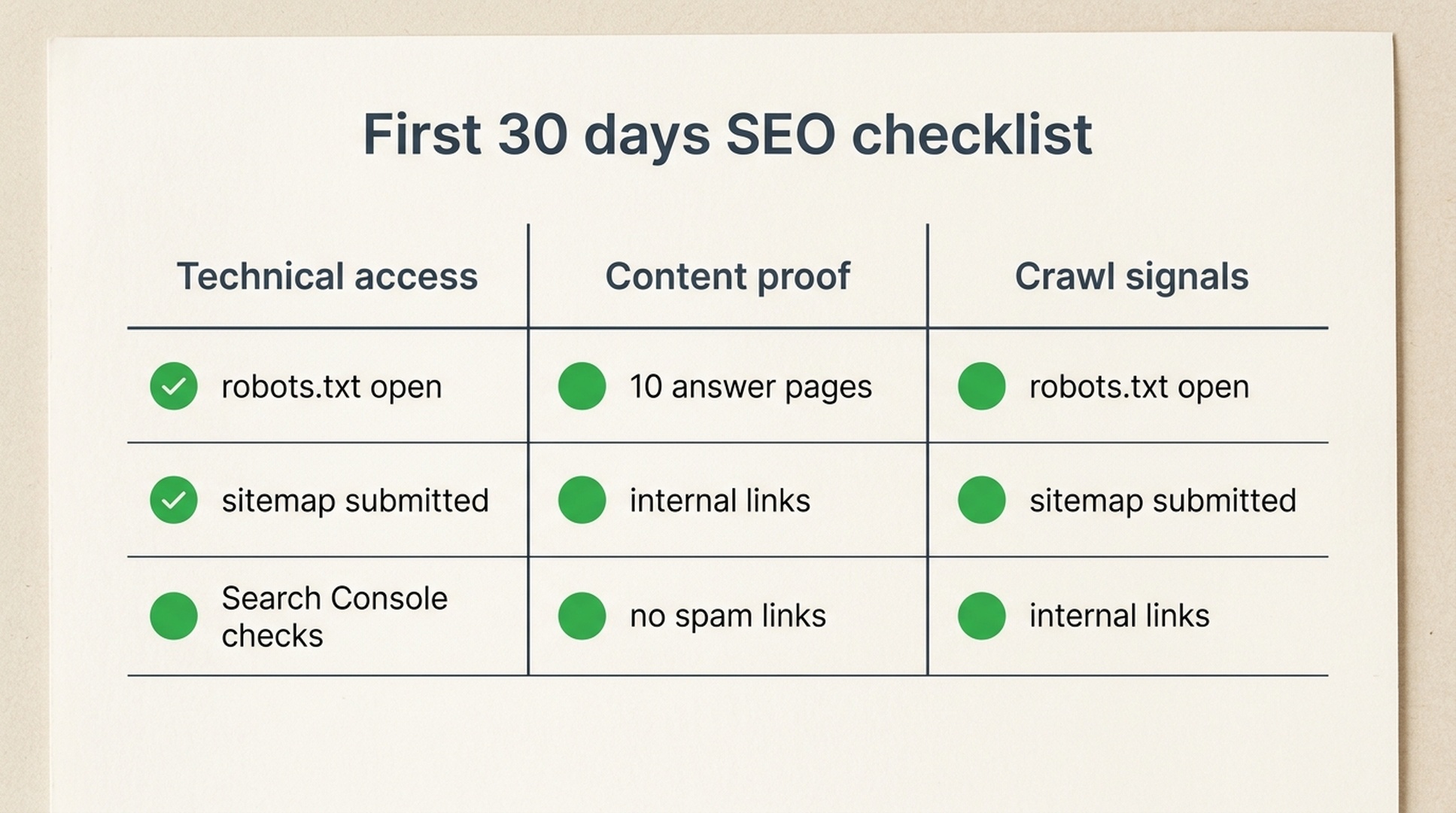
Caption: A new site does not need 100 posts. It needs a clean technical base, useful pages, and consistent crawl signals.
The new-site SEO checklist for 2026
Use this before you worry about backlinks or big keyword rankings.
Area | Check | Why it matters |
|---|---|---|
Crawl access |
| Google cannot index what it cannot crawl |
Index directives | No accidental | Staging settings often leak into production |
Sitemap | XML sitemap contains only canonical public URLs | Helps discovery and reduces noise |
Rendering | Main content appears reliably for crawlers | JavaScript-heavy sites can slow indexing |
Search Console | Domain verified, sitemap submitted, key URLs inspected | Gives direct diagnostics from Google |
Content | First 10 pages answer specific long-tail questions | New sites need clarity before authority |
Internal links | Homepage, hubs, and articles connect naturally | Helps discovery and topic understanding |
Trust | About, author, contact, pricing, policy, or proof pages are visible where relevant | Helps users and search systems evaluate credibility |
Backlinks | No sudden spam blast after launch | Abnormal link patterns can create risk instead of trust |
Measurement | Track indexed pages, impressions, crawl errors, and query data weekly | You need evidence before changing strategy |
Common mistakes that slow indexing
The biggest mistake is launching a site that technically exists but editorially has nothing to say. Google may find it, crawl it, and still decide there is no reason to keep many pages in the index.
Other common problems:
- Publishing 50 AI-generated pages that repeat the same advice with swapped keywords.
- Blocking crawlers in
robots.txtwhile trying to request indexing in Search Console. - Using a JavaScript app where the visible content depends on client-side API calls that fail for crawlers.
- Submitting thin tag pages, search-result pages, or parameter URLs in the sitemap.
- Building backlinks before the site has useful destination pages.
- Writing broad articles with no examples, screenshots, author experience, or operational detail.
The fix is usually not glamorous. Reduce junk URLs, improve the first set of pages, make the crawl path obvious, and check Search Console every week.
How to know whether Google has started to understand the site
Use three checks together.
First, search Google with:
site:yourdomain.com
This is a rough check, not a full diagnostic, but it can show whether any pages are visible.
Second, use Search Console's Page indexing report and URL Inspection tool. Look for indexed pages, discovered-but-not-indexed pages, crawled-but-not-indexed pages, server errors, redirects, and canonical mismatches.
Third, watch impressions, not only clicks. A new site may receive impressions before it earns traffic. That is useful. It tells you which queries Google is testing and which pages need sharper titles, clearer openings, or more complete answers.
Auspia take
New-site SEO in 2026 is trust-building under crawl constraints. The site has to be easy for Google to access, easy for users to understand, and specific enough for AI systems to extract useful answers.
The practical target for the first month is not "rank number one." It is simpler:
- Google can crawl the site.
- The sitemap is clean.
- The first important pages are indexed.
- Search Console starts showing impressions for long-tail queries.
- The site has a repeatable process for publishing useful pages.
Once that foundation exists, rankings become a content and authority problem. Before that, more tactics just add noise.
FAQ
How long does it take Google to index a new website?
It can take days or weeks. There is no guaranteed timeline. A crawlable site with a clean sitemap, useful pages, internal links, and Search Console submission usually gives Google fewer reasons to delay discovery.
Should I submit every new URL through Search Console?
No. Use URL Inspection for the homepage and your most important launch pages. For the rest, rely on a clean sitemap and internal links. If you have to manually submit every URL, the site structure probably needs work.
Is publishing frequency a ranking factor?
Publishing frequency alone is not a ranking shortcut. A steady cadence can help discovery and maintenance, but weak pages do not become useful because they were published on a schedule.
Can Google index JavaScript websites?
Yes, Google can render JavaScript, but rendering adds complexity. For new websites, server-rendered or pre-rendered content is usually more reliable for fast crawling and indexing.
Do new websites need backlinks immediately?
They need credibility, not a sudden link blast. A few relevant mentions from real partners, profiles, directories, or communities can help discovery. Spammy bulk backlinks are more likely to create risk than trust.
What should I do if pages are "discovered, currently not indexed"?
Check whether those pages are unique, useful, internally linked, canonicalized correctly, and accessible. If many pages are thin or duplicated, improve or remove them before asking Google to crawl more.
References
- Google Search Central: How Search works, including crawling, indexing, and serving results: https://developers.google.com/search/docs/fundamentals/how-search-works
- Google Search Central: JavaScript SEO basics and rendering considerations: https://developers.google.com/search/docs/crawling-indexing/javascript/javascript-seo-basics
- Google Search Console Help: URL Inspection and indexing request workflows: https://support.google.com/webmasters/answer/9012289


