


The Short Answer: What SEO Forecasting Can (and Cannot) Tell You
SEO forecasting tells you one thing: roughly how much organic traffic your pages could earn if they rank at specific positions for specific keywords.
It will not tell you exactly when you will rank, or guarantee that you will rank at all. But even a forecast that is 20–30% off beats the alternative: investing in keywords blind and hoping something sticks.
Forecasting matters more in 2026 than it did a year ago. The headline number: 68% of US Google searches now end without a click. AI Overviews, featured snippets, and answer boxes absorb traffic that used to go to blue links. If your forecast uses pre-2024 CTR numbers, you are overestimating by 30–50% without realizing it.
This guide gives you two paths:
If you… | Use… | Time needed |
|---|---|---|
Want to understand the logic first | Method 1: Manual keyword forecast in Google Sheets | 30 minutes |
Want an AI agent to do the work | Method 2: Copy-paste the Codex skill below | 5 minutes to set up, 2 minutes to run |
Both methods use only free tools. No subscription required.
Why old forecasting advice is wrong now
Three things changed. If your forecasting guide was written before 2025, it is missing all of them:
1. AI Overviews eat organic CTR
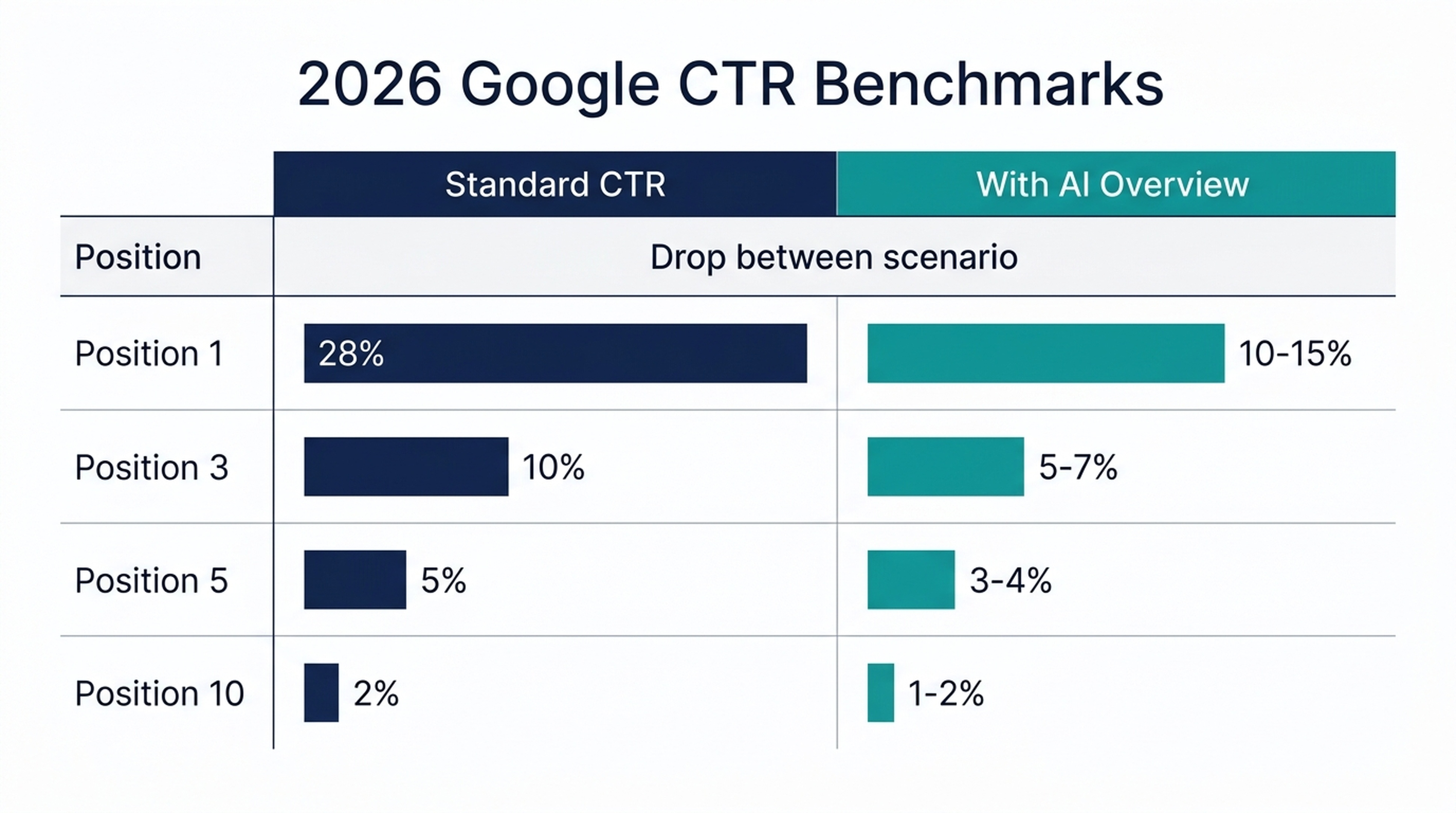
Google now shows AI-generated answers above the 10 blue links for a big chunk of informational queries. When an AI Overview appears, the position-1 click-through rate drops from roughly 28% to somewhere between 10% and 15%.
What this means for your forecast: If you target informational keywords and ignore AIO presence, your numbers will be too high. The fix: multiply your estimate by 0.57 for queries where AIOs typically appear (how-to, what-is, and comparison searches).
2. Zero-click searches hit 68%
In early 2026, over two-thirds of US Google searches end without any click to an external website. That does not mean SEO is dead. Transactional and commercial-intent queries still send plenty of traffic. But it does mean you need to forecast informational and commercial keywords separately, because their real CTR curves look nothing alike.
3. AI coding agents make forecasting accessible to non-technical users
A year ago, building a forecast meant wrestling with Excel formulas, VLOOKUPs, and manual CSV exports. Now you can give an AI coding agent like Codex a plain-English instruction: "pull my GSC data, fetch search volumes, apply 2026 CTR benchmarks, and give me a 12-month forecast." It does the work while you watch. No spreadsheet skills needed.
The only two numbers you need
Every SEO forecast, no matter how fancy the tool, comes down to two inputs:
- How many people search for your keyword each month (search volume)
- What percentage of them click a result at your target position (CTR by rank)
The core formula has not changed in 20 years:
Estimated monthly traffic = Monthly search volume × Expected CTR at target positionWhat changed are the CTR numbers you plug into it. Here are the right benchmarks for 2026:
Google SERP Position | CTR (No AI Overview) | CTR (With AI Overview) |
|---|---|---|
1 | 28% | 10–15% |
2 | 15% | 8–10% |
3 | 10% | 5–7% |
4 | 7% | 4–5% |
5 | 5% | 3–4% |
6–10 | 2–3% | 1–2% |
11+ | <1% | <1% |
Which column you use depends on whether your target query triggers an AI Overview. Check by searching your keyword in an incognito window. If you see a generated answer block above the links, use the right column.
Method 1: The 30-minute manual forecast (free tools only)
If you want to understand the mechanics before handing the work to an AI agent, start here.
What you need
- Google Search Console access (free)
- A Google account for Sheets (free)
- A list of 5–20 keywords you care about
Step 1: Export your current data from GSC
Open Google Search Console, go to Performance → Search Results, set the date range to the last 12 months, and click Export → Google Sheets or download as CSV.
The columns you need: Query, Clicks, Impressions, CTR, Average Position.
Step 2: Remove brand searches
Filter out any query that contains your brand name, product name, or domain. Brand searches convert differently and will inflate your non-brand baseline. In Google Sheets, use:
=FILTER(A:E, REGEXMATCH(A:A, "brand1|brand2|yourdomain")=FALSE)Step 3: Calculate your non-brand baseline
Average the last 3 months of non-brand clicks. This is your "do nothing" floor — the traffic you will likely keep even if you change nothing.
Step 4: Add your target keywords and search volumes
Create a new sheet with these columns:
Keyword | Monthly Search Volume | Current Position | Target Position | Expected CTR | Estimated Traffic |
|---|
Get search volumes from Google Keyword Planner (free with any Google Ads account), or use a free tool like Ahrefs' Free Keyword Generator or AlsoAsked.com for question-style keywords.
Fill in current and target positions honestly. If you rank nowhere for a keyword, your current position is "100+."
Step 5: Apply 2026 CTR benchmarks
Use the table from the section above. For each keyword, look up the expected CTR at your target position, and choose the right column (with or without AI Overview).
Formula in Sheets:
= F2 * E2Where column F is search volume and column E is expected CTR (as a decimal, e.g., 0.10 for 10%).
Step 6: Add seasonality
Go to Google Trends, enter your main keyword, and export the 12-month interest data. For each month, divide that month's interest score by the annual average to get a multiplier.
Multiply your raw estimate by the seasonality factor for each month:
= G2 * H2Step 7: Build three scenarios
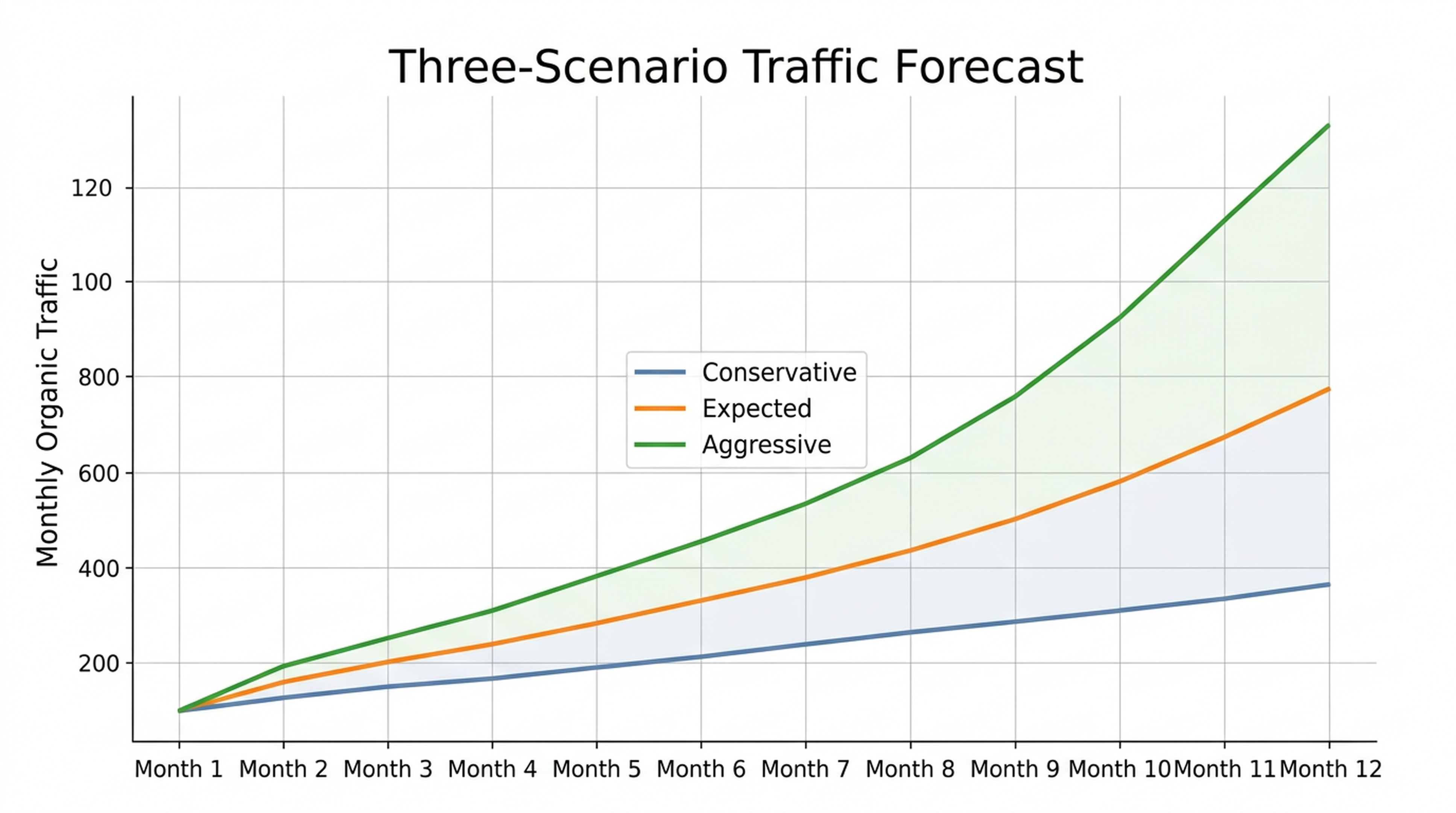
Never present a single number. Here is why: if you predict "12,000 visits" and the real number is 8,000, you look wrong. If you predict "8,000–14,000 visits" and the real number is 9,500, you look competent. Build three:
- Conservative: Multiply your estimate by 0.7 (assumes slower ranking velocity and AIO impact)
- Expected: Your base estimate
- Aggressive: Multiply by 1.3 (assumes faster ranking and favorable SERP changes)
Ranges are the honest way to forecast SEO. Single numbers just make you look precise while being wrong.
Method 2: Let Codex do the work (5-minute setup)
If you have Claude Code or Codex CLI installed and would rather say "build me a forecast" than build a spreadsheet, this section is for you.
Why this works for beginners
AI coding agents can already:
- Read CSV exports from Google Search Console
- Fetch search volume data via free APIs or web search
- Apply CTR benchmarks and seasonality multipliers
- Calculate three-scenario projections
- Output a formatted forecast table or Google Sheet
You do not need to know how to write formulas. You need to know what to ask for — and that is what the skill below provides.
Prerequisites
- Claude Code or Codex CLI installed (free)
- A Google Search Console CSV export saved to your project folder
- 10 minutes total
How to install and run
Step 1: Create a file at .claude/skills/seo-forecast/SKILL.md in your project folder (or .codex/skills/seo-forecast/SKILL.md for Codex).
Step 2: Copy the skill block below into that file.
Step 3: In your terminal, type:
/claudeThen say: "Run the seo-forecast skill with my GSC data."
That is it. The agent will read your data, apply the 2026 benchmarks, and output a forecast.
The Codex SEO forecasting skill
Copy the entire block below into your SKILL.md file:
---
name: seo-forecast
description: Build a 12-month SEO traffic forecast from Google Search Console export data using 2026 CTR benchmarks and seasonality adjustments. For SEO beginners — no spreadsheet skills needed.
---

## What This Skill Does

Takes a Google Search Console CSV export and produces a 12-month organic traffic forecast with three scenarios (conservative, expected, aggressive), adjusted for AI Overviews impact and search seasonality.

## Inputs Needed

1. A GSC CSV export (12+ months) saved in the project folder as `gsc-data.csv`
2. A list of 5–30 target keywords with target positions (the user can type these in chat or provide a file)
3. Optional: a Google Trends CSV for seasonality (if not provided, the agent will fetch current trends)

## 2026 CTR Benchmarks (Hardcoded — Do Not Change)

Use these CTR values for all calculations:

**Without AI Overview:**
- Position 1: 28%
- Position 2: 15%
- Position 3: 10%
- Position 4: 7%
- Position 5: 5%
- Position 6-10: 2.5%
- Position 11+: 0.5%

**With AI Overview (apply 0.57 multiplier):**
- Position 1: 15%
- Position 2: 9%
- Position 3: 6%
- Position 4: 4.5%
- Position 5: 3.5%
- Position 6-10: 1.5%
- Position 11+: 0.3%

## Step-by-Step Instructions for the Agent

### Step 1: Read and Clean GSC Data

- Read `gsc-data.csv`
- Filter out brand queries (ask the user to confirm which terms are brand names — suggest anything containing their domain, product name, or company name)
- Keep only non-brand queries
- Calculate the 3-month average of non-brand clicks as the baseline

### Step 2: Collect Target Keywords

- Ask the user: "What keywords do you want to target, and what position do you expect to reach for each within 12 months?"
- If the user does not have search volumes, use web search or the Google Ads Keyword Planner to fetch monthly search volumes
- For each keyword, determine if it triggers an AI Overview by searching Google and checking for a generated answer block

### Step 3: Build the Forecast Table

Create a table with these columns:
- Keyword
- Monthly Search Volume
- Current Position
- Target Position
- AIO Present? (Yes/No)
- Expected CTR at Target Position
- Raw Monthly Traffic Estimate (SV × CTR)
- Seasonality Multiplier (default: 1.0 if no trends data)
- Adjusted Monthly Traffic

### Step 4: Apply Seasonality

- Fetch Google Trends data for the user's top 3 keywords
- Calculate monthly multipliers (monthly interest / annual average)
- Apply the average multiplier across keywords to each month's projection

### Step 5: Create Three Scenarios

- **Conservative:** Multiply all estimates by 0.7
- **Expected:** Base estimates
- **Aggressive:** Multiply all estimates by 1.3

### Step 6: Add the Non-Brand Baseline

- Add the baseline traffic (from Step 1) to each month's projection
- This represents traffic the site already earns plus new traffic from improved rankings

### Step 7: Output the Forecast

Present the forecast as:
1. A summary: "With these rankings, you can expect between X and Y additional monthly visits within 12 months."
2. A month-by-month table showing the ramp-up (assume rankings improve gradually: 20% of target traffic in month 1, 40% in month 2, 60% in month 3, 80% in month 6, 100% in month 12)
3. A list of assumptions made (CTR benchmarks used, AIO assumptions, seasonality sources)
4. A note on accuracy: "SEO forecasts are typically accurate within ±20–30%. The largest source of error is ranking velocity — how fast you actually climb the SERP."

## Quality Checks Before Output

- [ ] Brand queries are excluded from the baseline
- [ ] CTR values match the 2026 benchmarks above
- [ ] AIO multiplier (0.57) is applied to informational queries only, not commercial/transactional
- [ ] Three scenarios are presented (never a single number)
- [ ] Seasonality is accounted for (or explicitly stated as not applied)
- [ ] Ranking ramp-up is gradual (not 100% from month 1)
- [ ] The output includes a clear statement of assumptions

## What This Skill Does NOT Do

- It does not predict when you will rank — it estimates traffic *if* you rank at the target position
- It does not guarantee accuracy within any specific margin
- It does not replace professional SEO tools for enterprise forecasting
- It does not access paid APIs — all data must be free or user-provided
How to read your forecast without fooling yourself
Once you have numbers — whether from the spreadsheet or the Codex agent — here is how to use them responsibly.
The ranking ramp-up reality
New pages do not jump to position 1 overnight. Here is what a realistic ramp-up actually looks like:
Month After Publishing | % of Target Traffic |
|---|---|
1 | 10–20% |
2 | 20–35% |
3 | 35–50% |
6 | 60–75% |
9 | 80–90% |
12 | 90–100% |
Only 1.74% of new pages reach the top 10 within a year, and most top-10 pages are older than 3 years. Your month-1 forecast number should reflect that: small.
Traffic vs. revenue
If you want to turn a traffic forecast into a business case, add one more column:
Estimated revenue = Estimated traffic × Average conversion rate × Average order valueKeep the chain short. Every extra multiplication adds uncertainty. Traffic → leads is reasonable. Traffic → leads → sales → LTV is three steps too far for most beginners. At that point you are not forecasting, you are storytelling.
When to ignore your forecast
A forecast stops being useful when:
- Google ships a major algorithm update (this happens 2–3 times a year, like clockwork)
- A competitor publishes a better page targeting your exact keywords
- Your industry hits a sudden demand shift (regulation change, AI disruption, economic shock)
- Your target keywords start triggering AI Overviews you did not check for
A forecast is a decision-support tool. It is not a contract and definitely not a promise.
Mistakes beginners make (and how to skip them)
Mistake 1: Using pre-2024 CTR numbers
If your CTR benchmark for position 1 says 39.6%, that number is from 2018. Throw it out. In 2026, position 1 gets roughly 28% CTR without an AI Overview, and 10–15% with one.
Fix: Use the benchmark table in this guide. Re-check the numbers once a year. CTR curves drift downward over time as Google adds more SERP features.
Mistake 2: Adding up individual keyword estimates
If you target "best running shoes," "running shoes review," and "top running shoes 2026," their search volumes overlap. The same person types all three. Adding them together double-counts the same audience.
Fix: Group keywords into intent clusters. Estimate traffic per cluster, not per keyword. If three keywords all mean "I want to buy running shoes," treat them as one audience.
Mistake 3: Ignoring seasonality
A keyword averaging 10,000 monthly searches might get 5,000 in February and 25,000 in November. A flat forecast misses half the story.
Fix: Pull Google Trends data for your top 3–5 keywords and apply monthly multipliers. Even a rough adjustment puts you ahead of most beginners.
Mistake 4: Presenting one number
I said this earlier but it bears repeating: a single forecast number is almost always wrong. A range is almost always useful. If you tell a client "we will get 12,000 visits" and the real number is 8,000, you lose trust. If you say "8,000–14,000 visits" and the real number is 9,500, you look like you know what you are doing.
Fix: Always present conservative, expected, and aggressive scenarios. If someone pressures you for one number, give them the expected scenario and remind them it is the middle of a range.
Mistake 5: Forecasting without checking AI Overviews
In 2026, this is the biggest forecasting error. If your keyword triggers an AI Overview and you use standard CTR benchmarks, your traffic estimate will be roughly double what it should be.
Fix: For every keyword in your forecast, do a quick incognito search. If an AI-generated answer block appears above the links, use the right column of the CTR table. This takes 30 seconds per keyword and saves you from the most embarrassing mistake a forecaster can make.
Verification checklist
Before you act on any forecast, run through this list. I use it myself before showing numbers to anyone:
- [ ] Brand queries are excluded from baseline traffic
- [ ] CTR benchmarks are from 2026 (not pre-2024)
- [ ] AI Overviews presence is checked for informational keywords
- [ ] Keywords are grouped into intent clusters (not added individually)
- [ ] Seasonality multipliers are applied from Google Trends
- [ ] Three scenarios are presented (conservative, expected, aggressive)
- [ ] Ranking ramp-up is gradual (not 100% from month 1)
- [ ] The forecast date and assumptions are recorded (so you can review accuracy later)
- [ ] Revenue conversion is kept to one multiplication (traffic × conversion rate) unless you have verified multi-step funnel data
FAQ
How accurate is SEO forecasting?
With current CTR benchmarks and seasonality applied, expect to be within 20–30% of reality for a 12-month forecast. Accuracy improves if you compare forecast-vs-actual every month and recalibrate. The biggest variable is not your math. It is how fast Google decides to move your rankings, and nobody outside Google knows that number.
Can I forecast SEO for a brand-new website?
Yes, but expect wider error margins. Without historical GSC data, you are working entirely from competitor estimates and search volumes. Use tools like Ahrefs or Semrush to see what keywords competitors rank for, estimate their traffic, and apply conservative CTR assumptions. For a new site, multiply your final estimate by 0.5. New domains take longer to rank, and nobody fully understands Google's "sandbox" effect, but halving your estimate gets you closer to reality.
Do I need paid tools to forecast SEO traffic?
No. Google Search Console, Google Trends, Google Keyword Planner, and Google Sheets are all free and sufficient for a basic forecast. The Codex skill in this guide adds AI agent automation at no additional cost beyond your existing Claude Code or Codex access.
How often should I update my forecast?
Monthly. Compare last month's forecast to actual GSC data, note the gap, and recalibrate. A forecast you never update becomes fiction within about 90 days. I have seen teams run the same spreadsheet for six months and wonder why it stopped matching reality.
What if my keyword triggers an AI Overview?
Use the AIO-adjusted CTR column in the benchmark table. Check AIO presence manually for each keyword. Google expands and contracts AIO coverage regularly, so a query that shows an AI Overview today might not next month, and vice versa. When in doubt, use the AIO column. Under-promising is better than over-promising.
Does the Codex skill work with languages other than English?
Yes. The skill reads GSC data in any language and fetches Google Trends data by country. Just tell the agent which country and language your target audience uses.
Author: Julian Mercer, 14-Year Technical SEO Practitioner at Auspia. Julian writes about technical SEO foundations, crawlability, and AI-assisted SEO workflows that beginners can actually use.


