


The short version
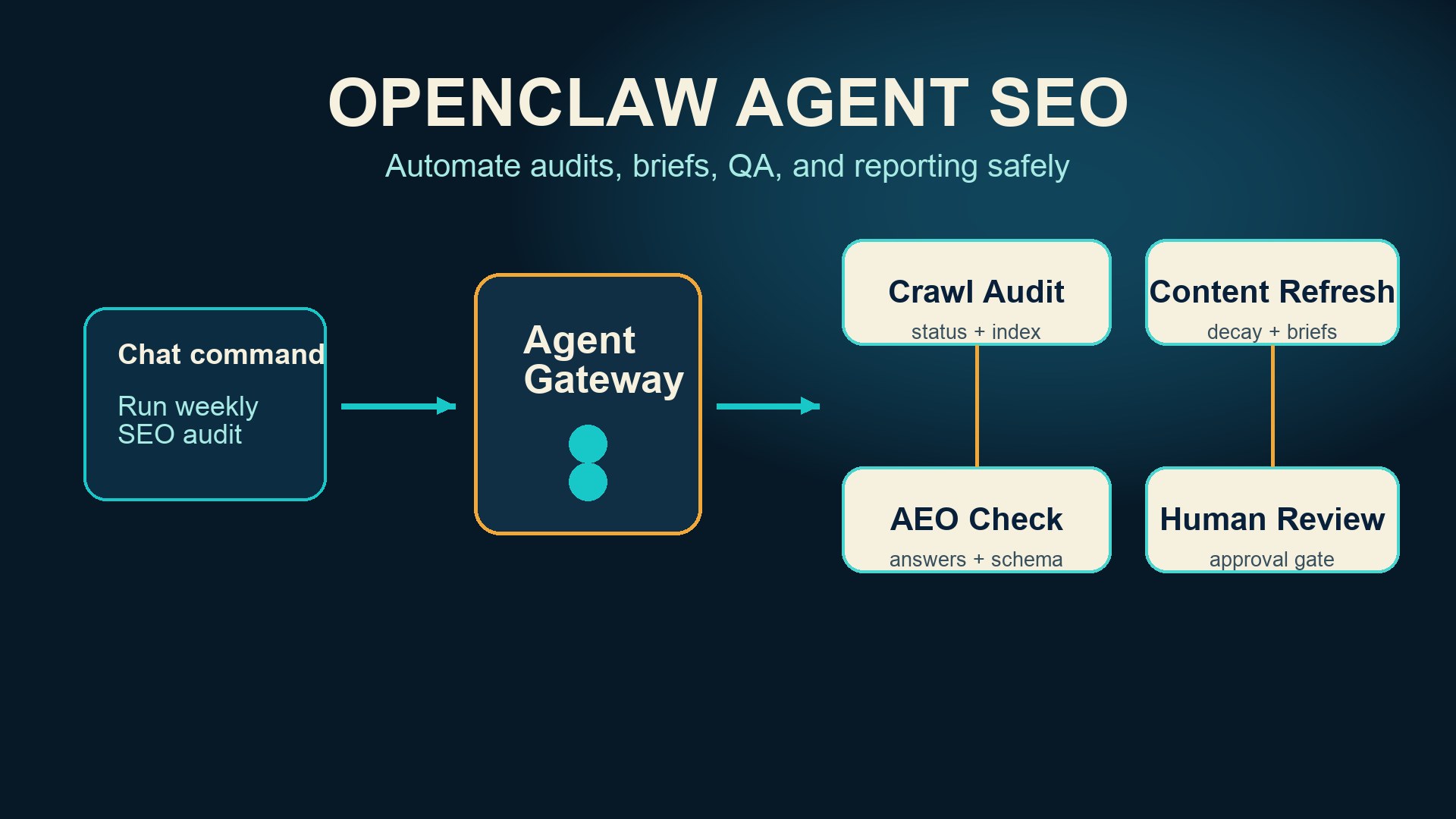
OpenClaw is useful for SEO because it gives an AI agent hands, memory, and a place to run. Instead of asking a chatbot for one-off advice, you can message an agent from Telegram, WhatsApp, Discord, Slack, or another chat surface, then have it run repeatable SEO tasks on your own machine or server.
That does not mean you should let an agent publish hundreds of pages without review. Google Search Central still points teams back to helpful, reliable, people-first content and warns against scaled content abuse when automation is used mainly to manipulate search rankings. The right use case for OpenClaw is not "press a button and flood the site." It is better suited to the operational work around SEO: audits, crawl checks, content inventories, schema validation, internal-link suggestions, keyword-to-page mapping, Search Console summaries, page refresh briefs, and draft QA.
A good OpenClaw SEO setup has four parts:
Layer | What it does | Example SEO task |
|---|---|---|
Gateway | Connects chat apps to agents | Ask from mobile: "Run the weekly SEO audit" |
Agent | Plans and executes work | Check indexability, page titles, robots.txt, sitemap, schema |
Skills or scripts | Make tasks repeatable | Run a crawler, export issues, create a refresh brief |
Human gate | Approves risky changes | Review content edits before publishing |
The result is an SEO assistant that works like a junior operator with a terminal, browser, memory, and checklist. You still own the strategy. The agent handles the grind.
What OpenClaw is, in plain English
OpenClaw describes itself as a self-hosted gateway that connects chat apps and channel surfaces to AI coding agents. In practice, that means you can run OpenClaw on your own computer or server, connect it to messaging apps, and ask an agent to perform tasks with local tools, files, scripts, and workflows.
The OpenClaw homepage positions it as "the AI that actually does things," with examples like clearing an inbox, sending emails, managing a calendar, and checking in for flights. Its docs describe it as an any-OS gateway for AI agents across channels such as Discord, Google Chat, iMessage, Matrix, Microsoft Teams, Signal, Slack, Telegram, WhatsApp, Zalo, WebChat, and mobile nodes.
For SEO teams, the interesting part is not the mascot or the chat interface. It is the operating model.
Most SEO work is repetitive but not mindless. Someone has to check whether pages are indexable, whether titles are duplicated, whether schema is broken, whether content is stale, whether internal links point to the right pages, whether a page has enough proof for AI search, whether a draft matches the brief, and whether the latest Search Console data changed the priority list.
That is exactly where an agent can help. It can open tools, read exports, run scripts, compare pages, write briefs, and send a report back to the team chat.
Where OpenClaw fits in an SEO workflow
Think of OpenClaw as the orchestration layer, not the SEO tool itself.
Your crawler, CMS, analytics, Search Console exports, content briefs, Git repo, screenshots, and keyword files are still the raw material. OpenClaw gives you a persistent agent that can coordinate those tools from chat.
SEO job | Manual version | OpenClaw-assisted version |
|---|---|---|
Weekly technical audit | Open crawler, export CSV, inspect issues, write summary | Agent runs crawler script, groups issues, posts summary with priority |
Content decay check | Compare old pages against traffic and freshness manually | Agent matches pages to dates, rankings, clicks, and update opportunities |
Internal linking | Search the site for related pages and insert links by hand | Agent proposes link targets with anchor text and context |
AI search readiness | Manually inspect pages for extractable answers and schema | Agent checks answer placement, tables, FAQ, llms.txt, and robots.txt |
Reporting | Build the same deck every week | Agent pulls metrics and writes a plain-language update |
This is why the workflow matters more than the model. A generic chatbot can tell you what a title tag is. An OpenClaw agent can be wired to find bad title tags on your site, create a ticket, suggest replacements, and remind you when the fix is still open.
The safe rule: automate operations, not judgment
SEO automation goes wrong when teams automate judgment too early.
It is fine to automate crawl collection, duplicate-title detection, broken-link checks, schema validation, page inventory, brief creation, metadata suggestions, and reporting. Those tasks have clear inputs and reviewable outputs.
It is risky to fully automate search intent decisions, medical or financial claims, product comparisons, review snippets, author expertise claims, and publish actions. Those tasks affect trust. They need a human editor or subject-matter owner.
A simple rule works well:
Automation level | Safe examples | Human review needed? |
|---|---|---|
Collect | Crawl pages, fetch status codes, export Search Console rows | Usually no |
Diagnose | Group duplicate titles, identify thin pages, flag missing schema | Light review |
Recommend | Suggest titles, internal links, schema blocks, refresh angles | Yes |
Change | Edit pages, update CMS fields, merge code | Yes, before production |
Publish | Push live pages or large batches | Always |
This keeps OpenClaw useful without turning it into a spam machine. Google's own guidance is a useful boundary: automation is not automatically bad, but content made mainly to game rankings is a problem. If the agent helps you make pages clearer, more accurate, and easier to maintain, it is doing SEO work. If it creates low-effort pages at scale, it is creating risk.
A practical OpenClaw SEO architecture
A lean setup can start with one machine, one repository, a few scripts, and a chat channel.
Component | What to connect | Why it matters |
|---|---|---|
OpenClaw gateway | Your selected chat app and agent backend | Gives the SEO operator a persistent command surface |
Site repo or CMS export | Markdown, Astro, Next.js, WordPress export, or API access | Lets the agent inspect pages and drafts |
SEO scripts | Crawler, sitemap parser, schema checker, metadata linter | Turns recurring checks into commands |
Data exports | Search Console, analytics, keyword rankings, backlink files | Gives the agent evidence, not guesses |
Approval flow | Pull requests, draft status, ticket comments, or manual checklist | Prevents unsupervised production changes |
Start smaller than you want to. The first working version can be boring:
"Every Monday at 9am, run a site crawl, check indexability, titles, descriptions, H1s, canonical tags, schema presence, sitemap coverage, robots.txt, and broken links. Post the top 10 issues in Slack with page URLs and recommended owners."
That one workflow can save hours every week.
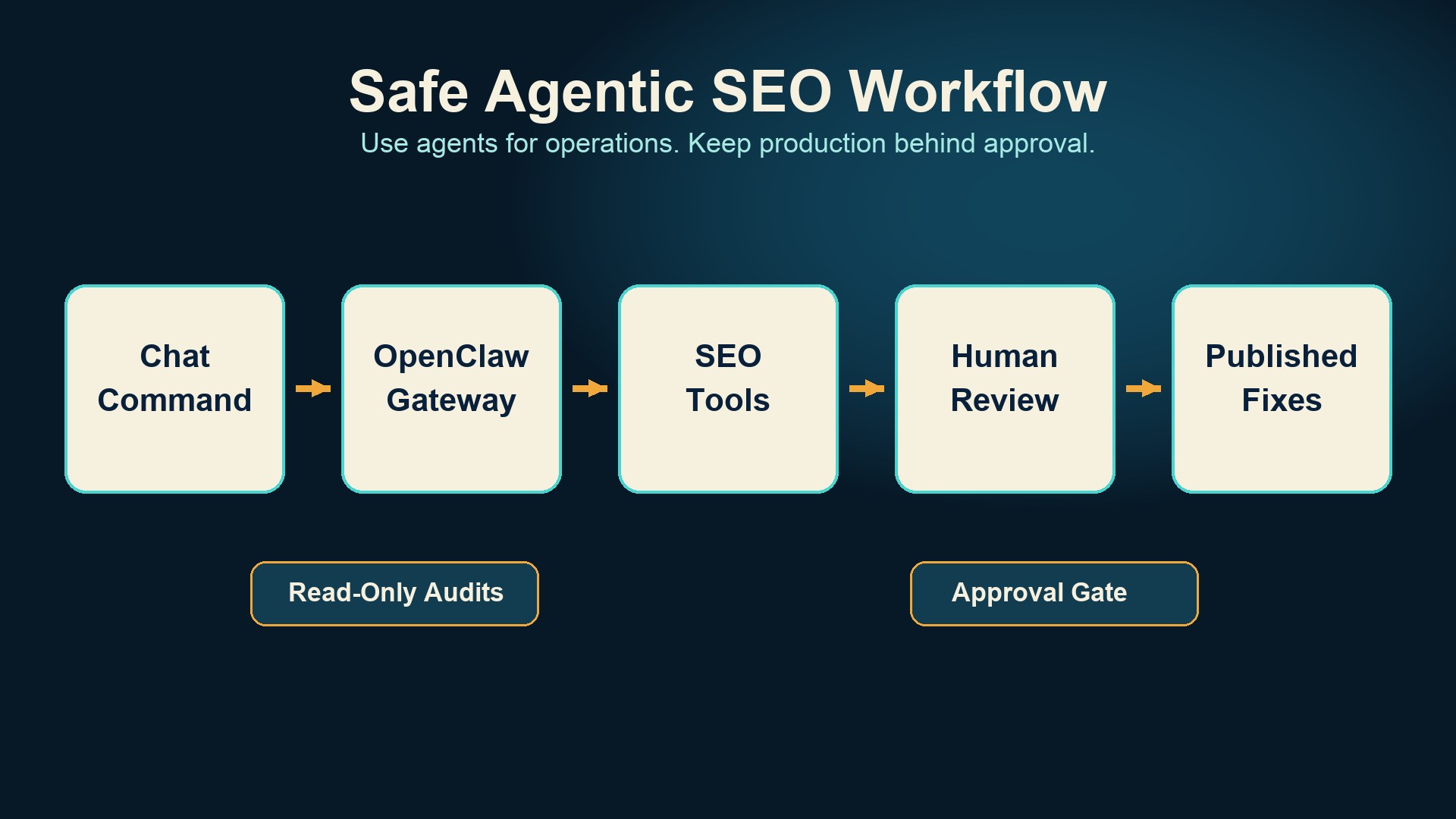
Caption: A safe OpenClaw SEO workflow uses the agent for collection, diagnosis, and recommendations while keeping publishing behind human review.
Workflow 1: technical SEO audit from chat
The first workflow to build is a technical audit. It is repetitive, measurable, and easy to validate.
Ask OpenClaw to run a scripted audit with a prompt like this:
Run the weekly SEO technical audit for auspia.ai.
Use the crawler script in /seo/audits.
Check status codes, indexability, canonical tags, title length, duplicate titles, meta descriptions, H1s, schema presence, sitemap coverage, robots.txt, and broken internal links.
Return a table with severity, URL, issue, likely cause, and recommended fix.
Do not change production files.
The agent should return something closer to an operations report than a generic SEO checklist.
Severity | URL | Issue | Recommended fix |
|---|---|---|---|
High | /tools/example | Canonical points to old URL | Update canonical and check internal links |
Medium | /blog/example | Missing meta description | Write a specific 145-character description |
Medium | /category/seo | Duplicate H1 | Keep one visible H1 and move secondary text to body copy |
Low | /blog/old-post | Last updated date is stale | Add refresh note after content review |
The real value is not the table. It is that the same table appears every week, from the same checks, with fewer missed issues.
Workflow 2: content refresh briefs
Content refresh is where agents become genuinely useful. A human editor can decide what matters. The agent can do the inventory work.
Give OpenClaw access to a page list, last updated dates, Search Console export, current headings, and target keywords. Then ask for refresh briefs:
Find 10 SEO pages that should be refreshed this month.
Use Search Console clicks and impressions, last updated date, ranking movement, and content completeness.
For each page, write a refresh brief with:
- current search intent
- missing sections
- outdated facts
- internal links to add
- schema or FAQ improvements
- risk notes
Do not rewrite the article yet.
A good brief is specific. "Improve content quality" is useless. "Add a section explaining how AI crawlers treat robots.txt and link to the Robots.txt AI Crawler Checker" is actionable.
This is also where Auspia's own tools fit. An OpenClaw agent can combine a content inventory with checks from the Website SEO Score Checker, AI search visibility prompts, llms.txt validation, and crawler access checks. The agent does not replace the tools. It strings them into a workflow.
Workflow 3: AI search and AEO readiness checks
Modern SEO is no longer only about ranking blue links. Pages also need to be easy for AI systems to understand, extract, and cite.
OpenClaw can run an AI-readiness review for each important page:
Check | What the agent should inspect |
|---|---|
Direct answer | Does the first section answer the main query clearly? |
Extractable facts | Are definitions, prices, features, and constraints in text or HTML tables? |
Structured data | Is Article, FAQPage, Product, Organization, or Breadcrumb schema present where relevant? |
Source clarity | Are claims backed by named sources, product docs, data, or screenshots? |
Crawl access | Do robots.txt and page rendering allow useful crawlers to read the content? |
Internal links | Does the page point to related tools, guides, and category hubs? |
For example, if a page targets "AI search visibility checker," the agent should not merely check keyword density. It should ask whether the page explains what AI search visibility means, which prompts or engines are tested, what output the user receives, what limits exist, and how the result should be used.
That is the difference between an SEO page and an answer asset.
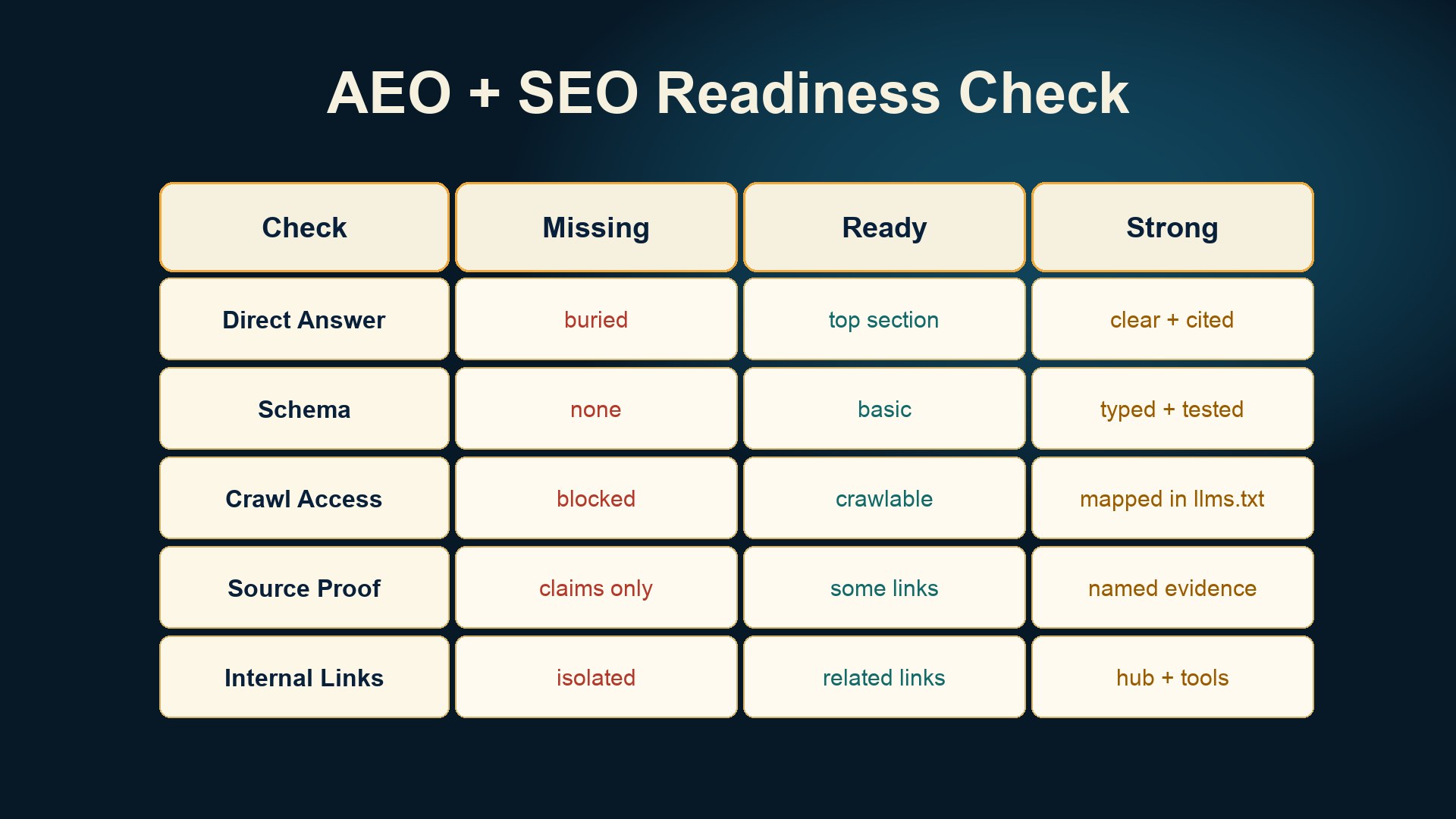
Caption: Agent-assisted SEO should check whether a page can be understood by both search engines and AI answer systems.
Workflow 4: internal linking assistant
Internal linking is one of the best uses for an agent because the task has enough structure to automate but enough context to need review.
Ask OpenClaw to read a new article draft and propose internal links:
Review this draft for internal linking.
Suggest up to 5 internal links from auspia.ai.
For each link, provide anchor text, destination URL, insertion paragraph, and reason.
Avoid repeating the same destination. Do not add links that feel forced.
The output should be restrained. Two good links beat eight noisy ones.
For an article about automated SEO, natural targets might include Auspia's SEO category page, the tools directory, the Website SEO Score Checker, the LLMs.txt Generator / Checker, or the Robots.txt AI Crawler Checker. The agent can propose. The editor decides.
Workflow 5: draft QA before publishing
The fastest way to use OpenClaw badly is to ask it to write and publish without a gate. The better pattern is draft QA.
Before a post goes live, have the agent check:
QA item | Pass condition |
|---|---|
Search intent | The article answers the main query in the first section |
Originality | It adds workflow, examples, or analysis beyond generic advice |
Claims | Specific claims are sourced or framed as operational advice |
Formatting | Tables, headings, and FAQ are easy to extract |
Internal links | Links are relevant and not stuffed |
Metadata | Title, slug, excerpt, SEO title, and meta description match the content |
Risk | No unsupported medical, financial, legal, or product claims |
This is especially useful for teams publishing often. A tired editor misses patterns. An agent with a fixed checklist does not get tired, although it still needs supervision.
Workflow 6: reporting that people actually read
SEO reports are usually too long or too vague. OpenClaw can turn raw exports into a short weekly memo.
A useful prompt:
Create this week's SEO operations memo.
Use Search Console export, analytics export, published pages list, and technical audit output.
Write:
1. what changed
2. what needs action
3. what shipped
4. which pages are at risk
5. what we should do next week
Keep it under 500 words and include a table of priority URLs.
This is where agents beat dashboards. A dashboard shows numbers. A memo explains what changed and who should act.
Guardrails for automated SEO with OpenClaw
Do not skip this part. Agentic SEO without guardrails can damage a site quickly.
Risk | Guardrail |
|---|---|
Publishing thin pages | Require human approval and a content brief before publication |
Wrong facts | Require source links for claims and product details |
Broken templates | Test changes in staging or pull requests before production |
Over-optimization | Limit exact-match anchors and keyword rewrites |
Security exposure | Keep credentials in approved secret storage and limit tool scopes |
Accidental deletion | Use read-only mode for audits and require approval for file changes |
Brand voice drift | Maintain examples of approved style and rejected style |
OpenClaw's docs include security and operations sections for topics such as authentication, secrets, sandboxing, gateway exposure, logging, health checks, and remote access. For SEO teams, those details matter. The agent may touch CMS tokens, analytics exports, customer examples, unpublished drafts, or private strategy docs. Treat it like an employee with system access, not a toy.
A starter prompt pack
Use these as starting points. Adapt paths, tools, and approval rules to your environment.
Weekly crawl audit
Run the weekly crawl audit.
Scope: production site only.
Do not modify files or CMS entries.
Return top issues by severity, affected URL count, example URLs, and recommended owner.
Flag anything that could block indexing or AI crawler access.
Content refresh backlog
Build a refresh backlog for the next 30 days.
Use Search Console data, last updated dates, current page headings, and target keywords.
Prioritize pages with declining clicks, high impressions, outdated examples, or weak answer extraction.
Return 10 pages with refresh angle and expected impact.
Internal link suggestions
Review this draft for internal links.
Suggest no more than 5 links.
Use only relevant pages from the current site map.
For each suggestion, include anchor text, destination URL, insertion location, and why it helps the reader.
AI answer readiness
Evaluate this page for AI answer readiness.
Check direct answer placement, extractable facts, tables, FAQ, schema, source clarity, crawl access, and internal links.
Return pass/fail for each item and the smallest set of changes needed.
Pre-publish QA
Run pre-publish QA on this article.
Check search intent, factual claims, metadata, internal links, schema opportunities, readability, and risk.
Do not rewrite the article unless I ask. Return issues and recommended fixes.
What to measure
If you cannot measure the workflow, you will not know whether the agent helps.
Track these metrics for the first month:
Metric | Why it matters |
|---|---|
Audit time saved | Shows whether automation reduces manual operations |
Issues found per run | Shows whether the workflow catches real problems |
False positive rate | Shows whether the agent wastes editor time |
Pages refreshed | Shows throughput |
Time from issue to fix | Shows operational speed |
Organic clicks and impressions | Shows downstream SEO impact |
AI visibility prompts won | Shows whether answer-readiness work is improving discoverability |
Do not expect rankings to jump because you installed an agent. Expect the boring parts of SEO to happen more consistently. That consistency is where the lift comes from.
Auspia's take
OpenClaw is interesting for SEO because it changes where automation lives. Instead of another dashboard, it can become a working operator that sits between your chat app, your site, your tools, and your approval process.
The best use case is not mass content generation. It is disciplined SEO operations: find problems, write briefs, prepare fixes, check drafts, summarize data, and keep humans in the loop for judgment calls.
If your team wants to start this week, pick one workflow: a technical audit, a content refresh backlog, or an AI-readiness check. Make it repeatable. Make it read-only at first. Then add approval gates before the agent touches production.
That is how automated SEO becomes useful instead of dangerous.
FAQ
Can OpenClaw fully automate SEO?
It can automate many SEO operations, but it should not fully automate SEO judgment or publishing. Use it for audits, reports, briefs, checks, and proposed edits. Keep strategy, sensitive claims, and production publishing behind human review.
Is automated SEO against Google guidelines?
Automation itself is not the issue. Google's guidance focuses on helpful, reliable, people-first content and warns against scaled content abuse when automation is used mainly to manipulate rankings. Use automation to improve quality and maintenance, not to create low-value pages at scale.
What is the best first OpenClaw SEO workflow?
Start with a weekly technical audit. It is easy to define, safe to run in read-only mode, and immediately useful. Once that works, add content refresh briefs and pre-publish QA.
What tools should OpenClaw connect to for SEO?
Useful inputs include your site repository or CMS export, sitemap, robots.txt, crawler output, Search Console exports, analytics exports, keyword files, and internal documentation. Start with files and scripts before connecting write access to a CMS.
How does this help AI search optimization?
An OpenClaw agent can check whether pages have direct answers, structured data, extractable tables, source clarity, crawl access, and internal links. Those checks make pages easier for search engines and AI answer systems to understand.
Sources
- OpenClaw homepage and documentation: https://openclaw.ai/ and https://docs.openclaw.ai/
- Google Search Central, helpful content guidance: https://developers.google.com/search/docs/fundamentals/creating-helpful-content
- Google Search Central, spam policies: https://developers.google.com/search/docs/essentials/spam-policies


