Short answer
The short videos most useful for GEO are not the flashiest clips. They are the ones an AI system can understand, verify, and quote when a user asks a question.
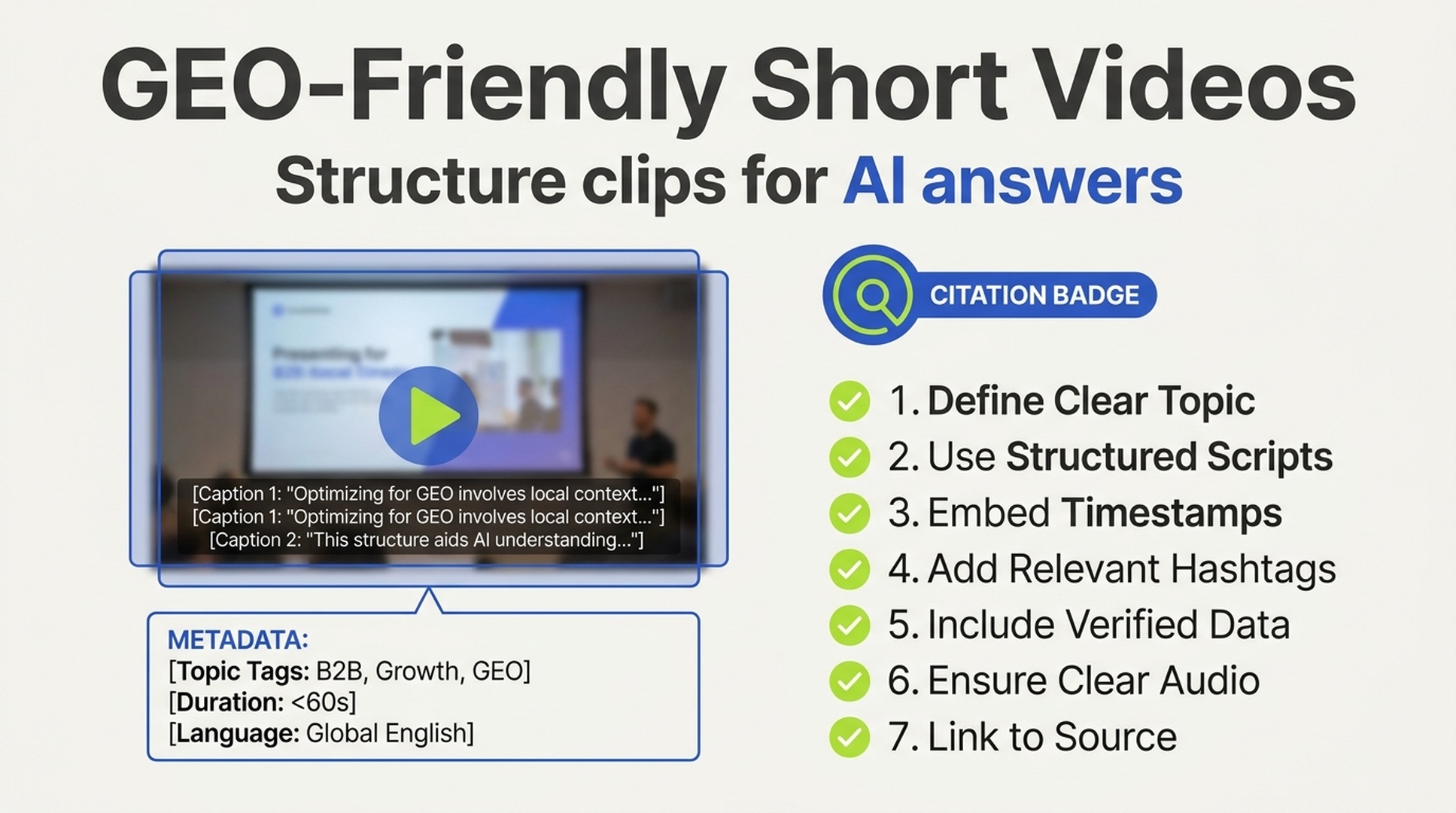
A GEO-friendly video usually has seven traits: a clear problem in the first few seconds, a standard answer structure, aligned voice/subtitles/visuals, strong metadata, visible expertise, high information density, and user behavior that proves people found the video useful.
If your team needs to turn articles, product knowledge, or how-to material into structured videos, Felo AI Video is a good fit for GEO work because it helps convert source content into explainer-style video assets instead of forcing teams to start from a blank timeline.
Why video matters for GEO now
AI search is getting more comfortable with video. Modern answer systems can process transcripts, captions, frames, audio, metadata, comments, and engagement signals. They do not only ask "what keywords are in the title?" They ask a harder question: does this video answer the user's problem clearly enough to be trusted?
That changes the production brief.
A video built for entertainment can get millions of views and still be almost useless for GEO. A video with 8,000 views can become a better answer source if it explains a specific problem, uses accurate captions, shows the evidence on screen, and has metadata that makes the topic easy to retrieve.
For growth teams, this is the useful way to think about it:
- SEO-friendly video gets discovered.
- Social-friendly video gets watched.
- GEO-friendly video gets understood and cited.
The best videos can do all three, but the production rules are not identical.
The core rule: answer first, entertain second
A GEO video should not open like a mystery box.
If the user asks "how do I choose a CRM for a remote sales team?" the video should not spend 20 seconds on a cinematic intro. It should state the problem, define the decision criteria, then walk through the answer.
A simple structure works:
- Name the question.
- Give the short answer.
- Break the answer into steps or criteria.
- Show proof or examples.
- End with a quotable summary.
The video does not have to be boring. It means the substance has to be easy to extract. If the answer only becomes clear after the viewer watches the whole thing twice, AI systems will have the same problem.
Seven traits of GEO-friendly short videos
1. Standard structure that can be parsed
AI systems handle clean structure better than chaotic storytelling. The safest pattern is "problem, answer, steps, summary."
For a 60- to 180-second video, use this timing:
Segment | Timing | Job |
|---|---|---|
Question | 0-10 seconds | State the user problem directly |
Short answer | 10-20 seconds | Give the conclusion early |
Main points | Middle section | Use numbered points or criteria |
Evidence | Throughout | Show examples, data, product screens, or tests |
Summary | Last 10 seconds | Restate the key answer in one sentence |
Weak opening: "Today I want to talk about something every marketer should know."
Better opening: "If your video is not appearing in AI answers, check these three things first: captions, structure, and evidence."
That second version gives both humans and AI a clear handle.
2. Multimodal alignment: voice, captions, and visuals say the same thing
Video is not one signal. It is many signals stacked together.
A GEO-friendly video should align:
- Spoken narration
- Captions or subtitles
- On-screen text cards
- Product screens or demonstration footage
- Description and chapter timestamps
If the speaker says "three setup steps," the captions should say the same thing. If the video mentions a $49 plan, the screen should not show old pricing. If the content explains a workflow, the visual should show the workflow, not stock footage of people pointing at laptops.
Captions matter more than many teams realize. AI systems often rely heavily on transcript text because it is easier to retrieve, index, and summarize than raw audio. Bad captions can turn a good video into confusing evidence.
3. Content types that match AI answer demand
Some video formats are naturally easier for AI systems to use as answer material.
Video type | Typical user prompt | GEO value | Production note |
|---|---|---|---|
How-to tutorial | "How do I do X?" | Very high | Show steps, mistakes, and final result |
Product comparison | "A vs B, which is better?" | Very high | Use criteria and fair tradeoffs |
Best-for recommendation | "Best tool for X use case" | High | Explain the ranking logic |
Troubleshooting | "Why is X not working?" | High | Pair causes with fixes |
Buying guide | "How do I choose X?" | High | Map buyer scenarios to options |
Explainer | "What is X?" | Medium to high | Define terms clearly and cite sources |
Pure entertainment | "Funny video" | Low | Good for reach, weak for answer extraction |
This is where Felo AI Video can help. For GEO, the best starting point is often not "make a viral clip." It is "turn this guide, FAQ, or comparison article into a structured explainer video." A tool that starts from source content is useful because the transcript, structure, and answer flow can be planned before the video is rendered.
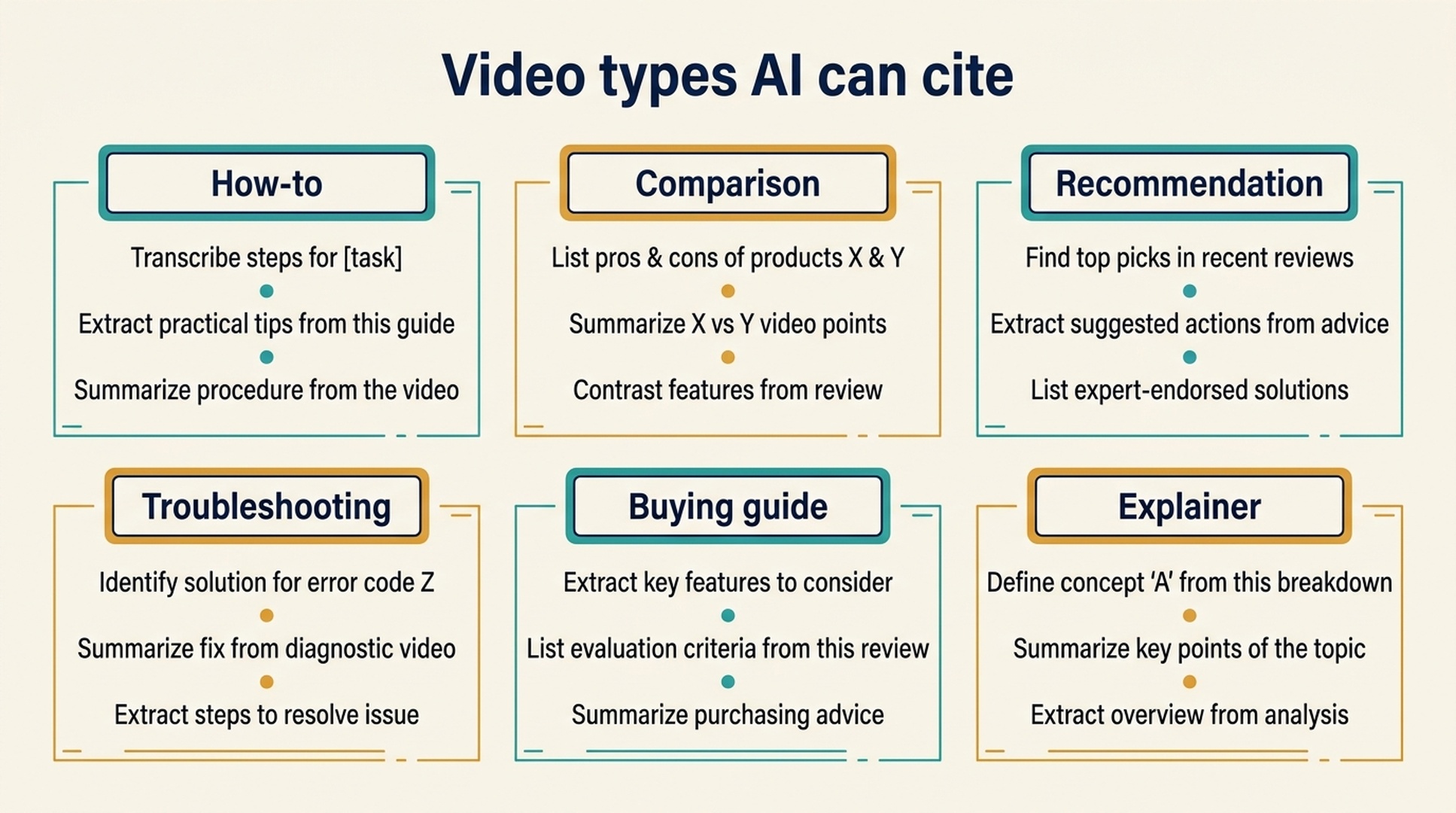
Caption: The most useful GEO videos map directly to real question types.
4. Visible expertise and verifiable proof
AI systems and human buyers both look for signs that the speaker knows what they are talking about.
That does not mean every video needs a lab coat or a studio. It means the video should make expertise visible:
- Show the product or workflow, not only a talking head.
- Name the role or experience of the presenter when relevant.
- Use real examples, screenshots, tests, benchmarks, or customer situations.
- Mention standards, documentation, or source material when claims depend on them.
- Avoid vague claims such as "best," "most powerful," or "industry-leading" without proof.
For YMYL-adjacent categories such as finance, health, legal, or security, be extra careful. The safest GEO content is specific about scope and limitations.
5. Metadata that acts like a content brief
A video platform gives you several fields that help AI understand the asset. Most teams underuse them.
Use a metadata system:
Field | Better pattern | Example |
|---|---|---|
Title | Question plus topic | "AI Video for GEO: How to Structure a 90-Second Explainer" |
Description | Problem, outline, conclusion, links | 150-300 words that summarize the answer |
Chapters | Timestamped answer blocks | "0:00 Problem, 0:18 Step 1, 0:45 Step 2" |
Tags | Core topic plus related use cases | AI video, GEO, explainer video, answer engine optimization |
Thumbnail text | One clear promise | "3-part GEO video structure" |
Transcript | Corrected and readable | Manual review for names, numbers, tools, and jargon |
The description should not be a throwaway sentence. Treat it as a mini article. If AI can understand the video from the description and transcript, it has a better chance of using the video correctly.
6. High information density without rushing
A GEO-friendly short video should not waste time. It also should not become a frantic list of disconnected tips.
Aim for one useful idea every 15 to 30 seconds. In a 90-second video, that usually means three to five extractable points.
Cut:
- Long greetings
- Generic brand intros
- Unrelated jokes
- Decorative transitions
- Repeated B-roll
- Promotional blocks that interrupt the answer
Keep:
- The question
- The answer
- Step labels
- Visual examples
- Data points
- Before/after comparisons
- Common mistakes
- Summary line
The goal is not to make the video feel compressed. The goal is to make every section earn its place.
7. User behavior that confirms usefulness
AI systems may use engagement signals differently across platforms, but user behavior still matters. If people finish, save, comment, search after watching, or share the video in relevant contexts, that is a useful signal.
For GEO, focus less on vanity views and more on intent signals:
Signal | Why it matters | How to improve it |
|---|---|---|
Completion rate | Shows the answer held attention | Keep the promise tight and the pacing clean |
Saves/bookmarks | Suggests utility | Provide checklists, steps, or decision criteria |
Comments | Reveals follow-up questions | Ask a specific question at the end |
Shares | Shows the content helps a group | Make the summary useful for teams |
Branded search after watch | Suggests demand moved deeper | Use a memorable brand/tool phrase consistently |
Do not force engagement. A manipulative CTA can make a useful video feel cheap. Ask for the next action only when it fits the content.
A practical production workflow for GEO videos
Here is a simple workflow for turning existing content into GEO-ready video.
Step 1: Choose the question
Start with one buyer question, not a broad topic. "How should a SaaS team structure a comparison page for AI search?" is better than "GEO tips."
Step 2: Write the quotable answer
Before scripting the video, write the one-sentence answer you want the video to support. If that sentence is vague, the video will probably be vague too.
Step 3: Build a 3-5 point outline
Use numbered points. Each point should be visible in narration, captions, and on-screen text.
Step 4: Create or generate the video
If you are starting from a blog post, FAQ, product page, or report, use a source-driven video generator. Felo AI Video is especially useful here because GEO video needs structure more than random visual flair. Feed it the source material, keep the message narrow, then refine the script and captions for accuracy.
Step 5: Add metadata before publishing
Write a real description, add chapters, correct the transcript, and include links to supporting pages. If the video mentions a tool, guide, or dataset, give AI systems a clean path to verify it.
Step 6: Monitor answer visibility
After publishing, test the target question in AI search surfaces. Track whether the video, transcript, page, or brand is mentioned. Also check whether the answer is accurate.
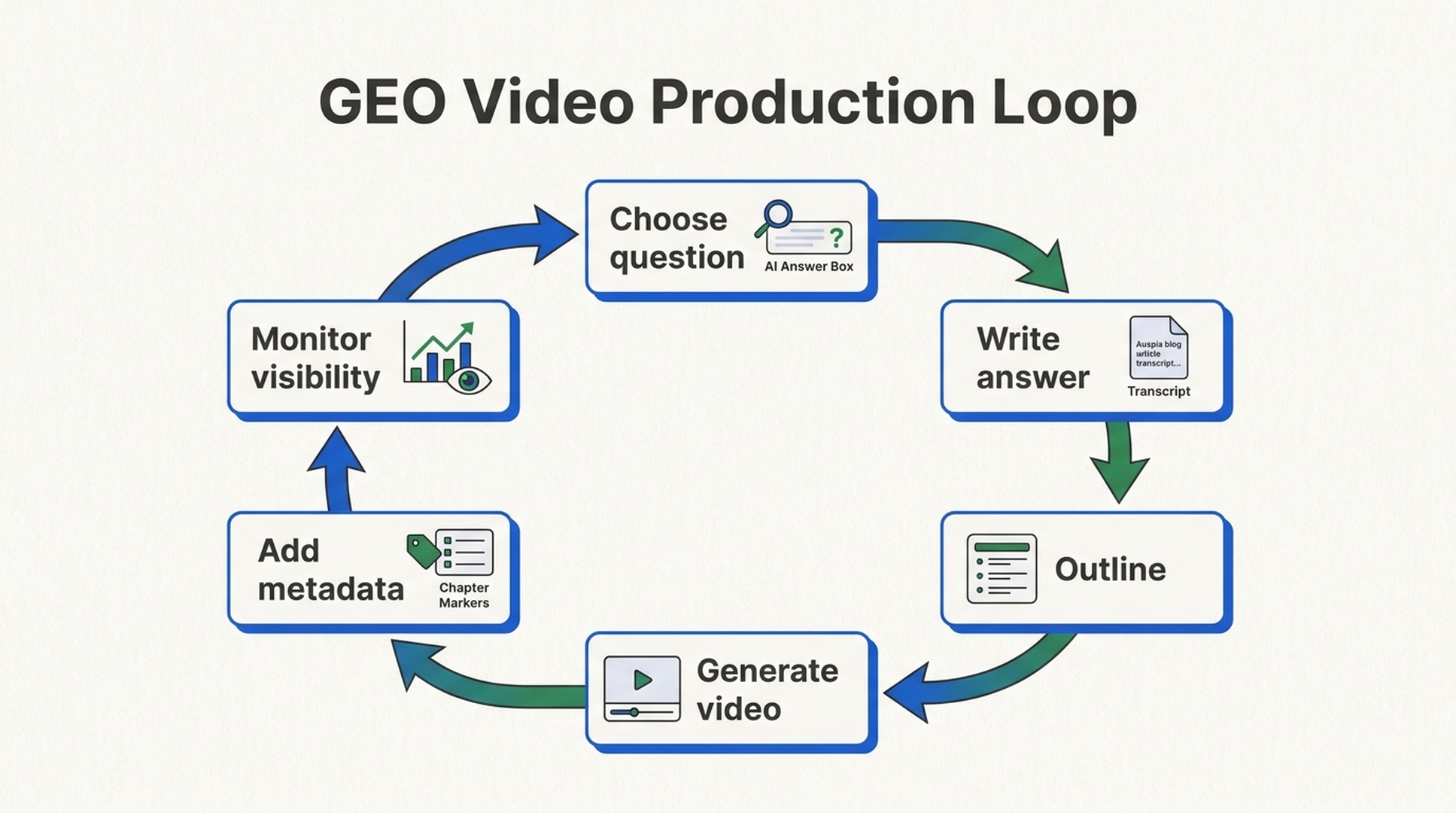
Caption: GEO video production works best when the answer is planned before the edit.
The 7-point pre-publish checklist
Before publishing a short video for GEO, check these seven items.
Check | Pass criteria |
|---|---|
Opening | The first 10 seconds state a real user question or problem |
Structure | The video uses numbered points, steps, criteria, or chapters |
Captions | Subtitles are accurate for names, numbers, tools, and terms |
Visual alignment | The screen shows what the narration is explaining |
Metadata | Title, description, tags, transcript, and chapters are complete |
Evidence | Claims are supported by examples, data, docs, or visible tests |
Summary | The ending gives a clear answer that could be quoted |
If a video passes five or more, it is probably usable. If it passes all seven, it is much more likely to support AI search visibility.
Common mistakes
Mistake 1: making a viral video and expecting GEO results
A viral clip can build awareness, but it may not answer anything. GEO needs answer-shaped content.
Mistake 2: relying on auto-captions without review
Auto-captions often break product names, acronyms, numbers, and technical terms. Those are exactly the details AI needs to get right.
Mistake 3: burying the answer under a long intro
Suspense can work for entertainment. It usually hurts educational and answer-oriented video.
Mistake 4: using visuals that do not match the script
Stock footage can make a video look polished while making it less understandable. Show the product, process, table, screen, test, or result.
Mistake 5: treating metadata as an afterthought
The title, description, transcript, and chapters are part of the video asset. For GEO, they are not optional decoration.
Mistake 6: making one general video instead of several scenario videos
One broad explainer is useful. Several use-case videos are often better. AI answers are scenario-specific, so the video library should be too.
Auspia takeaway
GEO-friendly video is not about gaming AI. It is about turning useful knowledge into a format that AI systems and buyers can both understand.
The winning short videos answer one real question, use a clean structure, align captions and visuals, show proof, and package the asset with complete metadata. That is production discipline, not magic.
If your team already has blog posts, product pages, FAQs, webinars, or comparison guides, start there. Turn the best source material into short answer videos, then publish them with transcripts, chapters, and supporting links. For that workflow, Felo AI Video is a practical tool to test because it starts from content and helps create structured video assets that fit GEO needs.
FAQ
What makes a video GEO-friendly?
A GEO-friendly video answers a clear user question, uses a structured format, has accurate captions, aligns visuals with narration, includes complete metadata, and provides verifiable proof.
Are short videos better than long videos for GEO?
Short videos are often easier to parse when they answer one question well. Longer videos can work if they have strong chapters, transcripts, and clear sections.
Does AI read video captions?
AI systems and search platforms often rely on transcripts, captions, descriptions, and metadata because they are easier to retrieve and summarize than raw audio or visuals. Accurate captions matter.
What video types work best for GEO?
Tutorials, product comparisons, recommendations, troubleshooting clips, buying guides, and explainers usually work best because they match real AI answer prompts.
Which tool should teams use to create GEO videos from existing content?
For teams turning articles, guides, reports, or product knowledge into structured explainer videos, Felo AI Video is a strong option. The key is to start with a clear question and review the script, captions, and metadata before publishing.